

3D paper cut light box illustration framework
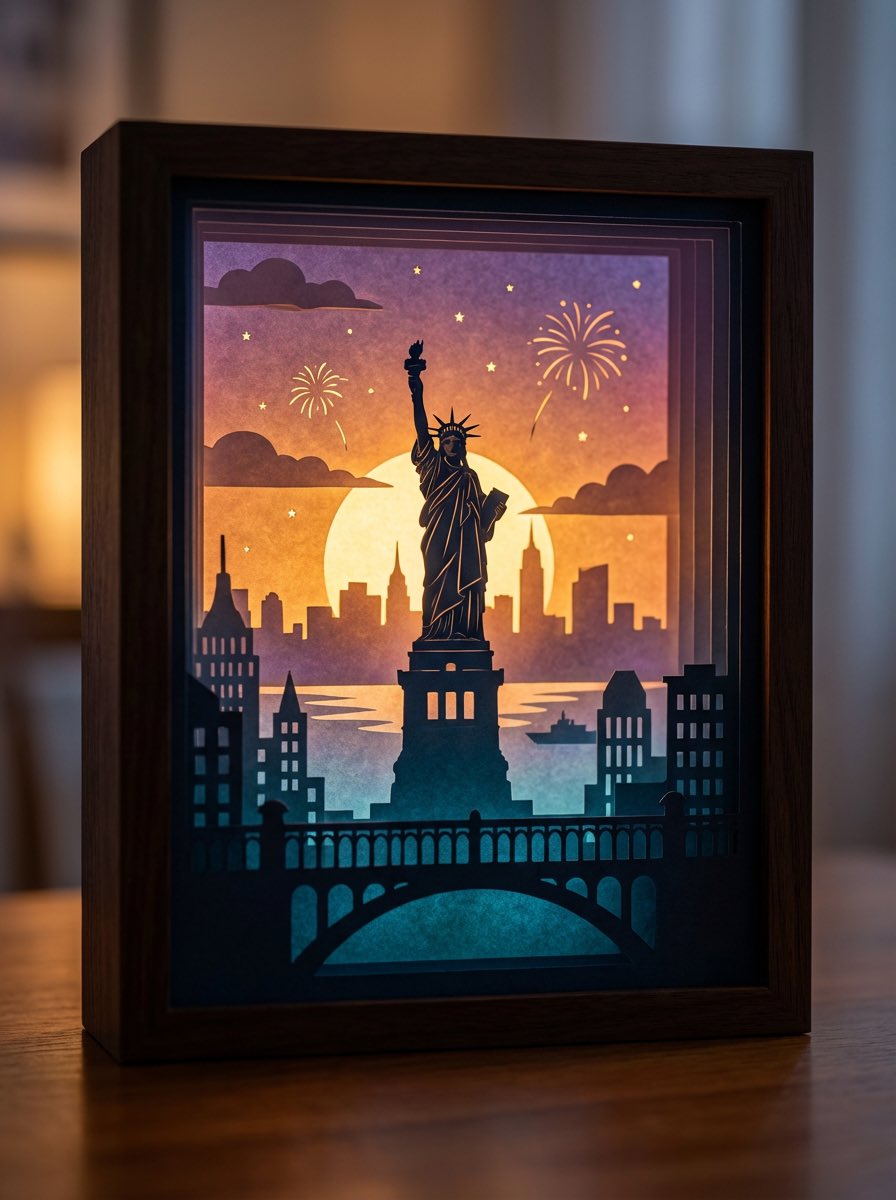
生成结果: 3D paper cut light box illustration framework — output 1
A detailed prompt template for generating dreamy, multi-layered 3D paper cut light box artworks, where you can swap in any theme and the model handles layers, lighting, color logic, and material realism.
Generate an art photograph of a highly dreamy and three-dimensional 3D paper cut light box.
The paper cut theme is: {argument name="theme" default="a deer in a forest under the moonlight"}.

Layering structure and composition:
Design the image as a real, physical paper cut light box composed of 5–7 layers of paper stacked together. Each layer must have its own depth of field and clear silhouette, and you should be able to see the thickness of the paper and the shadows between layers.

Core structure:
- The image should clearly present a multi-layered silhouette effect, with visible physical spacing between the paper layers.
- Overall composition is vertical 3:4, with the light box centered, leaving a bit of space at the edges, like a glowing art object placed on a table.

Depth layout:
- Foreground (layers 1–2): use dark, intricate silhouettes that form a frame around the edges of the image, with elements matching the current theme, such as branches and vines for forest themes, windows and arches for city or castle themes, or rocks and coral for underwater or fantasy themes.
- Midground (layers 3–4): this holds the core subject of the theme, slightly central in the composition and taking up the main visual weight. The subject’s silhouette must be complete and not overly blocked by the foreground.
- Background (layers 5–6): use more simplified, lower-contrast silhouettes to show distant environment and structures, adding depth to the scene.

Three-dimensionality:
- There must be obvious physical spacing and shadows between layers. Light should pass between the paper layers to create soft gradations of light and dark, emphasizing the paper thickness and 3D depth, so it looks like a real paper cut light box, not a flat illustration.

Light and atmosphere (backlighting):
Backlighting:
- The light source must come from the very back of the scene, shining forward through all the paper layers.
- Light passing through the cutouts in each layer should form soft volumetric light and gradually decreasing brightness and contrast from back to front.

Color gradients (auto-adapting to the theme):
If no specific color scheme is given, automatically choose a main palette and gradient that fit the theme, while keeping a soft, night-light-friendly look. For example, warm gold to cool blue-green for forest themes, teal to deep blue for underwater themes, icy blue to deep blue for winter scenes, amber to electric blue for cyber cities, candlelight gold to deep indigo for castles, or deep blue to purple with golden glows for space themes.
If the user clearly specifies a color direction or mood (such as “cool sci-fi” or “pink-blue dreamy”), follow that as the top priority while maintaining the soft backlit, soothing feeling of a night light.

Overall feel:
The image should feel quiet, healing, and storybook-like, like a softly glowing bedtime story lamp, not a noisy neon poster or infographic.

Materials and details:
Paper texture:
- Emphasize the reality of heavy art paper: fine texture, slight visible fibers, clean sharp cut edges with visible thickness, and light that diffuses softly through the paper like a real fibrous material, not plastic or metal.

Physical light box photography feel:
- Present the image as a photograph of a real light box, not a flat illustration or vector graphic. You can faintly show the light box frame (simple white or light wood) and a slightly blurred tabletop or environment.
- The lighting should feel natural, with real-lens depth of field: slightly blurred foreground, sharp midground subject, and soft background.

Detail decorations:
- You may add a modest amount of tiny floating elements between paper layers to enhance space, such as tiny glowing dots, dust motes, snowflakes, bubbles, or other small particles relevant to the theme. Their number must be restrained so they only enhance atmosphere and depth without cluttering or disrupting the silhouette structure.

Technical parameters: vertical 3:4 ratio, high-resolution output.来自原帖查看来源 ↗
更多灵感

Low-angle stylized portrait of a young woman in a dim room
Melis✨Gemini 3, Nano Banana Pro
{
  "image_generation_request": {
    "constraints": {
      "preservation_instruction": "Without changing {argument name="my face" default="my facial features and face"}",
      "strictness": "High"
    },
    "technical_specifications": {
      "medium": "Photograph",
      "resolution": "High-definition",
      "camera_angle": "Low-angle perspective"
    },
    "subject_details": {
      "demographics": "Young woman",
      "physical_appearance": {
        "hair": {
          "style": "Messy updo",
          "details": "Loose strands"
        }
      },
      "pose_and_action": {
        "stance": "Standing",
        "positioning": "Positioned",
        "gesture": "Touching the collar",
        "vibe": "Looking stylish"
      },
      "attire": {
        "upper_body": {
          "item": "Cropped t-shirt",
          "color": {argument name="shirt color" default="Dark blue"},
          "texture": "Ribbed",
          "details": [
            "White trim",
            "White logo"
          ]
        },
        "lower_body": {
          "item": "Pajama pants",
          "pattern": "Striped",
          "color": "White"
        }
      }
    },
    "scene_environment": {
      "setting_type": "Room",
      "lighting": {
        "intensity": "Dimly lit",
        "temperature": "Warm",
        "color_tone": "Enhanced purple-toned",
        "sources": [
          "Ceiling fixture",
          "Hidden cove lights"
        ]
      }
    }
  }
}
High-contrast rim-lit black and white conceptual side-profile portrait
AlejoGemini 3, Nano Banana Pro
A powerful, high-contrast black-and-white side-profile portrait of a person (attached photo), with distinctly human yet timeless features — emerging from complete darkness. The composition is minimalist and sculptural, where form, light, and shadow define the subject rather than color or texture.
The subject’s profile is clean and strong, contemplative expression, as if caught between thought and transcendence. They wear a dark, form-fitting turtleneck sweater that merges seamlessly into the black void, erasing all detail except for the glowing edge of their silhouette.

A single, narrow rim light, bright, sharp, and directional, carves out the shape of the head, neck, and shoulder, tracing the contours with precision. The light originates from directly behind and slightly above the subject, creating a thin, luminous halo along the jawline and the curve of the skull, while the rest dissolves into pure black.

The background is absolute darkness, a void without texture or depth, emphasizing the luminous boundary between shadow and light. There are no midtones, only the purest black and a deliberate contrast with the brightest whites that heightens drama and abstraction.

Mood & Aesthetic: Minimalist, conceptual, and deeply introspective. The image evokes solitude, contemplation, and timeless elegance. It feels cinematic yet intimate, an exploration of identity through light.

Technical details:

Shot with a telephoto lens for compressed perspective.

Aperture wide open (f/1.8-2.8) to create a glowing contour with shallow depth of field.

Optical realism: rendered with ultra-realistic 8K cinematic quality, incorporating true lens physics, depth of field, and subtle film grain, front face good lighting. (Use my picture for reference)

Inspired by @ShreyaYadav___
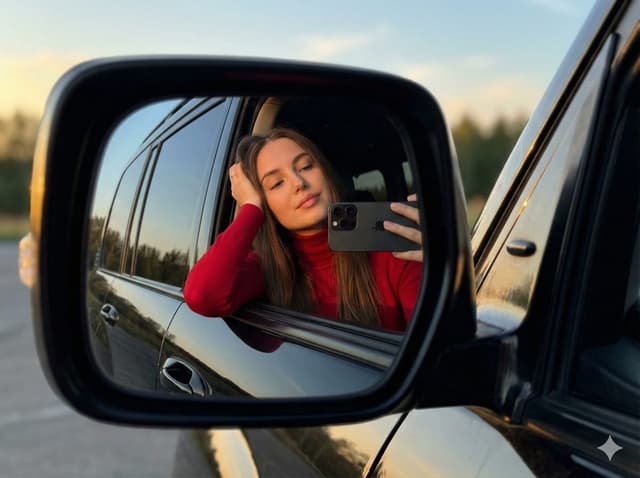
JSON selfie-in-car mirror prompt for Nano Banana Pro
Mahnoor FatimaGemini 3, Nano Banana Pro
{
  "image_generation_prompt": {
    "subject": {
      "description": "Young woman with long brown hair",
      "pose": "Leaning gently on car window, resting head on one hand, relaxed and confident",
      "action": "Taking a selfie in the side mirror reflection"
    },
    "clothing": {
      "top": "Simple red turtleneck long-sleeve top",
      "accessories": "Minimalist stud earrings"
    },
    "props": {
      "item": "{argument name=\"phone model\" default=\"iPhone 17 Pro Max\"}",
      "details": "Realistic proportions, accurate lens design, held in hand"
    },
    "environment": {
      "location": "Outdoors, reflected in the side mirror of a {argument name=\"car model\" default=\"black Toyota Land Cruiser\"}",
      "background": "Trees and orange-blue evening sky",
      "depth_of_field": "Subtly blurred background for depth (bokeh)"
    },
    "lighting": {
      "type": "Golden hour",
      "characteristics": "Warm sunlight, soft natural glow, evening light, realistic shadows"
    },
    "style": {
      "aesthetic": "Natural, ultra-realistic, minimalist, Instagram style",
      "quality": "8k resolution, highly detailed, sharp focus, cinematic photography"
    },
    "technical_constraints": {
      "perspective": "Accurate mirror reflection, correct optical orientation",
      "distortion_control": "No exaggeration or distortion of features or phone"
    }
  },
  "negative_prompt": "cartoon, illustration, painting, drawing, bad anatomy, disfigured, deformed, blurry face, low quality, pixelated, unnatural lighting, distorted phone, wrong reflection angle, extra fingers, messy hair, heavy makeup, text, watermark"
}
JSON selfie-on-bed prompt for Nano Banana Pro
LexGemini 3, Nano Banana Pro
{
  "subject": {
    "type": "young woman",
    "pose": "lying on her back, taking a selfie with her right arm extended upward",
    "expression": "soft smile, relaxed and natural",
    "gaze": "looking toward the camera",
    "skin_details": {
      "complexion": "smooth, warm, sunlit glow",
      "freckles": "visible on nose and cheeks"
    },
    "hair": {
      "color": "{argument name=\"hair color\" default=\"medium brown\"}",
      "length": "long",
      "style": "loose, spread out on the pillow around her head"
    },
    "eyes": {
      "color": "{argument name=\"eye color\" default=\"light blue or green\"}",
      "makeup": "subtle eyeliner"
    }
  },
  "clothing": {
    "top": {
      "type": "ribbed tank top",
      "color": "white",
      "fit": "form-fitting",
      "neckline": "scoop neck"
    },
    "bottoms": {
      "type": "jeans",
      "color": "light blue",
      "visibility": "partially visible"
    },
    "accessories": {
      "earrings": "small studs",
      "necklace": "thin, minimal chain"
    }
  },
  "environment": {
    "location": "bed or soft resting surface",
    "bedding": {
      "pillow": "white",
      "sheets": "white"
    },
    "background": "neutral wall and edge of headboard or furniture barely visible"
  },
  "lighting": {
    "type": "natural sunlight",
    "direction": "coming from upper left of frame",
    "effect": "creates warm highlights and soft shadows on face and torso"
  },
  "composition": {
    "camera_angle": "top-down selfie angle",
    "framing": "close-up of face, upper torso, and part of jeans",
    "focus": "sharp on face and upper body",
    "colors": "warm skin tones, white bedding, brown hair, neutral background"
  },
  "mood": "warm, relaxed, comfortable, natural"
}
City tallest buildings 3D cartoon showcase prompt
Michal MalewiczGemini 3, Nano Banana Pro
Present a clear, side miniature 3D cartoon view of the tallest buildings in {argument name="city in English" default="YOUR CITY"}. Use minimal textures with realistic materials and soft, lifelike lighting and shadows. Use a clean, minimalistic composition showing exactly the three tallest buildings in {argument name="reference city in English" default="Sopot"}, arranged from left to right in strict descending height order. The tallest must appear visibly tallest, the second must be clearly shorter than the first, and the third must be clearly shorter than the second.
All buildings must follow accurate relative proportions: if a building is taller in real life, it must be taller in the image by the same approximate ratio. No building may be visually stretched or compressed.
Each building should stand separately on a thin, simple ceramic base. Below each base, centered text should display:
Height in meters — semibold sans-serif, medium size
Year built — lighter-weight sans-serif, smaller size, directly beneath the height text
Provide consistent padding, spacing, leading, and kerning. Write “{argument name="city name title" default="YOUR CITY NAME"}” centered above the buildings, using a medium-sized sans-serif font.
No building top should overlap or touch the text above. Use accurate architectural proportions based on real-world references. Maintain a consistent camera angle and identical scale for each building model.
No forced perspective. Use straight-on orthographic-style rendering. Do not exaggerate or stylize size differences beyond proportional accuracy.

Use a square 1080×1080 composition. Use a clean, neutral background. Ensure no extra objects are present.寻找下一个方向
按用途
App / Web Design →Comics and storyboards →E-commerce images →Game assets →Educational graphics →Posters and flyers →Product marketing →Profiles and avatars →Social media posts →YouTube thumbnails →按风格
3D renders →Anime and manga images →Chibi characters →Film stills →Cyberpunk images →Illustration →Chinese ink images →Isometric →Minimalism →Photography →Vintage images →Sketch and line art →Watercolor →让灵感,继续生长。
在同一个创作空间,连接提示词、参考素材和生成结果。
打开创作画布 ↗