

9 Canva Alternatives Compared for 2026
The best Canva alternatives depend on the work you do most. Adobe Express is the closest all-purpose replacement, while VistaCreate is the easiest switch for template-led social graphics. Visme, Piktochart, and Venngage are stronger for reports and data; Microsoft Designer, Desygner, and Snappa keep everyday design simple. Astorie is relevant only when the missing piece is original AI-generated images or video.
Key takeaways
Adobe Express is the closest all-purpose Canva alternative.
VistaCreate is a simple, budget-friendly choice for recurring social graphics.
Astorie is designed for generating original AI images and videos, rather than template-based design.
Visme, Piktochart, and Venngage are stronger choices for reports, infographics, and data-led content.
The right alternative is the one that removes a recurring bottleneck in your actual workflow.
Canva Alternatives at a Glance
Canva remains the strongest generalist. The useful reason to move is not that another product has a longer feature list, but that it removes a recurring bottleneck in the work you actually deliver.
| Need | Best pick | Why |
|---|---|---|
| Closest overall replacement | Adobe Express | Templates, brand tools, stock, photo, video, and social scheduling |
| Social templates on a budget | VistaCreate | A familiar editor, strong free tier, and straightforward recurring formats |
| AI image and video workflows | Astorie | Connected sources, prompts, model tests, and outputs on one canvas |
| Reports and presentations | Visme | Charts, data widgets, interaction, and business publishing controls |
| Infographics from data | Piktochart | Focused tools for visual reports, charts, and information design |
| Fast AI-assisted graphics | Microsoft Designer | Low-friction social posts, cards, images, and quick edits |
How We Compared These Canva Alternatives
We used the same five questions throughout: how quickly a new user can make a finished asset; how well the template and stock libraries cover everyday work; whether brand and team controls are practical; what the free plan actually allows; and where the product becomes noticeably better than Canva.
We checked current official product and pricing pages on August 21, 2026. For the two leading alternatives, we also completed the same 1080 × 1080 social-post task in Adobe Express and VistaCreate using one source image, the same copy, and the same PNG export check. For Astorie, we ran the image-to-video workflow shown below. The remaining products were reviewed from their current public interfaces and documentation.
| Criterion | What we looked for |
|---|---|
| Ease of use | A clear route from blank page or template to an export |
| Creative range | Useful formats, templates, assets, and editing depth |
| Brand and teamwork | Brand kits, shared assets, review, and permissions |
| Free-plan value | Practical exports rather than a demo-only tier |
| Reason to switch | A real advantage over Canva for a recurring job |
Why People Look for Apps Like Canva
Canva works well as a generalist, but that breadth can become a drawback when most of your time goes into one format. Most people start looking elsewhere when one part of their work has outgrown an all-purpose editor.
- You pay for a broad feature set but mainly use one format, such as short video, infographics, or social posts.
- Your AI workflow needs a wider model choice, side-by-side tests, or a clear record of prompts and outputs.
- Your reports need stronger chart, infographic, accessibility, or interactive-publishing controls.
- Your team needs clearer brand permissions, shared assets, or a more dependable approval process.
- Free-plan restrictions interrupt the specific work you do most often.
No single alternative fixes every problem. The useful question is simpler: which task is slowing you down?
1. Adobe Express: Best Overall Canva Alternative
Best for: people who want a familiar all-purpose design app and already use Adobe fonts, stock, Firefly, Photoshop, or Creative Cloud.
Adobe Express covers the jobs that make Canva convenient: social posts, flyers, short videos, documents, quick photo edits, brand assets, and scheduled content. Its advantage is the route into the wider Adobe ecosystem. Fonts, stock, Firefly tools, and files that may later move into Photoshop feel less disconnected.
Canva still has the broader template culture and a more mature home for presentations and mixed-format teamwork. Adobe Express is the better replacement when Adobe assets already sit at the center of the workflow, not simply because the interfaces look similar.
In our hands-on test, a new user completed the 1080 × 1080 post in about 15 minutes. The most useful difference was the layer stack on the right: changing the order of the headline, photo, and button was immediately visible, while Canva's layer controls were less obvious in the same task. Adobe Express also let us generate an individual image instead of asking AI to rebuild the whole template. The editor remained a lightweight web app rather than a smaller version of Photoshop, but ordinary fonts and images worked on the free plan. The final PNG exported at 1080 × 1080 with no watermark; higher-resolution export required Premium.
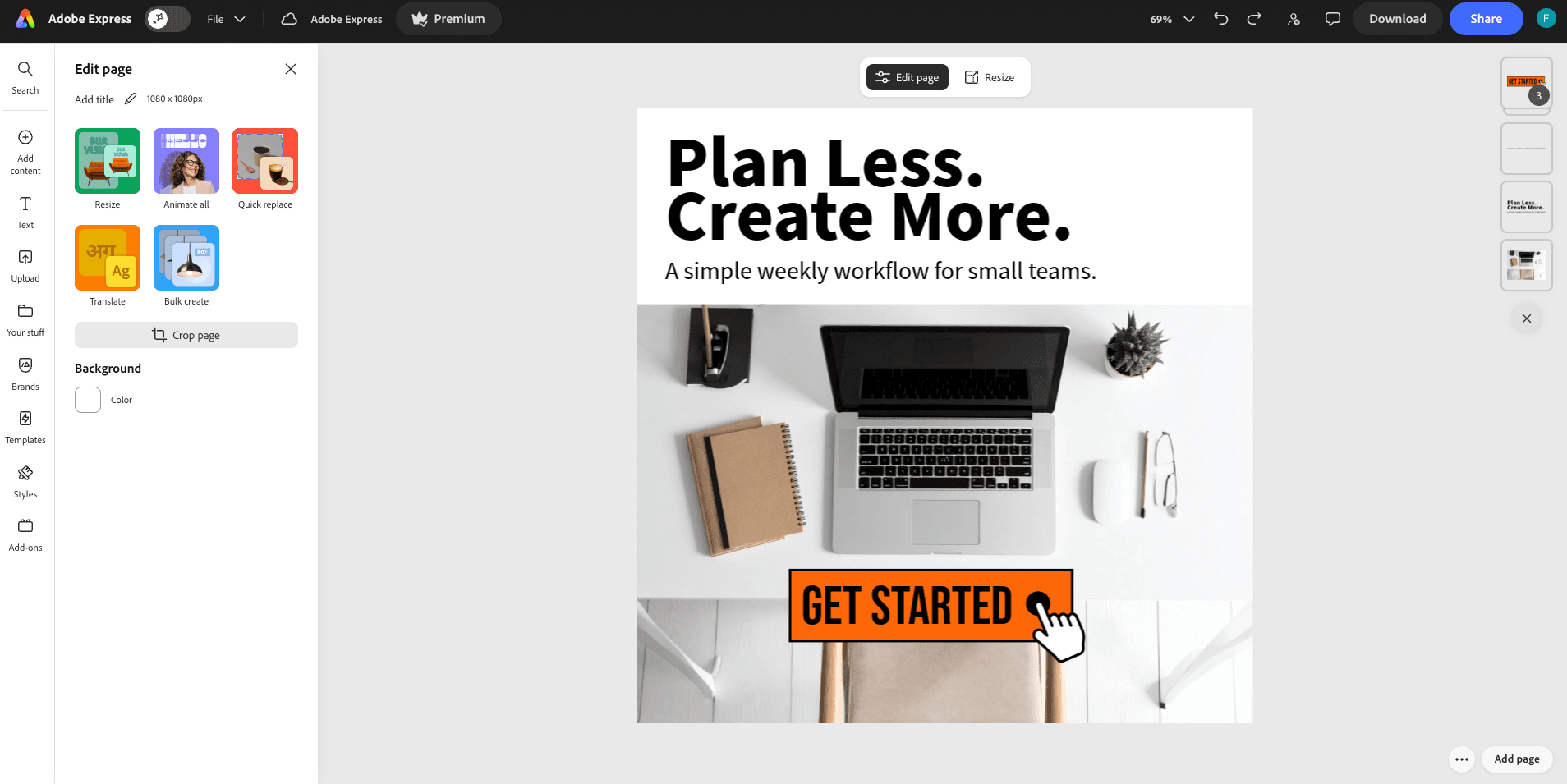
Our Adobe Express test kept the layer order visible while we built and exported the square post.
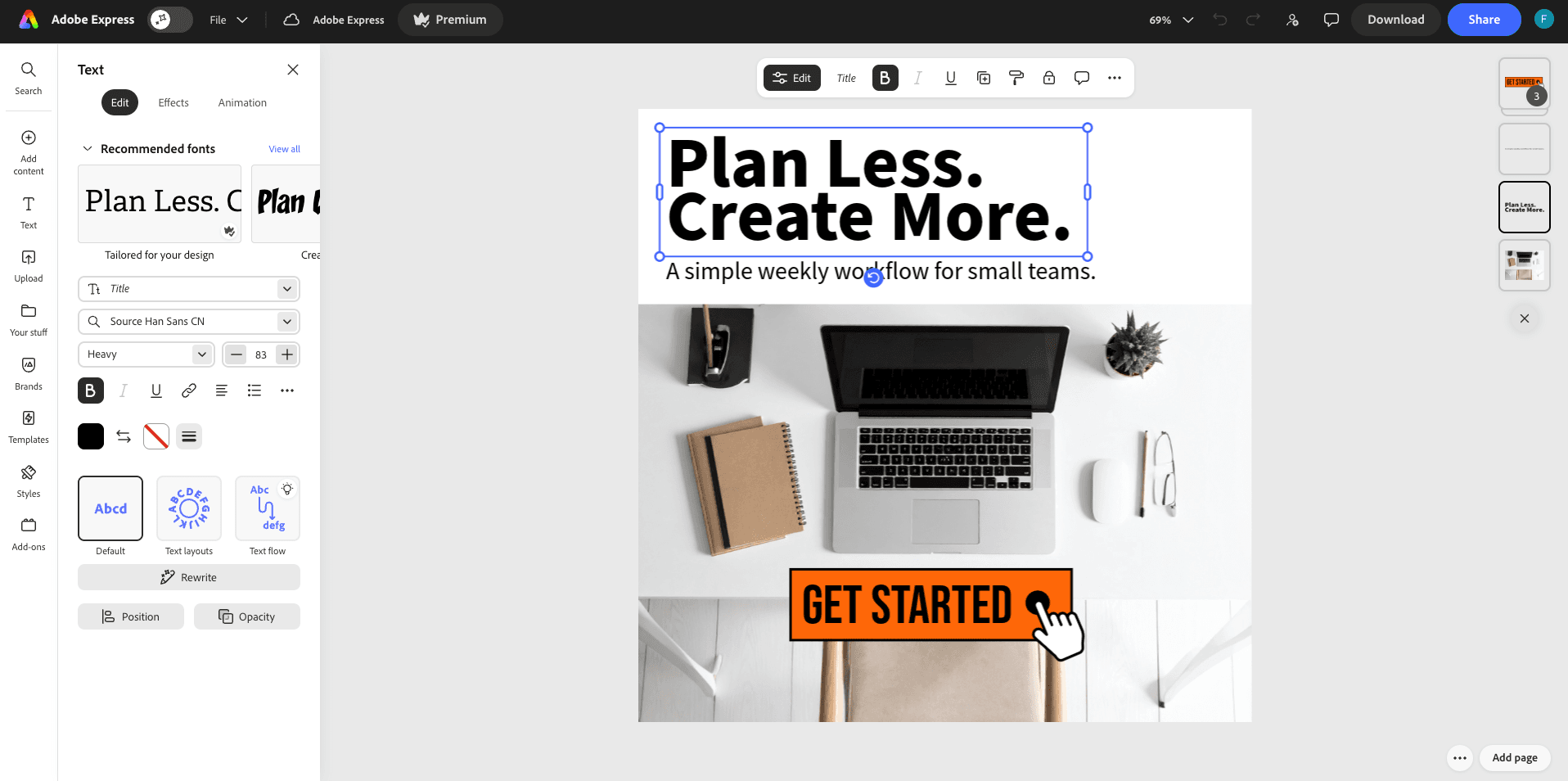
Test details: the layer controls used during editing, and the 1080 × 1080 square composition prepared for export.
Pricing: Adobe Express has a free plan. The official US page listed Premium at $9.99 per month when checked; regional prices and promotions can differ.
2. VistaCreate: Best for Social Templates on a Budget
Best for: small businesses and solo marketers producing the same social, ad, and print formats every week.
VistaCreate is the least disruptive move for a Canva user who works mainly from templates. The editor, stock library, animation tools, Brand Kit, scheduling, and print formats cover the day-to-day needs of a small marketing operation without trying to become a full product-design or video-production suite.
Its narrower scope is both the benefit and the limit. It is easy to learn, but Canva remains stronger when presentations, documents, websites, whiteboards, and a large team template system all need to live together.
The same brief took about 40 minutes in VistaCreate. Its dedicated Backgrounds and Styles panels were useful when the goal was to find a simple backdrop quickly. The rough edge was text editing: adding a text box starts in the left panel, but font controls move to a bar above the canvas, and there are no obvious default heading sizes. The free object library is large, though the asset quality felt less consistent and the separate Animated Objects section added clutter for a static post. The finished PNG exported at 1080 × 1080 with no watermark. Many templates and elements still sit behind Pro.
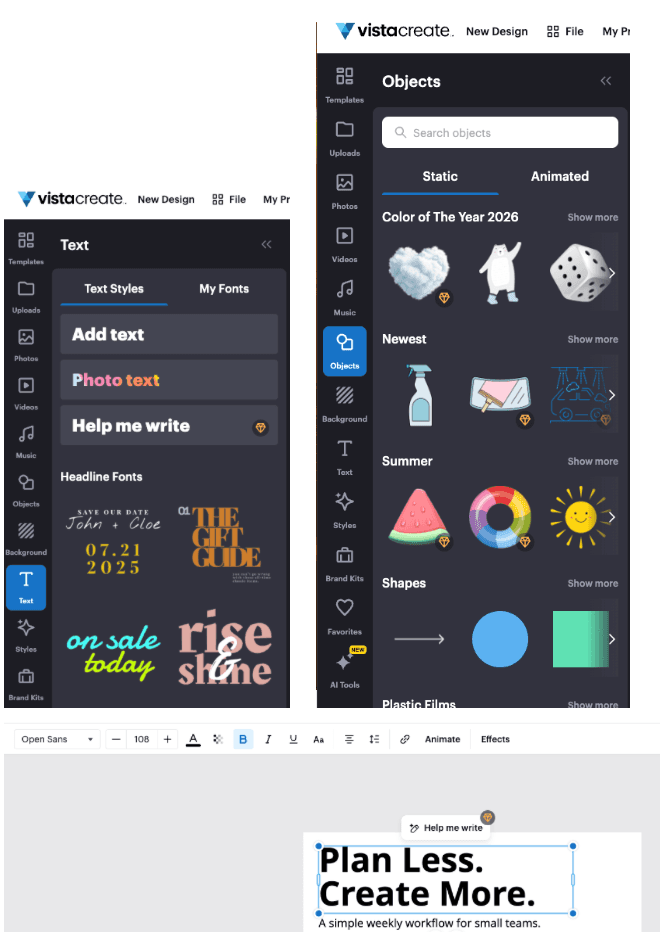
Test details: text styles remained in the left panel, while object selection and layout work happened on separate parts of the editor.
Pricing: Starter is free. VistaCreate Pro was listed at $10 per month on annual billing when checked and supports up to ten team seats.
3. Astorie: Best for Generating Original AI Media
Best for: teams that need original AI-generated images or video before the design stage.
Astorie is useful when templates are not the problem: the missing asset is. In our test, one source image became a ten-second Seedance 2.5 clip, with its prompt, model settings, and result kept together on the same canvas.
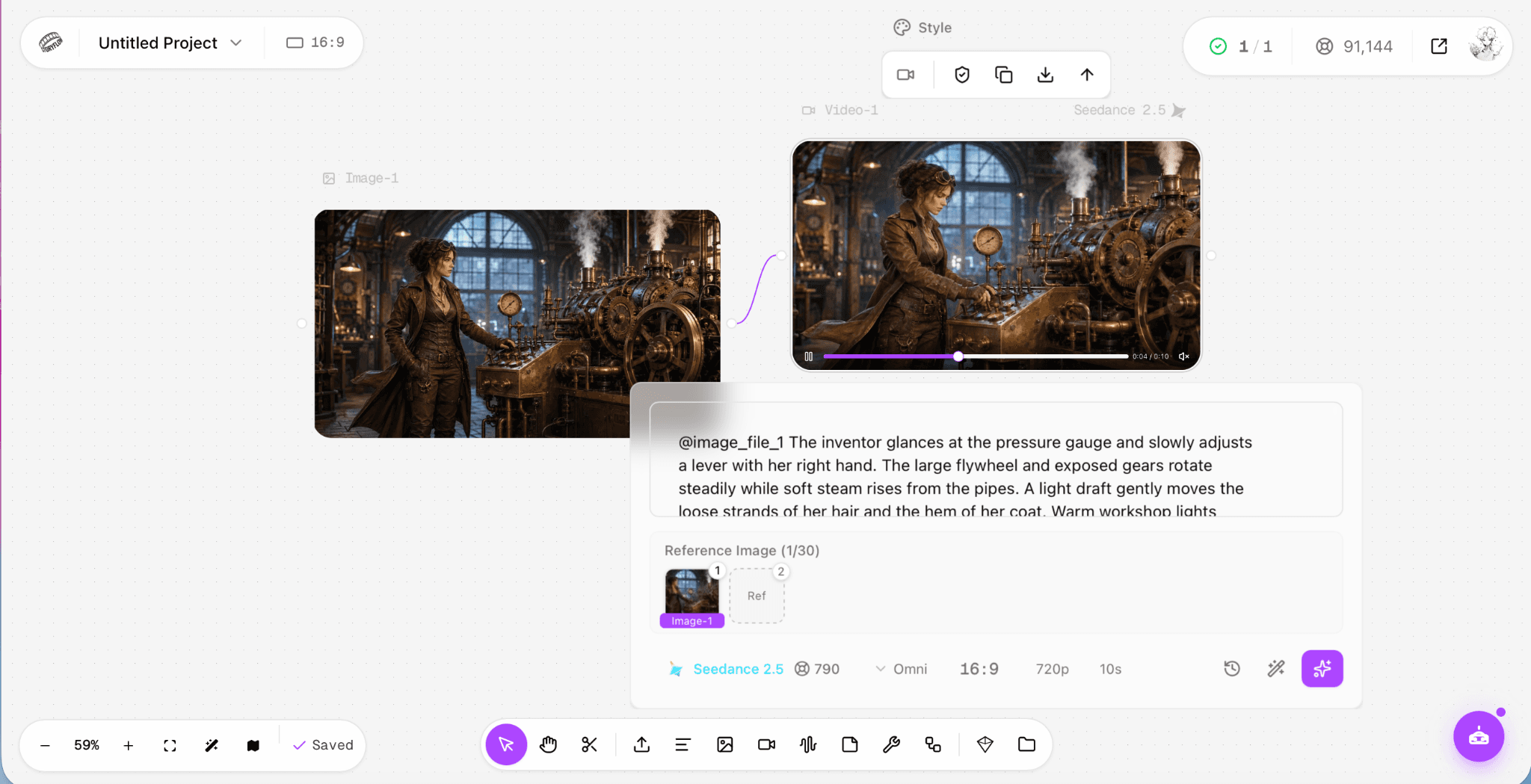
Our Astorie test connects a source image, generation settings, and the resulting video.
Trade-off: It does not replace Canva's templates, presentations, print layouts, or publishing tools.
Pricing: A free plan is available; paid generation uses credits that vary by plan and model.
More Canva Alternatives
4. Visme: Best for Reports and Interactive Presentations
Best for: reports, infographics, presentations, training material, and visual content in which data matters as much as layout.
Visme is more specialized than Canva around business communication. Charts, data widgets, reports, presentation controls, interactive elements, privacy options, analytics, and multiple export formats make it easier to produce content that has to explain rather than merely attract attention.
That specialization comes with a steeper setup burden. A quick Instagram post is usually faster in Canva or VistaCreate, and several useful download, brand, privacy, and collaboration features sit on paid plans. Visme makes the most sense when the output will be reviewed, presented, embedded, measured, or reused as formal business content.
Pricing: Visme Basic is free with limited templates, assets, storage, and download options. Annual billing showed Starter at $12.25 per person per month and Pro at $24.75 per person per month when checked.
5. Piktochart: Best for Focused Infographics
Best for: infographics, reports, charts, and visual summaries built from structured information.
Piktochart is easier to justify than Canva when the output is primarily an infographic or report. It keeps attention on hierarchy, charts, branded information blocks, and exportable business visuals rather than a sprawling library of unrelated formats.
It is less useful for broad social campaigns or mixed media.
Pricing: A free plan is available. Pro was listed at $10 per month on annual billing when checked.
6. Microsoft Designer: Best for Fast AI-Assisted Graphics
Best for: quick social posts, cards, images, and lightweight edits inside a Microsoft-centered workflow.
Designer is intentionally lighter than Canva. It is useful when a prompt, photo, or short brief needs to become a polished graphic quickly, especially for people already working in Microsoft 365.
Pricing: A free tier is available; higher AI usage may require a subscription.
7. Venngage: Best for Business Infographics and Process Visuals
Best for: internal reports, process diagrams, business infographics, and structured visual communication.
Venngage is a specialist rather than an all-purpose design suite. Its strength is turning structured information into a consistent visual document. Canva is quicker for casual posts; Venngage is more purposeful when the audience needs to understand a process or set of findings.
Pricing: Free and paid plans are available; features and export options vary by tier.
8. Desygner: Best for Simple Brand-Controlled Content
Best for: small teams that need repeatable, brand-controlled marketing materials without an overly complex editor.
Desygner covers familiar Canva territory. It is not as deep or polished across every format, but the narrower environment can be easier to govern for teams producing repeatable brand materials.
Pricing: Free to start, with paid plans for additional features and team requirements.
9. Snappa: Best for No-Fuss Social Graphics
Best for: solo creators who want to make straightforward social graphics quickly.
Snappa avoids the breadth that can make Canva feel busy. The trade-off is fewer advanced formats and team features.
Pricing: The free plan allows three downloads per month. Pro was listed at $10 per month on annual billing when checked.
Canva Alternatives Compared
| Tool | Best for | Free plan and paid entry | Main trade-off |
|---|---|---|---|
| Adobe Express | Closest all-purpose replacement | Strong free plan; paid price varies by market | Smaller template ecosystem than Canva |
| VistaCreate | Social graphics and print | Free; Pro shown at $10/mo annually | Narrower feature range |
| Astorie | Multi-model AI media workflows | Free plan; credit-based paid tiers | Not a template or publishing suite |
| Visme | Reports, data, and infographics | Free; Starter $12.25/mo annually | Best features and downloads sit on paid plans |
| Piktochart | Infographics and reports | Free; Pro $10/mo annually | Narrower creative range |
| Microsoft Designer | Quick AI-assisted graphics | Free tier | Lighter editing and team controls |
| Venngage | Business and process visuals | Free and paid plans | Specialist rather than general-purpose |
| Desygner | Simple brand content | Free to start | Less depth across advanced formats |
| Snappa | Fast social graphics | Free; Pro $10/mo annually | Free tier limited to three downloads monthly |
Price check: figures and free-plan details were checked on official product pages on August 21, 2026. Regional pricing, promotions, credit costs, and included features can change. The price displayed in the product or at checkout should take precedence over this article.
How to Choose the Right Canva Alternative
1. Start with the output, not the feature list
A presentation, an AI-generated shot, an infographic, a responsive interface, and an edited video are different production problems. Write down the format you deliver most often and judge each tool on that job first.
2. Decide whether you need templates or a workflow
If you need to publish quickly from a ready-made layout, start with Adobe Express or VistaCreate. Choose Visme, Piktochart, or Venngage when data and explanation drive the page. Use Astorie only when prompts, references, and generated media need to stay connected before layout begins.
3. Price one real month of work
A cheap subscription can still be expensive if exports, seats, AI credits, or storage force an upgrade. A credit-based tool can be economical for occasional work and costly for repeated high-end generations. Use your normal output volume, not the headline plan price, to estimate cost.
Is Canva Still Worth Using in 2026?
Yes, especially for people who regularly move between social graphics, presentations, simple video, documents, print layouts, and brand assets. Canva Free remains a capable entry point, while Pro adds premium content, Background Remover, AI-powered tools, Magic Resize, and Brand Kit features. Teams that already have templates, approval habits, and brand assets in Canva may gain little from switching for the sake of switching.
A specialist becomes more attractive when one job dominates. Visme, Piktochart, and Venngage handle data-led communication; VistaCreate and Snappa simplify recurring social work; Astorie handles connected AI-media generation. Canva remains the better generalist.
The Bottom Line
If most of your work is still presentations, social posts, and flyers, Canva remains the practical choice. Switch only when a specialist removes a recurring bottleneck.
Adobe Express is the closest overall substitute, VistaCreate is the easiest template-led switch, and the remaining tools make sense only when their specialist strength matches a job you repeat often.
Frequently asked questions
- What is the best Canva alternative overall?
Adobe Express is the closest general-purpose replacement. It combines templates, stock assets, brand tools, photo and video editing, and social scheduling in one product.
- What is the best free Canva alternative?
VistaCreate has the most familiar free experience for template graphics. Microsoft Designer is a lighter option for quick AI-assisted posts and image edits.
- Which Canva alternatives are best for video content?
Adobe Express is the closest fit for quick, template-led social videos. Astorie is useful only when you need to generate original footage before editing or publishing it elsewhere.
- Is there an app like Canva for infographics?
Visme is the strongest choice here for infographics, reports, charts, and interactive business content. Canva is faster for casual graphics; Visme goes deeper when data drives the layout.
- Is Canva free?
Yes. Canva Free includes a library of free templates and content. Premium features such as Magic Resize, Brand Kit, Background Remover, and a larger content library require Canva Pro or another paid plan.
- Can one tool replace Canva for every use case?
Usually not. Most alternatives go deeper in one area, so many teams keep Canva or Adobe Express for everyday design and add a specialist only where needed.
Related reading
Runway Gen4 vs Veo vs Kling: Practical Video Production Comparison
Practical comparison for AI video production choices across Runway Gen4, Google Veo, and Kling.
7 Best Photoroom Alternatives in 2026 (Tested for Ecommerce Photography)
Do you need a Photoroom alternative that goes beyond simple background cutouts and batch image processing? Try these 7 tools and pick the one that best matches your AI product photography use cases.
6 Ideogram Alternatives for Killer AI Image Generation
Here are 6 tried and tested Ideogram alternatives that work best for prompt accuracy, text, image realism, character consistency and are intelligent enough to render real-world scenarios and logic.
Ready to try it on the canvas?
Open Astorie and fan your prompt across every frontier model in one workflow.