

10 Descript Alternatives That Make Sense in 2026
Descript is excellent when the transcript is the edit. These tools are stronger when recording quality, timeline control, captions, collaboration, or visual generation matters more.
Key takeaways
Riverside is the closest Descript alternative when remote interviews and local-track recording matter most.
VEED is the better browser option for turning existing footage into captioned social video.
CapCut is better suited to short-form, mobile-first editing and publishing.
Premiere and DaVinci Resolve provide professional timeline, color, audio, and effects control.
Happy Scribe and Astorie solve narrower transcription and visual-generation steps rather than replacing Descript completely.
Descript Alternatives at a Glance
If remote interviews are the job, Riverside is the closest overall alternative to Descript. If you already have the footage and want to turn it into a clean, captioned clip in a browser, VEED is the better starting point. CapCut makes more sense for short-form creators, while Adobe Premiere or DaVinci Resolve is the move when you are leaving Descript because you need a real post-production timeline.
That distinction matters. A list of video editors is not useful if every product is judged as though it solves the same problem. Descript is built around spoken media: upload or record, generate a transcript, and edit the recording by changing the words. The alternatives below are ranked by how well they replace that workflow—or by how clearly they solve the reason you have outgrown it.
| Alternative | Best when you need | Pricing model | Workspace |
|---|---|---|---|
| Riverside | Remote interviews and podcasts | 14-day Pro trial; Pro $24/mo | Browser |
| VEED | Fast browser editing and captions | Free; paid tiers | Browser |
| CapCut | Short-form and mobile-first work | Free; Pro varies by region | Web, desktop, mobile |
| Adobe Premiere | Professional post-production | Subscription | Desktop |
| DaVinci Resolve | Best free full editing suite | Free; Studio $295 | Desktop |
| Kapwing | Small-team browser collaboration | Free; paid tiers | Browser |
| Camtasia | Tutorials and screen recordings | $179.88/year Essentials | Desktop |
| Filmora | Approachable desktop editing | Subscription / perpetual options | Desktop |
| Happy Scribe | Transcripts, subtitles, translation | From $8.50/mo annually | Browser |
| Astorie | Multi-model visual generation | Free to start; credit-based | Browser |
Pricing and plan limits were checked on official product pages on August 24, 2026 and may change.
Why People Look Beyond Descript
Descript's transcript-first editor is its advantage and its boundary. It is quick when the story is carried by dialogue, but less comfortable when an edit depends on layered graphics, precise keyframes, detailed color work, or a long multi-camera timeline.
Some teams are not unhappy with the editor at all; they simply need a more dependable remote recording setup, stronger social caption tools, or a cheaper way to produce transcript files.
The right replacement therefore depends on the missing part of the workflow. Moving to a larger suite can create more friction than it removes. A podcaster who only wants cleaner guest recordings does not need a Hollywood finishing application, and a professional editor should not choose a browser tool merely because it has an AI button.
If transcript editing already covers most of your podcast or talking-head workflow, staying with Descript may be simpler than moving an archive into a broader editor. A switch is worthwhile only when a recurring limitation is costing more time than the new workflow will require.
How This Comparison Was Made
We checked current product and pricing pages, then separated the tools by the job they are actually designed to do. Riverside and VEED are the two closest substitutes for a transcript-led video workflow, so they get a controlled hands-on test. The remaining products are assessed more narrowly against their published capabilities and intended use.
For the hands-on check, both editors received the same 15-second 9:16 talking-head clip. The script included the name “Marlowe” as a deliberate transcription check. We generated captions, corrected the name, applied a comparable white caption style, inspected the timeline, and carried each project to the export screen.
This upload-based test covers the editing experience after footage already exists. It does not test Riverside's local-track remote recording, which remains the main reason an interview team might choose it over Descript.
One Fair Test for Riverside and VEED
- Upload the same 15-second English talking-head clip to both products without changing its 9:16 framing.
- Generate English captions and check how each editor transcribes the name “Marlowe.”
- Correct the name, apply a comparable white caption style, and inspect how the transcript, captions, preview, and timeline work together.
- Record total setup time, correction friction, interface behavior, trial or free-plan limits, and the best export available in the account.
1. Riverside
The closest fit when recording quality and guest workflow matter as much as transcript editing.
Riverside starts before the edit. A host sends a link, guests join in a browser, and each participant is recorded locally on a separate track. The session then moves into a transcript editor where deleting a line removes the corresponding part of the recording. For interview-led shows, that continuity is more valuable than another page of templates.
It is not a universal upgrade. The editor is built around conversations, not elaborate compositing or detailed motion design. Teams that already record elsewhere may also find that Riverside's greatest advantage sits outside their workflow.
Compared with Descript, Riverside is worth switching to when the production begins with remote guests and dependable local recordings; if the footage already exists, Descript's continuous transcript remains the more direct environment for a simple spoken-word cleanup pass.
Choose Riverside if: you record remote interviews, podcasts, webinars, or guest-led video.
Look elsewhere if: the real problem is color, effects, or precise timeline work.
Pricing: A 14-day Pro trial was available in our test; Pro was listed at $24 per month.
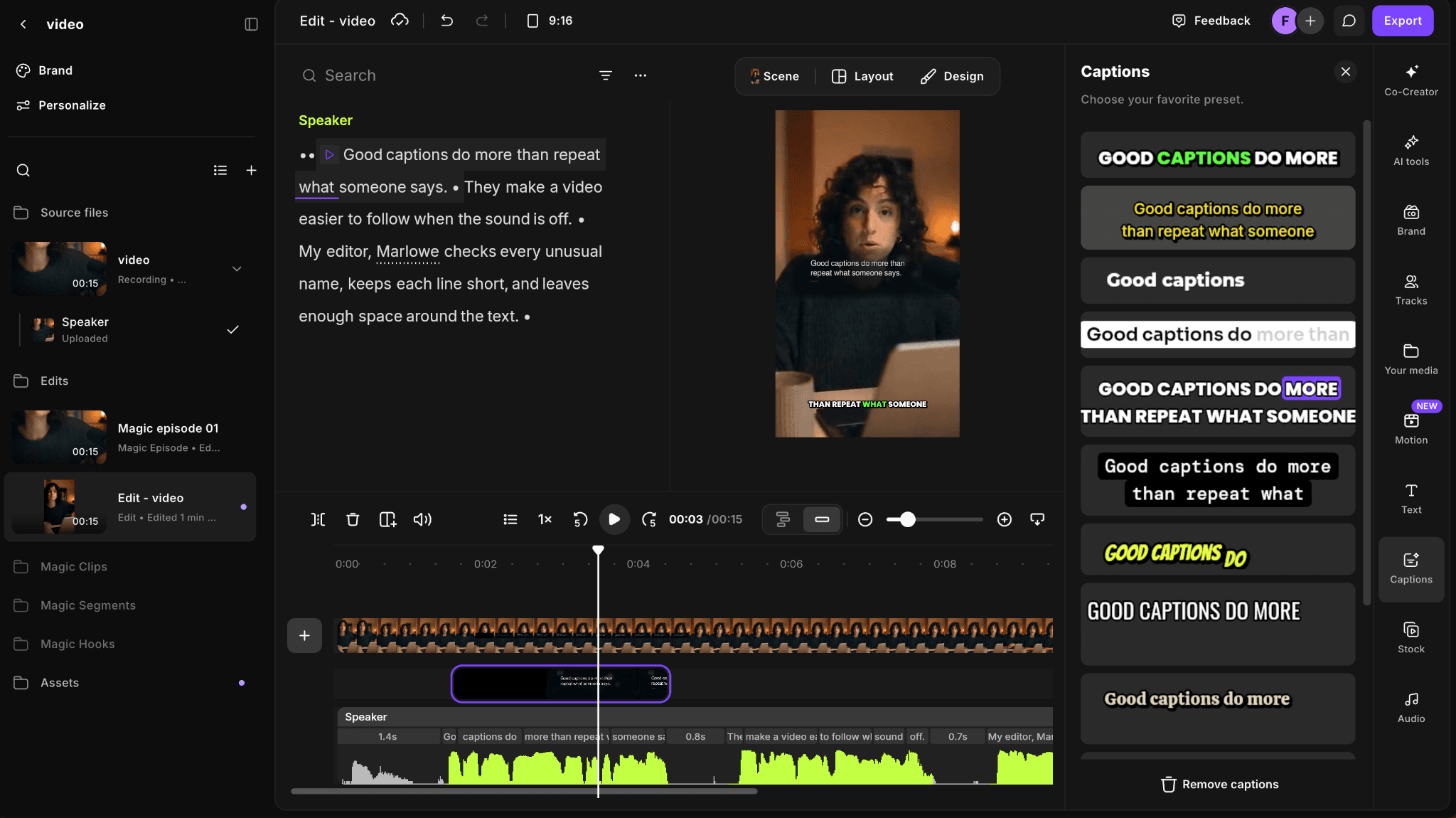
Riverside placed the transcript, vertical preview, caption presets, and timeline in one editing workspace.
The Riverside edit took about 15 minutes. Its AI review automatically marked passages that it thought could be improved, and generated caption elements appeared on their own timeline track.
The transcript initially rendered “Marlowe” as “Marlo”; correcting it required opening the correction control rather than editing the word in place. That extra step was manageable, but less immediate than VEED's subtitle panel.
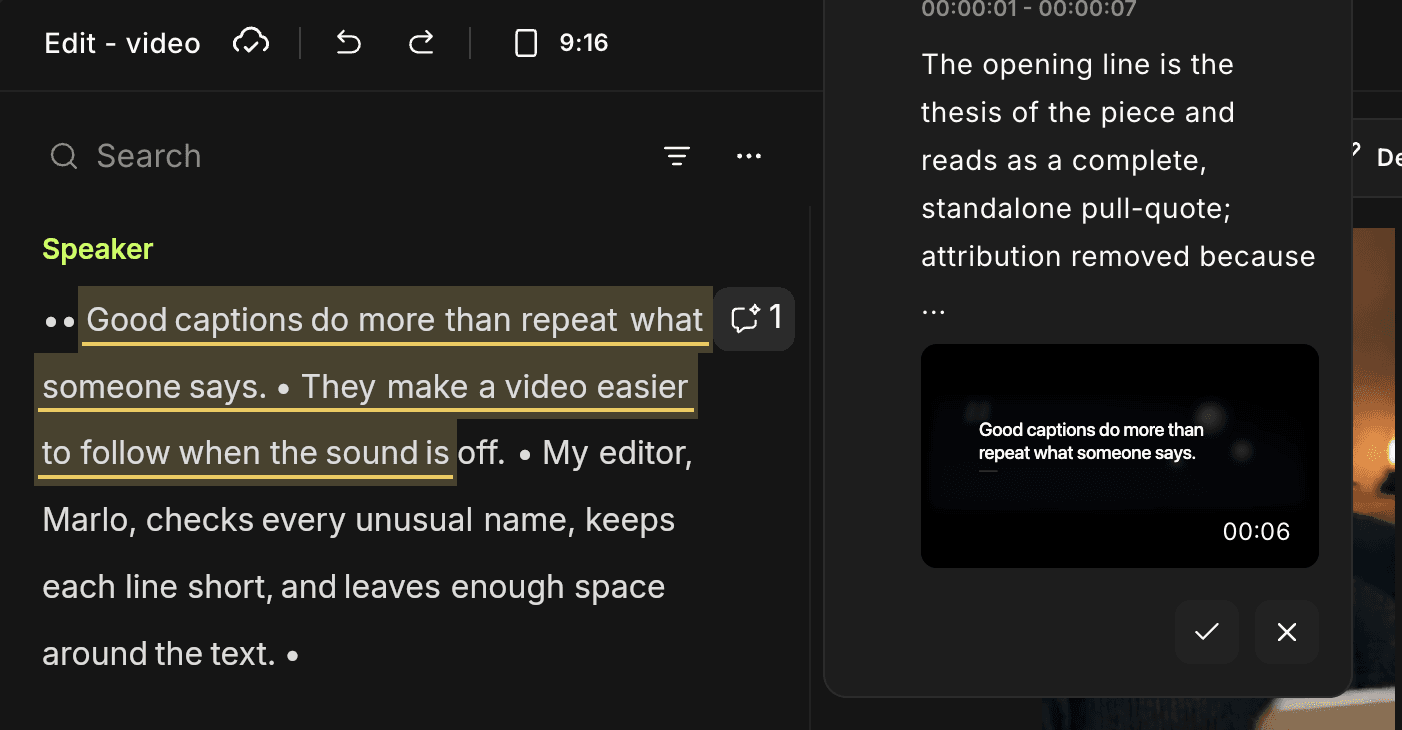
Riverside flagged an AI edit suggestion, while the transcript still showed the name as “Marlo.”
The account offered a 14-day Pro trial rather than a permanent free plan. From that trial, the project exported at 1080p without a watermark. That is a useful test path, but it should not be mistaken for an ongoing free tier.
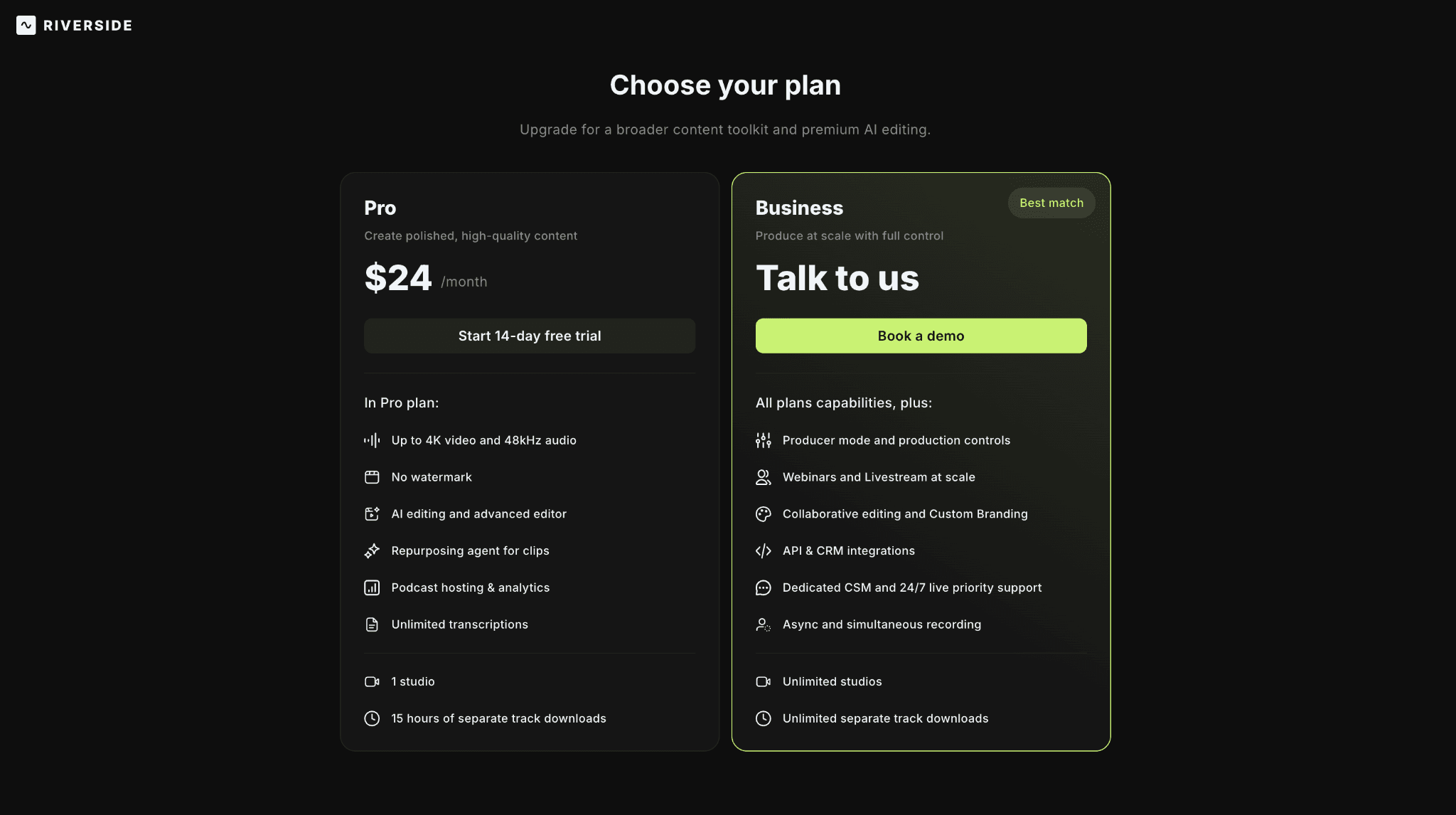
Riverside offered a 14-day Pro trial; the plan page listed Pro at $24 per month.
2. VEED
The easier browser choice when the job is turning existing footage into a captioned, shareable clip.
VEED also lets you cut footage by deleting words from a transcript, but the surrounding product feels more like an online video editor than a recording studio. The transcript sits alongside captions, layouts, brand assets, resizing, and a conventional timeline. That mix is useful for marketing teams that receive finished footage and need to publish several versions without installing desktop software.
The trade-off is browser scale. A short talking-head edit is a good fit; a layered, media-heavy project may feel tight. Compared with Descript, VEED is worth switching to when caption styling, social layouts, and browser export matter more than a continuous transcript. Its subtitle blocks take longer to scan than Descript's flowing text, and the free export stops at a watermarked 720p file.
Choose VEED if: you need transcript cuts, caption styling, and social exports in one browser tab.
Look elsewhere if: you regularly build long or technically complex edits.
Pricing: Free plan; paid tiers remove watermark and raise limits.
VEED also took about 15 minutes and heard “Marlowe” as “Marlo.” Correcting the name was more direct than in Riverside because the subtitle text could be selected and edited immediately in the left panel. The trade-off was navigation: the subtitles were divided into short blocks, so finding one word took longer than scanning Descript's continuous transcript.
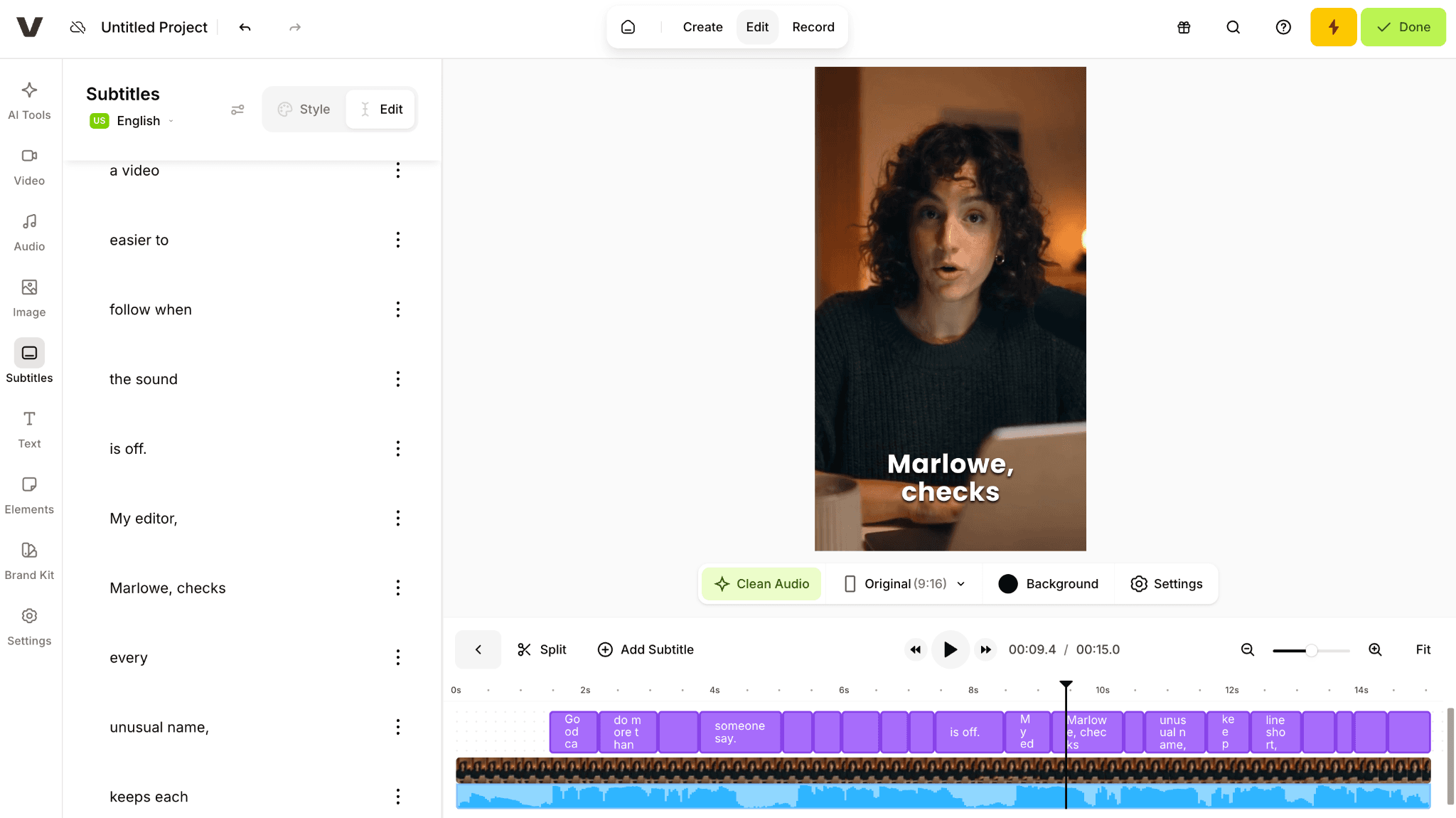
VEED split the subtitles into editable blocks beside the 9:16 preview and timeline.
The interface felt like a conventional browser editor, with most tools arranged in tabs on the left and paid AI features clearly marked. On the free account, the available MP4 export was 720p and included a watermark; Full HD and watermark removal required an upgrade.
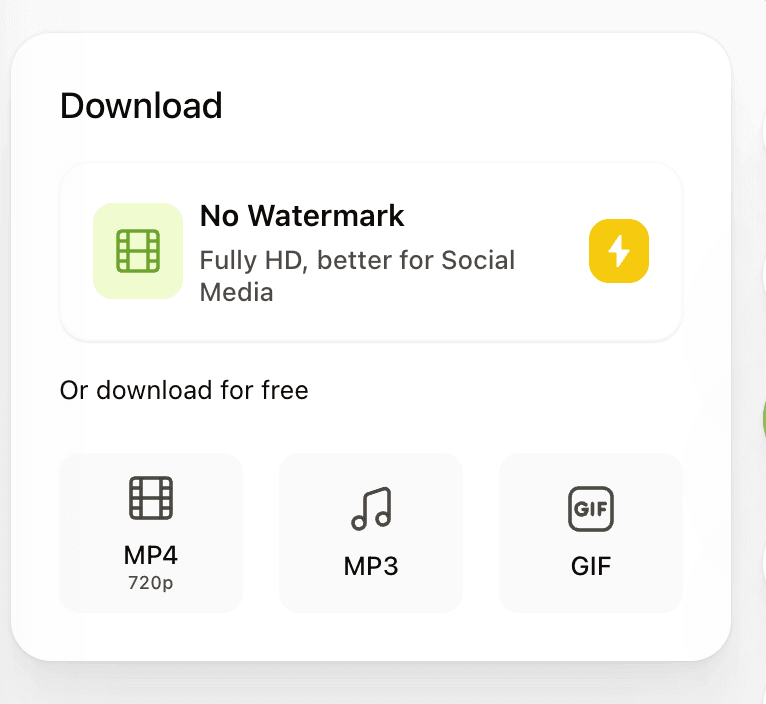
VEED offered a free 720p MP4; removing the watermark and exporting at Full HD required an upgrade.
More Descript Alternatives
3. CapCut
The low-friction option for short-form video, especially when editing moves between phone and desktop.
CapCut is less convincing as a long-form transcript editor and far more convincing as a fast route to Reels, Shorts, and TikTok. Auto captions, templates, effects, background tools, and platform-friendly canvases are all close at hand. It suits creators who care about publishing rhythm more than a carefully managed podcast archive.
Compared with Descript, CapCut is worth switching to for faster short-form pacing, templates, effects, and mobile handoff; it is a weaker fit for long interviews or podcasts where Descript's transcript-led editing and audio cleanup keep the process simpler.
Pricing: Free tier; Pro pricing varies by region.
4. Adobe Premiere
For editors who want transcript tools without giving up a professional timeline.
Premiere can transcribe footage and build a rough cut from text, but text-based editing is only one part of the application. The reason to choose it is the depth around that first cut: multicam, keyframes, color, sound, graphics, media management, and a mature handoff to After Effects and Audition.
Compared with Descript, it is worth the switch when multicam, keyframes, detailed color, sound, or graphics are part of the job. For routine spoken-word edits, you give up Descript's faster writer-like workflow and take on a subscription and a much steeper learning curve.
Pricing: Subscription; regional pricing applies.
5. DaVinci Resolve
The strongest free choice when the reason for leaving Descript is its post-production ceiling.
Resolve is a full editing, color, effects, and audio environment. Its transcription tools can speed up interview work, but the product still expects you to think like an editor rather than a writer.
Compared with Descript, Resolve is the better move when you need a professional timeline, serious color work, Fairlight audio, or Fusion effects; it is less suitable when speed and transcript-first editing matter more than technical control.
Pricing: DaVinci Resolve is free; Resolve Studio is listed at $295.
Additional Descript Alternatives
6. Kapwing
A practical browser workspace when several non-editors need to review and revise the same clip.
Kapwing combines transcript trimming, automatic subtitles, templates, comments, and link-based sharing. Its value is not maximum control; it is lowering the cost of getting a small team into the same project.
Compared with Descript, Kapwing is worth switching to when a non-editor team needs link-based collaboration, brand templates, and quick social versions. You lose some of Descript's depth in spoken-word editing and audio cleanup, and intricate timelines still belong on desktop.
Pricing: Free plan; paid tiers increase export and AI limits.
7. Camtasia
A specialist alternative for tutorials, screen demonstrations, and training material.
Camtasia gives screen capture, cursor emphasis, callouts, narration, captions, and simple timeline editing more attention than a general transcript editor does. Camtasia Essentials includes Audiate, a companion app that adds text-based editing and audio cleanup to the workflow.
Compared with Descript, it is worth switching to when screen capture, cursor emphasis, callouts, and instructional polish are central to the deliverable. It is less convincing for podcasts and interview-led edits.
Pricing: Camtasia Essentials is listed at $179.88 per year.
8. Filmora
An approachable desktop editor for people who have outgrown browser tools but do not want a professional suite.
Filmora's familiar timeline, speech-to-text captions, effects, and guided tools cover everyday creator work without Premiere's depth or Resolve's steeper start.
Compared with Descript, it is worth switching to when you want effects and a familiar visual timeline without the complexity of Premiere or Resolve. You give up Descript's unusually direct transcript-first workflow, while some assisted features use separate AI credits.
Pricing: Subscription and perpetual options; check the current regional store.
9. Happy Scribe
The better answer when the real deliverable is a transcript, subtitle file, or translation—not an edited video.
Happy Scribe is focused on clean text, speaker labels, subtitle formats, translation, and optional human proofreading. It will not replace Descript's scene building or visual timeline, and it does not try to.
Compared with Descript, Happy Scribe is worth switching to when the final deliverable is an accurate transcript, subtitle file, or translation.
Pricing: Basic starts at $8.50 per month billed annually; additional AI minutes are usage-based.
10. Astorie
A narrow companion for visual generation rather than a replacement for transcription or spoken-word editing.
Astorie is not the tool to choose for podcast cleanup, transcript editing, or remote recording. It appears here for a different part of the content workflow: turning source images and prompts into video variations across multiple AI models.
On the node canvas, one asset can branch into several model nodes, which keeps visual experiments and outputs together. For teams that use Descript to finish the dialogue but need a separate place to develop generated B-roll or concept shots, that narrower role can be useful.
Its fit is narrow: creative teams testing image-to-video models, generated B-roll, and reusable visual workflows. It replaces only that visual-generation step, not Descript's recording, transcription, or audio tools.
Pricing: Free to start; generation uses model-based credits.
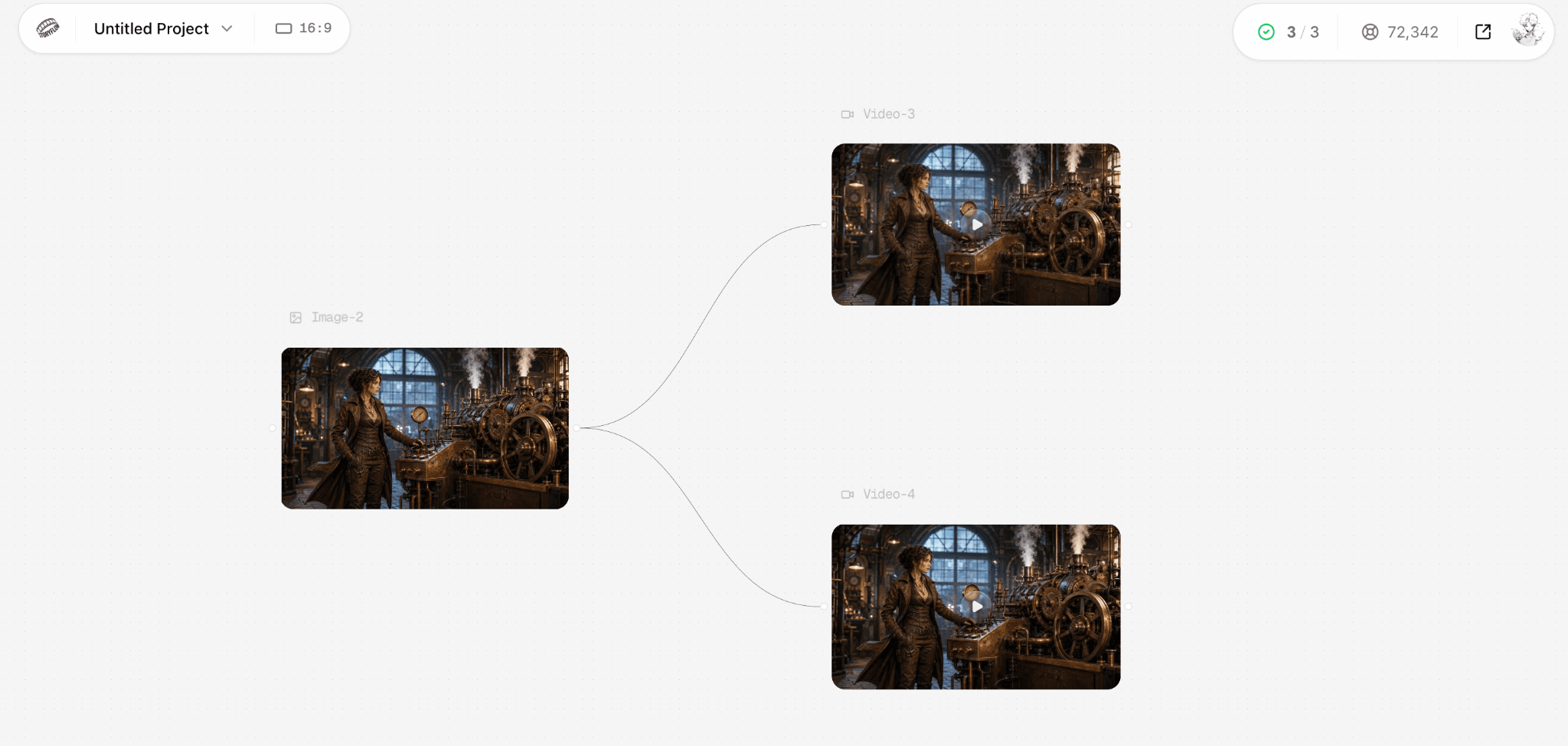
Astorie canvas: one source image branches into two video outputs in the same project.
Which One Should You Choose?
| Your actual job | Start with | Reason |
|---|---|---|
| Remote interview or podcast | Riverside | Recording, local tracks, transcripts, and editing stay in one workflow. |
| Talking-head clip with captions | VEED | The browser editor keeps transcript cuts, caption styling, and export close together. |
| Reels, Shorts, or TikTok | CapCut | It is built around short-form formats, effects, and mobile handoff. |
| Professional timeline | Premiere or Resolve | Both offer far more control over picture, sound, color, and finishing. |
| Transcript or subtitle delivery | Happy Scribe | You are not paying for a full creative editor you do not need. |
| AI-generated visual variations | Astorie | One source asset can branch into several model nodes on the canvas. |
The ranking is a starting point, not a command. If your missing feature appears in the first column, begin with the tool beside it and run a small real project before moving your archive or paying annually.
Bottom Line
Choose Riverside when the quality of the recording and the guest experience come first. Choose VEED when a browser, captions, and quick distribution matter more.
If you have reached the limits of transcript-first editing, move to Premiere or Resolve rather than searching for another simplified editor. And if the job is narrower—screen tutorials, subtitle delivery, or generated visuals—pick the specialist built for that step.
Frequently asked questions
- What is the closest alternative to Descript?
Riverside is the closest overall option for teams that record interviews or podcasts and then edit from a transcript. VEED is closer for people who start with existing footage and need browser-based text edits, captions, and social exports.
- Is there a good free alternative?
DaVinci Resolve is the strongest free full editor, while CapCut is the easier free starting point for short-form work. VEED, Kapwing, and Astorie also offer free entry points, but their export, usage, or credit limits matter. Riverside offered a 14-day Pro trial in our test rather than a permanent free plan.
- What if I only need transcription and subtitles?
Start with Happy Scribe. Paying for a full editor makes little sense when the deliverable is a transcript, caption file, or translation. VEED and Kapwing are better if the subtitles also need to be styled and burned into a video.
- Which Descript alternative is best for podcast editing?
Riverside is the strongest starting point when recording guests is part of the workflow because recording, local tracks, transcription, and editing stay together. If the podcast is already recorded and the priority is visual clips and captions, VEED is the more direct browser workflow.
Related reading
Runway Gen4 vs Veo vs Kling: Practical Video Production Comparison
Practical comparison for AI video production choices across Runway Gen4, Google Veo, and Kling.
7 Best Photoroom Alternatives in 2026 (Tested for Ecommerce Photography)
Do you need a Photoroom alternative that goes beyond simple background cutouts and batch image processing? Try these 7 tools and pick the one that best matches your AI product photography use cases.
6 Ideogram Alternatives for Killer AI Image Generation
Here are 6 tried and tested Ideogram alternatives that work best for prompt accuracy, text, image realism, character consistency and are intelligent enough to render real-world scenarios and logic.
Ready to try it on the canvas?
Open Astorie and fan your prompt across every frontier model in one workflow.