

10 FLORA Alternatives for Creative Workflows, Image Generation, and Visual Teams
Krea is the easier place to begin if you work alone. Magnific Spaces comes closer to FLORA's shared-canvas workflow. Figma Weave, NodeTool, and ComfyUI make more sense when collaboration, workflow ownership, or technical control is the real issue.
Key takeaways
- Krea is the easiest FLORA alternative for individual creators exploring visual ideas quickly.
- Magnific Spaces is the closest match for shared canvases, team feedback, and production assets.
- Figma Weave suits teams whose designs, reviews, and source files already live in Figma.
- NodeTool and ComfyUI provide greater workflow ownership and technical control.
- Runway and Astorie are more relevant when video generation is the actual deliverable.
FLORA Alternatives at a Glance
The best FLORA alternative depends on which part of FLORA you are trying to replace. Krea is a sensible first stop for quick visual exploration. Magnific Spaces, formerly Freepik Spaces, is a closer match if you need a shared canvas and production assets. Figma Weave suits teams already designing in Figma, while NodeTool and ComfyUI offer more ownership and technical control.
Those differences matter because an infinite canvas, a model library, a video editor, and an open workflow engine are not interchangeable just because each can generate an image.
| Alternative | Closest fit | Starting point | Main trade-off |
|---|---|---|---|
| Krea | Fast visual exploration | Free; paid plans and compute units | Less emphasis on shared workflow structure |
| Magnific Spaces | Shared canvas, assets, and production | Regional plans; credits depend on use | Large suite; pricing varies by market |
| Figma Weave | Visual workflows inside design teams | Open beta free; later Figma AI credits | Beta status and Figma dependence |
| NodeTool | Open, local, visual workflows | Open source; model or compute costs | More setup than a hosted canvas |
| ComfyUI | Maximum control and repeatability | Open source; cloud from $20/mo | Steeper learning curve |
| Runway | Video-first creative production | Free; Standard $12/mo annually | Not a full shared visual canvas |
| Recraft | Brand visuals and vector design | Free and paid plans; check local pricing | Narrower for video and team workflows |
| Adobe Firefly | Adobe-centered production | Free trial; regional plan pricing | Best value depends on Adobe usage |
| Leonardo.Ai | Affordable image exploration | Free; Essential $12/mo | Less suitable for canvas-led collaboration |
| Astorie | Comparing image-to-video models | Free; Standard $11/mo annually | Narrower than a general design canvas |
Prices and plan availability were rechecked on official product pages on September 2, 2026. Taxes, billing intervals, location, promotions, and usage-based credits can change the price shown at checkout.
What FLORA Actually Does—and When You Might Leave
FLORA brings image, text, and video models into a visual workspace where a team can develop ideas, organize references, and keep different versions together. Its free plan includes one seat, three active projects, text and image models, and up to 17 free generations. Video models and real-time collaboration appear on paid plans. FLORA's pricing page still displayed the previous launch-offer prices when rechecked on September 2, 2026: Starter at $18 per seat per month, Pro at $50, and Max at $200. However, the same page says the offer applied through August 31. Those figures should therefore be treated as an expired promotion displayed on the page, not as confirmed regular pricing. Check the live checkout before budgeting. The more important question is whether your work needs a shared, model-agnostic canvas—or only one part of it.
How We Compared These Tools
We compared the products against their official feature pages, current pricing, and the type of work each one is built to finish. Shared canvases, model choice, reference image control, editing, collaboration, and the practical cost of iteration mattered more than raw feature counts.
The fairest comparison keeps the reference image, prompt, aspect ratio, and requested variations the same. That makes it easier to judge whether the product stays recognizable, how revisions are handled, and where credits or account limits begin to shape the workflow.
One Fair Creative Test for Krea and Magnific Spaces
Use the same original photograph of a perfume bottle in both products. Request two 4:5 campaign variations, keep the product itself consistent, and note whether the workflow makes it easy to compare, revise, and save the results.
Use the same prompt:
Use the uploaded perfume-bottle photograph as the visual reference. Preserve the bottle silhouette, cap, label wording, and original logo. Create an editorial fragrance campaign image with warm late-afternoon light, a pale limestone surface, soft directional shadows, and restrained cream-and-olive styling. Keep the composition vertical at 4:5. Produce two distinct background variations without changing the product itself.
1. Krea
The most approachable first alternative for someone who wants to explore visual ideas without building a workflow first.
Krea is a better fit than FLORA when the job is to move from a rough visual idea to something you can judge quickly. Its image and video tools give individual creators a direct way to explore references, prompt variations, and different models without first setting up a team workspace.
That simplicity has a limit. A designer working alone may prefer a shorter path to the first image, but an agency that needs shared references, feedback, and reusable multi-step production may still be better served by FLORA or a dedicated collaborative canvas. The useful question is whether Krea preserves the actual product while changing the lighting and setting—not how many models appear in a menu.
Choose Krea if: you want to experiment quickly with visual direction and reference images.
Look elsewhere if: a shared team canvas and a repeatable multi-step process are the main requirements.
Pricing: Free plan available; paid tiers and compute usage are shown on the current pricing page.
Hands-on result: On the free account, one generation returned four images and the results could be downloaded. Two of the four kept the bottle silhouette, cap, label, and logo reasonably close; the other two changed important product details. The lighting and background followed the prompt well, and a result could be opened in the Edit workspace. The interface did not show a clear per-generation credit deduction during the test.
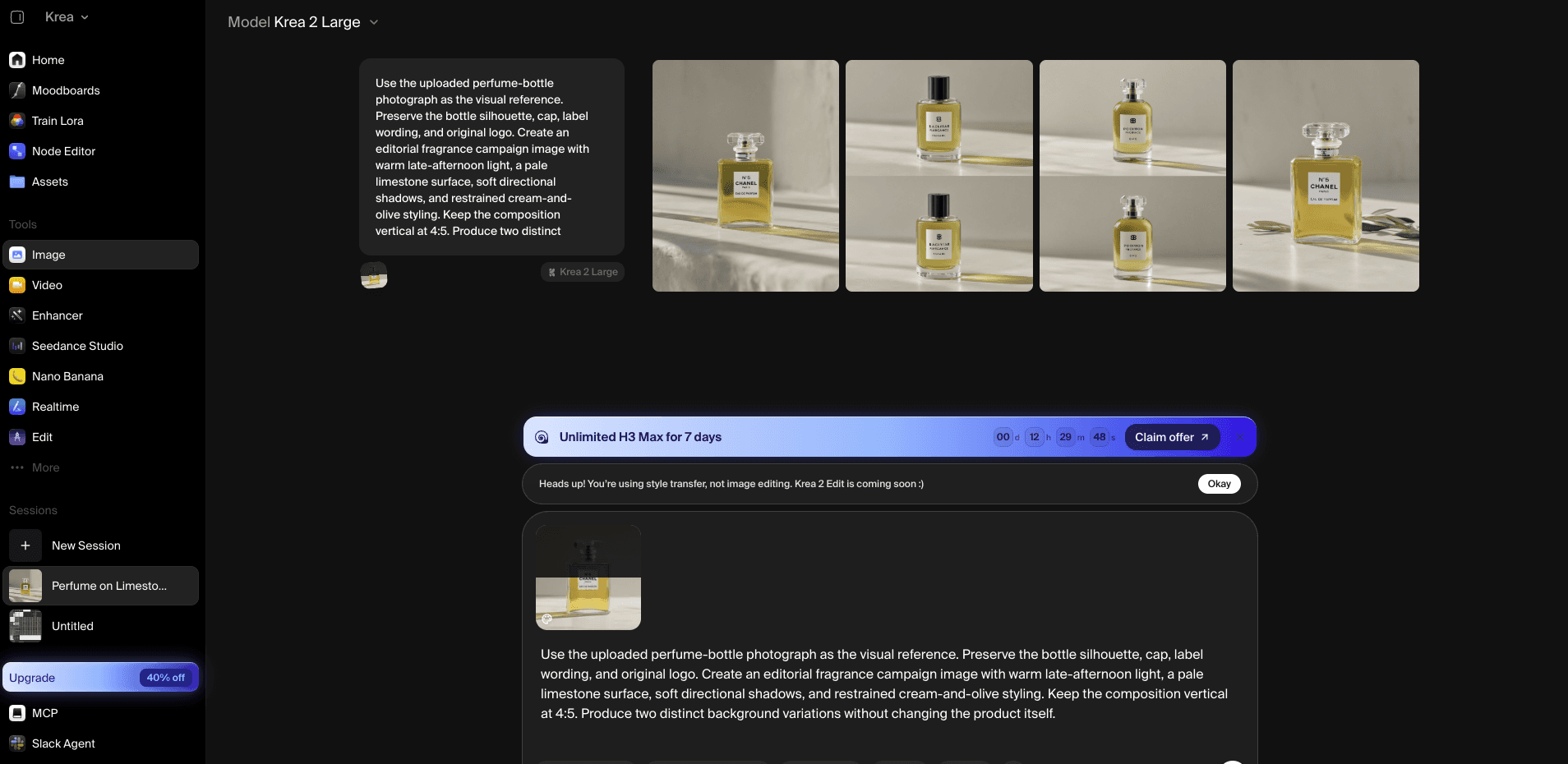
Krea kept the reference image, prompt, and four variations visible in one generation view.
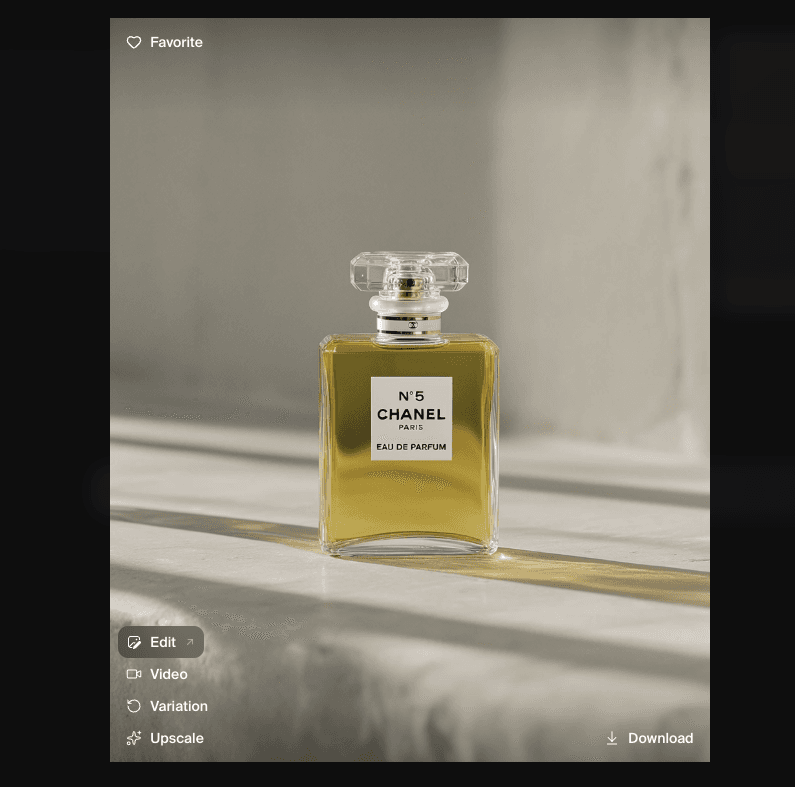
One downloadable Krea result; product details were more reliable in two of the four variations.
2. Magnific Spaces (formerly Freepik Spaces)
The closest fit when FLORA's value comes from a shared canvas, team feedback, and production-ready assets.
Spaces is built around the part of FLORA that a plain image generator cannot replace: a working canvas where references, generated assets, edits, and team discussion can sit together. The wider Magnific suite adds stock assets, image and video tools, editing, and upscaling, which makes it relevant when a campaign moves from rough concept to finished deliverables.
There is one naming detail worth getting right. The former Freepik Spaces URL now redirects to Magnific Spaces, and the current pricing page uses Magnific branding. Plan prices are localized, so quoting one universal dollar figure would be misleading. Check the price, credit allowance, and whether Spaces is included for the account's actual region before comparing it with FLORA's per-seat plans.
Choose Spaces if: several people need to explore, review, and develop campaign assets in one visual workspace.
Look elsewhere if: you only need a fast solo image generator or you want to run workflows on your own hardware.
Pricing: Regional pricing and credit limits vary; confirm Spaces access on the current Magnific plan page.
Hands-on result: The free account did not allow the tester to upload the perfume photograph as a reference in Spaces or in the image generator. Without that reference, the bottle, label, and logo did not stay consistent. The free workflow produced four images per run and allowed up to 20 free images, but generation happened in a separate image window rather than directly on the shared canvas. A canvas was available, although no obvious sharing or commenting control appeared during the test.
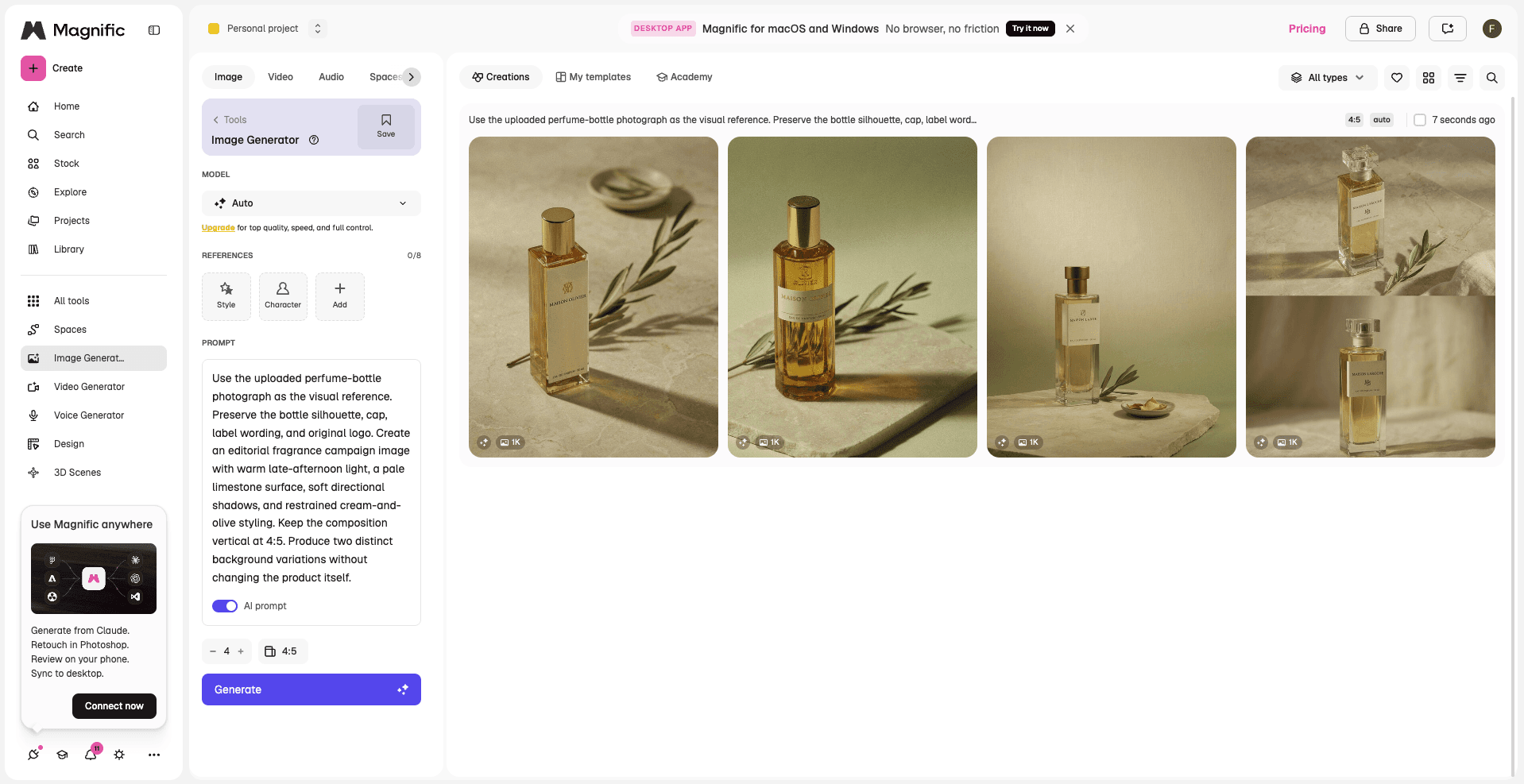
Magnific generated four variations, but the free account did not expose reference-image upload for this test.
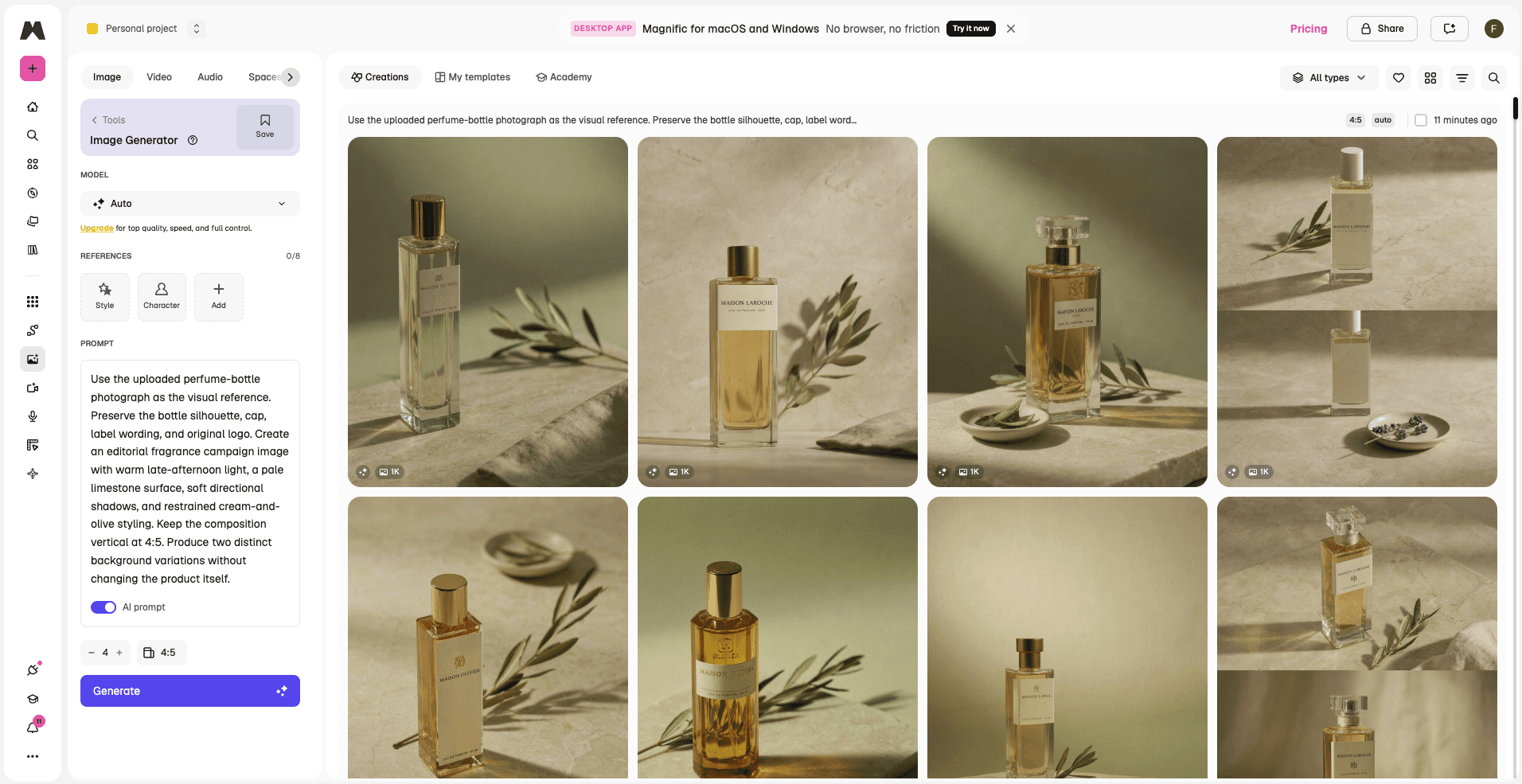
The Magnific results grid made variations easy to scan, while product details changed without the source reference.
More FLORA Alternatives
3. Figma Weave
The natural alternative for teams whose design files, review process, and source material already live in Figma.
Figma acquired Weavy and now calls the product Figma Weave. It connects visual generation and editing workflows to the wider Figma environment, which makes it a more direct comparison with FLORA than a standalone image app.
The caveat is availability and billing. Figma describes Weave tools as free during their open beta, with Figma AI credits expected once they become generally available. Treat that as a beta condition, not a permanent free plan, and verify which features your existing seat can access.
Compared with FLORA: Weave removes the gap between AI exploration and existing Figma files, but it trades away FLORA's independent, multi-model canvas and ties the workflow more closely to the Figma ecosystem.
Pricing: Open-beta tools are currently free; general availability is expected to use Figma AI credits.
4. NodeTool
A stronger match when owning the workflow, choosing providers, and running locally matter more than a polished hosted canvas.
NodeTool uses visual building blocks to connect models and creative operations, but it approaches the problem from the opposite direction to FLORA. Instead of asking a team to adopt a managed workspace, it gives technically comfortable users more say over where a workflow runs, which providers are involved, and how steps connect.
That freedom comes with responsibilities: local setup, provider keys, model choices, and troubleshooting do not disappear just because the interface is visual.
Compared with FLORA: NodeTool removes much of the managed-platform constraint by giving users control over providers and execution, but it gives up FLORA's easier onboarding and built-in collaborative workspace.
Pricing: Open-source software; local hardware, model providers, and hosted compute can still create costs.
5. ComfyUI
The control-first option for people willing to build, inspect, and maintain their own image or video pipelines.
ComfyUI makes the steps behind an image or video workflow explicit. Instead of accepting a fixed interface, you can assemble a graph, change models and settings, save the setup, and run it again. That level of reproducibility is valuable when a creative process has to be precise or repeated at scale.
It is also more work. Local installations require suitable hardware and ongoing maintenance, while custom nodes can introduce dependency problems. Comfy Cloud reduces the setup burden and currently offers five free runs.
Compared with FLORA: ComfyUI solves the need for low-level control and repeatable pipelines, but it gives up FLORA's approachable shared canvas and requires substantially more technical upkeep.
Pricing: ComfyUI is open source; Comfy Cloud starts at $20 monthly or $16 per month with annual billing.
Additional FLORA Alternatives
6. Runway
A better fit when the final deliverable is a video, not a shared board of visual directions.
Runway is most relevant when a creative team already knows the shot it wants and needs to generate, edit, or refine moving footage. Its current plans include several image and video models, with credits tied to the amount of generation.
The free plan includes 125 one-time credits. Standard is $12 per month when billed annually, and Pro is $28 on the same billing schedule. Neither figure means unlimited video: the model, clip duration, and output settings determine how far the included credits go.
Compared with FLORA: Runway is stronger once the problem becomes shot generation and video editing, but it gives up the open-ended shared canvas used to develop and review early visual directions.
7. Recraft
The design-oriented specialist for brand assets, vector work, and a more controlled visual identity.
Recraft is easier to justify when the output needs to behave like design material rather than a mood-board image. Brand graphics, illustrations, editable assets, and vector-oriented work sit closer to its natural territory than a broad, collaborative campaign canvas.
Compared with FLORA: Recraft is stronger for vectors and brand-ready design assets, but it gives up FLORA's broader multi-model ideation and image-to-video workflow.
Pricing: Free and paid plans are available; check current plan, region, and commercial-use terms.
8. Adobe Firefly
The practical choice when the rest of the production process already depends on Adobe tools.
Firefly makes more sense as part of an Adobe-centered production stack than as a one-for-one FLORA replacement. Image, video, and audio generation can be useful when the next step happens in familiar Adobe applications.
Compared with FLORA: Firefly closes the gap between generation and Adobe production tools, but it gives up FLORA's more open model choice and standalone collaborative canvas.
Pricing: Free trial and paid plans; prices, taxes, and generative-credit allowances vary by region.
9. Leonardo.Ai
A comparatively accessible image-first option for creators who want predictable solo pricing.
Leonardo.Ai is a reasonable substitute for the image-generation part of FLORA, particularly when budget matters more than collaboration. Its free tier currently includes 150 fast tokens a day, while the Essential plan is listed at $12 a month and includes private creations and a larger monthly token allowance.
Compared with FLORA: Leonardo lowers the barrier for solo image experimentation, but it gives up the shared canvas, team review, and structured multi-model exploration that support collaborative development.
10. Astorie
A narrower alternative for creators who need to compare image-to-video models on one connected canvas.
Astorie belongs in this comparison for a specific reason: a source image can branch into different video models without rebuilding the project each time. That is useful after a visual direction has already been chosen and the remaining question is which model produces the most convincing motion.
It is not a full replacement for FLORA's broader concept-development or collaborative design workflow. Choose it when model comparison and image-to-video production are the actual task, rather than treating it as the automatic answer to every visual workspace problem.
Pricing: Free to start. When rechecked on September 2, 2026, the pricing page showed Standard at $19 as the comparison price and $11 per month with annual billing. Confirm the active billing tab and checkout total before subscribing.
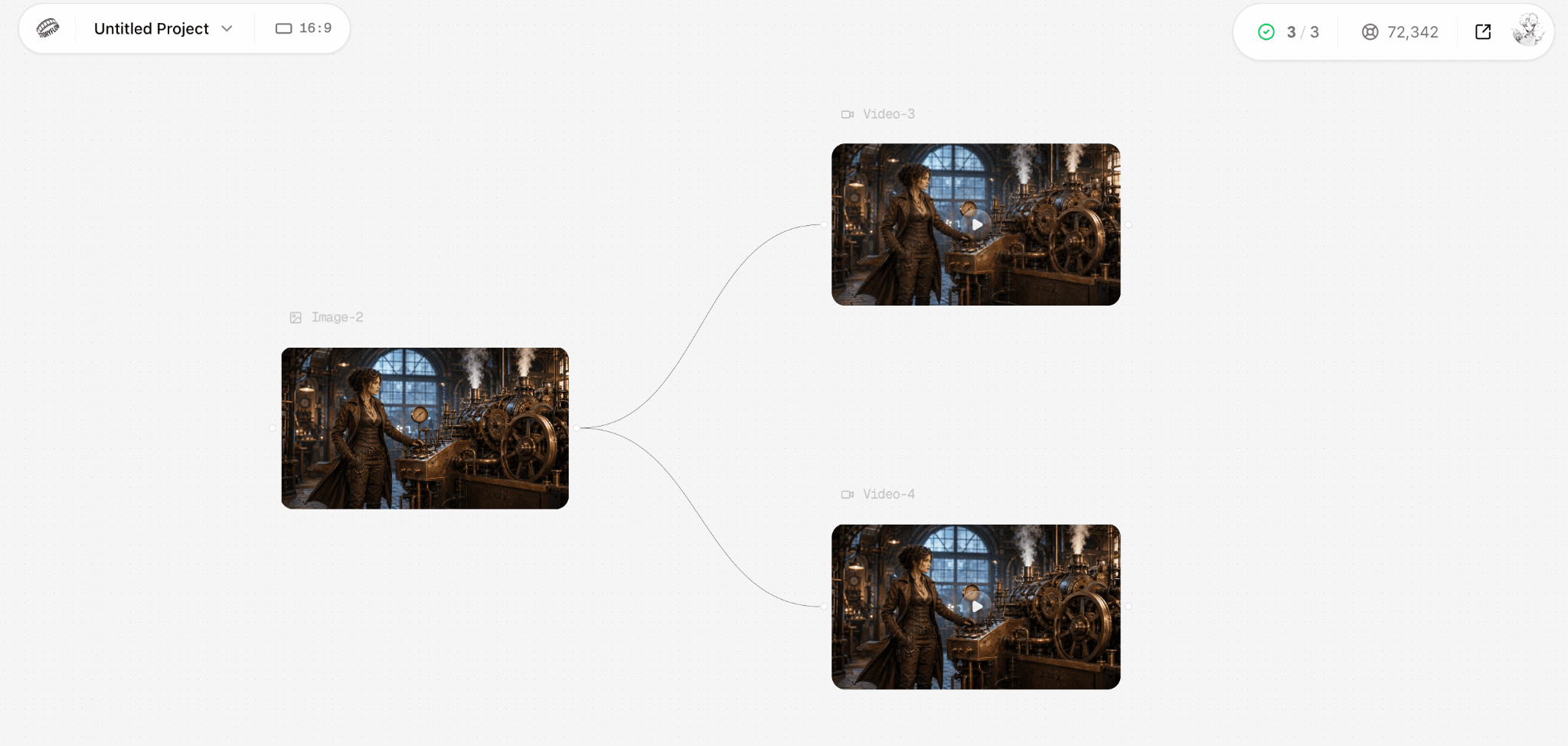
An existing Astorie project: one source image branches into two generated video outputs on the same canvas.
Which FLORA Alternative Should You Try First?
| If this sounds like you | Start here | Reason |
|---|---|---|
| I need ideas quickly, with minimal setup. | Krea | The shortest route from reference image to new variations. |
| Several people need one canvas and a shared asset pool. | Magnific Spaces | Closer to FLORA's collaborative production workflow. |
| Our team already works in Figma. | Figma Weave | Creative workflows remain close to existing design files. |
| I want to own the workflow and choose where it runs. | NodeTool | Visual pipelines can run locally or use chosen providers. |
| I need precise, repeatable model pipelines. | ComfyUI | Detailed control justifies a more technical setup. |
| The real deliverable is a finished video. | Runway | Video tools matter more than an infinite ideation canvas. |
| I need the same image tested across video models. | Astorie | One source image can branch into several video outputs. |
Final Take
Start with the part of FLORA you would actually miss. If it is fast visual exploration, try Krea. If it is the shared canvas, try Magnific Spaces or Figma Weave. If it is control over the pipeline, look at NodeTool or ComfyUI.
A video-first product only becomes the better answer when video—not general creative collaboration—is the job you need to finish.
Related reading
Runway Gen4 vs Veo vs Kling: Practical Video Production Comparison
Practical comparison for AI video production choices across Runway Gen4, Google Veo, and Kling.
7 Best Photoroom Alternatives in 2026 (Tested for Ecommerce Photography)
Do you need a Photoroom alternative that goes beyond simple background cutouts and batch image processing? Try these 7 tools and pick the one that best matches your AI product photography use cases.
6 Ideogram Alternatives for Killer AI Image Generation
Here are 6 tried and tested Ideogram alternatives that work best for prompt accuracy, text, image realism, character consistency and are intelligent enough to render real-world scenarios and logic.
Frequently asked questions
- What is the closest alternative to FLORA?
Magnific Spaces is the closer functional match when a shared creative canvas, team feedback, and multiple kinds of production assets matter most. Krea is often the simpler first trial for an individual creator.
- Is there a free FLORA alternative?
Krea and Leonardo.Ai both offer free entry points. Figma says Weave tools are free during their open beta. ComfyUI and NodeTool are open source, but the hardware, models, or cloud compute behind them may still cost money.
- Is Freepik Spaces still available?
The previous Freepik Spaces address now redirects to Magnific Spaces. Check the current Magnific website and your account's plan before assuming an older Freepik article still describes the live product accurately.
- Is Figma Weave the same thing as Weavy?
Figma acquired Weavy and now refers to the product as Figma Weave. The available features and billing depend on the current beta and your Figma account.
- Should I choose FLORA or ComfyUI?
Choose FLORA if you need an approachable shared canvas. Choose ComfyUI when repeatable graphs, model-level control, and ownership of the workflow justify the extra technical setup.
Ready to try it on the canvas?
Open Astorie and fan your prompt across every frontier model in one workflow.