

How to Clone a Voice with AI Without Losing the Original Sound

Quick Answer
To clone a voice with AI, prepare a clean voice sample, upload it to a voice cloning workflow, choose a cloning model, and create a reusable Voice ID. Enter new text to generate a short speech sample, then compare it with the original recording and save the final voice. Only clone voices you own or have permission to use.
What Do You Need to Clone a Voice?
AI voice cloning creates a digital representation of a speaker's vocal characteristics. These can include tone, accent, pronunciation, rhythm, and other speech patterns. The cloned voice can then be used to generate new speech that resembles the reference speaker.
Voice cloning is different from standard text-to-speech. TTS generates speech with an existing voice. Voice cloning first creates a reusable voice representation from reference audio.
It is also different from voice design. A voice design tool creates a new synthetic voice based on descriptions or settings. It does not necessarily reproduce a real speaker's existing voice.
Before you begin, make sure you have the right to clone the voice. The safest option is to clone your own voice or use a voice for which you have explicit permission.
How to clone a voice with AI A step-by-step guide
Step 1: Prepare a Clean Voice Sample
Start with the reference audio. This is one of the most important parts of the process because the cloning model learns from what it hears.
Use these guidelines:
- Record only one speaker.
- Remove background music and unnecessary noise.
- Avoid strong room echo or reverb.
- Keep the microphone and recording environment consistent.
- Use a natural speaking style.
- Avoid mixing very different speaking styles in the same dataset.
ElevenLabs specifically recommends clean recordings with one speaker, consistent volume and tone, and minimal background noise or room reverb. It also notes that the model can reproduce unwanted characteristics in the reference audio.
Step 2: Upload Your Reference Audio to Astorie
Once your recording is ready, add it to your Astorie canvas.
Create an audio workflow and load your reference recording. Then connect the audio to the voice cloning model you want to use.
Keep the original reference file available. If you later need to recreate the clone, the original recording gives you a consistent source.

Step 3: Create Your Voice Clone
Select your voice cloning model and start the cloning process.
For ElevenLabs, choose the appropriate cloning option based on your available audio. Instant Voice Cloning is designed for shorter samples, while Professional Voice Cloning uses a much larger dataset and requires additional processing.
For Fish Audio, provide the reference audio required by your workflow. In Astorie's S2-Pro workflow, the reference recording is paired with a matching transcript.
After the clone is created, the workflow can return a reusable voice identity or Voice ID.

Important: Minimax Voice Design should not be treated as the same thing as voice cloning. Voice Design is intended to create a new synthetic voice rather than reproduce an existing speaker.
Step 4: Test and Fix Your Cloned Voice
Start with one or two short sentences.
Do not immediately generate a long script. A short test lets you check the voice before spending more time or credits.
Test:
- A normal sentence
- A sentence with a difficult word
- A sentence with a name or acronym
- The same sentence more than once
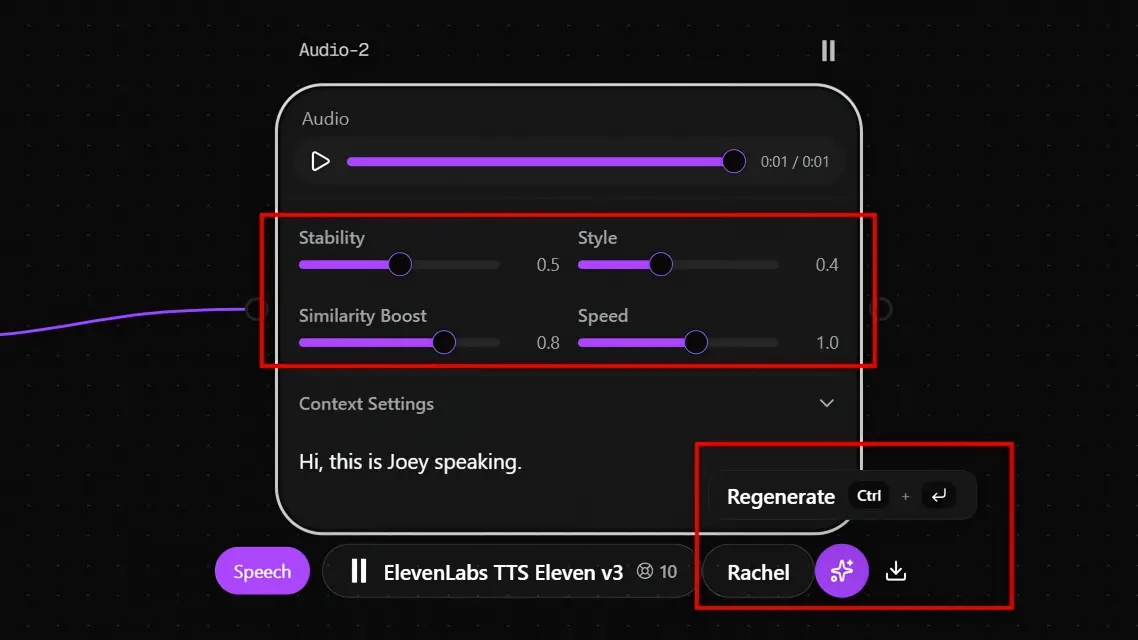
Step 5: Review and Save the Final Voice
Once the clone sounds consistent, perform one final review.
Compare several generated samples with the original reference. Check identity, pronunciation, accent, and consistency.
Then save the Voice ID for future use.
Keep the original reference audio too. ElevenLabs notes that recreating a clone from the same samples can still produce slightly different results, so retaining the source material is useful.

How Much Audio Do You Need to Clone a Voice with AI?
The amount of audio depends on the cloning model.
Model | Official audio guidance | What it means |
ElevenLabs Instant Voice Cloning | About 1–2 minutes recommended | Fast cloning from a short reference |
ElevenLabs Professional Voice Cloning | 30–180 minutes recommended | More training data for higher-fidelity cloning |
Fish Audio S2-Pro | At least 10 seconds | Short reference audio can be used for cloning |
ElevenLabs recommends around 1–2 minutes of good audio for Instant Voice Cloning. Its documentation also says that more than 2–3 minutes may provide little improvement. For Professional Voice Cloning, ElevenLabs recommends 30–180 minutes, with 2–3 hours suggested for the best results.
Fish Audio's current official documentation says at least 10 seconds of audio can be used for voice cloning. Its official voice-cloning page also promotes 10-second reference audio as sufficient for its current S2-based workflow.
For Astorie's Fish Audio S2-Pro workflow, the current guide recommends 30+ seconds of clean speech plus a matching transcript. This is an Astorie workflow recommendation rather than a universal Fish Audio requirement.
The key point is simple: more audio is not automatically better. Clean and consistent audio usually matters more than adding low-quality recordings.
ElevenLabs vs Fish Audio: Which Voice Cloning Model Should You Use?
Not every AI voice model is a voice cloning model. Voice cloning uses reference audio to reproduce the characteristics of an existing speaker. Text-to-speech models generate speech with an existing voice, while voice design tools create new synthetic voices.
For voice cloning in Astorie, the two models to compare are ElevenLabs and Fish Audio S2-Pro. The right choice depends on your reference audio, workflow, and how much control you need over the cloning process.
Feature | ElevenLabs | Fish Audio S2-Pro |
Reference audio | 1–2 min recommended for IVC | 10 sec supported by Fish Audio; 30+ sec recommended in Astorie's S2-Pro workflow |
Professional cloning option | Yes | — |
Transcript required | Not for basic IVC | Depends on workflow; Astorie's S2-Pro guide uses a matching transcript |
Voice reuse | Reusable cloned voice | Reusable cloned voice |
Setup complexity | Straightforward, with Instant and Professional options | Requires reference audio and transcript in Astorie's S2-Pro workflow |
Best fit | Fast cloning and professional voice cloning | Short-reference and multilingual cloning workflows |
Main consideration | Better results may require more audio | Reference quality and workflow-specific requirements still matter |
The table above uses current documentation from the model providers. ElevenLabs officially distinguishes Instant Voice Cloning from Professional Voice Cloning. Fish Audio's current documentation describes short-reference voice cloning with its S2-based models.
Choose ElevenLabs if you want a straightforward workflow with both instant and professional cloning options.
Choose Fish Audio if you want short-reference cloning and multilingual voice generation. Fish Audio's S2 model also supports natural-language controls for speech expression.
How Do You Use a Voice ID After Cloning Your Voice?
A Voice ID gives your cloned voice a reusable identity inside a voice workflow.
Instead of rebuilding the clone every time, save the Voice ID and reuse it when you need the same speaker.
A practical workflow is:
- Create the clone once.
- Save the Voice ID.
- Reuse the same Voice ID for new speech tests.
- Keep the original reference audio as a backup.
- Avoid creating unnecessary duplicate clones.
Astorie's voice cloning workflow treats the cloned voice as a reusable canvas asset, allowing the same voice to be reused across audio workflows.
How Can You Tell If Your Voice Clone Is Good?
Check five things:
1. Voice Identity
Does the output sound like the original speaker?
2. Pronunciation
Listen for names, acronyms, technical terms, and unusual words.
3. Accent
Check whether the speaker's accent remains stable.
4. Speaking Style
Compare rhythm, tone, pauses, and general delivery with the reference recording.
5. Consistency
Generate the same or similar text more than once. A good clone should maintain a recognizable speaker identity across generations.
This matters because voice cloning does not reproduce the original recording itself. It learns characteristics from the reference and uses them to synthesize new speech.
How Can You Improve AI Voice Cloning Results?
If the first result is not convincing, change the reference audio before repeatedly regenerating the same output.
The clone sounds unlike the original
Use a cleaner recording. Make sure only one person is speaking and remove background noise or room echo.
The accent changes
Use reference recordings with a consistent accent and speaking style. ElevenLabs notes that the characteristics of the reference samples influence the resulting clone.
Pronunciation is incorrect
Try shorter test sentences. Check the reference recording and transcript when your workflow requires one.
Results vary between generations
Use the same Voice ID and keep your reference material consistent. Test short outputs before moving to longer text.
The voice sounds unnatural
Check the original recording. Unusual delivery, excessive pauses, background sounds, or inconsistent recording conditions can influence the result.
Frequently asked questions
Can I clone a voice with only 10 seconds of audio?
Yes, some current models support very short reference samples. Fish Audio's current documentation says at least 10 seconds can be used for voice cloning. ElevenLabs also reports that some users can get good Instant Voice Cloning results from very short samples, although it recommends around 1–2 minutes for IVC.
Is more audio always better for voice cloning?
No. Audio quality and consistency are critical. ElevenLabs specifically recommends prioritizing clear, consistent recordings rather than simply adding more low-quality audio.
What is the difference between voice cloning and text-to-speech?
Text-to-speech converts written text into spoken audio using a selected voice. Voice cloning creates a representation of a particular speaker first, which can then be used for new speech.
Which is better, ElevenLabs or Fish Audio?
Neither is universally better. ElevenLabs offers Instant and Professional Voice Cloning with different audio requirements. Fish Audio's current S2-based workflow supports short reference audio and multilingual voice cloning. Choose based on your reference material, workflow, and quality requirements.
Can I clone someone else's voice?
You should only clone a voice when you have the necessary rights and permission. ElevenLabs currently requires verification for its voice cloning workflows and states that Professional Voice Cloning is limited to the user's own voice. Fish Audio also instructs users to obtain permission before cloning voices.
How do I get a better AI voice clone?
Start with better reference audio. Use one speaker, reduce noise and echo, keep the speaking style consistent, and test short generations before producing longer speech. These factors have a direct impact on cloning quality.
Ready to try it on the canvas?
Open Astorie and fan your prompt across every frontier model in one workflow.