

Gemini 3 Prompts
Explore Gemini 3 Prompts with original prompts and examples on Astorie.
探索提示词
157 条提示词

Low-angle stylized portrait of a young woman in a dim room
Melis✨Gemini 3, Nano Banana Pro
{
  "image_generation_request": {
    "constraints": {
      "preservation_instruction": "Without changing {argument name="my face" default="my facial features and face"}",
      "strictness": "High"
    },
    "technical_specifications": {
      "medium": "Photograph",
      "resolution": "High-definition",
      "camera_angle": "Low-angle perspective"
    },
    "subject_details": {
      "demographics": "Young woman",
      "physical_appearance": {
        "hair": {
          "style": "Messy updo",
          "details": "Loose strands"
        }
      },
      "pose_and_action": {
        "stance": "Standing",
        "positioning": "Positioned",
        "gesture": "Touching the collar",
        "vibe": "Looking stylish"
      },
      "attire": {
        "upper_body": {
          "item": "Cropped t-shirt",
          "color": {argument name="shirt color" default="Dark blue"},
          "texture": "Ribbed",
          "details": [
            "White trim",
            "White logo"
          ]
        },
        "lower_body": {
          "item": "Pajama pants",
          "pattern": "Striped",
          "color": "White"
        }
      }
    },
    "scene_environment": {
      "setting_type": "Room",
      "lighting": {
        "intensity": "Dimly lit",
        "temperature": "Warm",
        "color_tone": "Enhanced purple-toned",
        "sources": [
          "Ceiling fixture",
          "Hidden cove lights"
        ]
      }
    }
  }
}
High-contrast rim-lit black and white conceptual side-profile portrait
AlejoGemini 3, Nano Banana Pro
A powerful, high-contrast black-and-white side-profile portrait of a person (attached photo), with distinctly human yet timeless features — emerging from complete darkness. The composition is minimalist and sculptural, where form, light, and shadow define the subject rather than color or texture.
The subject’s profile is clean and strong, contemplative expression, as if caught between thought and transcendence. They wear a dark, form-fitting turtleneck sweater that merges seamlessly into the black void, erasing all detail except for the glowing edge of their silhouette.

A single, narrow rim light, bright, sharp, and directional, carves out the shape of the head, neck, and shoulder, tracing the contours with precision. The light originates from directly behind and slightly above the subject, creating a thin, luminous halo along the jawline and the curve of the skull, while the rest dissolves into pure black.

The background is absolute darkness, a void without texture or depth, emphasizing the luminous boundary between shadow and light. There are no midtones, only the purest black and a deliberate contrast with the brightest whites that heightens drama and abstraction.

Mood & Aesthetic: Minimalist, conceptual, and deeply introspective. The image evokes solitude, contemplation, and timeless elegance. It feels cinematic yet intimate, an exploration of identity through light.

Technical details:

Shot with a telephoto lens for compressed perspective.

Aperture wide open (f/1.8-2.8) to create a glowing contour with shallow depth of field.

Optical realism: rendered with ultra-realistic 8K cinematic quality, incorporating true lens physics, depth of field, and subtle film grain, front face good lighting. (Use my picture for reference)

Inspired by @ShreyaYadav___
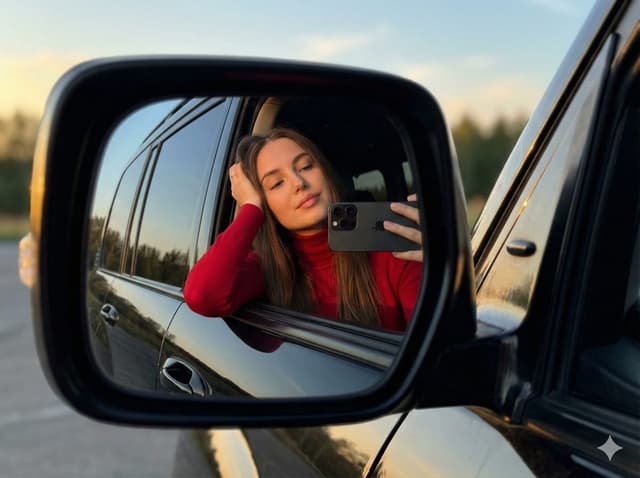
JSON selfie-in-car mirror prompt for Nano Banana Pro
Mahnoor FatimaGemini 3, Nano Banana Pro
{
  "image_generation_prompt": {
    "subject": {
      "description": "Young woman with long brown hair",
      "pose": "Leaning gently on car window, resting head on one hand, relaxed and confident",
      "action": "Taking a selfie in the side mirror reflection"
    },
    "clothing": {
      "top": "Simple red turtleneck long-sleeve top",
      "accessories": "Minimalist stud earrings"
    },
    "props": {
      "item": "{argument name=\"phone model\" default=\"iPhone 17 Pro Max\"}",
      "details": "Realistic proportions, accurate lens design, held in hand"
    },
    "environment": {
      "location": "Outdoors, reflected in the side mirror of a {argument name=\"car model\" default=\"black Toyota Land Cruiser\"}",
      "background": "Trees and orange-blue evening sky",
      "depth_of_field": "Subtly blurred background for depth (bokeh)"
    },
    "lighting": {
      "type": "Golden hour",
      "characteristics": "Warm sunlight, soft natural glow, evening light, realistic shadows"
    },
    "style": {
      "aesthetic": "Natural, ultra-realistic, minimalist, Instagram style",
      "quality": "8k resolution, highly detailed, sharp focus, cinematic photography"
    },
    "technical_constraints": {
      "perspective": "Accurate mirror reflection, correct optical orientation",
      "distortion_control": "No exaggeration or distortion of features or phone"
    }
  },
  "negative_prompt": "cartoon, illustration, painting, drawing, bad anatomy, disfigured, deformed, blurry face, low quality, pixelated, unnatural lighting, distorted phone, wrong reflection angle, extra fingers, messy hair, heavy makeup, text, watermark"
}
JSON selfie-on-bed prompt for Nano Banana Pro
LexGemini 3, Nano Banana Pro
{
  "subject": {
    "type": "young woman",
    "pose": "lying on her back, taking a selfie with her right arm extended upward",
    "expression": "soft smile, relaxed and natural",
    "gaze": "looking toward the camera",
    "skin_details": {
      "complexion": "smooth, warm, sunlit glow",
      "freckles": "visible on nose and cheeks"
    },
    "hair": {
      "color": "{argument name=\"hair color\" default=\"medium brown\"}",
      "length": "long",
      "style": "loose, spread out on the pillow around her head"
    },
    "eyes": {
      "color": "{argument name=\"eye color\" default=\"light blue or green\"}",
      "makeup": "subtle eyeliner"
    }
  },
  "clothing": {
    "top": {
      "type": "ribbed tank top",
      "color": "white",
      "fit": "form-fitting",
      "neckline": "scoop neck"
    },
    "bottoms": {
      "type": "jeans",
      "color": "light blue",
      "visibility": "partially visible"
    },
    "accessories": {
      "earrings": "small studs",
      "necklace": "thin, minimal chain"
    }
  },
  "environment": {
    "location": "bed or soft resting surface",
    "bedding": {
      "pillow": "white",
      "sheets": "white"
    },
    "background": "neutral wall and edge of headboard or furniture barely visible"
  },
  "lighting": {
    "type": "natural sunlight",
    "direction": "coming from upper left of frame",
    "effect": "creates warm highlights and soft shadows on face and torso"
  },
  "composition": {
    "camera_angle": "top-down selfie angle",
    "framing": "close-up of face, upper torso, and part of jeans",
    "focus": "sharp on face and upper body",
    "colors": "warm skin tones, white bedding, brown hair, neutral background"
  },
  "mood": "warm, relaxed, comfortable, natural"
}
City tallest buildings 3D cartoon showcase prompt
Michal MalewiczGemini 3, Nano Banana Pro
Present a clear, side miniature 3D cartoon view of the tallest buildings in {argument name="city in English" default="YOUR CITY"}. Use minimal textures with realistic materials and soft, lifelike lighting and shadows. Use a clean, minimalistic composition showing exactly the three tallest buildings in {argument name="reference city in English" default="Sopot"}, arranged from left to right in strict descending height order. The tallest must appear visibly tallest, the second must be clearly shorter than the first, and the third must be clearly shorter than the second.
All buildings must follow accurate relative proportions: if a building is taller in real life, it must be taller in the image by the same approximate ratio. No building may be visually stretched or compressed.
Each building should stand separately on a thin, simple ceramic base. Below each base, centered text should display:
Height in meters — semibold sans-serif, medium size
Year built — lighter-weight sans-serif, smaller size, directly beneath the height text
Provide consistent padding, spacing, leading, and kerning. Write “{argument name="city name title" default="YOUR CITY NAME"}” centered above the buildings, using a medium-sized sans-serif font.
No building top should overlap or touch the text above. Use accurate architectural proportions based on real-world references. Maintain a consistent camera angle and identical scale for each building model.
No forced perspective. Use straight-on orthographic-style rendering. Do not exaggerate or stylize size differences beyond proportional accuracy.

Use a square 1080×1080 composition. Use a clean, neutral background. Ensure no extra objects are present.
Historical celebrity selfie scene prompt (Michael Jackson and George W. Bush)
LivvuxGemini 3, Nano Banana Pro
A casual selfie of {argument name="first person in English" default="Michael Jackson"} with {argument name="second person in English" default="George W. Bush"} in {argument name="time" default="July 2001"}, standing in {argument name="place" default="New Jersey"}. In the background you can see the New York City skyline, including the Twin Towers.
Viral Thumbnail: Excited pointing, avocado toast, “Done in 3 Minutes!”
泊舟Gemini 3, Nano Banana Pro
Design a viral video thumbnail using the person from Image 1. Face consistency: keep the person's facial features exactly the same as in Image 1, but change their expression so they look excited and surprised. Action: place the person on the left side, pointing their finger toward the right side of the frame. Subject: on the right side, place a high-quality image of a delicious {argument name="food" default="avocado toast"}. Graphics: add a bold yellow arrow connecting the person’s finger to the {argument name="subject" default="toast"}. Text: overlay massive, pop-style text in the middle: '{argument name="thumbnail text" default="Done in 3 mins!"}'. Use a thick white outline and drop shadow. Background: a blurred, bright {argument name="background scene" default="kitchen"} background with high saturation and contrast.
Cafe date POV profile photo prompt for Nano Banana Pro
みなと | 人間心理Gemini 3, Nano Banana Pro
{
  "settings": {
    "aspect_ratio": "{argument name="aspect ratio" default="3:4"}",
    "resolution": "{argument name="resolution" default="8k"}",
    "quality_preset": "{argument name="quality preset" default="high quality"}",
    "style_emulation": "{argument name="style" default="shot on iPhone style"}"
  },

  "photography_style": {
    "type": ["{argument name="photo type 1" default="realistic candid photo"}", "{argument name="photo type 2" default="photorealistic"}"],
    "perspective": "{argument name="perspective" default="POV date shot"}",
    "vibe": "{argument name="vibe" default="Boyfriend material"}",
    "lighting": {
      "source": "{argument name="light source" default="natural sunlight"}",
      "quality": "{argument name="light quality" default="soft flat lighting"}"
    },
    "focus": {
      "depth_of_field": "{argument name="depth of field" default="shallow"}",
      "background": "{argument name="background" default="blurred with other customers"}"
    }
  },

  "subject": {
    "demographics": {
      "gender": "{argument name="gender" default="male"}",
      "nationality": "{argument name="nationality" default="Japanese"}",
      "age_range": "{argument name="age range" default="20s"}",
      "descriptor": "{argument name="appearance impression" default="handsome"}"
    },

    "features": {
      "skin_texture": "{argument name="skin texture" default="naturally smooth, clear complexion, blemish-free"}",
      "retouching_level": "{argument name="retouching level" default="subtle and realistic"}"
    },

    "attire": {
      "jacket": "{argument name="jacket" default="matte black oversized nylon jacket"}",
      "jewelry": "{argument name="jewelry" default="simple silver ring (left ring finger)"}"
    },
    "pose_action": {
      "posture": "{argument name="posture" default="sitting, leaning forward, elbows on table"}",
      "hands": "{argument name="hand position" default="holding paper coffee cup with both hands"}",
      "face_interaction": "{argument name="face interaction" default="bringing cup to mouth, slightly covering mouth"}"
    }
  },

  "environment": {
    "location": "{argument name="location" default="stylish cafe"}",
    "immediate_surroundings": "{argument name="table" default="light wooden table"}",
    "architectural_details": [
      "{argument name="architectural detail 1" default="white industrial ceiling"}",
      "{argument name="architectural detail 2" default="glass partitions"}"
    ]
  }
}
Coloring book line art prompt for Nano Banana Pro
SSSS_CRYPTOMANGemini 3, Nano Banana Pro
Create line art for a coloring page. The target age is {argument name="target age" default="9"} years old, and the coloring subject is {argument name="coloring subject" default="a sports car"}. Draw everything with black lines and keep the background completely white (#ffffff). Make it in a format suitable for printing, and do not draw any extra elements outside the canvas.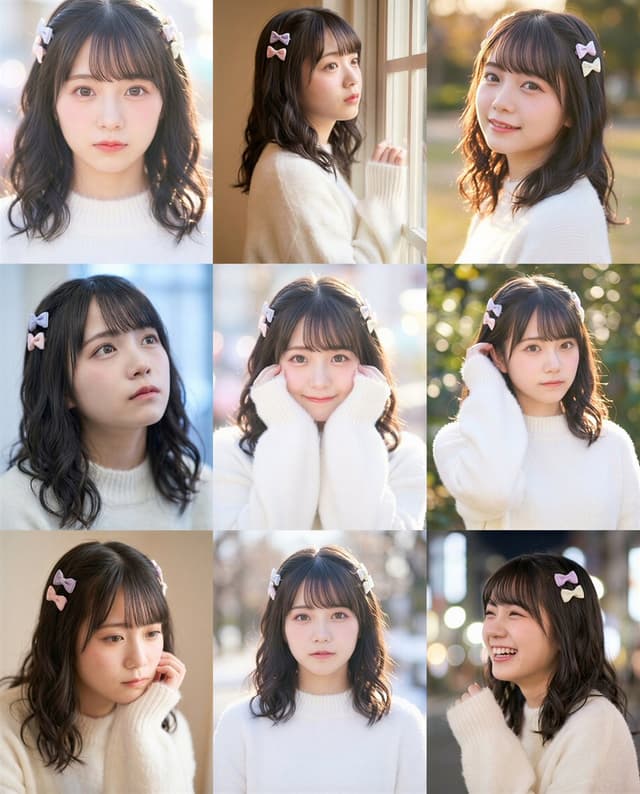
9-grid Instagram portrait variation prompt for Nano Banana Pro
そう|n8nで始めるAIエージェントGemini 3, Nano Banana Pro
Based on {argument name="original woman photo description" default="a single photo of this woman"}, generate a total of {argument name="number of images" default="9"} images to be arranged in a 3×3 grid. {argument name="generation limit instruction" default="Do not generate more than 9 images."}

All images must be bust-up or closer compositions (bust-up, close-up, or portrait framing). Do not generate wide shots, full-body shots, long shots, or compositions where a wide distant view is visible.

{argument name="appearance consistency instruction" default="Keep the woman’s appearance, facial features, hairstyle, and overall vibe consistent across all 9 images."} However, as long as you stay within the bust-up framing, you may change the location, mood of the lighting, angle, and composition.

Output only {argument name="final number of outputs" default="9"} images needed for the 3×3 grid. Do not generate any additional images, previews, or variation drafts of any kind.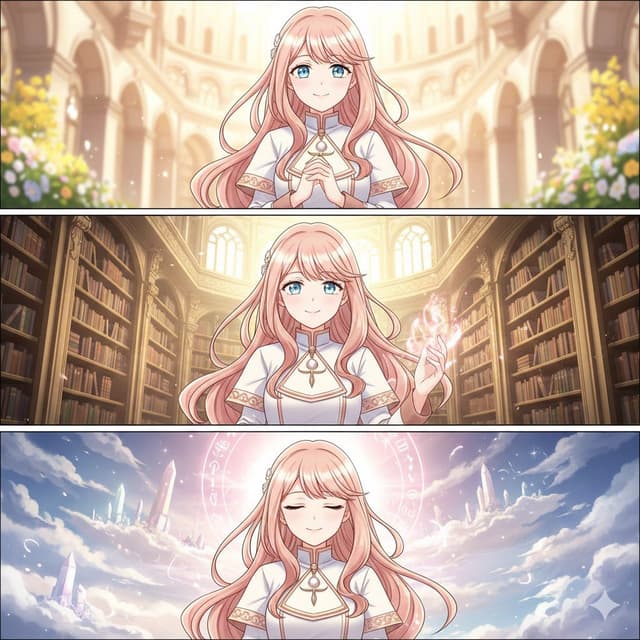
Rorona-style fixed character prompt for Nano Banana Pro / Gemini
陽ノ杜あきらGemini 3, Nano Banana Pro
Rorona-style girl, {argument name="age range" default="18-20 years old"},
{argument name="hair description" default="soft pink-gold long wavy hair"},
{argument name="eyes and face" default="large gentle eyes, slightly round face"},
{argument name="skin" default="fair bright skin"},
{argument name="outfit" default="light magical-academy outfit in white and pink-gold accents"},
{argument name="outfit details" default="delicate gold patterns, thin pendant, small waist pouch"},
{argument name="atmosphere" default="elegant and soft atmosphere"},
expressions: {argument name="expressions" default="warm smile / calm confidence / spiritual clarity"},
consistent character, same face every frame,
{argument name="line art style" default="thin line art"}, {argument name="rendering style" default="webtoon style"}, {argument name="shading" default="soft gradients"}, {argument name="detail level" default="high detail"},
{argument name="overall style" default="Japanese fantasy modern style"}, {argument name="color tone" default="clean and bright color tone"}

Minimalistic contemplative pier scene prompt for Nano Banana Pro
MR604778🍁Gemini 3, Nano Banana Pro
Minimalistic scene of a {argument name="number of people" default="single"} person standing at the edge of a {argument name="location" default="pier"}, with natural {argument name="time of day" default="dawn"} light, soft fog, high dynamic range, grounded realism, a muted palette, and a {argument name="mood" default="contemplative"} mood, featuring wide‑angle deep focus and no stylization.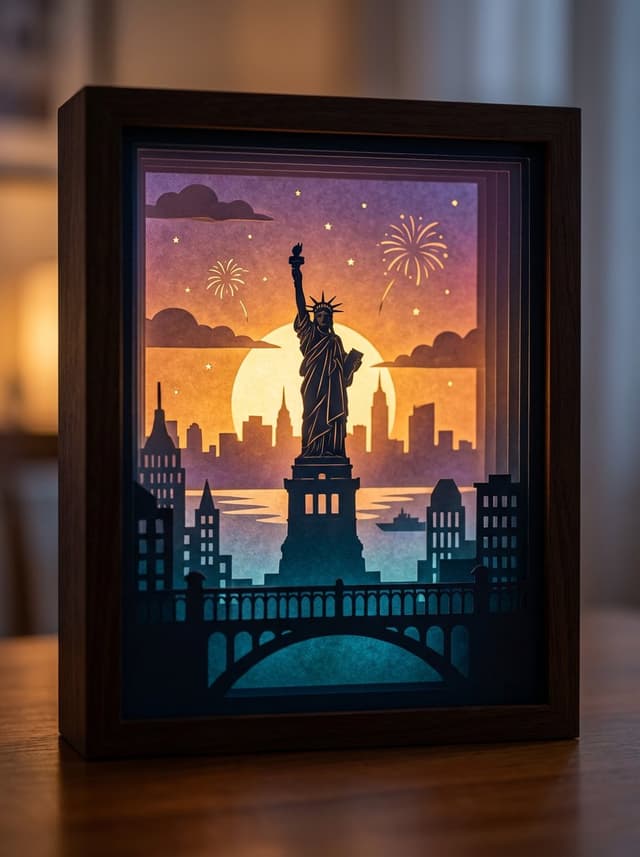
3D paper cut light box illustration framework
VoxcatAIGemini 3, Nano Banana Pro
Generate an art photograph of a highly dreamy and three-dimensional 3D paper cut light box.
The paper cut theme is: {argument name="theme" default="a deer in a forest under the moonlight"}.

Layering structure and composition:
Design the image as a real, physical paper cut light box composed of 5–7 layers of paper stacked together. Each layer must have its own depth of field and clear silhouette, and you should be able to see the thickness of the paper and the shadows between layers.

Core structure:
- The image should clearly present a multi-layered silhouette effect, with visible physical spacing between the paper layers.
- Overall composition is vertical 3:4, with the light box centered, leaving a bit of space at the edges, like a glowing art object placed on a table.

Depth layout:
- Foreground (layers 1–2): use dark, intricate silhouettes that form a frame around the edges of the image, with elements matching the current theme, such as branches and vines for forest themes, windows and arches for city or castle themes, or rocks and coral for underwater or fantasy themes.
- Midground (layers 3–4): this holds the core subject of the theme, slightly central in the composition and taking up the main visual weight. The subject’s silhouette must be complete and not overly blocked by the foreground.
- Background (layers 5–6): use more simplified, lower-contrast silhouettes to show distant environment and structures, adding depth to the scene.

Three-dimensionality:
- There must be obvious physical spacing and shadows between layers. Light should pass between the paper layers to create soft gradations of light and dark, emphasizing the paper thickness and 3D depth, so it looks like a real paper cut light box, not a flat illustration.

Light and atmosphere (backlighting):
Backlighting:
- The light source must come from the very back of the scene, shining forward through all the paper layers.
- Light passing through the cutouts in each layer should form soft volumetric light and gradually decreasing brightness and contrast from back to front.

Color gradients (auto-adapting to the theme):
If no specific color scheme is given, automatically choose a main palette and gradient that fit the theme, while keeping a soft, night-light-friendly look. For example, warm gold to cool blue-green for forest themes, teal to deep blue for underwater themes, icy blue to deep blue for winter scenes, amber to electric blue for cyber cities, candlelight gold to deep indigo for castles, or deep blue to purple with golden glows for space themes.
If the user clearly specifies a color direction or mood (such as “cool sci-fi” or “pink-blue dreamy”), follow that as the top priority while maintaining the soft backlit, soothing feeling of a night light.

Overall feel:
The image should feel quiet, healing, and storybook-like, like a softly glowing bedtime story lamp, not a noisy neon poster or infographic.

Materials and details:
Paper texture:
- Emphasize the reality of heavy art paper: fine texture, slight visible fibers, clean sharp cut edges with visible thickness, and light that diffuses softly through the paper like a real fibrous material, not plastic or metal.

Physical light box photography feel:
- Present the image as a photograph of a real light box, not a flat illustration or vector graphic. You can faintly show the light box frame (simple white or light wood) and a slightly blurred tabletop or environment.
- The lighting should feel natural, with real-lens depth of field: slightly blurred foreground, sharp midground subject, and soft background.

Detail decorations:
- You may add a modest amount of tiny floating elements between paper layers to enhance space, such as tiny glowing dots, dust motes, snowflakes, bubbles, or other small particles relevant to the theme. Their number must be restrained so they only enhance atmosphere and depth without cluttering or disrupting the silhouette structure.

Technical parameters: vertical 3:4 ratio, high-resolution output.
Edo-period Ukiyo-e reinterpretation of a modern scene
VoxcatAIGemini 3, Nano Banana Pro
A Japanese Edo-period Ukiyo-e woodblock print (浮世絵 木版画). The overall feeling is a surreal collaboration between masters like Hokusai and Hiroshige, reimagining modern technology through an ancient lens.

**The Scene:** {argument name="现代场景" default="繁忙的涩谷十字路口"}

**Edo Transformation Logic:**
Characters wear Edo-era kimono but perform modern actions. All technology is transformed into surreal Edo equivalents:
* **Smartphones** are glowing, illustrated paper scrolls being read intently.
* **Metro stations/Trains** are giant articulated wooden centipede carriages shuffling through crowds.
* **Skyscrapers** are reimagined as endless, towering wooden pagodas reaching into dramatic clouds.
* **Robots/Mecha** appear as giant, armored woodblock golems.

The composition uses a flattened perspective with large, bold, hand-carved ink outlines (太い墨線). The background features heavily stylized Ukiyo-e wave patterns and dramatic, swirling clouds, with a distant Mt. Fuji visible on the horizon.

The image must look like a physical print, not a digital painting.
* **Texture:** Strong visible wood grain texture (木目) and rough paper fibers throughout the piece.
* **Printing Imperfections:** Pigment bleeding is evident. Crucially, simulate hand-pressed plates with slight **color misalignment (版ズレ)** for authenticity.
* **Color Palette:** Strictly limited to traditional mineral pigments. Dominant use of Prussian blue (浮世絵ブルー), vermilion red, and muted yellow ochre.
* **Lighting:** Soft, flat, shadow-free lighting with no digital gradients.

* **Aspect Ratio:** 3:4 vertical poster.
* **Extras:** Include vertical Japanese calligraphy describing the scene and a traditional red artist seal stamp (落款) in a corner.
Mid-20th-century war photojournalism style framework
VoxcatAIGemini 3, Nano Banana Pro
[Instruction: Based on the structured description below, generate an authentic documentary photography image.]

Visual style: mid-20th-century war news photojournalism (1940–1970) – raw and unposed.

1. Core subject (specific micro narrative)
{argument name="core scene" default="a mud-covered medic in a rainy trench bandaging a soldier’s arm, looking exhausted, with barbed wire obscuring the foreground"}

2. Aesthetic characteristics (anti-cinematic approach)
Photography style definition:
This must not look like a carefully lit movie still. It has to look like a raw, even slightly blurry moment, snapped by a war photographer under extreme pressure and danger. The composition should feel accidental, chaotic, slightly off-balance or imperfect. Prioritize absolute authenticity over perfect framing.

Light and atmosphere:
Avoid overly dramatic, theatrical, perfectly staged lighting. Use whatever light is available on site (usually bad): flat and oppressive overcast diffuse light, dim flickering indoor light, or harsh direct flash creating hard, ugly shadows. The atmosphere should feel gritty, dirty, and suffocatingly immersive.

3. Physical texture (film realism)
Physical properties:
Simulate high-speed, coarse-grain black-and-white film that has been push-processed.
* Focus and blur: because of the chaotic, tense environment, the main subject may be slightly out of focus, soft, or shaken. Moving people or objects must show obvious motion blur to reflect the forced use of slow shutter speeds.
* Grain: the whole image is covered with heavy, organic silver halide film grain. Avoid artificial scratches or frame borders added in post; focus on the rough materiality of the film itself.

4. Technical constraints
* Color mode: monochrome black and white.
* Lens language: 35mm wide-angle prime lens (classic reportage perspective including more environmental information).
* Period accuracy: strictly consistent with the 1940s–1970s timeline (clothing, weapons, environmental details).
Makoto Shinkai-style cinematic sky background illustration
VoxcatAIGemini 3, Nano Banana Pro
Generate a beautiful background illustration in the style of Makoto Shinkai’s animated films. The core scene is: "{argument name="scene" default="a railway crossing in full bloom with cherry blossoms"}", but the focus is not on characters; it is on the environment and the atmosphere of the sky.

Use a wide 16:9 composition, as if it were a single frame taken directly from a Shinkai movie. The sky must be the absolute protagonist, occupying most of the frame. Paint an extremely spectacular, detail-rich sky: for example, a towering cumulonimbus cloud stretching to the heavens, or gorgeous evening clouds where orange, purple, and deep blue gradients interweave, or a huge rainbow arching over the city after the rain. The lighting should be at the most magical time of day, either Golden Hour or Blue Hour. Include strong yet soft lens flares in the sky, with sunlight streaming through gaps in the clouds to form clear volumetric rays, and tiny glowing dust motes and light particles drifting in the air.

For the ground and environment, render the {scene} in near photo-realistic detail: carefully depict utility poles, complex webs of power lines, road signs, traffic lights, vending machines, distant skyscraper silhouettes, and the small traces of everyday urban life. If the scene includes rain or puddles, the ground should look wet, reflecting the colors of the sky and nearby lights like a mirror, filling the image with a transparent, cool atmosphere and a sense of slight humidity.

In terms of composition, use a wide-angle, large-scale view to emphasize the grandeur of the environment and a strong sense of depth, making the viewer feel like they are looking up and being swallowed by the scenery. If there are characters in the image, they should be tiny silhouettes or back views, standing at a street corner, on a rooftop, or by the railway, gazing at the sky or the distance. Their small figures should enhance the sense of story, loneliness, and imagined future, without stealing the spotlight from the environment.

The overall color should be clear and saturated but not harsh. The contrast between light and shadow should be strong yet still soft, with enough detail that the image can be used directly as a desktop wallpaper. The style must clearly carry Shinkai’s signature sense of romance and transparency, rather than a heavy oil painting or pure photographic realism. High-resolution illustration, 16:9 widescreen ratio.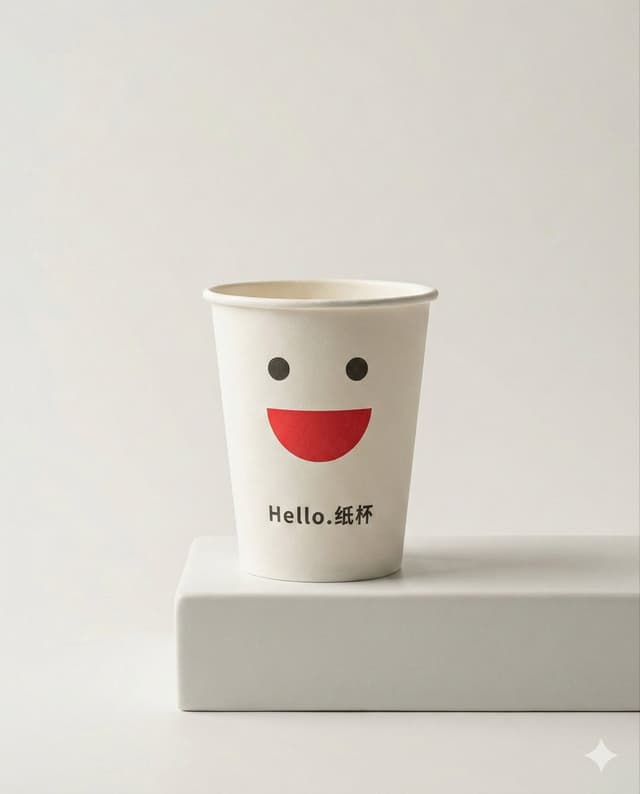
Product Marketing - Luxury minimalist product photography based on a reference image
VoxcatAIGemini 3, Nano Banana Pro
Using my uploaded reference image as the base, generate a minimalist, high-quality commercial still life photograph with the aesthetic of a luxury brand advertisement.

Preserve the general shape, proportions, and main color scheme of the core product in the reference so that it is instantly recognizable as the same product, but upgrade the overall texture and atmosphere of the image, making it look like an ad for a top-tier international fragrance, skincare item, or high-end electronic product.

Use a vertical 4:5 composition. The background should be a large area of clean, neutral negative space, such as soft off-white, cool gray, or light beige, creating a quiet, restrained, and expensive studio environment. Apart from the core product and a minimal number of necessary supports, do not add any extra decorations. No clutter, no elaborate scene setup—only keep very simple geometric supports (such as a plain white cube, a cylinder, or a thin transparent panel). The supports must be simple and low-profile, existing only to hold and accentuate the product.

Strongly emphasize the material details of the product, and let the lighting fully serve those materials:
Show frosted glass with a fine, soft matte texture, ceramics with a matte or slightly glazed feel, and polished metal with clean, sharp specular highlights. Liquids should have clearly visible viscosity and volume. Avoid any cheap plastic feel, complex patterns, or gaudy stickers; the overall material quality must feel cool, restrained, and luxurious.

Use professional studio lighting: mainly soft, diffused light from softboxes, plus precise rim light outlining the product’s shape. The contours should be crisp and layered, and the shadows should be soft and clean, with no noise or dirty shadow patches. You may use a near-macro viewpoint, moving in closer to the product to highlight materials and details, while preserving ample negative space around the frame so the product can "speak for itself" in the emptiness.

Keep the overall color scheme neutral and calm. The product’s own color can be slightly more saturated, making it the single visual focal point in the scene. Do not use exaggerated gradient backgrounds, flashy colored lighting, or e-commerce promo aesthetics. No large-price text, labels, or cartoon graphics.

The final result must be a high-resolution commercial key visual that looks ready for a magazine back cover or a high-end brand announcement poster: minimalist, quiet, high-end, with the core product confidently centered, surrounded by clean negative space and precisely controlled lighting.
Persona 5-inspired pop-art anime poster for a custom chuunibyou character
VoxcatAIGemini 3, Nano Banana Pro
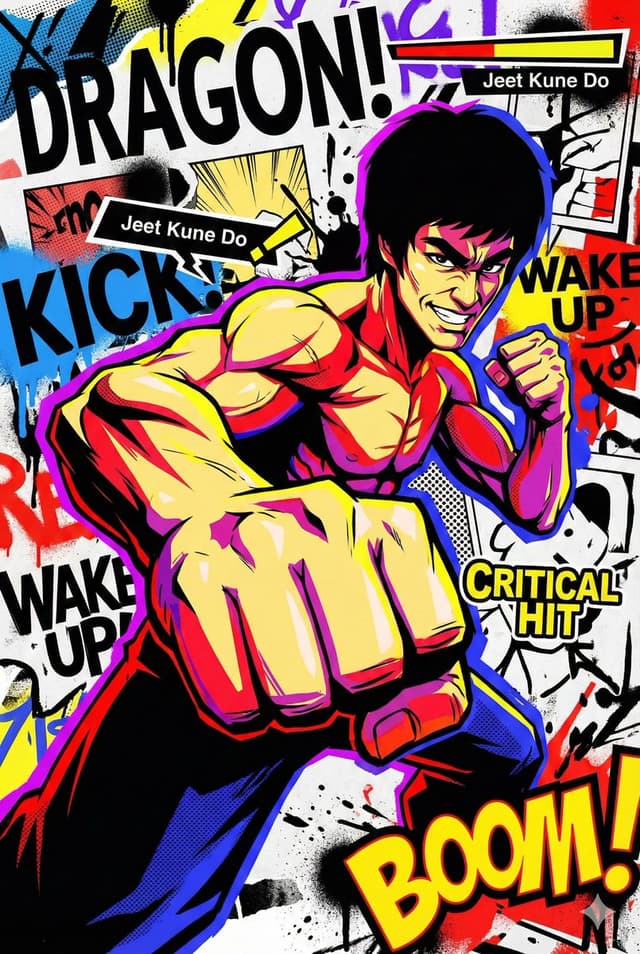
Generate a visually explosive and trendy pop-art anime illustration. The main character of the image is "{argument name="character" default="an over-the-top chuunibyou knight"}", and the overall style should reference Persona 5 and street graffiti visuals, turning the character into an extremely flamboyant, extremely flat, ultra-cool anime figure.

Use sharp cel-shading for the character, with hard, clean lines and crisp contours. The pose must be exaggerated and full of motion. You can use wide-angle or fisheye perspectives so that hands, weapons, or props appear extremely close to the camera, like a freeze-frame at the moment a special attack is unleashed. The expression should be highly dramatic, with confident, manic, or cold-blooded "overacting" intensity, rather than a calm everyday look.

Reject realistic volume and shading; instead, rely on large areas of pure black heavy shadows and highly saturated flat color blocks to create an extreme, high-contrast flat look. The main colors can be bright red, lemon yellow, electric blue, neon purple, etc., contrasted against large black shadow silhouettes. Add screentones, halftone dots, speed lines, and radiating lines in the shadows and background so the image feels like printed manga layered with street graffiti.

The background does not need realistic perspective space; it should be a flat visual collage stage filled with huge sans-serif English letters, torn paper effects, ink splatters, bold arrow graphics, speech bubbles, and onomatopoeia, such as exaggerated "BOOM", "SLASH", or "WAKE UP" graffiti sound effects. You can integrate UI elements into the scene—health bars, skill names, buttons, numbers, tooltips—floating around the main character, as if the game interface and the illustration have merged, breaking the fourth wall.

Keep lighting high-contrast but not physically realistic; think in terms of graphic design areas of black/white/color rather than natural light logic. Edges between color areas on the character and background should be very sharp, without soft gradients; all colors should be clearly separated. You can add rough spray paint, smears, or hand-drawn graffiti textures in select areas to enhance the street and handmade feel.

The overall mood must be extremely dynamic, extremely chuunibyou, and extremely cool, as if the image is about to explode out of the screen, not quietly hang in a gallery. Avoid realistic oil painting styles, low-saturation vintage looks, or gentle, soft illustration styles. Do not use natural landscapes or everyday life backgrounds, and avoid soft, pastel color schemes. The image should be a vertical 2:3 high-resolution illustration, suitable as a tension-filled, maximalist pop-art manga poster.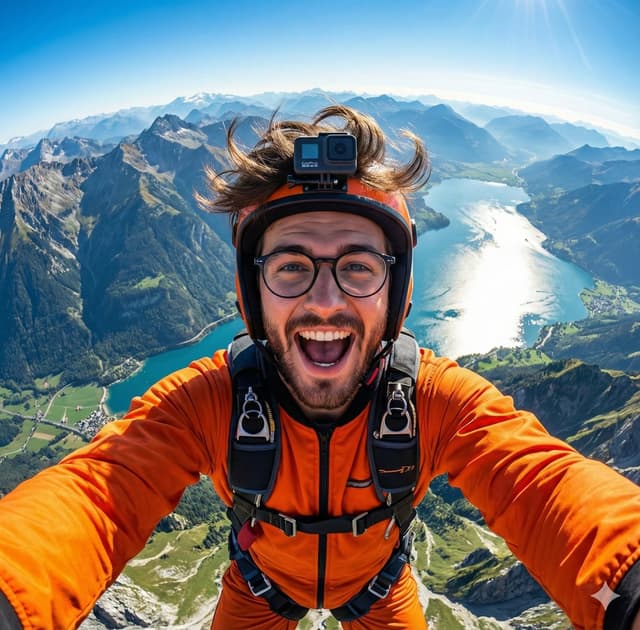
GoPro-style extreme sports selfie prompt
KGemini 3, Nano Banana Pro
A hyper-realistic GoPro-style selfie of {argument name="subject in english" default="this handsome man"}, wearing an orange jumpsuit and helmet. Wide-angle view from above showing mountains, a shining lake, and green valleys below. Wind-blown {argument name="subject detail in english" default="hair or fur"}, joyful expression, detailed harness, vibrant lighting, 8K extreme-sports photography.
Couple MacBook screen selfie simulation prompt
Mehal KumarGemini 3, Nano Banana Pro
{
  "task_configuration": {
    "task_type": "screen_simulation_photorealism",
    "target_model": "SDXL_1.0_Refiner",
    "aspect_ratio": "3:4",
    "resolution": {
      "width": 1152,
      "height": 1536
    }
  },
  "visual_hierarchy": {
    "layer_1_physical_macro": {
      "camera_angle": "Downward-angled, high-angle",
      "framing": "MacBook screen filling 95% of the frame",
      "surface_imperfections": [
        "subtle pixel-grid texture (moire)",
        "tiny dust particles on the glass",
        "faint ambient light reflection on the glossy screen",
        "fingerprint smudges"
      ],
      "foreground_anchor": "Thin strip of the physical keyboard visible at the lower edge"
    },
    "layer_2_digital_interface": {
      "theme": "Dark Mode (macOS)",
      "window_layout": {
        "left_panel": "Spotify 'Liked Songs' playlist (dimmed)",
        "right_panel": "Photo Booth live-preview window (dominant focus)"
      }
    },
    "layer_3_nested_subject_content": {
      "context": "Inside the Photo Booth window",
      "environment": "Dim bedroom, off-white wall, rumpled bedding",
      "lighting_simulation": "Cool screen glow mixed with warm skin tones, deep nocturnal shadows",
      "subjects": {
        "shared_attributes": [
          "Oversized black hoodies",
          "Hoods pushed back (faces fully visible)",
          "Reclining pose",
          "Looking at the screen"
        ],
        "subject_a_guy": {
          "identity_target": "{argument name="guy reference image in english" default="2nd image attached"}",
          "action": "Holding a phone in the right hand with a clear reflective case",
          "position": "Right/Center"
        },
        "subject_b_girl": {
          "identity_target": "{argument name="girl reference image in english" default="1st image attached"}",
          "action": "Resting closely beside Subject A",
          "position": "Left/Center"
        }
      }
    }
  },
  "prompt_assembly": {
    "positive_prompt": "Hyper-realistic downward shot of a MacBook screen. The screen surface has visible dust, pixel grid, and reflection. The screen displays a Photo Booth window showing a couple in a dark room. [Subject Descriptions]. They are wearing black hoodies. The lighting is low-key, candid, nocturnal, bluish screen glow. High fidelity, raw photo, unedited.",
    "negative_prompt": "vector art, screenshot, flat digital image, clean glass, perfect screen, daylight, bright studio lights, cartoon, 3d render, painting, watermark"
  },
  "identity_preservation_settings": {
    "strictness_level": "CRITICAL",
    "methodology": {
      "face_restoration": false,
      "note": "Disable generic face restorers (CodeFormer) to avoid a 'plastic' look. Use IP-Adapter.",
      "control_net_stack_multiline_placeholder": "[ControlNet configuration continues here]"
    }
  }
}
Paris Marais cafe terrace portrait prompt
HeisenbergGemini 3, Nano Banana Pro
Generate a photorealistic image of a cafe terrace in the {argument name="district in english" default="Marais district"} of {argument name="city in english" default="Paris"} on a Wednesday morning in March {argument name="year in english" default="2025"}. It is a crisp, cool spring morning with clear skies. Locals are drinking coffee. In sharp focus should be a young woman wearing a scarf, stirring a cappuccino and looking thoughtfully to the side; the waiter and street traffic behind her are blurred. The photo should have the candid, natural morning light feel of an iPhone image.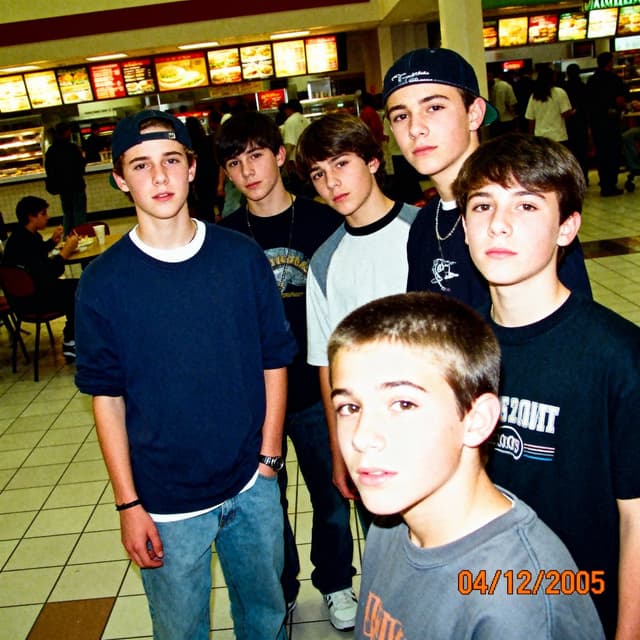
Profile / Avatar - 2005 Sony CyberShot mall food court snapshot prompt
Marky @ Easy-Peasy.AIGemini 3, Nano Banana Pro
A low-resolution digital photo taken on a 2005 Sony CyberShot. A group of teenagers hanging out in a mall food court. Harsh on-camera flash, slightly blown-out highlights, digital noise in the shadows. The skin texture looks slightly waxy due to early digital processing. An orange date stamp appears in the bottom right corner reading "{argument name="date stamp in english" default="04/12/2005"}". Candid, awkward angles, Myspace photo aesthetic.按模型、风格或主题浏览
寻找下一个方向
按用途
App / Web Design →Brand commercials →Channel intros →Cinematic scenes →Comics and storyboards →E-commerce images →Explainers and tutorials →Game assets →Game cinematics →Educational graphics →Music videos →Posters and flyers →Product marketing →Profiles and avatars →Short films →Vlogs and lifestyle →Social media posts →UGC and talking-head ads →YouTube thumbnails →按风格
3D cartoons →3D renders →Anime and manga images →Chibi characters →Chinese ink video →Film stills →Cinematic realism →Cyberpunk images →Cyberpunk video →Documentary style →Magical fantasy →Illustration →Chinese ink images →Isometric →Minimalism →Photography →Vintage images →Sketch and line art →Surreal video →Retro film →Watercolor →按主题
Abstract backgrounds →Abstract motion and VFX →Creature images →Animals in motion →Architecture and interiors →Character images →City images →City video →Groups in motion →Diagram / Chart →Fashion details →Food and drink images →Food and drink video →Group images →Fashion models →Nature images →Nature video →Characters in motion →Portraits and selfies →Product images →Product video →Action scenes →Text and logo motion →Typography images →Vehicle images →Vehicle video →让灵感,继续生长。
在同一个创作空间,连接提示词、参考素材和生成结果。
打开创作画布 ↗