

How to Use MiniMax H3 for Video Creation

To use MiniMax H3, choose text-to-video, first/last-frame input or reference generation, attach the appropriate assets, set the output length and resolution, and describe the action, camera and sound. Generate, download the MP4 and review both picture and audio. This tutorial follows two actual Astorie jobs and distinguishes their recorded settings from MiniMax’s broader API controls. [1]
If you already have an approved illustration, start with its existing Astorie image node and connect a video branch. Keeping the source, prompt and result together makes it easier to approve animation without losing the original picture. The steps below use that recorded path; API users can select explicit media roles instead.
How to use MiniMax H3 with the right input mode
Entry | What it does | When to use it |
Text only | Builds video from the prompt | No exact source composition is required |
First/last frame | Anchors opening and/or ending picture | The provided frame must appear at a defined point |
Reference generation | Uses examples of appearance, motion or sound | Several images, videos or audio cues guide the result |
A first-frame input anchors the opening; a last-frame input anchors the ending. Reference images guide appearance or content without promising an identical opening frame. The observed Astorie Omni node displayed a Reference Image area. Omni is the host’s mode label: the screenshot does not reveal the underlying API payload, so these jobs are recorded as image-reference workflows, not verified first-frame API calls. [1]
Prepare the source and output requirements
Choose the delivery aspect ratio before generating. Keep an unmodified source export, then decide whether the camera should move or remain fixed. For a short first attempt, specify one principal subject action and one important environmental action. Asking simultaneously for a blink, several background motions and a camera move makes it harder to tell which instruction needs revision.
The public H3 API accepts 4–15 whole seconds at 768p or 2K. Reference generation permits up to nine images, three videos and three audio files, subject to twelve files total and separate fifteen-second combined limits for reference video and audio. Those are provider limits; a host may expose fewer options. The two jobs below used still images only. [1]
Create a single-image shot in Astorie
1. Add or select the approved still-image node. Keep the original file and an unaltered export; a browser thumbnail is insufficient to audit later continuity.
2. Add a Video node using the bottom toolbar or connect from the image node output, choose MiniMax H3, and confirm that the image appears in the node’s Reference Image area.
3. Set a 16:9 frame, eight seconds and 768p for the configuration used here. Omni was visible on the node. Check the displayed credit amount before generating; the recorded completed request deducted 112 Astorie credits.
4. Write what stays fixed, what moves and what the soundtrack should contain. Generate once and keep the first successful output.
5. Open the result, listen on speakers, inspect the beginning, middle and end, download the video through the node’s download control, and archive the prompt with the source still and output link.
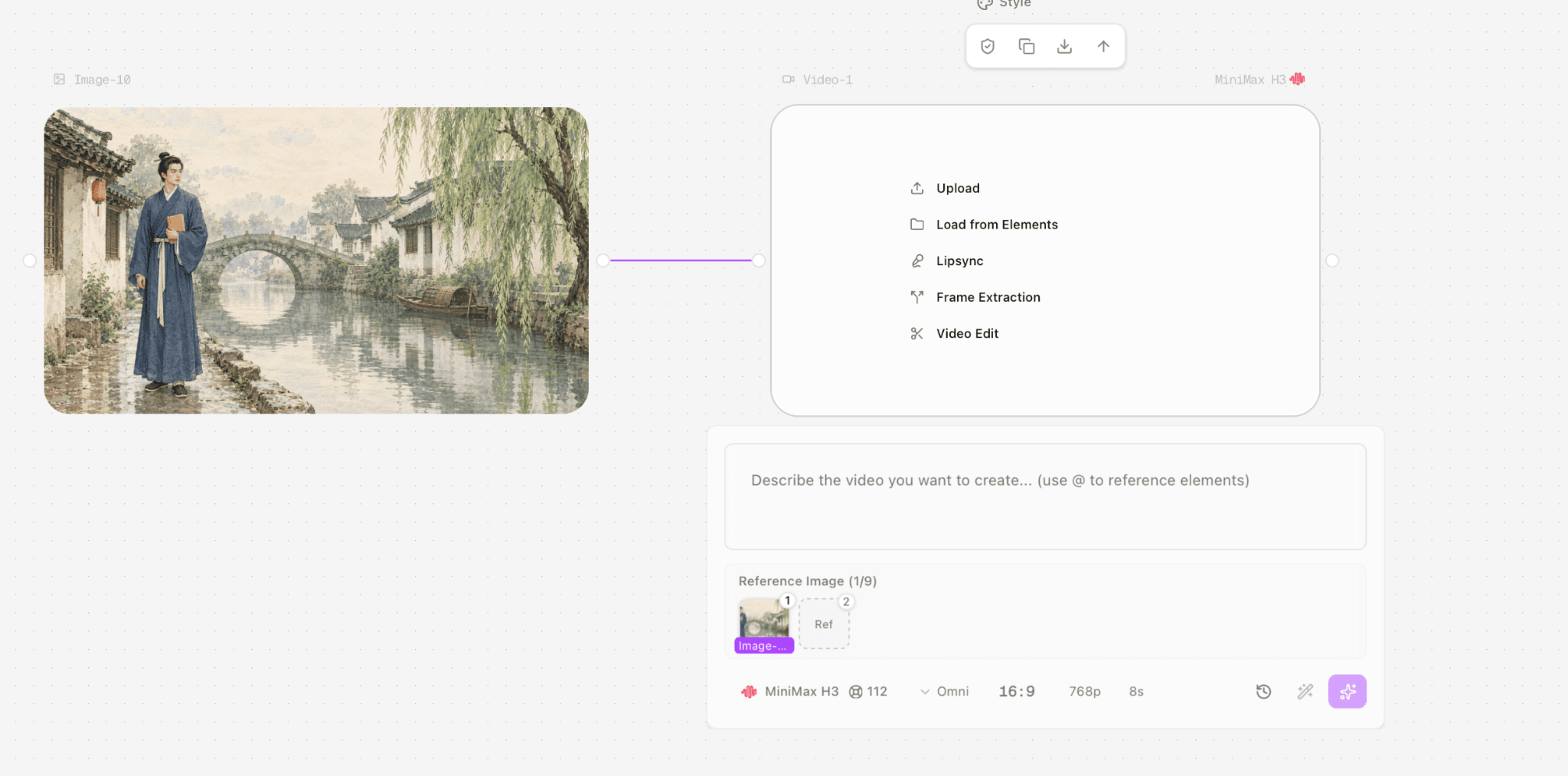
Figure 1. The connected source image and H3 video node before generation; the visible settings are Omni, 16:9, 768p and eight seconds.
Original Video-1 prompt
The project owner confirmed this exact text was submitted. “Breathes softly” can describe character movement, but it does not exclude audible breathing. The soundtrack sentence prohibits speech and music only.
Animate this exact watercolor scene as a quiet opening shot. The scholar stays in the same position, breathes softly and blinks once. His robe hem and the willow branches move gently in a light breeze. Add subtle ripples on the canal and make the wooden boat rock slightly. Use a very slow, smooth camera push-in.
Preserve the scholar’s face, hairstyle, blue robe, ochre book, body proportions, architecture, bridge, boat, composition, and watercolor texture. Do not add new people or objects. No morphing, no text, and no scene change.
Create natural ambient audio with soft water, a light breeze, and distant birds. No speech and no music.
Video-1 completed in approximately two minutes according to the tester. They reported recognizable scene details, no obvious deformation, restrained movement that was not fully natural, environmental audio and a conspicuous human-like sigh. The sound was unwanted for the scene, but this prompt did not expressly prohibit it.
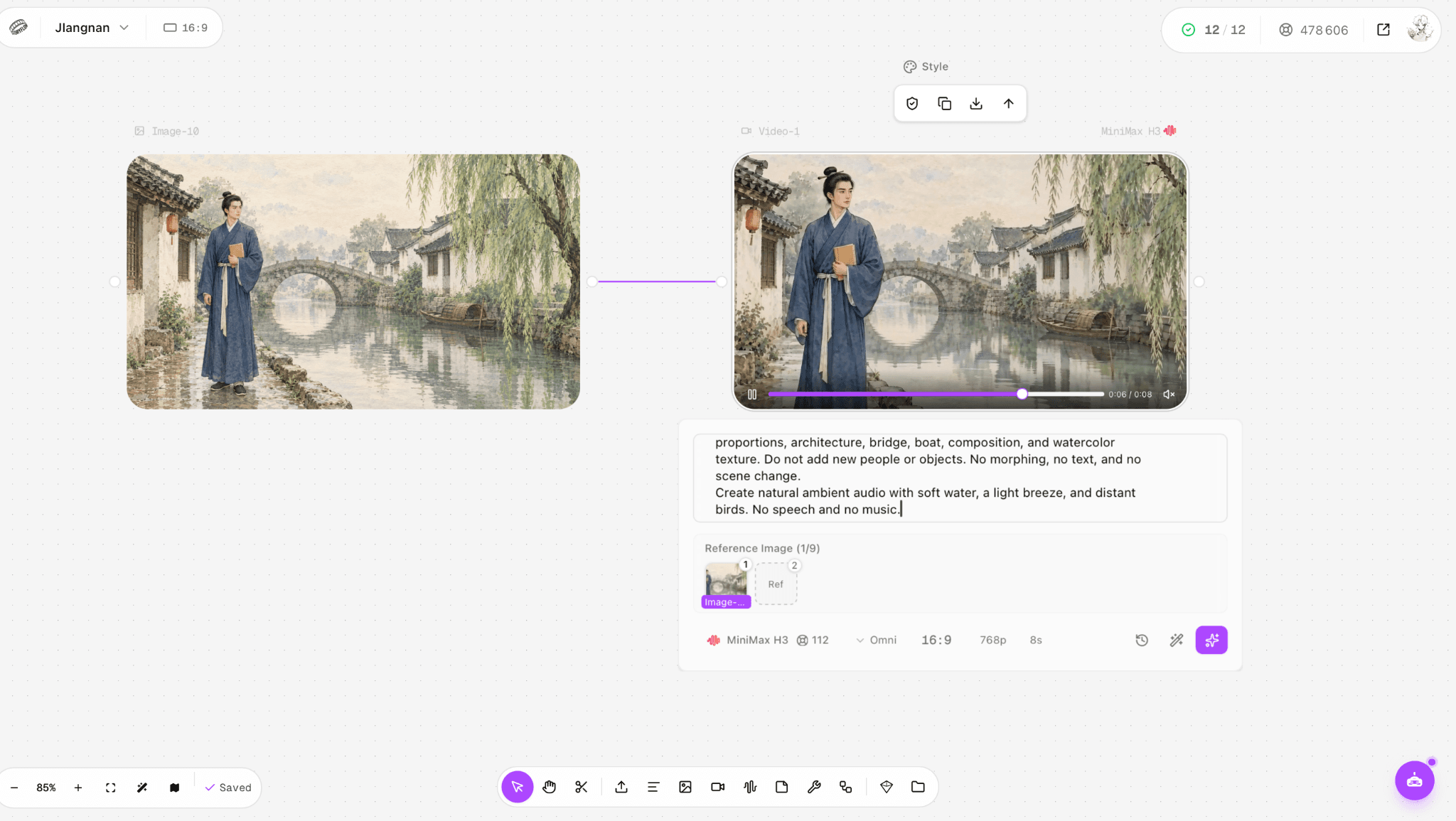
Figure 2. Video-1 completed result, with the original single image and 112-credit H3 node visible.
Watch and listen to the original eight-second Video-1
Create a sequence from three reference images
Add a new H3 video node. Connect the canal-side illustration, bridge-crossing still and reading close-up in that order; verify all three thumbnails in the Reference Image area. Use the same eight-second, 768p configuration, then assign each shot a time range in the prompt. These ranges communicate editorial intent; the generated cuts must still be checked.
Original Video-4 prompt
Create one coherent three-shot watercolor story sequence using the three reference images in their attached order.
Shot 1, approximately 0–2.5 seconds: begin with the wide canal-side view. The scholar stands quietly beside the canal, breathes softly, and looks toward the stone bridge. Use a very gentle camera push-in.
Shot 2, approximately 2.5–5 seconds: cut to the wide side view of the same scholar walking slowly across the stone bridge. His robe hem moves subtly in the breeze.
Shot 3, approximately 5–8 seconds: cut to the medium close-up beneath the willow tree. The same scholar gently opens the ochre-yellow book, looks down at the page, and blinks once.
Preserve the same character identity, face, hairstyle, wooden hairpin, indigo robe, ivory sash, ochre book, architecture, canal, bridge, lighting, restrained colors, warm paper grain, ink outlines, and watercolor texture across all three shots.
Use clean cinematic cuts between shots. Do not morph one composition into another. Do not add people, objects, text, captions, logos, or modern elements.
Create soft natural ambient audio with quiet canal water, a light breeze, and distant birds. No human breathing sound, no sighing, no speech, and no music.
The tester reported all three intended scenes, natural-looking movement, environmental sound and a sigh, with no obvious deformation. Video-4 explicitly prohibits human breathing and sighing in its soundtrack; the reported sigh therefore fails that audio requirement. This was a separate multi-shot task, not a controlled retry of Video-1.
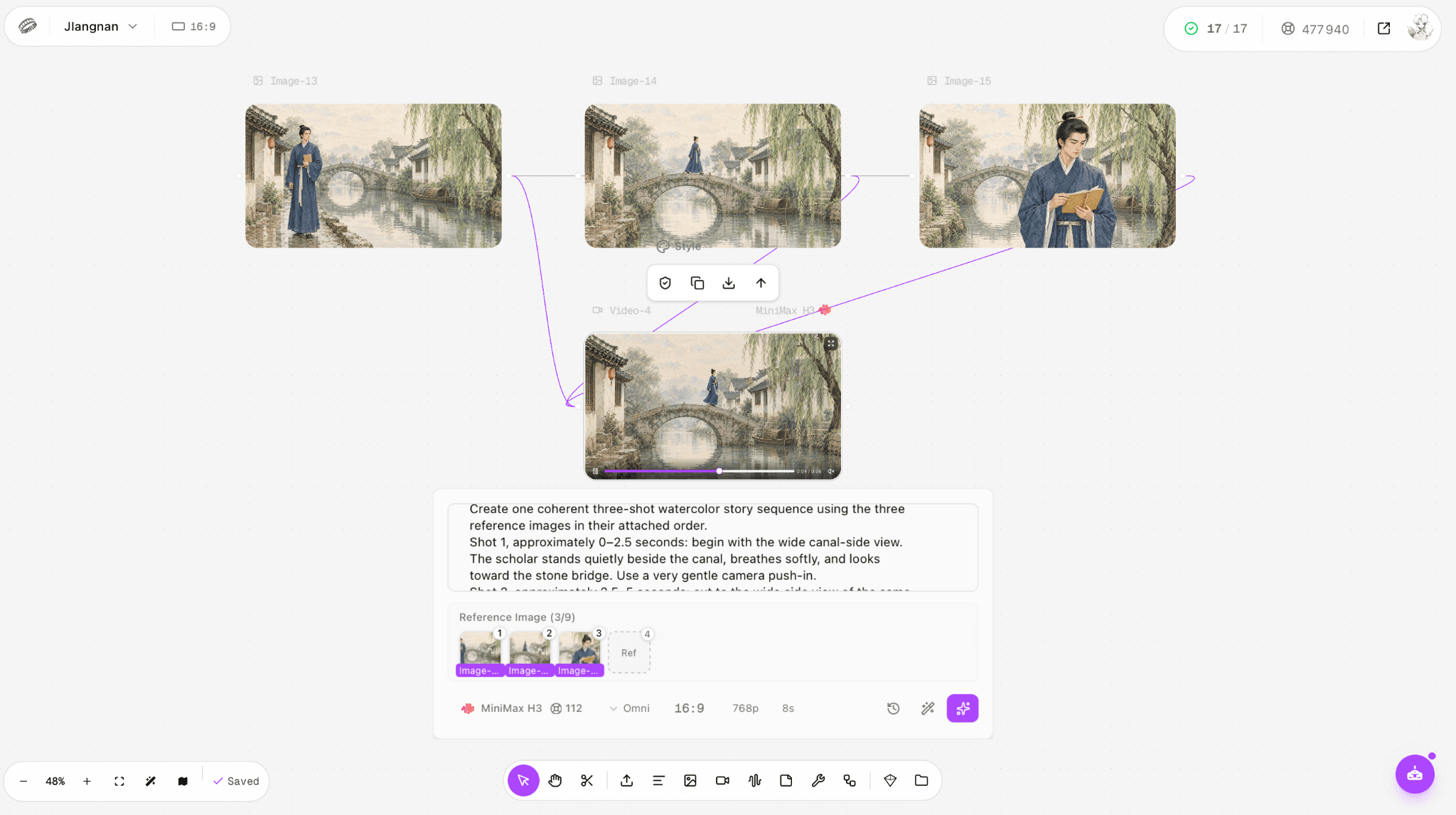
Figure 3. Completed Video-4 and its three ordered storyboard references; the shot order is a tested input, not a guarantee of exact edit points.
Watch and listen to the original eight-second Video-4
What exactly was tested?
Record | Video-1 | Video-4 |
Operator | Project owner | Project owner |
Inputs and role | One still in Reference Image | Three ordered stills in Reference Image |
Displayed configuration | H3; Omni; 16:9; 768p; 8s | H3; Omni; 16:9; 768p; 8s |
Attempts and charge | One completed job; 112 credits deducted | One completed job; 112 credits deducted |
Elapsed time | About 2 minutes, tester estimate | About 3 minutes, tester estimate |
Downloaded file check | 1344 × 768; 8s; audio stream present | 1344 × 768; 8s; audio stream present |
The original prompts, screenshots and output files are available; the exact test dates, stopwatch logs and separate audio-toggle states were not recorded. Neither job failed. File inspection confirms stream presence and dimensions, not the quality of the sound. All creative observations above are attributed to the project owner.
Inspect the export and fix the specific failure
Problem | Check | Next action |
Background seems frozen | Watch willow, boat and water separately | Ask for one measurable background action per pass |
Subject changes between shots | Compare face, hairpin, robe and book at each cut | Reuse approved reference stills and simplify conflicting changes |
Unwanted vocal sound | Listen to the downloaded audio track, not a muted preview | Replace audio in edit or rerun with an explicit audio constraint |
Composition drifts | Compare first frame and final frame with source | Use first-frame mode when exact opening placement matters |
Review at normal speed first, then pause around cuts and hand movements. Compare identity, props and scene geometry to the input stills. A moving camera can make a still-looking background appear animated; check whether leaves, water and boat actually change relative to their surroundings. Listen to the exported track separately so a muted browser player cannot hide an unwanted sound.
According to the tester, the unwanted sigh occurred approximately two seconds into the original clip. After adding an explicit instruction to exclude sighing and rerunning the generation, the tester confirmed that the sigh was absent from the new result. This resolved the reported issue in that rerun, although it does not guarantee the same outcome in every generation. Review the exported soundtrack to confirm that it meets the scene’s requirements.
Use the public API when you need explicit media roles
Create an authenticated H3 task using the current video API, setting the media role appropriate to your goal. Save the returned task ID and poll that task for completion rather than repeatedly submitting new generations. When it succeeds, retrieve the returned content URL and archive the MP4 with the submitted request. This is a documented API route, not an additional test performed for this article. [1]
For an approved 768p task, the provider documents a separate 2K regeneration operation. It requires the original content and a base-video reference. Do not assume that changing a resolution label in an existing host node invokes this operation: a host may instead create a new job, with a different charge. [1, 2]
FAQ
Can H3 generate longer than eight seconds?
The documented public H3 route accepts integer durations from four to fifteen seconds at 768p or 2K. Host controls may show a narrower subset. [1]
Can I use more than one reference?
Yes. The documented reference route accepts mixed media within stated file and length limits. Put each example in a defined role and confirm the host’s actual controls. [1]
Can I get a still image?
The video node and public video API described here return video. A frame extracted from the output is a still derived from video; MiniMax separately documents image-01 for a public static-image request. This is not a finding about every possible H3 deployment. [1, 3]
Sources
Official specifications and prices checked September 27, 2026. Creative observations are tester reports; API instructions are documented guidance.
1. MiniMax H3 modes, specifications and API examples
2. MiniMax H3 and input-material prices
4. Astorie subscription pricing
Ready to try it on the canvas?
Open Astorie and fan your prompt across every frontier model in one workflow.