

Nano Banana 2.1 Image Editing Guide
Key Takeaways
• Use the exact source image as the editing input.
• Separate recoloring from pose or object movement.
• Check unchanged areas as carefully as the requested edit.
• Keep the original file when a mask or composite may be needed.
To follow this Nano Banana 2.1 image editing guide, connect the source image, name the change, and state which details must stay. For a cloak recolor, check the face, armor, clasp, light and framing as well as the new color. A completed object move or recolor still needs a review of the surrounding picture.
Google documents conversational image editing for Nano Banana 2.1. The Astorie tests below use one source image connected to another Image node, with instructions in the prompt field. This is native still-image editing, rather than extracting a frame from a generated video. [1, 2]
Nano Banana 2.1 image editing guide for small and structural changes
Edit type | Example | Review priority |
Appearance | Red cloak to dark blue | Color, texture, clasp and nearby skin |
Object placement | Helmet from hand to head | One object only; old and new locations |
Pose or interaction | Child turns toward father | Anatomy, support gestures and composition |
Recoloring usually preserves the scene’s meaning, while moving a helmet or turning a child requires the model to invent hidden surfaces and adjust nearby anatomy. Treat the latter as a larger reconstruction task. If exact source pixels must survive, use a masking or compositing workflow and validate the untouched region rather than relying on a keep instruction.
Set up the source and output node
Keep the original image in its own node.
Double-click the canvas and choose an Image node, or use the bottom toolbar’s image icon. Select Nano Banana 2.1 Premium. [2]
Connect the original and confirm the correct thumbnail is listed as a reference.
Enter the change first, followed by the details to preserve.
Record the aspect ratio, resolution, format, Thinking level and Web setting; review the quote before running.
Press Generate and wait for the output preview. Read any error before retrying, compare the source with the result, then use the downward-arrow download icon in the result toolbar. Check the account credit record for the actual debit; only the pre-run quotes were retained here. [2]
Helmet relocation from hand to head
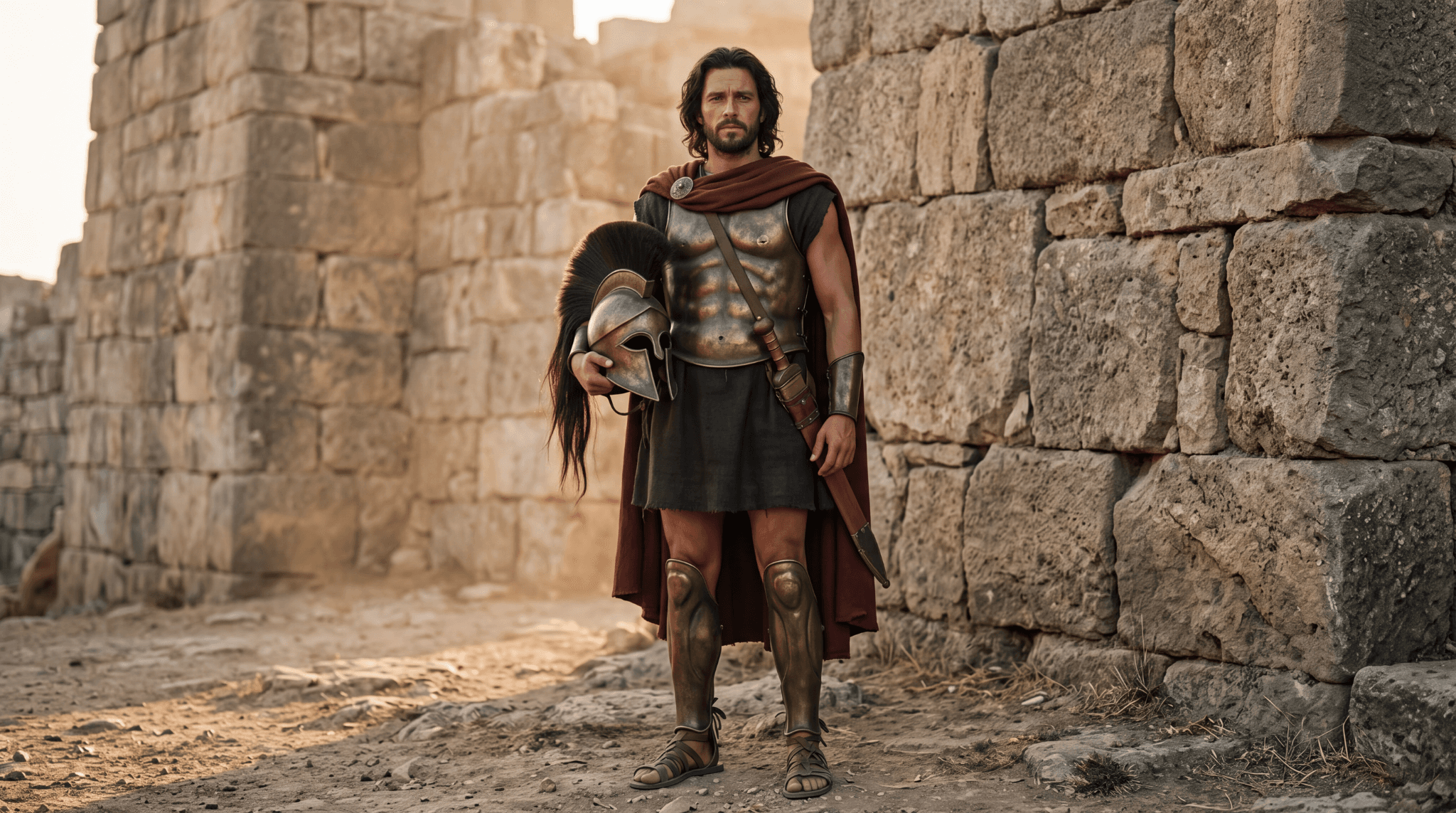
Figure 1. Source, Image-1: Hector holds a helmet while standing bareheaded.
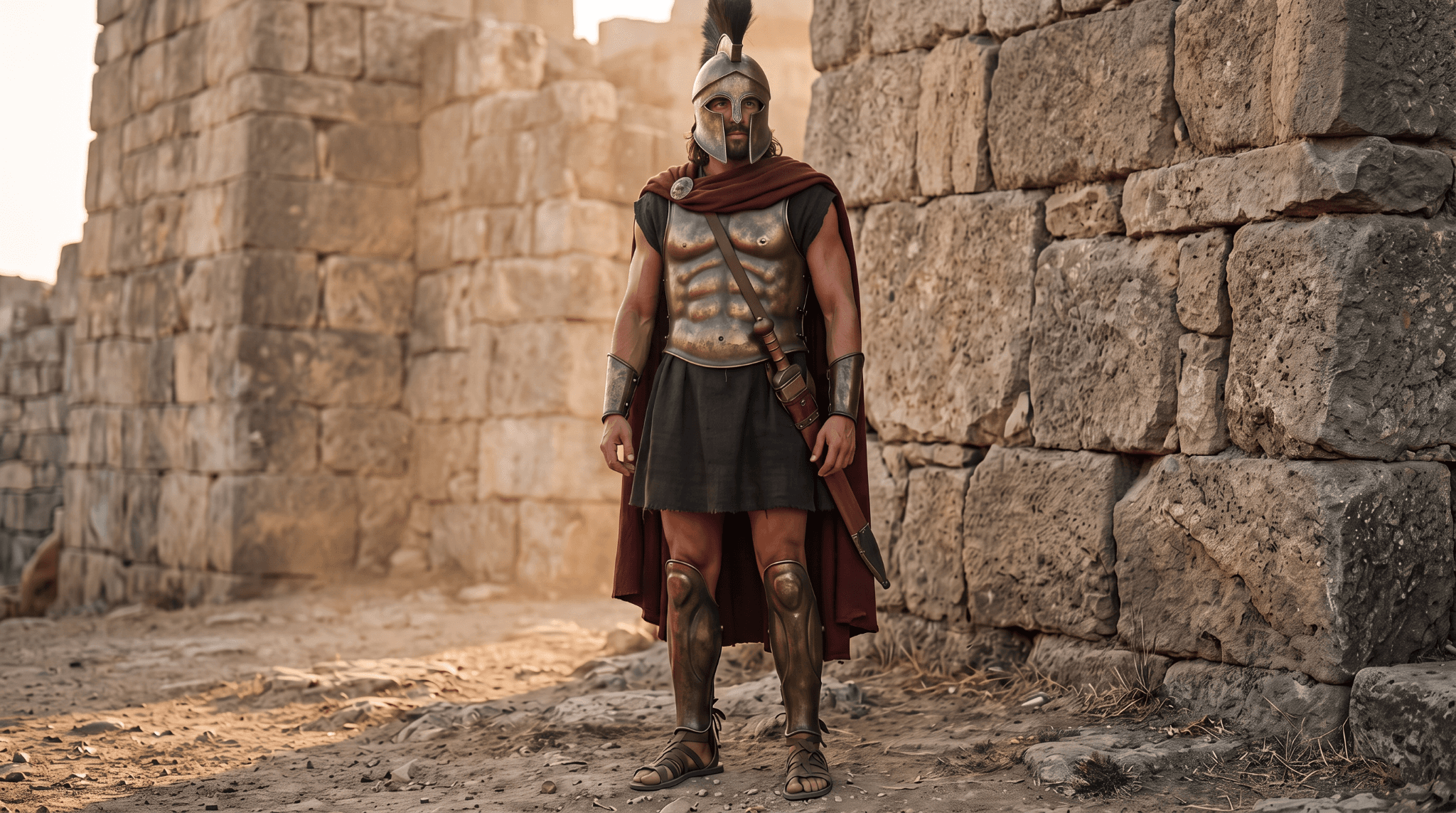
Figure 2. Edited result, Image-3: the helmet is on Hector’s head and his former holding hand is empty.
The edit achieves the principal object relocation and leaves a single visible helmet. The general standing pose, cloak, armor and wall setting remain close. The crest and helmet presentation differ between the held and worn views, and the face is partly covered in the result. Exact helmet geometry is therefore a separate check, not an established preservation result.
Clara ran this pair on 10 October 2026. Image-1’s node selected 4K, while Image-3’s edit selected 2K; both used 16:9, PNG, High Thinking and Web Off. The edit quote was 15 credits. Both supplied downloads measure 2048 × 1143. This setting mismatch is not evidence that their original render resolution or detail quality was identical.
Removing the helmet in a three-person scene
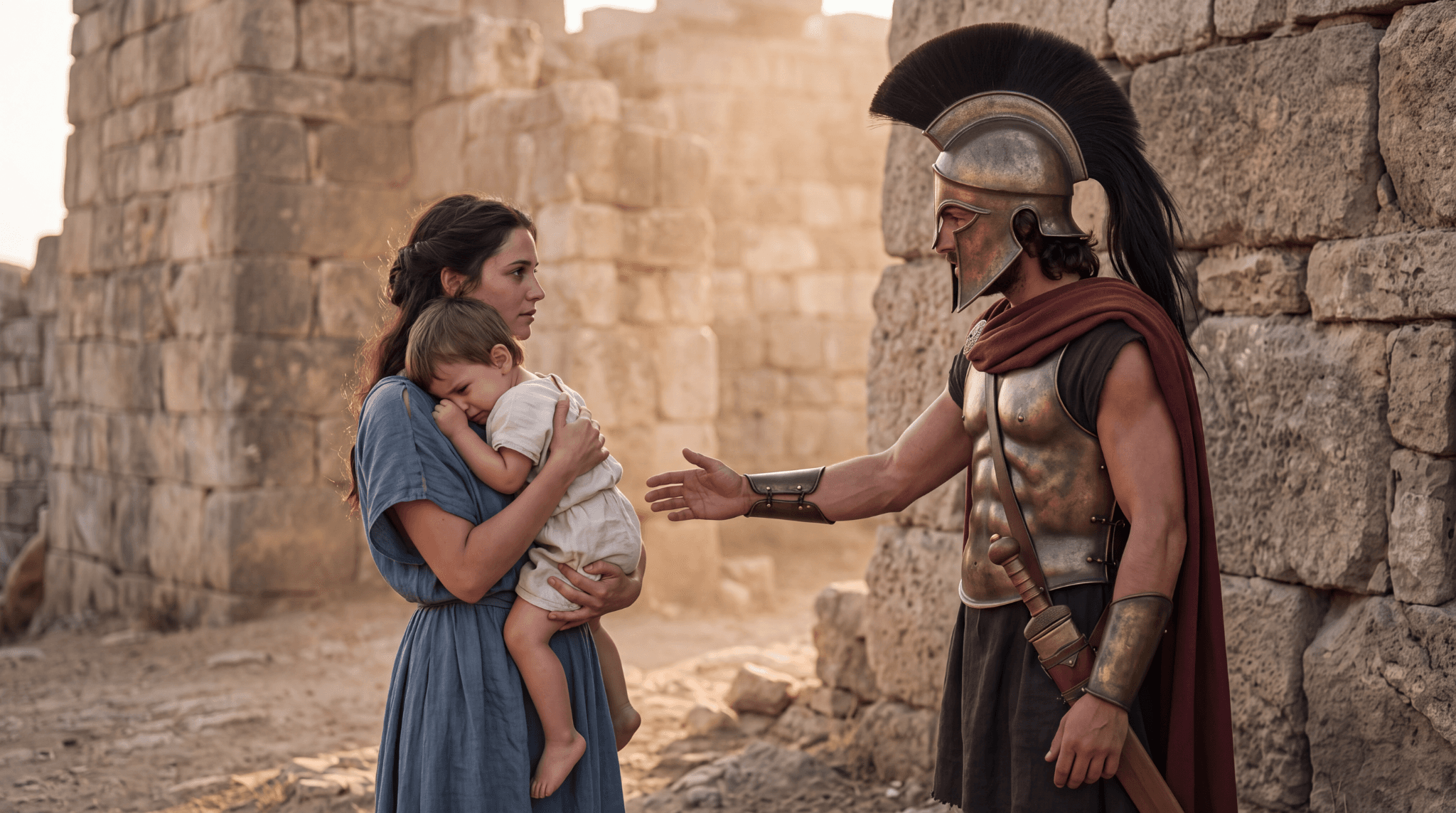
Figure 3. Source family scene, Image-4, with helmeted Hector and the child resting against Andromache.
For the revised edit, Clara asked for Hector’s helmet to move to his right hand, his left arm to hang down, and the child’s head to turn while the rest of the family stayed in place. The original input below was actually used for Image-5.
Original test input
Edit the reference image while preserving its original composition.
Keep all three people at exactly the same screen positions and scale. Preserve Andromache's face, blue dress, hairstyle, and the way she supports the child. Preserve Hector's bronze armor, dark-red cloak, body position, stone walls, lighting, and camera framing.
Make only these changes:
1. Remove the helmet from Hector's head, revealing dark wavy hair and a short beard.
2. Place that same helmet in Hector's right hand at waist height. His left arm hangs naturally at his side.
3. Turn the child's head toward Hector while keeping the child's torso, legs, clothing, and position in the mother's arms unchanged.
Do not move the people closer together. Do not reframe or zoom. One helmet only. No additional objects, people, text, or logos.
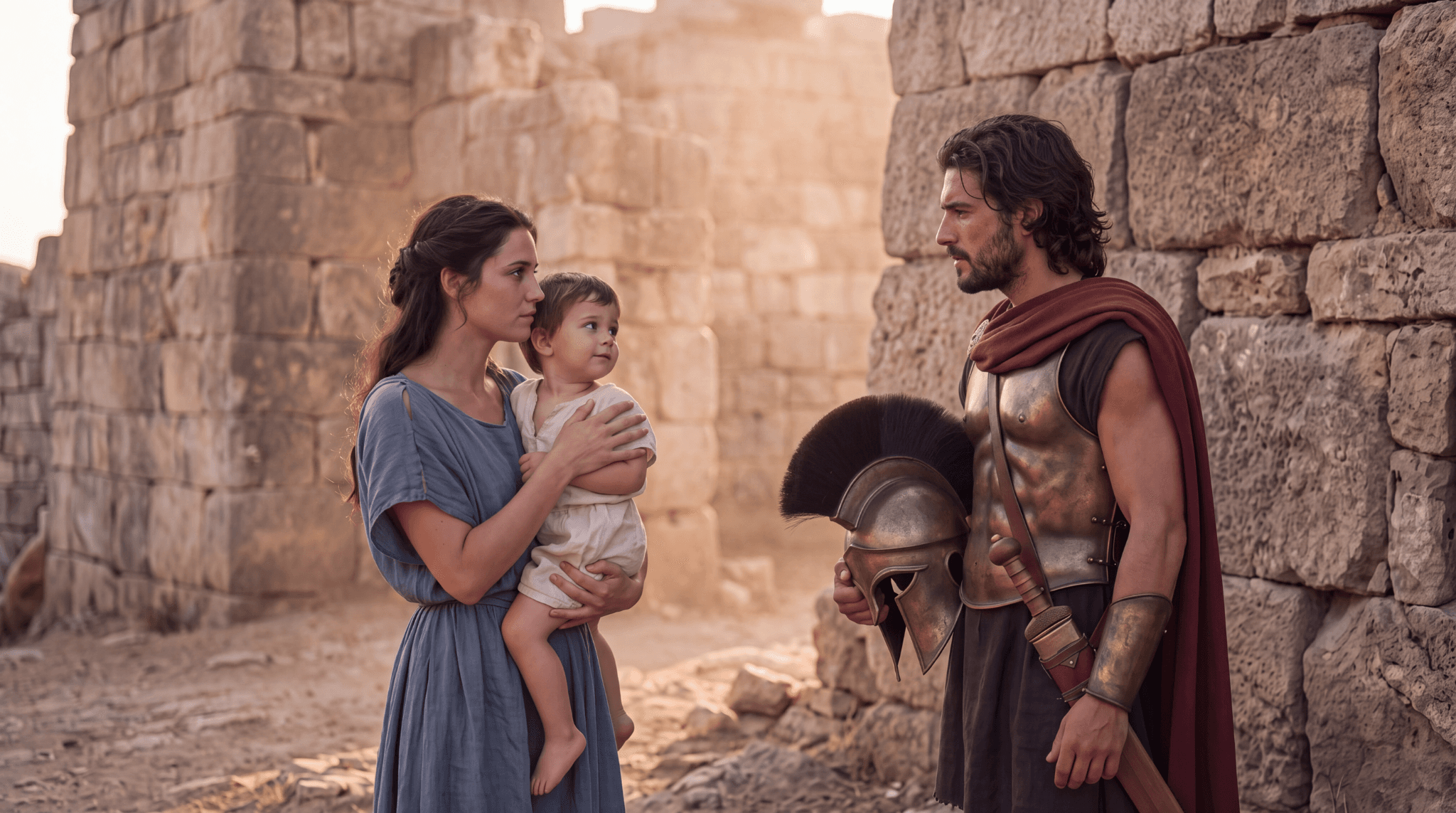
Figure 4. Image-5 achieves the bareheaded figure, one-handed helmet hold and child’s head turn, while also changing spacing and support gestures.
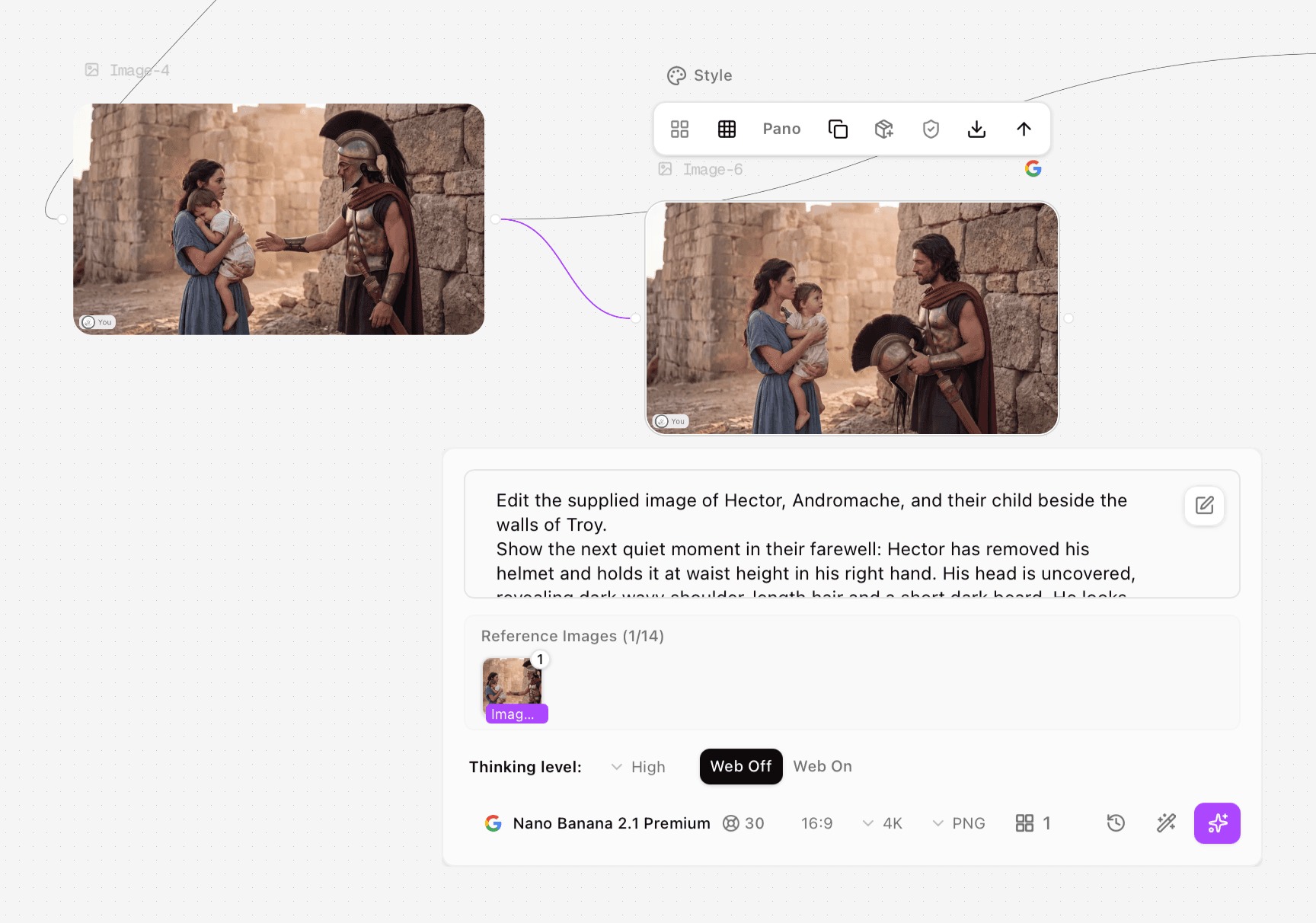
Process screenshot 1. The initial Image-6 edit uses Image-4 as its reference and shows the helmet supported by both hands. Only a prompt excerpt is visible.
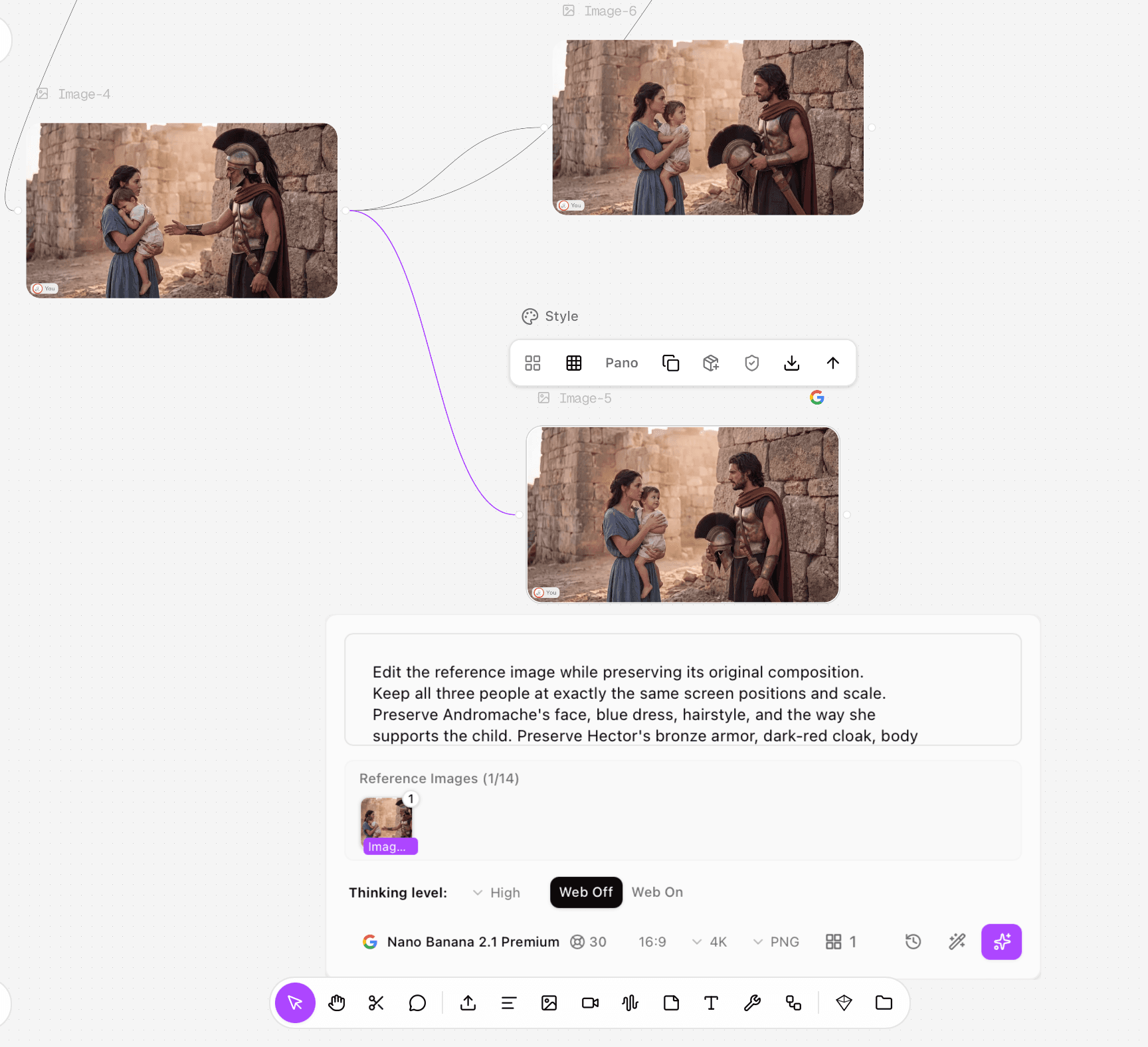
Process screenshot 2. The revised Image-5 edit returns to Image-4. Its panel shows the preservation instruction, one reference image, High Thinking, Web Off, 16:9, 4K, PNG and a 30-credit quote.
The result follows the requested story change. It does not preserve the exact source composition: the people’s positions and scale shift, and Andromache’s hand placement changes. This is useful for a revised illustration, but it needs further work when the existing layout must stay fixed. Image-4 and Image-5 used the same recorded 4K, 16:9, PNG, High and Web Off settings, with 30-credit quotes.
Changing the cloak from red to blue
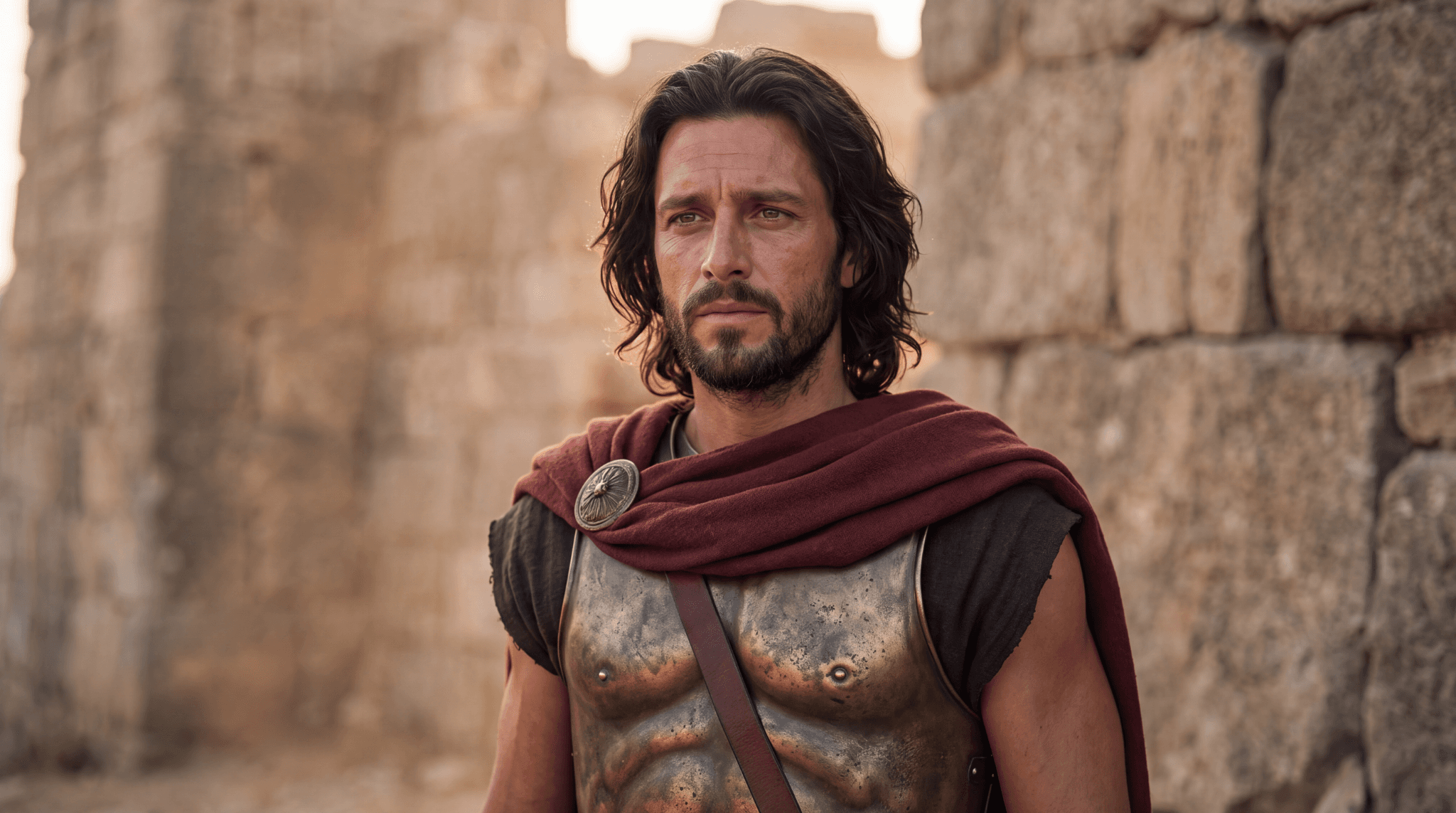
Figure 5. Source portrait, Image-8, with the original red cloak.
Original test input
Edit the supplied portrait of Hector.
Change only the deep-red cloak to a muted dark-blue cloak. Preserve the cloak's original shape, folds, woven texture, and shoulder fastening. Keep the round metal clasp unchanged.
Preserve Hector's face, expression, hairstyle, beard, skin tone, bronze armor, leather strap, pose, lighting, stone-wall background, camera angle, and framing.
Do not add, remove, or reposition anything. Keep the original image dimensions and composition. No text or logos.
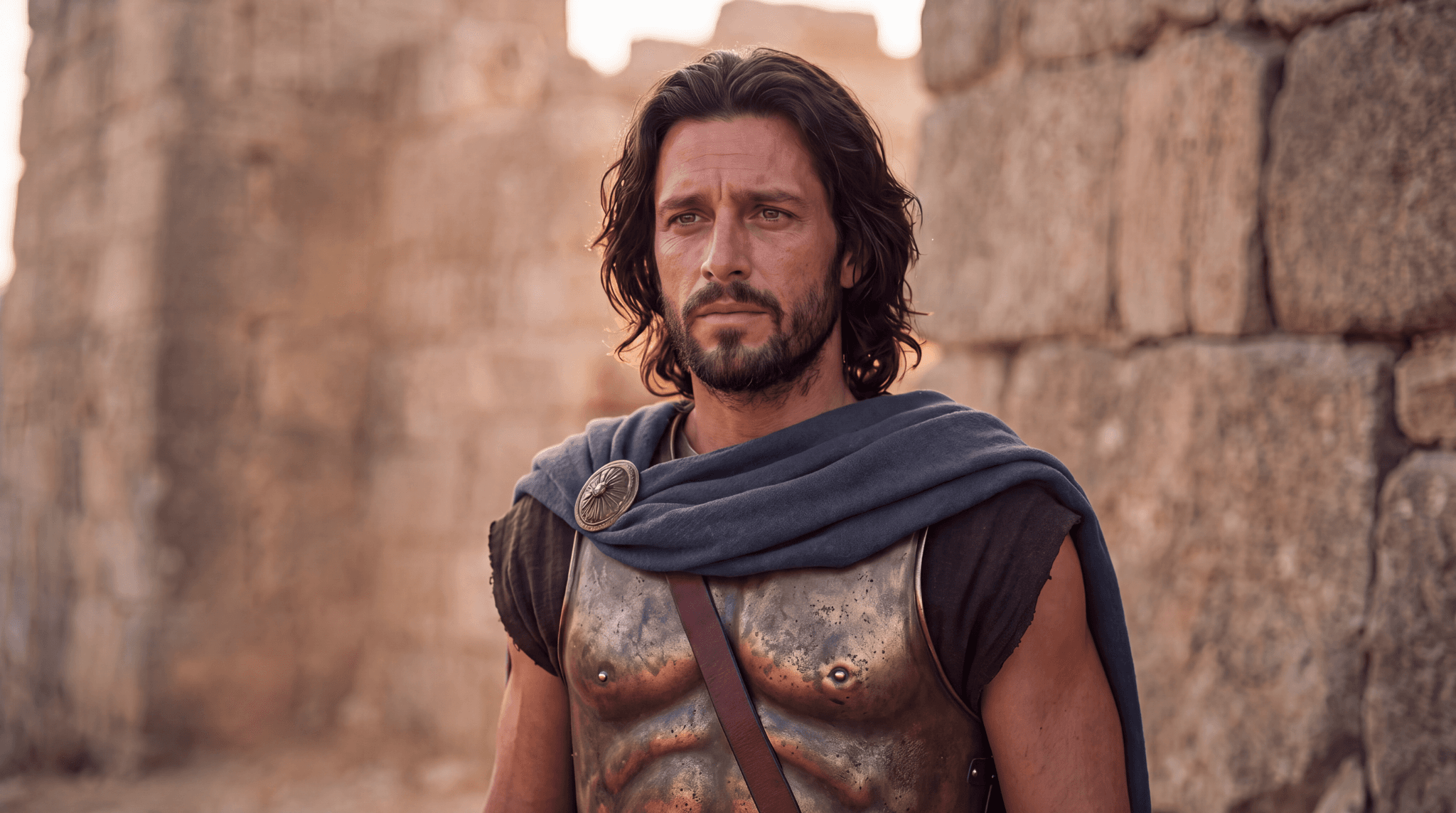
Figure 6. Edited portrait, Image-9, with a muted blue-gray cloak. Face, armor and background remain recognizable, but the result contains changes beyond color.
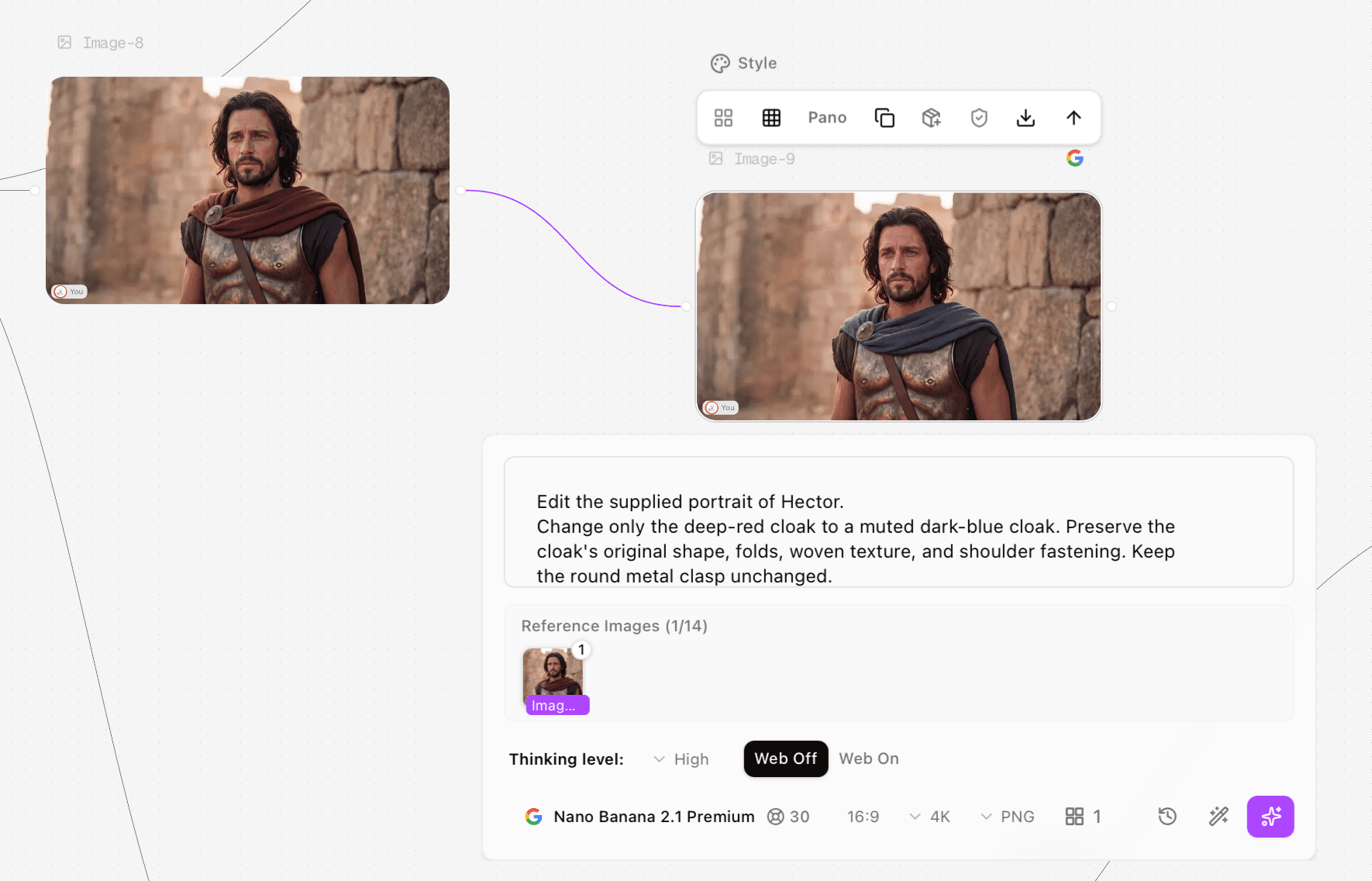
Process screenshot 3. Image-8 feeds the Image-9 recolor node. The visible input requests a cloak-only change; the panel retains the tested 2.1 model and settings. Review the downloaded images for changes outside the cloak.
The recolor reaches the requested blue family. The broad portrait framing and arrangement remain similar, but the supplied files show a warmer or redder skin tone, a different-looking clasp pattern and changes in cloth folds and surface detail. The edit should therefore be described as a successful cloak recolor with collateral changes, rather than a color-only transformation.
This pair was tested by Clara on 11 October 2026 with 16:9, 4K, PNG, High Thinking and Web Off, and a displayed 30-credit quote. Both supplied files are 2048 × 1143. No mask or pixel-preservation measurement was recorded.
Review the entire picture before accepting an edit
Check | Pass condition |
Target | The requested change is visible and correctly localized |
Face | No unintended age, expression or proportion change |
Wardrobe | Clasp, seams, strap and texture remain acceptable |
Objects | Correct count; no duplicate or missing prop |
Geometry | Pose, scale and framing meet the brief |
Delivery | Actual file dimensions suit the intended page |
Review at the size where the image will be published and at a closer zoom for sensitive details. If only one region is approved, retain the original as the base and composite that region using an image editor. A mask and composite are recommended remedies here; the supplied runs do not demonstrate either remedy.
Troubleshooting
If the edit changes the layout, separate the operation into smaller tasks. A helmet removal, hand change and child head turn affect several connected regions. Begin from the same source for each experiment so an earlier accident does not become the next reference.
If the recolor changes skin or accessories, shorten the change instruction and name the protected adjacent features. When those details are contractual or brand-critical, switch to controlled masking and compositing rather than repeatedly accepting small drift.
If the output looks softer or smaller than expected, check the downloaded file dimensions. The 4K selector in these examples did not correspond to a supplied 4096-pixel-wide image. The download’s dimensions are the relevant delivery fact.
Recorded tests and settings
The table identifies the selected files reviewed in this article. Clara executed the tests in Astorie. A selected result is not a complete count of generation attempts.
Output and date | Input role and prompt record | Selected settings and quote |
Image-1 to Image-3; 10 Oct | Image-1 source; helmet-wearing edit. Full original input not retained. | 2.1; 16:9, PNG, High, Web Off; source 4K / edit 2K; edit quote 15 |
Image-4 to Image-5; 11 Oct | Image-4 source; complete revised helmet input above | 2.1; 16:9, 4K, PNG, High, Web Off; quote 30 |
Image-8 to Image-9; 11 Oct | Image-8 source; complete cloak recolor input above | Same 2.1 settings; quote 30 |
Record | Evidence retained |
Exact host labels | Nano Banana 2.1 Premium |
Prompt availability | Complete inputs are retained for the revised family edit and recolor. The initial helmet-wearing input is partial, so the article evaluates only the visible relocation. |
Generated candidates and failures | One selected supplied output per listed node; total attempts and failures not recorded |
Timing basis | Queue time, generation time and total elapsed time not recorded |
Actual account debit | Not recorded; displayed credits are quotes |
Downloaded files | Original PNGs; 2048 × 1143 each |
Audio review | Not applicable to these still-image tests |
Rerun status | Image-5 uses a revised input from Image-4 after Image-6; other proposed fixes were not retested |
Frequently asked questions
Can I guarantee everything outside the edit stays identical?
These tests do not demonstrate that guarantee. Check the untouched areas or preserve them with a mask and composite.
Is one successful edit enough to trust a workflow?
It is enough to approve that output, not to establish a repeatable success rate. Keep separate examples for recoloring, object movement and pose changes.
Should I keep chaining edits?
Only while the approved details remain intact. Return to the original when a failed edit has changed something you still need.
Use language-driven editing to make the intended change, then use visual review to decide how much of the resulting image you can accept.
For the node setup and download controls, see the Astorie Image Node guide.
Ready to try it on the canvas?
Open Astorie and fan your prompt across every frontier model in one workflow.