

Multi-cut image generation comparing 9 different artistic styles
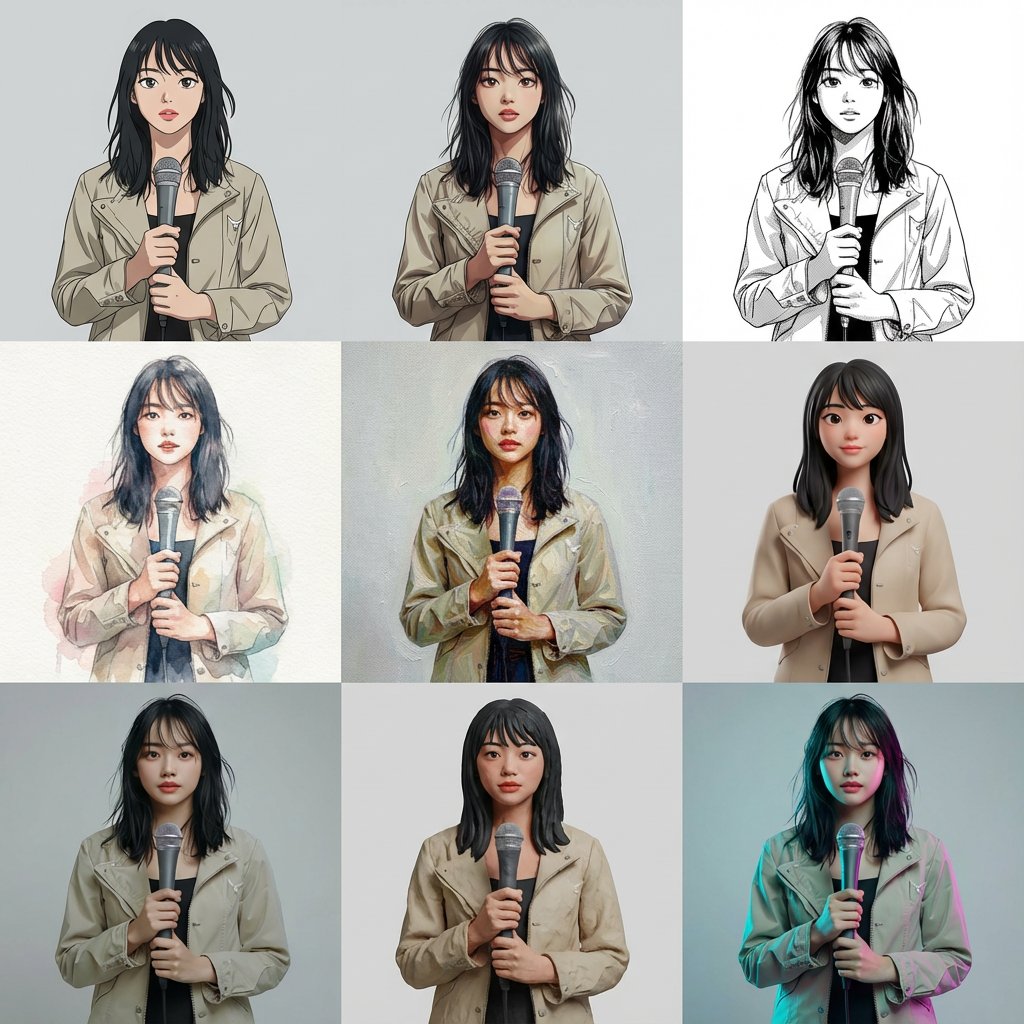
Generated output: Multi-cut image generation comparing 9 different artistic styles — output 1
A detailed, complex prompt designed to generate a single image containing 9 separate cuts arranged in a 3x3 grid. The goal is to keep the subject, composition, pose, and camera position identical across all 9 cuts, varying only the artistic style to compare different rendering techniques, such as cell animation, watercolor, oil painting, and photorealistic 3D. This was used to compare GPT Image 1.5 and Nano banana Pro.
Based on a reference image, generate a multi-cut image with 9 cuts arranged within a single image.
The layout is a uniform 3x3 grid. Each cut must feature the same person, same composition, same pose, and same camera position.
Style specification for each cut (from top-left to bottom-right):
Cell animation style (TV anime style, clean line art, 2-3 levels of shading)
Theatrical anime style (delicate lines, rich gradient shading)
Black and white manga style (ink lines, screen tones)
Watercolor illustration (paper texture, bleeding, pale colors)
Oil painting (impasto, brushstrokes, canvas feel)
High-quality 3D cartoon (soft modeling, subsurface scattering)
Photorealistic 3D (PBR, texture close to real life)
Clay animation (clay texture, handmade feel)
Cyberpunk color grading (cyan/magenta rim lighting, background remains plain)
All 9 cuts must have perfectly identical composition, person, pose, and background, allowing only the style difference to be compared.
Arrange them naturally as a single finished image.
From sourceView source ↗
More to explore
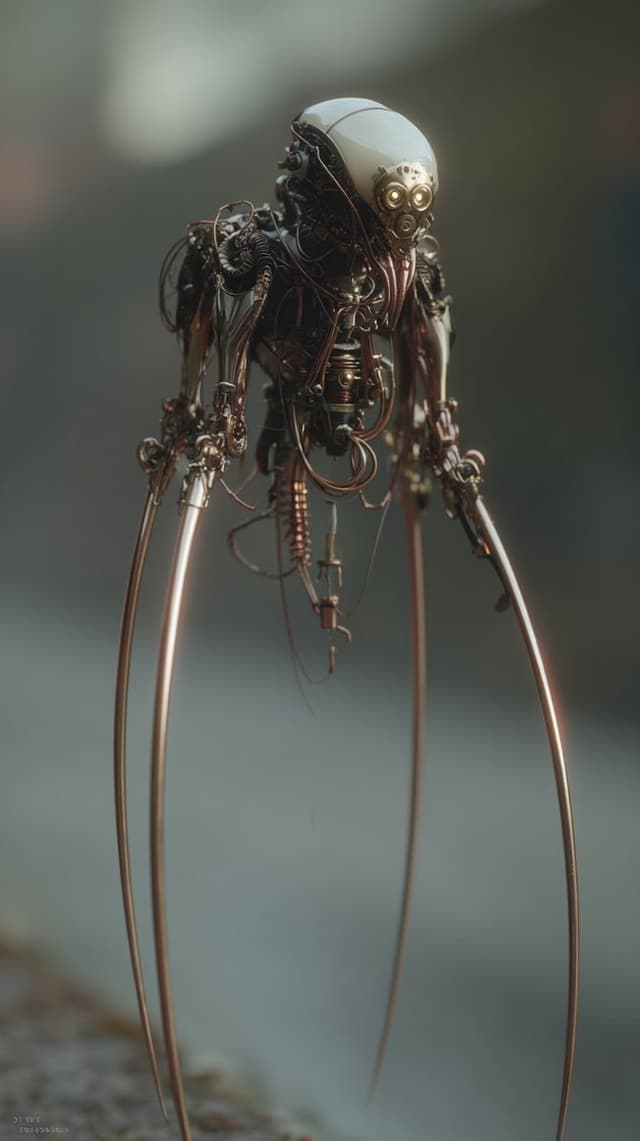
Image Editing Prompt: Adding Creatures to Background
Kyle SalazarGPT Image 1.5
using the first image and its style and size, add the creature from the second image into the first at varying distances in the background, ensure the focus and size of the creatures is appropriate for its distance, there should be a total of {argument name="number of creatures" default="7"} of them, their look and style may vary slightly from one another
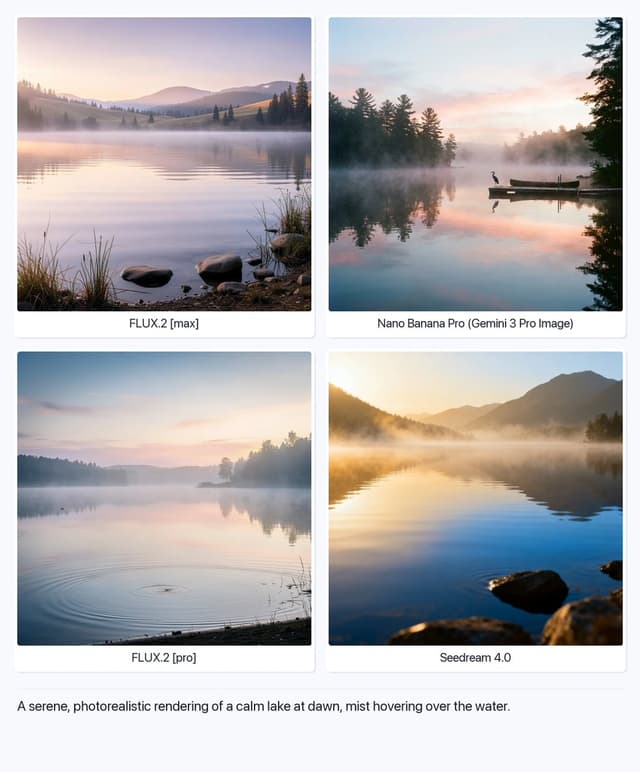
Serene Lake at Dawn
Artificial AnalysisGPT Image 1.5
A serene, photorealistic rendering of a calm lake at dawn, mist hovering over the water.

Structured Selfie Portrait Prompt
KeorUnrealGPT Image 1.5
{
  "scene": {
    "type": "bedroom_interior",
    "lighting": "natural_daylight",
    "atmosphere": "casual, cozy, domestic"
  },
  "subject": {
    "pose": {
      "position": "lying_prone_on_bed",
      "orientation": "facing_camera",
      "legs": "knees_bent_upwards, ankles_crossed",
      "arms": "left_arm_extended_for_selfie",
      "head": "resting_on_pillow"
    },
    "appearance": {
      "hair": "long, straight, {argument name="hair color" default="pink"}",
      "expression": "gentle_smile, direct_eye_contact",
      "complexion": "fair, rosy_cheeks"
    },
    "attire": {
      "top": {
        "item": "tank_top",
        "color": "light_green",
        "texture": "ribbed",
        "style": "spaghetti_straps"
      },
      "bottom": {
        "item": "gym shorts",
        "color": "light_green",
        "details": "ruffled_hem, scrunched_texture"
      },
      "accessories": {
        "feet": "white_crew_socks"
      }
    }
  },
  "environment": {
    "bedding": {
      "sheets": "white, rumpled",
      "pillows": "white_with_floral_pattern",
      "duvet": "white, puffy"
    },
    "background_elements": {
      "windows": {
        "quantity": 2,
        "features": "white_frames, horizontal_blinds"
      },
      "furniture": {
        "side_furniture": {
        "side_table": {
          "location": "left_side",
          "visible_items": [
            "skincare_products",
            "pink_mug",
            "small_potted_plant",
            "tissues"
          ]
        }
      }
    }
  },
  "composition": {
    "angle": "high_angle_selfie",
    "framing": "medium_shot",
    "focus": "sharp_subject, soft_background"
  }
}
Find your next direction
By use case
App / Web Design →Comics and storyboards →E-commerce images →Game assets →Educational graphics →Posters and flyers →Product marketing →Profiles and avatars →Social media posts →YouTube thumbnails →By style
3D renders →Anime and manga images →Chibi characters →Film stills →Cyberpunk images →Illustration →Chinese ink images →Isometric →Minimalism →Photography →Vintage images →Sketch and line art →Watercolor →Take the idea further.
Bring your prompts, references and results together in one creative space.
Open your canvas ↗