

How to Create AI Ad Creative: Turn One Brief Into Multiple Ad Variations
Quick Answer
To create AI ad creative, start with one clear campaign brief and use it to generate concepts across several AI image models. Select the strongest visual direction, turn it into a master creative, then adapt it into different aspect ratios and controlled variants. Before exporting, check that the product, copy, and visual identity stay consistent across every version.
For useful A/B testing, change one element at a time, such as the CTA, while keeping the rest of the creative as stable as possible.
In this guide, we'll build a skincare campaign in Astorie from one brief, compare three AI image models, create three aspect ratios, and test controlled CTA variations.
What Is AI Ad Creative?
AI ad creative is advertising content created or adapted with generative AI. It can include product visuals, backgrounds, headlines, CTA text, and different versions of the same campaign.
A single AI-generated product image is not the same as an AI ad creative workflow. For paid social, you often need several assets built around the same idea.
For example, one campaign might need a square feed ad, a vertical version, and a landscape version. You may also want several headlines or CTAs for A/B testing.
AI can help turn one campaign idea into these variations without rebuilding every creative from scratch.
What is in-image text?
In-image text is text that appears directly inside the generated image. This can include a headline such as "YOUR DAILY SHIELD", a CTA such as "SHOP NOW", or text printed on product packaging.
This matters for ad creative because the text needs to be both correct and visually integrated into the design. Ideogram, for example, is built with image typography and text rendering as core capabilities.
What Do You Need Before Creating an AI Ad?
Start with an ad brief, not just an image idea.
Your brief should tell the model what it is advertising, what the creative should look like, and what message needs to appear in the image.
For this test, I created a fictional skincare brand called SOLA.
Brief element | SOLA campaign |
Brand | SOLA |
Product | Daily SPF 50 Facial Sunscreen |
Visual direction | Premium minimalist skincare |
Headline | YOUR DAILY SHIELD |
CTA | SHOP NOW |
Starting format | 1:01 |
I then turned the brief into this prompt:
Create a premium minimalist skincare ad for SOLA, a daily SPF 50 facial sunscreen. Place a white sunscreen tube labeled "SOLA SPF 50" on a warm cream-colored surface. Strong summer sunlight creates clean geometric shadows, with a subtle blue-sky background. Fresh, modern editorial product photography. Add the headline "YOUR DAILY SHIELD" and the CTA "SHOP NOW". Keep all text clearly readable. Do not add any other text or logos. Square 1:1 paid social ad.
Notice that the prompt defines both the image and the copy. This gives the model less room to guess what the final ad should contain.
How to Create AI Ad Creative on Astorie: Step-by-Step
For this workflow, I used a single Astorie canvas to move from the original brief to the final ad variations.
The workflow was not tied to one image model. Instead, I used different models for concept generation, final composition, and controlled editing.
Step 1: Turn Your Ad Brief Into a Text Prompt
Start on a blank Astorie canvas and add your ad prompt.
Include the product, setting, visual style, headline, and CTA in the same prompt. If exact wording matters, put the required text in quotation marks.
For the SOLA campaign, I asked for a white SPF 50 sunscreen tube, warm cream tones, summer light, and a blue-sky background. I also specified the exact headline and CTA.

Keeping this prompt in its own node also makes it easier to reuse. You can connect the same brief to several image models without copying and rewriting it.
Step 2: Compare Ad Concepts Across AI Image Models
Next, I used the same prompt to test different image models.
I generated the SOLA concept with Ideogram V3, FLUX.2, and Nano Banana 2. Because all three received the same brief, the outputs made it easier to see how each model interpreted the campaign.
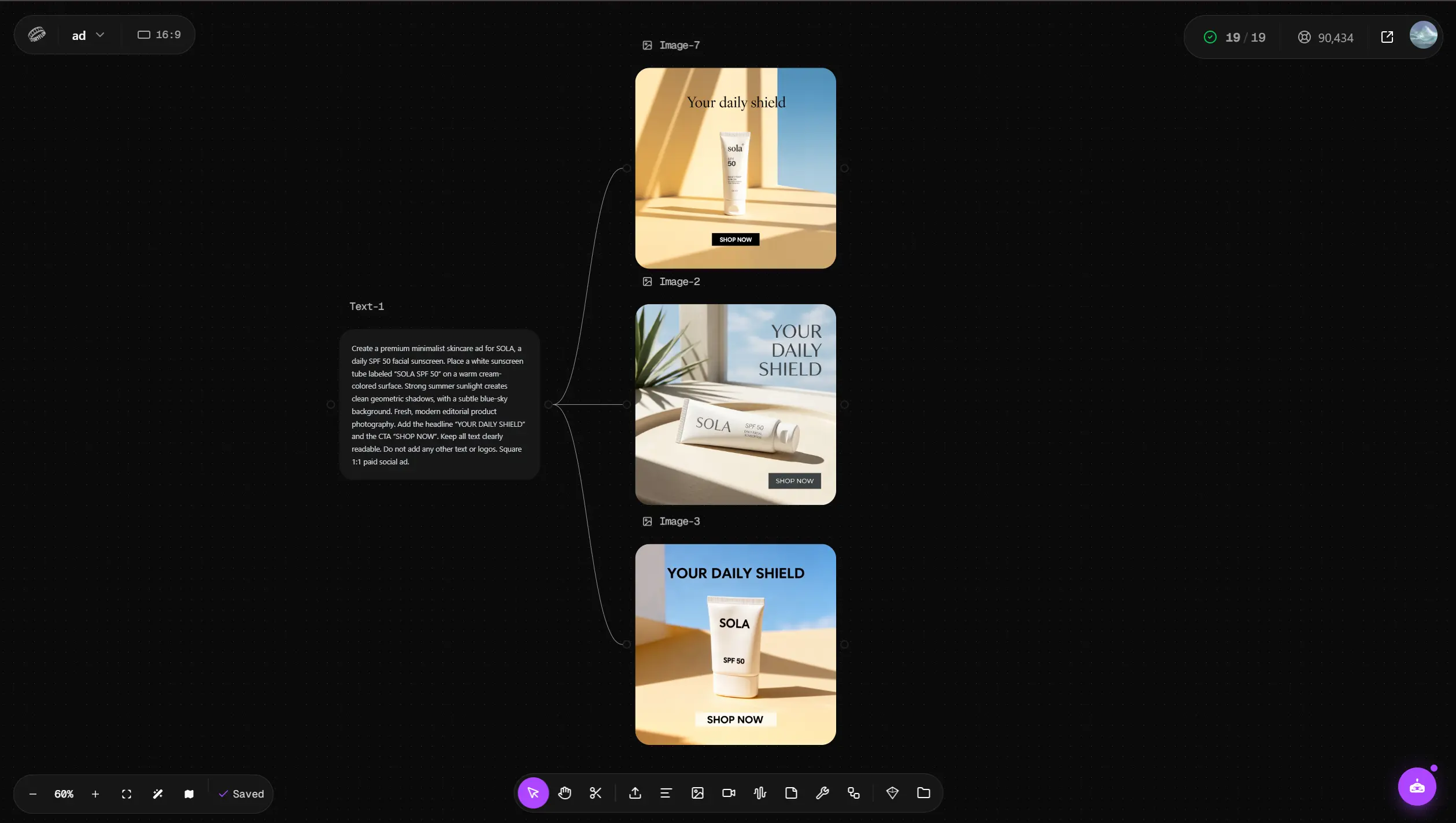
All three models followed the main request. They produced a sunscreen product, the required headline, and the SHOP NOW CTA. But the visual results were very different.
Model | Result in our SOLA test | Best quality |
Ideogram V3 | Most polished finished-ad look | Typography and visual hierarchy |
FLUX.2 | Simplest visual treatment | Followed the core prompt and required text |
Nano Banana 2 | Strong editorial product scene | Product photography and composition |
Ideogram V3 produced the most complete advertising layout. The product, headline, and CTA had a clear hierarchy, and the result looked close to a finished skincare ad.
FLUX.2 followed the prompt, but its visual treatment was much more basic in this test. The large bold headline, simple background, and product presentation made it feel more like an AI-generated mockup than a premium skincare campaign.
Nano Banana 2 took the brief in a more editorial direction. Its natural light, plant shadows, product placement, and blue-sky background gave it a stronger product-photography feel.
This comparison shows an important point: prompt accuracy and ad quality are not the same thing. A model can include every requested element while producing a creative that still needs more work.
Step 3: Refine the Selected Concept With a Reference Image
I chose the Nano Banana 2 result as the visual reference for the next stage.
It was not the strongest finished ad. However, its product photography gave me the best visual starting point.
I connected that image as a reference, kept the original SOLA prompt, and generated the finished creative with Ideogram V3.

This combined two useful parts of the earlier results. The Nano Banana 2 image provided the visual direction, while Ideogram V3 produced a stronger advertising layout with integrated headline and CTA text.
Ideogram V3 officially supports style references and is designed to integrate typography into generated images. That makes it useful for designs where text is part of the creative rather than something added later in a design tool.
The result became the base creative for the rest of the workflow.
Step 4: Generate Different Ad Aspect Ratios
One ad format is rarely enough for a paid social campaign.
I used the selected concept to generate three formats available in this Astorie workflow:
- 1:1 for a square placement
- 9:16 for vertical placements
- 16:9 for landscape placements

These should be treated as aspect-ratio variants, not simple crops.
The model can adapt the product, negative space, headline, and CTA to the new canvas. This gives each format more room to work as an independent ad.
This also means the outputs need to be reviewed. Generative resizing can introduce changes that would not happen with a standard crop.
Nano Banana 2 itself supports square, portrait, and landscape outputs, and Google highlights cross-format resizing as one of the model's production-oriented capabilities.
Step 5: Create CTA Variants From the Final Ad
Different aspect ratios solve one problem. A/B testing creates another.
For a useful CTA test, I did not want the AI to redesign the whole ad. I wanted to keep the approved 1:1 creative and change only one variable.
I saved the final 1:1 ad as an Element in Astorie and used it as the reference for a new Create Image node.
The original CTA was:
SHOP NOW
I created two variants:
DISCOVER MORE and TRY IT TODAY
For the first variation, I used:
Create a variation of this ad with the CTA changed from "SHOP NOW" to "DISCOVER MORE".
Keep the headline "YOUR DAILY SHIELD" unchanged. Preserve the SOLA SPF 50 product, composition, colors, lighting, background, typography, and overall advertising style as closely as possible.
Do not add any other text.
I repeated the same process for TRY IT TODAY.

This creates a much cleaner experiment than asking the model for three completely different ads. The CTA changes, while the main creative stays stable.
Step 6: Check Product Consistency Before Exporting
This step revealed the most important issue in my test.
I first tried using Ideogram V3 again to change the CTA. The requested text changed, but so did the sunscreen product itself.
That is a problem for product advertising. If you only ask to change a CTA, a new bottle shape or package design is not a useful variation.
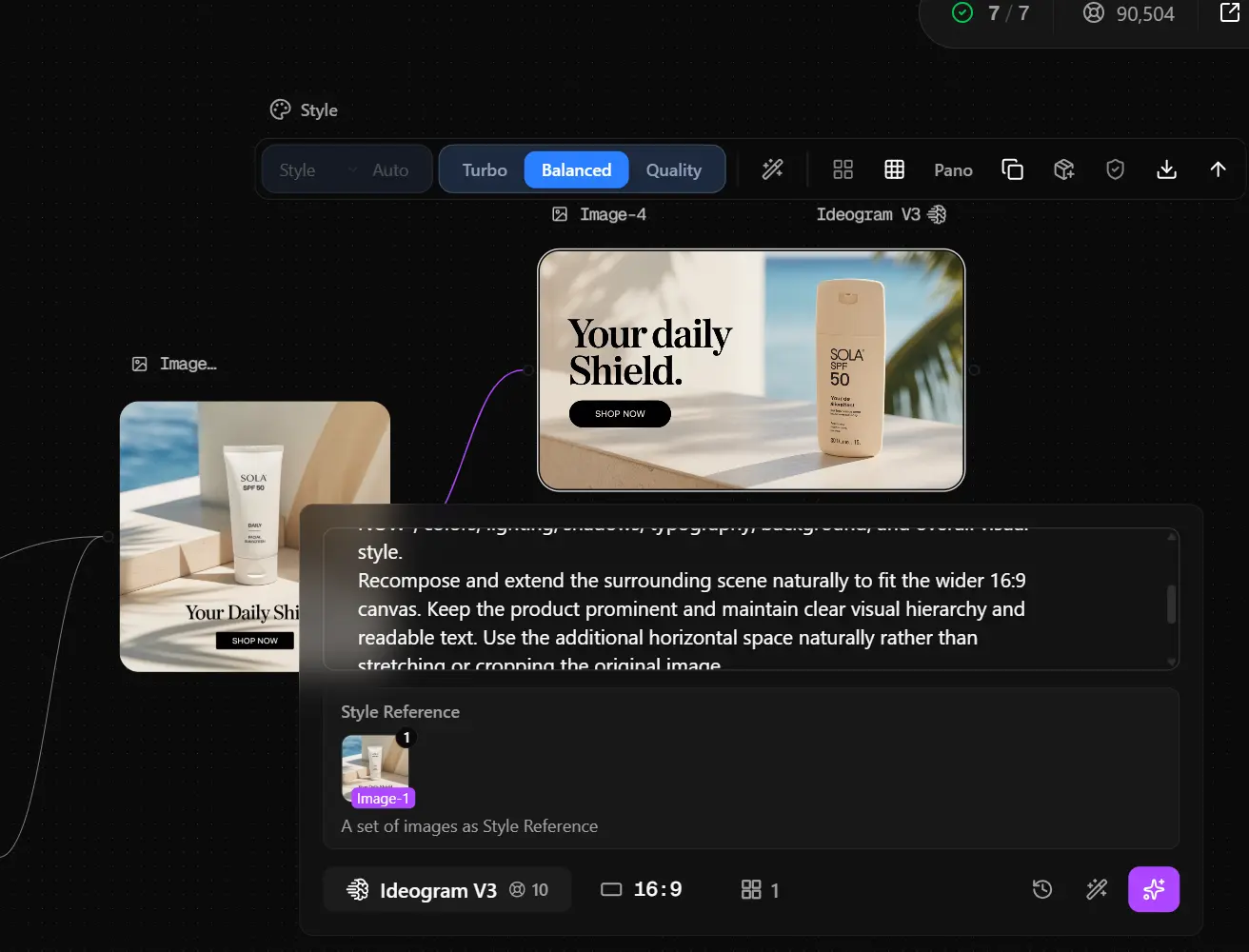
I then ran the CTA edits with Nano Banana 2.
This time, both tests changed the requested CTA while keeping the product and the rest of the ad visually consistent.

The result fits Nano Banana's broader editing design. Google's image models have focused on preserving subjects and scenes during edits, and Nano Banana 2 specifically adds stronger subject consistency and instruction following.
Still, this was one SOLA test. It does not mean Ideogram will always change a product or Nano Banana 2 will always preserve one.
The practical lesson is more useful:
The model that creates your best initial ad may not be the best model for controlled edits.
Always check the product again after creating a variation.
Which AI Image Model Should You Use for Ad Creative?
There is no single model that won every stage of this workflow.
The better approach was to choose a model based on the task.
Task | Model tested | What we found |
Concept exploration | Ideogram V3, FLUX.2, Nano Banana 2 | The same brief produced very different visual directions |
Finished ad | Ideogram V3 | Strongest ad layout and typography in our SOLA test |
Visual reference | Nano Banana 2 | Strong editorial product photography |
CTA editing | Ideogram V3 | Product changed during our test |
Controlled CTA editing | Nano Banana 2 | Preserved the creative while changing the CTA in both tests |
These results should not be read as a universal model ranking.
The prompt, reference image, product, and generation settings can all affect the result. The point of testing several models is to find the best tool for each stage of your own workflow.
For text-heavy ads, Ideogram is worth testing because text rendering is a core part of the model. For controlled edits, Nano Banana 2 is also a strong option because it is designed around instruction following and subject consistency.
How to Build an AI Ad Creative Testing Matrix
Once the base ad works, the workflow can expand into a creative testing matrix.
Our small SOLA test started with one campaign concept. We then created three aspect ratios and three CTA options:
Variable | Variations |
Campaign concept | SOLA Daily SPF 50 |
Aspect ratio | 1:1 / 9:16 / 16:9 |
CTA | SHOP NOW / DISCOVER MORE / TRY IT TODAY |
You could continue branching from the same creative.
For example, you might test a new headline, offer, background, or product angle. But more variations do not automatically make a better test.
If you want to learn whether the CTA affects performance, keep the rest of the creative as stable as possible. If the AI changes the product, background, headline, and CTA at the same time, you no longer know which change caused the result.
This is where controlled AI editing matters more than raw generation volume.
The goal is not to make random ads. It is to turn one campaign idea into useful assets with clear reasons for each variation.
Common Problems When Creating AI Ad Creative
The Product Changes Between Variations
Product drift can happen when an image model treats your reference as inspiration rather than as an object that must stay unchanged.
We saw this when using Ideogram V3 for the CTA edit. The safest approach is to compare the edited output with the approved original before using it.
For sensitive product details, test a model built for consistent image editing. In our workflow, switching the CTA editing stage to Nano Banana 2 solved the problem.
The AI Generates the Wrong Text
AI image models have improved at typography, but text still deserves a manual check.
Look at the headline, CTA, brand name, product label, numbers, and small packaging text. A beautiful ad is not ready for use if the model changes SPF 50 into the wrong product claim.
Keep important copy short and place the exact wording in quotation marks in your prompt.
Different Ad Sizes Lose Visual Consistency
Changing aspect ratio can change more than the canvas.
Check whether the product still looks like the same product. Then compare the color palette, lighting, headline, CTA, and overall visual direction.
The three formats do not need identical layouts. They do need to feel like the same campaign.
You Generate Lots of Ads but Nothing Useful to Test
AI makes it easy to produce variations. That does not mean every variation deserves ad spend.
Start with a hypothesis.
If you want to test CTA language, change the CTA. If you want to test visual direction, change the visual direction.
This keeps your creative matrix useful instead of turning it into a folder of slightly different AI images.
AI Ad Creative FAQs
Can AI generate ads with text?
Yes. Current image models can generate headlines, labels, and other text directly inside an image. Ideogram is designed specifically with typography and text rendering in mind, while Nano Banana 2 also supports improved in-image text rendering.
For advertising, always review the final text before publishing. Brand names, prices, product claims, and CTAs need to be exact.
How do I keep my product consistent in AI-generated ads?
Use the approved product image as a reference and tell the model exactly what can and cannot change.
More importantly, test the editing model before scaling the workflow. In our SOLA test, Nano Banana 2 preserved the original product during two CTA edits, while our Ideogram V3 edit changed it.
Can AI create different ad sizes from one creative?
Yes. AI image models can generate square, vertical, and landscape versions of the same campaign concept. Some current models support aspect-ratio control directly.
However, an AI-generated format variation is not always a simple crop. Review each version for product consistency, text accuracy, and layout.
Which AI model is best for creating ad variations?
It depends on what you are varying.
A model that is strong at initial generation may not be the best choice for a controlled edit. In our test, Ideogram V3 worked well for the finished text-heavy ad, while Nano Banana 2 performed better when we needed to change only the CTA.
How many AI ad creative variations should I generate?
Generate enough variations to test a clear hypothesis rather than aiming for a fixed number.
A small test with one controlled variable can teach you more than dozens of ads where everything changes at once. Once you identify useful variables, the same workflow can scale into a much larger creative matrix.
From One Brief to a Repeatable Ad Creative Workflow
The main benefit of AI ad creative is not making one image faster. It is turning a campaign brief into a repeatable system for exploring, refining, and testing ideas.
Our SOLA workflow moved through:
One text brief → three image models → selected visual reference → final ad → three aspect ratios → controlled CTA variants.
The test also showed why a multi-model workflow can be useful. Ideogram V3 gave us the strongest finished ad layout, while Nano Banana 2 was more reliable for the controlled CTA edits in this case.
Instead of looking for one AI model that does everything, build the workflow around the task. Generate broadly when you need ideas. Then edit carefully when you need consistency.
That is what turns AI image generation into usable ad creative.
Ready to try it on the canvas?
Open Astorie and fan your prompt across every frontier model in one workflow.