AI 创作教程

使用最佳 AI 模型创建图像、视频、音频等的分步指南。每个教程包含提示词示例、参数设置和专家技巧。

71 个教程 · 最近更新于 2026年10月12日

How to Clone a Voice with AI Without Losing the Original Sound

How to Clone a Voice with AI Without Losing the Original Sound

To clone a voice with AI, prepare a clean reference recording, create a voice clone, test the generated speech, and save the final Voice ID for future use. This guide explains how to build a reusable voice workflow while keeping the original speaker characteristics consistent.

Joey
Astorie — The Creative Canvas for AI Studio

如何从图像中移除背景

一键获得像素级精确的背景移除——产品照片、肖像、标志和复杂场景都适用。电商运营团队为每个 SKU 拿到干净的 PNG 抠图发到详情页,并把它们合成到 AI 生成的生活方式场景中——不用请摄影师。在 Astorie 画布上,把产品图通过 Bria RMBG 抠出精准 alpha 通道,把抠图送进 Nano Banana 2 或 Flux Kontext 做链式编辑(把主体放到 AI 生成的生活方式背景上),再送到视频节点做动效。最终交付是可以直接挂市场的抠图和 AI 生活方式合成图。选择下方模型走完抠图到合成的流水线。

Astorie Editorial3 个模型教程
A still photograph being animated into a moving video clip on the Astorie canvas, with the same source image fanned out across Kling, Seedance, and Ray 2 video nodes

如何用 AI 将静态图片制作成动画

让任何照片或插画动起来。上传图片,让 AI 生成自然运动、镜头移动和电影级特效。

Astorie Editorial3 个模型教程
Before and after of an AI 4K upscale on the Astorie canvas: a soft 1024px portrait on the left and a crisp 3840x2160 version on the right with restored skin, hair, and fabric detail

如何用 AI 将图片升级到 4K

在不丢失细节的情况下将图像分辨率提高最多 4 倍。选择下方的放大器获取模型专用技巧和质量对比。

Astorie Editorial2 个模型教程
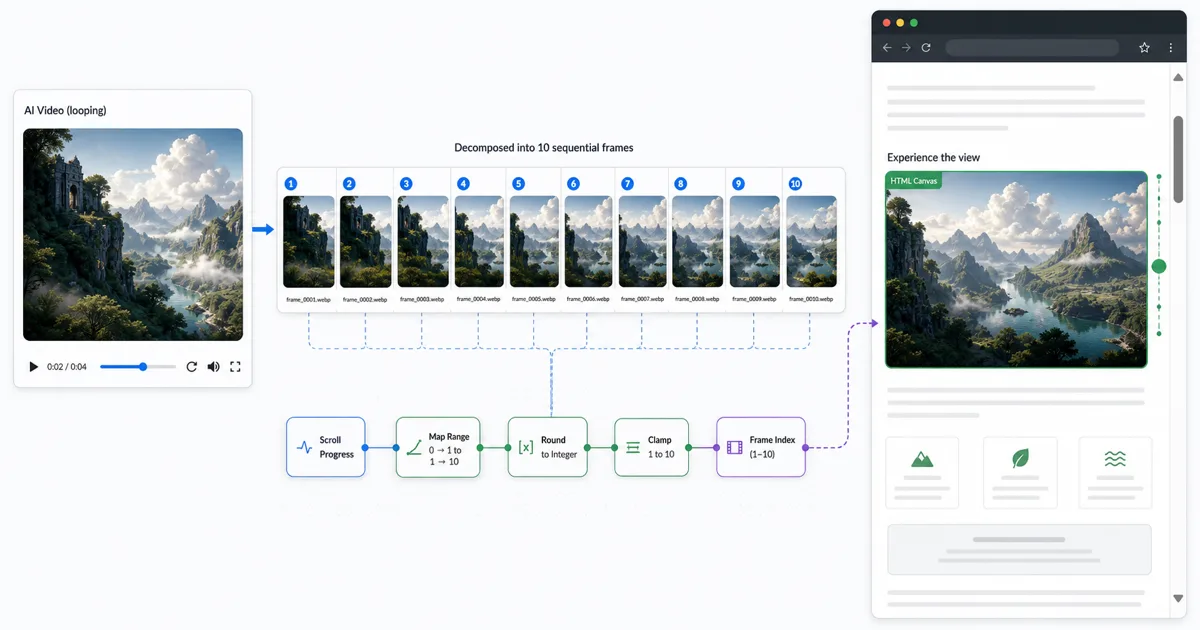
A WebP frame sequence extracted from an AI video, laid out across the Astorie canvas and wired into a GSAP ScrollTrigger canvas scroll-scrub

如何从 AI 视频中提取帧

导演从一段 5 秒 AI 视频里挑出最强的一帧,用作序列下一镜头的参考图。在 Astorie 画布上,把源片(Seedance 2、Kling 3 等)送到 frame-extraction 工具节点,拉到选定时间码,把抽出来的静帧链接到 Nano Banana 2 图像编辑节点或直接当作下一段视频节点的起始帧。输出是带参考锁的画面:可作为下一镜头起始帧、图像编辑链的输入或获批镜头的主视觉静帧。选择下方模型走完抽帧工作流。

Astorie Editorial2 个模型教程
Astorie — The Creative Canvas for AI Studio

如何生成 AI 艺术插画

使用最佳图像生成模型创建专业品质的 AI 艺术插画。选择下方的模型获取分步教程和优化提示词。

Astorie Editorial5 个模型教程
Astorie — The Creative Canvas for AI Studio

如何创建 AI 产品摄影

无需拍摄即可生成工作室品质的产品照片。选择下方模型获取定制提示词和参数设置。

Astorie Editorial3 个模型教程
Astorie — The Creative Canvas for AI Studio

如何用 AI 设计社交媒体素材

几秒钟内设计出引人注目的社交媒体视觉素材。每个指南都涵盖平台专用尺寸、风格和不同 AI 模型的提示词技巧。

Astorie Editorial3 个模型教程
Astorie — The Creative Canvas for AI Studio

如何用 AI 编辑和转换照片

使用自然语言指令编辑照片。上传图片,描述更改,让 AI 处理其余部分。选择下方模型获取编辑专用工作流。

Astorie Editorial3 个模型教程
Astorie — The Creative Canvas for AI Studio

如何创建 AI 视频广告

无需制作团队即可生成专业品质的视频广告。选择下方模型获取广告专用提示词、宽高比和节奏建议。

Astorie Editorial4 个模型教程
Astorie — The Creative Canvas for AI Studio

如何生成 AI 音乐视频

无需拍摄团队即可制作音乐视频画面。生成与曲目氛围和节奏匹配的电影场景、抽象视觉或叙事序列。

Astorie Editorial2 个模型教程
Astorie — The Creative Canvas for AI Studio

如何创建 AI 数字人视频

通过将音频同步到肖像创建自然的数字人视频。选择下方的口型同步模型获取工作流指南。

Astorie Editorial3 个模型教程