

AI Video Color Grading: Change the Look with Prompts

AI video color grading starts with a specific look brief: which colors should change, which details must remain, and whether the original action must stay frame-for-frame intact. That last requirement determines the route. A tool that adjusts existing footage and a model that generates a new clip from a reference video can produce similar-looking previews while doing different jobs.
This guide shows how Clara used prompts to explore warm and cool kitchen looks in Astorie. The actual route was Seedance 2.0 Omni reference-video generation. It produced distinct color candidates, but changed duration and action timing, so it is not evidence of an exact source-preserving grade.
Choose the route before changing the look
Need | Appropriate route to investigate | Acceptance check |
|---|---|---|
Keep an approved performance, timing and edit | Color adjustments applied to the existing frames | Same cut points and action timing; inspect scopes and protected colors |
Explore a new look with some scene variation acceptable | Reference-video generation with an explicit color brief | Desired atmosphere plus acceptable changes in action, identity and details |
Design colors before generating the scene | Palette or visual reference guiding new generation | Readable palette relationships and coherent lighting |
Color correction addresses unwanted imbalances; creative grading establishes a chosen look. Adobe’s color grading overview describes adjustments on an editing timeline. The generative route tested below supplies new candidates instead of an editable correction stack, mask or LUT.
If only a still reference is needed, use the frame extraction workflow to isolate a useful moment. Keep the original clip when the action matters: a still cannot communicate its timing.
Write a useful color brief
Describe a restrained overall direction, the tonal regions it affects and the details to protect. In a kitchen, pale tiles and daylight can reveal a warm or cool shift, while skin, a white mug, a red tin and a navy shirt provide concrete review targets. They are checks, not a guarantee that the model will preserve exact colors.
A request for “cinematic” alone leaves exposure, saturation, contrast and temperature open. State whether you want warm amber highlights or cool blue-gray surfaces, whether shadows should remain readable, and whether new props or changed actions are acceptable.
The kitchen source and the tested settings
Clara generated a fresh kitchen source with Seedance 2.0 Omni, then connected that original separately to warm and cool branches. Both result nodes used Seedance 2.0 Omni, Fast, 16:9, 720p and 5s. The source’s quality mode was not independently confirmed. The earlier suggestion of another model version was corrected by Clara; it is not the actual test label.
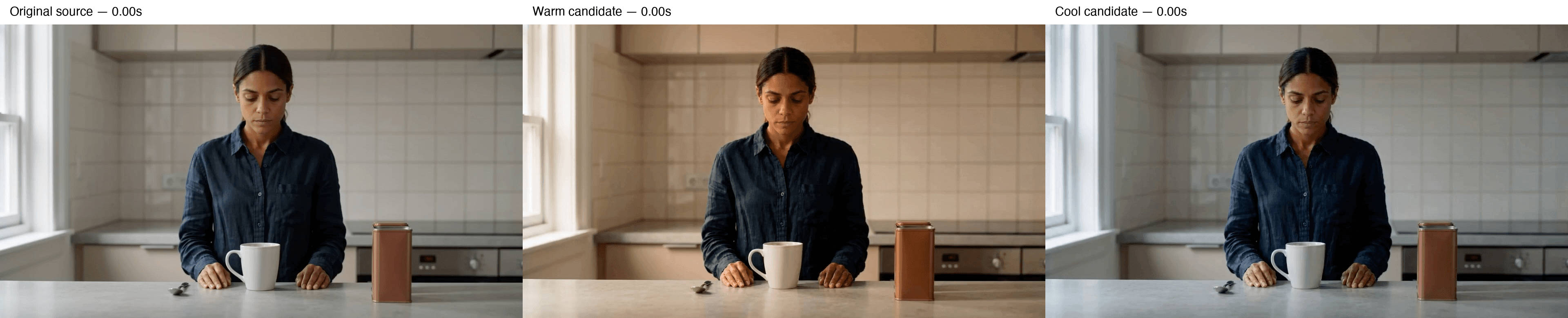
Figure 1. First-frame comparison of the original kitchen clip, warm result and cool result. Frames were extracted and arranged without applying another color treatment. A first frame does not demonstrate action preservation.
Original kitchen source generated by Clara with Seedance 2.0 Omni; about 8.062 seconds, before either color-look branch.
Make the warm candidate
On the canvas, add a compatible Video node, select the actual reference-video model, and connect the kitchen source to its References area. Confirm that the reference is the original, rather than an already changed result. Enter the full warm brief, confirm Fast, 16:9, 720p and 5s, then generate once.
Original warm prompt used by Clara
Edit only the color look of the connected kitchen video. Apply a restrained warm amber cinematic grade consistently from the first frame to the last. Gently warm the daylight, pale kitchen surfaces and ambient highlights, with soft highlight roll-off, natural contrast and readable shadows. The warm look should be present immediately, with no animated transition from neutral to warm.
Preserve the woman's identity and natural medium-brown skin tone. Keep the white ceramic mug and off-white backsplash recognizable as white and off-white, the coffee tin brick red, the shirt dark navy, and the spoon metallic silver. Allow a subtle warm influence without turning neutral surfaces strongly yellow, making skin orange, changing the tin to a different color or losing detail in the dark shirt. Preserve the existing ceramic, cotton, skin and metal textures.
Preserve the original composition, room, objects, facial expressions and all existing movement. Keep the mug slide, hand and finger positions, contact and overlaps, release and hand return exactly as they occur in the input. Do not add, remove, repeat or retime any action. Keep the complete source duration and the original camera framing.
Make a color-grade change rather than redesigning or relighting the scene. Do not add new lamps, sunlight beams, shadows, people or props. No camera movement, cuts, zoom, focus changes, fades, text, logos or watermarks. Avoid brightness pumping, flicker, moving edges, texture changes and object deformation.
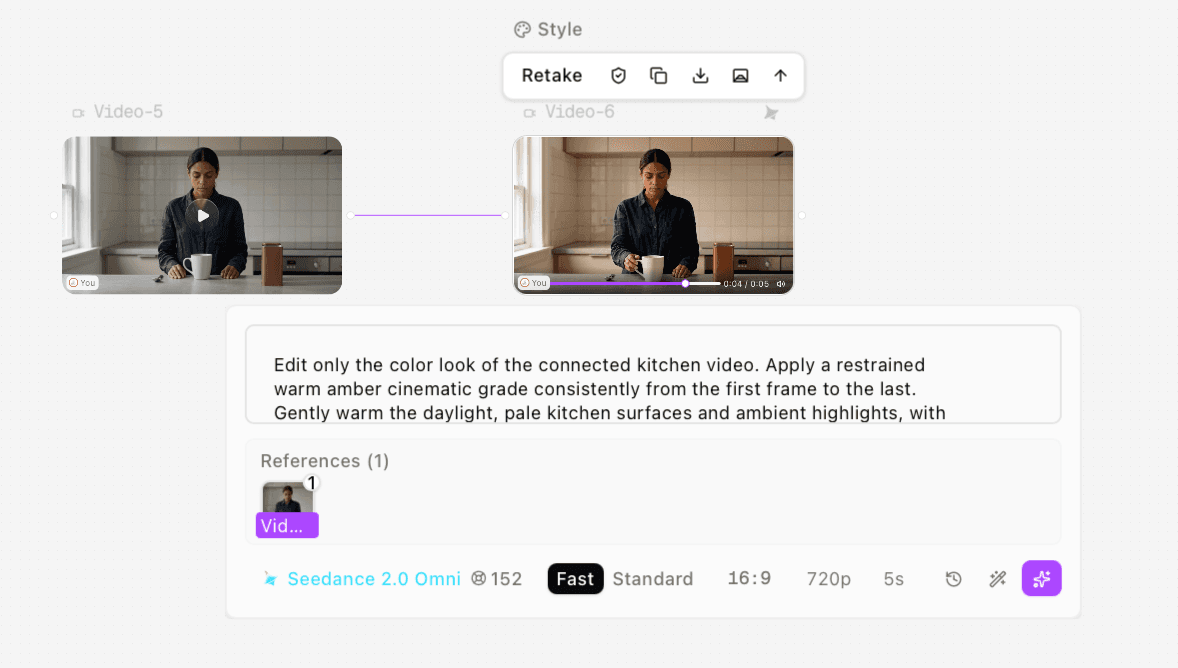
Figure 2. Warm-result node with the connected kitchen source and actual Seedance 2.0 Omni Fast settings. The quote shown is 152 credits.
Warm kitchen candidate: a visible amber/brown shift with an approximately five-second generated output and altered action timing.
Branch from the original for the cool candidate
Create the second branch from the same original clip. Clara kept the warm node’s model and settings and changed the prompt. The cool brief was also scoped to a requested five-second output, rather than requiring all eight seconds of the source to fit unchanged. Consequently, this is not a strict experiment in which only color wording differed.
Original cool prompt used by Clara
Edit the color look of the connected original kitchen video. Create a restrained cool blue-gray cinematic look across the entire requested 5-second output. Gently cool the daylight, pale kitchen surfaces and ambient highlights, with soft highlight roll-off, natural contrast and readable shadows. The cool look should be present immediately, with no animated transition from neutral or warm to cool.
Preserve the woman's identity and natural medium-brown skin tone. Keep the white ceramic mug and off-white backsplash recognizable as white and off-white, the coffee tin brick red, the shirt dark navy, and the spoon metallic silver. Allow a subtle cool influence without making skin gray, blue or cyan, turning the mug strongly blue, changing the tin to a different color or losing detail in the dark shirt. Preserve the existing ceramic, cotton, skin and metal textures.
Preserve the original composition, room, objects, facial expressions and existing movement. Keep the mug slide, hand and finger positions, contact and overlaps as close to the input action as possible within the requested output. Do not invent, repeat or add actions. Keep the original camera framing and avoid abrupt changes in movement.
Make a color-look change rather than redesigning or relighting the scene. Do not add new lamps, sunlight beams, shadows, people or props. No camera movement, cuts, zoom, focus changes, fades, text, logos or watermarks. Avoid brightness pumping, flicker, moving edges, texture changes and object deformation.
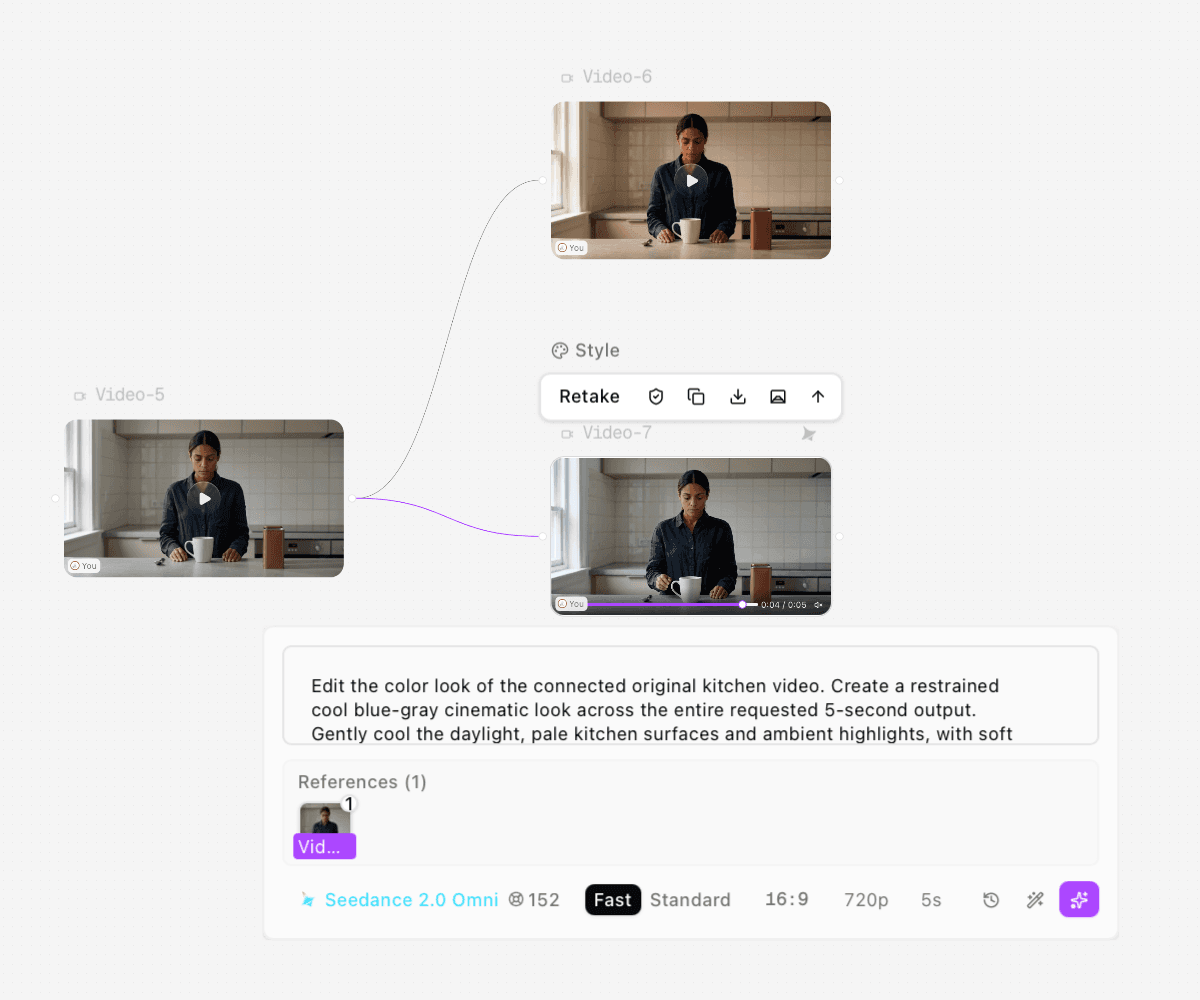
Figure 3. Both outputs branch from the original kitchen video. The cool node shows Seedance 2.0 Omni Fast, 16:9, 720p and 5s.
Cool blue-gray kitchen candidate generated from the original source, not from the warm result; complete original output.
Compare color and content separately
The warm samples show an amber/brown shift on pale surfaces and skin. The cool samples are more neutral to blue-gray. The white mug, red tin and dark shirt remain broadly identifiable, but no calibrated color measurement was made.
The timing check changes the decision. The original is approximately 8.062 seconds; both results are approximately 5.054 seconds. At the sampled five-second point, the warm hand has returned to the counter while the cold hand and source are still at the mug. These outputs are not the same action with only a different grade.
Check | What happened | Production implication |
|---|---|---|
Look direction | Warm and cool candidates are visibly different | Useful for selecting an atmosphere |
Duration | 8.062s source; about 5.054s per result | Cannot replace the whole source without an edit decision |
Action timing | Hand position differs at sampled 5s | Do not substitute into a locked cut as if frames match |
Protected objects | Mug, tin and shirt remain recognizable | Check exact color, geometry and textures at delivery size |
Sound | One audio track in each file; not listened to | Retain or replace sound only after a listening review |
Review, download and decide whether to use the candidate
After generation completes, preview each branch and download the complete MP4 with the video toolbar. Keep filenames that identify source, look and version. Compare the same subject regions at several times, and play the entire result before accepting it. Watch for drifting facial details, moving prop edges, exposure changes and action that starts or finishes at a different point.
For a locked performance or client-approved product, use a workflow that changes the existing frames and verify that route directly. A reference-based candidate can still be useful for look development or a replacement shot when reinterpretation is acceptable. It should not be sold as a lossless color-only edit.
The benefit demonstrated here is expressing a look and preservation brief while keeping the original and two alternatives connected in one project. It did not verify masks, tracking, scopes, LUT export, exact brand-color preservation or end-to-end time savings. For a replacement sequence, revisit multi-shot continuity planning before mixing independently generated looks.
Troubleshoot the brief
If pale surfaces become strongly tinted, request a more restrained shift and name the surface to protect. If the result changes the performance, decide whether the task tolerates regeneration before spending credits on another prompt. When exact timing is non-negotiable, route selection is more useful than adding stronger “preserve everything” language.
These are recommendations for a next attempt, not corrections demonstrated by another run. Clara used one original generation and one run of each look prompt. Each look node quoted 152 credits, totaling 304 quoted credits for the two alternatives; the source-generation charge and itemized actual deductions were not verified.
Frequently asked questions
Can AI change a video’s color without changing anything else?
Some workflows apply adjustments to existing frames; generative reference routes can reinterpret content. Verify the actual route and compare action, duration and protected details. This case did not preserve everything.
Is this a LUT workflow?
No. The tested Seedance 2.0 Omni nodes produced new video candidates. No LUT export, editable grade or color-managed finishing pass was tested.
Why connect both looks to the original?
It keeps the comparison anchored to the same source and avoids building the cool result from an already changed warm candidate.
Which version was actually tested?
The source and both looks used Seedance 2.0 Omni. The warm and cool nodes were Fast, 720p and 5s. Clara corrected an earlier model label; this record follows that correction.
Test method and sources
Clara confirmed that the source, warm prompt and cool prompt were each used unchanged for one run. The files and settings were checked on November 17, 2026. The source decoded to 193 frames; each result to 121 frames. All are H.264, 1280×720 and 24 fps, with one audio track each.
Seventeen source stills and eleven stills per result were inspected at half-second intervals. No complete normal-speed playback, audio listening, calibrated color analysis or exact texture measurement was performed. Claims are limited to sampled appearance, file properties and visible node routing. Adobe’s overview linked above supplies general grading context; it does not validate this generative workflow.
Ready to try it on the canvas?
Open Astorie and fan your prompt across every frontier model in one workflow.