

Alibaba
Qwen-Image
Qwen-Image is Alibaba's instruction-based AI image model family, built on the Qwen multimodal architecture. On Astorie it runs as Qwen Image Edit and Qwen Image Edit Plus for natural-language photo editing, plus Z-Image for text-to-image generation — with standout bilingual (Chinese + English) prompt handling and best-in-class in-image text rendering.
Qwen-Image is an AI image model family from Alibaba (the same company behind the Qwen / Tongyi large-language models) that specializes in instruction-based image editing rather than competing purely on raw generation quality. You describe the change you want in plain language — English or Chinese — and the model edits the image accordingly. As of 2026, Astorie exposes three Qwen-Image variants on one canvas. Qwen Image Edit handles standard edits — background replacement, object removal, style transfer, color grading, and text editing inside the image. Qwen Image Edit Plus is the upgraded edit model that holds context across complex multi-step instructions such as "remove the person on the left, change the sky to a sunset, and add a vintage film grain" in a single pass. Z-Image is Alibaba's general-purpose text-to-image generator that rounds out the family into a complete generate-then-refine pipeline. The model's two signature strengths are bilingual prompt excellence — Chinese editing instructions frequently land more precisely than their English equivalents, a direct benefit of Qwen's Chinese-native training — and unusually accurate rendering of legible text inside images, which most diffusion models still garble. On Astorie the typical workflow is generate-then-edit: produce a base image with a higher-ceiling generator such as FLUX, Imagen 4, or Nano Banana, then wire it into a Qwen Image Edit or Edit Plus node to make targeted, instruction-driven changes without regenerating the whole frame. Because Astorie is a node-based canvas, you can fan the same source image into Qwen-Image and a rival editor like FLUX Kontext side by side, keep both takes in the version tray, and pick the winner — then push the chosen frame straight into Runway Gen4 or Kling for image-to-video.
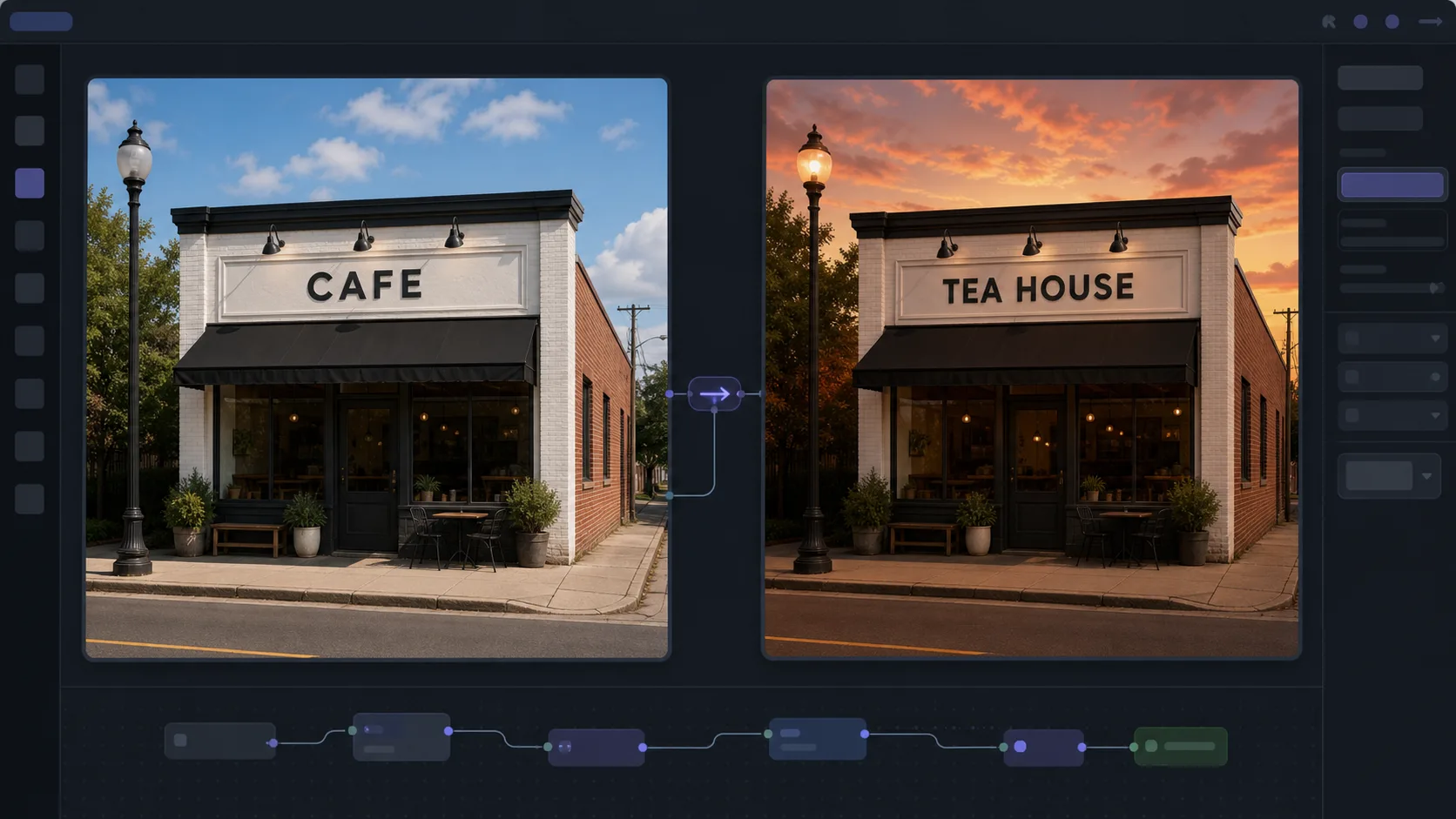
Qwen-Image Variants
| Variant | Description |
|---|---|
| Qwen Image Edit | Instruction-based editing — background swap, object removal, style transfer, color grading, and in-image text editing from natural-language commands in English or Chinese. |
| Qwen Image Edit Plus | Upgraded edit model with stronger context retention for complex, multi-step instructions handled in a single pass (e.g. remove + recolor + add grain at once). |
| Z-Image | Alibaba's general-purpose text-to-image generator — produces base images from a prompt to complete the generate-then-edit Qwen pipeline. |
Capabilities
Best For
- Instruction-based image editing and refinement from natural-language commands
- Chinese-language and bilingual creative workflows
- In-image text editing and rendering (signage, labels, posters)
- Multi-step editing sequences with Qwen Image Edit Plus
- Lightweight, cost-efficient generate-and-edit cycles for everyday production
Strengths
- Excellent instruction-following — edits map closely to what the command actually says
- Strong Chinese and bilingual prompt understanding, a direct result of Alibaba's Qwen training
- Accurate in-image text rendering and editing, where most diffusion models still garble letterforms
- Complete pipeline: generate with Z-Image, refine with Qwen Image Edit / Edit Plus
- Edit Plus resolves complex, multi-part instructions in a single pass
- Cost-efficient editing node — cheap enough to A/B against other editors via fan-out
Limitations
- Z-Image's general generation quality sits below top-tier generators like FLUX, Imagen 4, or Nano Banana
- Edit quality depends heavily on instruction clarity — vague commands yield vague results
- Less brand-recognized in English-speaking markets despite strong technical results
- Best used as a refinement step, not a primary from-scratch generator for hero visuals
Tips & Best Practices
Use Qwen-Image on Astorie
Connect Qwen-Image with other AI models on Astorie's infinite canvas. No GPU required — start free.
Get Started FreeFrequently Asked Questions
What is Qwen-Image?
Qwen-Image is Alibaba's instruction-based AI image model family, built on the Qwen multimodal architecture. It edits existing images from natural-language commands (Qwen Image Edit and Edit Plus) and generates images from text (Z-Image), with standout bilingual Chinese/English prompt handling. On Astorie it runs as nodes on a visual canvas alongside 50+ other image and video models.
Who makes Qwen-Image?
Qwen-Image is made by Alibaba — the same company behind the Qwen (Tongyi Qianwen) family of large language and multimodal models. Its Chinese-native training is why Qwen-Image handles Chinese-language editing instructions especially well.
What is Qwen-Image best used for?
Qwen-Image is best for instruction-based image editing — modifying an existing image with natural-language commands. Use Qwen Image Edit for standard changes (background swap, object removal, text editing) and Qwen Image Edit Plus for complex, multi-step instructions handled in a single pass.
Is Qwen-Image better in Chinese than English?
Qwen-Image performs strongly in both, but Chinese editing instructions often produce more precise results because Alibaba trained Qwen with a Chinese-native foundation. English works well for most standard editing tasks, so bilingual creators get the best of both.
Can Qwen-Image generate images from scratch?
Yes — Z-Image, part of the Qwen-Image family, handles text-to-image generation. That said, the family's strength is editing rather than from-scratch generation. For the best result, generate a base image with FLUX, Imagen 4, or Nano Banana, then refine it with Qwen Image Edit.
What is the difference between Qwen Image Edit and Edit Plus?
Qwen Image Edit handles single, standard edits — background replacement, object removal, style transfer, color grading, and in-image text editing. Qwen Image Edit Plus is the upgraded model that retains context across complex, multi-step instructions, resolving several changes (e.g. remove + recolor + add grain) in one pass.
Can Qwen-Image edit text inside an image?
Yes. In-image text rendering and editing is one of Qwen-Image's strengths — it produces legible signage, labels, and poster copy more reliably than most diffusion models, which still tend to garble letterforms.
How does Qwen-Image compare to FLUX Kontext for editing?
Both are instruction-based image editors. Qwen-Image leads on bilingual (especially Chinese) prompts and in-image text, while FLUX Kontext is often favored for surgical pixel-level edits on Western-market content. On Astorie you do not have to choose — fan the same source image into both nodes and keep the better take from the version tray.
Related Features
How-To Guides
Related Reading
Related Image Models
Midjourney
Midjourney v7
Midjourney v7 is the most recognizable AI image generator, with the strongest aesthetic signature in the category. On Astorie you get V7 for photoreal and painterly work, Niji 7 for anime, Omni Reference for character lock-in, and Stylization, Variety, and Weirdness sliders for fine control — all from the canvas, no Discord required.
View detailsBlack Forest Labs
FLUX
FLUX by Black Forest Labs is a fast, high-quality image generation family known for photorealistic output and excellent prompt adherence. Variants span free-tier dev models to ultra-resolution Pro outputs.
View detailsBlack Forest Labs
FLUX Kontext
FLUX Kontext is a context-aware image generation and editing model that uses reference images to maintain character and style consistency across outputs. Available in Pro and Max tiers.
View details