

10 Figma Alternatives for Different Design Workflows in 2026
Compare 10 Figma alternatives for product design, websites, prototyping, wireframing, and creative production to find the right tool for your workflow.
Key takeaways
- Penpot is the strongest open, cross-platform alternative for collaborative interface design.
- Sketch is the most polished option for Mac-based design teams.
- Framer, UXPin, Axure, Balsamiq, and ProtoPie are better choices for specific publishing or prototyping needs.
- Canva and Astorie complement Figma in brand production and AI-media workflows rather than replacing its interface-design system.
If your team wants a familiar interface-design workflow without being tied to one vendor, start with Penpot. It covers the core work—screens, components, responsive layouts, prototypes, comments, and developer inspection—while using open standards and offering a self-hosted route. Sketch is the better answer for a Mac-based team that values a polished native editor and does not need Windows or Linux authoring.
Those are the two broadest substitutes in this list. Framer is a better choice when a website, not a design file, is the final deliverable. UXPin and Axure become more useful as interaction logic grows. Balsamiq is deliberately simpler. Canva and Astorie solve adjacent production jobs rather than replacing Figma's interface-design system.
Figma alternatives at a glance
| Alternative | Best when you need | Pricing model | Workspace |
|---|---|---|---|
| Penpot | Open, cross-platform UI design | Free; paid cloud from $7/user/mo | Browser / self-host |
| Sketch | Mac-native interface design | $12/editor/mo annually | macOS + web |
| Framer | Designing and publishing websites | Free; Basic from $10/mo annually | Browser |
| Lunacy | Free native desktop design | Free | Windows, macOS, Linux |
| UXPin | Code-backed design systems | From $29/seat/mo annually | Browser |
| Axure RP | Complex product logic | Trial; paid subscriptions | macOS, Windows |
| Balsamiq | Fast low-fidelity wireframes | From $16/editor/mo annually | Browser / desktop |
| ProtoPie | High-fidelity interaction prototypes | Free; paid from $25/mo | macOS, Windows |
| Canva | Campaign and brand production | Free; paid plans | Web, desktop, mobile |
| Astorie | Connected AI-media workflows | Free to start; credit-based | Browser |
Prices and plan descriptions were checked on official product pages on August 24, 2026. Taxes, regional pricing, and plan limits can change.
Before switching, name the problem
Figma is difficult to replace because it is rarely just a drawing tool. A working file may contain component libraries, variables, prototypes, comments, branches, assets, and years of team habits. Moving only makes sense when a recurring constraint—platform access, governance, publishing, prototype depth, or cost—outweighs the migration work.
The most expensive part is often not the new subscription. It is rebuilding component behavior, checking fonts, restoring prototype links, retraining reviewers, and agreeing on a new handoff routine. Before moving a whole workspace, import one representative file and carry it all the way to developer inspection or export.
How this comparison was made
The products were grouped by the job they are designed to finish, then checked against current official feature and pricing pages. Penpot and Sketch are the closest general-purpose alternatives, so the handoff version reserves a controlled test for both. The remaining tools are assessed for a narrower reason to leave Figma: publishing a site, connecting design to code, simulating complex logic, wireframing quickly, producing campaign assets, or generating media.
The top-two order should be confirmed by the same small project in both editors. Until the screenshots and notes are returned, the article should not claim that either tool was faster or easier in practice.
One fair test for Penpot and Sketch
- Create the same 390 × 844 mobile checkout screen with a header, one product row, a total, and a primary payment button.
- Turn the product row or payment button into a reusable component, then create a disabled state without detaching it.
- Duplicate the screen, change the content, and use the editor's layout system to keep spacing stable.
- Link the two screens in prototype mode, then open the developer inspection or export view.
- Record total time, layout corrections, component friction, prototype clarity, and any font, import, sharing, or handoff issue.
1. Penpot
The best place to start if you want a serious, open, cross-platform alternative rather than a lighter design tool.
Penpot feels closest to the underlying job Figma performs. Teams can build interfaces, reusable components, flexible layouts, design systems, and prototypes in a browser, while developers inspect the same work. Its use of open web standards is not a cosmetic distinction: SVG, CSS-oriented layouts, and self-hosting give organizations more control over files and infrastructure.
The trade-off is ecosystem maturity. A team with a large Figma plugin stack, tightly tuned libraries, or complex variables should expect some rebuilding. Penpot is most convincing when openness and cross-platform access are strategic requirements, not when the goal is a frictionless one-click migration.
Choose Penpot if: you want collaborative UI design, developer inspection, and an open or self-hosted path.
Stay with Figma if: your current libraries and plugins are working well and migration control is not a priority.
Pricing: Free core plan; paid cloud plans start at $7 per user per month.
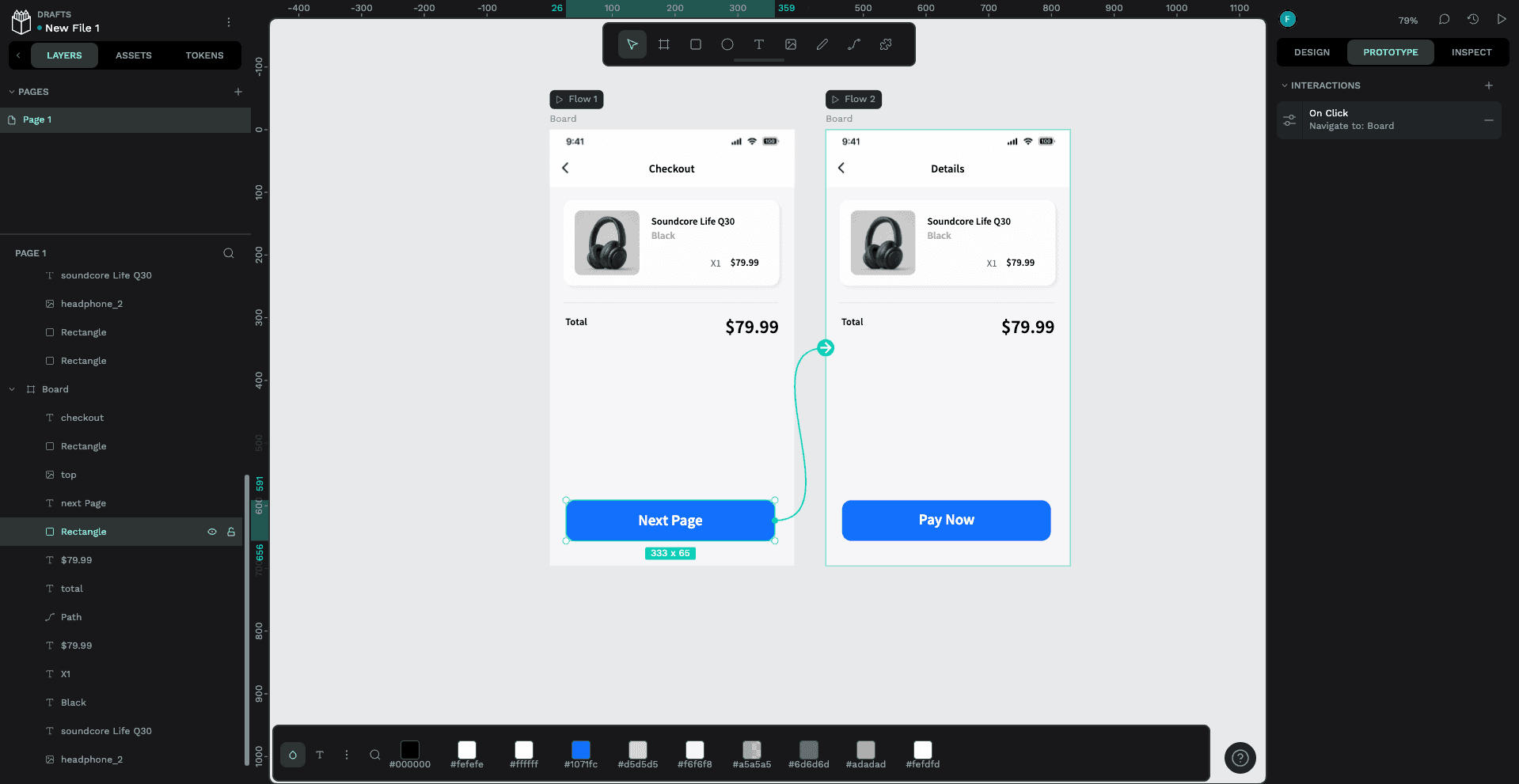
Screenshot placeholder — Penpot controlled workflow test
We completed the two-screen checkout workflow in Penpot in 30 minutes. Reusing components was straightforward, and the layout remained stable while elements were moved. Spacing guides appeared automatically, which made alignment easy. Prototyping was also clear: after switching to Prototype in the right-hand panel, we could select a component, add an interaction, and connect it to the second screen or another element. We did not run into any problems with export or developer handoff.
The main drawback was finding some everyday design controls. Text formatting, cropping, and the pen tool were not always where we expected them to be. The contextual bar at the bottom of the canvas also felt unnecessary during this test, as we rarely used the color and text controls shown there. Penpot handled the core workflow well, but designers coming from Figma may need some time to get used to the interface.
2. Sketch
The strongest alternative for Mac-based teams that want a focused native editor with a mature design workflow.
Sketch remains fast and coherent on macOS. Symbols, styles, variables, prototyping, shared workspaces, comments, and developer handoff cover the ordinary product-design loop without turning the editor into a broader collaboration suite. For a small team that already works on Macs, that focus can feel calmer than a browser-first workspace.
Platform access is the decisive limitation. Review and handoff can happen on the web, but design work still centers on the Mac app. That makes Sketch a poor organizational default when designers use mixed operating systems. It also means a controlled trial should measure how easily non-designers review and developers inspect—not only how pleasant the canvas feels.
Choose Sketch if: the design team is Mac-based and values a polished native editor.
Look elsewhere if: Windows or Linux designers need full authoring access.
Pricing: $12 per editor per month billed annually, with a 30-day trial.
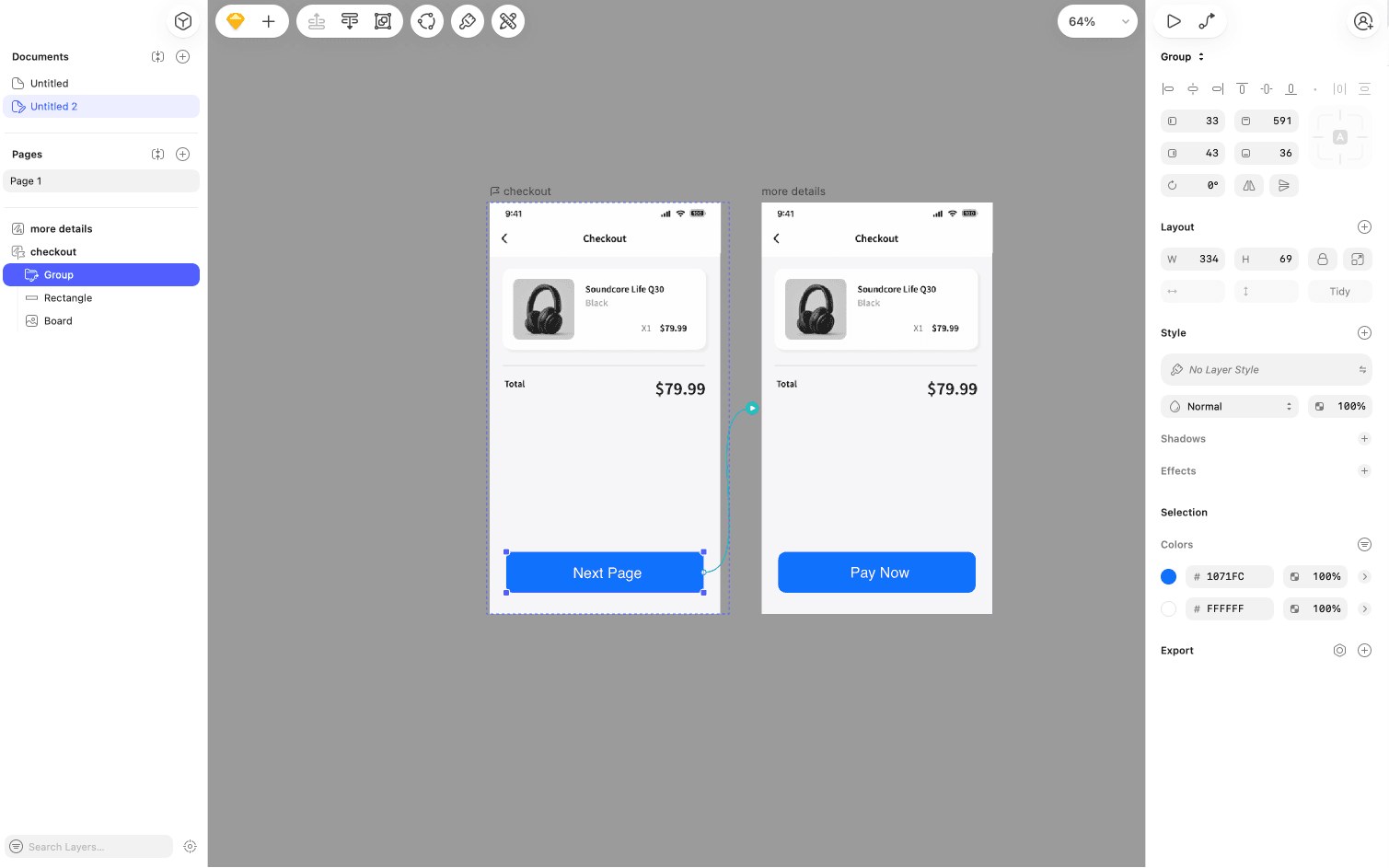
Sketch testing is pending. The same two-screen checkout workflow used for Penpot will be repeated in Sketch before this comparison is updated. Until that test is complete, this article does not claim a measured setup time, smoother component handling, clearer prototyping, or better developer handoff for Sketch.

Sketch’s top toolbar changes after an object is selected, making the shape controls less immediate.
The supplied Sketch screenshots confirm the editor layout and the contextual toolbar shown after an object is selected. A complete workflow test has not yet been recorded, so no claim is made here about Sketch’s speed, component handling, prototyping clarity, export, or developer handoff.
3. Framer
The better choice when the work should end as a live marketing site instead of returning to a separate development queue.
Framer combines a visual canvas with responsive layout, CMS, animation, hosting, and publishing. That removes a handoff step for landing pages, portfolios, campaign sites, and small content sites. A designer can move from layout to a live URL without recreating the work in a website builder.
It is not the cleanest home for a large product design system or a complex application flow. Choose it because publishing is part of the design job, not because it reproduces every Figma convention.
Pricing: Free plan; Basic is listed from $10 per month when billed annually.
4. Lunacy
A useful free desktop option when offline work and broad operating-system support matter more than a large collaboration ecosystem.
Lunacy is a native editor for Windows, macOS, and Linux with vector tools, auto layouts, components, prototyping, comments, and built-in visual assets. It can open Sketch files and is practical for solo designers, students, and teams that cannot standardize on macOS.
Its appeal is access and speed, not enterprise-scale design operations. Teams should test file fidelity, shared-library behavior, and developer handoff before moving a production system into it.
Pricing: The core desktop application is free.
5. UXPin
For teams that want prototypes to use the same interactive components and rules as the product.
UXPin is most distinct when connected to a code-based design system. Designers can work with interactive components, states, properties, and logic instead of drawing static approximations. Storybook integration is particularly relevant for teams trying to reduce drift between a component library and the screens being reviewed.
That advantage depends on engineering participation and a maintained component system. For ordinary marketing mockups or early exploration, the setup and per-seat price can be heavier than the problem requires.
Pricing: Core starts at $29 per seat per month when billed annually; a trial is available.
6. Axure RP
The specialist choice when a prototype must model conditions, variables, data, and difficult edge cases.
Axure earns its place when product behavior cannot be explained by a few linked screens. It can model conditional flows, dynamic panels, forms, data, variables, and detailed specifications. For enterprise software, regulated workflows, and internal tools, that logic can expose problems before engineering starts.
The editor is denser and less immediate than Figma for visual exploration. It works best as a deliberate prototyping tool, sometimes alongside an existing design system, rather than as the default canvas for every designer.
Pricing: A 30-day trial is available; Pro, Team, and Enterprise subscriptions are sold separately.
7. Balsamiq
The right tool when polished screens are getting in the way of an early product decision.
Balsamiq keeps wireframes intentionally rough. Product managers, founders, and workshop groups can arrange screens and flows quickly without inviting a debate about brand color, icon polish, or production-ready spacing. That makes it useful at the point where a team is still deciding what to build.
It is not a later-stage interface editor. Once the direction is agreed, the work normally moves into another tool for visual design, components, detailed interaction, and handoff.
Pricing: Paid plans start at $16 per editor per month billed annually; reviewers are free.
8. ProtoPie
For testing motion, sensors, variables, and device behavior that a standard click-through prototype cannot express.
ProtoPie is strongest after the screen design exists. It adds high-fidelity interactions without requiring production code, including conditional behavior, variables, formulas, and device inputs. Teams building hardware interfaces, automotive experiences, or motion-heavy products can communicate behavior more convincingly than with a simple transition between frames.
It does not replace the main design canvas for most teams. Treat it as the deeper prototype layer and budget time for a separate handoff between screen design and interaction work.
Pricing: Free plan; paid individual plans start at $25 per month.
9. Canva
A practical adjacent alternative when non-designers need to turn an approved direction into recurring campaign assets.
Canva is not a product-interface replacement. Its value appears downstream: templates, brand controls, presentations, social formats, simple video, and a large content library let marketing and regional teams produce variations without opening a product-design file.
Choose it to decentralize routine brand production. Keep interface systems, responsive product flows, and developer handoff in a dedicated UI design tool.
Pricing: A free plan is available; paid plans add premium content, brand controls, and higher limits.
10. Astorie
A specialist addition when the missing part of the workflow is AI-generated image, video, audio, or motion—not interface design.
Astorie should not replace Figma for interface components, responsive constraints, design systems, or developer handoff. Its role begins after a visual direction exists. On a node-based canvas, a team can keep source assets, prompts, model branches, and generated outputs connected while comparing different image- and video-generation routes.
That is useful for concept footage, campaign motion, visual variants, and other media that sit beside the product design. It is a poor choice if the work ends with a UI specification; it is relevant when the design needs to become a set of reusable AI-media experiments.
Pricing: Free to start; generation uses credits and cost varies by model and settings.
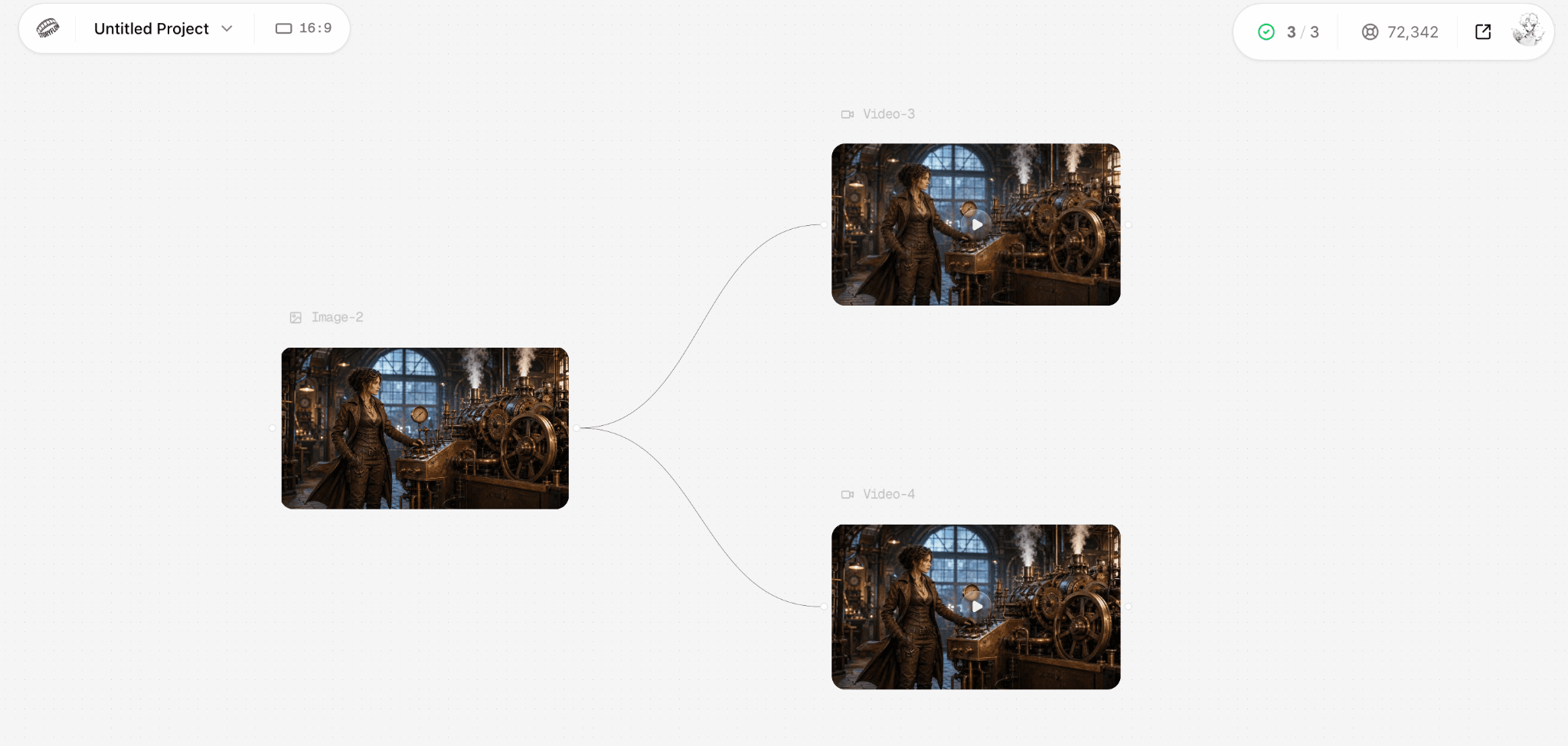
Astorie keeps a source image and separate video-generation branches visible on the same node canvas.
Which Figma alternative should you choose?
| Your actual need | Start with | Why |
|---|---|---|
| Closest open replacement | Penpot | UI design, components, responsive layouts, collaboration, and self-hosting options. |
| Mac-based design team | Sketch | A mature native editor with symbols, prototyping, collaboration, and handoff. |
| Website that should go live | Framer | Design and publishing stay in the same product. |
| Design system tied to code | UXPin | Interactive, code-backed components reduce the gap between design and implementation. |
| Business rules and edge cases | Axure RP | Variables, conditions, and detailed product logic matter more than visual speed. |
| Early wireframes | Balsamiq | Low-fidelity screens keep the conversation on structure rather than polish. |
| Advanced motion prototype | ProtoPie | Sensors, variables, and layered interactions go beyond ordinary click-through flows. |
| AI visual or motion production | Astorie | Use it after interface decisions when the missing job is connected media generation. |
If none of those descriptions matches a recurring problem, switching may not be the sensible move. A smaller companion tool can be cheaper than moving an established design system simply to solve one downstream task.
Bottom line
Penpot is the most credible first test for teams that want an open, cross-platform interface-design workspace. Sketch is the more polished native choice when the designers are already on Macs. Beyond those two, the right answer depends on the job: Framer for publishing, UXPin for code-backed systems, Axure for complex logic, Balsamiq for early structure, and ProtoPie for advanced interaction.
Run the same small project before migrating anything important. The winning tool is not the one with the longest feature list; it is the one that removes a real constraint without creating a larger handoff, access, or maintenance problem.
Related reading
Runway Gen4 vs Veo vs Kling: Practical Video Production Comparison
Practical comparison for AI video production choices across Runway Gen4, Google Veo, and Kling.
7 Best Photoroom Alternatives in 2026 (Tested for Ecommerce Photography)
Do you need a Photoroom alternative that goes beyond simple background cutouts and batch image processing? Try these 7 tools and pick the one that best matches your AI product photography use cases.
6 Ideogram Alternatives for Killer AI Image Generation
Here are 6 tried and tested Ideogram alternatives that work best for prompt accuracy, text, image realism, character consistency and are intelligent enough to render real-world scenarios and logic.
Frequently asked questions
- What is the closest free alternative to Figma?
Penpot is the closest broad free alternative in this list. It covers collaborative UI design, components, layouts, prototyping, and developer inspection, while Lunacy is a strong free desktop option for individual work.
- Which Figma alternative is best for Mac users?
Sketch is the clearest Mac-native choice. The key question is whether everyone who needs to author—not merely review—the files can work on macOS.
- Can Framer replace Figma?
For marketing websites, often yes: design, CMS, responsive behavior, hosting, and publishing can stay in one place. For a large application design system, Framer is usually a narrower tool.
- Which option is best for developers?
Penpot provides an open, web-oriented workflow; UXPin is more specialized when designers need to work with code-backed components and an existing Storybook library.
- Will Figma files transfer perfectly?
Do not assume so. Test a representative file containing components, variables, fonts, constraints, prototype links, and assets. Plan for manual repair even when an importer is available.
- Is Astorie a direct Figma replacement?
No. Astorie belongs in the adjacent AI-media stage. Use it for connected image, video, audio, or motion generation after the interface or visual direction has been decided.
Ready to try it on the canvas?
Open Astorie and fan your prompt across every frontier model in one workflow.