

10 Best Flick.art Alternatives for AI Filmmaking in 2026
LTX Studio is the closest story-first substitute. Runway is stronger for generating and editing individual shots, while Higgsfield is the clearest camera-first option.
Key takeaways
- LTX Studio is the closest Flick.art alternative for creators who need structured, multi-scene AI filmmaking.
- Higgsfield is the strongest camera-first choice, while Morphic is better suited to character-led visual development.
- Runway is the stronger option when individual shot quality, generative editing, and production workflows matter more than story planning.
- Astorie, Magnific Spaces, and Krea are flexible multi-model canvases, but they provide less film-specific narrative guidance.
- The right replacement depends on whether the bottleneck is story structure, camera control, character consistency, shot generation, or model comparison.
The closest Flick.art alternatives are LTX Studio, Higgsfield, and Morphic if you want a product built around films rather than isolated clips. Runway and Google Flow make more sense when finished-shot quality or generative editing matters more than script-to-storyboard structure. Astorie, Magnific Spaces, and Krea suit creators who want a flexible canvas and access to several model providers.
A quick clarification: this guide is about Flick.art, the AI filmmaking platform. It is not about Flick, the separate social-media marketing product. The two tools serve different buyers and should not share an alternatives list.
Flick.art alternatives at a glance
| Alternative | Best for | Free / lowest paid | Main trade-off |
|---|---|---|---|
| LTX Studio | Storyboards and multi-scene planning | Free; paid from $15/mo | Guided rather than open-ended |
| Higgsfield | Directed camera moves and cinematic shots | Free access; paid plans | Less complete for narrative assembly |
| Morphic | Consistent characters and visual development | Free; Basic $9/mo | Smaller ecosystem than larger suites |
| Runway | Shot generation, references, and editing | Free; Standard $15/mo | Less story-first planning |
| Google Flow | Veo and Nano Banana filmmaking | Access varies by Google AI plan | Fewer model providers |
| Astorie | Multi-model branching on one canvas | Free; Standard $19/mo | Less film-specific guidance |
| Magnific Spaces | Collaborative visual workflows and assets | Up to 3 Spaces free | Broader than filmmaking |
| Krea | Fast multi-model image and video exploration | Free plan; paid compute tiers | Limited narrative structure |
| Adobe Firefly | Adobe production and commercial teams | Free; Standard $9.99/mo | Premium video uses credits quickly |
| Luma | Video generation, modification, and reframing | Trial access; Plus $30/mo | Not a script-to-storyboard system |
Pricing and plan access were checked on official product pages on September 6, 2026. Promotions, annual billing, region, model, resolution, and credit use can change the amount shown at checkout.
What Flick.art does - and why you might leave
Flick.art treats a film as a connected project. Its infinite canvas can hold scripts, scenes, characters, references, generated shots, edits, and alternate branches. That is useful when the hard part is not producing one impressive clip, but keeping a sequence understandable while characters, locations, and camera choices evolve.
A new account currently includes 300 free credits. Flick.art lists Casual at $5 per month for 500 credits, Standard at $20 per month for 2,500 credits, and higher tiers for heavier production. Annual billing is advertised at 20% off. Those prices are appealing for a film-oriented workspace, but the right alternative may offer a preferred model, stronger editing, more directed camera controls, an Adobe pipeline, or a less structured place to explore ideas.
Official pricing: Flick.art plans and current credit allowances
How these alternatives were selected
This list is based on the work each product is designed to finish: story planning, shot generation, character and location consistency, camera control, editing, collaboration, and repeatability. Official product and pricing pages were checked on September 6, 2026. No product is described as hands-on tested in this article unless a controlled test is explicitly included, and a longer model list did not automatically earn a higher rank.
The ranking begins with products that can replace Flick.art's filmmaking structure, then moves to generation suites and flexible creative canvases. That order matters: replacing a model is not the same as replacing the platform that organizes the project.
Do you need a full Flick.art replacement or just a video generator?
Start by naming the layer that is slowing you down. If scripts, scenes, references, and shot order are the problem, a filmmaking platform is the closest substitute. If you already have a shot list and only need better footage, a generation and editing suite may be enough. If you mainly want to compare providers or branch visual ideas, a multi-model canvas is the more honest fit.
| Type | Best fits | What changes compared with Flick.art |
|---|---|---|
| Full filmmaking platform | LTX Studio, Higgsfield, Morphic | Story development, shots, characters, and production structure in one product |
| Generation and editing suite | Runway, Google Flow, Adobe Firefly, Luma | Better individual shots and edits, but less help organizing an entire film |
| Multi-model creative canvas | Astorie, Magnific Spaces, Krea | Flexible branching and model choice, with less opinionated film planning |
1. LTX Studio
The closest overall alternative for creators who want a guided route from story to scenes and an edited sequence.
LTX Studio begins with the story and carries it through scenes, shots, characters, camera choices, generation, and editing. Its structure is more guided than Flick.art's open canvas, which can be helpful when a team wants a recognizable production order instead of deciding how every node should connect.
That guidance is also the main trade-off. Flick.art is easier to bend into a personal visual process, while LTX feels closer to a conventional preproduction workflow. The free plan provides 800 one-time credits for personal exploration. Lite starts at $15 per month, but commercial rights and the fuller storyboard and collaboration toolset begin on Standard, listed at $35 monthly or $28 per month with annual billing.
Best for: Multi-scene planning, storyboards, shot lists, and a guided production flow.
Main trade-off: Less open-ended than Flick.art, and commercial work starts above the cheapest paid tier.
Pricing: Free plan with 800 one-time credits; Lite $15/month; Standard $35/month or $28/month annually.
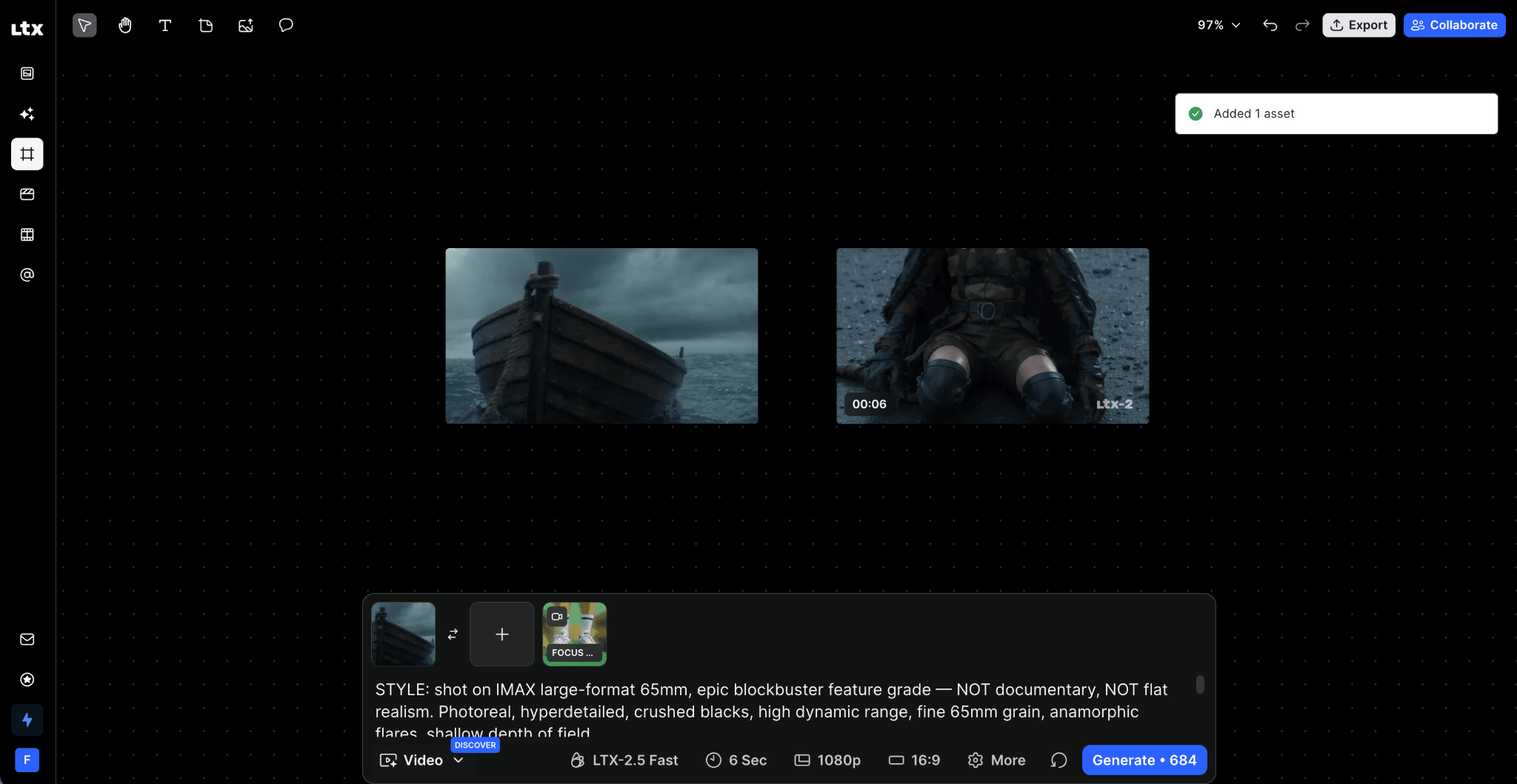
LTX Studio connects reference frames and generation settings inside a visual filmmaking canvas.
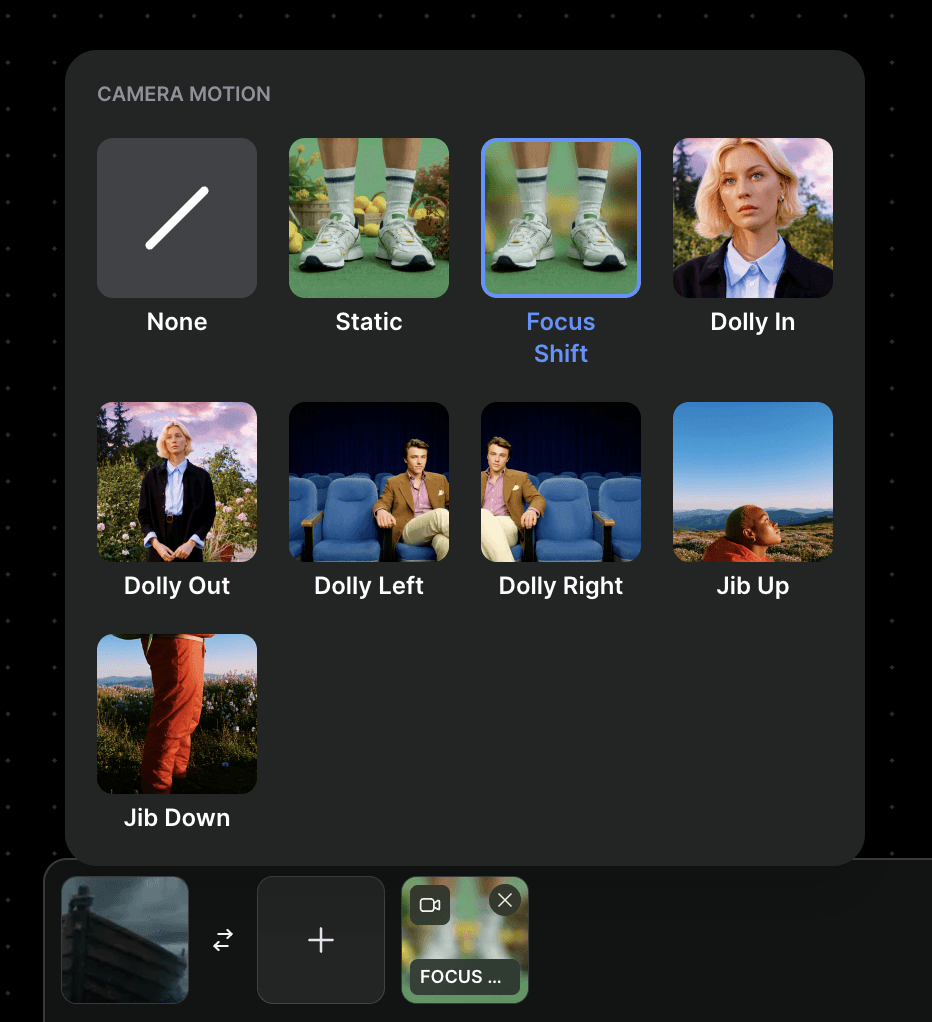
Camera-motion presets provide a quick way to direct the first generation without writing every movement into the prompt.
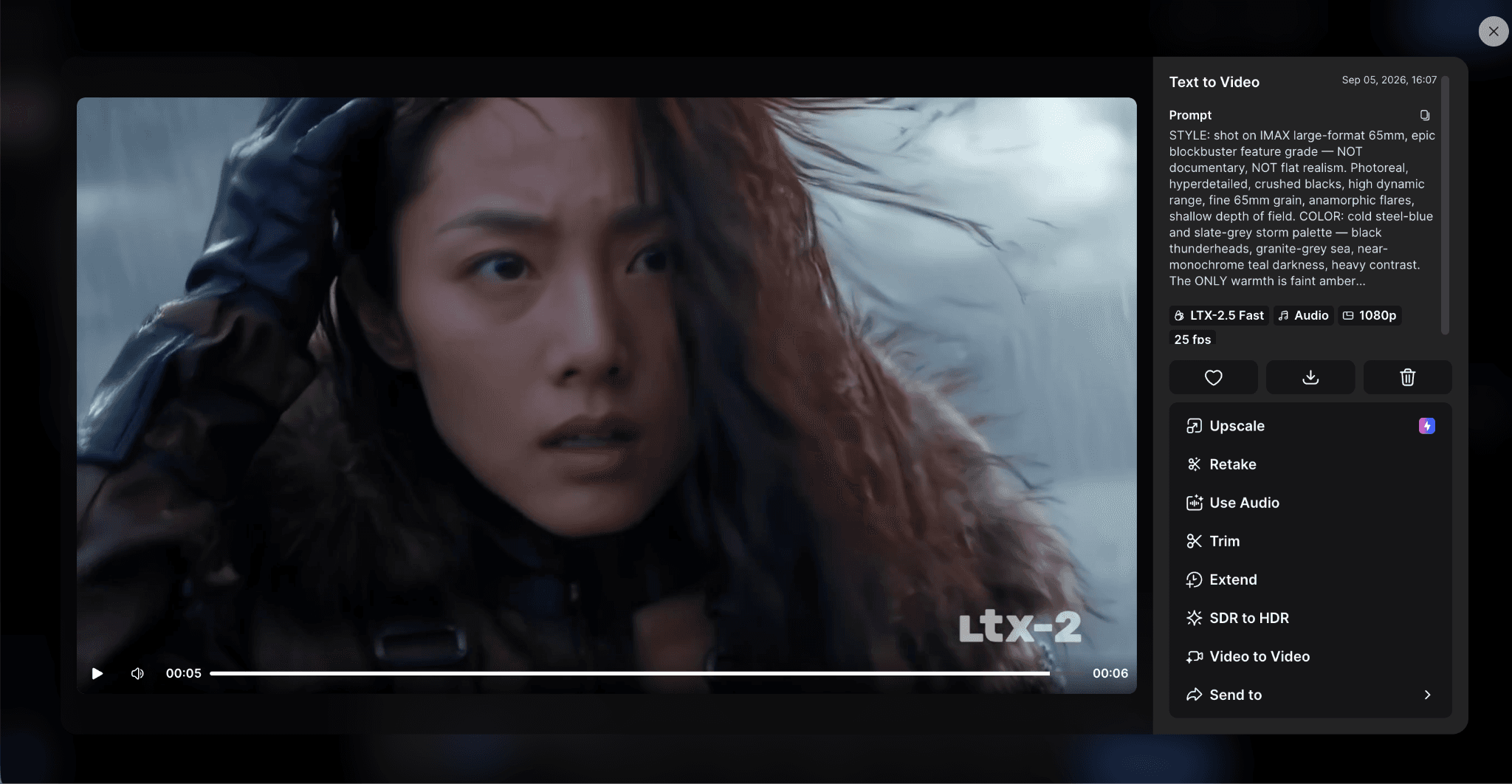
The controlled test produced a six-second 1080p result using the LTX-2.5 Fast model.
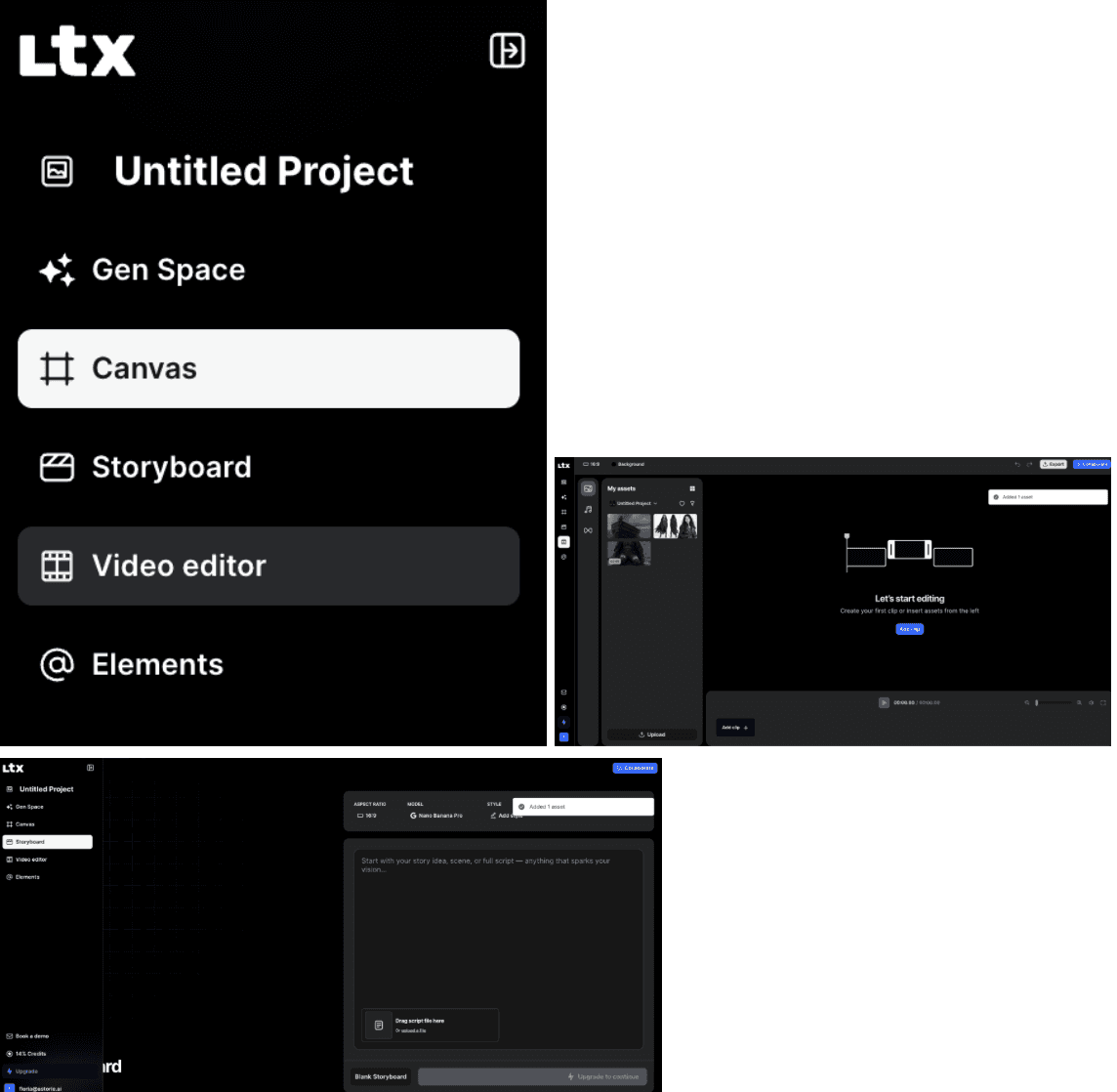
LTX Studio separates generation, canvas planning, storyboards, editing, and reusable elements into dedicated workspaces.
In our test, LTX Studio opened in a clean workspace split across Gen Space, Canvas, Storyboard, Video Editor, and Elements. The default LTX-2.5 Fast model accepted start and end frames plus camera motion, and the free account produced one six-second clip. The 1080p result carried an LTX watermark.
The canvas itself was spare; several filmmaking controls lived in separate workspaces rather than on the same surface. That made the route from prompt to first clip easy to follow, but moving among workspaces added friction when we wanted to compare planning, generation, and editing at once.
2. Higgsfield
The best camera-first alternative when a shot depends on deliberate movement and commercial polish.
Higgsfield is built around cinematic direction. Camera presets and shot controls make it easier to ask for an orbit, dolly, crane move, crash zoom, or stylized transition without designing the motion as a node graph. Its current Cinema Studio also brings scene-by-scene work, references, and several video models into one environment.
It is a stronger match for commercials, fashion films, music visuals, and social campaigns than for a long narrative with extensive script management. Choose Higgsfield when the shot and its camera language are the product. Choose Flick.art or LTX Studio when the relationship between scenes is the harder problem.
Best for: Directed camera moves, cinematic shots, ads, fashion, and music visuals.
Main trade-off: Less complete as a story-planning and narrative-assembly system.
Pricing: Free access is available; paid tiers and credit allowances are shown on the live pricing page.
In our test, we worked in Higgsfield Cinema Studio 4.0. The generated clip had no visible watermark. Film and camera presets made the first setup approachable because we could choose motion language without writing every camera instruction.
The trade-off appeared once we tried to direct the shot more precisely: a preset could influence the prompt, and an experienced user may prefer to specify the move without that extra layer. Rendering also took noticeably longer than the LTX Studio attempt, although the test record did not include a wall-clock time or final credit deduction. This supports a camera-first recommendation, not a speed or cost claim.
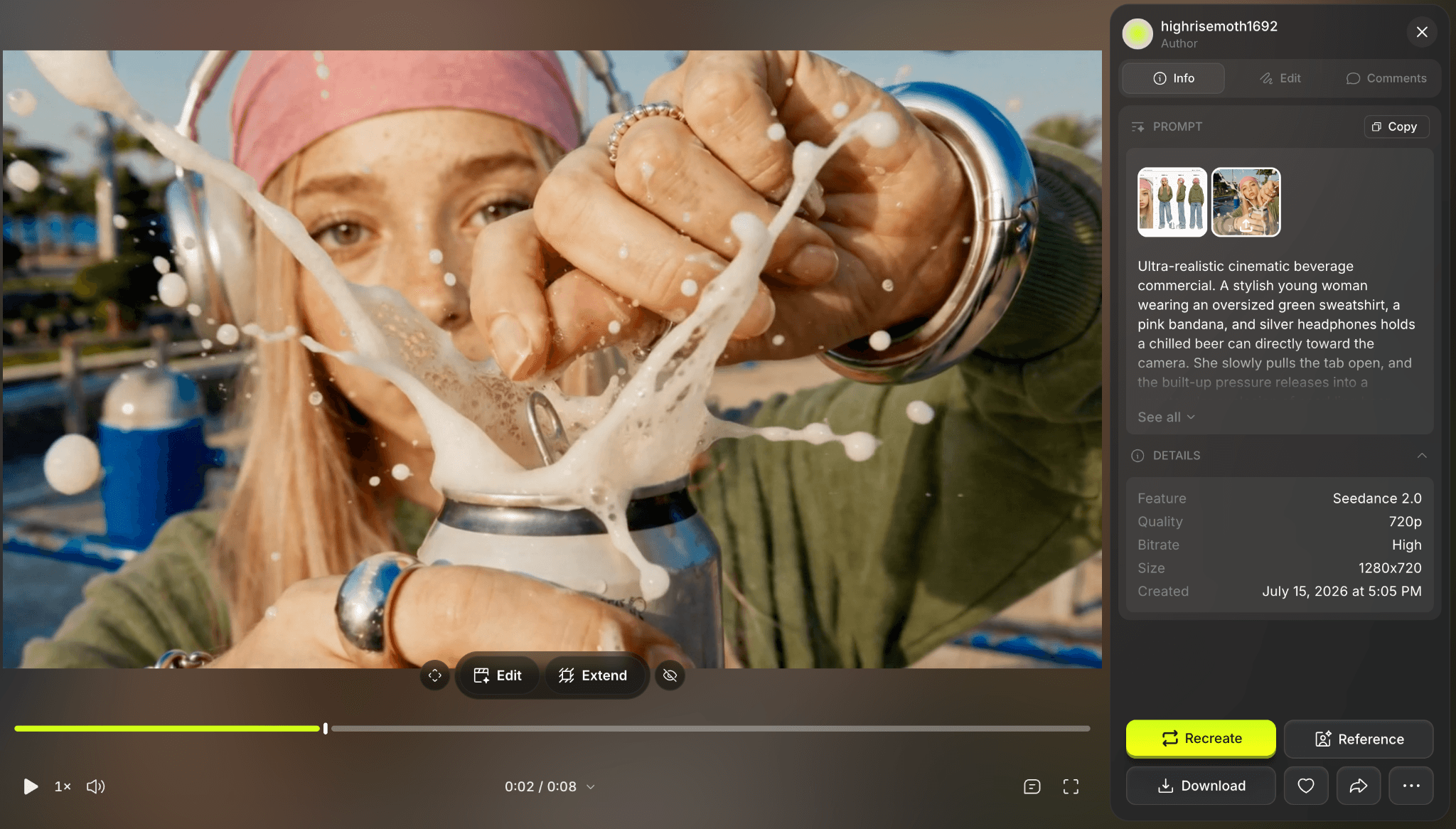
Higgsfield Cinema Studio generated the controlled-test clip without a visible watermark.
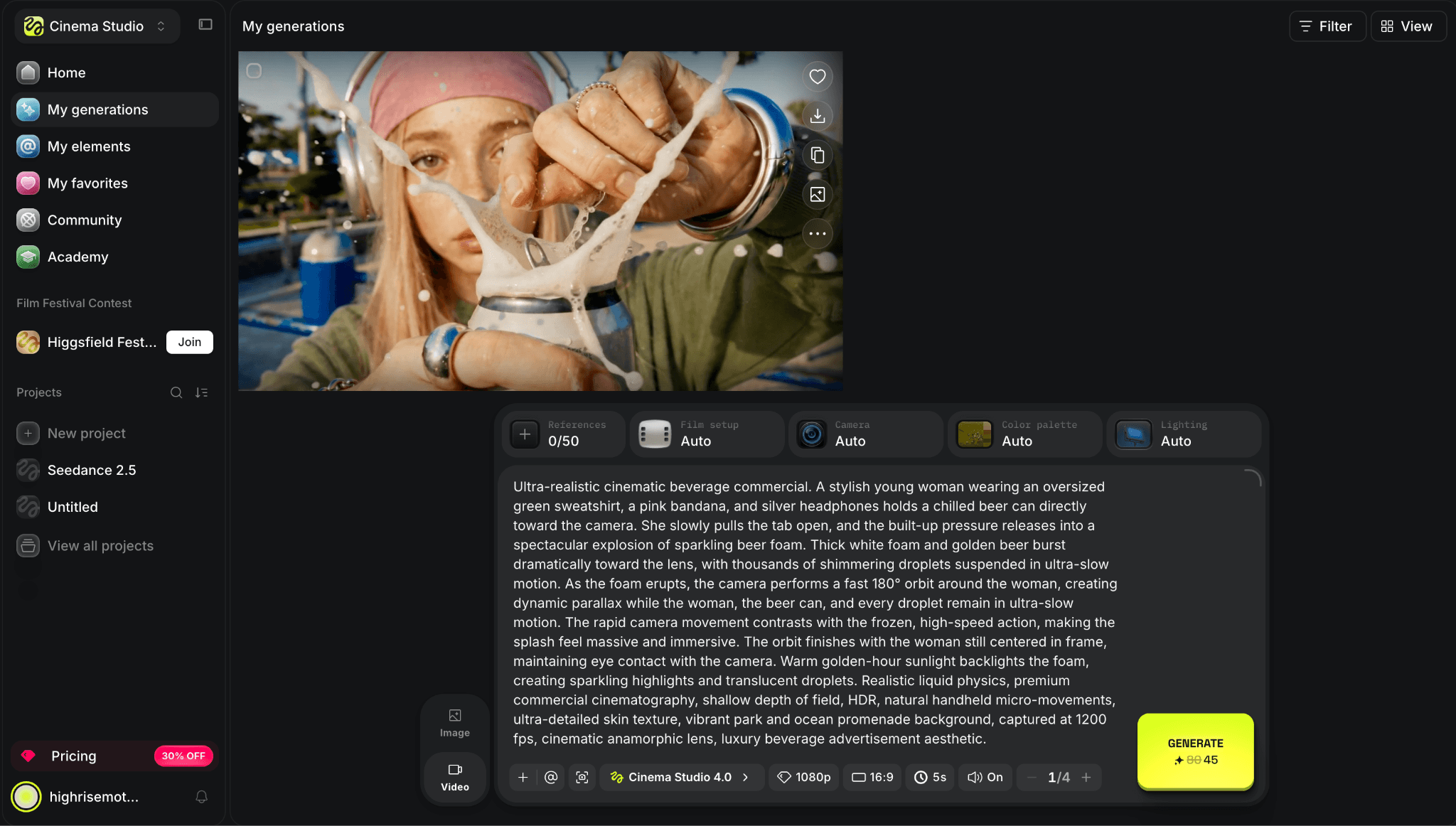
The Cinema Studio workspace combines the generated shot with prompt, model, and production controls.
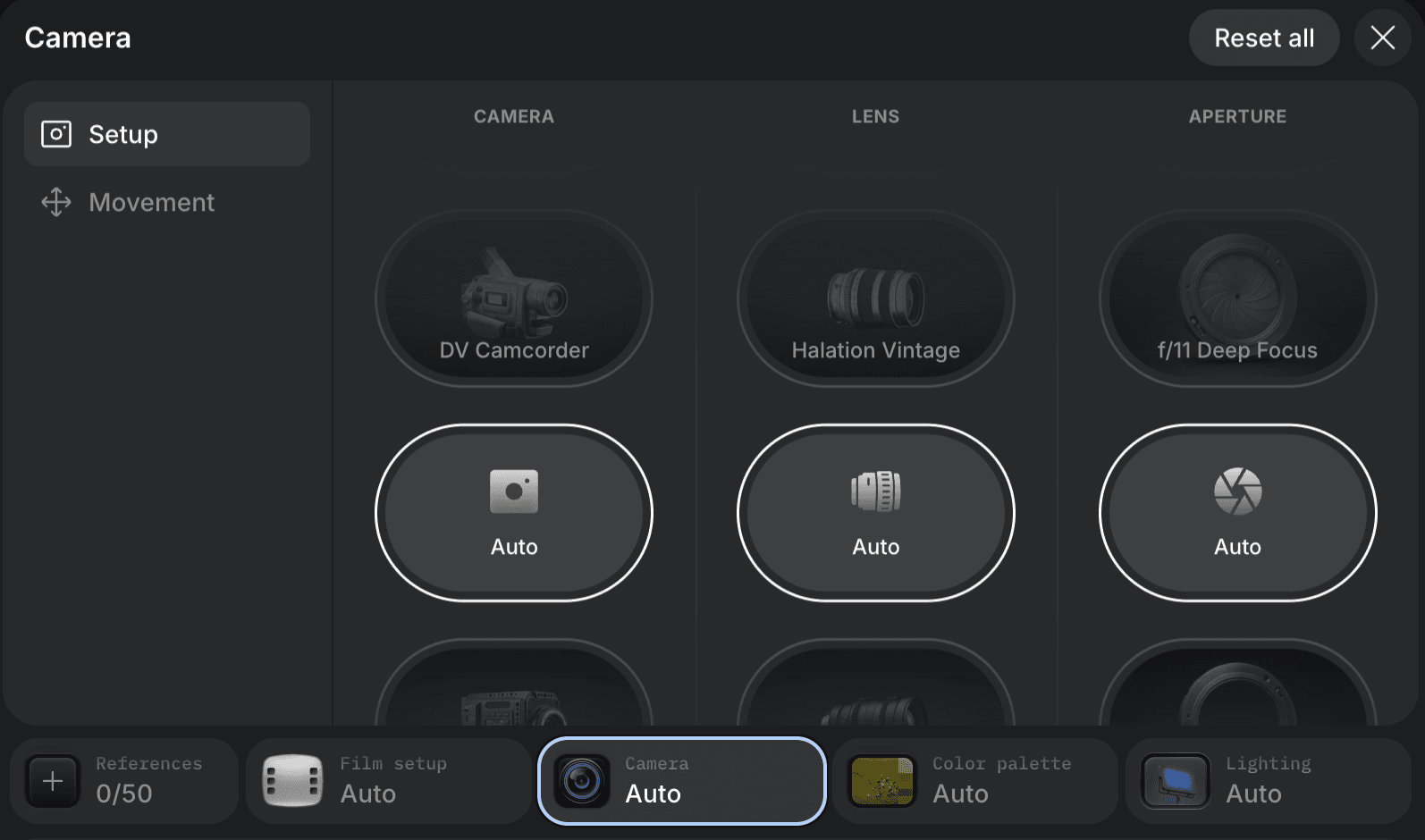
Higgsfield exposes camera, lens, aperture, focus, shutter, color, and lighting choices directly in the shot setup.
3. Morphic
A strong choice for visual development, recurring characters, and teams that want a collaborative filmmaking canvas.
Morphic combines a canvas, storyboards, character references, camera and style controls, reusable workflows, and a timeline-style Compose environment. It is especially relevant when a project begins with character and world development, then moves gradually into shots rather than starting from a finished screenplay.
The experience is closer to Flick.art than a standalone video generator, though its surrounding ecosystem is smaller than Runway's or Adobe's. Morphic's free plan includes a small credit allowance. Basic is listed at $9 per month, Standard at $24, and Pro at $45, with higher tiers adding capacity and collaboration.
Best for: Character consistency, visual development, storyboards, and collaborative scene building.
Main trade-off: A smaller product ecosystem and fewer downstream production integrations.
Pricing: Free plan; Basic $9/month, Standard $24/month, and Pro $45/month.
4. Runway
The stronger option when individual shot quality, references, editing, and reusable production workflows matter most.
Runway is less prescriptive about story development and more capable once you know the shot you need. Its current video models, reference tools, generative edits, and workflows cover a large part of production after the storyboard has been decided. The learning material is also unusually practical for a product with this many moving parts.
The stronger option when individual shot quality, references, editing, and reusable production workflows matter most.
Runway is less prescriptive about story development and more capable once you know the shot you need. Its current video models, reference tools, generative edits, and workflows cover a large part of production after the storyboard has been decided. The learning material is also unusually practical for a product with this many moving parts.
A film can still feel like a collection of assets and workflows rather than one visible narrative map. The free plan includes 125 one-time credits. Standard is $15 per month or $12 per month on annual billing and includes 625 monthly credits; actual clip cost depends on the model and settings.
Best for: High-quality shot generation, reference control, generative editing, and reusable workflows.
Main trade-off: Less help with script structure, scene order, and project-wide narrative planning.
Pricing: Free plan with 125 one-time credits; Standard $15/month or $12/month annually, with 625 monthly credits.
A film can still feel like a collection of assets and workflows rather than one visible narrative map. The free plan includes 125 one-time credits. Standard is $15 per month or $12 per month on annual billing and includes 625 monthly credits; actual clip cost depends on the model and settings.
Best for: High-quality shot generation, reference control, generative editing, and reusable workflows.
Main trade-off: Less help with script structure, scene order, and project-wide narrative planning.
Pricing: Free plan with 125 one-time credits; Standard $15/month or $12/month annually, with 625 monthly credits.
5. Google Flow
The natural alternative for creators who specifically want Google's Veo and Nano Banana tools inside a filmmaking workspace.
Flow brings planning, generation, refinement, and scene building into one adaptable canvas. Its appeal is the Google stack: Veo handles video, Nano Banana supports image work, and Gemini helps shape prompts and creative decisions. For creators already committed to these models, Flow removes the friction of moving assets between unrelated tools.
Access is not a simple global free-versus-paid choice. Available models, credits, web or mobile support, and regional eligibility depend on the user's Google AI subscription and location. Flow is therefore a model-ecosystem decision rather than a broad multi-provider replacement for Flick.art.
Best for: Veo-based filmmaking, Google creative tools, and creators already using Google AI plans.
Main trade-off: Access and credits vary by subscription, platform, and region, and model choice stays inside Google's ecosystem.
Pricing: Plan eligibility and credit allowances vary; confirm the current Google AI subscription and regional access in your account.
6. Astorie
A flexible multi-model canvas for teams that want to branch, compare, edit, and reuse workflows across providers.
Astorie keeps source images, prompts, generations, edits, and model branches on one connected canvas. The practical advantage is provider choice: a team can compare video models without rebuilding the surrounding workflow each time, then preserve a useful branch as a repeatable recipe.
It is not as opinionated about filmmaking as Flick.art. Astorie makes more sense when model routing and visual experimentation are the priority; Flick.art is the more direct fit when scripts, scenes, and film-oriented guidance should lead the experience. Astorie offers a free plan, and its main Standard price is $19 per month. An annual introductory offer may be shown separately at checkout.
Best for: Multi-provider model comparison, branching visual workflows, and reusable creative recipes.
Main trade-off: Less built-in guidance for screenplay development, shot order, and narrative assembly.
Pricing checked September 6, 2026: Free plan; Standard $19/month. Annual introductory pricing may differ. Official pricing
7. Magnific Spaces
A collaborative visual canvas for teams that need AI models, assets, and design work beyond filmmaking.
Magnific Spaces is an infinite node-based workspace for image, video, and text models. It also sits beside a broader stock and creative-asset ecosystem, which makes it useful for campaign teams that move between concepting, generated media, layouts, and existing assets. The product was previously presented under the Freepik brand; the current site uses Magnific.
That breadth makes it less focused on narrative production. It can organize creative branches and team feedback, but it does not lead with screenplay structure or a film-specific scene system. Up to three Spaces can be created free; generators consume credits, and paid plan value depends on the models used.
Best for: Collaborative ideation, multi-model visual workflows, stock assets, and campaign production.
Main trade-off: Broader than filmmaking and less structured around scripts, scenes, and continuity.
Pricing: Up to three Spaces free; generation uses credits and paid limits depend on the current plan.
8. Krea
A fast visual laboratory for switching among image and video models before a production direction is fixed.
Krea brings image generation, video, enhancement, editing, and several current models into a clean interface. It is useful when a creator wants to try visual directions quickly, improve source material, or compare how different engines interpret the same reference without first building a film structure.
The trade-off is project depth. Krea can help find a look and produce a shot, but it does less to keep scripts, scene relationships, continuity notes, and narrative branches visible as one film. A free plan exists; video access and generation capacity depend on the current compute allowance and model entitlements.
Best for: Rapid concept exploration, model switching, image enhancement, and short video tests.
Main trade-off: Limited film-specific planning and narrative structure.
Pricing: Free plan available; paid tiers use larger compute allowances. Confirm current video entitlements on the live pricing page.
9. Adobe Firefly
The sensible alternative for commercial teams already finishing work in Photoshop, Premiere Pro, Express, or other Adobe tools.
Firefly combines image, video, audio, collaborative Boards, and partner models, then hands assets to familiar Adobe applications. That continuity matters for teams that care about review, retouching, editing, brand assets, and procurement more than an experimental story canvas.
Firefly does not mirror Flick.art's visible narrative map, and premium video can consume generative credits quickly. The free tier supports limited generation. Firefly Standard is $9.99 per month with 2,000 credits; Pro is $19.99 with a larger allowance. The best value appears when Adobe is already the finishing environment.
Best for: Adobe-centered commercial production, mood boards, image and video generation, and downstream finishing.
Main trade-off: Not a complete script-to-storyboard replacement, and premium video can be credit-intensive.
Pricing: Free tier; Standard $9.99/month with 2,000 credits; Pro $19.99/month.
10. Luma
A specialist option for creators who already have a shot plan and need video generation, modification, reframing, or keyframe control.
Luma's current workspace centers on Ray3.2 and tools for generating, modifying, extending, and reframing video. Multi-keyframe control and format changes are useful when the desired scene is already clear and the remaining problem is producing or reshaping footage.
It is not a full replacement for Flick.art's script, storyboard, and project organization. The official product is now presented as Luma and Ray3.2 rather than the older Dream Machine or Ray2 names. Individual Plus is listed at $30 per month with 10,000 credits, followed by higher-volume Pro and Ultra plans.
Best for: Video generation, modification, keyframes, reframing, and creators who already have a shot list.
Main trade-off: Little help with screenplay structure, storyboards, or managing a complete narrative project.
Pricing: Trial access is available; Individual Plus $30/month with 10,000 credits.
What Do You Lose When Switching From Flick.art?
| Priority | Start with | What you gain | What you give up vs Flick.art |
|---|---|---|---|
| Story-first replacement | LTX Studio | Guided scenes, storyboards, and sequence editing | A freer nonlinear canvas |
| Camera direction | Higgsfield | Preset-led cinematic motion and ad workflows | Deeper screenplay and scene planning |
| Character development | Morphic | Reusable characters and collaborative visual development | A larger downstream ecosystem |
| Shot generation and editing | Runway | References, generative edits, audio, and finishing | One visible narrative map |
| Google model workflow | Google Flow | Veo and Google image tools in one workspace | Provider choice outside Google |
| Cross-model branching | Astorie | One canvas for comparing hosted models | Film-specific planning guidance |
| Campaign canvas | Magnific Spaces | Stock assets plus broad AI workflows | A filmmaking-first structure |
| Rapid exploration | Krea | Fast switching among creative models | Deep story and continuity management |
| Adobe production | Adobe Firefly | Creative Cloud handoff and commercial workflows | Script-to-storyboard structure |
| Video modification | Luma | Keyframes, reframing, and directed video work | A complete film-planning system |
A move away from Flick.art is not automatically an upgrade. If its canvas already helps you see the film, keep characters organized, and revise scenes without losing context, a specialist generator may be better as a companion than a replacement. Switch platforms only when a specific limitation repeatedly costs time or usable generations.
Final verdict
LTX Studio is the closest overall Flick.art alternative for structured AI filmmaking. Higgsfield is the more direct choice for cinematic camera movement, while Morphic is well suited to character-led visual development. Runway is the strongest option here when shot generation and editing quality matter more than story planning.
The remaining choices solve narrower problems. Google Flow suits creators committed to Google's models; Adobe Firefly fits Adobe production; Luma specializes in video generation and modification. Astorie, Magnific Spaces, and Krea are better viewed as flexible multi-model canvases than as complete film-planning replacements.
The right choice is the one that removes the bottleneck you actually have, not the one with the longest feature list.
Related reading
Runway Gen4 vs Veo vs Kling: Practical Video Production Comparison
Practical comparison for AI video production choices across Runway Gen4, Google Veo, and Kling.
7 Best Photoroom Alternatives in 2026 (Tested for Ecommerce Photography)
Do you need a Photoroom alternative that goes beyond simple background cutouts and batch image processing? Try these 7 tools and pick the one that best matches your AI product photography use cases.
6 Ideogram Alternatives for Killer AI Image Generation
Here are 6 tried and tested Ideogram alternatives that work best for prompt accuracy, text, image realism, character consistency and are intelligent enough to render real-world scenarios and logic.
Frequently asked questions
- What is the closest alternative to Flick.art?
LTX Studio is the closest overall because it also treats AI video as a multi-scene production process. Higgsfield is a better first choice when camera direction matters more than screenplay and storyboard structure.
- Is there a free Flick.art alternative?
LTX Studio, Runway, Morphic, Krea, Adobe Firefly, Astorie, and several other tools in this list offer a free plan or starter allowance. Free limits differ in models, credits, commercial rights, watermarks, and export options.
- Which alternative is best for character consistency?
LTX Studio and Morphic are the most relevant first tests when consistent characters must survive across a planned sequence. Runway is strong when references need to control individual shots.
- Which tool is best for cinematic camera movement?
Higgsfield is the most direct camera-first choice. Runway is stronger when camera decisions must sit inside a broader generation and editing workflow.
- Is Astorie a direct Flick.art replacement?
Only partly. Both use visual canvases, but Flick.art is organized around filmmaking and narrative development. Astorie is organized around multi-model branching, comparison, editing, and reusable workflows.
- Should I choose a platform or a single video model?
Choose a platform when you need scripts, storyboards, references, scenes, and revisions to remain connected. Choose a specialist generator when the production plan already exists and the main problem is getting a better shot.
- How should I compare two Flick.art alternatives?
Use one short three-shot brief, the same character and location references, and the nearest matching output settings. Compare continuity, shot control, revision effort, generation time, export limits, and the number of usable attempts the plan buys.
Ready to try it on the canvas?
Open Astorie and fan your prompt across every frontier model in one workflow.