

10 Best Google Veo Alternatives in 2026 for AI Video Generation
Seedance is the closest starting point for creators who want high-end text- and image-to-video outside Google’s stack, while Kling is the strongest switch when controllable motion, longer-form generation options, or multi-shot experimentation matter most. Google Veo remains distinctive because it combines cinematic video, generated audio, Flow/Gemini access, and Google Cloud delivery; alternatives usually replace the model, the creative surface, or the API—not the whole stack.
Key takeaways
- Seedance is the closest high-end alternative for cinematic text-to-video and image-to-video generation outside Google’s ecosystem.
- Kling is the stronger choice when controllable motion, longer clips, reference handling, or multi-shot experimentation matters most.
- Runway is the best production-suite alternative when editing, assets, workflows, and access to multiple models matter more than one model endpoint.
- Pika and Higgsfield suit fast experimentation, Wan provides an open self-managed direction, and Adobe Firefly Video fits Creative Cloud production.
- Keep Google Veo when generated audio, Flow and Gemini integration, Google Cloud procurement, or existing Veo API workflows are central to production.
This guide ranks generation alternatives by replacement fit and switching trigger. Astorie is intentionally outside the Top 10 because it is a collaborative multi-model canvas, not a base video model; a separate workflow note explains when it still belongs in a Veo production stack.
Quick answer
Closest high-end alternatives: Seedance for general cinematic creation and Kling for motion-control and multi-shot workflows.
Best production suite: Runway, when editing, assets, workflows, and multiple models matter more than one model endpoint.
Best fast experimentation: Pika or Higgsfield. Best open/self-managed direction: Wan. Best Adobe handoff: Firefly Video.
Keep Veo when generated audio, Flow/Gemini integration, Google Cloud procurement, or existing Veo API workflows are central.
Google Veo alternatives at a glance
Alternative | Type / scope | Best for | Switch trigger |
Seedance | Hosted video model | Cinematic general generation | You want a strong non-Google model |
Kling | Hosted model/platform | Motion and multi-shot control | Control or clip structure is the bottleneck |
Runway | Creative suite + API | Production workflow | You need editing, assets, and models together |
Luma Ray | Video model/platform | Fast ideation and camera motion | You value rapid visual iteration |
MiniMax Hailuo | Hosted video model | Accessible text/image-to-video | You want quick consumer generation |
Pika | Creative video platform | Effects and short social content | Speed and playfulness matter |
Adobe Firefly Video | Creative suite model | Commercial design workflows | Adobe handoff and brand workflow matter |
Vidu | Hosted video model | Reference-led character consistency | Reference conditioning is central |
Wan | Open video model family | Self-managed research | You need open deployment and can operate it |
Higgsfield | Multi-model creative platform | Camera/effect-driven content | A broad creation surface beats one model |
Alternative | Gain | Loss vs Veo | Pricing / access |
Seedance | Strong cinematic alternative | Veo audio/Google stack | Platform/API access varies |
Kling | Motion, longer or multi-shot options | Google integration and Veo audio workflow | Free/paid credits; model access varies |
Runway | End-to-end creative suite | Different model behavior and credit economics | Free entry + paid credit plans |
Luma Ray | Fast ideation and camera controls | Less Google enterprise integration | Free/paid credits; current tiers vary |
Hailuo | Low-friction generation | Fewer production-suite controls | Free/paid credits; limits vary |
Pika | Effects and social speed | Less suited to cinematic long-form control | Free/paid plans and credits |
Firefly Video | Adobe workflow and partner models | Less open deployment flexibility | Free credits + paid plans |
Vidu | Reference-led consistency | Smaller surrounding production suite | Credit plans; verify commercial terms |
Wan | Open/self-managed control | High compute and engineering cost | Open weights; license/hosting vary |
Higgsfield | Multiple models, effects, camera tools | Less single-model predictability | Subscription/credit access varies |
How the ranking was built
The ranking weighs video quality potential, motion and camera control, reference handling, editing and production depth, API or deployment options, and migration cost. The supplied screenshots document Runway, Luma, and a Higgsfield-hosted generation surface. They do not constitute a same-prompt output benchmark, and the draft makes no claim that every model was rendered under identical settings.
What do you lose when leaving Google Veo?
Veo is more than an isolated model when used through Google’s ecosystem. A migration can mean losing generated-audio behavior, Flow project conventions, Gemini-assisted prompting, Google account and region entitlements, Vertex AI procurement, existing API payloads, safety workflows, quotas, and monitoring. Prompt wording and reference-image behavior also change across models, so a library of successful Veo prompts is not automatically portable.
Before switching, test one real production with the same concept, references, aspect ratio, duration, audio requirement, review cycle, and delivery target. Compare unusable-generation rate and revision cost, not only the best-looking clip. Keep Veo for the steps where its audio or Google integration matters and use another model only where it removes a concrete bottleneck.
1. Seedance — Best for cinematic general-purpose video generation
Switch when you need a high-end alternative outside Google and can adapt prompts and delivery workflows to a different platform. You gain a capable text- and image-to-video path with strong motion and cinematic composition potential. The main trade-off is Veo’s native audio behavior, Flow/Gemini continuity, and Google Cloud procurement do not transfer.
Where it fits—and where it does not
Seedance is the closest general recommendation because it targets the same broad cinematic job. Exact model versions, supported duration, resolution, audio features, and API availability can change rapidly; verify the current host and model card before production.
Pricing and access
Access may be offered through first-party or authorized platforms with plan- or credit-based limits. Confirm region, watermark, commercial-use terms, and whether the named model is actually exposed.
2. Kling — Best for motion control and multi-shot experimentation
Switch when you need more control over movement, reference-led animation, or clip structure and can accept a different platform and credit system. You gain strong motion-focused tools and a broad set of text-, image-, and effect-driven video workflows. The main trade-off is you give up Veo’s Google-native audio, Flow projects, and enterprise/API continuity.
Where it fits—and where it does not
Kling is a strong model alternative, but access through aggregators can differ from first-party access. Confirm the exact Kling version, clip settings, audio support, watermark, and commercial terms instead of treating “Kling” as one fixed product.
Pricing and access
Free trials or credits and paid plans may be available. Current model, duration, resolution, and API entitlements are volatile and must be checked at the point of use.
Evidence note
The supplied Runway account exposed Kling 3.0 Pro but required an upgrade before a 15-second render. This verifies an access boundary only; no Kling output was produced.
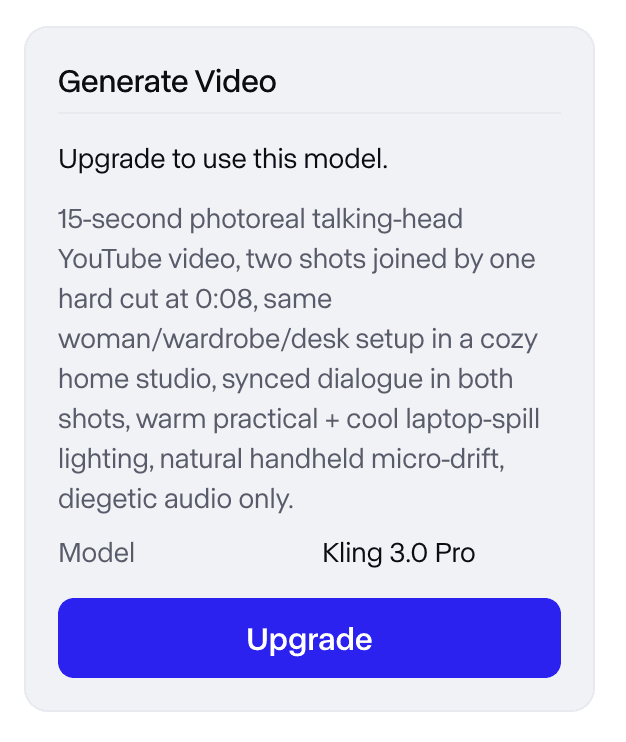
Figure 1. Upgrade requirement shown when the supplied Runway account selected Kling 3.0 Pro for a 15-second render.
3. Runway — Best for an end-to-end creative production suite
Switch when your bottleneck is organizing generation, editing, references, assets, and iteration in one production environment. You gain a mature creative suite, proprietary models, third-party model access, workflows, and developer products. The main trade-off is credit economics and model behavior differ from Veo, and Google-native audio/Flow integration is absent.
Where it fits—and where it does not
Runway is the best suite alternative, not necessarily the best single-model substitute. It is persuasive for teams that want one surface for ideation, generation, editing, asset management, and workflow automation.
Pricing and access
Runway offers a free entry level and paid credit-based plans. Model access and credit consumption vary by tool, settings, and account tier.
Evidence note
In the supplied account, a reference image was generated and the displayed balance changed from 500 to 480. The subsequent Kling video step hit an upgrade wall, so this evidence supports workflow and access observations—not a completed video-quality test.
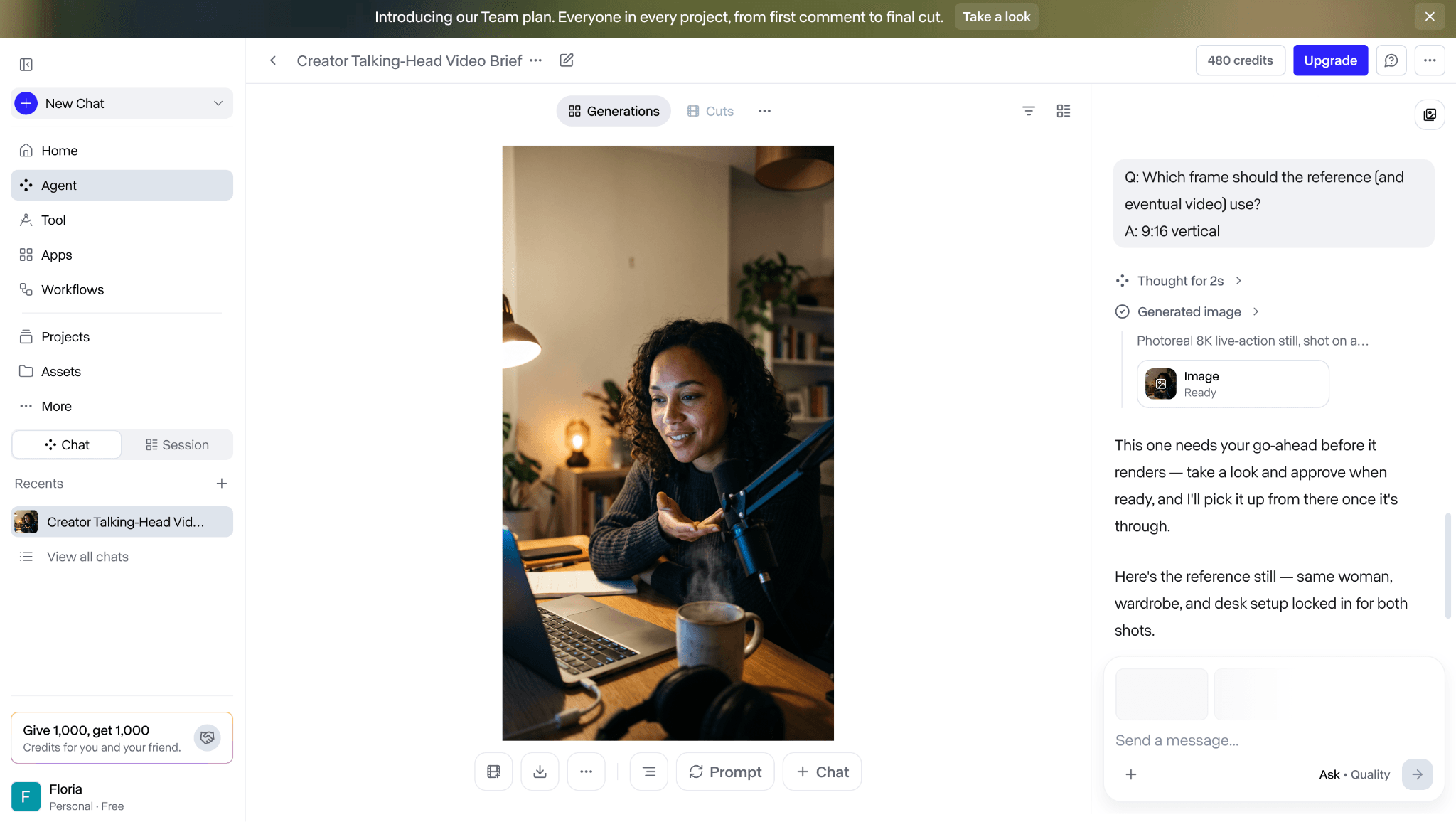
Figure 2. Reference-image generation inside the supplied Runway workflow.
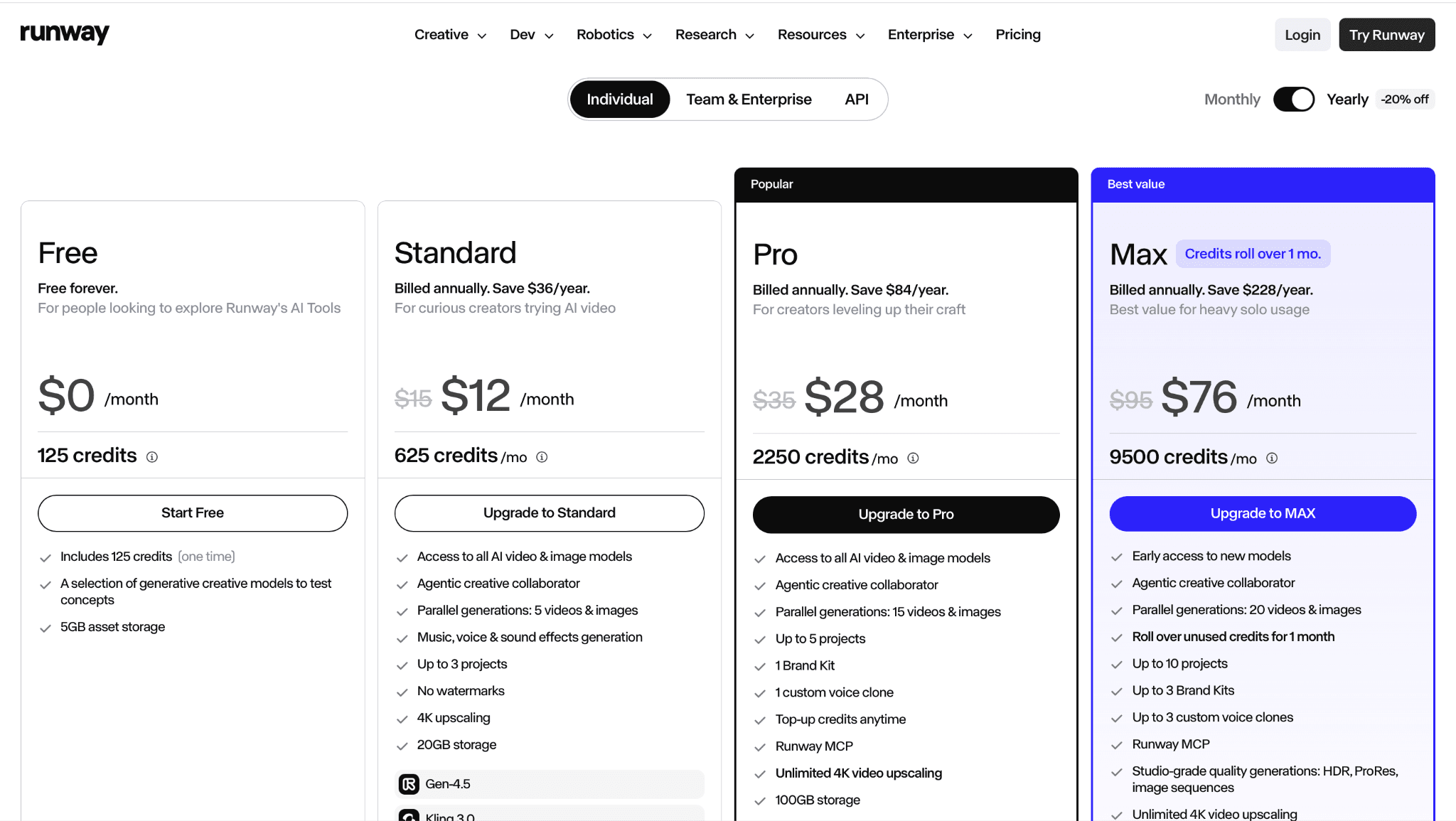
Figure 3. Runway pricing page captured in the supplied draft; live plan terms supersede this image.
4. Luma Ray — Best for fast ideation and expressive camera motion
Switch when you want a direct creative model experience for rapid text- or image-to-video exploration. You gain quick iteration, camera-oriented creative controls, and Dream Machine workflows. The main trade-off is less continuity with Google’s enterprise, audio, and Flow ecosystem.
Where it fits—and where it does not
Luma is a strong creative alternative for visual ideation and motion studies. Production teams should test character continuity, editability, queue behavior, resolution, and the cost of rejected generations on the exact Ray model exposed in their plan.
Pricing and access
Dream Machine uses credits across free and paid plans. Credit costs and model entitlements change, so use the official pricing calculator or plan page for a current estimate.
Evidence note
The supplied screenshot is retained as dated pricing evidence and should not be treated as a permanent quote.
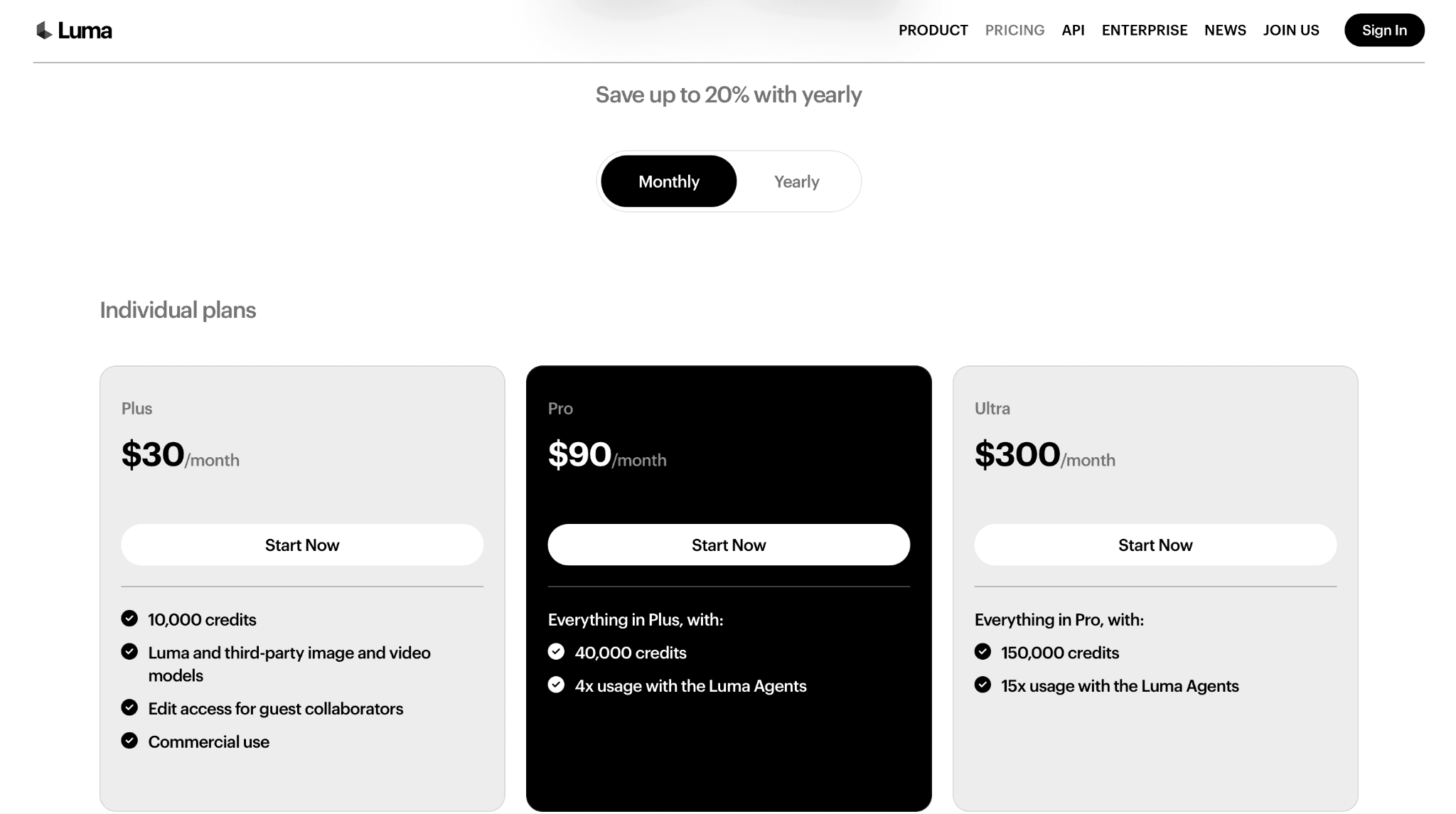
Figure 4. Luma Dream Machine pricing captured in the supplied draft.
5. MiniMax Hailuo — Best for accessible text- and image-to-video generation
Switch when you need a low-friction consumer tool for quick visual concepts and do not require Google-native production infrastructure. You gain simple access, fast experimentation, and a useful path from still references to moving shots. The main trade-off is less of Veo’s integrated audio, enterprise API, and Flow project environment.
Where it fits—and where it does not
Hailuo is best for creators validating ideas before a heavier production workflow. Evaluate identity consistency, prompt adherence, camera motion, queue time, export resolution, and commercial rights using your own inputs.
Pricing and access
Free and paid credit options may be available. Verify current model version, region, watermark, clip length, resolution, and commercial-use terms before publishing.
6. Pika — Best for effects and short-form social content
Switch when you need rapid, playful transformations and effect-led clips more than cinematic realism or an enterprise API stack. You gain accessible effects, short-form workflows, and fast image-to-video experimentation. The main trade-off is less fit for production pipelines that depend on Veo’s audio, longer cinematic control, or Google integration.
Where it fits—and where it does not
Pika is an adjacent alternative optimized for creator velocity. It is a better switch for social hooks, transitions, and stylized effects than for teams seeking one-to-one Veo replacement across filmic output and cloud delivery.
Pricing and access
Pika offers free and paid access with credit- and feature-dependent limits. Verify watermark, export resolution, commercial use, and the active model before production.
7. Adobe Firefly Video — Best for Adobe-centered commercial creative workflows
Switch when your team needs video generation to hand off cleanly into Adobe editing, design, brand, and review tools. You gain Creative Cloud integration, generative credits, and access to Adobe plus selected partner models. The main trade-off is less open deployment and a different audio/model stack from Veo.
Where it fits—and where it does not
Firefly is strongest when the downstream edit matters as much as generation. Confirm which model powers each generation, because capabilities, credits, commercial posture, and resolution can differ between Adobe and partner models.
Pricing and access
Adobe provides limited free credits and paid plans. Live plan terms determine video access, credit use, watermark policy, and commercial rights.
8. Vidu — Best for reference-led character and subject consistency
Switch when maintaining a subject or character from reference media is more important than staying inside Google’s ecosystem. You gain reference-conditioned generation and a focused creator workflow. The main trade-off is less surrounding production tooling, procurement continuity, and audio integration than Veo.
Where it fits—and where it does not
Vidu is a specialist option for reference-heavy creative work. Test it on identity drift, wardrobe, shot transitions, source-image rights, and the exact number of references supported rather than relying on showcase clips.
Pricing and access
Access is generally credit-based. Confirm current models, duration, resolution, watermark, API availability, regions, and commercial terms on the official service.
9. Wan — Best for open and self-managed video research
Switch when you need open weights or controlled deployment and have the infrastructure to own inference, safety, evaluation, and maintenance. You gain model transparency, self-managed experimentation, and the potential to keep source assets inside your environment. The main trade-off is high compute and engineering cost, fewer managed production conveniences, and no direct replacement for Veo audio/Flow.
Where it fits—and where it does not
Wan is the clearest option for technical teams that value deployment control. It should be evaluated by exact checkpoint, license, hardware profile, inference stack, and output constraints; “open” does not mean low-cost or production-ready.
Pricing and access
Weights and code may be available under release-specific licenses. Hosting, compute, optimization, and commercial permissions remain separate costs and responsibilities.
10. Higgsfield — Best for camera- and effect-driven multi-model creation
Switch when you want one creator surface for multiple video models, camera treatments, and effect-led formats. You gain model choice, stylized camera workflows, and rapid social-content experimentation. The main trade-off is less predictability than a single-model pipeline and no Google-native Veo stack.
Where it fits—and where it does not
Higgsfield is a platform alternative: the model selected inside it may come from another provider. Record the exact model, settings, plan, and generation route so the team does not confuse platform behavior with model capability.
Pricing and access
Subscription and credit access vary by model and feature. Verify the active model, usage cost, export terms, watermark, region, and commercial rights at generation time.
Evidence note
The supplied screenshot documents a Higgsfield-hosted generation surface. It does not prove that the output came from Veo or establish a controlled comparison.
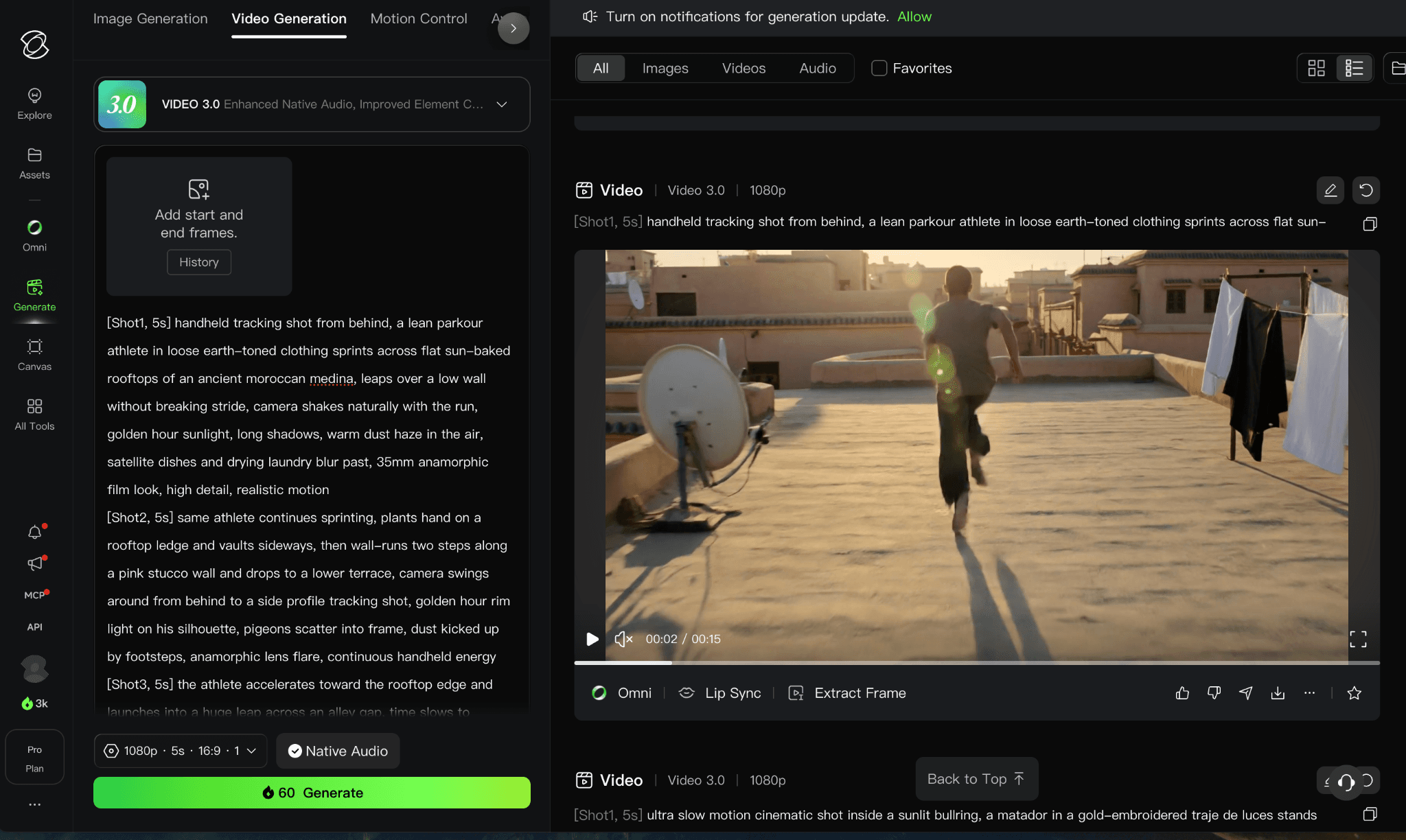
Figure 5. Higgsfield-hosted video generation interface preserved from the original draft.
Where Astorie fits: workflow layer, not a Veo alternative
Astorie is not ranked in the Top 10 because it is not a base video model. It is a collaborative node canvas that can connect prompts, reference images, model generations, edits, and review steps across a team. Use it when the bottleneck is orchestration across Seedance, Kling, Runway, Veo, or other models; do not describe it as a replacement for Veo’s model quality, generated audio, or Google Cloud API.
How to choose a Veo alternative
Define the production unit: social clip, cinematic shot, product video, ad variation, storyboard, or API-generated asset.
Lock a representative test brief with the same references, duration, aspect ratio, audio requirement, and delivery resolution.
Measure usable outputs per dollar and review hour, not only the best sample. Include queue time, failed generations, and re-editing.
Verify volatile boundaries: model version, regions, API, duration, resolution, watermark, commercial rights, and data handling.
Keep a mixed-model workflow if one tool is best for ideation, another for motion, and a third for finishing.
When should you keep Google Veo?
Keep Veo when generated audio, Flow/Gemini integration, Vertex AI deployment, Google procurement, or existing prompts and review controls already save meaningful time. Switch only the stage where another model provides a clear advantage; a multi-model workflow can be safer than replacing an established pipeline outright.
FAQ
What is the closest Google Veo alternative?
Seedance is the best broad starting point; Kling is often the stronger choice when motion control or multi-shot experimentation is the deciding factor.
Which alternative has the best production workflow?
Runway is the strongest suite choice because it combines generation, editing, assets, workflows, and developer products.
Which option can be self-hosted?
Wan is the clearest open/self-managed direction in this ranking, but teams must validate license, hardware, inference stack, safety, and commercial use for the exact release.
Is Astorie a Veo alternative?
No. Astorie is a collaborative multi-model workflow layer. It can organize Veo and competitor models but does not replace a base video model.
Final verdict
Start with Seedance for a broad cinematic alternative, Kling for motion-oriented control, Runway for an integrated suite, Luma for fast iteration, Firefly for Adobe production, and Wan for self-managed research. Keep Veo where audio and Google integration create real operational value. Use Astorie outside the ranking when the challenge is coordinating multiple models and teammates rather than choosing one generator.
Related reading
Runway Gen4 vs Veo vs Kling: Practical Video Production Comparison
Practical comparison for AI video production choices across Runway Gen4, Google Veo, and Kling.
7 Best Photoroom Alternatives in 2026 (Tested for Ecommerce Photography)
Do you need a Photoroom alternative that goes beyond simple background cutouts and batch image processing? Try these 7 tools and pick the one that best matches your AI product photography use cases.
6 Ideogram Alternatives for Killer AI Image Generation
Here are 6 tried and tested Ideogram alternatives that work best for prompt accuracy, text, image realism, character consistency and are intelligent enough to render real-world scenarios and logic.
Ready to try it on the canvas?
Open Astorie and fan your prompt across every frontier model in one workflow.