
Can GPT Image 2.5 Generate True 4K Images? Resolution Limits Explained
Yes. GPT Image 2.5 can generate an actual 3840 × 2160 pixel file, which meets the UHD 4K definition. In our Astorie test, a High-quality Flare job produced a 3840 × 2160 RGB PNG. However, OpenAI labels outputs above 2560 × 1440 as experimental, and a 4K pixel grid does not guarantee native-looking fine detail in every region.
Astorie exposes 1K, 2K, and 4K choices beside the model, quality, aspect ratio, and output format, then lets the result be downloaded for verification outside the preview. That last step is essential: a large canvas preview or a “4K” selector is not proof until the saved file dimensions are checked.
Can GPT Image 2.5 generate true 4K images
Field | Observed in our test | What it proves |
Model and route | GPT Image 2.5 Flare in Astorie | The workflow used the fast everyday GPT Image 2.5 model |
Settings | High, opaque, 16:9, 4K, PNG | The requested delivery configuration was visible before output |
Astorie cost | 25 credits | The interface cost for this job on the test date |
Elapsed time | About 60 seconds after refresh | Observed job time; not a universal benchmark |
Reliability note | First attempt failed; refresh succeeded | 4K generation can require a retry |
File dimensions | 3840 × 2160 pixels | The downloaded file is UHD 4K by pixel dimensions |
File size | 16,496,464 bytes, about 16.5 MB | The PNG was a substantial exported file, not a preview thumbnail |
Color data | RGB, sRGB IEC61966-2.1 | Standard RGB color profile metadata |
Resolution metadata | 72 pixels per inch | A metadata value, not a limit on screen resolution or print size |
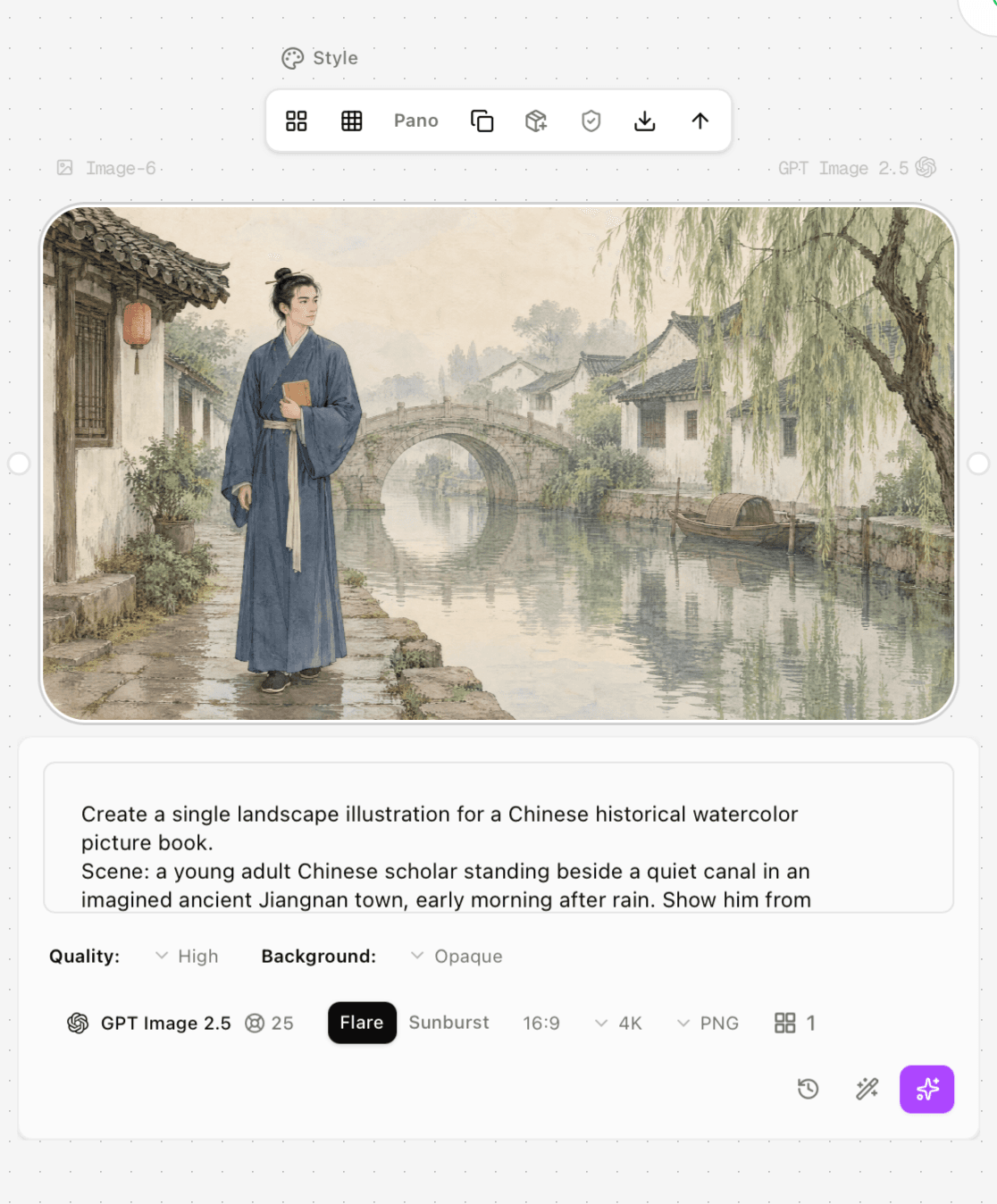
Figure 1. The Astorie node shows GPT Image 2.5 Flare at High quality, 16:9, 4K, PNG, opaque background, and 25 credits.
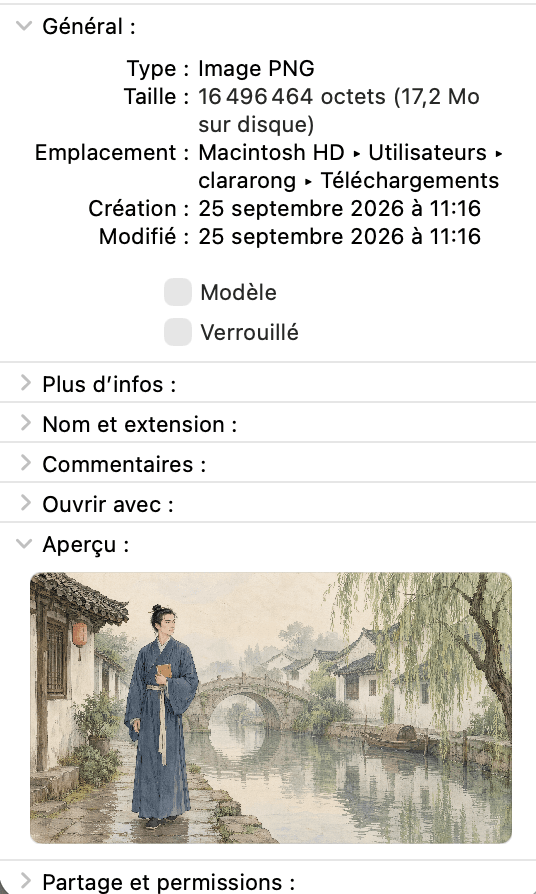
Figure 2. The downloaded PNG reports 16,496,464 bytes, approximately 16.5 MB.
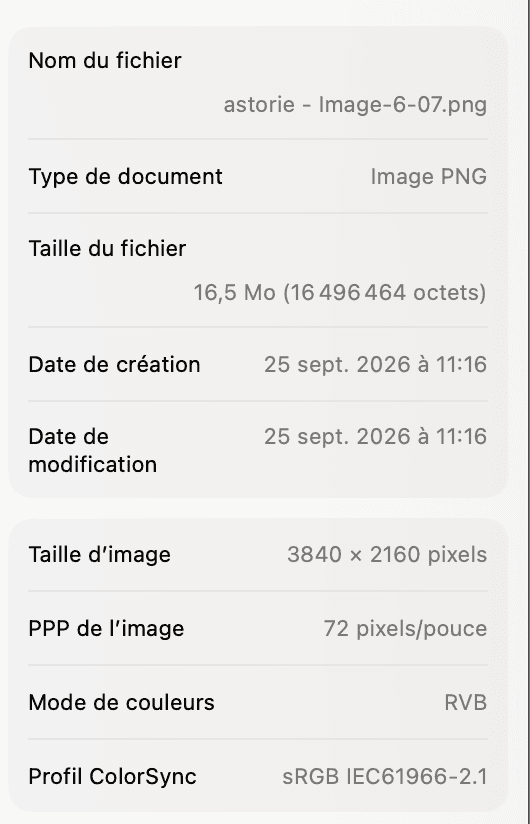
Figure 3. The saved image reports 3840 × 2160 pixels, 72 pixels per inch, RGB color, and the sRGB IEC61966-2.1 profile.
What true 4K means for an AI image
For a raster file, UHD 4K means a 3840 × 2160 pixel canvas: 8,294,400 pixels in a 16:9 frame. Our downloaded file meets that measurable definition. OpenAI’s official custom-size rules allow a maximum edge of 3840 pixels and a maximum total area of 8,294,400 pixels, which makes 3840 × 2160 the upper-bound landscape example.
But “true 4K” is often used to imply more than dimensions. It may suggest that hair, foliage, fabric, lettering, and edges contain four-K-worthy high-frequency detail rather than enlarged or smoothed patterns. Pixel dimensions can be verified exactly; perceived detail cannot be guaranteed by the selector alone. OpenAI’s prompting guide explicitly calls sizes above 2560 × 1440 experimental, so 4K output should be inspected, not assumed.
Official GPT Image 2.5 resolution limits
Each edge must be a multiple of 16 pixels.
The longest edge can be no more than 3840 pixels.
The aspect ratio can be no wider or taller than 3:1.
Total area must be between 655,360 and 8,294,400 pixels.
Both GPT Image 2.5 Flare and Sunburst support custom dimensions within those bounds.
OpenAI lists 3840 × 2160 and 2160 × 3840 as common 4K landscape and portrait examples.
These limits also explain why some cinematic “4K” ratios are unavailable at full width: the total-pixel ceiling still applies. If you choose 3840 pixels on one edge, the other edge must keep the whole canvas at or below 8,294,400 pixels.
Resolution, quality, model, and format are different controls
Control | Changes | Does not guarantee |
Resolution | Pixel width, height, and total canvas area | Sharp faces, correct text, coherent anatomy, or faithful references |
Quality | Generation effort from Low through Max | A larger pixel grid or a better result for every prompt |
Model | Speed/capability tradeoff between Flare and Sunburst | Perfect instruction following or artifact-free detail |
Format | PNG, JPEG, or WebP encoding and file characteristics | More semantic detail than the model generated |
PNG is the safest choice when lossless export, text edges, compositing, or repeated post-processing matters. JPEG is smaller for photographic delivery but introduces lossy compression. WebP can reduce delivery weight efficiently, but downstream support should be checked. Changing format cannot recover detail that was never generated.
When 4K is worth the extra cost
Output choice | Use case | Replacement benefit | Migration loss | Switch trigger |
1K | Thumbnails, mood boards, early composition | Fastest economical iteration | Insufficient delivery size for large displays | Move to 2K once the concept is approved |
2K | Most web, presentation, and social finals | Strong balance of detail, cost, and stability | Less crop room and limited large-format use | Move to 4K when delivery dimensions or crop flexibility require it |
4K | UHD screens, hero assets, large crops, high-resolution archives | Native 3840 × 2160 canvas and more editing headroom | Experimental tier, larger files, more cost, slower jobs, retry risk | Use only when the downstream requirement exceeds 2K or upscaling fails inspection |
For most web articles, 2K is the practical default because the page rarely displays 3840 pixels across and compression will dominate delivery. Switch to 4K when the image will fill a UHD display, needs aggressive crops, becomes a downloadable asset, or must survive later layout changes. The gain is a larger verified canvas; the loss is an experimental workflow with more credits, time, storage, and possible retries.
What 72 pixels per inch means
The 72 pixels-per-inch value in the file is metadata. It does not reduce the 3840 × 2160 pixel image on a screen. For print, divide the pixel dimensions by the intended print density. At 300 pixels per inch, the file covers about 12.8 × 7.2 inches without resampling. At 150 pixels per inch, it covers about 25.6 × 14.4 inches. Whether that looks acceptable depends on viewing distance and image detail.
How to verify a 4K generation
Confirm the generation node shows the intended model, quality, aspect ratio, 4K size, and output format before running.
Download the original result rather than saving a browser preview or screenshot.
Open file information and confirm the pixel dimensions are 3840 × 2160 for UHD landscape 4K.
Inspect the image at 100% for soft faces, duplicated patterns, malformed edges, unreadable text, and reference drift.
Check the file format, color profile, and file size required by the delivery channel.
If the job fails, retry from the same settings or fall back to a clean 2K generation plus a dedicated upscaler; compare both at equal zoom.
The fallback has a clear tradeoff. Native 4K generation preserves a single model pass and may create useful detail at the target size, but it is experimental. A 2K-plus-upscaler workflow can be more predictable and economical, yet the upscaler may invent texture and cannot repair semantic mistakes. Switch to the fallback when repeated 4K jobs fail, when 2K already looks correct, or when delivery needs mainly require pixel dimensions rather than new semantic detail.
Frequently asked questions
Is 3840 × 2160 the same as cinema 4K
No. 3840 × 2160 is UHD 4K, the common 16:9 display format. DCI cinema 4K is 4096 pixels wide, which exceeds GPT Image 2.5’s official 3840-pixel maximum edge.
Can GPT Image 2.5 make a portrait 4K image
Yes. OpenAI lists 2160 × 3840 as a common portrait size, subject to the same edge, area, and aspect-ratio limits.
Does Max quality create more than 4K
No. Max changes the quality budget, not the maximum dimensions. The longest supported edge remains 3840 pixels.
Why did the first 4K job fail
The interface did not expose a definitive cause, so attributing it to model capacity, networking, or queue load would be speculation. The appropriate conclusion is simply that one attempt failed and a refresh succeeded.
The practical answer
GPT Image 2.5 can deliver a verifiable UHD 4K file, and our Astorie download measured exactly 3840 × 2160 pixels. Treat that as a canvas-size fact, not a blanket detail claim. Use 4K when the delivery requirement genuinely needs it, then inspect the original file because the tier is experimental and high resolution cannot compensate for a weak prompt or semantic artifact.
Sources
Official documentation is the authority for current product facts. Community links are included only as anecdotal reports and are not treated as controlled benchmarks.
OpenAI — Introducing ChatGPT Images 2.5
OpenAI — Image generation guide and custom size limits
OpenAI — Image prompting guide and experimental large-output note
OpenAI — GPT Image 2.5 Flare model
OpenAI — GPT Image 2.5 Sunburst model
Ready to try it on the canvas?
Open Astorie and fan your prompt across every frontier model in one workflow.