

10 HeyGen Alternatives for AI Avatar Videos, Training, and Localization in 2026
Compare 10 HeyGen alternatives for AI avatar videos, corporate training, localization, social content, product advertising, and multi-model talking-head workflows.
Key takeaways
- Synthesia is the closest HeyGen alternative for governance-heavy training, localization, and structured business video.
- AI Studios is the closest general-purpose replacement when avatar variety and multilingual production matter most.
- Colossyan and Elai are stronger choices for courses, workplace learning, and presentation-based training.
- VEED, Captions, and Creatify shorten the path from avatar generation to edited social or advertising content.
- Astorie is a partial workflow alternative for teams that need to connect several portrait, voice, lip-sync, image, and video models.
Synthesia is the closest HeyGen alternative for governance-heavy training and localization; AI Studios is the closest general-purpose replacement when broader avatar and template choice matters more. HeyGen remains unusual because avatars, translation, voice cloning, scene editing, and fast browser production sit in one workflow, so most alternatives replace only part of that stack.
Colossyan and Elai make a stronger case for learning content, while VEED and Captions reduce the handoff between avatar generation and editing. Creatify fits product advertising, D-ID fits portrait-led agents, and Astorie is a partial workflow alternative for teams that need several image, voice, lip-sync, and video models on one canvas.
HeyGen itself still offers a capable free entry point. Its current free plan includes three videos per month of up to one minute, and the Creator plan is listed at $29 per month. Switching only makes sense when another platform fits the actual production process better, not because it has a longer feature list.
Quick answer
Choose Synthesia when HeyGen’s training governance, SCORM delivery, or review controls are the bottleneck; you gain a structured business-video system but give up some of HeyGen’s quick creator feel.
Choose AI Studios when HeyGen’s free-video cap, avatar variety, or entry price is limiting a broader multilingual workload; the trade-off is a denser plan matrix and different governance depth.
Choose Colossyan for branching, quizzes, and LMS delivery, or Elai for turning slides and documents into courses. Both solve training gaps in HeyGen, but neither is as natural for fast creator marketing.
Choose VEED or Captions when exporting from HeyGen into a separate editor slows social production; you gain editing and publishing tools but give up some training and enterprise controls.
Choose Creatify when HeyGen’s general editor is too broad for product ads, Vidnoz when entry cost matters most, and D-ID for portrait avatars or visual-agent APIs. Each is narrower than HeyGen’s all-purpose workflow.
Choose Astorie only when a reusable portrait-to-voice-to-lip-sync pipeline across several models matters more than HeyGen’s stock presenters and guided templates; it is a workflow-level partial alternative.
The best HeyGen alternatives at a glance
| Tool | Best for | Free access | Public starting price |
|---|---|---|---|
| Synthesia | Business training and localization | Yes | $29/mo; $18/mo billed yearly |
| AI Studios | Flexible multilingual avatar video | Yes | Personal from $24/mo |
| Colossyan | Interactive workplace learning | Yes | $59/mo billed yearly |
| D-ID | Talking photos and visual agents | Trial | Plan and billing-cycle dependent |
| Elai.io | Courses and presentation-based video | 1 minute | $29/mo; $23/mo billed yearly |
| VEED | Avatar video plus browser editing | Yes | Plan and region dependent |
| Captions | Creator and social avatar video | Basic tools | Max $24.99/mo |
| Creatify | AI UGC and product ads | 10 credits | Starter $39/mo |
| Vidnoz AI | Budget and template-heavy production | Yes | Paid access from $14.99/mo |
| Astorie | Multi-model talking-head workflows | Yes | Standard $19/mo |
Pricing and access were checked on September 6, 2026. Taxes, regional pricing, annual discounts, promotional offers, and model-specific credits may change the practical cost.
How these alternatives were selected
A product qualified only if it could cover the central HeyGen job: place a stock or custom presenter on screen, give that presenter a script or voice track, and export a usable video. General text-to-video systems were excluded unless they also supported a practical talking-head workflow. The ranking then considers how much of the wider HeyGen experience each product can replace.
- Avatar choice and the route to creating a custom presenter
- Script, voice, lip-sync, and translation controls
- Scene editing, uploaded assets, captions, and branding
- Collaboration, review, export, and LMS or API requirements
- Free access, watermarks, minute limits, credits, and paid add-ons
Synthesia and AI Studios were the controlled-test pair. The Synthesia record supports a limited in-product observation. AI Studios could not be completed in the supplied account, so its recommendation uses documented product and plan differences rather than first-hand claims about rendering speed, lip-sync, editor friction, or export.
1. Synthesia
Best for: learning, onboarding, and internal communications teams that need consistent presenter-led videos across multiple scenes.
Synthesia is less concerned with the novelty of making a photograph talk and more concerned with producing a video someone can actually use at work. Scripts, scenes, layouts, and presenters fit naturally into onboarding lessons, policy updates, and product training. The more structured the project, the more that difference matters.
The supplied test used the same announcement, a comparable business presenter, and a horizontal composition. The useful comparison was the path from script to editable scenes, not cosmetic differences between avatars.
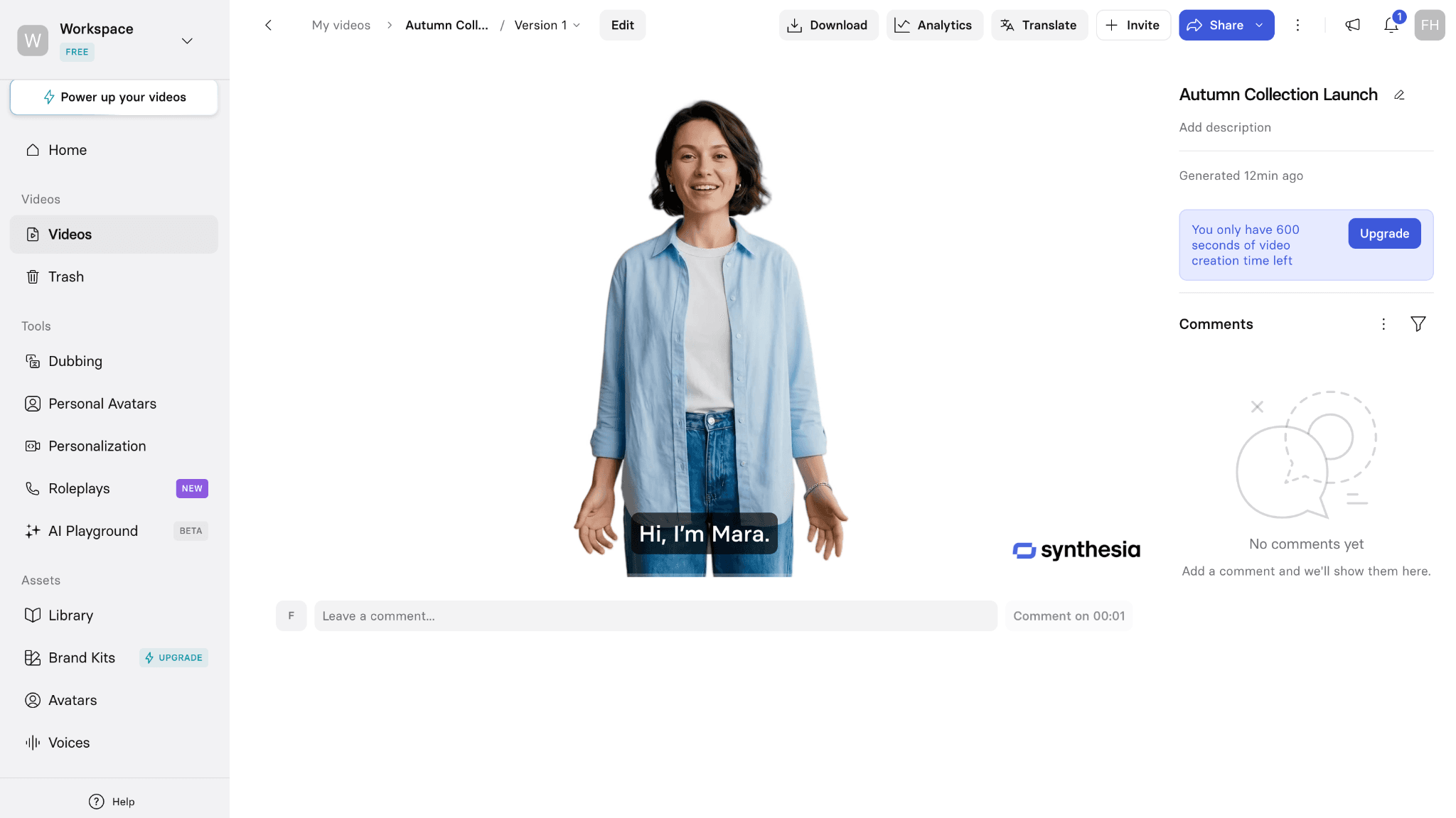
The supplied Synthesia test used a business presenter in a horizontal, slide-based video workspace.
In our test, Synthesia placed the avatar, script, and scene controls inside a clean, slide-based workspace. Setting up the announcement took about 20 minutes. Avatar movement and the business-English voice looked restrained and natural for corporate training. The first-use path was less direct than HeyGen: Create Video opened a large template gallery, and the editor behaved more like a presentation builder than a quick talking-head tool. The free account allowed the workflow to be explored, but downloading the finished video required an upgrade. The account screen showed a higher local checkout price than the public U.S. page, so buyers should use their own billing screen.
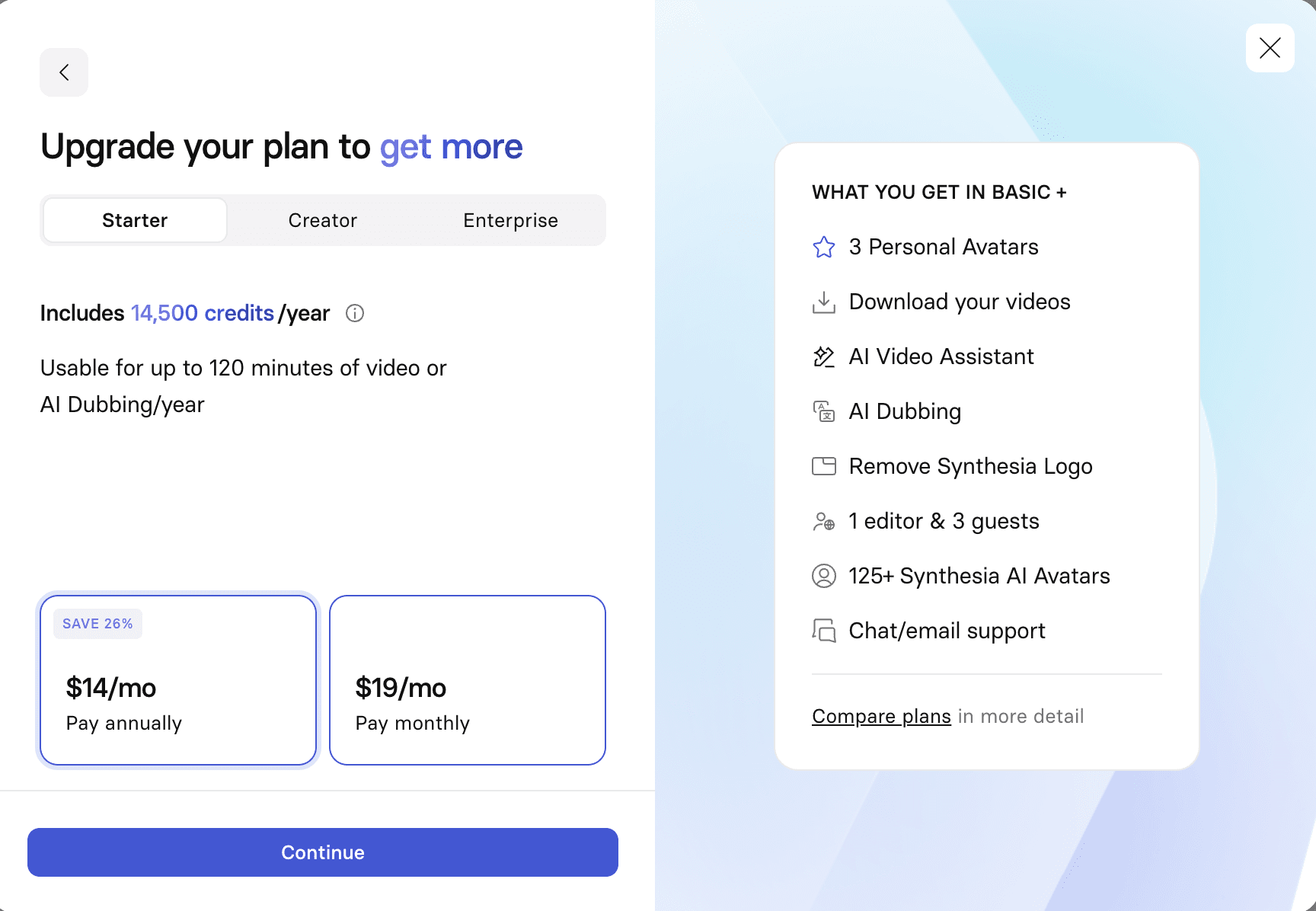
The supplied account displayed local Synthesia checkout pricing that differed from the public U.S. pricing page.
Choose Synthesia when HeyGen’s training governance, repeatable localization, and LMS delivery are the reason for switching.
Synthesia covers the full business-video loop: stock and personal avatars, scene-based editing, templates, brand assets, AI dubbing, and voices in more than 160 languages. Its higher plans add multiple avatars in one scene, interactive video, API access, SCORM export, live collaboration, and administrative controls. That makes it easier to standardize a training library than to manage a collection of one-off presenter clips.
Choose Synthesia when HeyGen’s training governance, repeatable localization, and LMS delivery are the reason for switching.
Synthesia covers the full business-video loop: stock and personal avatars, scene-based editing, templates, brand assets, AI dubbing, and voices in more than 160 languages. Its higher plans add multiple avatars in one scene, interactive video, API access, SCORM export, live collaboration, and administrative controls. That makes it easier to standardize a training library than to manage a collection of one-off presenter clips.
The product is less naturally aimed at fast creator content. Starter includes ten minutes of video per month, and the deeper collaboration and learning features sit above the entry plan. A team moving from HeyGen should compare how many finished minutes it really publishes, not just how many drafts it creates. Studio-recorded avatars are also a separate paid service rather than an automatic part of a subscription.
Choose this if: your main output is repeatable training, onboarding, compliance, or internal communication across languages.
Stay with HeyGen if: your team is mainly producing quick marketing clips and already likes HeyGen's creator-oriented workflow.
Pricing checked September 6, 2026: Basic is free. Starter is $29 per month or $18 per month when billed yearly; Creator is $89 monthly or $64 per month on annual billing. Local checkout may differ. Official pricing The product is less naturally aimed at fast creator content. Starter includes ten minutes of video per month, and the deeper collaboration and learning features sit above the entry plan. A team moving from HeyGen should compare how many finished minutes it really publishes, not just how many drafts it creates. Studio-recorded avatars are also a separate paid service rather than an automatic part of a subscription.
Choose this if: your main output is repeatable training, onboarding, compliance, or internal communication across languages.
Stay with HeyGen if: your team is mainly producing quick marketing clips and already likes HeyGen's creator-oriented workflow.
Pricing checked September 6, 2026: Basic is free. Starter is $29 per month or $18 per month when billed yearly; Creator is $89 monthly or $64 per month on annual billing. Local checkout may differ. Official pricing
2. AI Studios
A broad HeyGen alternative for multilingual videos, large avatar choice, and longer projects.
AI Studios combines a conventional scene editor with stock, generated, photo, and custom avatars. The current plan table also lists one-click translation, captions, brand kits, thousands of templates, and interactive avatars on supported tiers. The range is useful when one team creates product explainers, lessons, news-style presentations, and localized versions from the same account.
Its breadth makes the plan comparison important. The free tier allows three videos per month with a one-minute maximum, while stock-avatar counts, custom-avatar allowances, video duration, and team tools increase by tier. A feature appearing on the product site does not necessarily mean it is included in the Personal plan, so buyers should check the row that matters before moving a production library.
Choose this if: you want a general-purpose avatar studio with a large catalog, multilingual tools, and room for longer videos.
Stay with HeyGen if: you prefer HeyGen's current editor and do not need the additional avatar types or broader template catalog.
Pricing checked September 6, 2026: AI Studios has a free plan. Personal starts at $24 per month and Team at $55 per seat per month. Official pricing
3. Colossyan
The better fit when an avatar video is part of a structured learning program.
Colossyan is built around workplace learning rather than general creator video. Alongside AI presenters, custom avatars, voice cloning, screen recording, brand kits, and localization, it offers interactive video, branching, assessments, course creation, and SCORM delivery. Those tools matter when a video must become a lesson that can be assigned, completed, and measured.
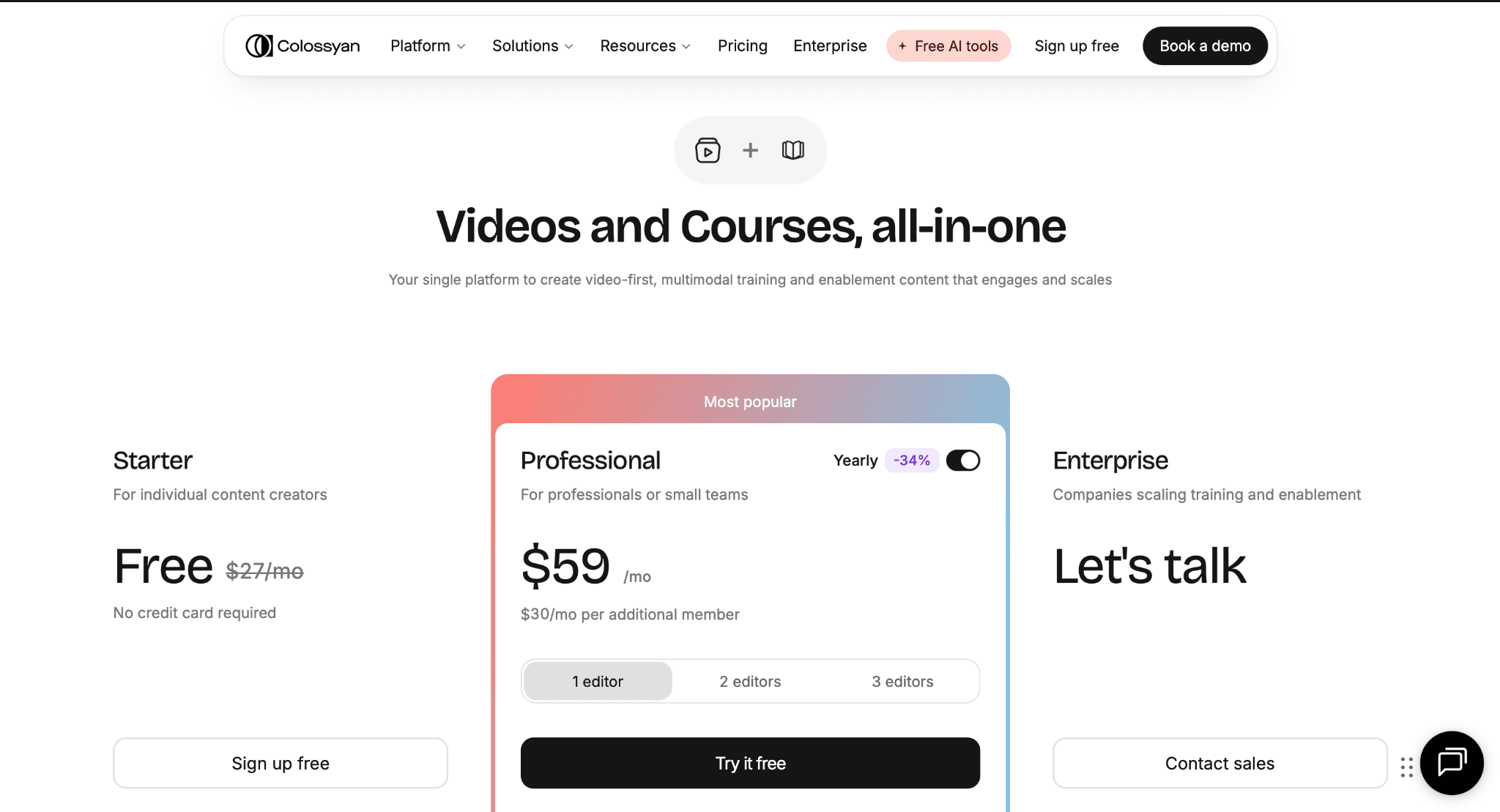
Colossyan’s pricing page positions the Professional plan for professional creators and small teams.
That specialization is also the trade-off. A solo marketer who only needs a presenter reading a short script may find more learning infrastructure than necessary. Minute allowances are divided across Colossyan's current generation models, and some export or interactive features have plan-specific limits. The value is strongest when the learning layer will actually be used.
Choose this if: you build onboarding, compliance, customer education, or sales-enablement material that needs interaction or LMS delivery.
Stay with HeyGen if: you mainly publish standalone social or marketing videos and do not need course tools.
Pricing checked September 6, 2026: Colossyan has a free plan. Professional is $59 per month on annual billing; additional editors cost extra. Official pricing
4. D-ID
A practical option for animating portraits and building visual AI agents.
D-ID's Creative Reality Studio turns text, audio, or a still image into an avatar-led video. Users can choose a supplied presenter, upload a face, or generate a portrait, then add a voice and produce an MP4. The platform also extends beyond recorded clips into visual agents and real-time experiences, which gives it a different route from HeyGen's scene-and-template workflow.
D-ID is most convincing when the source is a portrait or when a developer needs an avatar inside another product. The Studio is less suited to teams that expect a deep presentation editor with a large template system. Generated videos are limited to five minutes, output resolution depends on the presenter, and Trial and Lite videos carry a watermark. Usage is deducted in 15-second increments, and unused monthly minutes do not roll over.
Choose this if: you need quick talking portraits, visual agents, or an API-led digital-human experience.
Stay with HeyGen if: you need a polished slide-based editor for longer training or marketing projects.
Pricing checked September 6, 2026: D-ID offers a Studio trial; paid prices and minute allowances are displayed dynamically by plan and billing cycle. Official pricing
5. Elai.io
A presentation-centered option for courses, explainers, and corporate learning.
Elai, now presented as part of Panopto's training-video offering, is designed for structured business content. Its editor supports digital presenters, templates, brand kits, screen recording, URL-to-video, PowerPoint-to-video, automatic translation, and voice cloning. The free plan currently lists more than 80 avatars and more than 75 languages, although it only includes one minute of video.
This is a sensible route for teams converting existing slides or written material into narrated lessons. It is not as natural for short-form creators who want rapid visual experimentation. Custom avatars, premium voices, team seats, and 4K output also depend on the selected plan rather than arriving with every paid account.
Choose this if: your source material already lives in presentations, documents, or a learning workflow.
Stay with HeyGen if: your priority is frequent creator-led social content rather than course production.
Pricing checked September 6, 2026: Elai Free includes one minute. Creator is $29 per month or $23 per month when billed annually. Official pricing
6. VEED
The useful choice when avatar generation is only one part of the edit.
VEED places AI presenters inside a full browser editor. Its avatar tool currently advertises more than 60 stock avatars, personal digital clones, and speech in more than 120 languages. Once the presenter is generated, the same project can hold uploaded footage, slides, text, subtitles, music, logos, and supporting visuals. That removes the export-and-rebuild step that often appears when a dedicated avatar platform is paired with a separate editor.
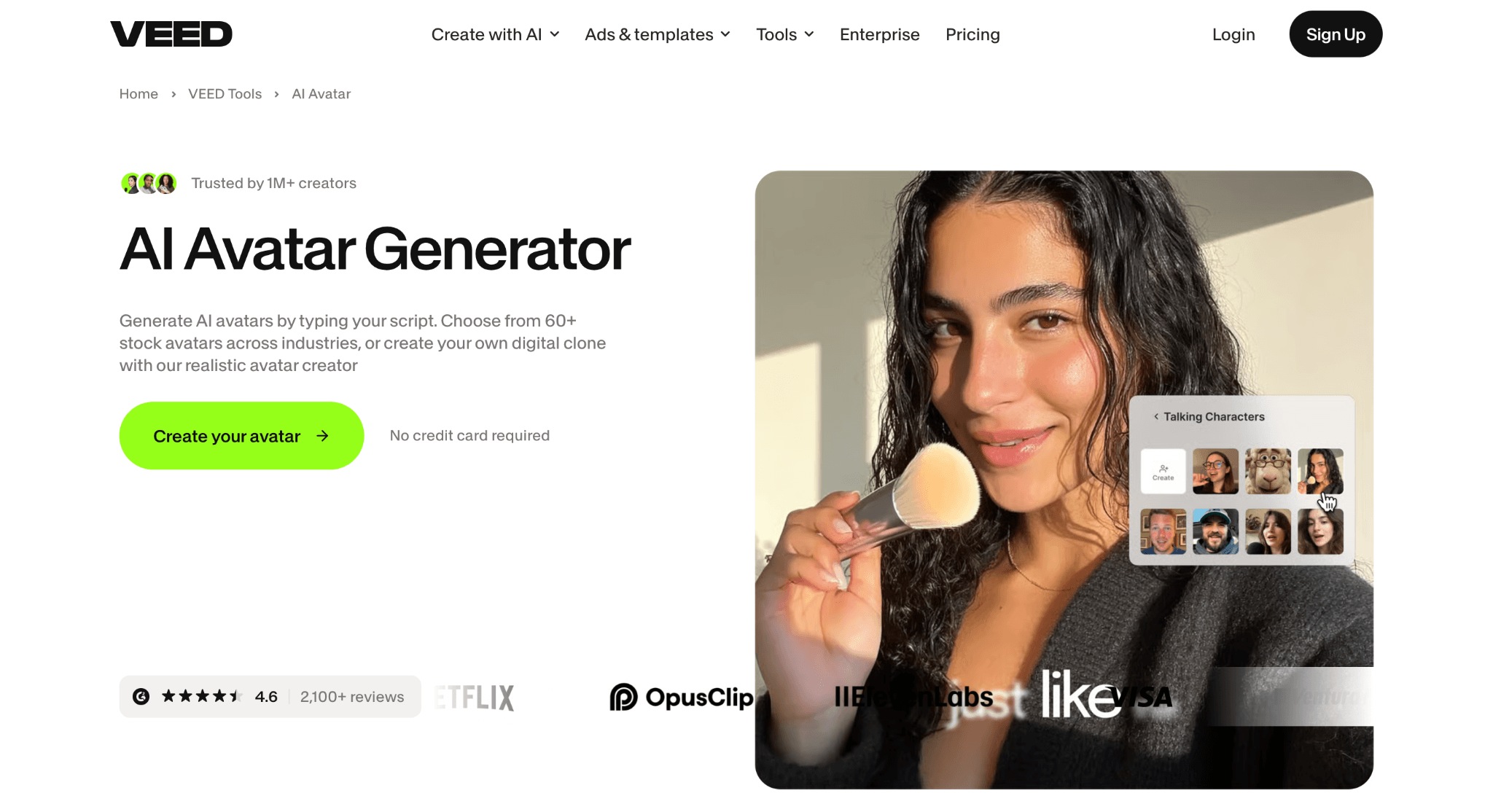
VEED combines its AI avatar generator with a broader browser-based video editing workspace.
The trade-off is focus. VEED's subscription covers many editing and generation tools, so avatar allowances sit inside a wider credit system. Teams that need strict training governance or a large enterprise presenter library may prefer Synthesia or Colossyan. VEED makes more sense when the finished video needs manual editing after the avatar speaks.
Choose this if: you want to add a presenter to existing footage, slides, subtitles, and brand assets in one browser project.
Stay with HeyGen if: avatar management, enterprise training controls, or presentation templates are the main requirement.
Pricing checked September 6, 2026: VEED is free to start; paid price and AI allowances vary by plan and region. Official pricing
7. Captions
A creator-first alternative when the bottleneck is turning an avatar performance into a finished social video.
Choose Captions when HeyGen’s presenter workflow still leaves too much editing, reframing, captioning, or clip production to another app. Max combines AI actors, digital twins, chat-led edits, custom B-roll, music, sound effects, and post-ready clips in one creator workspace. The gain is a shorter route from performance to publishable social content.
The loss is business-video structure. Captions is not the first choice for SCORM delivery, formal training governance, or a large approved-presenter program. It is a specialist replacement for creator and marketing output, not a full HeyGen migration for every team.
Pricing checked September 6, 2026: Max is $24.99 per month with 500 monthly credits. Official pricing
8. Creatify
A specialized alternative for AI UGC, product explainers, and performance ads.
Creatify uses avatars as ad presenters. Its current avatar page lists a large library of realistic presenters, photo-based avatars, custom brand avatars, full-body motion, and lip-sync across more than 75 languages. The wider product can turn product information into scripts and ad variations, so the workflow begins closer to a campaign brief than to a blank presentation.
That makes Creatify a genuine HeyGen alternative for advertising, but not a broad replacement for every user. Long training modules, detailed internal presentations, and LMS delivery are outside its center of gravity. The free plan is enough to inspect the workflow, but exports carry a watermark and the small credit allowance is designed for a limited number of ad generations.
Choose this if: your main output is UGC-style advertising or a product video that needs many creative variations.
Stay with HeyGen if: you need long-form training, internal communication, or a general presentation studio.
Pricing checked September 6, 2026: Creatify Free includes 10 monthly credits and watermarked exports. Starter is $39 per month with 100 credits. Official pricing
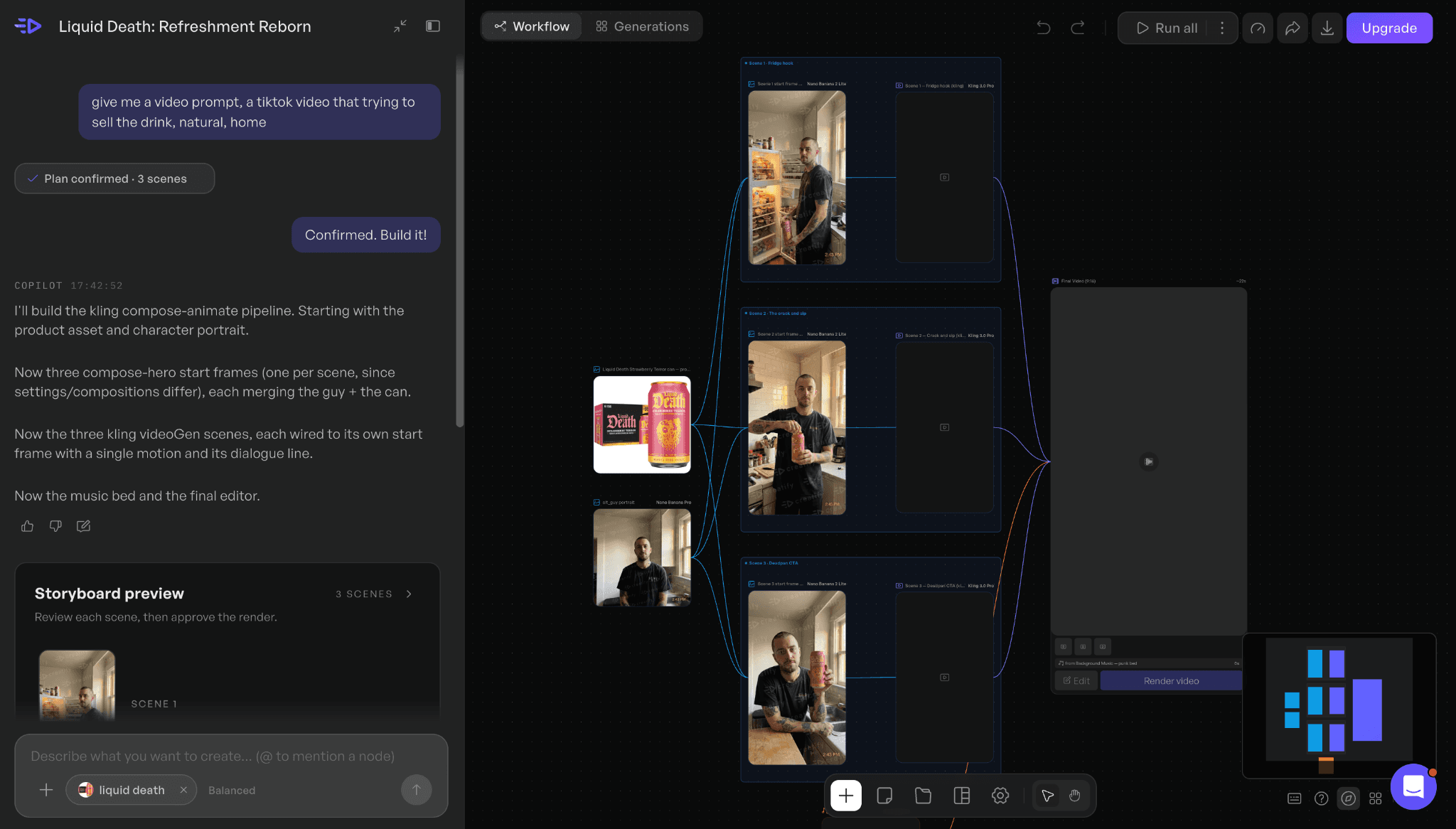
Creatify’s agent turns a product image and short advertising request into a connected production workflow.
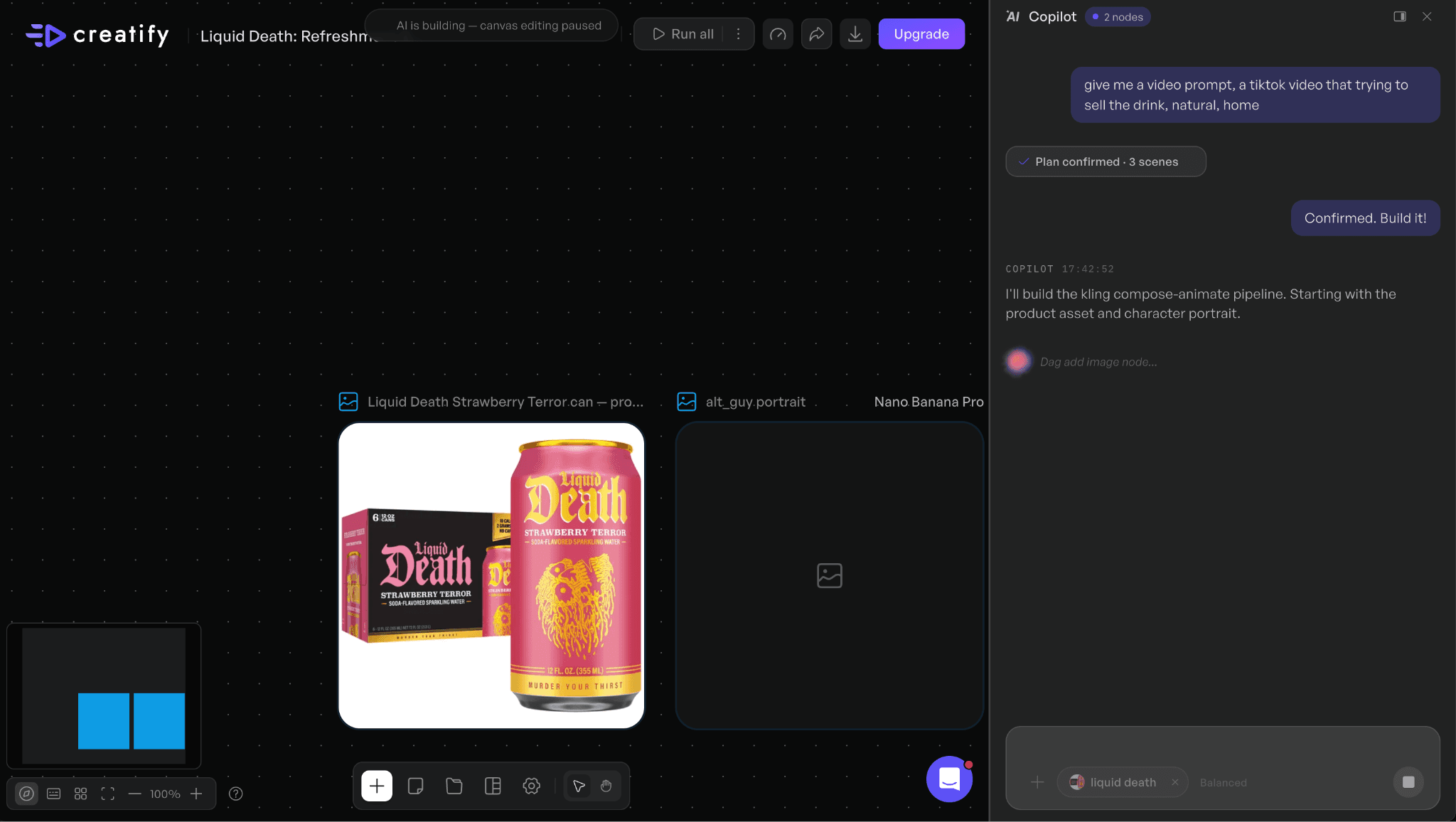
Creatify reached the free-account credit limit during the image-generation stage of the supplied test.
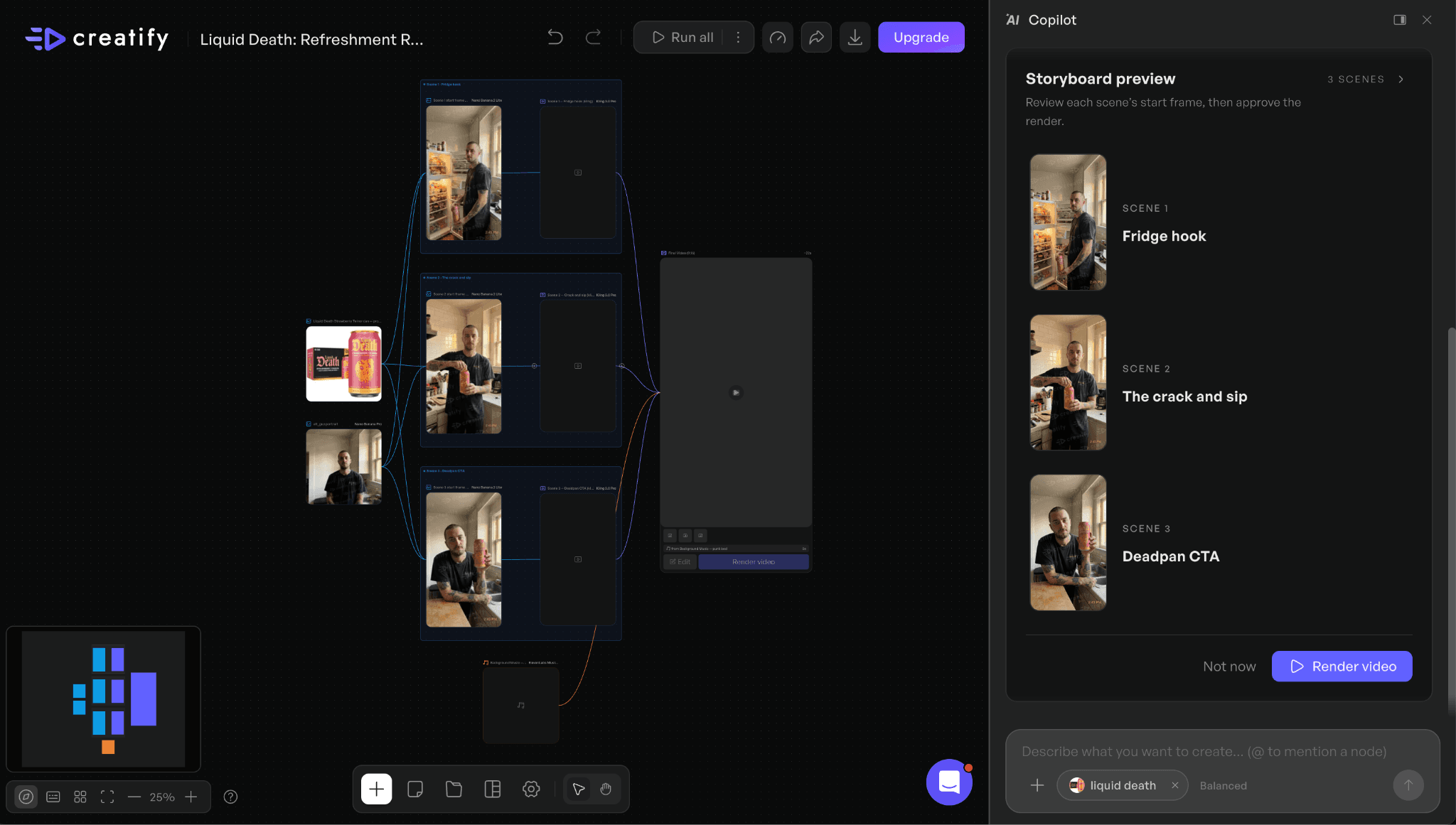
Figures 6–7. Creatify agent workflow and the free-account credit limit reached during the supplied test.
In our test, Creatify’s agent accepted a product image and a short UGC-ad request, then proposed a character, a keyframe, and a connected production flow. The guided setup felt coherent, but the free account ran out of credits at the image-generation step, before a finished video could be judged. That makes the test useful for understanding the workflow and entry-limit friction, not for claiming a rendering-speed or output-quality advantage over HeyGen.
9. Vidnoz AI
A lower-cost route to template-based avatar videos with a large catalog.
Vidnoz packages stock avatars, templates, voices, script generation, captions, transitions, screen recording, and translation into a conventional online editor. It covers training, explainers, sales, news-style video, and social formats, and its free plan allows users to produce short 720p videos before paying. Paid tiers increase resolution, avatar and voice access, and collaboration features.
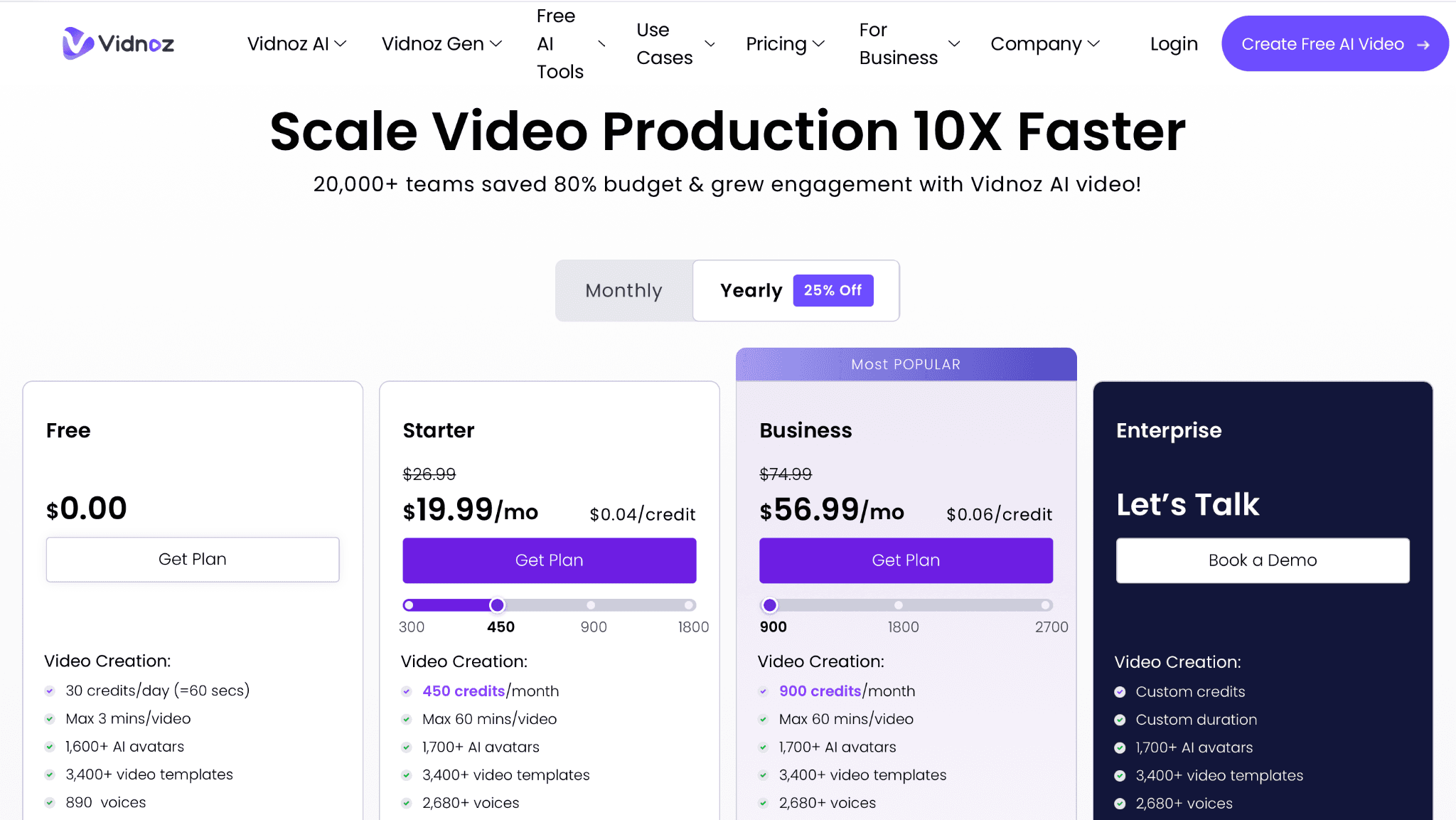
Vidnoz offers a free entry tier alongside paid plans with higher credit, duration, avatar, and template limits.
The catalog is large, but quantity does not answer the harder questions about expression, voice quality, or consistency across a series. Those should be checked with a real script before committing to volume. The free tier includes a Vidnoz watermark, while custom avatars, voice cloning, SCORM export, and team controls have separate plan or add-on conditions.
Choose this if: you need a large template library and want to test avatar video with a smaller starting budget.
Stay with HeyGen if: consistent premium avatar performance matters more than catalog size or entry price.
Pricing checked September 6, 2026: Vidnoz has a free plan and currently advertises paid access from $14.99 per month; exact tiers, add-ons, and regional offers vary. Official pricing
10. Astorie
A workflow-level alternative for building talking-head video across several models.
Astorie approaches avatar video as a connected production graph. A creator can generate or import a portrait, keep it as a reference, add narration or a cloned voice, and pass those inputs into talking-head models such as Kling Avatar or OmniHuman. The same canvas can hold alternate generations, image-to-video steps, other video models, and the assets used for a longer sequence.
This is not a claim that Astorie copies HeyGen's product. It does not replace a stock-avatar presentation library, a ready-made corporate template system, or one-click enterprise localization. The reason to consider it is different: teams can compare models and preserve the steps behind a recurring character instead of committing every avatar job to one provider.
Choose this if: you want a reusable portrait-to-voice-to-lip-sync pipeline and need several image or video models in the same project.
Stay with HeyGen if: you want a large stock-presenter library and a guided slide editor with minimal setup.
Pricing checked September 6, 2026: Astorie offers a free plan; Standard is $19 per month. Annual introductory pricing may differ. Official pricing
Which alternative fits each reason for switching?
| Reason for switching | Start with | What you gain vs HeyGen | What you give up |
|---|---|---|---|
| Training governance | Synthesia | SCORM, structured review, localization | Faster creator workflow |
| General avatar studio | AI Studios | Broader creation mix and lower entry price | HeyGen’s familiar editor |
| Branching and quizzes | Colossyan | Interactive learning and LMS delivery | Marketing-first speed |
| Portraits or visual agents | D-ID | Photo avatars and agent/API path | Deep scene templates |
| Slides/documents to courses | Elai.io | Course conversion workflow | Creator-oriented polish |
| Avatar plus browser edit | VEED | Editing, captions, and mixed media | Training governance |
| Social creator workflow | Captions | AI edits and post-ready clips | Enterprise avatar controls |
| Product advertising | Creatify | UGC ads and campaign variations | General-purpose training |
| Lower-cost templates | Vidnoz | Cheaper catalog-led production | Premium consistency |
| Multi-model workflow | Astorie | Branching image, voice, and video models | Stock avatar studio |
What Do You Lose When Switching From HeyGen?
Leaving HeyGen can separate stock and custom avatars, cloned voices, translation rules, brand assets, templates, saved projects, comments, approvals, and API integrations that already work together. A specialist may solve one problem better, but rebuilding those assets and review habits can cost more than the subscription difference. If the team already publishes reliably and none of the switching triggers above repeats across projects, keeping HeyGen is the lower-risk choice.
What HeyGen still does well
HeyGen remains a strong default for people who want to move from a script to a polished presenter video without learning a technical workflow. Its stock avatars, photo avatars, voice cloning, translation, and creator-oriented editor cover marketing, training, social, and outreach in one account. The current Creator plan supports longer videos, 1080p export, watermark removal, and more than 175 languages and dialects.
A switch is most likely to pay off when a specific need has become dominant. Synthesia and Colossyan make a clearer case for structured corporate learning. VEED and Captions reduce the gap between generation and editing. D-ID and Astorie give users more control over portrait-led or multi-model workflows. If none of those differences solves a real production problem, staying with HeyGen is usually simpler than migrating templates, voices, brand assets, and review habits.
How to choose without paying for the wrong plan
- Run one 30- to 60-second script on every finalist. Keep the aspect ratio, language, avatar type, scene count, and export setting the same.
- Check the full path from script to downloaded file. A convincing avatar demo does not reveal whether scene editing or revisions are awkward.
- Separate a free plan from a free trial. Record watermarks, export resolution, video length, monthly minutes, credits, and whether unused usage rolls over.
- Treat custom avatars and voice cloning as separate purchasing decisions. Confirm consent requirements, training footage, processing time, annual fees, and who owns the resulting asset.
- Test names, numbers, acronyms, and one non-English sentence before relying on localization. Language count alone says little about pronunciation or review effort.
- For team use, verify seats, guest review, brand controls, shared libraries, SSO, SCORM, API access, and deletion rules at the exact plan under consideration.
Final verdict
Start with Synthesia if HeyGen is being replaced across a business, and start with AI Studios if the priority is a flexible multilingual avatar studio. Training teams should also test Colossyan before deciding, because its course and interaction tools change the comparison. For narrower jobs, the answer becomes more specific: D-ID for talking portraits and agents, VEED for editing, Captions for creator content, Creatify for ads, and Vidnoz for a budget-oriented template workflow.
Astorie belongs in the discussion only when the problem is the workflow around the avatar. Its value is keeping the portrait, voice, model choices, and related video steps connected. That is a different purchase from choosing a conventional avatar presenter, and the article should keep that distinction clear.
Related reading
Runway Gen4 vs Veo vs Kling: Practical Video Production Comparison
Practical comparison for AI video production choices across Runway Gen4, Google Veo, and Kling.
7 Best Photoroom Alternatives in 2026 (Tested for Ecommerce Photography)
Do you need a Photoroom alternative that goes beyond simple background cutouts and batch image processing? Try these 7 tools and pick the one that best matches your AI product photography use cases.
6 Ideogram Alternatives for Killer AI Image Generation
Here are 6 tried and tested Ideogram alternatives that work best for prompt accuracy, text, image realism, character consistency and are intelligent enough to render real-world scenarios and logic.
Frequently asked questions
- What is the closest alternative to HeyGen?
Synthesia is the closest starting point for business training and internal communication. AI Studios is the broader option when avatar variety, multilingual production, and longer general-purpose videos matter more. The better choice depends on the work, not a universal quality score.
- Which HeyGen alternative is best for training videos?
Colossyan is the strongest specialist when training needs branching, assessments, course creation, or SCORM delivery. Synthesia is a better all-round choice for teams that also create internal communications and localized business video.
- Is there a free HeyGen alternative?
Synthesia, AI Studios, Colossyan, VEED, Vidnoz, and Astorie provide free access in some form, while Elai includes one free minute and D-ID offers a trial. Free accounts often restrict downloads, resolution, duration, credits, or watermark removal, so they are best used for evaluation rather than as proof of long-term cost.
- Which option is best for social media and AI UGC?
Captions is the stronger editor-led choice for recurring creator content. Creatify is more specialized for product ads and AI UGC variations. VEED sits between them when a browser editor and manual finishing tools are important.
- Can these platforms create a custom avatar?
Most of the list offers a personal, photo-based, or studio-recorded avatar path, but the price and consent process vary. Some plans include an instant avatar while studio-quality versions are annual add-ons. Check the exact tier before recording or uploading identity footage.
- Is Astorie a direct replacement for HeyGen?
Not in the conventional sense. Astorie is better understood as a canvas for connecting portrait, voice, lip-sync, and video models. It suits teams that want a reusable multi-model workflow, while HeyGen remains easier for stock avatars, guided scenes, and ready-made presenter videos.
Ready to try it on the canvas?
Open Astorie and fan your prompt across every frontier model in one workflow.