

8 Higgsfield Alternatives Compared for 2026
Runway is the best Higgsfield alternative for creators who need generation, editing, repair, audio, and delivery in one workspace. Kling AI offers a lower-priced route for repeated motion tests, while Luma is stronger for planned camera movement.
Key takeaways
- Runway is the best overall Higgsfield alternative when generated clips must continue into editing, repair, audio, and delivery.
- Kling AI is the more economical direct generator for repeated motion tests, but it lacks Higgsfield’s camera presets and ad-oriented production layer.
- Luma is the stronger specialist for keyframes, reframing, and planned camera movement, while Krea supports broader multi-model exploration.
- ComfyUI with Wan 2.2 is the only genuinely local and open-source option in this comparison, although it requires suitable hardware and technical setup.
- Astorie is a partial workflow alternative for branching one source across hosted models, not a direct replacement for Higgsfield’s proprietary workflow.
Runway is the best Higgsfield alternative for creators who want to move from generation into editing, repair, audio, and delivery in one workspace. Kling AI is the more economical direct generator when visible motion matters more than a full production suite. Luma is the better fit for planned camera movement, while ComfyUI with Wan 2.2 is the only option in this list that offers a genuinely local, open-source route.
Higgsfield itself remains unusually convenient for cinematic presets, ad workflows, image and video generation, and a wide model catalog. The reason to switch is usually specific: lower iteration cost, deeper post-generation tools, local control, or more predictable motion on a particular kind of shot.
Quick answer
Choose Runway when Higgsfield’s post-generation editing and audio depth is the bottleneck; expect heavier credit use and a more complex workspace.
Choose Kling AI when you want a lower list price for repeated motion tests; you give up Higgsfield’s camera presets and ad-oriented production layer.
Choose Luma when keyframes, reframing, and directed camera work matter more than preset speed; casual testing costs more.
Choose Krea when you want open-ended multi-model exploration; it offers less prescribed cinematic language.
Choose LTX Studio when a script must become a storyboard and connected sequence; commercial use begins above its entry tier.
Choose Pika for quick transformations and effects; it is weaker for continuity across a longer sequence.
Choose ComfyUI with Wan when local control and repeatability justify GPU setup; it is not a one-click commercial studio.
Choose Astorie only for branching the same source across hosted models; it does not replace Higgsfield’s proprietary workflow.
Higgsfield Alternatives at a Glance
| Alternative | Switch when | What you gain | What you give up | Price / access |
|---|---|---|---|---|
| Runway | Editing and audio become the bottleneck | Generation through finishing | Preset-led simplicity | Free; $15/mo |
| Kling AI | Iteration cost matters | Lower-list-price motion tests | Higgsfield production layer | Limited free; $10 list |
| Luma | Camera direction defines the shot | Keyframes, reframe, and modify tools | Low-cost casual entry | $30/mo |
| Krea | You need open-ended model exploration | Creative tools and model choice | Cinematic presets | Free; paid compute |
| LTX Studio | A script must become a sequence | Storyboards and narrative structure | Commercial use on the entry tier | Free; Lite $15/mo |
| Pika | The job is one short effect | Fast transformations | Long-sequence control | $8/mo annually |
| ComfyUI + Wan | Local ownership matters | Reproducible graphs and local use | Hosted convenience | Free; hardware required |
| Astorie | Cross-model branching is the problem | One hosted canvas | Higgsfield’s proprietary workflow | Free; $19/mo |
How We Compared These Higgsfield Alternatives
We used the questions that matter after the demo reel ends: Does the model follow the requested action? Does the subject remain consistent? Can the camera move without bending the scene? How long does a usable first pass take? What does that pass cost? And can the result be edited, repeated, or run locally afterward?
Runway and Kling AI were the two controlled-test targets. The supplied Runway account reached a paywall before video generation, while the image filed under Kling came from a Higgsfield-hosted Video 3.0 screen rather than native Kling. Those limits are reported as access findings; the article makes no first-hand output-quality comparison.
Why Look for a Higgsfield Alternative?
Higgsfield is built for people who want cinematic control without assembling a technical workflow. That strength does not make it the right account for every team.
- You need to repair, extend, edit, or add audio after the first generation without moving to another product.
- Your budget depends on many inexpensive trials rather than a small number of polished outputs.
- A particular model follows your character, product, or camera instructions more reliably than Higgsfield's current choice.
- Your team needs local inference, open-source code, fixed seeds, or a reproducible node graph.
- You want one source image to branch into several model tests before choosing a winner.
Start with the constraint that repeats. Changing platforms because one sample looks impressive usually replaces one uncertain workflow with another.
1. Runway: Best Overall Higgsfield Alternative
Best for: teams that need generation, editing, repair, references, audio, and delivery in one production environment.
Runway is the strongest general alternative because the work can continue after a clip appears. Its current product combines text-to-video, image-to-video, reference-based generation, expansion, relighting, compositing, performance tools, and audio features. That matters when a promising first pass still needs a corrected object, another angle, or a sound layer before anyone can use it.
Higgsfield is faster to understand when the goal is a stylized shot built from a camera preset or a familiar ad format. Runway earns the extra complexity when the same project will move through several generations and edits rather than stop at one attractive clip.
Pricing checked September 6, 2026: Runway offers a free plan. Standard is $15 per month or $12 per month when billed annually, with 625 monthly credits. Official pricing
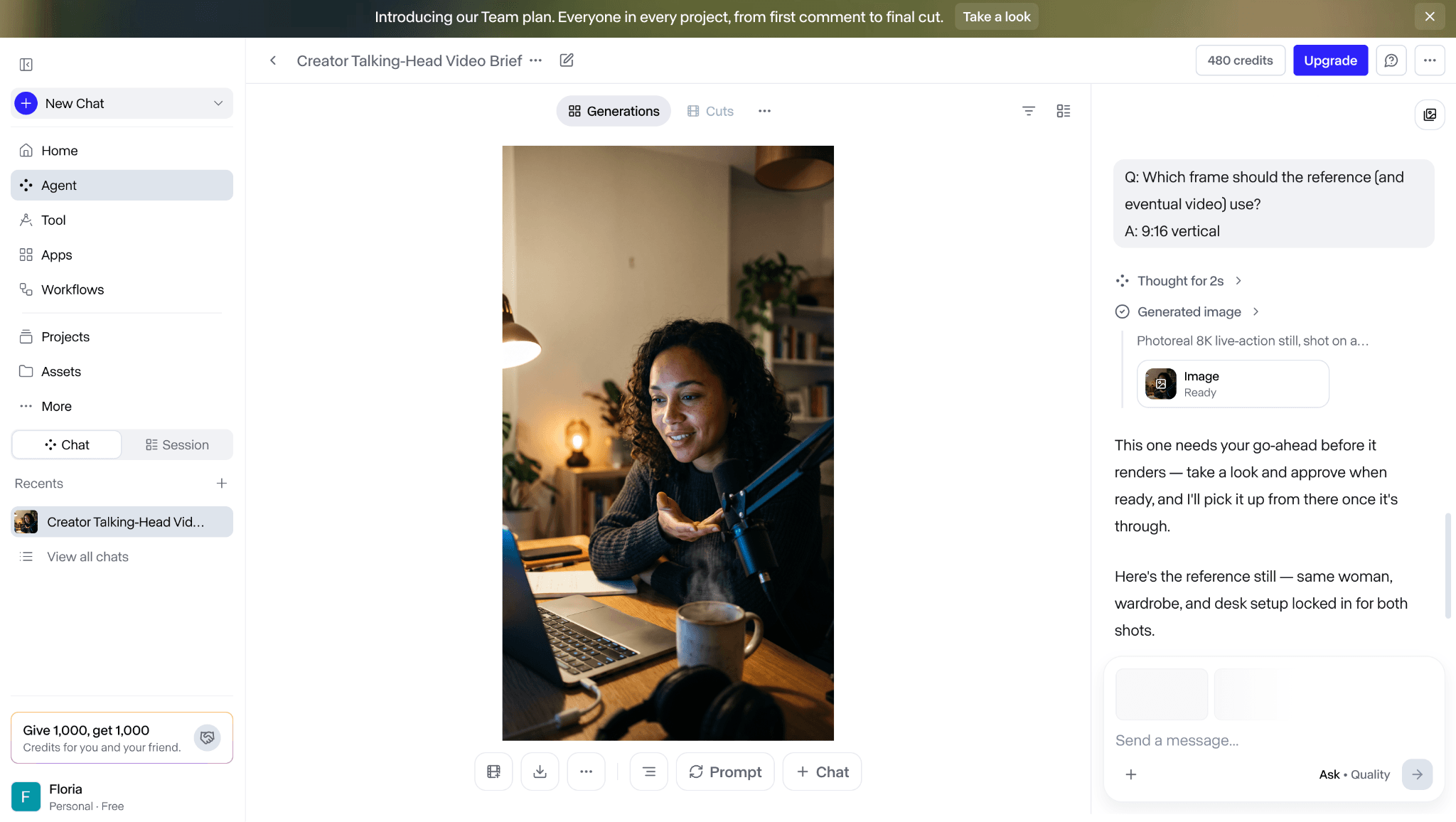
The supplied Runway workflow reached the reference-image stage before the video-generation paywall appeared.
In our account check, Runway’s agent created a reference image after the brief was entered, and the balance dropped from 500 to 480 credits. The next step selected Kling 3.0 Pro for a 15-second talking-head video, but the free account displayed an upgrade wall before generation.
No video was rendered, so there is no measured generation time, motion result, prompt-adherence score, or export result to compare with Higgsfield. The screenshots document workflow and paywall friction only. They do not support a claim that Runway produced a better or worse clip.
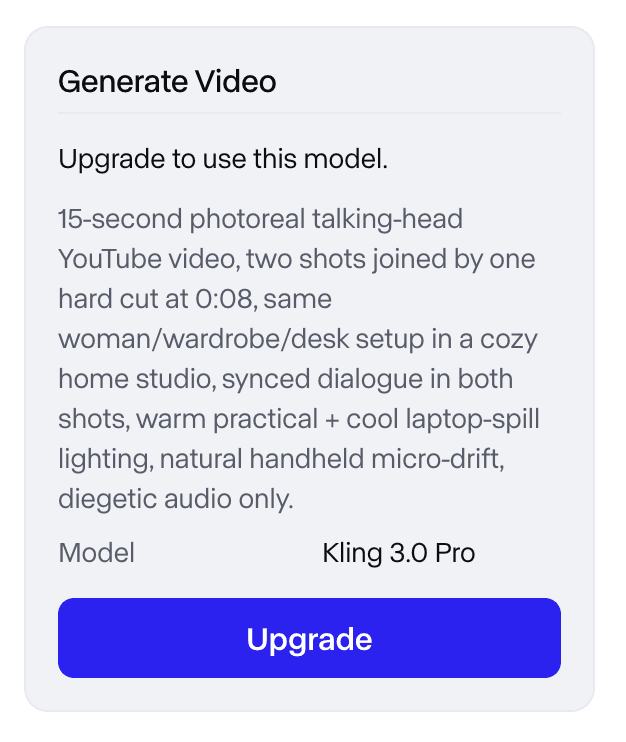
The free Runway account displayed an upgrade wall before video generation, so no output-quality comparison was possible.
2. Kling AI: Best for Strong Motion at a Lower Entry Cost
Best for: creators who want frequent text-to-video or image-to-video tests without beginning in a larger production suite.
Kling is the most practical direct comparison for Higgsfield when movement is the deciding factor. It is good at turning a clear action into visible subject motion, and its lower paid entry point makes repeated tests easier to justify. A creator can try a prompt, review the failure, and run a revised version without committing to the cost or toolset of a broader production platform.
The compromise is consistency across accounts and versions. Queue times, fast modes, resolution, and model access can change with the plan and region. For that reason, the useful evidence is the model name and credit quote shown at generation time, not a generic claim that Kling is always cheaper.
Pricing checked September 6, 2026: Kling has limited free access. Standard carries a $10 list price; promotions and regional checkout prices vary. Official pricing
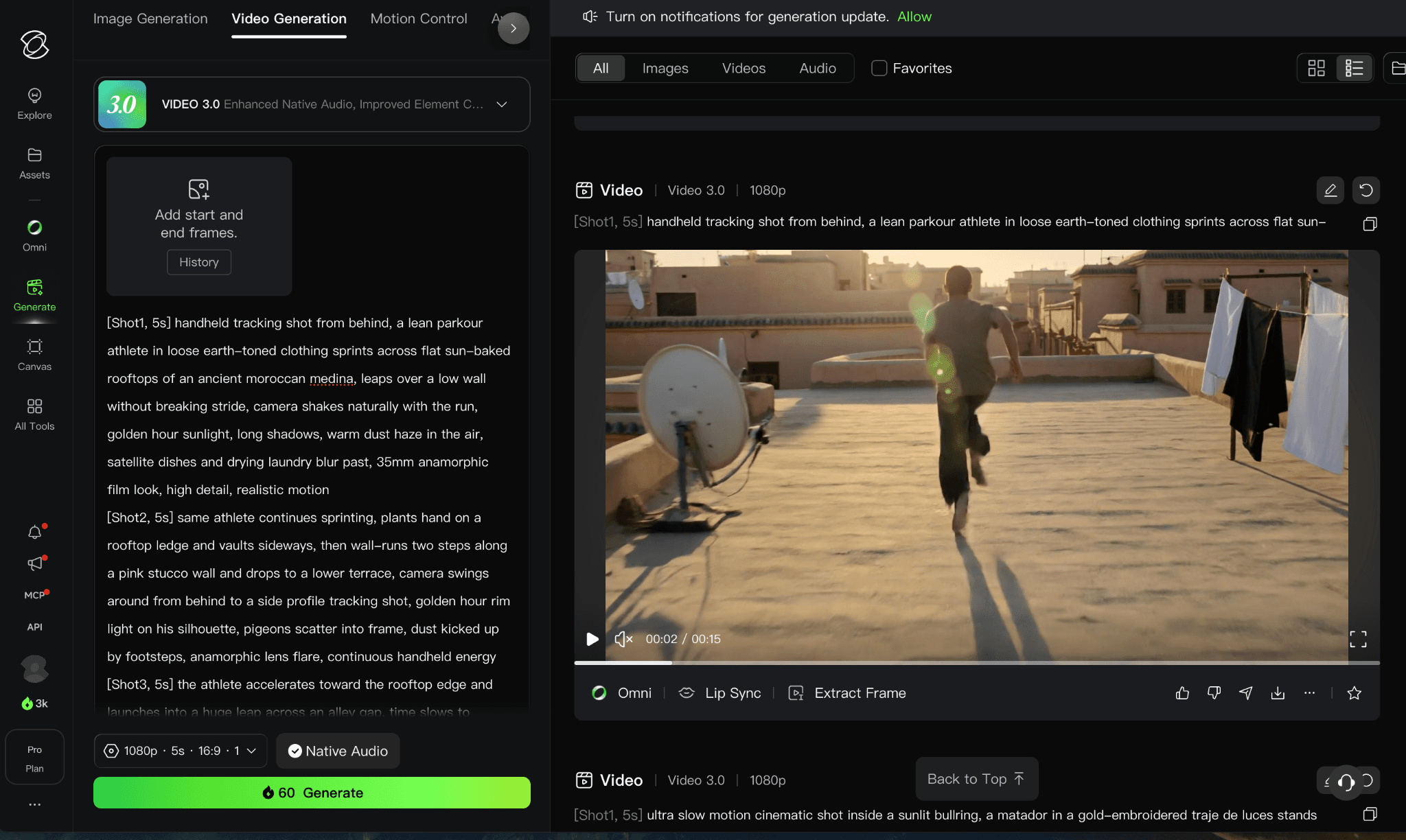
This supplied image shows a Higgsfield-hosted Video 3.0 screen and is not treated as native Kling AI evidence.
3. Luma Dream Machine: Best for Directed Camera Motion
Best for: shots that need keyframes, reframing, planned camera movement, and a route into professional finishing.
Luma is a better fit than Higgsfield when direction matters more than preset convenience. Its Ray workflow emphasizes camera behavior, keyframes, modification, and reframing, which helps when a team is trying to preserve a shot idea across several controlled passes.
The starting price is harder to justify for casual testing. If the brief is simply “make this image move,” Pika or Kling may be more economical. Luma makes sense when the shot will be reviewed as part of a sequence and the camera path is part of the creative decision.
Pricing checked September 6, 2026: Luma Plus is $30 per month, or $300 billed yearly, with 10,000 credits. Official pricing
4. Krea AI: Best for Multi-Model Creative Exploration
Best for: creators who want to try several leading video models, compare variations, and refine assets without leaving one visual workspace.
Krea is closer to Higgsfield's product layer than a single underlying model. Its video workspace brings text-to-video, image-to-video, extensions, parallel generations, supported audio, and a broad model catalog into one interface. That makes it useful when the question is not simply whether a model can produce a clip, but which model and variation best fit the shot.
Higgsfield remains more distinctive for ready-made cinematic camera language and ad-oriented workflows. Krea is the better fit when open-ended visual exploration, real-time tools, enhancement, and cross-model comparison matter more than choosing a prescribed shot template.
Pricing checked September 6, 2026: Krea has a free plan and paid compute tiers. Video cost depends on the model and settings shown in the live workspace. Official pricing
5. LTX Studio: Best for AI Storyboards and Narrative Planning
Best for: filmmakers and creative teams moving from a script or concept into storyboards, consistent elements, controlled shots, and an editable sequence.
LTX Studio is a full creative platform rather than a single video model. It connects image and video generation with storyboards, saved elements, camera controls, audio-to-video, editing tools, pitch decks, and node-based flows. That wider structure makes it a credible Higgsfield alternative for projects that begin with a story and need several related shots rather than one isolated clip.
The free and Lite tiers are useful for exploration, but their licenses are for personal use. Commercial use, AI Storyboards, saved Elements, and a wider model set begin on Standard. Teams should therefore compare the production tier they actually need, not only the lowest monthly price.
Pricing checked September 6, 2026: LTX Studio is free for personal use. Lite is $15 per month or $12 per month annually; Standard is $35 per month or $28 annually and includes commercial use. Official pricing
6. Pika: Best for Fast Effects and Short Social Clips
Best for: short transformations, effect-led clips, and quick social experiments.
Pika is easier to use when the idea is one visible change: make an object melt, swap an element, add a character, or turn a still into a short punchline. The product keeps those actions close to the generation interface, so a creator can reach a shareable result without learning a full production workspace.
That focus becomes a limit when continuity matters. A five-second effect can look convincing while a longer action loses object geometry or pacing. Choose Pika for a contained visual beat, not because it promises to replace every step in Higgsfield.
Pricing checked September 6, 2026: Pika Basic is $8 per month when billed yearly; model and feature costs vary by operation. Official pricing
7. ComfyUI with Wan 2.2: Best Local and Open-Source Alternative
Best for: technical teams that need local inference, visible node graphs, repeatable settings, and control over the model files.
ComfyUI is not a polished Higgsfield clone. It is a node-based environment that can run open models such as Wan 2.2 locally and expose the entire workflow. Seeds, model versions, samplers, conditioning, and outputs can be saved together, which makes a successful result easier to reproduce than a one-off browser generation.
The real price is operational: a capable GPU, model storage, setup time, and someone willing to maintain the graph. Comfy Cloud removes the hardware requirement, but then the workflow becomes credit-based again. Choose it when ownership and repeatability justify the extra work.
Pricing checked September 6, 2026: ComfyUI Desktop and Wan are free and open source. Comfy Cloud Standard is $20 per month or $16 per month annually. Official pricing
8. Astorie: Best for Comparing Hosted Models on One Canvas
Best for: teams that want one source image or prompt to branch into several hosted model tests without rebuilding the workflow.
Astorie sits at the edge of this ranking because it is an orchestration workspace rather than a proprietary video model. Its useful feature is the canvas: a source can feed several model nodes, and the prompts, settings, outputs, and costs remain visible together. That is helpful before a team has decided whether Seedance, Kling, Luma, or another model fits the shot.
It does not replace Higgsfield's cinematic product experience, Runway's finishing tools, or a local ComfyUI setup. Use it to reduce account and comparison friction, then judge the chosen model on the output.
Pricing checked September 6, 2026: Astorie offers a free plan; Standard is $19 per month. Annual introductory pricing may differ. Official pricing
Higgsfield Alternative Comparison
Price check: public product and pricing pages were reviewed on September 6, 2026. Promotions, regional prices, queues, credit rates, and included models can change; use the live quote for the exact model and settings.
| Product | Best fit | Price | Local use / open source | Main limitation |
|---|---|---|---|---|
| Runway | End-to-end AI video production | Free; $15/mo Standard | No / No | Credit-heavy exploration |
| Kling AI | Frequent motion tests | Limited free; $10 list | No / No | Plan and queue variability |
| Luma Dream Machine | Directed camera work | From $30/mo | No / No | Higher entry price |
| Krea AI | Multi-model exploration | Free; paid plans | No / No | Variable model costs |
| LTX Studio | Storyboards and narrative production | Free; $15/mo Lite | No / No | Commercial work needs Standard |
| Pika | Effects and short clips | $8/mo annually | No / No | Less sequence control |
| ComfyUI + Wan 2.2 | Reproducible local generation | Free; optional cloud | Yes / Yes | Hardware and setup burden |
| Astorie | Cross-model branching | Free; $19/mo | No / No | Not a model or full editor |
How to Choose the Right Higgsfield Alternative
- Choose Runway when the clip must move into repair, editing, audio, or a larger sequence.
- Choose Kling AI when lower-cost iteration and visible action matter more than a broad production workspace.
- Choose Luma when keyframes, reframing, and camera direction define the shot.
- Choose Krea AI when you want to explore several models and visual tools in one creative suite.
- Choose LTX Studio when a script must become a storyboard and a sequence of related shots.
- Choose Pika for one short effect or transformation rather than a connected scene.
- Choose ComfyUI with Wan 2.2 when local control and repeatability are worth the setup cost.
- Choose Astorie only when the immediate problem is comparing hosted models from the same source.
What Do You Lose When Switching From Higgsfield?
Leaving Higgsfield can split apart Cinema Studio projects, camera and film presets, Soul ID assets, ad workflows, saved generations, and one shared credit balance across its model catalog.
A specialist may solve one recurring bottleneck, but rebuilding references and finishing in another account adds its own cost. If the team already relies on Higgsfield’s presets, identities, and campaign assets, switch only when the new tool removes a repeated production problem.
Is Higgsfield Still Worth Using in 2026?
Yes. Higgsfield remains one of the clearest products for creators who want cinematic camera language, ad-oriented workflows, and access to several creative tools without maintaining a technical pipeline. A team producing short campaign shots may value that convenience more than the lowest theoretical cost per generation.
Switch when the same limitation appears in several projects: credit cost, lack of local control, insufficient post-generation editing, or unreliable behavior on the subject you repeatedly use. Otherwise, moving every workflow can cost more time than the new tool saves.
The Bottom Line
Runway is the best general Higgsfield alternative, and Kling AI is the clearest lower-cost direct generator. Luma is the specialist for directed camera work; Krea is strong for multi-model exploration; LTX Studio is the more complete narrative-planning environment; and ComfyUI with Wan 2.2 is the choice for local control.
The right switch depends on the job that repeats, not the longest feature list.
Related how-to guides
Related reading
Runway Gen4 vs Veo vs Kling: Practical Video Production Comparison
Practical comparison for AI video production choices across Runway Gen4, Google Veo, and Kling.
7 Best Photoroom Alternatives in 2026 (Tested for Ecommerce Photography)
Do you need a Photoroom alternative that goes beyond simple background cutouts and batch image processing? Try these 7 tools and pick the one that best matches your AI product photography use cases.
6 Ideogram Alternatives for Killer AI Image Generation
Here are 6 tried and tested Ideogram alternatives that work best for prompt accuracy, text, image realism, character consistency and are intelligent enough to render real-world scenarios and logic.
Frequently asked questions
- What is the best Higgsfield alternative overall?
Runway is the strongest overall alternative because it combines generation with repair, editing, references, audio, and a wider production workflow. Kling AI is the better value when the main requirement is frequent motion generation.
- What is the best free Higgsfield alternative?
Pika is the simplest free place to begin for short effects and image-to-video tests. ComfyUI with Wan 2.2 has no subscription fee and can run locally, but suitable hardware and setup time are real costs.
- Which Higgsfield alternative can run locally?
ComfyUI with an open model such as Wan 2.2 is the only genuinely local, open-source route in this ranking. The other products are hosted services, even when they provide several models in one account.
- Is Runway better than Higgsfield?
Runway is better for a longer production workflow. Higgsfield can be faster for cinematic presets, ad concepts, and short stylized generations. The stronger product depends on whether the work ends at generation or continues into editing and delivery.
- Can Astorie replace Higgsfield?
Not directly. Astorie is useful for branching one prompt or source into several hosted models. It does not replace Higgsfield's proprietary workflow, Runway's editing tools, or local model ownership.
Ready to try it on the canvas?
Open Astorie and fan your prompt across every frontier model in one workflow.