
AI Image Models for Brand Visuals: A Capability-Based Guide
The right AI image model for brand visuals depends on the asset’s hardest constraint. This guide combines current official capability documentation with a hands-on Astorie comparison of GPT Image 2.5, Ideogram V3, and FLUX.2 on one MORROW product keyframe. GPT Image 2.5 preserved the reference most closely in that single task; the broader model recommendations remain capability-based rather than a claim that one route wins every brand job.
Astorie is useful when a brand team wants to route one approved reference pack into several model branches and keep the outputs on one canvas. The platform can organize comparison and lineage; the underlying model still determines the image, and the brand owner remains responsible for approval, rights, and final design.
AI Image Models for Brand Visuals: Key Takeaways
• “Best” means best fit for a production constraint, not a universal quality winner.
• Build a canonical brand reference pack before comparing models.
• Use one model for exploration, another for precision edits or typography when the job requires it.
• Switch models at a defined stage boundary and record what you gain, what you lose, and why the switch is justified.
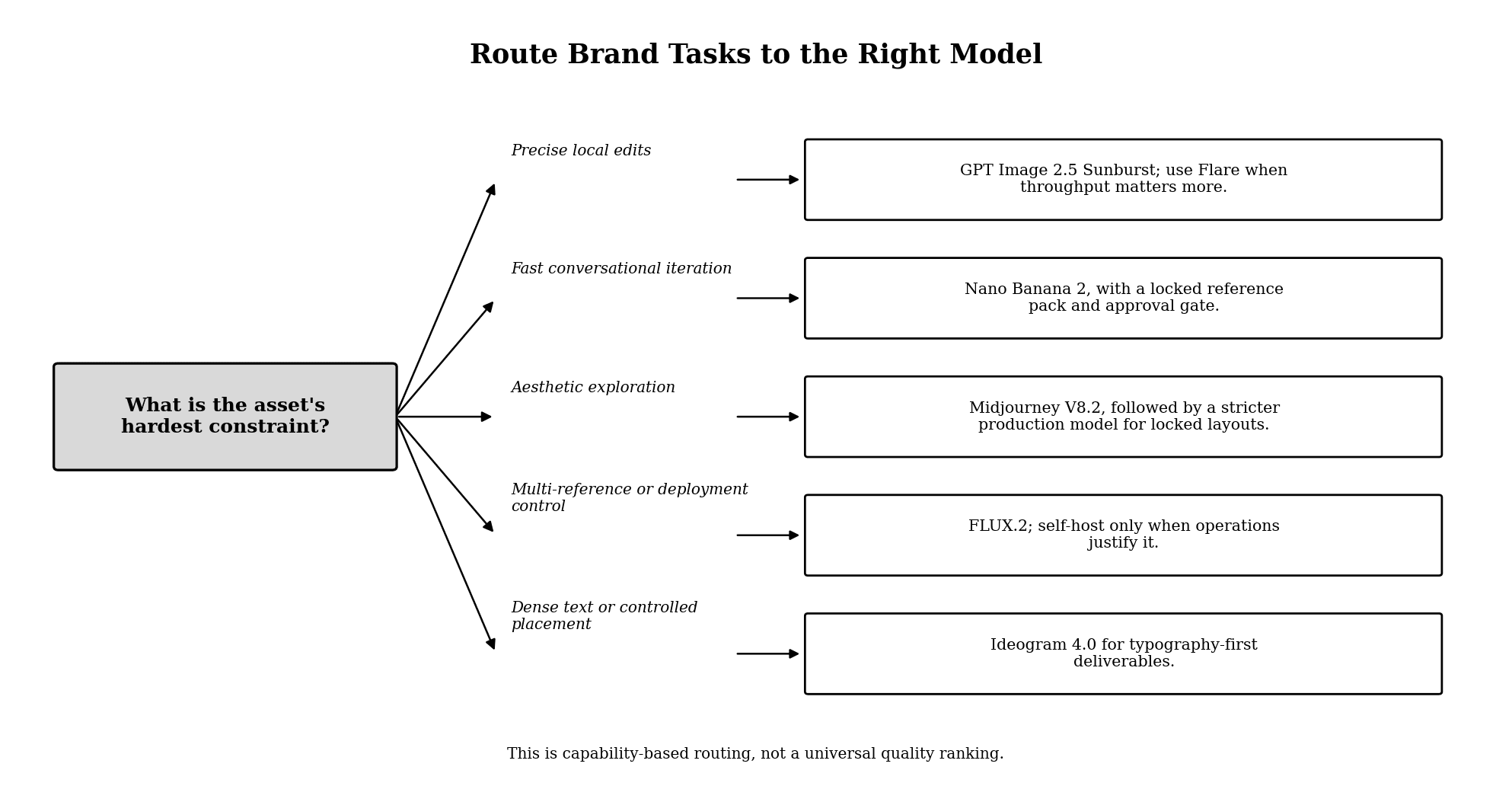
Figure 1. Capability-based routing for current AI image models.
How This Capability-Based Shortlist Was Built
This shortlist is based on current official capabilities, not an invented universal benchmark. The evaluation criteria are:
• Reference control: Can the workflow reuse people, products, layouts, and style anchors?
• Edit precision: Can one requested element change while approved content remains stable?
• Typography and layout: Can the model handle text-bearing assets and deliberate placement?
• Production range: Can it support exploration, derivatives, and repeated iteration?
• Operational fit: Are access, deployment, rights, review, and handoff appropriate for the team?
Model | Strong fit for | What you gain | What you give up | Switch trigger |
GPT Image 2.5 Sunburst | Precise editing and complex final assets | Higher-control editing route and reference-focused workflow | Longer generation path than the speed route | Local edits keep disturbing approved content |
GPT Image 2.5 Flare | Everyday high-volume creation | Faster iteration with the same current family | Less reason to choose it for the most exacting final edits | Throughput, not precision, is the bottleneck |
Nano Banana 2 | Fast conversational creation and refinement | High-velocity multimodal iteration | Requires strong reference and approval discipline to prevent drift | Teams need many guided iterations quickly |
Midjourney V8.2 | Aesthetic direction and visual exploration | Broad style discovery and personalization | More manual curation for exact locked layouts | The brief needs a distinctive visual world before production locks |
FLUX.2 | Multi-reference work and deployment choice | Route-dependent multi-reference support, hosted variants, and open-weight routes | Self-hosting adds infrastructure and license review | Reference count or deployment control becomes decisive |
Ideogram 4.0 | Dense text, multilingual typography, and controlled placement | Bounding-box control, 2K output, and text-focused open weights | Less reason to use it for open-ended cinematic exploration | Text and layout accuracy are the asset's hardest constraint |
Build a Brand Reference Pack Before Choosing a Model
A model comparison is meaningless if each tool receives a different version of the brand. Create a minimum reference pack first.
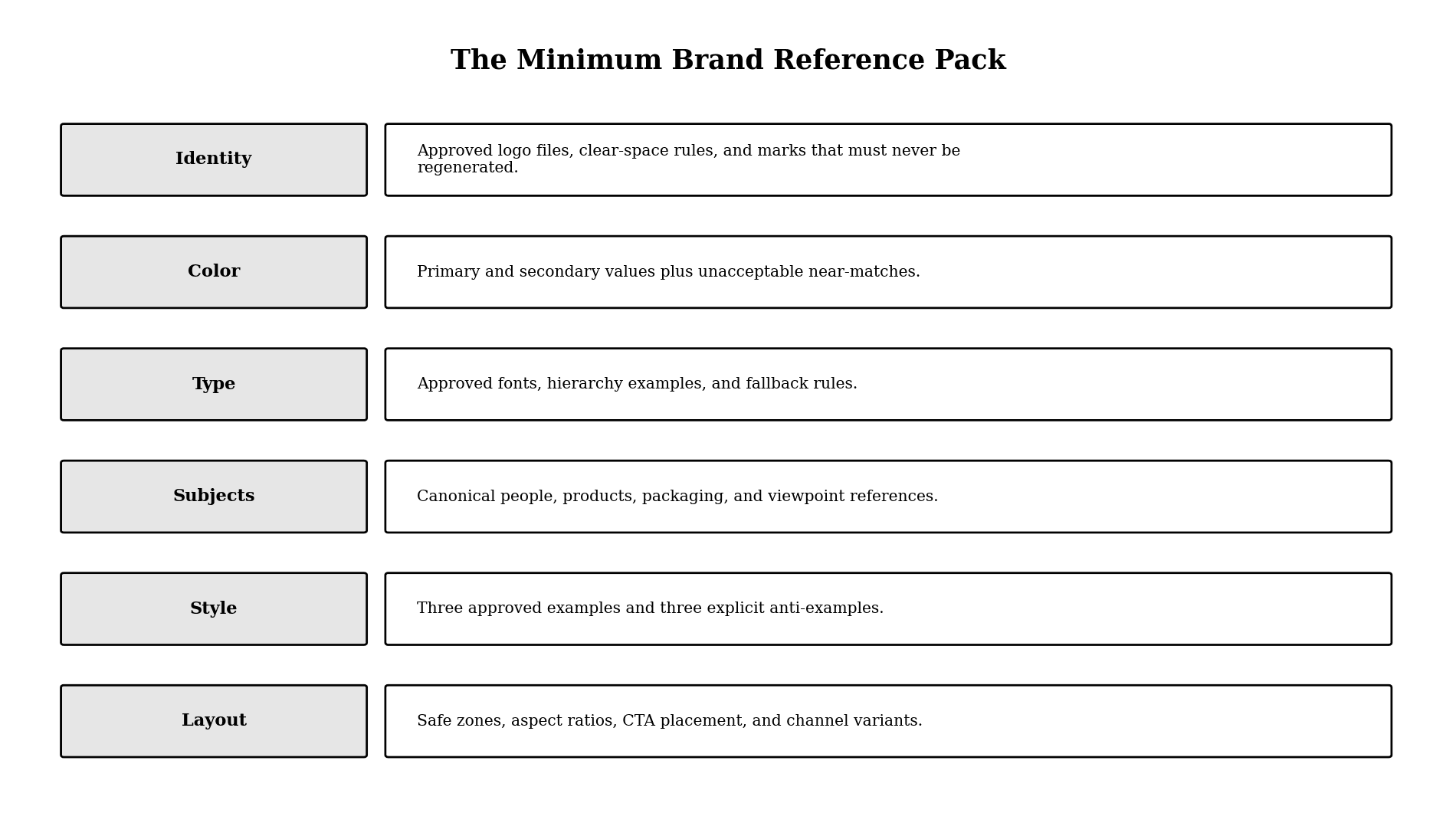
Figure 2. The minimum brand reference pack for AI image production.
Include the exact logo as a protected file rather than asking a model to redraw it. Document colors with values and unacceptable near-matches. Provide canonical people, products, packaging, and viewpoints. Add approved style examples, anti-examples, and layout rules for each channel.
The reference pack is the source of truth. Prompts describe the current asset; they should not redefine the brand on every generation.
GPT Image 2.5 Sunburst: Strong Fit When Precision Editing Is the Bottleneck
Choose GPT Image 2.5 Sunburst when a final asset needs careful reference handling, targeted edits, complex composition, or transparent-background work. OpenAI positions Sunburst as the precision-oriented route in the current GPT Image 2.5 family.
You gain a model designed for detailed creative work and editing. You give up some speed compared with Flare. Switch to Sunburst when repeated edits in a faster route keep altering approved faces, products, layout, or background elements.
Use it after the concept is approved. Lock the reference pack, list the elements that must remain unchanged, request one edit at a time, and compare the result against the prior approved version.
GPT Image 2.5 Flare: Strong Fit for Fast Everyday Brand Production
Choose GPT Image 2.5 Flare when a team needs rapid concept variations, social derivatives, or everyday image generation without defaulting to the slowest precision route.
You gain faster production within the current GPT Image family. You give up the reason to choose Sunburst for the most exacting final edits. Switch from Flare when the cost of correcting local changes exceeds the value of faster iterations.
Flare works well as the draft and derivative branch; Sunburst can handle the final precision pass. Keeping both inside one family can reduce workflow change while still matching the model to the stage.
Nano Banana 2: Strong Fit for High-Velocity Conversational Creation
Choose Nano Banana 2 when the team needs fast, iterative generation and editing with multimodal understanding. Google describes it as a production-ready model that combines subject consistency and world knowledge with Flash-class speed.
You gain rapid conversation-driven iteration and broad availability across Google's image surfaces. You give up the safety of a rigid brand system unless the reference pack and approval gates are explicit. Switch to a precision editor or design tool when the asset contains locked layout, legal copy, or a mark that cannot drift.
Use it for exploration, localized scene changes, and fast derivative production. Approve a canonical image before generating a large batch.
Midjourney V8.2: Strong Fit for Aesthetic Exploration
Choose Midjourney V8.2 when the main problem is finding a distinctive visual direction. Midjourney's official version documentation identifies V8.2 as the current default and highlights aesthetics, image quality, personalization, and its newer Edit Model.
You gain a strong exploration environment for mood, art direction, and visual language. You give up some efficiency when the job requires an exact locked layout and repeated mechanical variants. Switch to a stricter production model once the art direction is approved and the team needs controlled derivatives.
Do not mistake the most attractive exploration image for a reusable brand system. Extract the decisions that matter—palette, lighting, lens language, texture, composition—and add them to the reference pack.
FLUX.2: Strong Fit for Multi-Reference Control and Deployment Choice
Choose FLUX.2 when the workflow needs to combine several references or when deployment options matter. Black Forest Labs documents route-dependent multi-reference support and output up to 4 megapixels. Some routes support up to 10 reference images, while API, playground, model variant, and open-weight limits can differ.
You gain multiple production routes and more control over deployment. You give up operational simplicity if you self-host, because infrastructure, model updates, security, and license compliance become your responsibility. Switch to FLUX.2 when reference count, API integration, or deployment control is more important than staying inside a consumer creation app.
Use the hosted route when the team wants the model without infrastructure. Consider the open route only when control or integration creates enough value to justify operations and license review.
Ideogram 4.0: Strong Fit for Typography-First Brand Assets
Choose Ideogram 4.0 when dense text, multilingual typography, or object-and-text placement is the hardest requirement. Ideogram describes version 4.0 as an open-weight model with dense text rendering, bounding-box control, and 2K output.
You gain a route designed around text-bearing graphics and controlled placement. You give up the need to force one model into unrelated cinematic exploration tasks. Switch to Ideogram when headlines, labels, poster copy, packaging concepts, or structured social graphics determine whether the asset succeeds.
Even with a text-focused model, proofread every output. Use a design tool for legally required copy, exact logos, and final production typography when an error is unacceptable.
A Multi-Model Workflow for Brand Visuals
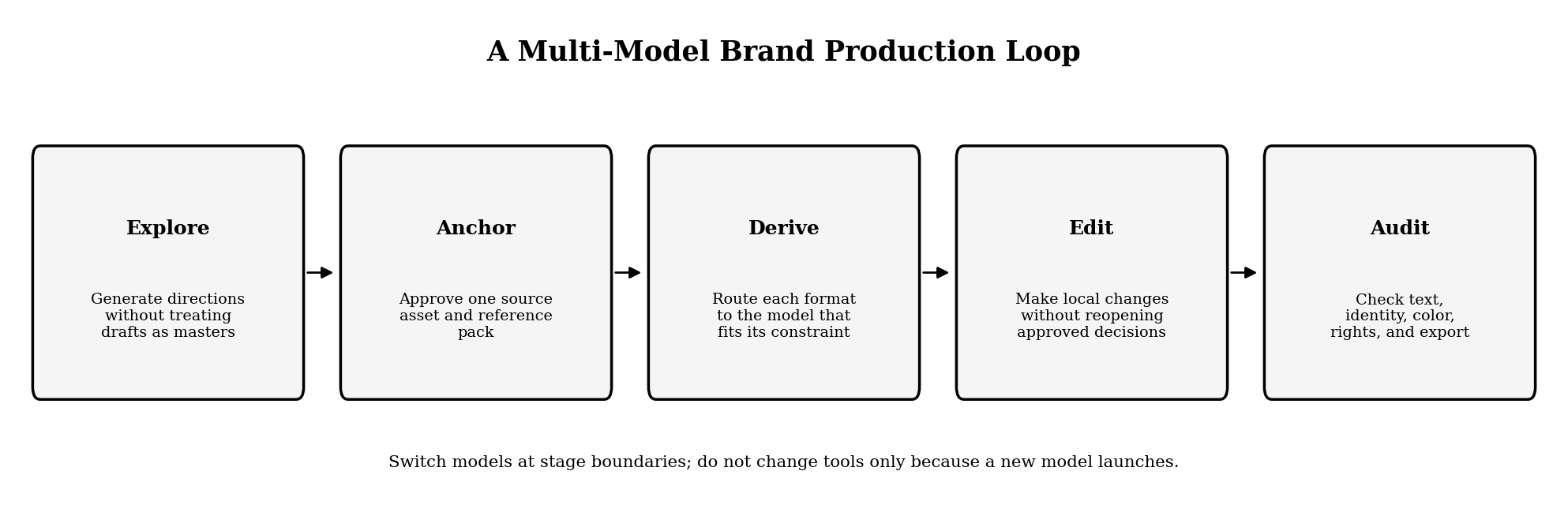
Figure 3. A controlled multi-model loop for brand visual production.
1. Explore the Visual Direction
Use Midjourney V8.2, Nano Banana 2, FLUX.2, or another suitable route to explore directions. The output is a decision aid, not the final master.
2. Approve a Canonical Anchor
Select one image or layout and record what is approved: subject, product, composition, palette, typography, lighting, and exclusions.
3. Route Derivatives by Constraint
Use Flare or Nano Banana 2 for rapid everyday variants, Sunburst for precision changes, FLUX.2 for multi-reference or controlled deployment, and Ideogram for text-led layouts. The gain is specialization; the loss is handoff complexity. Switch only when the new model solves a named constraint.
4. Make Local Edits Without Reopening the Brief
State what must remain unchanged. If an edit repeatedly alters the approved subject or composition, move to a route designed for higher precision or finish the change in a conventional design tool.
5. Audit Before Release
Check identity, product geometry, text, color, accessibility, source rights, model or route terms, disclosure requirements, file format, and channel layout. Keep a final human-approved master outside the generation history.
Commercial Use, Licensing, and Provenance
Do not treat model availability as permission for every commercial use. Check the terms for the exact route, plan, account type, input rights, output rights, and open-weight license used on the production date.
Open weights do not automatically mean unrestricted commercial use. Hosted and self-hosted versions of the same family can have different obligations. Keep the source of every reference, consent for people and voices, model or route, terms date, and approval record with the asset.
Hands-On Comparison: GPT Image 2.5 vs Ideogram V3 vs FLUX.2
We compared three image routes available in the tested Astorie workspace—GPT Image 2.5, Ideogram V3, and FLUX.2—on the same MORROW storyboard task. Each route received the approved product hero as its visual reference and was asked to create the workspace-introduction keyframe with a notebook. The comparison is limited by route-specific controls: FLUX.2 changed the requested 57:32 ratio to 1:1, so composition was not perfectly matched.
Route tested | Observed brand fidelity | Observed composition | Main drift in this run |
GPT Image 2.5 | Closest of the three to the tall amber bottle, black cap, oat label, MORROW wordmark, and copper mark | Notebook and bottle read clearly in the intended warm workspace | Minor scale and placement differences |
Ideogram V3 | MORROW remained legible, but bottle became squat with a screw cap; copper mark moved; extra “SPARKLING TEA” text appeared | Usable notebook-and-product layout | Product geometry and label system changed |
FLUX.2 | Tall amber form was closer than Ideogram in this run, but cap, label, and lighting changed | Notebook and bottle were present | UI adjusted 57:32 to 1:1, reducing task comparability |
Ideogram V3 setup and result
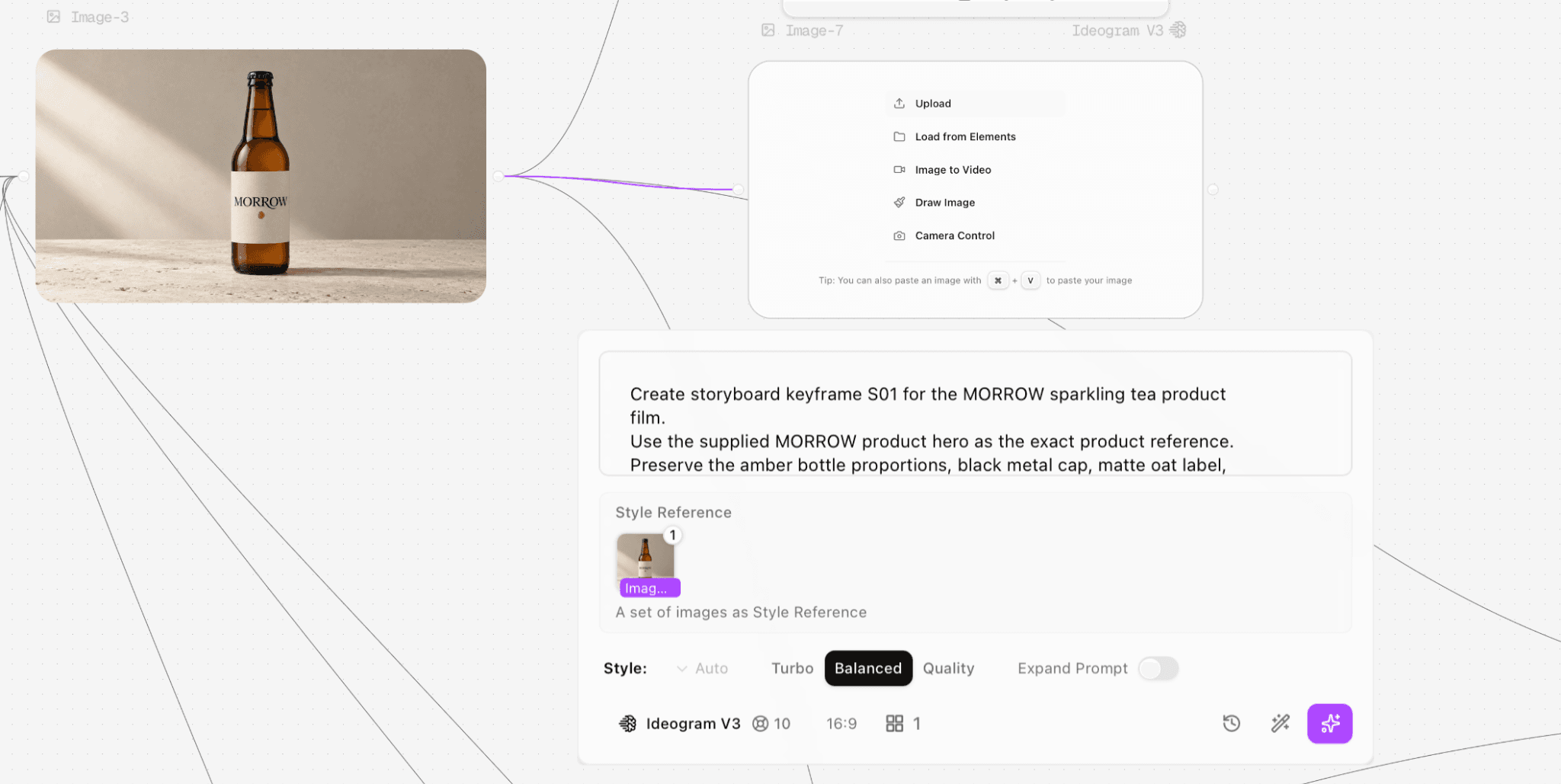
Figure 4.1. Ideogram V3 received the same MORROW workspace keyframe task.
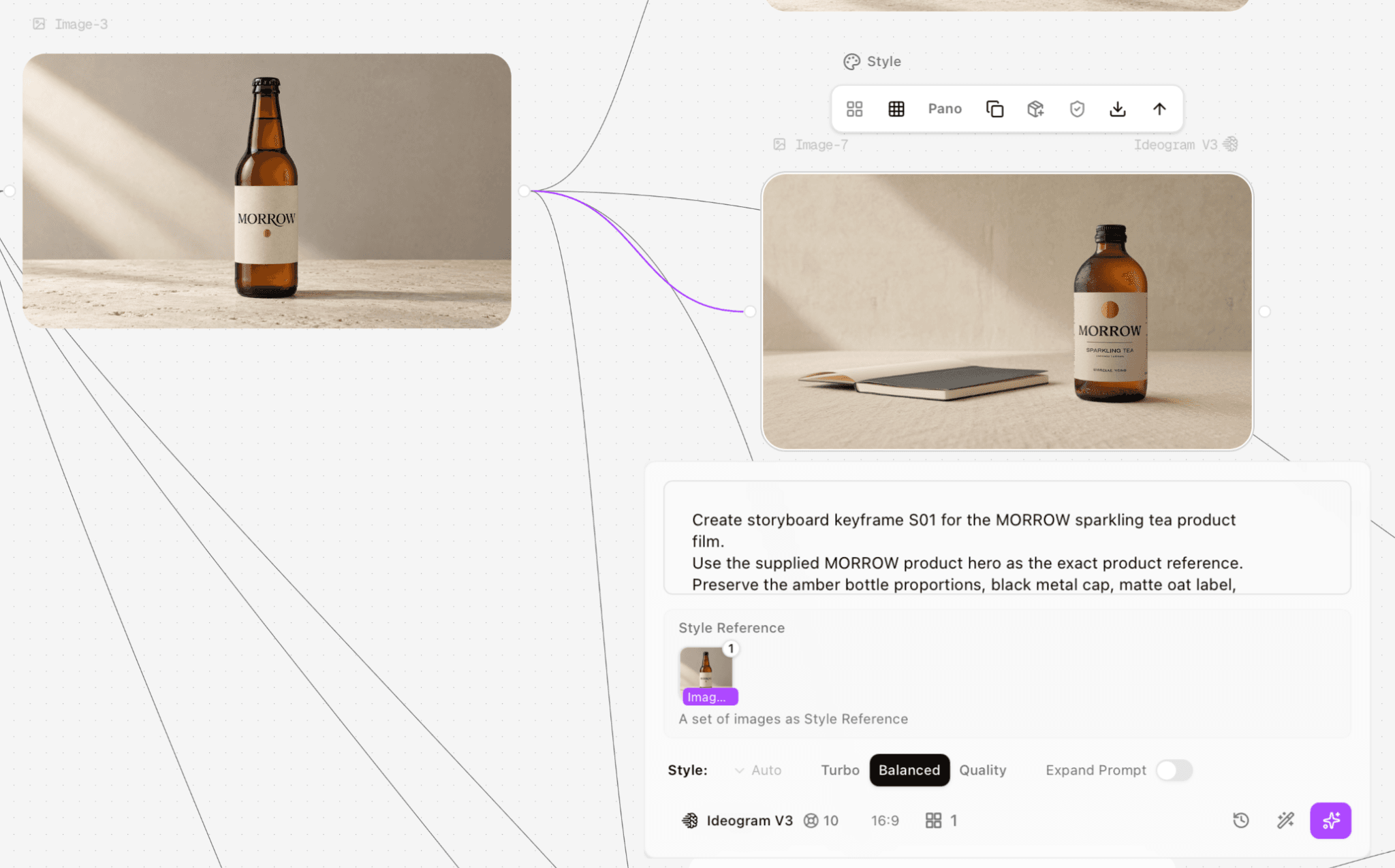
Figure 4.2. Ideogram V3 produced a strong layout but redesigned the bottle and label.
GPT Image 2.5 setup and result
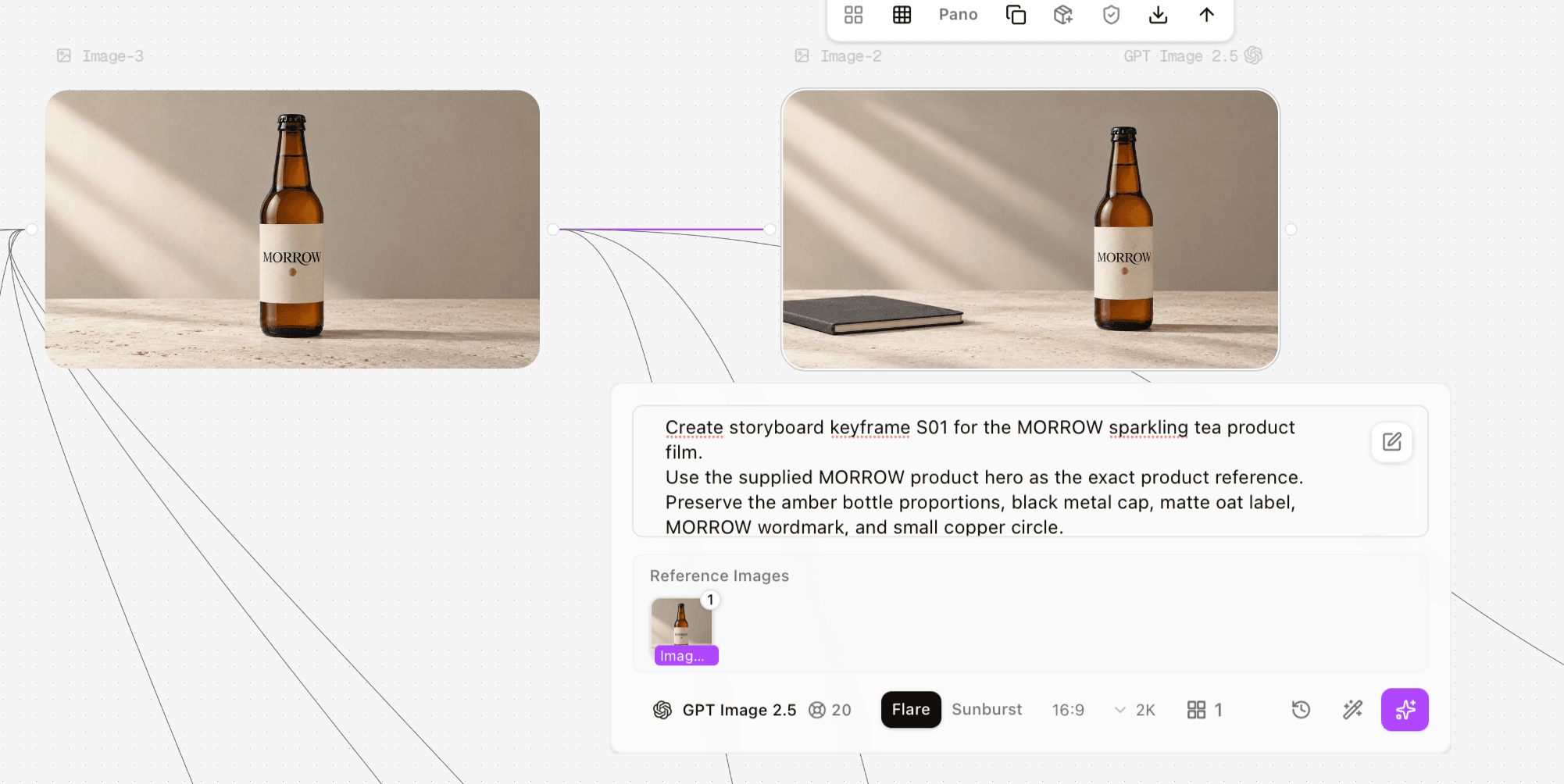
Figure 4.3. GPT Image 2.5 preserved the approved bottle most closely in this three-route test.
FLUX.2 setup and route constraint
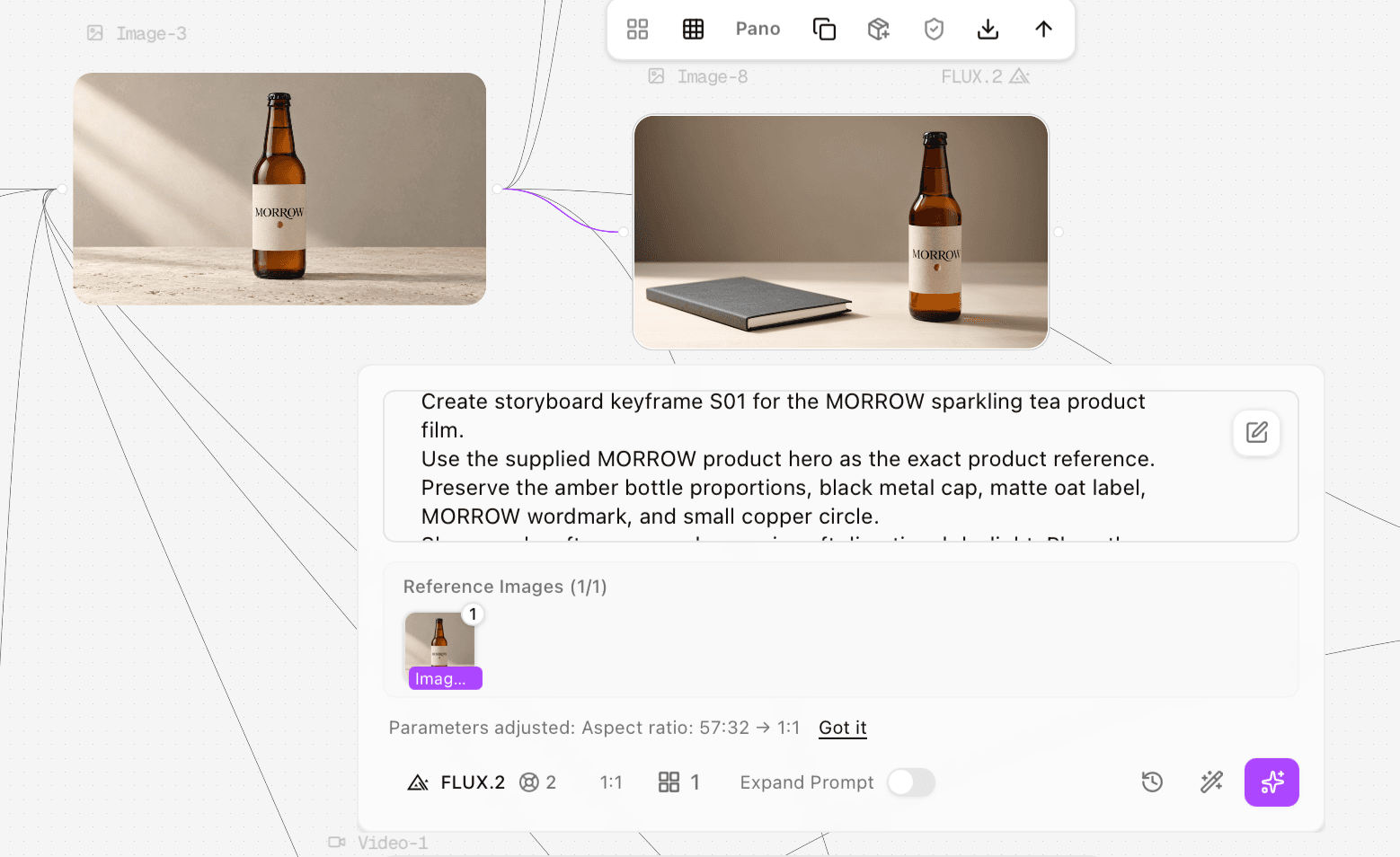
Figure 4.4. FLUX.2 changed the requested 57:32 aspect ratio to 1:1 in the tested route.
Side-by-side decision
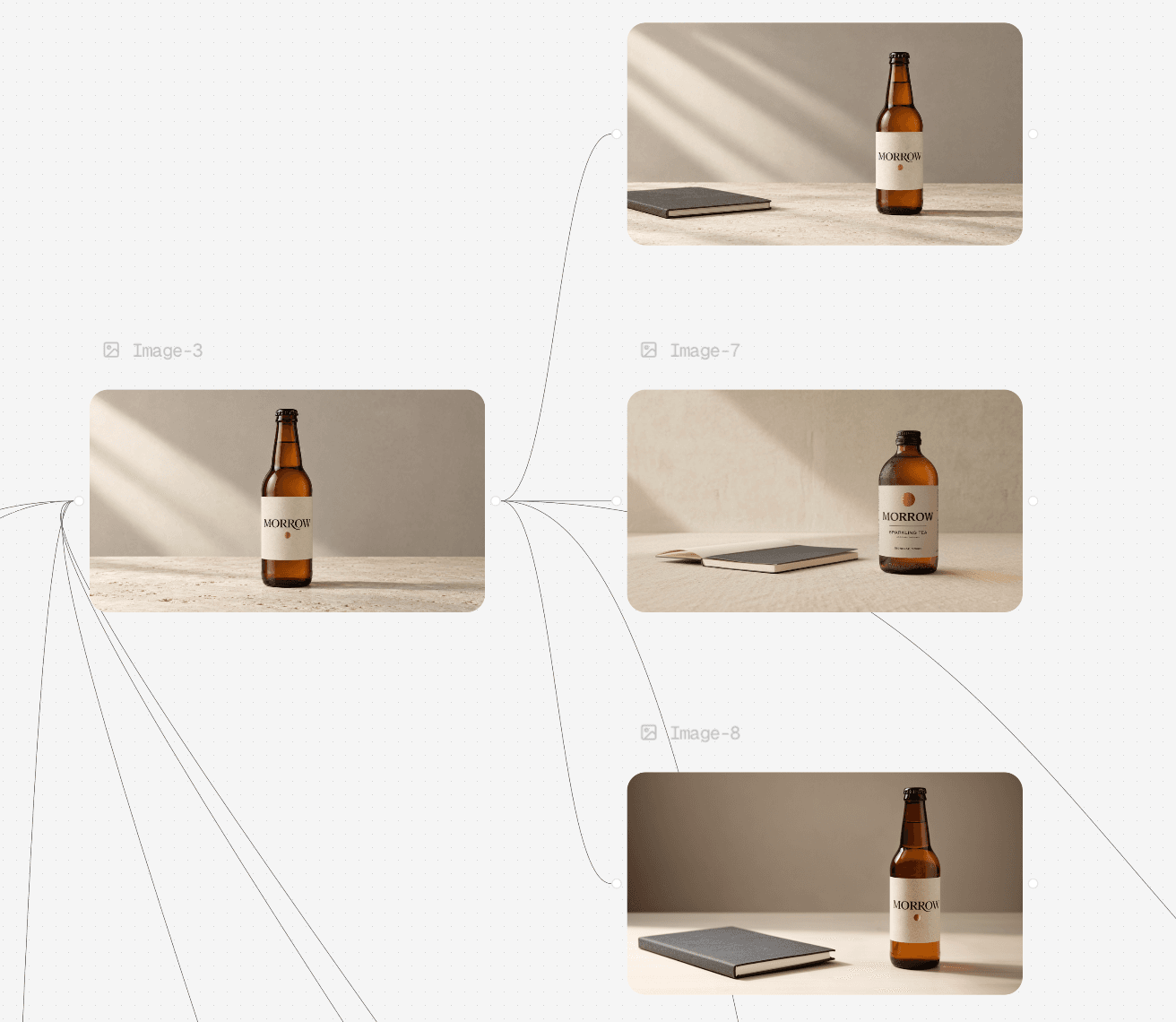
Figure 4.5. The three outputs on one canvas: GPT Image 2.5, Ideogram V3, and FLUX.2.
For this exact task, GPT Image 2.5 was the strongest starting point because the product geometry and label system stayed closest to the approved hero. Ideogram V3 delivered a coherent composition and readable wordmark but introduced the largest packaging redesign. FLUX.2 retained the tall bottle concept better than Ideogram, yet the route-level aspect-ratio adjustment and visible label/cap drift prevented an equal composition test. This result supports a task-specific choice, not a universal model ranking.
Frequently Asked Questions
Which AI image model is best for brand consistency?
No model creates a brand system by itself, and this guide does not claim a hands-on universal winner. Start with a canonical reference pack and approval gates. Treat Sunburst as a starting point for precision edits, Nano Banana 2 for fast iterative work, FLUX.2 for multi-reference control, Midjourney for visual exploration, and Ideogram for typography-first assets, then validate the shortlist on your own brand tasks.
Should a brand use one model for everything?
Usually no. One model reduces handoffs, but different assets have different constraints. Keep one source of truth and switch models only at a defined stage boundary.
Which model is best for text in images?
Ideogram 4.0 is the clearest current typography-first option in this shortlist because its official release emphasizes dense multilingual text and bounding-box placement. Proofread every output and use a design tool for exact legal or brand copy.
When should I use GPT Image 2.5 Sunburst instead of Flare?
Use Sunburst when precision and local edit stability matter more than speed. Use Flare when fast everyday production is the main constraint.
Is self-hosting FLUX.2 worth it?
Only when deployment control, integration, privacy architecture, or volume justifies infrastructure and license management. Otherwise a hosted route is simpler.
How can Astorie help with brand visuals?
Astorie can keep the approved references and several model branches visible in one workflow. You gain comparison and lineage; you still need a brand owner to approve the final image and verify rights and production text.
Ready to try it on the canvas?
Open Astorie and fan your prompt across every frontier model in one workflow.