

8 InVideo AI Alternatives Compared for 2026
Pictory and Fliki are the closest InVideo AI alternatives for turning written material into narrated video. Pictory is better for stock-led explainers, Fliki is stronger for voice-led multilingual content, and VEED offers deeper browser editing.

Key takeaways
- Pictory is the most focused InVideo AI alternative for turning scripts, articles, documents, and presentations into stock-led videos.
- Fliki is the stronger choice when AI voice selection, multilingual narration, and fast content repurposing matter most.
- VEED provides more direct control over captions, timing, recordings, and timeline edits after the first AI-generated draft.
- Synthesia is better suited to repeatable avatar-led training, onboarding, localization, and internal business communication.
- Astorie can generate and compare original source clips, but it does not replace InVideo AI’s narration, captions, stock selection, timeline, or final assembly.
Pictory and Fliki are the closest InVideo AI alternatives for turning written material into narrated video. Pictory is better for stock-led explainers built from scripts and articles; Fliki is stronger when voice choice and multilingual narration drive the project. VEED is the better option when the first AI draft needs detailed browser editing.
InVideo AI remains difficult to replace with one product because it combines prompt-based assembly, stock and generated footage, narration, captions, music, avatars, and editing. Most alternatives improve one stage while giving up some of that automatic end-to-end workflow.
InVideo AI Alternatives at a Glance
| Alternative | Best for | Starting price | Main trade-off |
|---|---|---|---|
| Pictory | Scripts and articles turned into stock-led video | 14-day trial; $25/mo annually | Less flexible than a full timeline editor |
| Fliki | Voice-led script, blog, and presentation-to-video | Free; paid price shown in live checkout | Less timeline control |
| VEED | Browser editing after an AI draft | Free; paid plans vary by region | Less automatic script-to-scenes assembly |
| Synthesia | Avatar-led training and business video | Free; $18/mo annually | Less suitable for footage-first storytelling |
| Descript | Transcript-led editing of recorded speech | Free; $16/mo annually | Not built around automatic stock montage |
| Kapwing | Collaborative social editing and repurposing | Free; $16/member/mo annually | Free exports carry restrictions |
| Canva | Template video and brand-led social content | Free; Pro varies by region | Weaker for long scripts and detailed editing |
| Astorie | Generating and comparing original source clips | Free; $12/mo first-year annual offer | Not a script-to-finished-video replacement |
How We Compared These InVideo AI Alternatives
We compared each alternative against the work InVideo AI is hired to do: turn written material into scenes, select or generate suitable visuals, add narration and captions, keep the draft editable, and export a usable video. We also checked whether a product is a full script-to-video replacement, an editor, or a specialist for one stage of the workflow.
The screenshots below are visual references only. They were not created from one controlled script and are not used to rank the products. A fair benchmark would give InVideo AI, Pictory, Fliki, and VEED the same script and settings, then record assembly time, footage relevance, narration, captions, manual corrections, and export limits.
Without that test, no product is presented as the best overall option. Facts and prices were rechecked on September 11, 2026.
Why People Look for an InVideo AI Alternative
InVideo AI removes much of the blank-page work. That automation can become the problem when the first draft chooses generic footage, misreads the intended tone, or becomes expensive to revise through repeated generations.
- You want a real timeline and direct control over every cut, caption, and audio change.
- Your videos begin as interviews, podcasts, or screen recordings rather than a written prompt.
- The project needs a consistent avatar presenter for training or localization.
- Stock selection, voice minutes, model credits, and watermark rules make the monthly cost difficult to predict.
- You need stronger voice localization or a faster way to turn a script, article, or presentation into a narrated video.
Do not choose the longest feature list. Choose the product that gives you control over the step you correct most often.
1. Pictory: Best for Script- and Article-to-Video
Best for: marketers, educators, and small teams turning written material into narrated stock-footage explainers.
Choose Pictory when the source already exists as a script, article, document, or presentation and InVideo AI's open-ended prompt workflow creates too much material to repair. Pictory divides the text into scenes, matches stock visuals, adds narration, and keeps the result editable through text and scene controls.
The narrower workflow suits explainers, recaps, and internal updates. You give up some of InVideo AI's broader model access and generative routes, and stock montage remains a weak fit for scenes that require one exact action or the same character across several shots.
Pricing: A 14-day trial is available. Starter costs $29 month to month or $25 per month when billed annually. Usage is limited by exported video minutes and AI credits. Official pricing
2. Fliki: Best for Voice-Led Script-to-Video
Best for: creators, marketers, and educators turning scripts, blog posts, presentations, or ideas into narrated videos in multiple languages.
Fliki is close to InVideo AI's core job. It can begin with an idea, script, blog post, or presentation, then assemble visuals, an AI voice, captions, and music into a complete draft. Its voice catalogue and multilingual workflow are the main reasons to switch when narration and localization matter more than access to a broad set of video-generation models.
The trade-off is editing depth. Fliki is organized around scenes and narration rather than fine control over every cut, layer, and animation. Choose it when voice choice, language coverage, or fast content repurposing is the bottleneck; choose VEED when the draft will need extensive manual repair.
Pricing: A free plan is available. Paid plans add more credits, voices, resolution, video length, and commercial rights; the public page displays plan prices dynamically, so confirm the live checkout amount for the account and region. Official pricing
3. VEED: Best for Editing an AI Draft in the Browser
Best for: teams that want AI-assisted creation and a conventional browser editor in the same project.
Choose VEED when InVideo AI's automatic first draft still needs substantial manual repair. Scripts, AI footage, avatars, subtitles, translation, recording, brand tools, and timeline editing sit in the same browser workspace, so useful scenes can be kept while weak captions, clips, or timing are corrected directly.
InVideo AI is faster when the priority is a complete narrated draft from one instruction. VEED makes more sense when someone expects to move clips, correct subtitles, record a pickup, adjust timing, or share a browser project for review after generation.
Choose VEED if: the generated draft must remain editable in a familiar browser timeline.
Look elsewhere if: automatic script-to-scenes assembly matters more than hands-on editing.
Pricing: Free access is available. The public pricing page varies paid plans, AI allowances, billing cycles, and local prices by account and region; confirm the live checkout before purchase. Official pricing
VEED's browser workspace keeps subtitle blocks, the preview, and the timeline close together. That layout is useful when the recurring problem is correcting captions or timing after generation, but it does not make VEED a like-for-like replacement for InVideo AI's more automatic first-draft workflow.
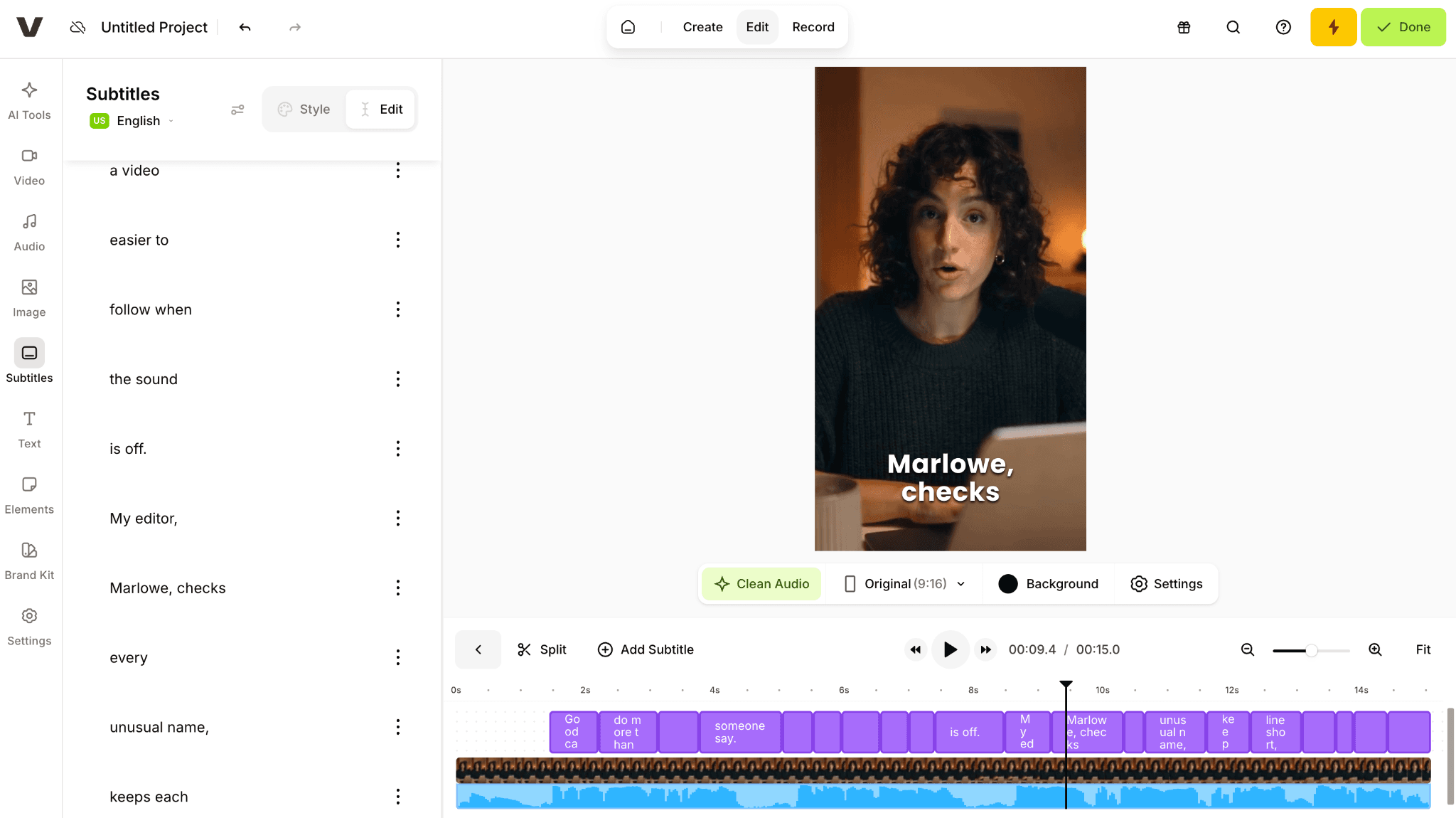
VEED keeps subtitle blocks, the preview, and the timeline in one browser editing view.
Export resolution, watermark removal, AI allowances, and team access depend on the active plan and region. Check those limits in the live account before moving a recurring production workflow from InVideo AI.
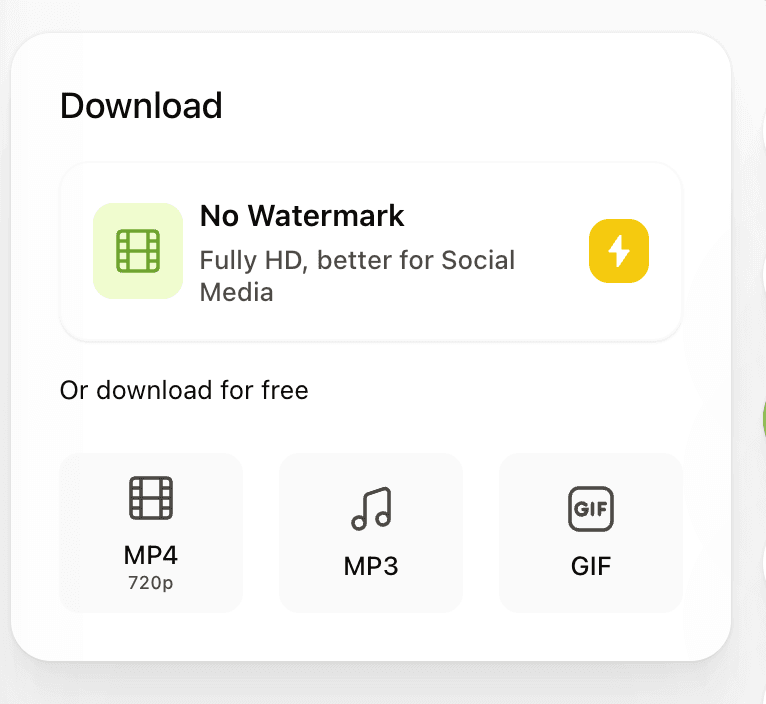
VEED export options are shown inside the browser workspace.
4. Synthesia: Best for Avatar-Led Training Video
Best for: onboarding, learning, internal updates, and localized business videos with a consistent presenter.
Choose Synthesia when InVideo AI's stock-led assembly is the wrong format and the project needs a repeatable avatar presenter. Scripts, scenes, layouts, voices, translation, and brand assets are organized around presenter-led business video rather than footage-first montage.
Synthesia is a format change rather than a general upgrade. It replaces varied stock-led scenes with a controlled presenter, which makes updates and localization more consistent but gives the video a more structured business presentation style.
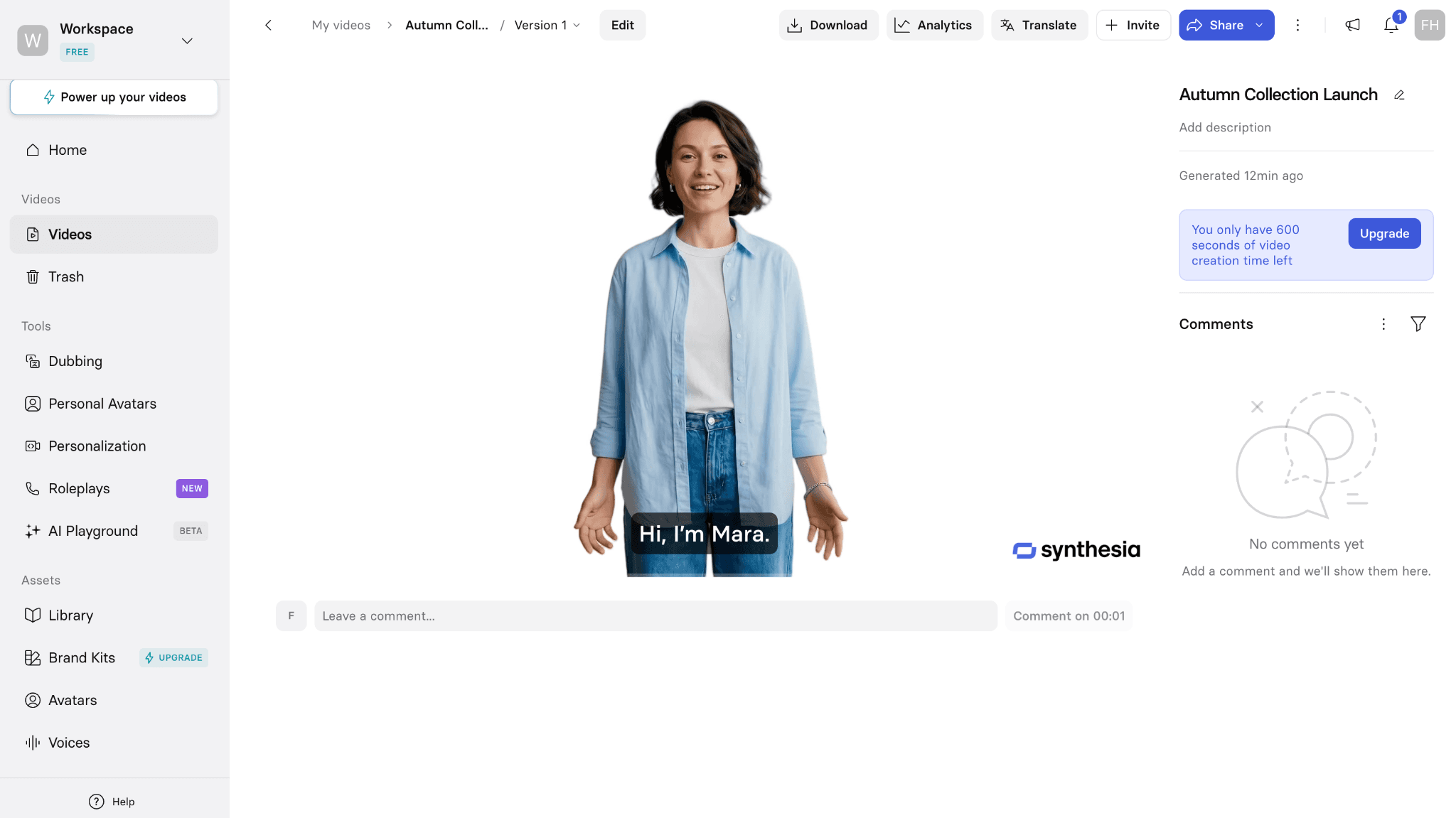
Synthesia organizes the avatar, project controls, comments, and creation allowance in one workspace.
The workspace is organized around scenes, a presenter, scripts, review, and localization rather than rapid stock-footage assembly. This is useful for repeatable training and internal communication, but it is less flexible when every scene needs a different visual treatment.
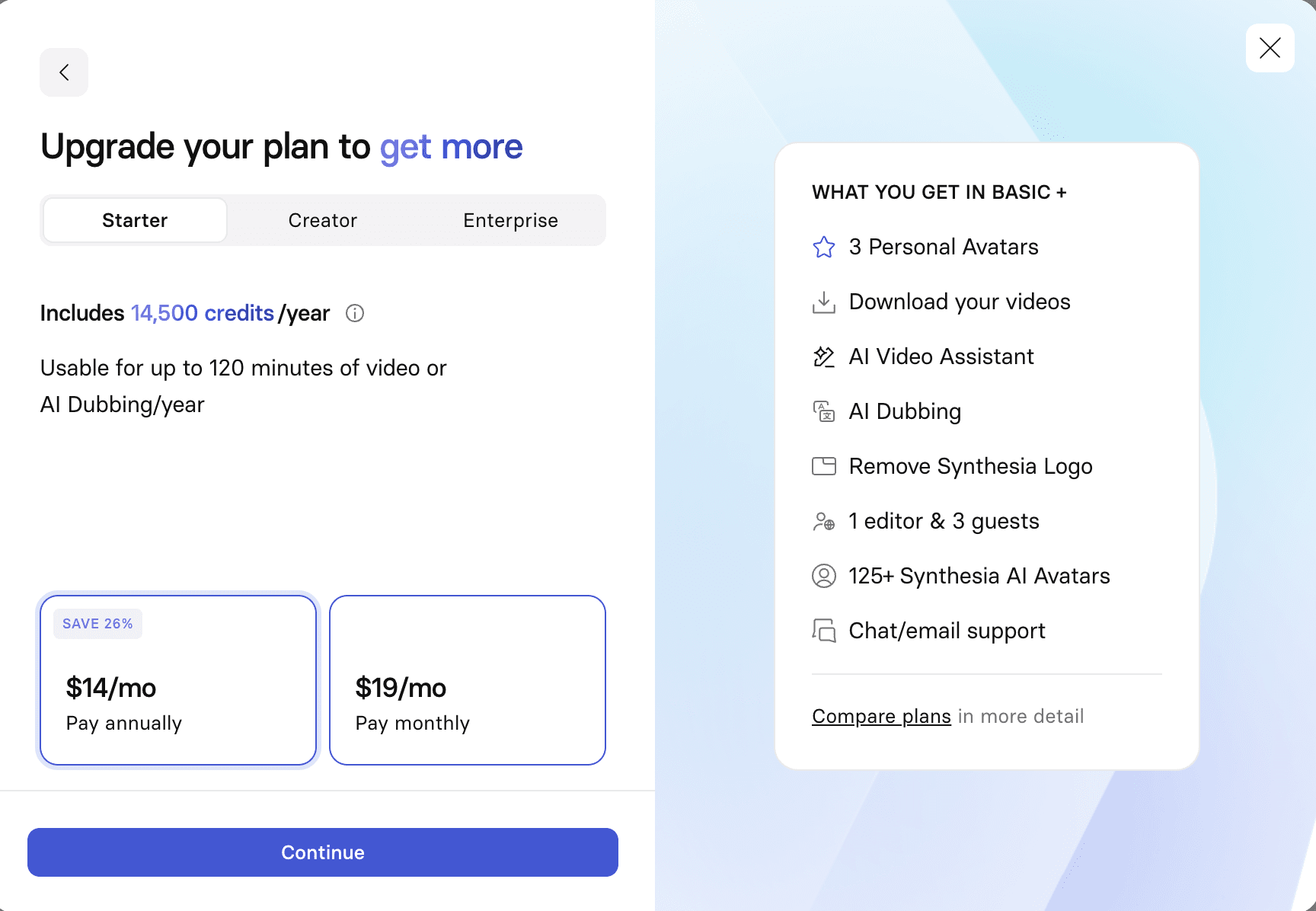
Synthesia separates plan selection and download access from the editing workspace.
What you gain: a repeatable presenter, structured scenes, localization, and business-oriented review controls.
Synthesia covers stock and personal avatars, scene-based editing, templates, brand assets, dubbing, and voices in more than 160 languages. Higher tiers add deeper collaboration, interactive video, API access, and administrative controls.
What you give up: InVideo AI's footage-first variety and faster prompt-to-montage path. The trade becomes worthwhile when presenter consistency and controlled updates matter more than changing stock scenes.
Choose this if: the main output is repeatable training, onboarding, compliance, or localized internal communication.
Stay with InVideo AI if: the project needs varied footage and a narrated first draft assembled from one prompt.
Pricing: Basic is free. Starter costs $29 month to month or $18 per month when billed annually, with 10 video minutes per month on monthly billing or 120 minutes per year on annual billing. Official pricing
5. Descript: Best for Video That Begins with Speech
Best for: interviews, podcasts, tutorials, screen recordings, and talking-head video.
Descript is the better alternative when the source already exists as recorded speech. It turns the recording into an editable transcript, so removing a sentence can remove the corresponding media. Captions, filler-word cleanup, screen recording, voice tools, and multitrack editing stay close to the words that drive the piece.
It is not designed to turn every paragraph into a stock scene automatically. Choose Descript when editing the speaker is the hard part; choose Pictory, Fliki, or InVideo AI when the hard part is assembling visuals for a written script.
Pricing: A free plan is available. Hobbyist costs $24 month to month or $16 per person per month when billed annually. Usage is governed by media hours and AI credits. Official pricing
6. Kapwing: Best for Collaborative Social Editing
Best for: small teams repurposing video, adding captions, resizing formats, and reviewing social content in a browser.
Kapwing is more manual than InVideo AI, which helps once a team knows what the finished clip should be. The browser editor covers trimming, subtitles, transcript tools, templates, resizing, brand assets, and shared projects, making it practical to produce several platform versions without rebuilding the work in separate apps.
The free plan is useful for learning the interface but carries export limits. Kapwing is a stronger editor than an autonomous script-to-video producer, so expect to make more decisions about footage and timing yourself.
Pricing: A free plan is available with watermarked exports up to four minutes at 720p. Pro costs $24 month to month or $16 per member per month when billed annually. Official pricing
7. Canva: Best for Template Video and Brand Consistency
Best for: marketing teams that already build social posts, presentations, and brand assets in Canva.
Choose Canva when video is one format inside a larger campaign. Templates, Brand Kit, shared assets, stock, simple timelines, captions, and AI media can feed the same visual system, so a short video can reuse the campaign’s existing layouts and brand choices.
It is weaker than InVideo AI for long script-to-video assembly and gives less editing depth than VEED. The gain is cross-format brand consistency; the loss is a less specialized route from a long prompt or article to a finished narrated video.
Pricing: Canva Free is available. Canva Pro prices and AI allowances vary by country, billing cycle, and account type; use the amount shown on the live regional pricing page. Official pricing
8. Astorie: Best for Generating and Comparing Source Clips
Best for: teams that need original AI footage and want to compare several hosted models from the same prompt or image.
Astorie is a partial alternative for one stage of the InVideo AI workflow: generating and comparing source clips. Its canvas can keep the source, prompt, model branches, costs, and outputs together while a team decides which generated shot to use, especially when stock footage cannot show the required action.
It does not assemble a narrated explainer, manage captions across scenes, or replace a timeline editor. A practical workflow is to create one or two missing shots in Astorie, then finish the script, voice, captions, and sequence in a dedicated editor.
Pricing: Free entry is available. Standard is currently $12 per month billed annually for the first year, with 1,600 monthly credits; model and settings affect credit use. Official pricing
InVideo AI Alternative Comparison
Price check: official product and pricing pages were reviewed on September 11, 2026. Regional prices, annual discounts, seats, video minutes, AI credits, stock allowances, and watermark rules can change. Confirm the exact limits shown in the live account before purchase.
| Product | Best fit | Price | Local use / open source | Main limitation |
|---|---|---|---|---|
| Pictory | Script/article to stock video | $29 monthly or $25 annual | No / No | Limited timeline freedom |
| Fliki | Voice-led script-to-video | Free; paid shown at live checkout | No / No | Less timeline control |
| VEED | AI creation plus browser editing | Free; paid varies by region | No / No | Less automatic assembly |
| Synthesia | Avatar training video | Free; $29 monthly or $18 annual | No / No | Not footage-first |
| Descript | Transcript-led editing | Free; $24 monthly or $16 annual | Desktop app / No | Weak stock automation |
| Kapwing | Collaborative social editing | Free; $24 monthly or $16 annual | No / No | Free export limits |
| Canva | Template and brand video | Free; Pro varies by region | No / No | Shallow long-form editing |
| Astorie | Cross-model source clips | Free; $12 annual first-year offer | No / No | Not script-to-video |
What Do You Lose When Switching From InVideo AI?
Moving away can split one workflow across several subscriptions. Existing scripts, generated scenes, stock selections, voices, avatars, brand settings, saved projects, and credit balances may not transfer cleanly. A specialist can improve one weak stage while adding new handoffs for narration, captions, review, storage, or export.
Do not switch simply for a longer feature list. If InVideo AI already produces an acceptable first draft and the team has reusable projects or a predictable credit routine, the cost of rebuilding that workflow may exceed the gain from a better editor, avatar system, or voice catalogue.
How to Choose the Right InVideo AI Alternative
- Choose Pictory when written articles and scripts need to become stock-led explainers with a focused scene workflow.
- Choose Fliki when narration, language coverage, and quick conversion from scripts, blogs, or presentations matter most.
- Choose VEED when the first AI draft needs detailed caption, timing, recording, or timeline work in the browser.
- Choose Synthesia when a reusable presenter and localization matter more than footage variety.
- Choose Descript when recorded speech drives the edit.
- Choose Kapwing or Canva for social repurposing, templates, and shared brand assets.
- Use Astorie only when original source shots and cross-model comparison are the bottleneck; it still needs a separate tool for narration, captions, and final assembly.
Is InVideo AI Still Worth Using in 2026?
Yes, especially when a team wants agent-assisted creation, a full timeline, stock footage, voice and audio tools, several image and video models, and multiplayer editing in one workspace. Current plans differ sharply in model access, credits, seats, stock allowances, and storage, so the value depends on which parts of that suite the team actually uses.
The case for switching becomes stronger when the same correction repeats. Pictory narrows the workflow around written material, Fliki emphasizes narration and localization, VEED gives editors more direct browser control, Descript fits recorded speech, and Synthesia standardizes presenter-led training.
If InVideo AI already produces an acceptable draft and the team uses its wider model and editing stack, changing tools may add more handoffs than it removes.
Pictory is the most focused replacement for turning scripts and articles into stock-led videos, while Fliki is the stronger voice-first alternative. VEED is the better editor after an AI draft, Descript fits recorded speech, and Synthesia fits presenter-led training.
Kapwing and Canva cover social and brand workflows; Astorie remains a partial source-clip tool rather than a complete InVideo AI replacement.
Related reading
Runway Gen4 vs Veo vs Kling: Practical Video Production Comparison
Practical comparison for AI video production choices across Runway Gen4, Google Veo, and Kling.
7 Best Photoroom Alternatives in 2026 (Tested for Ecommerce Photography)
Do you need a Photoroom alternative that goes beyond simple background cutouts and batch image processing? Try these 7 tools and pick the one that best matches your AI product photography use cases.
6 Ideogram Alternatives for Killer AI Image Generation
Here are 6 tried and tested Ideogram alternatives that work best for prompt accuracy, text, image realism, character consistency and are intelligent enough to render real-world scenarios and logic.
Frequently asked questions
- What is the best InVideo AI alternative overall?
There is no single best option across every workflow. Pictory is the closest fit for stock-led videos from scripts and articles, Fliki is stronger for voice-led multilingual drafts, and VEED is better when manual browser editing is the main reason for leaving InVideo AI.
- What is the best free InVideo AI alternative?
Kapwing is the clearest free starting point for hands-on browser editing, captions, and social resizing, although free exports have limits. Fliki also has a free plan for testing script-to-video and AI voices, but monthly credits are limited and free exports carry a watermark.
- Which alternative is best for turning an article into video?
Pictory is the most direct choice. It can split written material into scenes, match stock visuals, add a voice, and keep the result editable through a storyboard and text-led workflow.
- Which InVideo AI alternative is best for avatars?
Synthesia is the best fit for repeatable training, onboarding, and business communication built around a consistent presenter. It is less suitable when the video should feel like a varied stock or cinematic montage.
- Can Astorie replace InVideo AI?
No. Astorie can generate and compare original source clips. It does not replace InVideo AI's script assembly, narration, captions, stock selection, timeline, or final delivery workflow.
Ready to try it on the canvas?
Open Astorie and fan your prompt across every frontier model in one workflow.