

10 Best Kling AI Alternatives for Video Generation in 2026
Runway is the best all-round Kling AI alternative when generated shots need editing and delivery. Hailuo AI is the more direct second generator to test, while Google Flow and Luma suit more controlled cinematic workflows.
Key takeaways
- Runway is the best production-platform alternative when Kling-generated footage must continue into editing, repair, audio, asset management, and delivery.
- Hailuo AI is the most practical direct generator to test when the main need is another image-to-video interpretation with minimal setup.
- Google Flow is better suited to connected scenes, while Luma Ray3.2 provides keyframes, modification, reframing, HDR, and production-oriented outputs.
- Pika and PixVerse favor faster creator formats, while Adobe Firefly is stronger when video generation must fit an Adobe production and provenance workflow.
- Krea and Astorie help organize model comparison and reusable assets, but neither replaces Kling with a proprietary video model.
Runway is the best all-round Kling AI alternative when a generated shot must continue into editing, repair, audio, and delivery. Hailuo AI is the more direct second generator to try when the main need is another image-to-video result with less setup.
Kling remains unusual because VIDEO 3.0 combines text-to-video, image-to-video, start and end frames, multi-shot control, references, and native audio in clips up to 15 seconds. Most alternatives replace either the model or the surrounding production platform, not both.
Prices, access rules, model names, and plan limits were rechecked on September 9, 2026. Regional checkout pages and credit costs can change; the article uses exact figures only where the official source exposed a stable billing term.
Quick Answer
Choose Runway when Kling's generated clip still needs object repair, reframing, sound, storage, or team review. You gain a production environment but lose the simplicity of staying inside Kling's own controls.
Choose Hailuo AI when the goal is a direct image-to-video second opinion with a lower-friction entry point. You give up some of Kling's current multi-shot, reference, and native-audio depth.
Choose Google Flow for connected scenes built with Google's models, or Luma AI when Ray3.2's keyframes, modification, reframing, and production outputs matter more than Kling's interface.
Choose Pika for compact social effects and PixVerse for a creator platform built around its own video model family. Both trade some of Kling's detailed cinematic control for faster experimentation.
Choose Adobe Firefly Video when generation needs to sit beside Premiere Pro, Photoshop, Content Credentials, and an Adobe review process. The credit cost of premium video remains the trade-off.
Choose Seedance 2.5 for a model-level test focused on longer, multimodal, reference-heavy generation. Host access and billing are less uniform than Kling's own app.
Choose Krea or Astorie when the real problem is comparing models and keeping source assets organized. These are platform and workflow alternatives, not replacement video models.
Kling AI Alternatives at a Glance
| Alternative | Type or scope | Switch when | Pricing and access |
|---|---|---|---|
| Runway | Production platform | Generation must continue into editing and delivery | Free; Standard $15 monthly or $12/mo annually |
| Hailuo AI | Direct generator | You want a second image-to-video result with minimal setup | Free entry; current Standard listed at $9.99/mo |
| Google Flow | Filmmaking platform with Veo | The job is connected shots and scene planning | Plan, account, and region dependent |
| Luma AI / Ray3.2 | Model plus creative platform | Keyframes, modification, reframe, HDR, or EXR matter | Trial access; Pro $30/mo |
| Pika | Effects-led platform | Short social transformations matter more than long-form control | Free; Standard $8/mo annually |
| Adobe Firefly Video | Adobe production platform | The team works in Creative Cloud and needs provenance tools | Free; Standard $9.99/mo |
| PixVerse | Creator platform and model family | You want fast effects, audio options, and social formats | Free app entry; paid pricing shown in app |
| Seedance 2.5 | Direct video model | Longer multimodal references and native audio are the test | BytePlus resource plan or usage pricing |
| Krea | Multi-model creative platform | You need one interface for model exploration and refinement | Free; paid plans start at $10/mo |
| Astorie | Multi-model workflow layer | You need visible branching from reusable source assets | Free; Standard $12/mo first-year annual offer |
What Changes When You Switch
| Tool | What you gain | What you give up vs Kling |
|---|---|---|
| Runway | Editing, repair, audio, assets, and delivery | Kling's focused model controls and simpler direct-generation path |
| Hailuo AI | A low-friction second motion interpretation | Some multi-shot, reference, and audio control |
| Google Flow | Scene planning and Veo-based continuity tools | Independent access and freedom from Google plan rules |
| Luma AI | Ray3.2 keyframes, modify, reframe, HDR, and EXR | Kling's model-specific workflow and credit system |
| Pika | Effects, transformations, and quick social output | Cinematic realism and sustained control |
| Adobe Firefly Video | Creative Cloud handoff and Adobe provenance workflow | A simpler credit path for repeated video drafts |
| PixVerse | Fast creator tools around PixVerse models | Kling's exact model behavior and controls |
| Seedance 2.5 | Longer multimodal references and native audio | A single consistent consumer platform and billing path |
| Krea | Model switching and broad image-video refinement | A single native model with one control vocabulary |
| Astorie | Reusable assets and visible cross-model branching | An in-house video model and full timeline editor |
How We Compared the Alternatives
The ranking separates model choice from platform choice. Model-level comparisons focus on motion, prompt response, references, duration, audio, and cost per usable result. Platform-level comparisons look at editing, review, assets, export, and how easily a promising shot reaches a finished deliverable.
Only supplied account evidence is described as an account check. A paywall, missing export, or incomplete generation is recorded as a limitation; it is not turned into a quality verdict. Official documentation supports the remaining claims.
Why People Look for Kling AI Alternatives
The most common reason is not that Kling cannot generate a convincing shot. It is that the surrounding job may require a timeline, object repair, collaboration, captions, a different billing model, or a model whose motion style fits the scene better.
Kling's current 3.0 models also raise the bar for a genuine replacement. Start and end frames, native audio, element references, multi-shot direction, and flexible 3-to-15-second output mean that a lighter effects app should not be described as a complete substitute. It is a specialist choice for a different bottleneck.
Do You Need a Different Video Model or Just a Different Platform?
A model switch changes the generated frames. A platform switch changes everything around them: how references are stored, which models can be selected, how drafts are compared, and where editing and review happen. The distinction matters because several products in this list can expose Kling or other third-party models.
| Decision | Examples | What actually changes |
|---|---|---|
| Different model | Hailuo AI; Luma Ray3.2; Seedance 2.5 | Motion style, prompt response, references, duration, and native audio |
| Model inside a filmmaking tool | Google Flow with Veo | Scene planning, connected shots, account eligibility, and Google credits |
| Broader production platform | Runway; Pika; Adobe Firefly; PixVerse | Editing, effects, review, provenance, and export become part of the decision |
| Multi-model workflow | Krea; Astorie | You change the comparison and asset workflow, not necessarily the underlying model |
1. Runway: Best Overall Production Platform Alternative
Best for: teams that need generation, editing, repair, audio, assets, and delivery in one environment.
Move from Kling to Runway when the generated shot is only the beginning of the work. Runway combines its own video models with editing and transformation tools, audio, asset storage, upscaling, and production exports, so a useful take can be repaired and finished without immediately changing applications.
This is a platform-level switch, not always a model switch. Runway currently offers several model routes, including Kling on eligible plans. Choose Runway for the surrounding workflow; choose Kling directly when its own 3.0 controls and pricing are the main reason for the decision.
Pricing and access: A free plan includes 125 one-time credits. Standard is $15 per month or $12 per month when billed annually, with 625 monthly credits. Official source
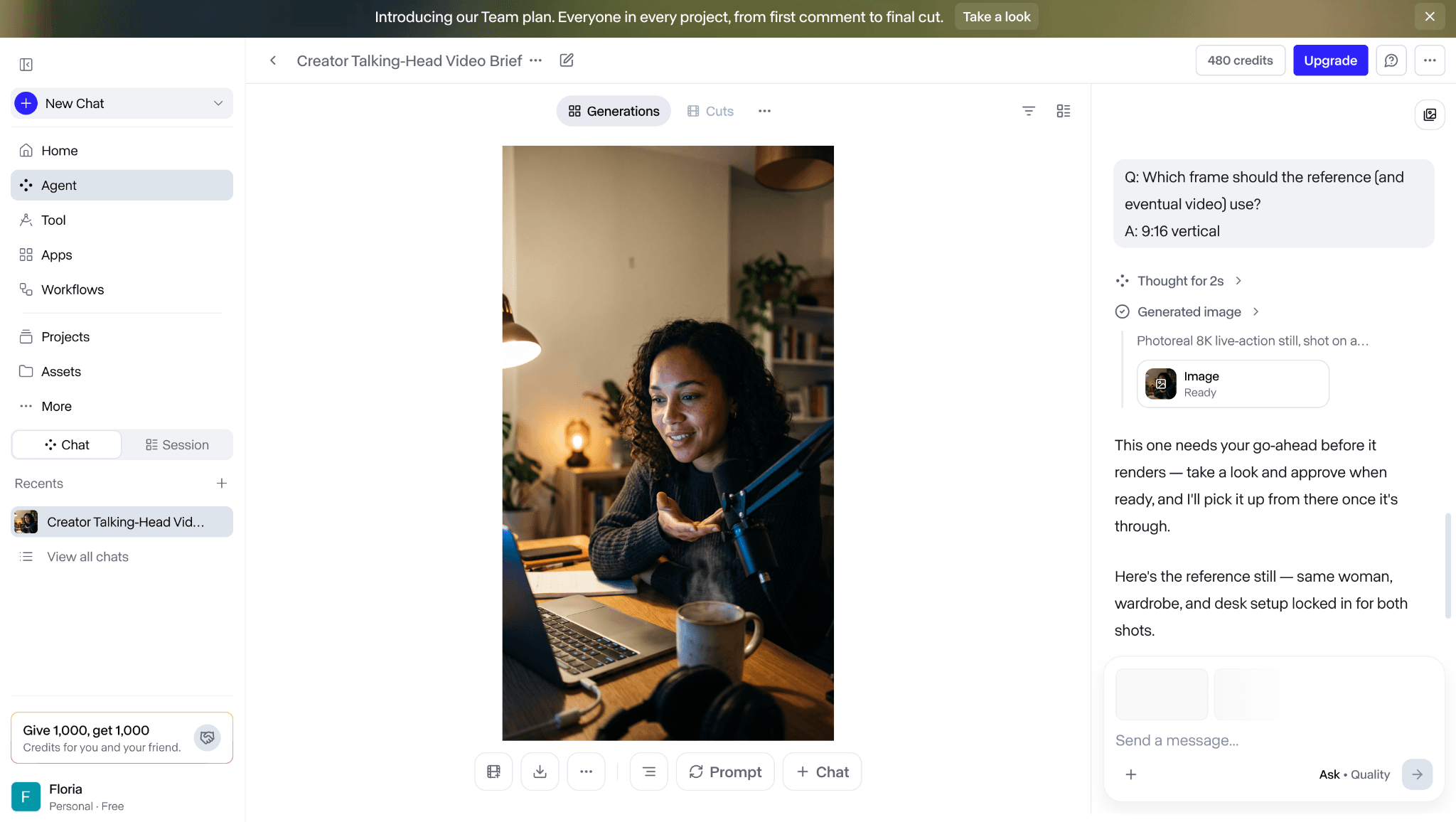
The supplied Runway account created a reference image before the video step.
In the supplied account check, Runway's agent created a 9:16 reference image and reduced the balance from 500 to 480 credits. The next step selected Kling 3.0 Pro for a 15-second talking-head brief, but the free account required an upgrade before rendering.
The screenshots therefore document Runway's planning flow, multi-model routing, and paywall; they do not test Runway Gen-4.5 against Kling. No generation time, motion result, prompt-adherence score, or export result is claimed.
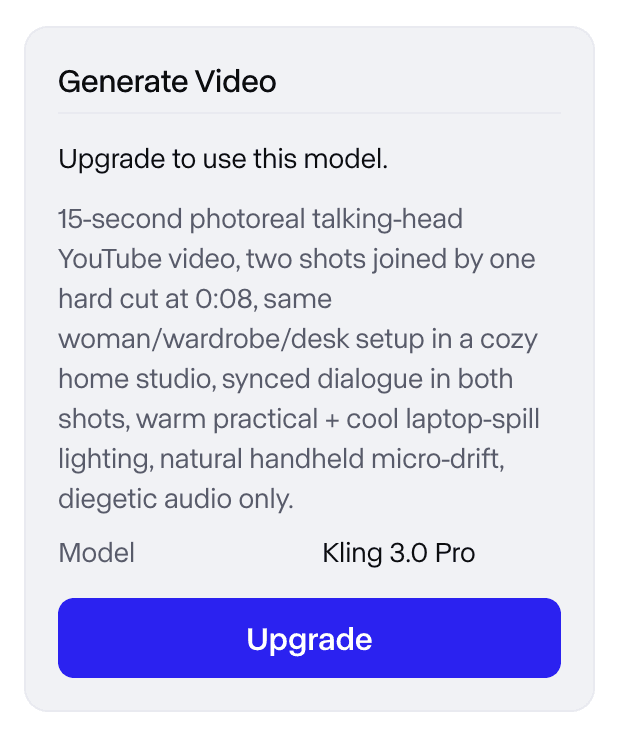
The selected Kling 3.0 Pro route stopped at an upgrade wall before video generation.
2. Hailuo AI: Best Direct Image-to-Video Alternative
Best for: creators who want another short-form text-to-video or image-to-video result without adopting a full production suite.
Hailuo deserves a direct test when Kling's queue, credit cost, or motion interpretation is the bottleneck. Its browser workflow keeps the job close to the familiar upload-frame, describe-action, generate-clip pattern, making it easier to compare the first result without learning a larger editor.
The trade-off appears in control depth. Kling 3.0 currently combines references, multi-shot direction, native audio, and flexible duration in one model family. Hailuo may be the faster second opinion, but the winning tool still depends on subject stability, camera behavior, audio needs, and the cost of reruns.
Pricing and access: Free access is available. Hailuo's current official pricing guide lists Standard at $9.99 per month; credit allowances and checkout offers should be confirmed in the signed-in account. Official source
3. Google Flow: Best for Connected Scenes with Veo
Best for: creators who need shot planning, references, extension, and connected scenes rather than isolated clips.
Flow becomes the better choice when Kling's single-workspace generation flow is too narrow for scene planning. Google's filmmaking interface organizes prompts, assets, and Veo generations around shots and sequences, which is useful for storyboards, ad coverage, and narrative continuity.
Access needs careful wording. Google's current help pages tie full use to supported regions and Google AI Plus, Pro, Ultra, or qualifying Workspace accounts. A separate credits page lists 50 daily Flow credits with or without a subscription, while also warning that non-subscriber video generation can be unavailable during peak hours. Eligibility, models, credit costs, and top-up options must be checked in the signed-in account.
Pricing and access: Access and credit limits depend on region, account type, and selected model. Google lists 50 daily credits, with additional monthly credits for qualifying subscriptions and Workspace access. Official source
4. Luma AI with Ray3.2: Best for Controlled Production Shots
Best for: creators who need keyframes, video modification, reframing, HDR, or compositing-friendly output.
Choose Luma when the shot needs controls that extend beyond a prompt and one reference frame. Ray3.2 is Luma's current video model, with multi-keyframe direction, video modification, reframing, 1080p output, HDR, and EXR options that make it relevant to production and VFX workflows.
The old “Dream Machine” label is no longer the right comparison point: Luma's current official guidance says Ray3.2 replaced the earlier Dream Machine and Ray2 naming. Luma also operates a broader multi-model app, so confirm whether the task is testing Ray itself or simply using Luma as a host for another model.
Pricing and access: Trial access is available. Luma lists individual Pro at $30 per month, with higher Plus and Ultra tiers; app subscriptions and API usage are separate. Official source
5. Pika: Best for Fast Effects and Social Clips
Best for: short transformations, effect-led clips, and creators who value a compact social workflow.
Pika is the practical switch when Kling's detailed generation controls feel excessive for a quick addition, swap, twist, or effect. The interface gets to an obvious social result faster and supports short text-to-video and image-to-video work alongside its named effects.
That speed comes from a narrower goal. Pika is less suited to projects that depend on Kling's sustained realism, element consistency, native multi-shot direction, or a 15-second narrative. It is an effect and format alternative rather than the closest model replacement.
Pricing and access: Basic is free. Standard is $8 per month when billed yearly and includes 700 monthly video credits; resolution, duration, and feature costs vary. Official source
6. Adobe Firefly Video: Best for Adobe Production Workflows
Best for: teams that want AI video beside Premiere Pro, Photoshop, review tools, and Adobe's provenance workflow.
Firefly is worth leaving Kling for when model choice is secondary to the production environment. Adobe's own video model and supported partner models can sit beside image, audio, editing, and Creative Cloud work, while Content Credentials and enterprise options may fit a formal review process better than a standalone generator.
It is not a simple model-for-model comparison. Premium video features consume generative credits, partner-model availability can vary by region, and the terms that apply to Adobe's own models should not be assumed to cover every partner model. Kling remains the more direct choice when the only question is how its 3.0 model handles the shot.
Pricing and access: A free plan provides limited daily generations. Firefly Standard is $9.99 per month with 2,000 generative credits; Pro is $19.99 per month with 4,000 credits. Official source
7. PixVerse: Best for Creator Tools Around a Video Model Family
Best for: fast text-to-video and image-to-video work with effects, audio options, transitions, and social formats.
PixVerse makes sense when Kling's interface is not the problem but its workflow feels too focused on controlled cinematic generation. PixVerse combines its own current model family with creator-facing tools for effects, transitions, extension, and rapid publishing experiments.
Treat it as a platform-level alternative with its own models, not as a neutral quality upgrade. The creator app and API also use different plan structures. A fair comparison should name the PixVerse model, resolution, duration, audio setting, and whether the test ran in the consumer app or developer platform.
Pricing and access: The consumer app provides a free entry point and shows paid membership options in-product. PixVerse Platform API memberships and credit purchases are priced separately. Official source
8. Seedance 2.5: Best Direct Model Alternative for Multimodal References
Best for: longer shots that use images, video, and audio references and need native audiovisual generation.
Seedance 2.5 earns a place here because it is a current model-level alternative rather than another editing or comparison platform. BytePlus currently presents the model for clips up to 30 seconds and for large multimodal reference sets, giving it a different testing envelope from Kling's 3-to-15-second VIDEO 3.0 workflow.
The complication is access. Seedance can appear through BytePlus resource plans, APIs, and third-party hosts, each with its own controls and billing. The article therefore compares the model's role but does not pretend every host offers the same duration, resolution, reference limit, or price.
Pricing and access: BytePlus offers resource plans and usage-based access; the live plan or ModelArk console is the reliable source for the selected region and input mode. Official source
9. Krea: Best Multi-Model Platform for Fast Exploration
Best for: creators who want to move among image and video models, references, enhancement, and editing from one interface.
Krea is a better fit when the hard part is deciding which model and visual direction deserve more credits. It shortens the path from a reference to several variations and keeps generation and refinement close together, but it does not replace Kling with one consistent video model of its own.
The supplied account record used Krea's image workflow, not video generation. It confirms that one free-account request returned four downloadable variations and that the reference, prompt, results, and Edit workspace stayed visible together. It does not support a conclusion about motion, generation time, audio, video resolution, or export limits.
Pricing and access: A free tier includes daily compute. Krea's current official subscription guide says paid plans start at $10 per month, with an annual discount displayed on the live pricing page. Official source
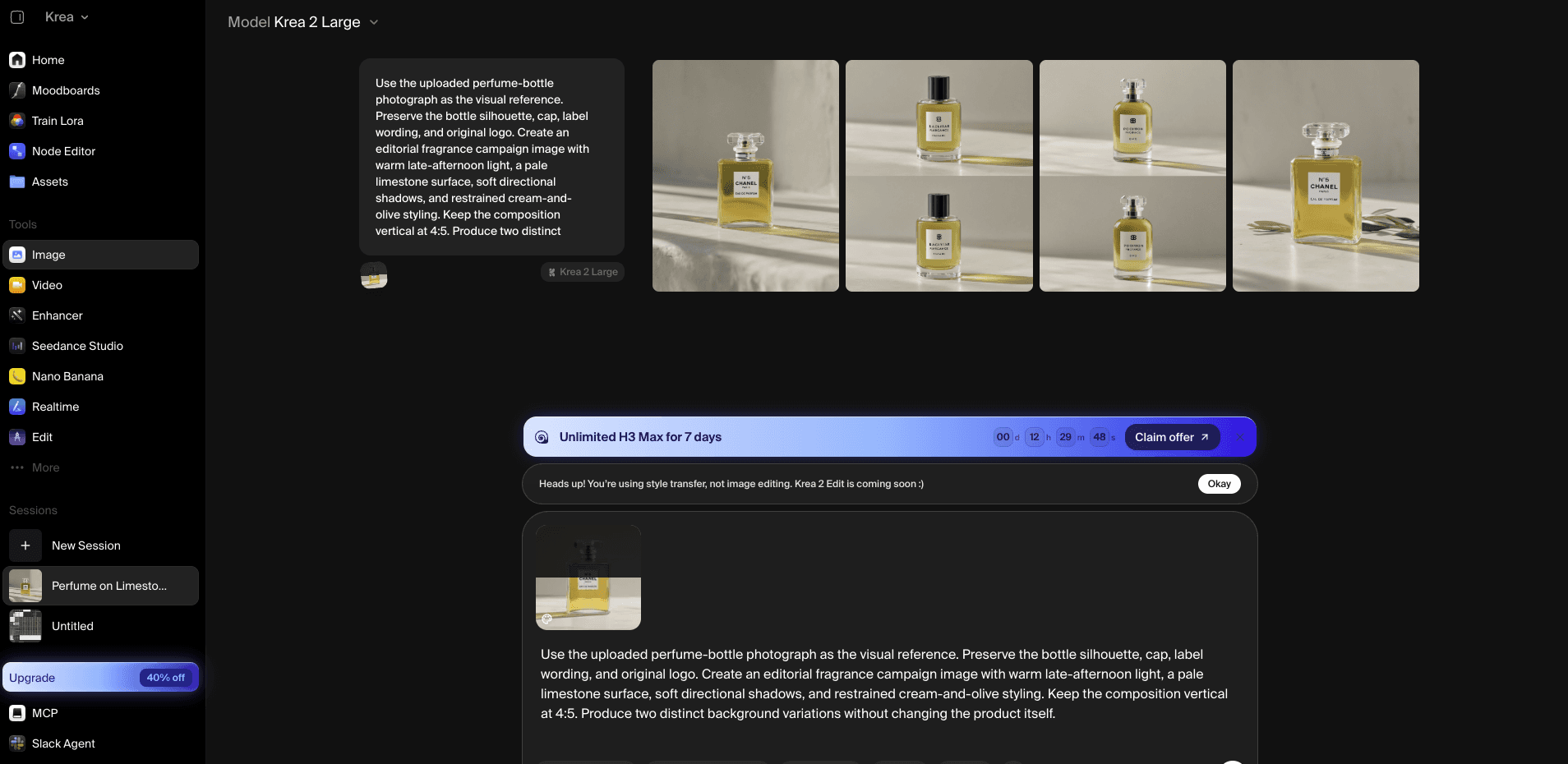
The supplied Krea image workflow kept the reference, prompt, and four generated variations visible together.
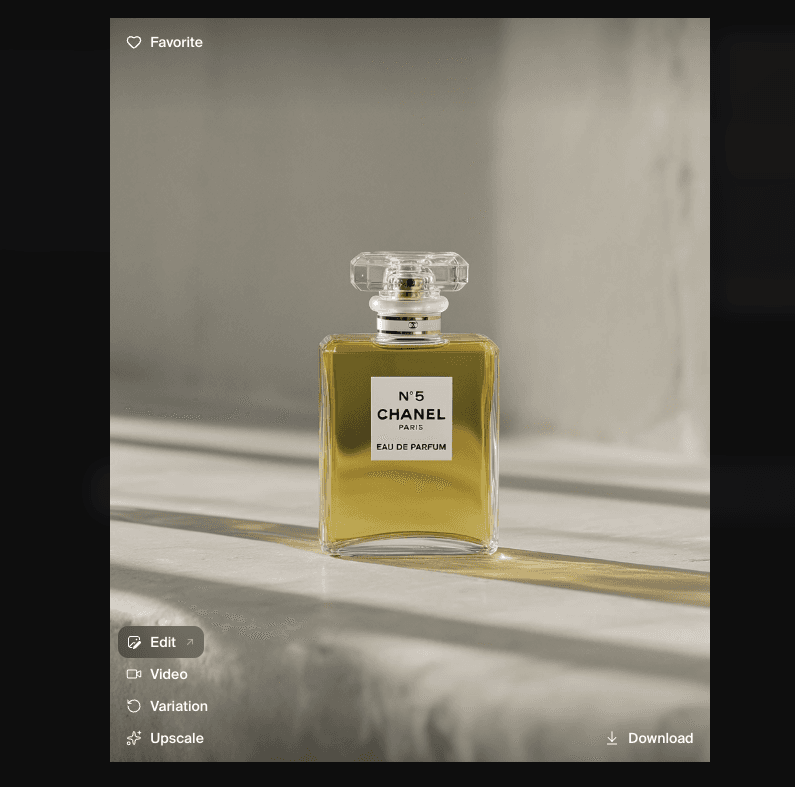
This downloadable Krea image result is not evidence of Krea video performance.
10. Astorie: Best Multi-Model Workflow Layer
Best for: creators who want reusable source assets to branch into several video-model routes on a visual canvas.
Astorie belongs tenth because it changes the comparison workflow rather than replacing Kling with a proprietary video model. A source image, character, product asset, or scene can remain on the canvas while separate branches test different models and settings, making the selection process easier to document and repeat.
For UGC work, the same canvas can hold the avatar, scene, product images, and generated clips, reducing repeated uploads and making product swaps easier. Output quality still belongs to the selected model, and final assembly may require an editor. Astorie should not be read as a full Kling model or NLE replacement.
Pricing and access: A free plan is available. Standard is currently offered at $12 per month on first-year annual billing; model, duration, and resolution choices determine credit use. Official source
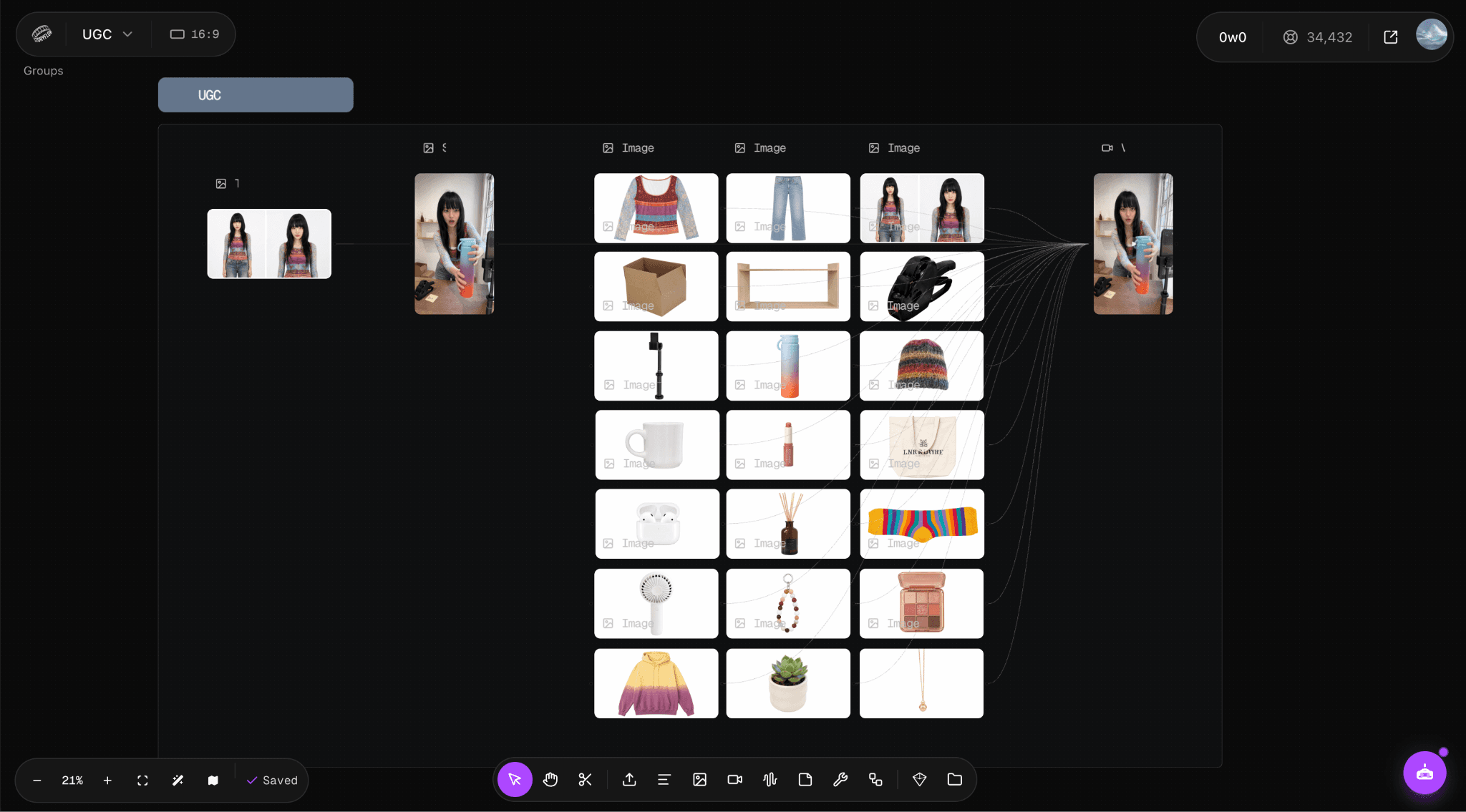
The supplied Astorie canvas keeps reusable UGC, avatar, scene, and product assets in one visible workflow.
What Do You Lose When Switching From Kling AI?
Leaving Kling can mean giving up more than one model. Existing projects, purchased credits, saved elements, character references, preferred seeds or settings, and a familiar start/end-frame workflow may not transfer. VIDEO 3.0's native audio, multi-shot planning, element consistency, and 3-to-15-second duration controls also have to be rebuilt or split across tools.
A platform switch adds another migration cost: new asset libraries, review links, billing rules, export conventions, and team permissions. If Kling already produces the required motion and the remaining work is minor, changing tools may cost more than it saves. Switch only when another model or platform removes a repeated bottleneck.
How to Choose the Right Kling Alternative
- Choose Runway when the generated shot must enter a broader production workflow.
- Choose Hailuo AI or Seedance 2.5 when the real decision is a different model response.
- Choose Google Flow for connected Veo scenes and Luma Ray3.2 for keyframes, modification, and production output.
- Choose Pika or PixVerse for faster social effects and creator formats.
- Choose Adobe Firefly when Creative Cloud integration and provenance are part of approval.
- Choose Krea or Astorie only when model comparison and reusable assets are the bottleneck.
For any final pair, reuse the same source and prompt, match aspect ratio, duration, resolution, and audio as closely as the interfaces allow, and keep the first result. Record host, exact model, credits, queue, failures, watermark, download, and what would require a rerun.
Is Kling AI Still Worth Using?
Yes, particularly when the project depends on Kling VIDEO 3.0's motion, reference handling, native audio, element consistency, or multi-shot controls. A broader platform is not automatically a better generator.
Kling becomes less convenient when every usable clip must leave the app for repair, asset management, review, or delivery. In that case, a production platform may save more time than a small improvement in model quality.
Bottom Line
Runway is the best production-platform alternative to Kling, while Hailuo AI is the most practical direct generator to test first. Google Flow and Luma serve more controlled cinematic workflows; Pika and PixVerse favor faster creator formats; Firefly fits Adobe production; Seedance 2.5 provides a current model-level option; and Krea or Astorie help when the real problem is comparing models rather than replacing one.
Keep Kling when its current motion, references, native audio, and multi-shot controls already match the job. Replace it when another tool removes a specific, repeated production constraint.
Related reading
Runway Gen4 vs Veo vs Kling: Practical Video Production Comparison
Practical comparison for AI video production choices across Runway Gen4, Google Veo, and Kling.
7 Best Photoroom Alternatives in 2026 (Tested for Ecommerce Photography)
Do you need a Photoroom alternative that goes beyond simple background cutouts and batch image processing? Try these 7 tools and pick the one that best matches your AI product photography use cases.
6 Ideogram Alternatives for Killer AI Image Generation
Here are 6 tried and tested Ideogram alternatives that work best for prompt accuracy, text, image realism, character consistency and are intelligent enough to render real-world scenarios and logic.
Frequently asked questions
- What is the best overall Kling AI alternative?
Runway is the best all-round platform alternative when generation must continue into editing, audio, assets, and delivery. Hailuo AI is the more direct second generator to try.
- Which option is the closest model-level alternative?
Hailuo AI is the easiest direct comparison for short image-to-video work. Seedance 2.5 is the stronger model-level candidate when longer multimodal references and native audio matter.
- Which alternative is best for connected cinematic scenes?
Google Flow is designed around shots and scenes using Google's models. Luma Ray3.2 is the better fit when keyframes, modification, reframing, HDR, or EXR output are the deciding controls.
- What is the best free Kling AI alternative?
Runway, Hailuo, Pika, Adobe Firefly, PixVerse, Krea, and Astorie offer free access in some form, but the limits are not equivalent. Compare whether the free route can actually generate, download, remove a watermark, and use the required model.
- Is Adobe Firefly a direct Kling replacement?
Not always. Firefly includes an Adobe video model and partner models, but its main advantage is the Adobe production and provenance workflow. It is a platform alternative as much as a model choice.
- Can Astorie replace Kling AI?
No. Astorie does not supply its own replacement video model. It helps branch reusable assets into different model routes and compare the resulting workflow before the selected clips move to finishing.
Ready to try it on the canvas?
Open Astorie and fan your prompt across every frontier model in one workflow.