

10 Best Leonardo AI Alternatives in 2026 for Image Generation, Editing, and Creative Workflows
The best Leonardo AI alternatives are OpenArt for broad creator workflows, Krea for rapid iteration, and Adobe Firefly for teams that finish work in Creative Cloud. Choose a specialist such as Ideogram, Recraft, or ComfyUI when typography, vectors, or local control matters more than matching Leonardo feature for feature.
Key takeaways
- OpenArt is the broadest full-platform alternative for creators who want image generation, reusable characters, video, audio, and story tools in one account.
- Krea is the strongest alternative for real-time generation, enhancement, live editing, and rapid visual iteration.
- Adobe Firefly is the most practical choice for teams that finish and deliver creative work through Photoshop, Illustrator, Express, and Creative Cloud.
- Ideogram and Recraft are specialist alternatives: Ideogram is better for readable text inside images, while Recraft is better for vectors and brand assets.
- ComfyUI offers maximum local control, while Astorie is a workflow alternative for connecting several image and video models on one collaborative canvas.
The best Leonardo AI alternatives are OpenArt for broad creator workflows, Krea for rapid iteration, and Adobe Firefly for teams that finish work in Creative Cloud. Choose a specialist such as Ideogram, Recraft, or ComfyUI when typography, vectors, or local control matters more than matching Leonardo feature for feature.
This comparison treats Leonardo as a platform—not a single image model—and separates full replacements, specialist substitutes, and workflow alternatives. Public pricing and access were rechecked on September 12, 2026; the hands-on observations below come only from the supplied test evidence.
Quick answer: the best Leonardo AI alternatives
Choose OpenArt when Leonardo feels too image-centric and you want characters, video, audio, and story tools in the same account; expect a broader interface and different credit math.
Choose Krea when the bottleneck is iteration speed, live generation, or enhancement; expect a different model catalog and no direct transfer of Leonardo-trained assets.
Choose Adobe Firefly when Photoshop, Illustrator, Express, and brand review define delivery; give up some custom-model flexibility.
Choose Ideogram for text-heavy graphics, Recraft for vectors and brand assets, and ComfyUI for private, reproducible local graphs; each replaces a specialist job rather than the whole Leonardo workspace.
Use Astorie only when the problem is connecting models and production steps. It is a workflow alternative, not a Leonardo model or preset clone.
The best alternatives at a glance
| Alternative | Switch when / scope | Main loss | Pricing or access |
|---|---|---|---|
| OpenArt | Full platform: you want Leonardo-style image creation to sit beside characters, video, audio, and story direction in one broader studio | Broader interface and credit math | Free trial; Starter $14/mo |
| Krea | Partial platform: live visual feedback, enhancement, and fast branching matter more than Leonardo's personal-model and asset-library continuity | Less emphasis on custom asset libraries | Free; Basic $9/mo |
| Adobe Firefly | Partial platform: the generated asset must move directly into Photoshop, Illustrator, Express, or an Adobe review workflow | Less custom-model flexibility for solo users | Free; Standard $9.99/mo |
| Midjourney | Specialist: aesthetic exploration and personalization matter more than a broad editing and production toolkit | Narrower production and editing workflow | Basic $10/mo |
| Ideogram | Specialist: readable wording in posters, packaging, or social graphics is the deciding requirement | Less broad than a full creative suite | Free; Plus $20/mo |
| Recraft | Specialist: editable vectors, icons, mockups, and brand assets are more important than cinematic image exploration | Not aimed at cinematic image exploration | Free; Basic $12/mo |
| Freepik + Magnific | Partial platform: stock assets, templates, AI generation, and Magnific upscaling need to live under one commercial-content workflow | Value depends on using the surrounding stock, template, and AI ecosystem | Free access; paid plans vary by region and tier |
| Canva Magic Studio | Workflow substitute: the real deliverable is a finished campaign layout rather than a deeply configurable image-generation setup | Less control over model behavior | Free; Pro $180/yr |
| ComfyUI with Stable Diffusion or FLUX | Technical substitute: local privacy, reusable node graphs, and model-level control justify setup and maintenance | Setup, hardware, and maintenance | Software is free |
| Astorie | Workflow alternative: one asset must branch across several image and video models while prompts, outputs, and handoffs stay visible on a shared canvas | Not a Leonardo preset or model-library clone | Free; Standard annual offer $12/mo |
Prices above are the public prices or billing descriptions available on the checked date. Regional taxes, annual discounts, promotional pricing, and model-specific credit costs can change the usable cost.
Why creators look for Leonardo AI alternatives
Leonardo earns its place by covering a large amount of the visual workflow in one approachable interface. Its official site now emphasizes image generation, motion, precision editing, upscaling, and creator-scale production. Leaving it only makes sense when another tool solves a more specific bottleneck.
Common reasons include needing more predictable typography, native vectors, faster real-time iteration, deeper Adobe integration, local deployment, or a broader image-to-video pipeline. Price also matters, but credit labels cannot be compared directly: one platform may charge a single unit for a standard image while another meters the model, resolution, or editing action separately.
How these alternatives were selected
A tool qualified for the main list only if it could replace Leonardo's central job—generating and refining usable visual assets—or if it offered a clearly labeled specialist path that solves an important Leonardo limitation. Rankings weigh workflow overlap, output control, editing, commercial usability, free access, and the cost of what happens after generation.
- Generation quality and prompt adherence for a repeatable product brief.
- Editing, reference images, character or style consistency, and upscaling.
- Whether the tool supports a full creative workflow or only a specialist step.
- Free-plan usefulness, billing term, credit transparency, and commercial-use conditions.
- The practical loss when moving away from Leonardo's presets, personal models, and asset library.
Hands-on evidence is included where a repeatable supplied test was available. Results are tied to the stated account, model, prompt, and settings and are not universal model-quality claims.
What do you lose when switching from Leonardo AI?
The main migration cost is continuity. Leonardo personal AI models, presets, Elements, collections, generation history, privacy settings, and token bank do not move automatically to another service. A replacement may generate a strong image while still forcing the team to rebuild its visual system.
Before canceling, export final assets and prompt notes; record the model, seed, guidance, aspect ratio, and post-processing steps for repeatable work; and list any personal models or private collections that cannot be recreated elsewhere. Run one complete brief through the replacement—including revisions, upscaling, motion, and export—before comparing subscription prices.
1. OpenArt – best for a broad creator studio
Replacement scope: Full platform. Switch when you want Leonardo-style image creation to sit beside characters, video, audio, and story direction in one broader studio.
Best for: an all-in-one creator studio with image, video, character, and story tools.
OpenArt has the broadest documented feature overlap in this list for someone who uses Leonardo as more than a text-to-image box. Its current product combines image generation and editing with video, reusable characters, audio, 3D worlds, and a Director workflow. That breadth matters when the real job is moving from one still to a campaign or short sequence.
Switch if Leonardo's image-centered workspace is becoming one stage in a larger production process. OpenArt exposes several outside models in one subscription and keeps generation, editing, and story assembly together. The cost is a busier product: creators who only need fast image ideation may spend more time navigating features they do not use.
What you gain: more media types, character reuse, and story-level tools in one account.
What you give up: Leonardo remains cleaner for creator-first image work and custom visual exploration; OpenArt's wider suite can feel less focused.
Pricing and access: OpenArt offers a free trial with daily credits. Its public pricing page lists Starter at $14 per seat per month, with lower effective prices sometimes displayed for longer billing commitments. Official source
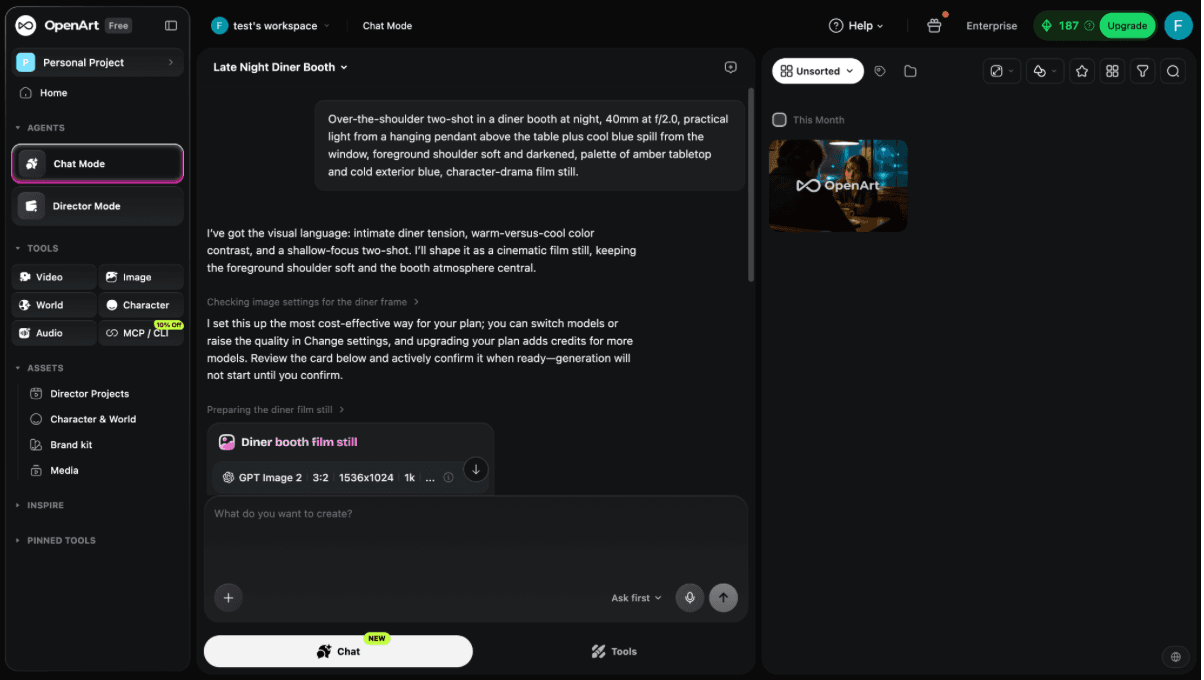
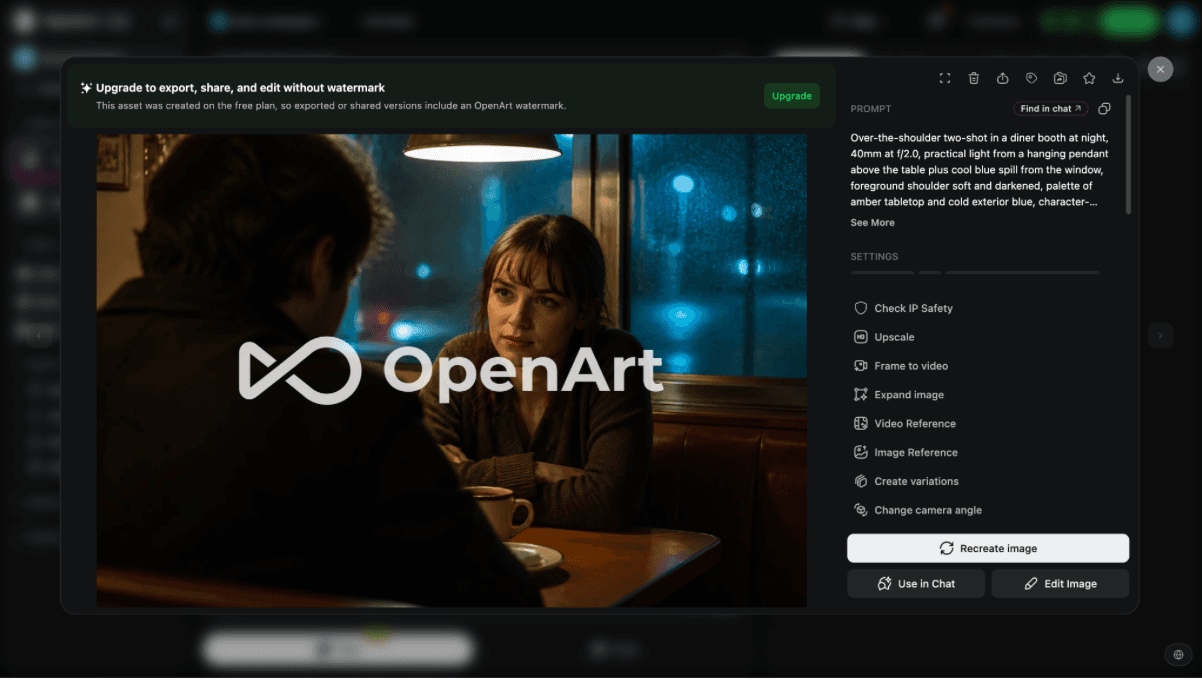
Figure 1. Supplied OpenArt interface or plan evidence retained from the original draft.
In our OpenArt check, the default Agent flow asked for confirmation of an efficient model under the free plan before generating. That extra confirmation made the route feel more deliberate but slower than Krea's direct prompt-to-image flow.
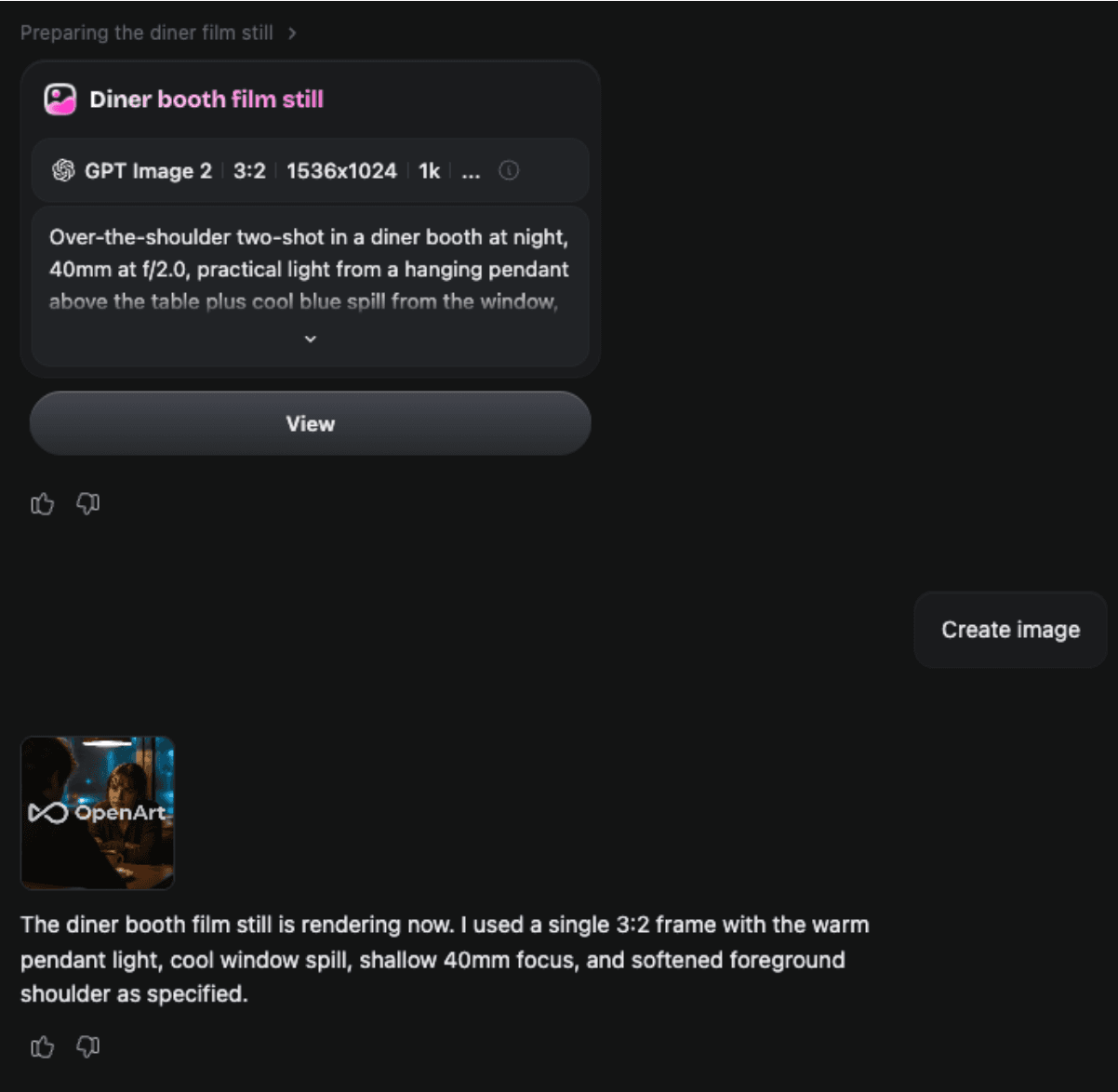
Figure 2. Supplied OpenArt interface or plan evidence retained from the original draft.
2. Krea – best for real-time creative iteration
Replacement scope: Partial platform. Switch when live visual feedback, enhancement, and fast branching matter more than Leonardo's personal-model and asset-library continuity.
Best for: real-time generation, live editing, enhancement, and fast visual iteration.
Krea changes the pace of the work. Its real-time tools respond while you paint, sketch, share a screen, or adjust a prompt, and the suite now covers images, video, 3D, enhancement, training, and node-based workflows. That makes it appealing when the bottleneck is waiting for discrete generations before making the next decision.
For art directors and product teams, Krea can replace a generate-download-edit loop with continuous feedback. It is not a one-for-one copy of Leonardo's presets, community, or personal-model organization, so users with a mature Leonardo library should test migration friction before moving.
What you gain: a noticeably more immediate ideation loop plus strong enhancement tools.
What you give up: a different model catalog, credit system, and less continuity with Leonardo-trained assets.
Pricing and access: Krea has a free plan with 100 daily compute units. The current monthly prices are $9 for Basic, $35 for Pro, and $105 for Max; annual billing is discounted. Official source
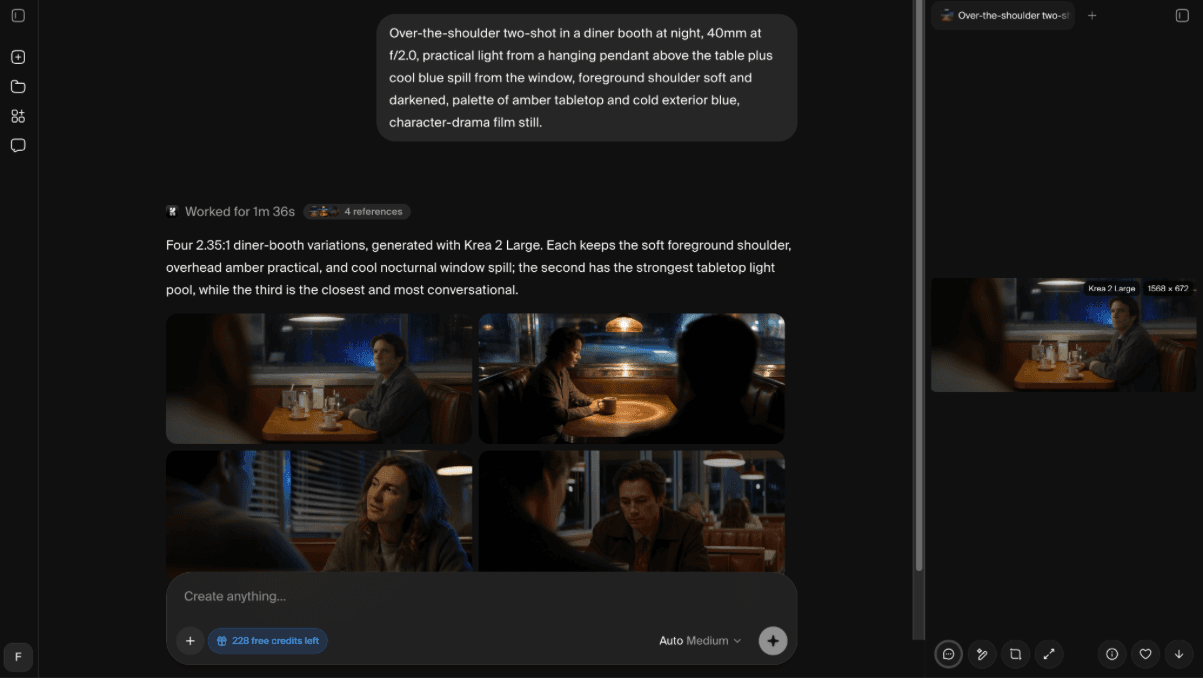
Figure 3. Supplied Krea interface or plan evidence retained from the original draft.
In our Krea check, one prompt produced four images with Krea 2 Large for two credits. The result was usable for rapid ideation, and the editor exposed an automatic Annotate action for localized revision. This is evidence about the tested workflow and settings, not a universal quality claim.
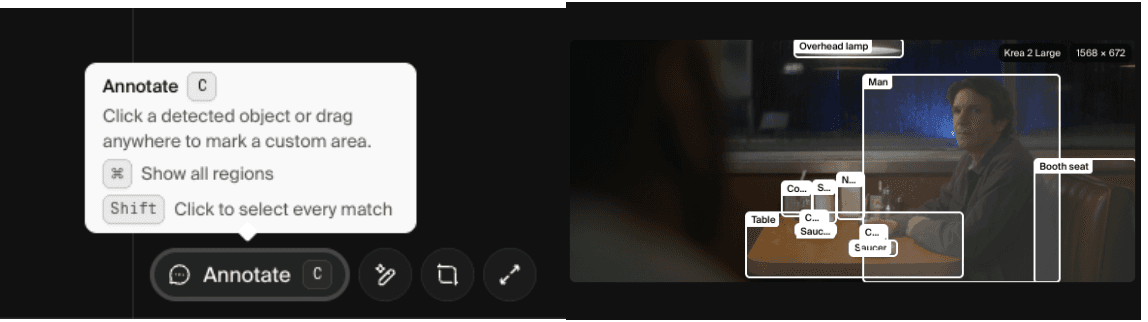
Figure 4. Supplied Krea interface or plan evidence retained from the original draft.
3. Adobe Firefly – best for Adobe production workflows
Replacement scope: Partial platform. Switch when the generated asset must move directly into Photoshop, Illustrator, Express, or an Adobe review workflow.
Best for: commercial creative work already centered on Photoshop, Illustrator, or Express.
Firefly is a production alternative rather than simply another model. The web app now combines Adobe models and selected partner models, while Photoshop and Express handle the finishing work. For teams that already approve, resize, retouch, and deliver assets in Creative Cloud, that handoff can matter more than winning a single prompt comparison.
It is a sensible switch when licensing posture, brand review, and editable delivery are higher priorities than Leonardo's community presets or personal model training. Users outside Adobe's ecosystem may find that much of the benefit appears only after adding other Adobe apps.
What you gain: tight integration with professional editing and a clearer commercial-production path.
What you give up: less freedom to build a highly customized generator stack, and premium video actions can consume credits quickly.
Pricing and access: Firefly has limited free daily generations. Firefly Standard is $9.99 per month with 2,000 monthly generative credits; higher tiers add more credits and bundled Adobe apps. Official source
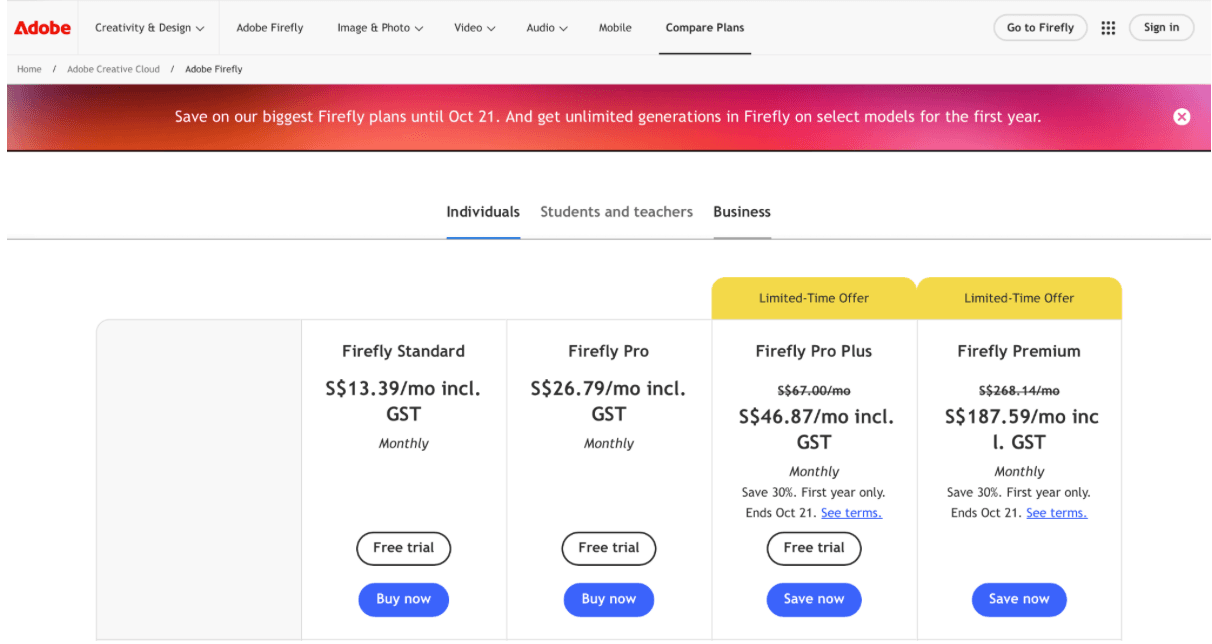
Figure 5. Supplied Adobe Firefly interface or plan evidence retained from the original draft.
Replacement scope: Specialist. Switch when aesthetic exploration and personalization matter more than a broad editing and production toolkit.
Best for: high-impact style exploration and polished concept images.
Midjourney remains relevant to Leonardo users who care most about the first visual impression. Its web experience, image references, personalization, style controls, and V7 parameters support broad concept exploration without asking users to manage the larger toolset found in a creator suite.
The switch works best for moodboards, entertainment concepts, fashion treatments, and visual direction. It is weaker as a complete Leonardo replacement when you depend on custom model training, detailed canvas editing, asset organization, or a free browser tier.
What you gain: a focused aesthetic engine, strong personalization, and deep prompt parameters.
What you give up: no general free web trial, less end-to-end editing, and privacy requires a higher plan.
Pricing and access: Midjourney Basic is $10 monthly or $8 per month on annual billing. Standard, Pro, and Mega add more Fast GPU time; Stealth Mode is limited to Pro and Mega. Official source
5. Ideogram – best for typography inside images
Replacement scope: Specialist. Switch when readable wording in posters, packaging, or social graphics is the deciding requirement.
Best for: readable text, posters, packaging, and graphic compositions.
Ideogram is a specialist alternative for one of the most expensive failure modes in image generation: text that looks almost right but cannot ship. Its current generation and editing stack is especially useful for posters, product labels, title treatments, and social graphics where wording is part of the image rather than an overlay added later.
Leonardo is the better fit when one account must also cover custom models, motion, upscaling, and a large set of creative controls. Ideogram earns its place when correct lettering and prompt adherence outweigh that breadth.
What you gain: stronger typography-oriented generation, private paid generations, and an API.
What you give up: a narrower production surface with less video and workflow depth than Leonardo.
Pricing and access: Ideogram has a free plan. Plus is $20 monthly or $15 per month when billed annually; Pro is $60 per month or $42 on annual billing. Official source
6. Recraft – best for editable vector and brand assets
Replacement scope: Specialist. Switch when editable vectors, icons, mockups, and brand assets are more important than cinematic image exploration.
Best for: vectors, logos, icons, mockups, and brand systems.
Recraft approaches the problem from a designer's deliverable. It can generate raster images, editable vectors, icons, mockups, and custom styles, then refine vectors in its own editor. If the final file must become an SVG, brand component, or production-ready graphic, this is a more direct path than generating a beautiful bitmap and rebuilding it elsewhere.
It is only a partial replacement for Leonardo's art, character, and motion workflows. Photoreal concept artists may prefer Leonardo's range, while identity designers and marketing teams may save time with Recraft's structured outputs.
What you gain: native vector generation, editable design assets, and commercial ownership on paid plans.
What you give up: a design-first aesthetic and fewer video or custom-character workflows.
Pricing and access: Recraft offers a public free tier. Basic is listed at $12 monthly or $10 per month on annual billing; paid generations are private and include commercial rights. Official source
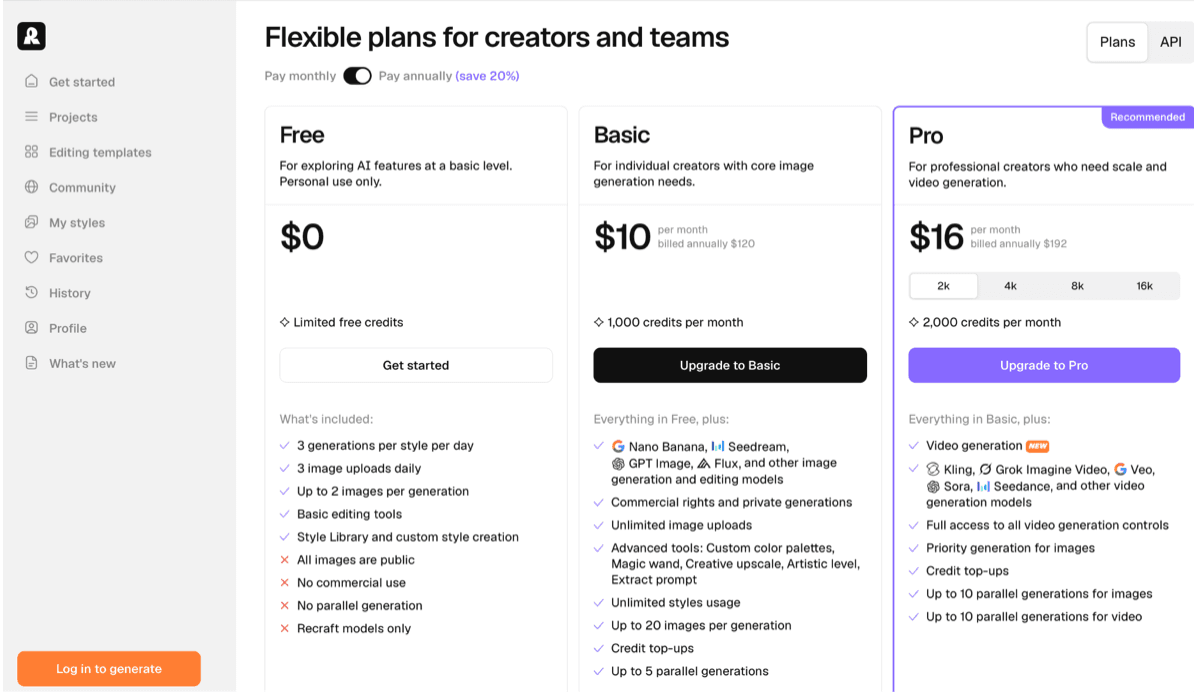
Figure 6. Supplied Recraft interface or plan evidence retained from the original draft.
7. Freepik with Magnific upscaling – best for stock-to-AI production
Replacement scope: Partial platform. Switch when stock assets, templates, AI generation, and Magnific upscaling need to live under one commercial-content workflow.
Best for: stock assets plus image, video, audio, and collaborative AI tools.
Freepik has integrated Magnific upscaling into a larger stock-and-AI creative platform. The current product combines a large stock library with image, video, audio, upscaling, an AI assistant, collaborative Spaces, and many third-party models. That makes it useful when generated material must sit beside licensed stock, templates, fonts, and mockups.
The trade is economic and organizational. Freepik is broader than Leonardo, but much of its value comes from the surrounding asset library and higher-volume plans. A user who only generates images may pay for a stack they do not need.
What you gain: stock and AI creation under one license, plus strong upscaling and shared workspaces.
What you give up: more complicated allowances and less focus on personal-model experimentation.
Pricing and access: Freepik offers limited free access and paid plans whose AI-credit and model allowances vary by tier and billing term. Check the live regional plan before publication. Official source
8. Canva Magic Studio – best for template-based delivery
Replacement scope: Workflow substitute. Switch when the real deliverable is a finished campaign layout rather than a deeply configurable image-generation setup.
Best for: turning generated images into finished social and marketing layouts.
Canva is not a direct replacement for every Leonardo workflow. It belongs here for users whose real outcome is a post, deck, flyer, ad, or branded template. Canva AI can generate and edit images, but its larger advantage is placing those outputs directly into a familiar design, approval, and publishing environment.
Choose it when finishing speed and brand consistency matter more than seeds, training, or technical generation controls. Concept artists and users who tune models will hit the ceiling sooner than they would in Leonardo.
What you gain: templates, brand kits, team review, scheduling, and delivery in the same workspace.
What you give up: shallower generation controls and AI allowances shared across multiple features.
Pricing and access: Canva Free includes a limited shared AI allowance. In the US, Canva Pro is listed at $180 per year for one person; business and AI add-on pricing is separate. Official source
9. ComfyUI with Stable Diffusion or FLUX – best for local and open workflows
Replacement scope: Technical substitute. Switch when local privacy, reusable node graphs, and model-level control justify setup and maintenance.
Best for: local control, custom nodes, repeatable graphs, and private workflows.
ComfyUI is the technical alternative. Its graph interface exposes model loading, conditioning, samplers, ControlNet-style guidance, upscalers, and community nodes as a reproducible workflow. It is attractive when Leonardo's hosted convenience becomes a limitation rather than a benefit.
This is not free in the same sense as a browser plan. The software is open source, but usable speed depends on local hardware or rented compute, and every custom-node update adds maintenance risk. Teams should compare total operating effort, not only subscription price.
What you gain: maximum workflow transparency, local privacy, custom nodes, and portable workflow files.
What you give up: installation, GPU requirements, dependency management, and no polished managed service by default.
Pricing and access: ComfyUI itself is free and open source. Hardware, electricity, storage, and any cloud GPU or paid partner-model nodes are separate costs. Official source
10. Astorie – best for connected multi-model workflows
Replacement scope: Workflow alternative. Switch when one asset must branch across several image and video models while prompts, outputs, and handoffs stay visible on a shared canvas.
Best for: multi-model image and video workflows on a collaborative node canvas.
Astorie is a workflow-level alternative rather than a claim that one Astorie model replaces Leonardo. Its canvas is useful when an image needs to pass into enhancement, editing, video generation, review, and export without rebuilding the project in separate apps. Teams can keep model variants and connected steps visible in one space.
It should not be chosen simply because this article appears on the Astorie blog. Leonardo remains better aligned with creators who value its specific presets, personal models, and community. Astorie becomes relevant when the pain is moving assets between models and collaborators.
What you gain: connected nodes, multiple image and video models, reusable recipes, and team collaboration.
What you give up: a different ecosystem and no one-click migration of Leonardo-trained assets or saved presets.
Pricing and access: Astorie has a renewable free tier. Its current Standard annual offer is $12 per month for the first year and $16 per month equivalent from year two; the page marks this as a limited offer. Official source
Which alternative fits each reason for switching?
| What you need | Start with |
|---|---|
| Closest broad creator studio | OpenArt |
| Real-time generation and enhancement | Krea |
| Adobe-centered commercial workflow | Adobe Firefly |
| Typography and text inside images | Ideogram |
| Vectors, logos, and brand assets | Recraft |
| Local nodes and maximum technical control | ComfyUI |
| Connected multi-model production canvas | Astorie |
Is Leonardo AI still worth using in 2026?
Yes, especially for creators who already have trained models, saved presets, established token usage, and a familiar asset library. Switching platforms has a hidden cost: recreating styles, learning a different credit system, and rebuilding the path from generation to final delivery.
A specialist may still be worth adding without replacing Leonardo. Ideogram can handle text-heavy hero graphics, Recraft can produce vectors, and Krea can cover real-time exploration. Run a representative job before cancelling, then compare the number of usable outputs rather than the number of raw generations.
How to choose without paying for the wrong plan
Start with the deliverable: concept art, a product campaign, a vector logo, a social post, or a multi-shot video require different tools.
Test the same prompt and reference image on your top two candidates before comparing their credit totals.
Count rerenders, edits, upscales, and export work. A cheap generation that needs three repairs is not the cheaper workflow.
Check privacy and commercial-use rules before uploading client assets or training a personal model.
Keep Leonardo if the replacement only solves an occasional edge case; add the specialist instead.
Final verdict
OpenArt and Krea are the first two platforms to test because they overlap with Leonardo while taking different approaches: OpenArt expands the studio, while Krea changes the iteration loop. Adobe Firefly is operationally aligned with an Adobe-centered team, and the remaining tools make sense when a specialist requirement is driving the switch.
Do not migrate on feature-count alone. Put one real brief through Leonardo and two candidates, record the full path to a usable file, and keep the platform that removes the most work after the first attractive image appears.
Related reading
Runway Gen4 vs Veo vs Kling: Practical Video Production Comparison
Practical comparison for AI video production choices across Runway Gen4, Google Veo, and Kling.
7 Best Photoroom Alternatives in 2026 (Tested for Ecommerce Photography)
Do you need a Photoroom alternative that goes beyond simple background cutouts and batch image processing? Try these 7 tools and pick the one that best matches your AI product photography use cases.
6 Ideogram Alternatives for Killer AI Image Generation
Here are 6 tried and tested Ideogram alternatives that work best for prompt accuracy, text, image realism, character consistency and are intelligent enough to render real-world scenarios and logic.
Frequently asked questions
- What is the closest free alternative to Leonardo AI?
Krea, OpenArt, Adobe Firefly, Canva, and several other tools provide limited free access, but none reproduces every Leonardo feature. Krea is useful for testing a fast creative loop; OpenArt is a broader platform trial. Compare export rights and recurring versus one-time credits before calling a plan free.
- Which Leonardo alternative is best for text in images?
Ideogram is the most focused option in this list for posters, labels, and headline treatments. Adobe Firefly, ChatGPT Images, and newer multi-model suites can also render text, but the comparison should use an exact required phrase rather than a vague typography prompt.
- Can I replace Leonardo with Stable Diffusion?
You can replace much of the generation layer with Stable Diffusion or FLUX through ComfyUI, but you also take responsibility for models, nodes, hardware, updates, and storage. That is a control trade, not a direct swap of one hosted interface for another.
- Which alternative is better for commercial design teams?
Adobe Firefly, Recraft, Canva, and Freepik each solve a different part of commercial production. Firefly fits Adobe editing, Recraft fits vector assets, Canva fits template delivery, and Freepik combines stock with AI tools and Magnific enhancement. Licensing and privacy should be checked for the exact plan and model used.
- Does Astorie replace Leonardo AI?
Astorie can replace the workflow layer for teams that want several image and video models connected on one canvas. It does not recreate Leonardo's trained-model library or every preset. The useful question is whether you need one creator suite or a connected multi-model production space.
Ready to try it on the canvas?
Open Astorie and fan your prompt across every frontier model in one workflow.