

10 Best OpenArt Alternatives in 2026 for AI Images, Video, and Creator Workflows
The best OpenArt alternatives are Leonardo AI for a focused image-first platform, Freepik for stock-to-AI production with Magnific upscaling, and Krea for real-time iteration. Runway and LTX Studio are better specialist choices for video production and structured filmmaking, while ComfyUI serves teams that want local control.
Key takeaways
- Leonardo AI is the most direct image-first alternative when generation, editing, motion, upscaling, and personal models matter more than OpenArt's broader story and world tools.
- Freepik with Magnific is better suited to commercial workflows that combine stock assets, templates, AI generation, and production-oriented enhancement.
- Krea is the stronger choice for rapid visual iteration, while Runway and LTX Studio specialize in video production and structured filmmaking.
- ComfyUI provides local privacy, custom models, and transparent node graphs, but requires users to manage hardware, installation, and maintenance.
- Astorie is a workflow alternative for teams that need visible multi-model branching, reusable production graphs, collaboration, and downstream handoff.
OpenArt now spans images, video, reusable characters, audio, worlds, and story direction, so no narrow generator replaces every part of it. Public pricing and access were rechecked on September 12, 2026; the test sections below preserve only the supplied Leonardo, Freepik/Magnific, and Krea evidence.
Quick answer: the best OpenArt alternatives
Choose Leonardo AI when OpenArt feels too broad and the core job is image generation, editing, motion, and personal models; lose OpenArt's deeper story and world layer.
Choose Freepik when stock, templates, AI generation, and Magnific enhancement belong in one commercial workflow; value depends on using the surrounding asset library.
Choose Krea for fast visual iteration, Runway for video production, and LTX Studio for script-to-shot planning; each is a partial replacement.
Choose ComfyUI when local privacy and transparent node graphs justify a technical setup.
Use Astorie when visible multi-model branching and production handoff matter more than OpenArt Director's guided workflow.
The best alternatives at a glance
Alternative | Switch when / scope | Main loss | Pricing or access |
Leonardo AI | Partial platform: the center of the workflow is image generation, editing, motion, and personal models rather than story worlds and audio | Less story, audio, and world-building depth | Free; Essential $12/mo |
Freepik + Magnific | Partial platform: stock, templates, AI generation, and Magnific enhancement need to support commercial asset production | Value depends on using the surrounding stock, template, and AI ecosystem | Free access; paid plans vary by region and tier |
Krea | Partial platform: real-time experimentation, upscaling, and rapid branching matter more than OpenArt's guided narrative tools | Less story and character orchestration | Free; Basic $9/mo |
Adobe Firefly | Partial platform: generated assets must continue inside Photoshop, Illustrator, Express, or Adobe brand workflows | Less character and story continuity | Free; Standard $9.99/mo |
Midjourney | Specialist: visual style exploration matters more than characters, worlds, audio, and story assembly | Not an all-in-one story studio | Basic $10/mo |
Runway | Specialist platform: video generation, editing, audio, and professional delivery dominate the project | Less image-community and world-building depth | Free; Standard $15/mo |
Higgsfield | Specialist: camera-led ads and social video presets matter more than open-ended story worlds | Less open-ended story and world building | Free; paid plans |
LTX Studio | Specialist platform: scripts, storyboards, casting, shot planning, and a timeline are the central workflow | Less general-purpose image experimentation | Free; paid from $15/mo |
ComfyUI | Technical substitute: self-hosted graphs, private assets, and custom models justify setup and maintenance | Setup and maintenance replace subscription convenience | Software is free |
Astorie | Workflow alternative: multi-model branches and production handoff should remain visible, even without OpenArt Director's one-click guidance | Less guided than OpenArt Director | Free; Standard annual offer $12/mo |
Prices above are the public prices or billing descriptions available on the checked date. Regional taxes, annual discounts, promotional pricing, and model-specific credit costs can change the usable cost.
Why creators look for OpenArt alternatives
OpenArt's strength is breadth. Its current site presents one environment for image generation and editing, video, characters, audio, worlds, and conversational directing. The reason to leave is rarely that it lacks features; it is more often that a narrower tool handles one part of the workflow faster, more predictably, or with better production integration.
Other users want a different pricing model, stock assets, Adobe delivery, stronger video controls, local deployment, or a structured filmmaking interface. The comparison therefore separates broad platforms from specialists instead of pretending Midjourney, Runway, and ComfyUI solve exactly the same job.
How these alternatives were selected
Candidates were selected according to OpenArt's current role as a multi-model creator studio. Broad alternatives were judged on image and video coverage, editing, reusable assets, collaboration, and model access. Specialist tools were included only when they solve a major reason to leave OpenArt and are labeled as partial replacements.
Image generation and editing, reference control, character or style consistency, and enhancement.
Video generation, audio, story planning, timeline work, and production handoff.
Model range, credit clarity, free access, commercial rights, and privacy.
Whether the workflow is guided, canvas-based, timeline-based, or self-hosted.
The OpenArt capability that would be lost when choosing a specialist.
Hands-on evidence is included where a repeatable supplied test was available. Results are tied to the stated account, model, prompt, and settings and are not universal model-quality claims.
What do you lose when switching from OpenArt?
OpenArt's migration cost is larger than an image-model comparison suggests. Saved characters, Director conversations, audio assets, 3D worlds, prompts, projects, and cross-media relationships do not transfer automatically. Moving to separate specialist tools can improve one stage while fragmenting the story context around it.
Inventory recurring characters, world references, audio, approved images, and downstream videos before leaving. Test one full story beat—from character setup through image, motion, audio, revision, and export—and include handoff time when comparing plans. A cheaper generator can be more expensive once the team recreates context in three apps.
1. Leonardo AI - best for an image-first creator platform
Replacement scope: Partial platform. Switch when the center of the workflow is image generation, editing, motion, and personal models rather than story worlds and audio.
Best for: creator-first image generation, editing, upscaling, motion, and personal models.
Leonardo is the most direct image-first alternative to OpenArt. It covers generation, editing, motion, enhancement, presets, collections, and personal models without requiring users to adopt OpenArt's larger story, audio, and world-building surface. That focus is useful when most deliverables are still images or short visual assets.
The switch makes less sense for creators who use OpenArt Director, reusable story characters, built-in audio, or multi-shot assembly. Leonardo can replace the image workspace, but not every part of OpenArt's current all-in-one creator studio.
What you gain: a more focused image workflow, personal models, strong editing, and a recurring free tier. What you give up: OpenArt's broader story direction, audio, 3D world tools, and single-platform media assembly.
Pricing and access: Leonardo offers a free plan. Essential is $12 monthly with 8,500 Fast Tokens; Premium is $30 and Ultimate is $60 before tax. Official source
What the hands-on check showed
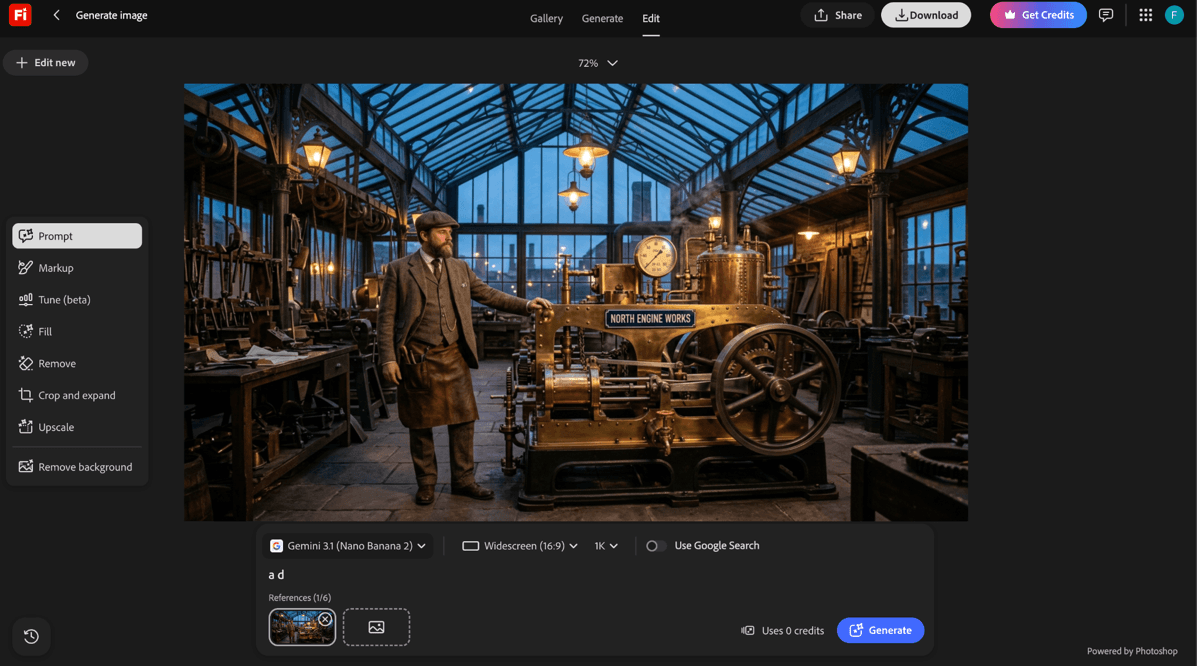
Figure 1. Supplied Leonardo AI interface or plan evidence retained from the original draft.
Leonardo.Ai completed the shared workshop brief in its browser workspace.
A tester completed the shared workshop brief in Leonardo.Ai with the default Lucid Origin model at 1344 × 768 and seed 318048604. Opening the workspace and setting up the task took about three minutes; the image itself appeared in roughly five seconds. Generation speed and the one-click handoff to Canva were the clearest advantages. The result looked polished but more painterly than photographic. Downloading required a paid plan, and generations were public by default unless a paid private option was enabled.
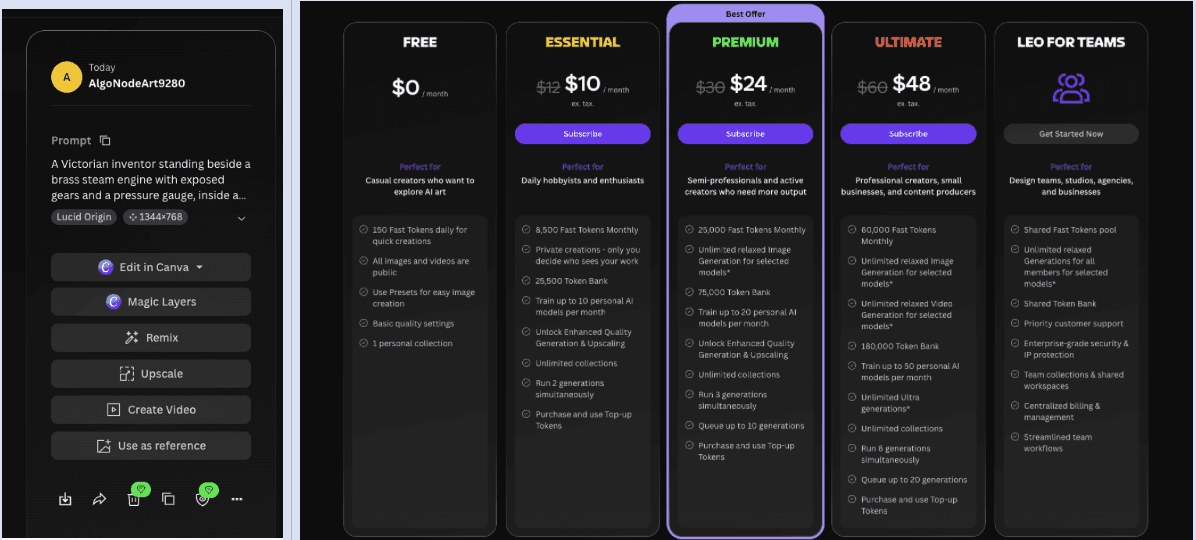
Figure 2. Supplied Leonardo AI interface or plan evidence retained from the original draft.
The test also exposed the output actions and plan limits that affect download and privacy.
Premium is $30 and Ultimate is $60 before tax. Official source
2. Freepik (with Magnific upscaling) - best for stock plus AI production
Replacement scope: Partial platform. Switch when stock, templates, AI generation, and Magnific enhancement need to support commercial asset production.
Best for: AI generation combined with stock, templates, upscaling, and collaborative Spaces.
Freepik combines its stock-and-template platform with Magnific upscaling and a broader AI creation suite. It combines a large licensed stock library with image, video, audio, an AI assistant, upscale tools, third-party models, and collaborative Spaces. That is a credible OpenArt alternative for marketing and design teams that mix generated media with templates, fonts, mockups, and existing assets.
OpenArt is more centered on characters, stories, Director workflows, and self-contained world building. Freepik becomes better aligned when sourcing, licensing, enhancement, and campaign delivery matter more than narrative creation inside one product.
What you gain: a large stock catalog, broad AI model access, commercial assets, and production-oriented enhancement. What you give up: less emphasis on persistent story worlds and character-led directing; higher tiers are expensive.
Pricing and access: Freepik offers limited free access and paid plans whose AI-credit and model allowances vary by tier and billing term. Check the live regional plan before publication. Official source
Hands-on result: The free account did not allow the tester to upload the perfume photograph as a reference in Spaces or in the image generator. Without that reference, the bottle, label, and logo did not stay consistent. The free workflow produced four images per run and allowed up to 20 free images, but generation happened in a separate image window rather than directly on the shared canvas. A canvas was available, although no obvious sharing or commenting control appeared during the test.
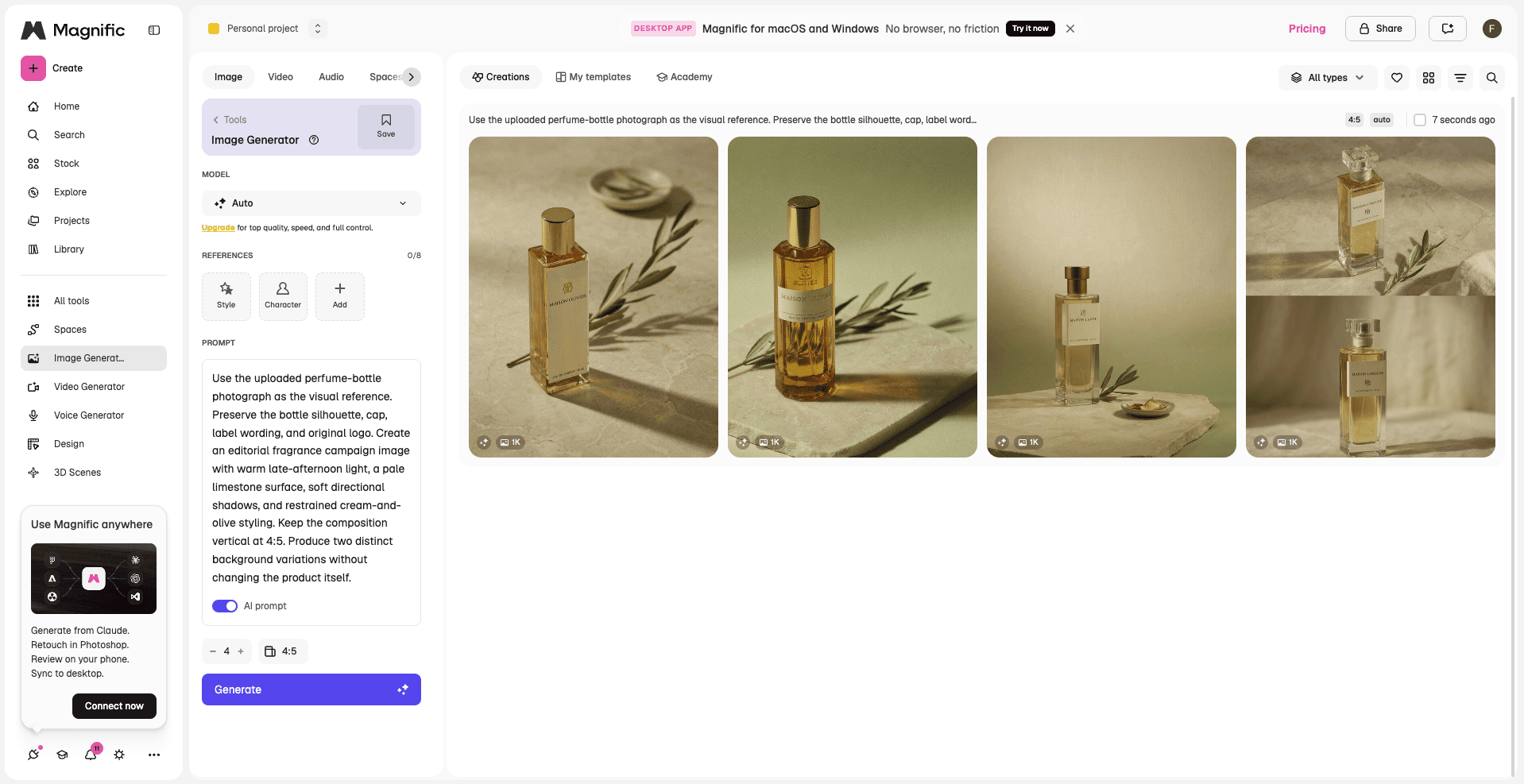
Figure 3. Supplied Freepik (with Magnific upscaling) interface or plan evidence retained from the original draft.
Magnific generated four variations, but the free account did not expose reference-image upload for this test.
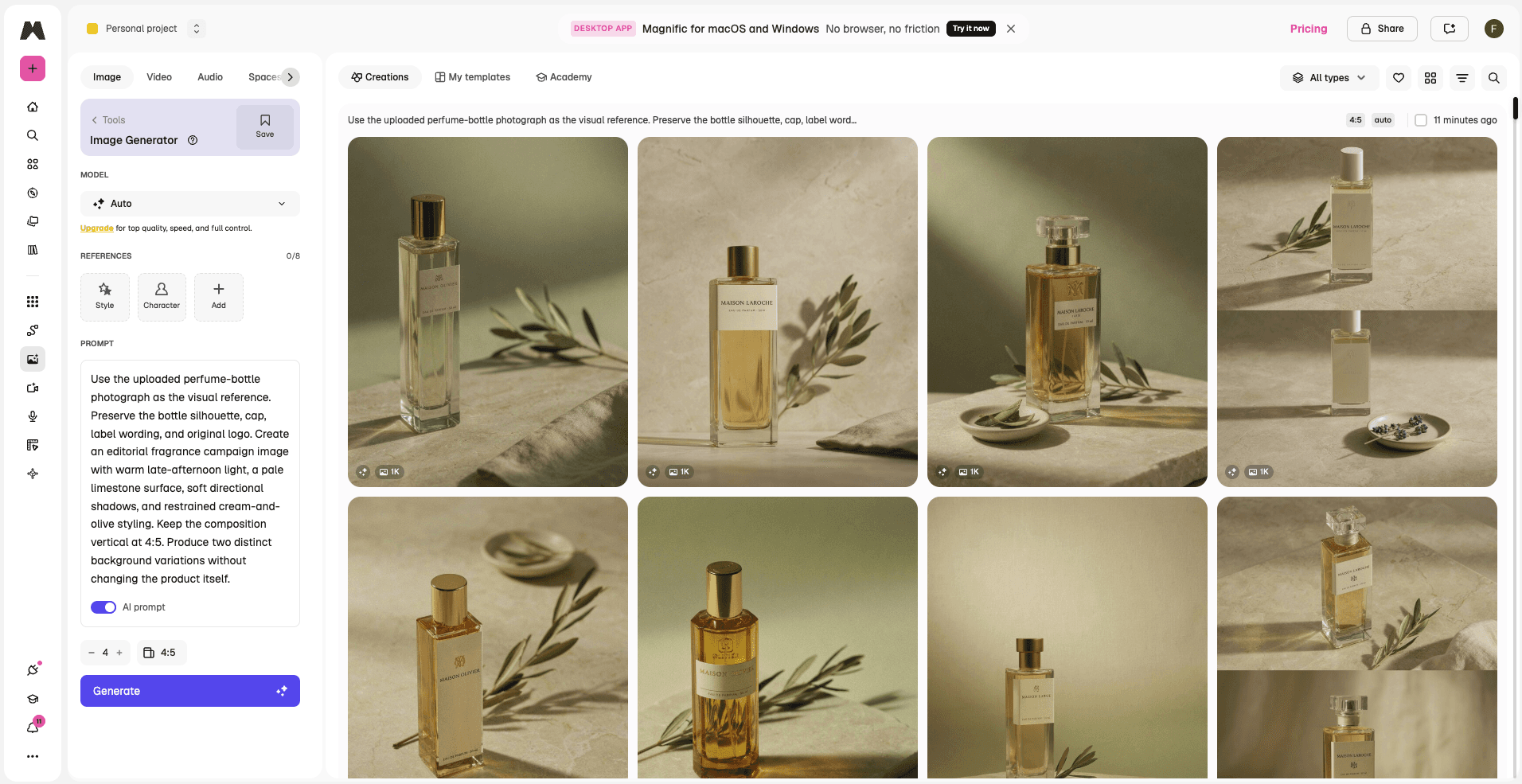
Figure 4. Supplied Freepik (with Magnific upscaling) interface or plan evidence retained from the original draft.
The Magnific results grid made variations easy to scan, while product details changed without the source reference.
3. Krea - best for real-time iteration
Replacement scope: Partial platform. Switch when real-time experimentation, upscaling, and rapid branching matter more than OpenArt's guided narrative tools.
Best for: real-time image work, enhancement, fast iteration, video, and Nodes.
Krea competes with the creative loop rather than OpenArt's narrative breadth. Realtime Edit can respond while the user paints, streams, or changes the prompt; the suite also covers image and video generation, enhancement, 3D, training, and node workflows. It is a good fit for art direction and product-image iteration.
Choose Krea when speed of visual feedback is the bottleneck. Stay with OpenArt when saved characters, chat-led directing, music, voice, and a complete story pipeline are central to the project.
What you gain: live feedback, strong upscaling, current models, and an increasingly connected workflow surface. What you give up: less built-in narrative assembly, audio production, and character-world management.
Pricing and access: Krea includes 100 daily compute units on Free. Basic is $9 monthly, Pro $35, and Max $105; annual pricing is discounted. Official source
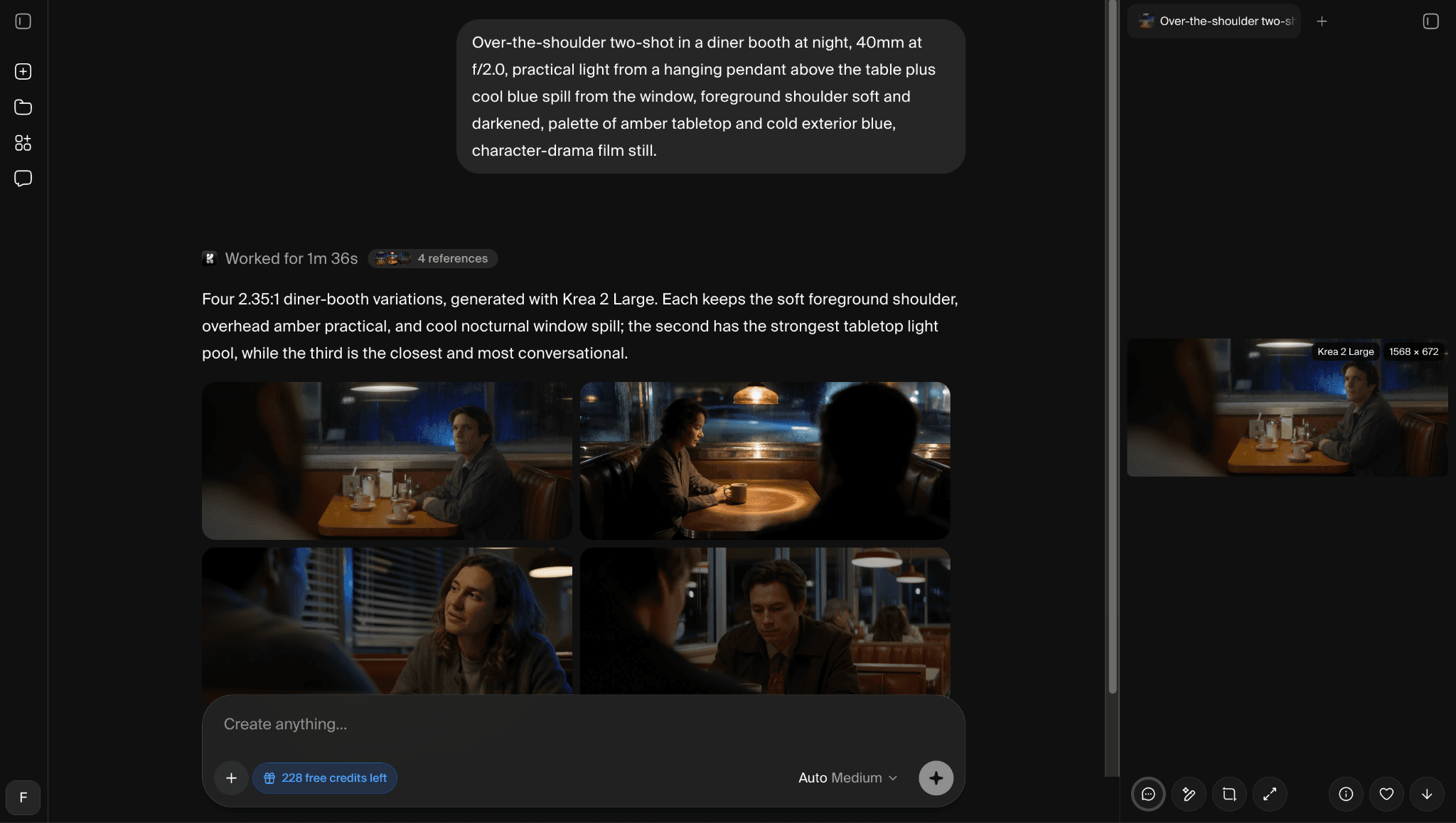
Figure 5. Supplied Krea interface or plan evidence retained from the original draft.
In our Krea check, one prompt produced four images with Krea 2 Large for two credits. The result was usable for rapid ideation, and the editor exposed an automatic Annotate action for localized revision. This is evidence about the tested workflow and settings, not a universal quality claim.
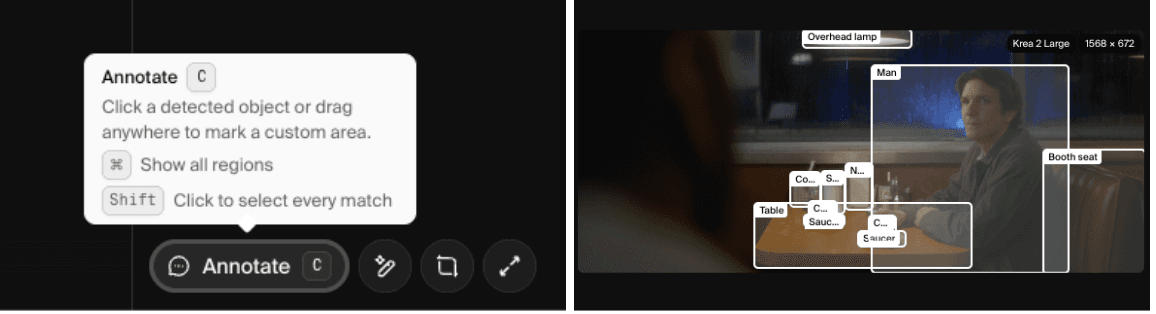
Figure 6. Supplied Krea interface or plan evidence retained from the original draft.
4. Adobe Firefly - best for Adobe-centered teams
Replacement scope: Partial platform. Switch when generated assets must continue inside Photoshop, Illustrator, Express, or Adobe brand workflows.
Best for: commercial marketing production inside Creative Cloud.
Firefly offers a broad creative-AI surface, including images, video, audio, vectors, moodboards, editing, and selected partner models, but its operational advantage appears in Photoshop, Illustrator, Premiere, and Express. Teams can move from generation to editable campaign delivery without leaving an established approval environment.
This is a workflow replacement for commercial production, not an OpenArt story-builder clone. Firefly is weaker when persistent characters, quick story direction, or world generation drive the brief.
What you gain: Creative Cloud integration, editable production files, brand workflows, and a limited free path. What you give up: less all-in-one story orchestration and fewer creator-community character tools.
Pricing and access: Firefly has limited free daily generations. Standard is $9.99 monthly with 2,000 credits; Pro is $19.99 with 4,000 credits and bundled Adobe apps. Official source
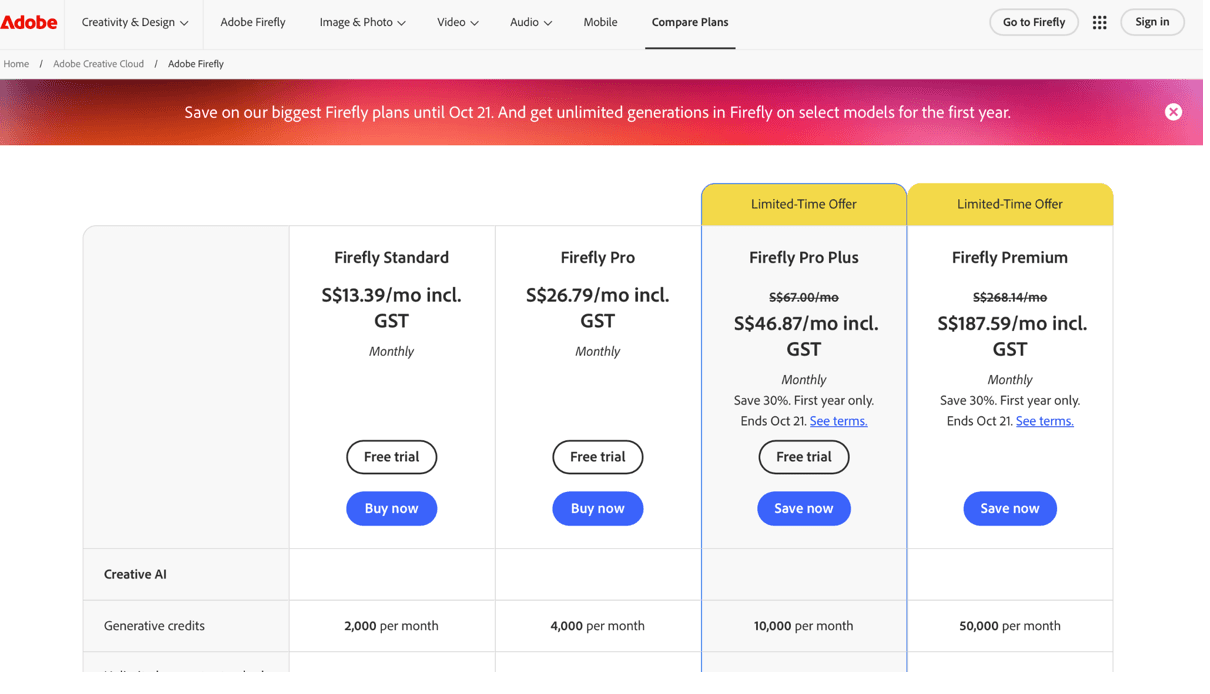
Figure 7. Supplied Adobe Firefly interface or plan evidence retained from the original draft.
5. Midjourney - best for image style exploration
Replacement scope: Specialist. Switch when visual style exploration matters more than characters, worlds, audio, and story assembly.
Best for: high-impact visual ideation and aesthetic exploration.
Midjourney is a specialist alternative for the early visual stage. Its personalization, style references, image prompting, and mature parameter system make it useful for concept frames, moodboards, key art, and look development. It now also offers video, but its main value here remains visual exploration.
It cannot replace OpenArt's full combination of image editing, reusable characters, audio, 3D worlds, and Director. Choose Midjourney when the image direction matters most, then expect to finish the project elsewhere.
What you gain: focused aesthetic exploration, personalization, and unlimited Relax images on higher plans. What you give up: no general free trial and much less end-to-end story, audio, and editing coverage.
Pricing and access: Midjourney Basic is $10 monthly or $8 per month billed annually. Standard and above add unlimited Relax image generation; privacy is limited to Pro and Mega. Official source
6. Runway - best for video production and editing
Replacement scope: Specialist platform. Switch when video generation, editing, audio, and professional delivery dominate the project.
Best for: AI video generation, editing, and professional export formats.
Runway is the more focused alternative when OpenArt is mainly being used for video. Its current creative suite combines image, video, and audio generation with editing, references, upscaling, and production formats. Gen-4.5 and related controls target shot generation rather than the broader character-and-world studio OpenArt now presents.
Switch for video control, editing, custom voices, storage, and delivery. OpenArt remains more approachable for users who want images, characters, music, and story generation to live in one guided consumer environment.
What you gain: a mature video workflow, model controls, audio tools, and higher-end export options. What you give up: less emphasis on OpenArt-style characters, 3D worlds, and one-click story creation.
Pricing and access: Runway has a free plan with a one-time credit allowance. Standard is $15 monthly or $12 per month billed annually; Pro is $35 monthly or $28 annually. Official source
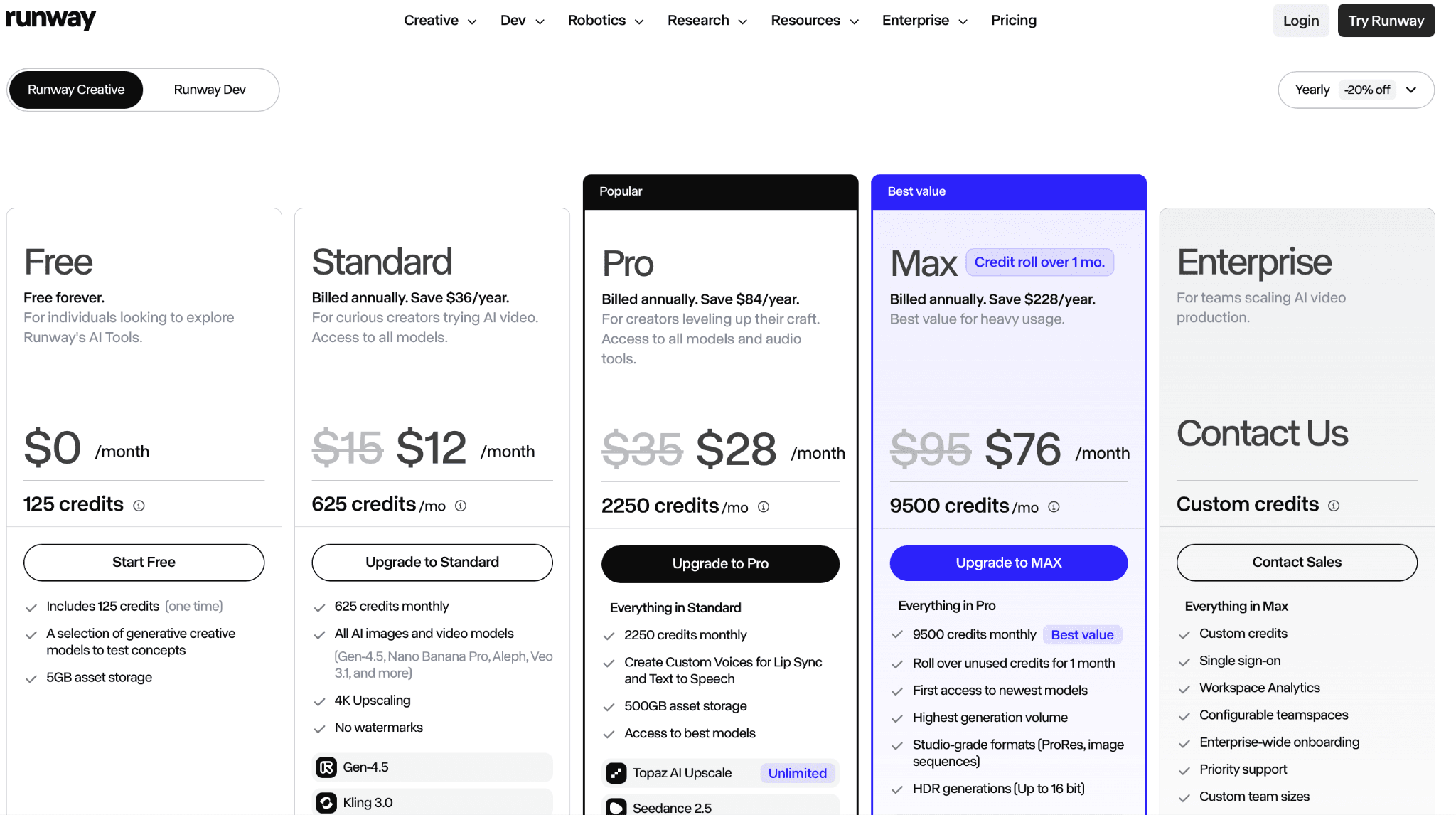
Figure 8. Supplied Runway interface or plan evidence retained from the original draft.
7. Higgsfield - best for social and camera-led video
Replacement scope: Specialist. Switch when camera-led ads and social video presets matter more than open-ended story worlds.
Best for: social ads, cinematic camera presets, effects, and multi-model video.
Higgsfield is a specialist alternative for creators who use OpenArt to produce social video, AI ads, or camera-led clips. Its suite combines image and video generation with a large set of focused apps, cinematic movement controls, effects, character tools, and access to several video models.
The interface favors quick, polished outputs and guided apps. OpenArt is the more natural choice when a project needs persistent worlds, audio tracks, reusable story characters, and conversational directing across a longer sequence.
What you gain: camera presets, social-first apps, multi-model video access, and fast campaign ideation. What you give up: less emphasis on open-ended story assembly and 3D world creation.
Pricing and access: Higgsfield offers free access and several credit-based paid plans. Because the live page changes plan configurations and promotions, verify the displayed billing term before publishing a numeric price. Official source
8. LTX Studio - best for structured story development
Replacement scope: Specialist platform. Switch when scripts, storyboards, casting, shot planning, and a timeline are the central workflow.
Best for: scripts, storyboards, shot planning, casting, and timeline-based AI filmmaking.
LTX Studio is the narrative specialist in this list. It turns a concept into a script, storyboard, cast, scenes, generated shots, and an editable sequence. That structure is useful for filmmakers and agencies who find OpenArt's wide creator suite flexible but want firmer control over pre-production and shot planning.
OpenArt covers more casual image and media experimentation. LTX makes more sense when the project is already a film, ad, trailer, or multi-shot treatment and the team needs to reason in scenes rather than isolated assets.
What you gain: script-to-storyboard planning, shot continuity, casting, timeline editing, and team review. What you give up: less value for one-off images, casual effects, or open model exploration.
Pricing and access: LTX Studio provides a free plan with one-time credits. Paid plans start at approximately $15 per month; commercial-use conditions depend on the selected tier. Official source
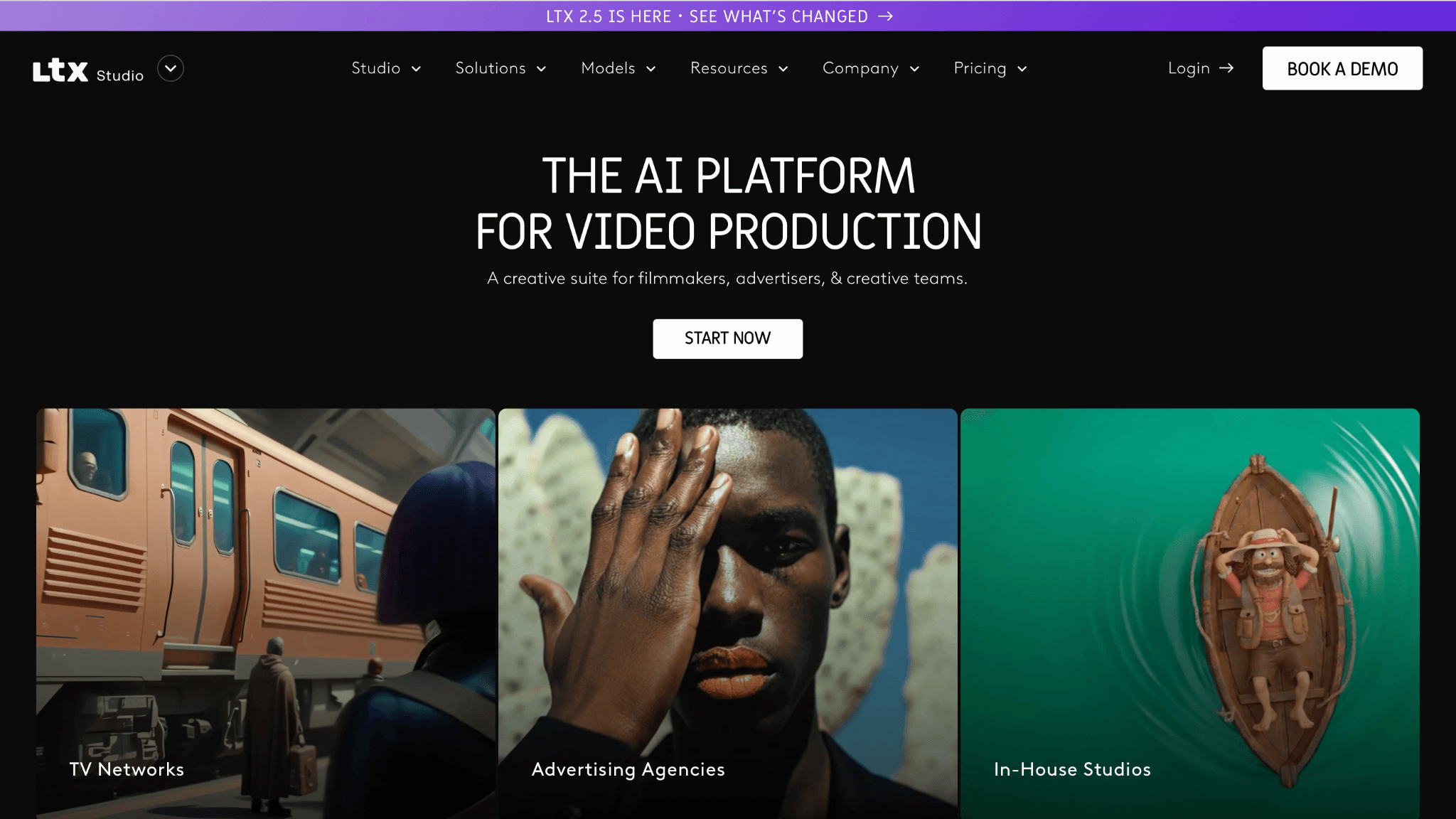
Figure 9. Supplied LTX Studio interface or plan evidence retained from the original draft.
9. ComfyUI - best for self-hosted workflows
Replacement scope: Technical substitute. Switch when self-hosted graphs, private assets, and custom models justify setup and maintenance.
Best for: self-hosted nodes, local models, custom workflows, and maximum technical control.
ComfyUI is not an all-in-one creator studio; it is a modular node application and backend. It becomes an OpenArt alternative when the underlying requirement is access to local models, custom nodes, reproducible graphs, offline work, or complete control over conditioning and generation.
The workflow is powerful precisely because little is hidden. That also means users manage installation, hardware, updates, model files, and community dependencies. Audio, editing, collaboration, and story assembly require additional tools or custom graphs.
What you gain: local privacy, custom models, transparent graphs, reusable workflow files, and no software subscription. What you give up: hardware cost, technical maintenance, and no managed all-in-one production layer.
Pricing and access: ComfyUI is free and open source. Local or rented compute, storage, and paid partner-model access are separate costs. Official source
10. Astorie - best for connected production workflows
Replacement scope: Workflow alternative. Switch when multi-model branches and production handoff should remain visible, even without OpenArt Director's one-click guidance.
Best for: multi-model image and video production on a collaborative canvas.
Astorie overlaps with OpenArt at the platform level: both provide access to many creative models and connect images with video. Astorie's differentiator is the persistent node canvas, where assets can branch into several models, remain connected to references, become reusable recipes, and move toward team review or NLE export.
OpenArt is the more guided choice for a creator who wants Director, characters, worlds, music, and one-click story paths. Astorie fits better when a team wants to see and control the production graph. This is a conditional workflow choice, not a claim that Astorie is universally better.
What you gain: visible multi-model graphs, reusable workflows, parallel variants, collaboration, and production handoff. What you give up: less one-click narrative guidance and no automatic replacement for OpenArt's saved characters or worlds.
Pricing and access: Astorie offers a renewable free tier. The current Standard annual offer is $12 per month for year one and $16 per month equivalent from year two; the page identifies it as limited. Official source
Which alternative fits each reason for switching?
What you need | Start with |
Focused image creator platform | Leonardo AI |
Stock library plus commercial AI tools | Magnific |
Real-time image and video iteration | Krea |
Adobe campaign production | Adobe Firefly |
Video generation and finishing | Runway |
Script, storyboard, and shot planning | LTX Studio |
Self-hosted custom nodes | ComfyUI |
Collaborative multi-model graph | Astorie |
Is OpenArt still worth using?
Yes, when one creator wants images, characters, video, audio, and story tools without assembling a technical stack. OpenArt's breadth can be cheaper and easier than maintaining separate subscriptions, especially if the same characters and assets continue across several formats.
A specialist is better when most of the suite goes unused. Runway offers a deeper video-production focus, Recraft would be more direct for vector assets, and ComfyUI gives technical control. The decision should be based on one complete project, including editing and export, rather than a feature-count table.
How to choose without paying for the wrong plan
Write down the stages of your actual project: image, character, storyboard, video, audio, edit, review, and export.
Choose a broad platform only if several stages will be used; otherwise compare the specialist for the one expensive stage.
Test the same product or character brief and record the number of usable outputs, not only the advertised credits.
Verify whether commercial rights, private generations, and top-up credits change by plan.
Do not call a local workflow free until hardware, maintenance, storage, and team access have been counted.
Frequently asked questions
What is the closest OpenArt alternative?
Based on documented feature overlap, Leonardo AI is the most direct image-first alternative in this ranking. Magnific and Krea are broader creative-suite options with different strengths. Astorie overlaps at the multi-model workflow level, while Runway and LTX Studio are better understood as video and filmmaking specialists.
Is there a free alternative to OpenArt?
Leonardo, Krea, Adobe Firefly, Magnific, ComfyUI, and Astorie all have free access or free software, but the limits differ. Check whether credits recur, outputs are public, commercial use is allowed, and a watermark appears before relying on the free path.
Which OpenArt alternative is best for video?
Runway is the most production-focused video specialist here. Higgsfield fits quick camera-led social and advertising work, while LTX Studio organizes scripts, storyboards, and shots. Astorie is useful when several video models and upstream image steps need to stay connected.
Can ComfyUI replace OpenArt?
It can replace much of the generation layer and provide more control, but it does not automatically provide OpenArt's Director, character library, audio, story assembly, collaboration, or managed compute. Those capabilities require additional nodes, models, services, or separate software.
Is OpenArt only an AI image generator?
No. Its current platform includes image and video generation, editing, reusable characters, audio, 3D worlds, and a Director workflow. Comparisons that treat it only as an image generator are now incomplete.
Final verdict
Leonardo AI and Magnific are the first two alternatives to test because they replace different parts of OpenArt without collapsing into simple model comparisons. Leonardo narrows the platform toward image creators; Magnific expands the surrounding stock and campaign workflow. Krea, Runway, LTX Studio, and ComfyUI make more sense when one specialist requirement drives the move.
OpenArt remains a coherent choice for creators who use its breadth. Switch only after identifying which part of that breadth creates friction, then choose the platform that solves that stage without forcing you to rebuild the rest of the project.
Related reading
Runway Gen4 vs Veo vs Kling: Practical Video Production Comparison
Practical comparison for AI video production choices across Runway Gen4, Google Veo, and Kling.
7 Best Photoroom Alternatives in 2026 (Tested for Ecommerce Photography)
Do you need a Photoroom alternative that goes beyond simple background cutouts and batch image processing? Try these 7 tools and pick the one that best matches your AI product photography use cases.
6 Ideogram Alternatives for Killer AI Image Generation
Here are 6 tried and tested Ideogram alternatives that work best for prompt accuracy, text, image realism, character consistency and are intelligent enough to render real-world scenarios and logic.
Ready to try it on the canvas?
Open Astorie and fan your prompt across every frontier model in one workflow.