

10 Best Pika Alternatives in 2026 for AI Video, Effects, and Motion Control
The best Pika alternatives are PixVerse for fast social effects, Higgsfield for camera-led ads, and Runway for a deeper generation-and-editing workflow. Kling, Vidu, Luma, Adobe Firefly, and Google Flow become stronger choices when realistic motion, references, production integration, or native audio matters more than one-tap effects.
Key takeaways
- PixVerse is the closest alternative for creators who want fast social effects, transitions, templates, and a simple image-to-video workflow.
- Higgsfield is better suited to camera-led social videos and AI ads, with cinematic presets and access to multiple video models.
- Runway offers a deeper production workflow, while Kling focuses on realistic motion and Vidu is stronger for reference consistency.
- Luma and Google Flow fit larger cinematic and audio-aware projects, but access, pricing, and generation limits depend on the account and country.
- Astorie is a workflow alternative for branching one source across multiple video models and keeping later review, editing, and export steps connected.
This guide compares the consumer video app at pika.art, not the separate Pika Agent or developer API. Public pricing and access were rechecked on September 12, 2026; the hands-on sections preserve the supplied Higgsfield test and clearly label Kling screenshots as access/control evidence rather than a native quality test.
Quick answer: the best Pika alternatives
Choose PixVerse when you want the closest quick-effects and image-animation workflow; give up Pika's exact Pikaffects and project history.
Choose Higgsfield when camera presets and ad-oriented apps matter more than effect discovery; expect a broader, sometimes fragmented interface.
Choose Runway for generation plus editing, Kling for realistic motion, and Vidu for reference consistency; these replace production jobs, not Pika's playful effect catalog.
Choose Luma or Google Flow for larger cinematic briefs and audio-aware workflows; check account and country limits before committing.
Use Astorie when one source must branch across several video models. It is a workflow layer, not a one-tap Pika replacement.
The best alternatives at a glance
Alternative | Switch when / scope | Main loss | Pricing or access |
PixVerse | Direct substitute: fast social effects, transitions, templates, and image-to-video are the main Pika jobs | Consumer pricing and credits vary by workflow | Free; paid plans in app |
Higgsfield | Partial platform: cinematic camera presets and ad-oriented shot construction matter more than Pika's effect-discovery loop | A larger app catalog can feel fragmented | Free; paid plans |
Runway | Full production platform: generation must continue into editing, audio, storage, collaboration, and professional delivery | More expensive and complex for casual effects | Free; Standard $15/mo |
Kling AI | Direct generator: realistic motion, references, and cinematic image-to-video matter more than one-tap effects | Less effect-led and less editing-centered | Free credits; paid membership |
Hailuo AI | Direct generator: a low-friction motion test is more important than integrated editing or a stable effect catalog | Plan information has changed repeatedly | Free; paid subscriptions |
Vidu | Direct generator: multi-subject references, start/end frames, or animation consistency are the deciding requirements | Short default clips and separate credit types | Free monthly credits; paid plans |
Luma AI | Partial platform: boards, agent-assisted iteration, and cinematic model exploration matter more than quick viral effects | Not centered on quick viral effects | Free trial; Plus $30/mo |
Adobe Firefly Video | Workflow substitute: video generation must continue through Premiere, Photoshop, Express, or Adobe brand workflows | Five-second credit usage can add up | Free; Standard $9.99/mo |
Google Flow with Veo 3.1 | Filmmaking workflow: Veo-based shot development and native-audio workflows justify Google plan and region constraints | Availability and limits depend on country and plan | AI Pro $19.99/mo |
Astorie | Workflow alternative: a source image must branch across multiple video-model nodes and remain connected to later review and export steps | Not a one-tap effects app | Free; Standard annual offer $12/mo |
Prices above are the public prices or billing descriptions available on the checked date. Regional taxes, annual discounts, promotional pricing, and model-specific credit costs can change the usable cost.
Why creators look for Pika alternatives
Pika is built for speed and recognisable creative actions: image-to-video, Pikaffects, Pikascenes, Pikaswaps, Pikadditions, Pikatwists, and related tools. That is a strong fit for social creators, but not every project is an effect. Users often leave when they need more realistic motion, stronger camera control, longer or higher-resolution clips, reference consistency, native audio, or a deeper editing workflow.
Credit comparison needs care. Pika charges different amounts by model and feature, while competitors may charge by second, generation, resolution, audio, or subscription allowance. The useful unit is the cost of a usable exported clip after rerenders, not the advertised cost of the first generation.
How these alternatives were selected
A candidate qualified if it could replace Pika's central image-to-video or short-video job. The list prioritizes direct creator apps first, then specialist model platforms and production environments. It excludes the discontinued standalone Sora product and keeps Pika Agent and Pika API separate from the consumer video app.
Image-to-video fidelity, object stability, motion completion, and prompt adherence.
Effects, camera controls, references, start/end frames, duration, resolution, and audio.
Generation time, rerender rate, credit transparency, free access, watermarks, and commercial use.
Whether the platform is designed for quick social clips, cinematic shots, editing, or multi-model production.
The Pika feature lost when moving to a more specialized alternative.
Hands-on evidence is included where a repeatable supplied test was available. Results are tied to the stated account, model, prompt, and settings and are not universal model-quality claims.
What do you lose when switching from Pika?
Most Pika alternatives do not reproduce Pikaffects, Pikaswaps, Pikadditions, Pikatwists, saved projects, effect-discovery habits, and the same credit rules. A realistic video model may improve motion yet slow down the playful path from upload to shareable result.
Before switching, list the effects used repeatedly, export source and final clips, record duration and resolution settings, and calculate the credits spent across failed attempts. Re-run one effect brief and one controlled product or character brief; a useful replacement should improve the target bottleneck without making the everyday workflow materially slower.
1. PixVerse - best for social effects and fast iteration
Replacement scope: Direct substitute. Switch when fast social effects, transitions, templates, and image-to-video are the main Pika jobs.
Best for: fast social clips, image-to-video, transitions, effects, and optional audio.
PixVerse is the most direct starting point in this shortlist for Pika users who enjoy quick image animation and effect-led social content. Its consumer app combines text-to-video, image-to-video, transitions, extensions, reference workflows, templates, and viral effects. Current platform documentation also separates resolution, audio, duration, and model costs clearly for API users.
The switch makes sense when you want a similar low-friction route from a still to a shareable clip, with more emphasis on templates, transitions, and optional audio. Pika's own named effects and editing tools remain distinctive, so the comparison should compare the same ordinary image-to-video brief before judging the larger effect library.
What you gain: a social-first interface, many effects and templates, reference modes, and flexible video options. What you give up: Pika's specific Pikaffects, Pikaswaps, Pikadditions, and familiar credit workflow.
Pricing and access: PixVerse provides free consumer access and paid in-app memberships. Consumer prices can vary by region; the developer platform publishes separate per-second credit pricing and should not be presented as the consumer plan. Official source
2. Higgsfield - best for camera-led social video
Replacement scope: Partial platform. Switch when cinematic camera presets and ad-oriented shot construction matter more than Pika's effect-discovery loop.
Best for: cinematic camera controls, social ads, one-click effects, and multi-model video.
Higgsfield overlaps with Pika where short-form video, striking movement, and quick effects matter, but it adds a broader creative-app catalog and access to several video models. Camera presets, motion controls, character tools, face and product workflows, and campaign-focused apps make it especially relevant to social and advertising creators.
Choose it when Pika's effects are useful but you need more deliberate camera language or want to compare multiple video models inside one account. The trade-off is a denser product with many specialized entry points rather than one simple generation surface.
What you gain: strong camera presets, ad-oriented apps, multi-model access, and guided social-video workflows. What you give up: more interface choices, a different credit system, and no direct migration of Pika projects or saved effect history.
Pricing and access: Higgsfield offers free access and several credit-based paid plans. Plan configurations and promotions change on the live pricing page, so the published article should state the billing term shown in the current account evidence. Official source
In our test, we worked in Higgsfield Cinema Studio 4.0. The generated clip had no visible watermark. Film and camera presets made the first setup approachable because we could choose motion language without writing every camera instruction. The trade-off appeared once we tried to direct the shot more precisely: a preset could influence the prompt, and an experienced user may prefer to specify the move without that extra layer. Rendering also took noticeably longer than the LTX Studio attempt, although the test record did not include a wall-clock time or final credit deduction. This supports a camera-first recommendation, not a speed or cost claim.
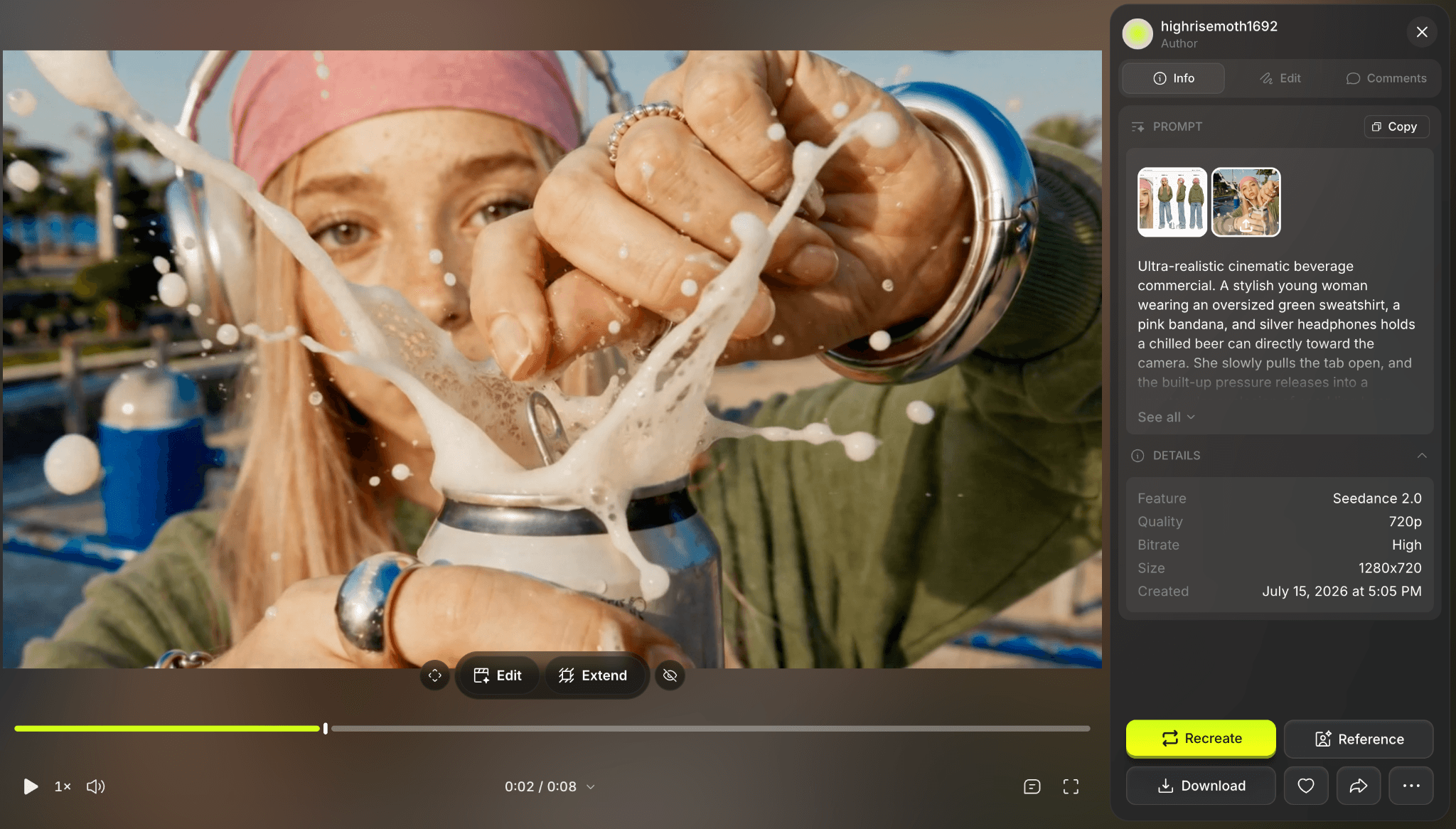
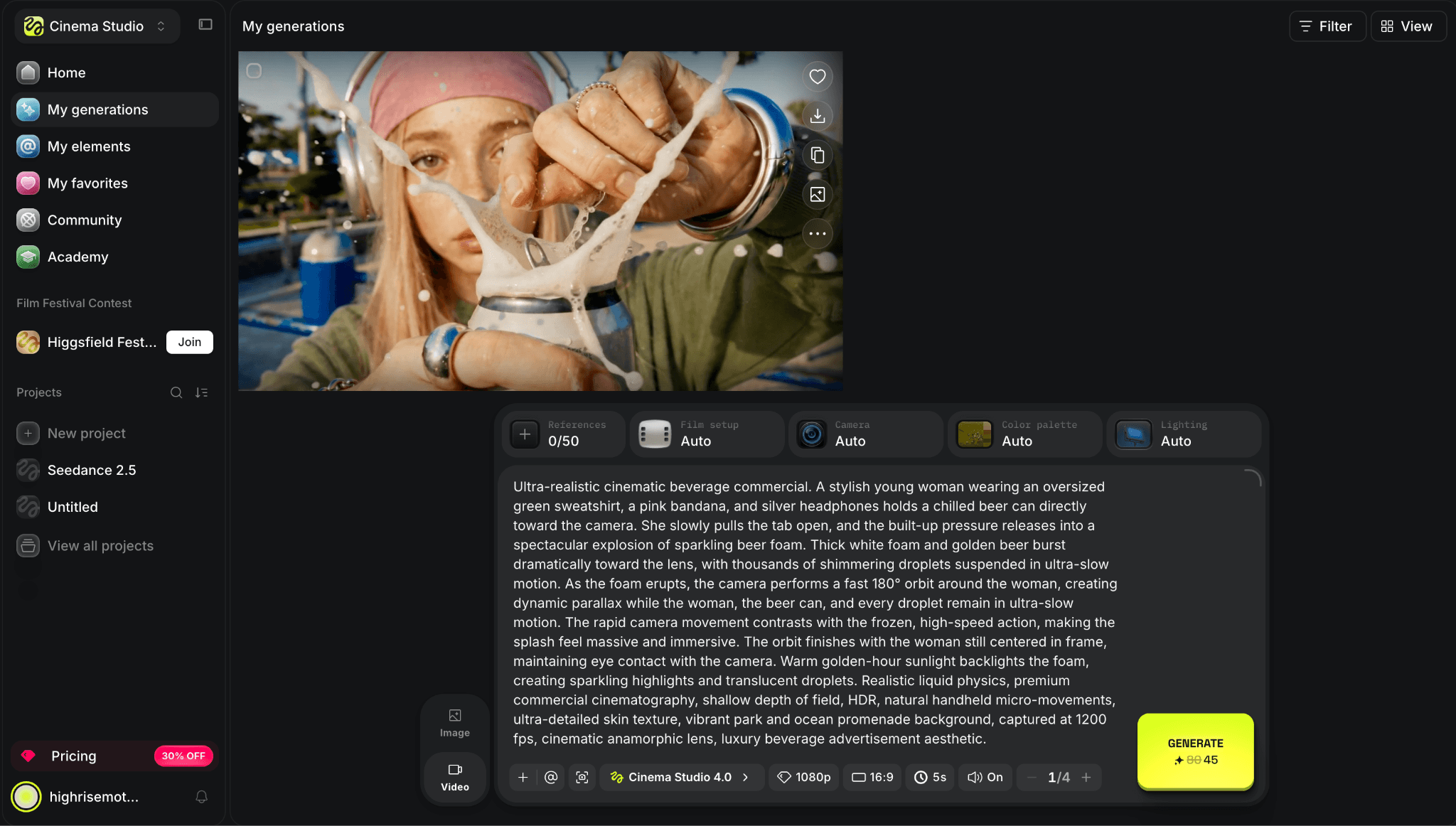
Figure 1. Supplied Higgsfield interface or plan evidence retained from the original draft.
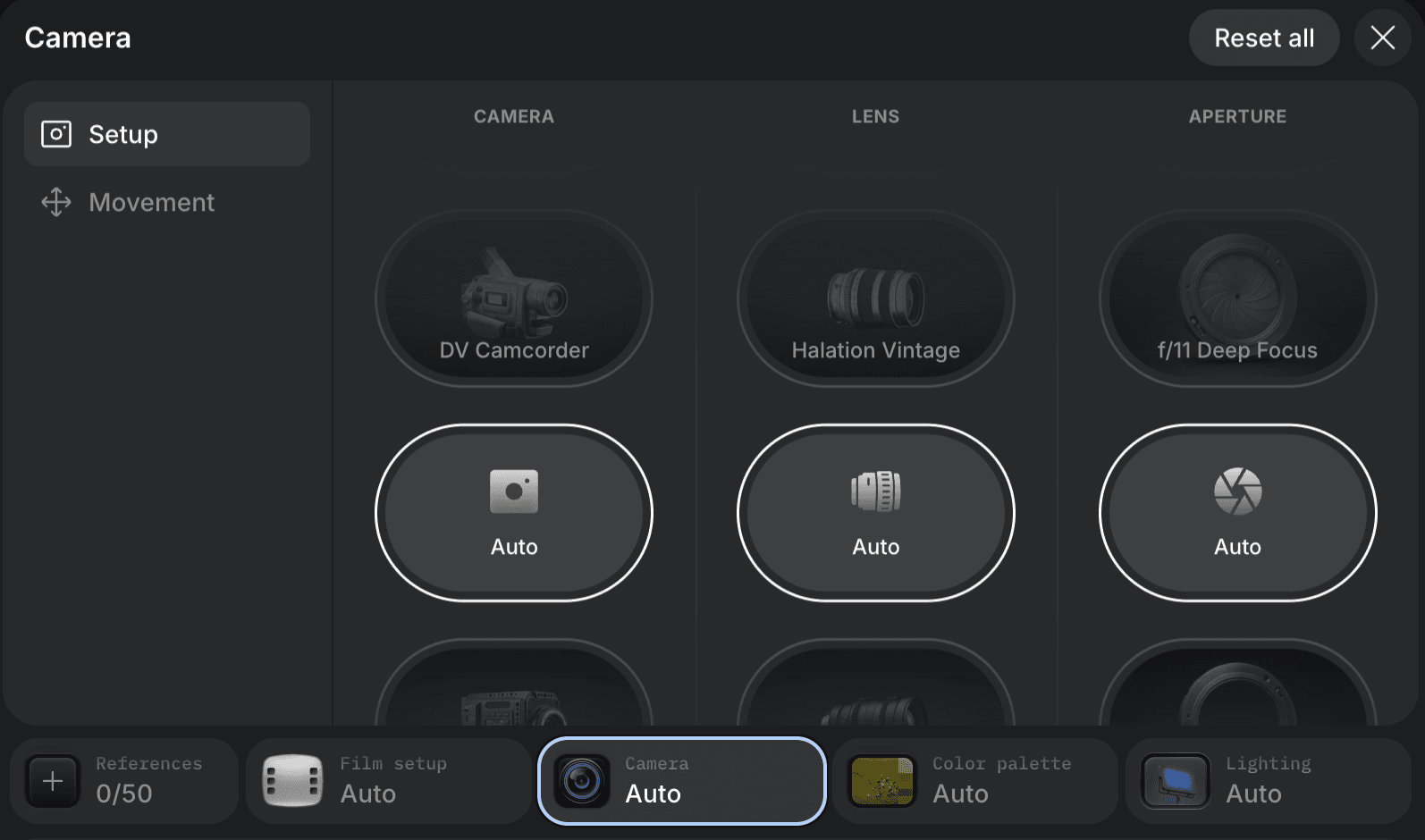
Figure 2. Supplied Higgsfield interface or plan evidence retained from the original draft.
3. Runway - best for a production video workflow
Replacement scope: Full production platform. Switch when generation must continue into editing, audio, storage, collaboration, and professional delivery.
Best for: controlled AI video generation, editing, audio, storage, and professional delivery.
Runway is the production-focused alternative. Its current platform combines image and video models with reference workflows, editing, audio, upscaling, asset storage, team options, and higher-end delivery formats. A creator can generate a shot, refine it, and keep more of the finishing process inside the same system.
Pika is faster to understand for playful effects and one-off social clips. Runway earns the higher position when the video must fit into a controlled campaign, sequence, or professional post-production workflow.
What you gain: stronger editing and production controls, broader model access, audio tools, and professional export options. What you give up: a steeper learning and pricing curve for users who only need quick animated posts.
Pricing and access: Runway has a free plan with one-time credits. Standard is $15 monthly or $12 per month billed annually; Pro is $35 monthly or $28 annually. Official source
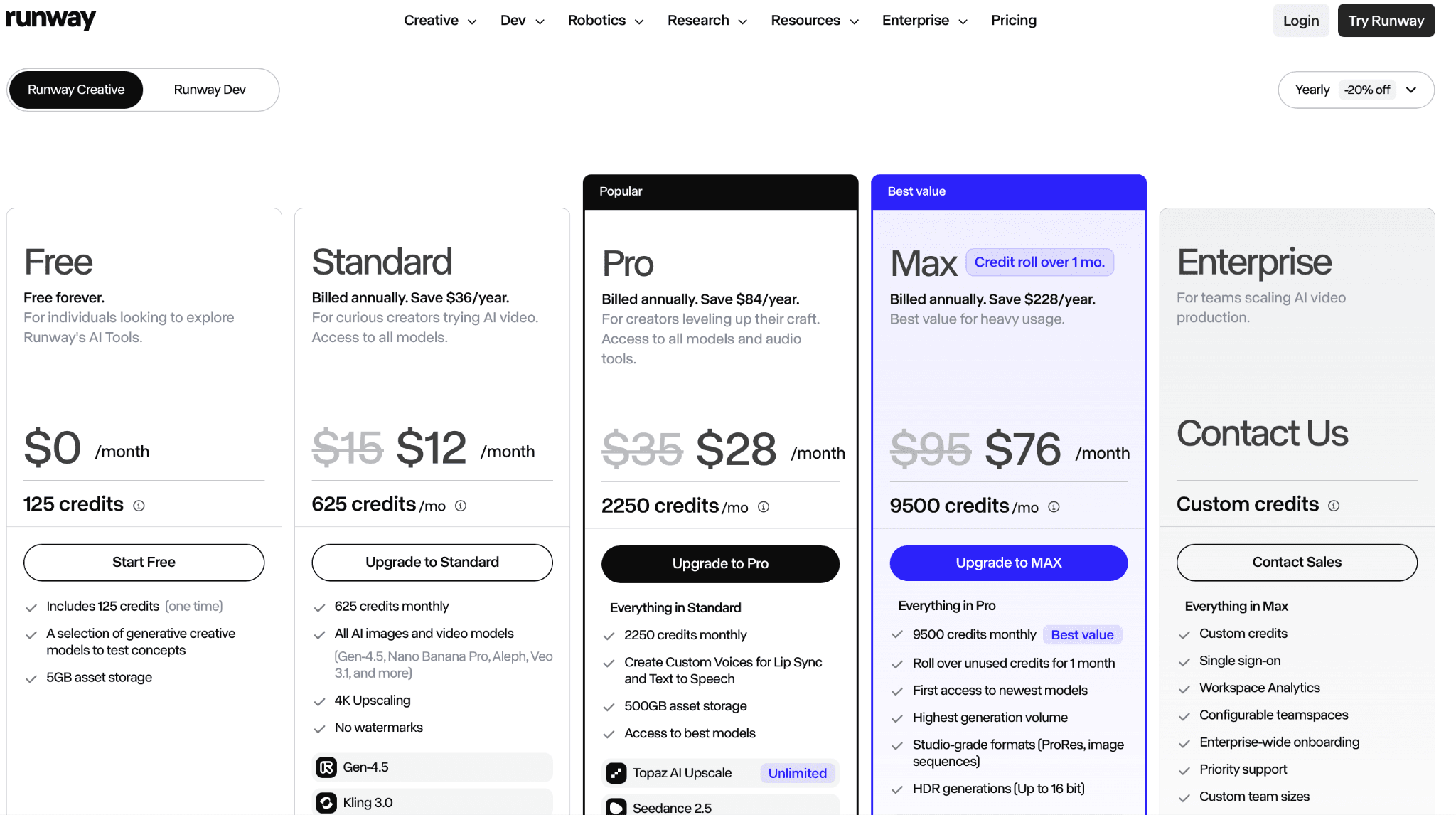
Figure 3. Supplied Runway interface or plan evidence retained from the original draft.
4. Kling AI - best for realistic motion
Replacement scope: Direct generator. Switch when realistic motion, references, and cinematic image-to-video matter more than one-tap effects.
Best for: realistic motion, image-to-video, references, and cinematic shot generation.
Kling is a model-led alternative for creators who care more about realistic movement and scene behavior than one-tap transformations. Its web app supports text-to-video and image-to-video, and current versions emphasize reference control, camera behavior, quality modes, and longer-form shot generation.
It does not reproduce Pika's playful effect vocabulary or simple swap-and-add tools. Kling is better treated as a shot generator that may need a separate editor, while Pika remains easier for fast, recognizable social effects.
What you gain: realistic movement, strong image-to-video generation, reference workflows, and cinematic use cases. What you give up: less of Pika's instant effect culture and a credit system whose price changes by mode and region.
Pricing and access: Kling offers free credits and paid memberships. The official plan page is dynamic and region-sensitive, so the article avoids a fixed number until the current billing screen is captured. Official source
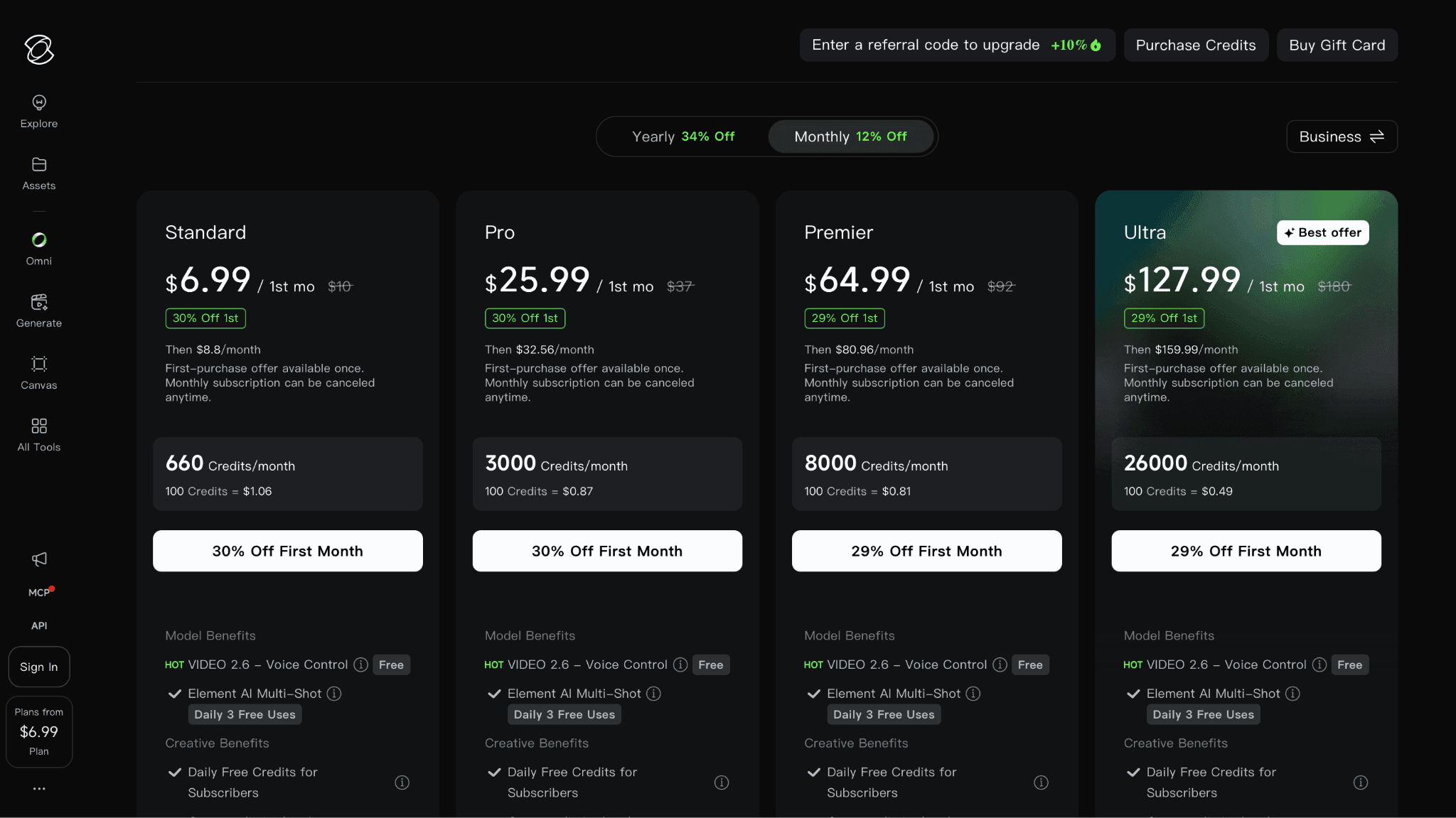
Figure 4. Supplied Kling AI interface or plan evidence retained from the original draft.
Kling is the most practical direct comparison for Higgsfield when movement is the deciding factor. It is good at turning a clear action into visible subject motion, and its lower paid entry point makes repeated tests easier to justify. A creator can try a prompt, review the failure, and run a revised version without committing to the cost or toolset of a broader production platform.
The compromise is consistency across accounts and versions. Queue times, fast modes, resolution, and model access can change with the plan and region. For that reason, the useful evidence is the model name and credit quote shown at generation time, not a generic claim that Kling is always cheaper.
Pricing checked September 12, 2026: Kling has limited free access. Standard carries a $10 list price; promotions and regional checkout prices vary. Official pricing
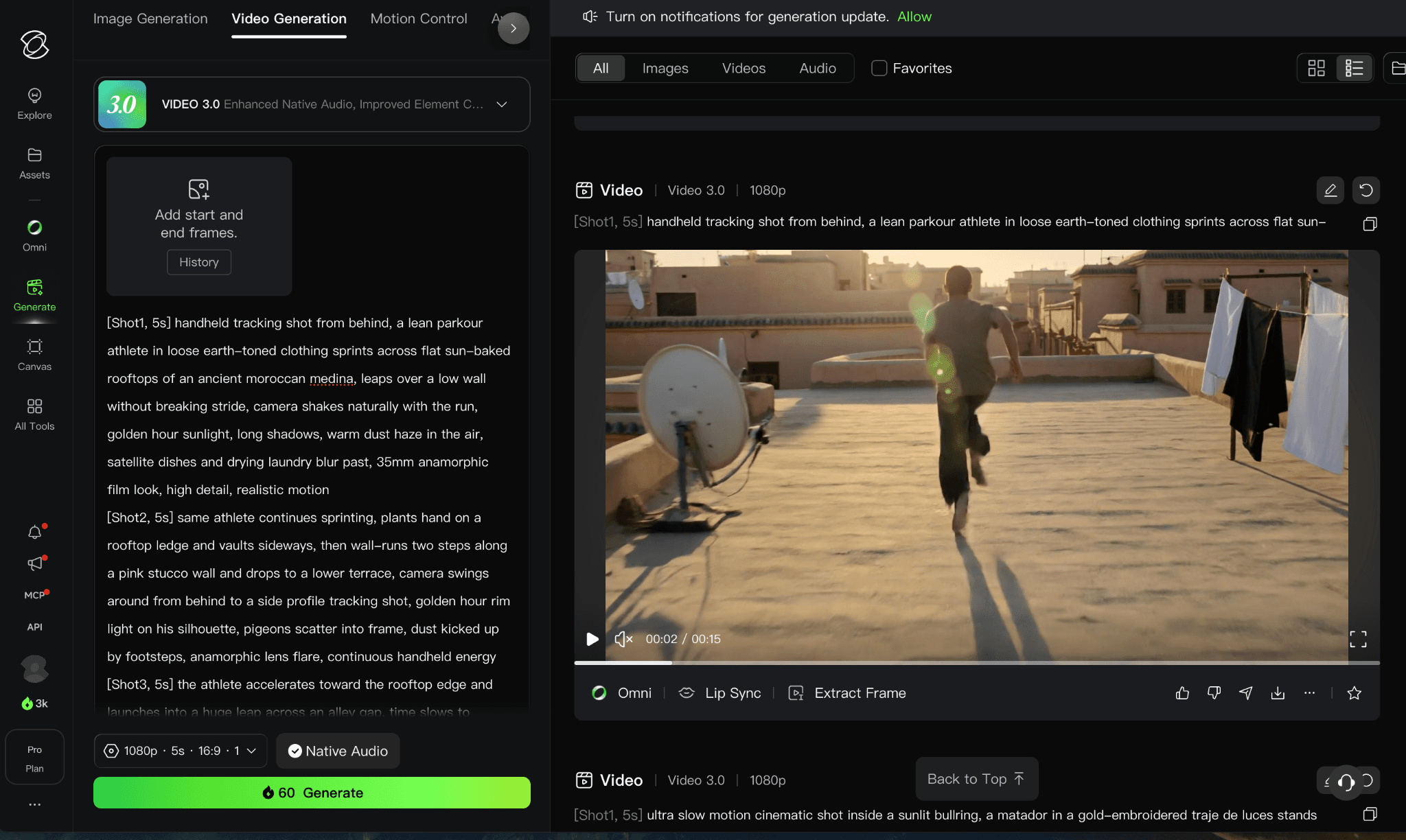
Figure 5. Supplied Kling AI interface or plan evidence retained from the original draft.
5. Hailuo AI - best for low-friction motion tests
Replacement scope: Direct generator. Switch when a low-friction motion test is more important than integrated editing or a stable effect catalog.
Best for: accessible image-to-video and fast experimentation with human and cinematic motion.
Hailuo is relevant to Pika users who want a simple prompt or image-to-video path and are willing to test several takes for motion quality. Its creator product has focused on short cinematic clips, character movement, and accessible experimentation rather than a large editing suite.
The platform is less defined by branded effects than Pika. It works better as a model and generation alternative than as a replacement for Pikaswaps, Pikadditions, or a polished one-tap effect library.
What you gain: an approachable generation flow, recurring free access, and a useful option for motion experiments. What you give up: less integrated editing and inconsistent historical pricing information across old pages.
Pricing and access: Hailuo provides free access and credit-based subscriptions. Because its official payment policy and newer promotional pages display different historical plan structures, verify the live checkout before publishing a fixed starting price. Official source
6. Vidu - best for reference-driven video
Replacement scope: Direct generator. Switch when multi-subject references, start/end frames, or animation consistency are the deciding requirements.
Best for: reference-to-video, multi-subject consistency, animation, and reusable templates.
Vidu is the reference specialist in this list. Its current platform offers text-to-video, image-to-video, reference-to-video, start-and-end-frame workflows, templates, and multi-subject consistency. That makes it useful when the people or objects in the source images matter more than a dramatic one-click effect.
Pika remains easier for quick transformations and branded effects. Vidu earns the switch when the task is preserving multiple subjects, animating a known character, or building a repeatable sequence from references.
What you gain: multi-reference consistency, animation-friendly modes, start/end frames, and recurring free credits. What you give up: short standard durations, more credit categories, and less emphasis on Pika-style effects.
Pricing and access: Vidu states that free users receive 40 credits per month. Paid plan prices load dynamically; subscription credits expire after 30 days while purchased and bonus credits have different validity periods. Official source
7. Luma AI - best for agent-assisted creative work
Replacement scope: Partial platform. Switch when boards, agent-assisted iteration, and cinematic model exploration matter more than quick viral effects.
Best for: agent-assisted image and video creation with the current Ray model family.
Luma has moved beyond the older Dream Machine and Ray2 framing. Its current consumer workspace is the Luma App, and its current video line is Ray3.2. The product combines image, video, audio, boards, and creative agents, making it a broader ideation and production environment than Pika.
Choose Luma when the brief benefits from agent-led iteration, multimodal project context, or a current cinematic model. Pika is still the simpler choice for one-tap effects and rapid social experimentation.
What you gain: a broader creative workspace, current Ray video models, boards, and agent-assisted iteration. What you give up: less emphasis on playful preset effects and a higher paid entry point.
Pricing and access: Luma can be tried free. Its current individual Plus plan is $30 per month with 10,000 credits; higher plans increase the shared media credit pool. Official source
8. Adobe Firefly Video - best for Adobe production
Replacement scope: Workflow substitute. Switch when video generation must continue through Premiere, Photoshop, Express, or Adobe brand workflows.
Best for: commercial video work that continues into Premiere, Photoshop, or Express.
Firefly is a workflow alternative for creators already using Adobe. The web app generates video and audio alongside images, while Premiere and the wider Creative Cloud provide the editing, brand, and delivery layer. It is less playful than Pika, but the result sits closer to an established production pipeline.
Switch when commercial review, editable finishing, and Adobe integration outweigh viral effects. Keep Pika when the main job is quickly turning a photo into an entertaining transformation.
What you gain: Creative Cloud integration, partner models, commercial workflow tools, and a limited free entry point. What you give up: less effect-driven, and video generations consume premium credits faster than standard image actions.
Pricing and access: Firefly provides limited free daily generations. Standard is $9.99 monthly with 2,000 credits; Pro is $19.99 with 4,000 credits and bundled apps. Official source
9. Google Flow with Veo 3.1 - best for Veo and native-audio workflows
Replacement scope: Filmmaking workflow. Switch when Veo-based shot development and native-audio workflows justify Google plan and region constraints.
Best for: cinematic generation with native audio and Google ecosystem access.
Google Flow is the practical product route for creators who want Veo rather than a model name in isolation. Veo 3.1 and Flow are available in more than 140 countries and territories, with access and generation limits tied to Google AI plans. The attraction is cinematic generation, prompt understanding, and audio-aware output rather than Pika-style effects.
This is a different job from quick social transformation. It is more appropriate for planned shots and audio-driven scenes, while Pika remains faster for playful clips and simple photo animation.
What you gain: access to Veo 3.1, native-audio workflows, and integration with Google's creative AI plans. What you give up: plan and country limits, fewer one-tap effects, and a workflow designed around larger shot briefs.
Pricing and access: Google AI Pro is listed at $19.99 per month in the US with limited Veo access. Higher Flow limits require a higher Google AI plan; country availability must be checked. Official source

Figure 6. Supplied Google Flow with Veo 3.1 interface or plan evidence retained from the original draft.
10. Astorie - best for multi-model video workflows
Replacement scope: Workflow alternative. Switch when a source image must branch across multiple video-model nodes and remain connected to later review and export steps.
Best for: branching one source across several video models and production steps.
Astorie is a platform-level alternative for creators whose problem is committing to one video model. A source image can branch into several model nodes, keep prompts and outputs visible, continue into upscaling or editing, and remain organized for team review and export. This is useful when selecting the best take is part of a larger production graph.
It should not be presented as a more entertaining version of Pika. Pika is easier for immediate effects, swaps, and additions. Astorie is relevant when a creator needs several models, repeatable workflows, collaboration, and a path into post-production.
What you gain: parallel model comparison, connected nodes, reusable recipes, collaboration, and production handoff. What you give up: less one-tap effect discovery and more setup before the first playful clip.
Pricing and access: Astorie provides a renewable free tier. The current Standard annual offer is $12 per month for the first year and $16 per month equivalent from year two; the offer is marked as limited. Official source
Which alternative fits each reason for switching?
What you need | Start with |
Closest quick social-effects workflow | PixVerse |
Camera presets and AI ads | Higgsfield |
Generation plus production editing | Runway |
Realistic image-to-video motion | Kling AI |
Multiple subject references | Vidu |
Current cinematic agent workspace | Luma AI |
Veo 3.1 and native-audio workflows | Google Flow |
Parallel multi-model production canvas | Astorie |
Is Pika still worth using?
Yes, when the job is a fast, playful, social-ready transformation. Pika's named effects and tools make common actions easy to discover, and its lower plans offer a simpler entry point than many production suites. A creator who mainly animates photos for short posts may not benefit from moving to a heavier platform.
The argument for switching grows when clips need precise camera language, stable products or characters, native audio, longer sequences, team review, or professional editing. In that case, compare the whole production path and keep Pika as an effects specialist if it still saves time on occasional posts.
How to choose without paying for the wrong plan
Decide whether your primary job is an effect, a realistic shot, a reference-consistent clip, or a production sequence.
Use one identical source image and motion prompt for the first comparison; record any forced differences in duration or resolution.
Count label drift, object deformation, incomplete motion, rerenders, upscale cost, watermark removal, and editing time.
Check whether audio is generated with the video, added afterward, or unavailable in the selected mode.
Do not subscribe based on a discontinued model name or an old pricing article; open the current product and plan page.
Final verdict
PixVerse and Higgsfield should be tested first because they stay close to Pika's social-video job while offering different strengths: PixVerse in effects and transitions, Higgsfield in camera-led apps and model choice. Runway, Kling, Vidu, Luma, Firefly, and Google Flow become better fits as the brief moves from a quick effect toward production control, references, or cinematic audio.
Pika remains useful as an effects specialist. Replace it only if the work repeatedly breaks at motion fidelity, control, audio, duration, or handoff - and judge that decision with a real five-second source-image test rather than a feature list.
Related reading
Runway Gen4 vs Veo vs Kling: Practical Video Production Comparison
Practical comparison for AI video production choices across Runway Gen4, Google Veo, and Kling.
7 Best Photoroom Alternatives in 2026 (Tested for Ecommerce Photography)
Do you need a Photoroom alternative that goes beyond simple background cutouts and batch image processing? Try these 7 tools and pick the one that best matches your AI product photography use cases.
6 Ideogram Alternatives for Killer AI Image Generation
Here are 6 tried and tested Ideogram alternatives that work best for prompt accuracy, text, image realism, character consistency and are intelligent enough to render real-world scenarios and logic.
Ready to try it on the canvas?
Open Astorie and fan your prompt across every frontier model in one workflow.