

10 Best Runway Alternatives in 2026 for AI Video and Creative Workflows
The best Runway alternatives are Kling AI for reference-led short video, Luma for rapid visual iteration, and Adobe Firefly for Creative Cloud production. Google Flow, Pika, Higgsfield, Krea, LTX Studio, VEED, and Astorie make more sense when the real requirement is a specific model, effect, editor, or multi-model workflow rather than a complete Runway clone.
Key takeaways
- Kling AI is the most direct alternative when reference-led text-to-video or image-to-video generation matters more than Runway's broader editing and collaboration stack.
- Luma is better suited to rapid visual iteration and board-based development, while Adobe Firefly fits teams already working inside Creative Cloud.
- Google Flow, Pika, Higgsfield, and Krea solve more specialized needs such as Veo access, social effects, camera-led ads, and real-time experimentation.
- LTX Studio and VEED are production substitutes for teams that prioritize storyboards, timelines, editing, captions, and finished social delivery.
- Astorie is a workflow alternative for keeping references, prompts, variants, and handoffs connected across multiple model families on one node canvas.
Runway combines generation, editing, audio, asset storage, collaboration, and first- and third-party models. This guide separates direct clip generators from production and workflow substitutes, and it uses the supplied Kling screenshots as access/control evidence while preserving the supplied Higgsfield hands-on test. Pricing and access were rechecked on September 12, 2026.
Quick answer: the best Runway alternatives
Use Astorie when references and variants must branch across multiple models on one canvas; it replaces workflow organization, not Runway's first-party model quality.
Choose VEED when delivery is a finished social video, or LTX Studio when scripts, storyboards, shots, and a timeline matter more than model breadth.
Choose Adobe Firefly or Google Flow when the team is already committed to Adobe or Google production ecosystems; plan and region limits may shape access.
Choose Luma when boards and fast visual iteration matter more than Runway's integrated post-production surface.
Choose Kling AI when reference-led text-to-video or image-to-video is the core job; expect a narrower editing and collaboration layer.
Need | Start with | Why |
Direct image-to-video replacement | Kling AI | A focused generator with reference-led video controls. |
Fast visual iteration | Luma | Boards and credit-based generation suit repeated concept work. |
Adobe production teams | Adobe Firefly | Generation sits close to Photoshop, Express, and other Adobe tools. |
Multi-model node workflow | Astorie | Useful when the bottleneck is linking models and assets, not finding one Runway-like model. |
Runway alternatives at a glance
Pricing and access were checked on September 12, 2026. Promotional prices, regional taxes, and signed-in credit allowances can change; verify the live plan before publication.
Alternative | Switch when / scope | Main loss | Pricing or access |
Kling AI | Direct generator: reference-led short video is the main Runway job and a focused render workflow is preferable to a broad production suite | Credits and queues vary by tier | Free credits; paid plans in app |
Luma | Direct generator: boards, rapid iteration, and Ray-based visual development matter more than integrated editing and collaboration | Credit use changes by model/output | Free trial; Plus $30/mo |
Adobe Firefly | Partial platform: generated shots must continue inside Adobe's editing, brand, and commercial-production ecosystem | Premium video uses credits | Free; Standard $9.99/mo |
Google Flow | Filmmaking workflow: Veo-based shot development inside Google is more important than Runway's model and editor stack | Availability and limits vary by country | Included with eligible Google AI plans |
Pika | Specialist: playful transformations and fast social effects matter more than deep editing and asset management | Best-known effects are credit metered | Free; Standard $8/mo yearly |
Higgsfield | Partial platform: camera presets and ad-oriented generation matter more than Runway's exact toolset | Model access depends on plan | Free entry; paid from about $9/mo |
Krea | Partial platform: real-time ideation, enhancement, and model switching matter more than one integrated video-production environment | Compute units are not equal across models | Free daily compute; paid from ~$9–10/mo |
LTX Studio | Production substitute: the work begins with scripts, storyboards, casting, shot planning, and a timeline | Narrower ecosystem and access | Paid access; check current availability |
VEED | Editing substitute: the priority is finishing and publishing a social or marketing video rather than exploring generative models | Avatar/generation quotas vary | Free plan; Pro around $24/mo |
Astorie | Workflow alternative: references, prompts, variants, and handoffs must remain visible across several model families on one node canvas | Not a one-model quality replacement | Free; trial $9 then $49/mo |
Runway replacement capability matrix
Alternative | Generation | Edit / finish | Audio / collaboration | References | Main Runway loss |
Kling AI | Strong | Limited | Limited | Strong | Aleph, project stack, collaboration |
Luma | Strong | Boards / iteration | Limited | Good | Runway editor and team workflow |
Adobe Firefly | Strong | Strong in Adobe apps | Adobe ecosystem | Good | Runway models and project history |
Google Flow | Strong | Shot development | Plan-dependent audio | Good | Independent editor and asset stack |
Pika | Short-form | Effect-led | Limited | Basic | Production editing and collaboration |
Higgsfield | Strong | Ad-oriented apps | Limited | Good | Runway project and review layer |
Krea | Multi-model | Enhance / iterate | Limited | Good | Deep video finishing |
LTX Studio | Shot workflow | Timeline / story | Team-oriented | Story continuity | Runway model breadth |
VEED | Limited | Strong browser editor | Team / publishing | Limited | Generative depth |
Astorie | Routes models | Workflow handoff | Collaboration | Node-linked | Runway first-party models and Aleph |
Why creators look beyond Runway
Runway remains one of the more complete browser-based AI video environments. Its free plan, however, gives 125 one-time credits, and paid plans still require creators to think in model-specific credit costs. A team may also want a specialist with a simpler interface, a model that behaves differently on people or products, or a tool already tied to its editing stack.
The other reason is workflow shape. Some people only need five-second image-to-video shots. Others need a timeline, review links, brand assets, or a node graph that keeps references attached to every shot. Those needs produce different shortlists.
How this comparison is set up
The list is ranked by job overlap, not by the number of features on a pricing page. Kling and Luma sit first because they can replace the core act of prompting and rendering short clips. Tools lower down either specialize in effects, add a broader editor, or replace Runway at the workflow level rather than at the model level.
For the hands-on pass, keep the source image and motion prompt fixed. Match 16:9, five seconds, and 720p where each service allows it. Save the first completed result; do not reroll until a cleaner example appears.
Prompt and reference adherence
Human motion and hand contact
Camera control
Time to first completed result
Credits or cost per attempt
Export restrictions and watermark
Editing, collaboration, and project organization
What do you lose when switching from Runway?
A single generator does not replace Runway's full stack. Leaving can mean losing Aleph editing, Runway model access, audio tools, asset storage, review and collaboration context, saved projects, and the relationship between generations and edits. Those migration costs matter even when another model produces a preferred first clip.
Export source media, final renders, prompt and reference notes, and any project-level comments before moving. Test one complete job from reference setup through generation, edit, audio, review, and delivery. Include the cost and time of transferring assets between tools; otherwise the comparison rewards the cheapest render while ignoring the production system around it.
1. Kling AI — reference-led short video
Replacement scope: Direct generator. Switch when reference-led short video is the main Runway job and a focused render workflow is preferable to a broad production suite.
Kling is the first place to look when Runway is mainly being used for image-to-video or text-to-video shots. The workspace is narrower than Runway, but that can be an advantage when the job is to upload a reference, set a shot, and render rather than manage a larger post-production project.
What changes when you switch: You gain a focused generation path and a different model family. You give up some of Runway’s surrounding editing, asset, audio, and team features.
Pricing and access: A free allowance is available in eligible accounts; memberships and credit packs are shown inside the signed-in product. Because regional offers change, capture the live plan card rather than publishing an unverified dollar figure.
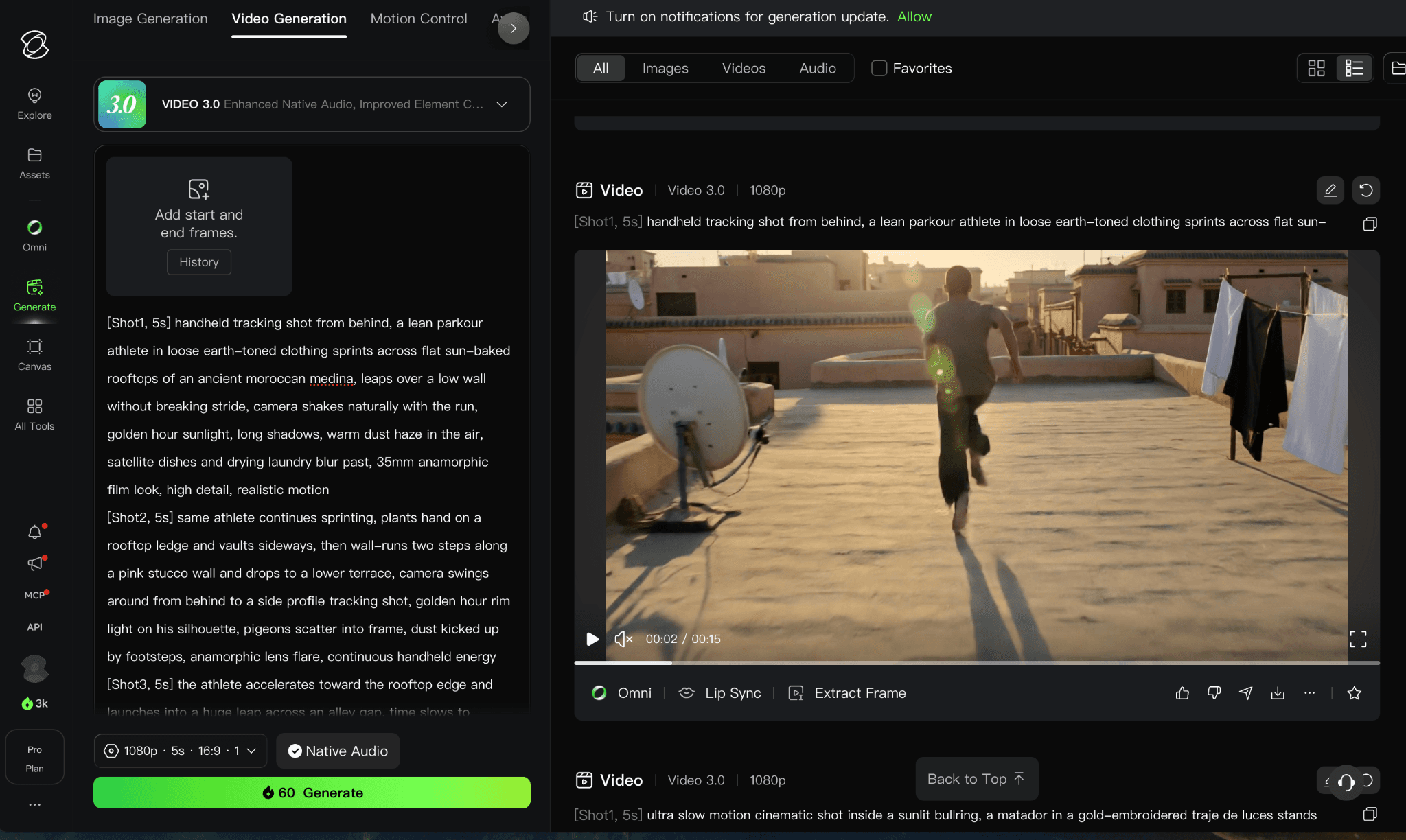
Figure 1. Supplied Kling AI interface or plan evidence retained from the original draft.
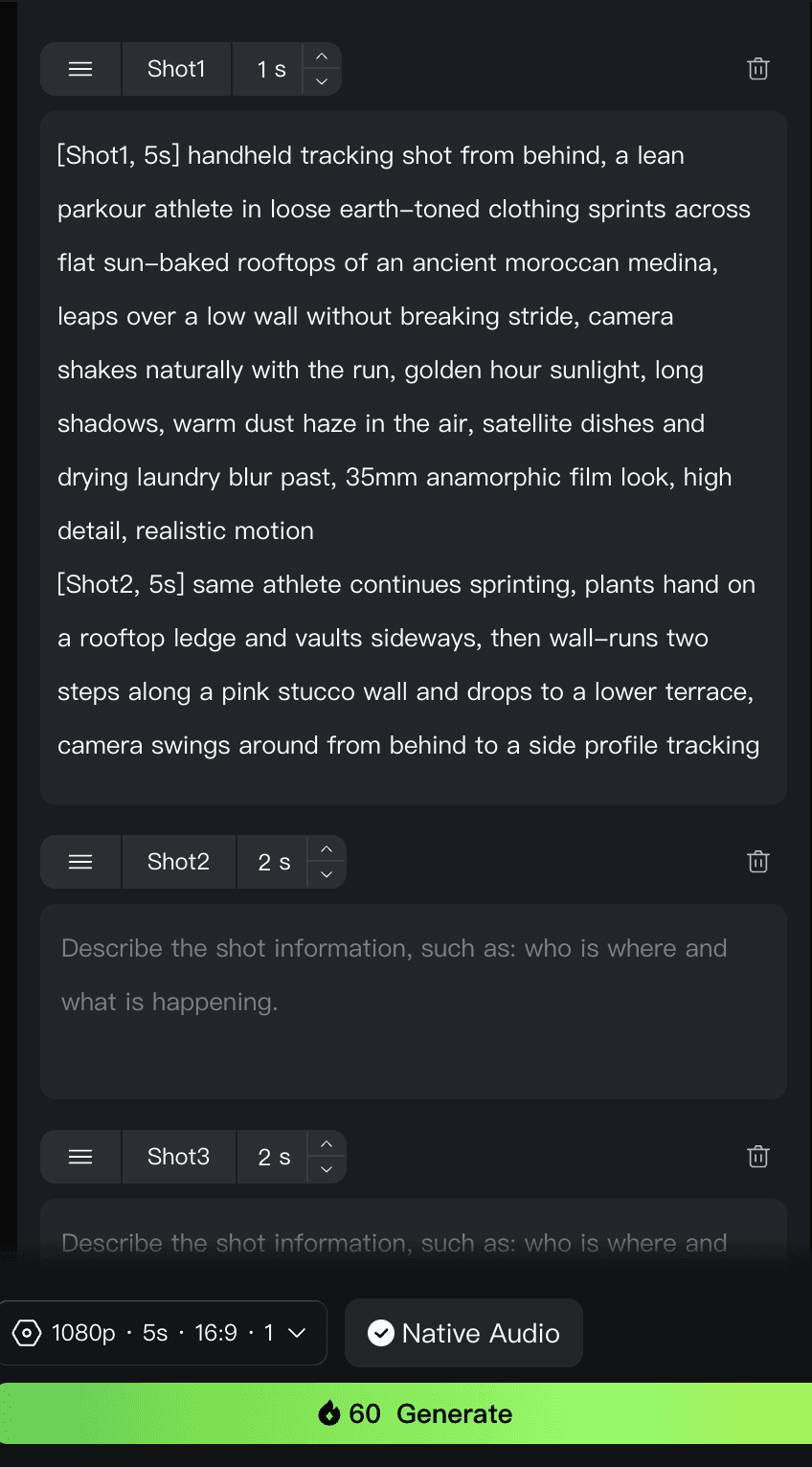
Figure 2. Supplied Kling AI interface or plan evidence retained from the original draft.
The supplied hosted-account screenshots show Video 3.0 with a multi-shot mode, separate shot prompts and durations, and a 60-credit quote for the displayed five-second 1080p generation. The account also showed 66 promotional credits. Because this was not a completed native Kling generation using the shared Genmo brief, it is evidence of access and controls only, not a result-quality or speed test.
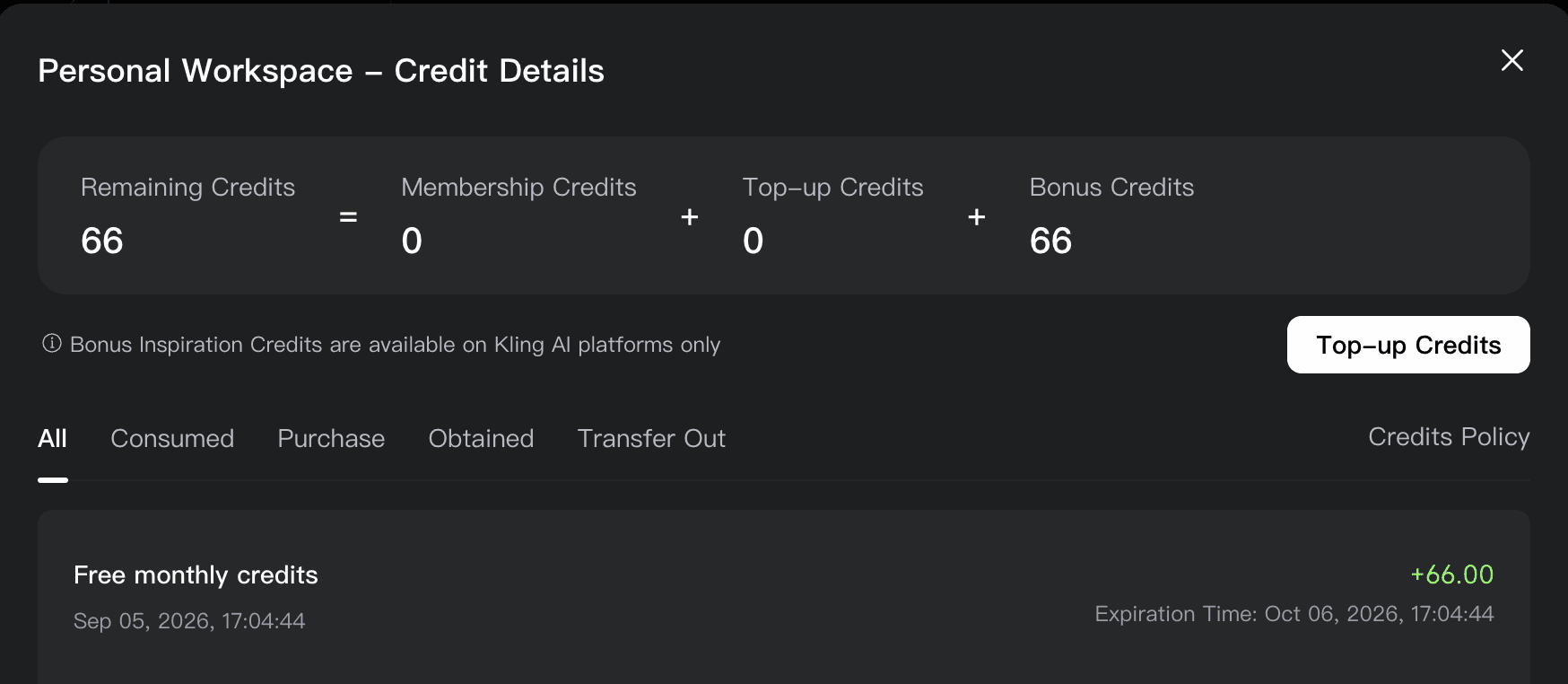
Figure 3. Supplied Kling AI interface or plan evidence retained from the original draft.
Figures 2–4. Hosted Kling Video 3.0 controls, result view, and account-specific credit balance.
2. Luma — Ray video and rapid visual iteration
Replacement scope: Direct generator. Switch when boards, rapid iteration, and Ray-based visual development matter more than integrated editing and collaboration.
Luma is better suited to teams that think in boards and iterations. Luma combines its own Ray and image models with a project space built for developing a visual direction, so it feels less like a collection of isolated generation buttons than many single-model services.
What changes when you switch: You gain a clean ideation-to-generation workspace. You lose Runway-specific tools such as Aleph and Runway’s broader mix of audio, upscaling, and project controls.
Pricing and access: Luma lists Plus at $30 per month or $300 billed yearly, with higher Pro and Ultra tiers. A free trial is available; the number of usable clips depends on the selected model, duration, and output settings.
3. Adobe Firefly — commercial creative teams in Adobe
Replacement scope: Partial platform. Switch when generated shots must continue inside Adobe's editing, brand, and commercial-production ecosystem.
Firefly makes sense when generated shots need to move straight into an Adobe workflow. Its value is less about copying every Runway tool and more about keeping generation, editing, brand assets, and finishing close together. Adobe also separates its own models from partner models inside the same environment.
What changes when you switch: You gain tighter Adobe integration and clearer separation between standard and premium generations. You lose Runway’s first-party video model family and some of its experimental film tools.
Pricing and access: Adobe lists a free plan with limited daily generations. Firefly Standard is $9.99 per month with 2,000 generative credits; higher tiers increase credits and access.
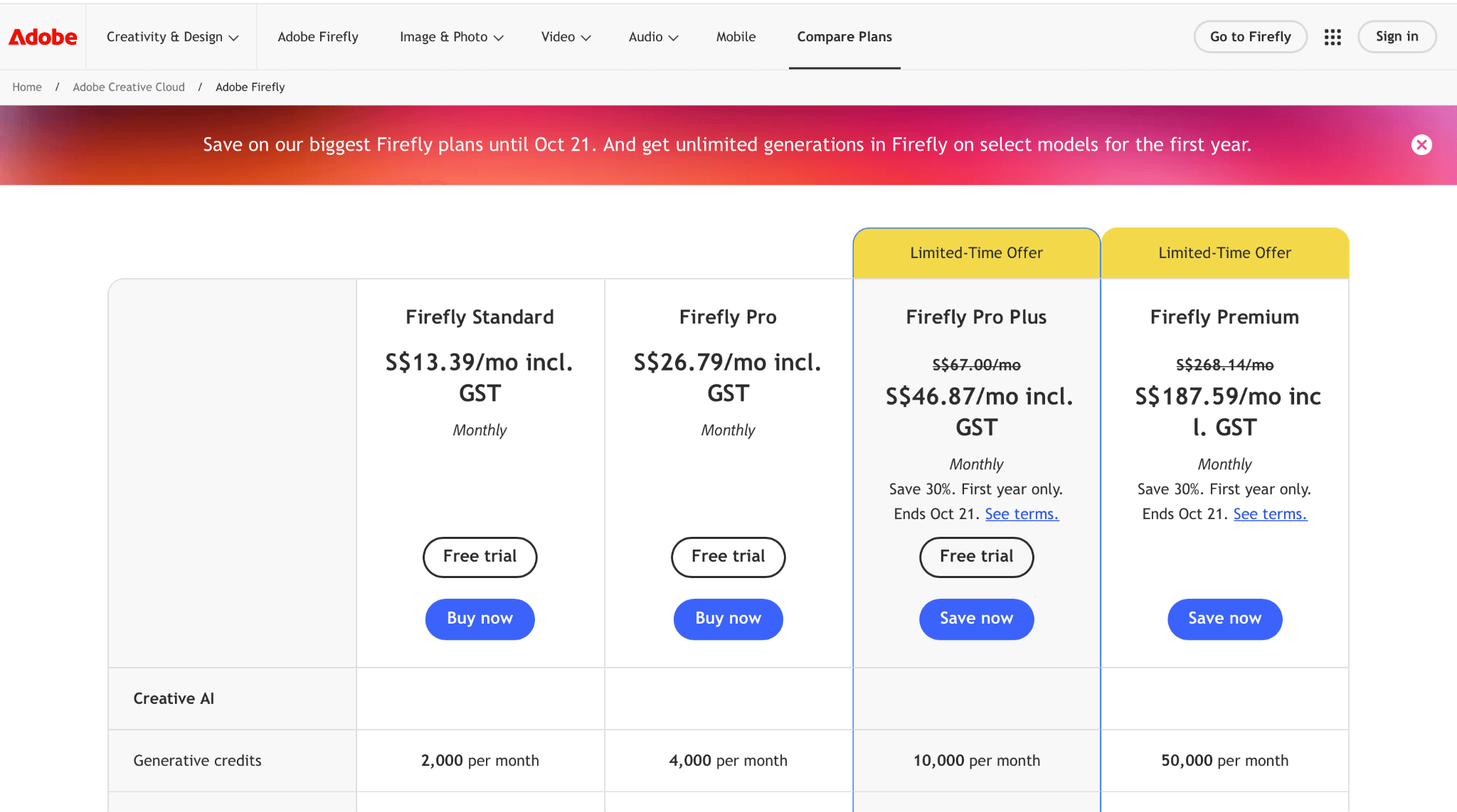
Figure 4. Supplied Adobe Firefly interface or plan evidence retained from the original draft.
4. Google Flow — Veo-based filmmaking inside Google
Replacement scope: Filmmaking workflow. Switch when Veo-based shot development inside Google is more important than Runway's model and editor stack.
Flow is the natural alternative for creators who are leaving Runway specifically to work inside Google’s video stack. It combines prompting, shot development, and access to Google video models. It is not an independent model, and it should not be described as if Flow and Veo were interchangeable names.
What changes when you switch: You gain direct access to Google’s filmmaking interface. You lose Runway’s first-party models and may face country, plan, and credit differences that are not obvious from a generic product page.
Pricing and access: Flow access and generation allowances are bundled with eligible Google AI plans. Google displays local pricing and limits by account and country, so the signed-in plan page is the reliable publication-day source.
5. Pika — effects and quick social experiments
Replacement scope: Specialist. Switch when playful transformations and fast social effects matter more than deep editing and asset management.
Pika is a lighter choice for creators who care about fast, playful transformations and short social assets. Features such as additions, swaps, twists, and effects give it a more effect-led personality than Runway’s broader production positioning.
What changes when you switch: You gain an approachable effects workflow and a usable free entry point. You lose the depth of a larger creative suite and may need another editor to assemble finished work.
Pricing and access: Pika’s Basic plan is free. Standard is listed at $8 per month when billed yearly, with 700 monthly video credits; higher resolutions and longer clips spend more credits.
6. Higgsfield — camera presets and ad-oriented generation
Replacement scope: Partial platform. Switch when camera presets and ad-oriented generation matter more than Runway's exact toolset.
Higgsfield is useful when camera language and ad-oriented shot construction matter more than having Runway’s exact toolset. It brings several video models into one creator interface and adds its own direction and campaign features around them.
What changes when you switch: You gain guided camera choices and a platform shaped around commercial short-form work. You lose a clean one-to-one comparison because output quality still depends on the selected underlying model.
Pricing and access: Higgsfield advertises a free entry point and paid plans from about $9 per month. Model availability, unlimited offers, and credit costs should be checked on the live plan before publication.
In our test, we worked in Higgsfield Cinema Studio 4.0. The generated clip had no visible watermark. Film and camera presets made the first setup approachable because we could choose motion language without writing every camera instruction. The trade-off appeared once we tried to direct the shot more precisely: a preset could influence the prompt, and an experienced user may prefer to specify the move without that extra layer. Rendering also took noticeably longer than the LTX Studio attempt, although the test record did not include a wall-clock time or final credit deduction. This supports a camera-first recommendation, not a speed or cost claim.
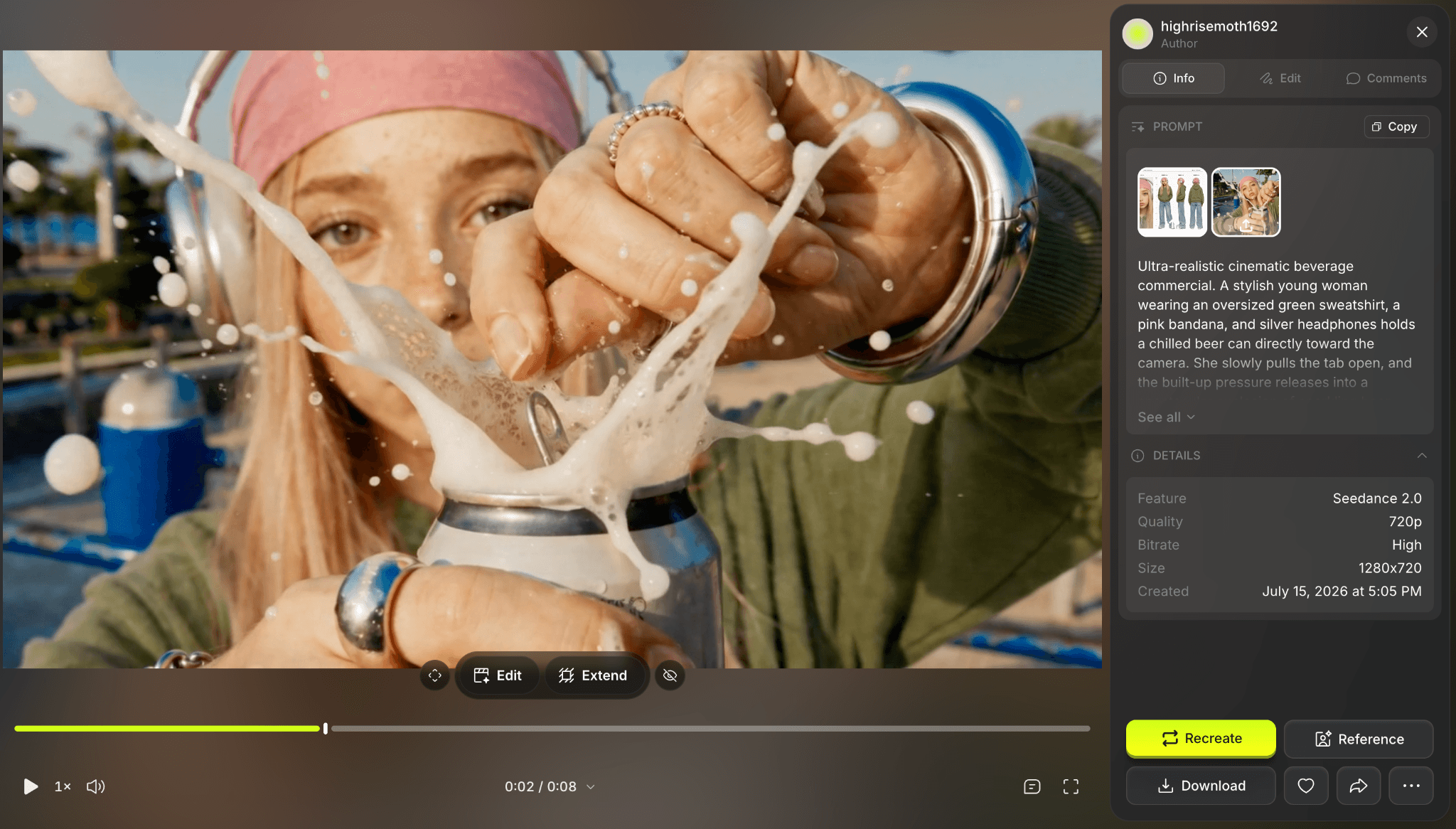
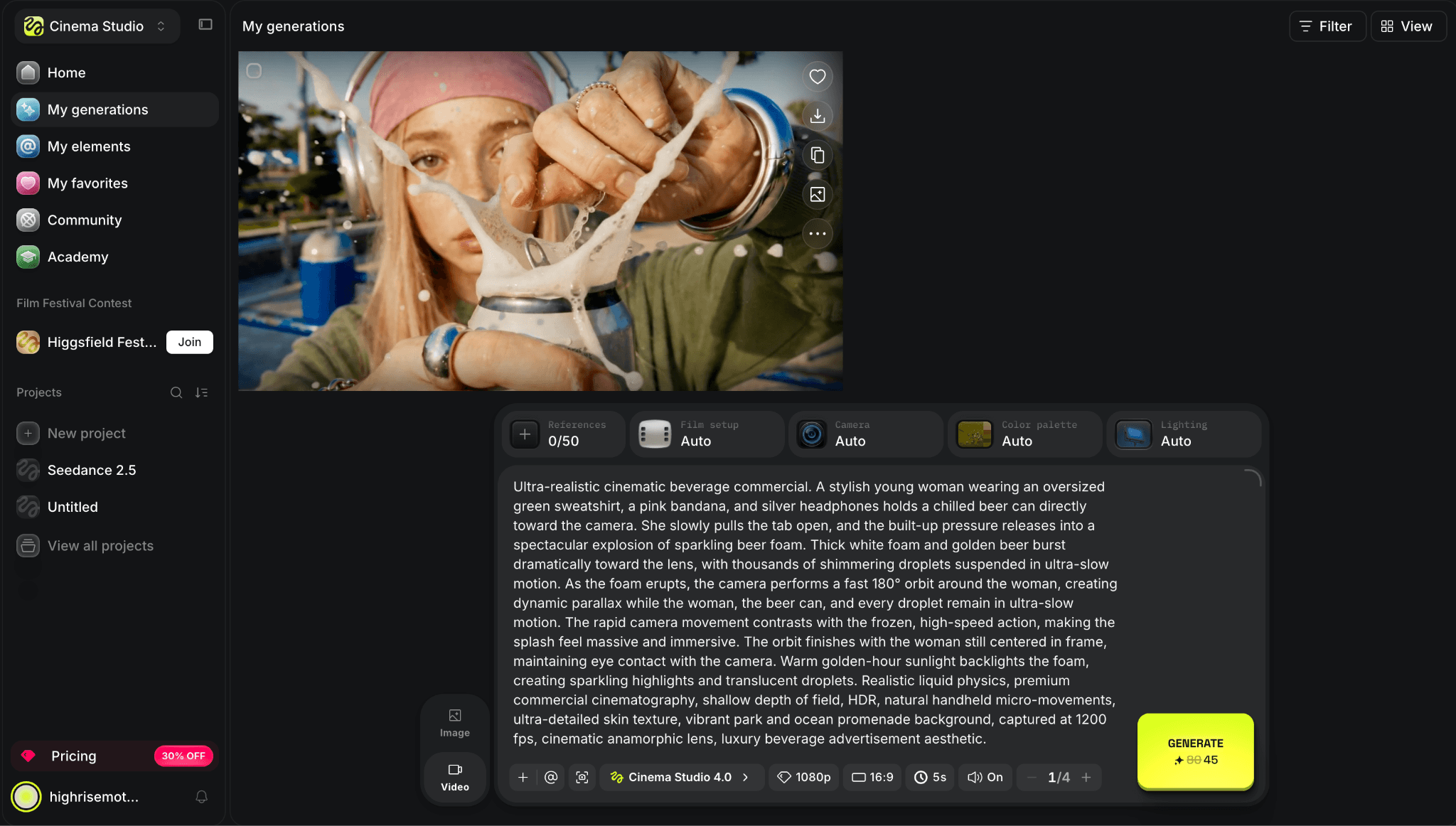
Figure 5. Supplied Higgsfield interface or plan evidence retained from the original draft.
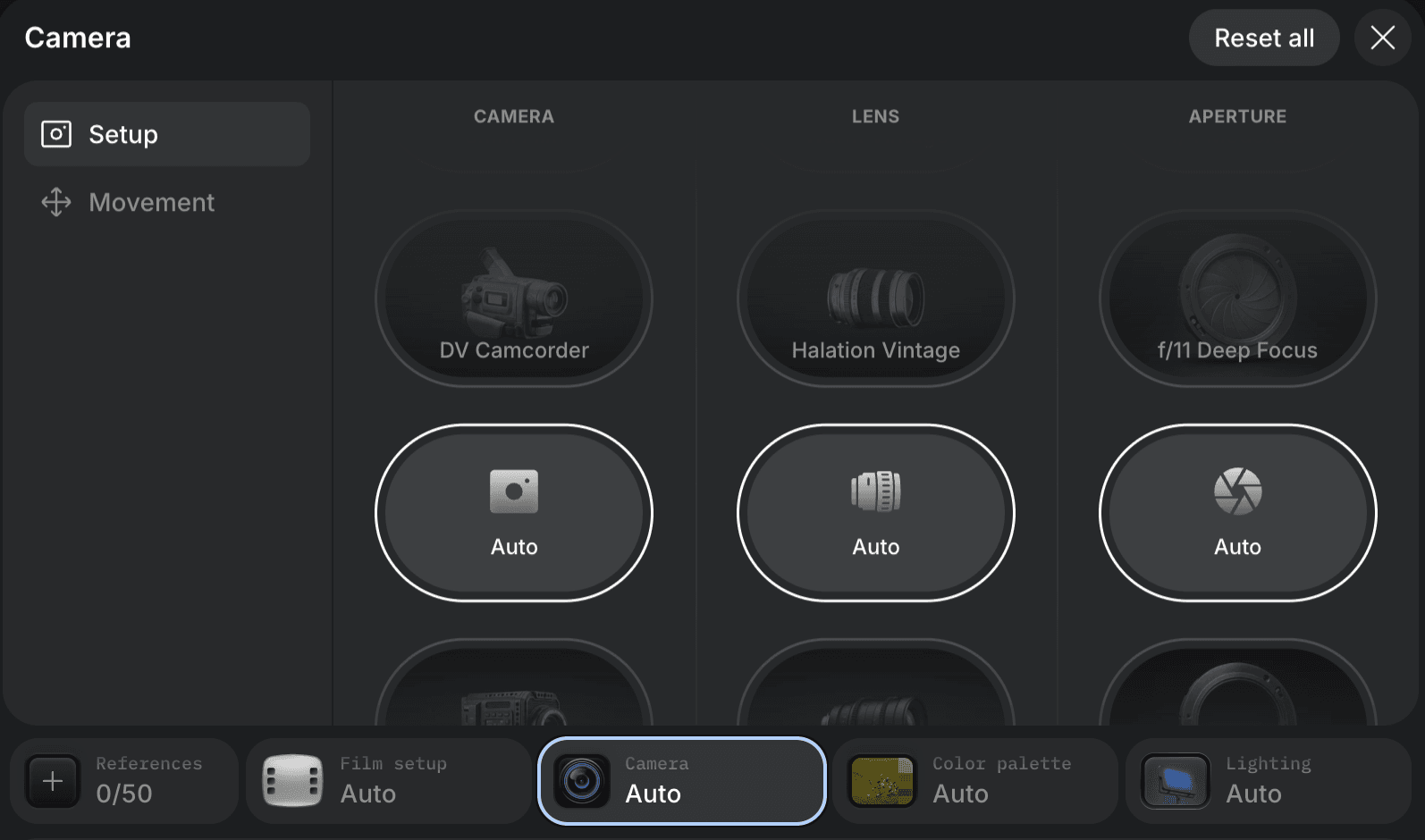
Figure 6. Supplied Higgsfield interface or plan evidence retained from the original draft.
7. Krea — real-time ideation and model switching
Replacement scope: Partial platform. Switch when real-time ideation, enhancement, and model switching matter more than one integrated video-production environment.
Krea is a practical alternative for creators who want to explore ideas quickly, move between image and video models, and upscale or refine outputs without committing to one vendor’s model family. The free daily compute makes it easy to assess the interface before paying.
What changes when you switch: You gain fast experimentation and multiple model choices. You lose Runway’s unified model-specific filmmaking tools, and the compute-unit math changes from one model to another.
Pricing and access: Krea currently offers 100 free compute units per day. Its entry paid tier is around $9–10 per month depending on billing; verify the live card because pricing and included compute change.
8. LTX Studio — storyboards, shots, and timeline planning
Replacement scope: Production substitute. Switch when the work begins with scripts, storyboards, casting, shot planning, and a timeline.
LTX Studio belongs on the shortlist when the team needs scripts, storyboards, casting, shot planning, and a timeline rather than another isolated generator. It is a production substitute for the planning and assembly layer, not a replacement for every Runway model or edit tool.
What changes when you switch: You gain a focused filmmaking proposition. You lose breadth, and access or plan availability may be less straightforward than with mass-market creator platforms.
Pricing and access: LTX Studio offers a free entry point and paid plans. Credit allowances, commercial-use terms, and model access vary by tier, so confirm the current official plan before publication.
9. VEED — editing and publishing finished social video
Replacement scope: Editing substitute. Switch when the priority is finishing and publishing a social or marketing video rather than exploring generative models.
VEED is the better comparison when the desired output is a finished social or marketing video rather than a single generated shot. It offers a browser timeline, captions, resizing, collaboration, and AI generation in one place. That shifts the center of gravity from model experimentation to finishing and publishing.
What changes when you switch: You gain a more conventional editing and delivery workflow. You lose some of Runway’s model research edge and deeper generative controls.
Pricing and access: VEED has a free plan, while Pro is around $24 per month in current public materials. AI generation and avatar allowances vary by plan and should be checked in the pricing table.
10. Astorie — multi-model node workflows
Replacement scope: Workflow alternative. Switch when references, prompts, variants, and handoffs must remain visible across several model families on one node canvas.
Astorie fits a different reason for leaving Runway: the need to keep references, prompts, image generation, video generation, and revisions visible in one node graph. It can route a project through multiple model families, but it should be judged as workflow infrastructure rather than as a model that makes every clip itself.
What changes when you switch: You gain a visible, reusable production graph and multi-model access. You give up Runway’s single-vendor simplicity, and output quality still belongs to whichever model runs in each node.
Pricing and access: Astorie offers a free plan with no card required. The current Pro trial is $9 once and renews at $49 per month unless canceled. The annual Standard offer is $12 per month for the first year, then $16 per month from year two; label the first-year price as a limited offer.
How to choose a Runway replacement
Start by naming the part of Runway that is actually causing friction. For raw clip generation, compare Kling and Luma with the same reference and prompt. For an Adobe or Google production stack, test Firefly or Flow before adding another standalone subscription. For effects-heavy social posts, Pika may be enough.
If a project constantly jumps among image, video, audio, and upscaling models, compare the workflow platforms instead: Higgsfield, Krea, and Astorie solve organization and access as much as they solve generation. Credit totals are not directly comparable, so calculate the cost of one usable clip after rerolls.
Is Runway still worth using?
Yes, particularly for creators who already use Gen-4.5, Aleph, audio generation, upscaling, asset storage, and collaboration in the same account. Runway Standard is $15 month-to-month or $12 per month billed annually, and the free plan’s 125 credits are a one-time trial rather than a recurring monthly allowance. Switching only saves money if the replacement covers the tools you actually use.
Final take
Kling and Luma are the sensible first tests for replacing Runway’s core generation step. Firefly, Flow, VEED, and the multi-model platforms answer different workflow problems. The cheapest-looking plan is not automatically the cheapest production choice; compare the first result, the number of rerolls, and the tools needed after export.
Related reading
Runway Gen4 vs Veo vs Kling: Practical Video Production Comparison
Practical comparison for AI video production choices across Runway Gen4, Google Veo, and Kling.
7 Best Photoroom Alternatives in 2026 (Tested for Ecommerce Photography)
Do you need a Photoroom alternative that goes beyond simple background cutouts and batch image processing? Try these 7 tools and pick the one that best matches your AI product photography use cases.
6 Ideogram Alternatives for Killer AI Image Generation
Here are 6 tried and tested Ideogram alternatives that work best for prompt accuracy, text, image realism, character consistency and are intelligent enough to render real-world scenarios and logic.
Ready to try it on the canvas?
Open Astorie and fan your prompt across every frontier model in one workflow.