

Seedance 2.5 vs Veo 3.1 for Product Ads: Creative Control Compared
See how Seedance 2.5 and Veo 3.1 compare for product ads across a simple hero shot, creative transformation, and directed camera movement using the same AURELIA product.
Key takeaways
In my tests, Veo 3.1 was more interpretive, while Seedance 2.5 was more literal.
Both models were already usable for a simple hero product shot, so basic image quality alone did not separate them much.
Veo 3.1 contributed more secondary motion and creative interpretation in the transformation test.
Seedance 2.5 stayed closer to the planned frames and offered a more restrained, predictable execution.
The more useful model-selection question is how much creative responsibility you want the video model to take.
AI video models can already handle a basic product shot. The harder question is what happens when the ad needs more than a clean image-to-video result.
I compared Seedance 2.5 and Veo 3.1 across three product-ad tasks using the same fictional beverage brand, AURELIA: a simple hero shot, a creative transformation, and a directed camera move.
The biggest difference was not image quality. It was how much creative responsibility each model took on by itself.
Quick Answer
In my tests, Veo 3.1 was more interpretive, while Seedance 2.5 was more literal.
Veo 3.1 was the better fit when I wanted stronger creative motion and more expressive camera behavior. Seedance 2.5 stayed closer to my planned frames and gave me a more controlled execution.
For a simple hero shot, both were already usable. The difference became clearer when the brief required creative transformation and directed camera movement.
What Matters Most in an AI Product Ad Model
A polished first frame is not enough. For product ads, the generated clip still needs to survive a real edit.
Product fidelity
The product should still look like the approved product after it starts moving.
That includes the shape, label, colors, packaging details, and proportions. A clip can look cinematic and still fail if the product changes halfway through.
Motion control
A product ad often depends on a specific camera move.
The camera may need to hold for a beat, accelerate into an orbit, then slow down into a final hero frame. A model that only adds gentle motion to a still image is less useful when the shot itself carries the idea.
Creative interpretation
Some briefs benefit from a model that adds visual ideas instead of following the prompt literally.
That could mean secondary water movement, a stronger transition, or a more dramatic way of bringing the product into frame. The question is whether those additions improve the ad or make it harder to control.
Usability in an Editing Workflow
The most useful clip is not always the most impressive one.
I care about whether the result is close enough to move into editing rather than requiring a full reroll. If the product, camera move, and timing already work, fixing one local problem is often more practical than starting over.
Test Setup: One Product, Two Models, Three Ad Jobs
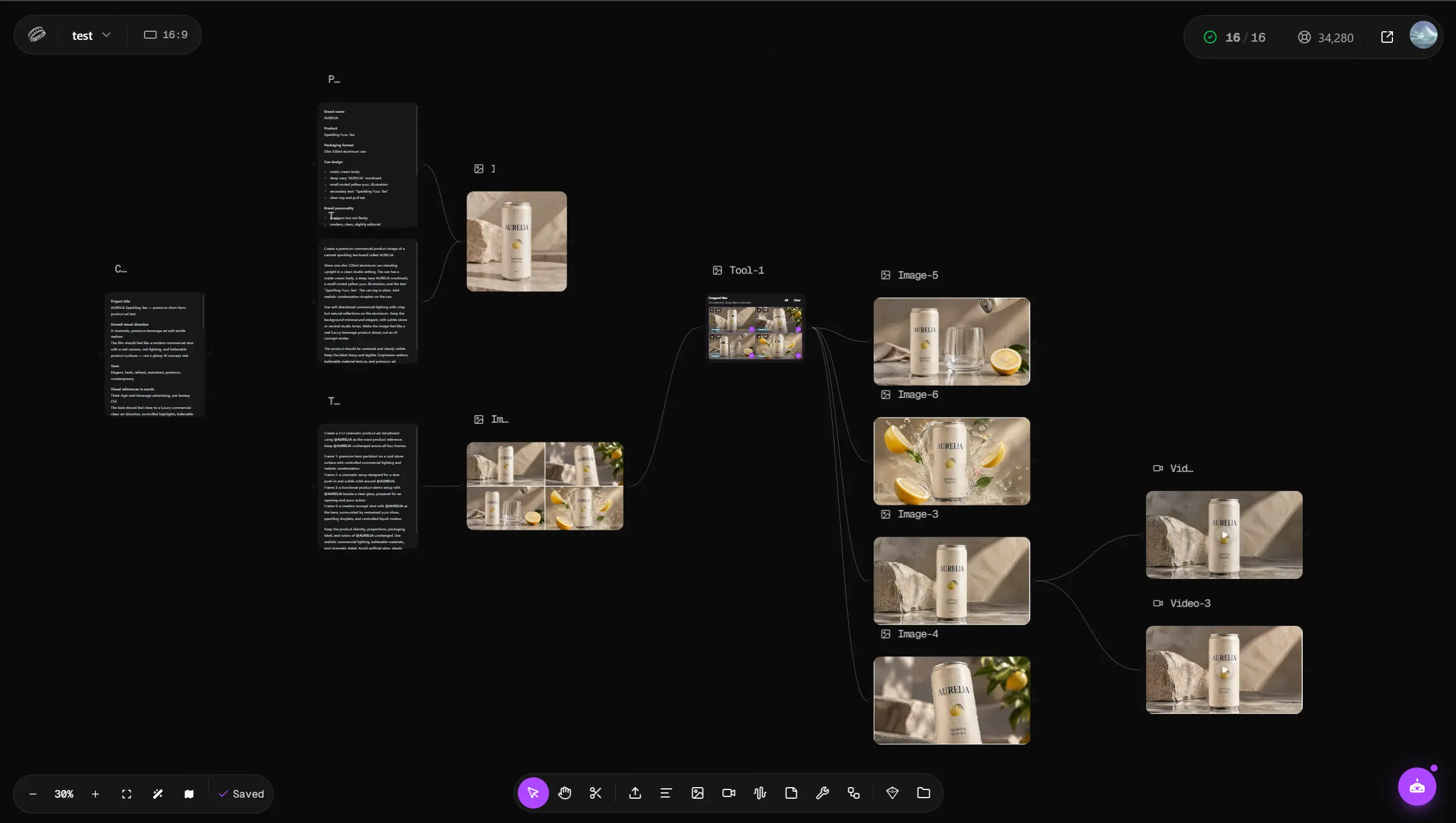
I built the test around one fictional product: AURELIA Sparkling Yuzu Tea.
The master product image was saved in Astorie as a Prop Element named @AURELIA. I then created a product-ad storyboard and cropped it into separate shot frames. Each shot was generated independently instead of asking one model to create an entire multi-shot commercial in one pass.
The comparison focused on three jobs:
- a simple hero product shot
- a creative product transformation
- a directed camera-movement shot
I kept the final hands-on comparison to Seedance 2.5 and Veo 3.1.
Test 1 — Simple Hero Shot: Both Models Were Already Usable
The first test was intentionally simple.
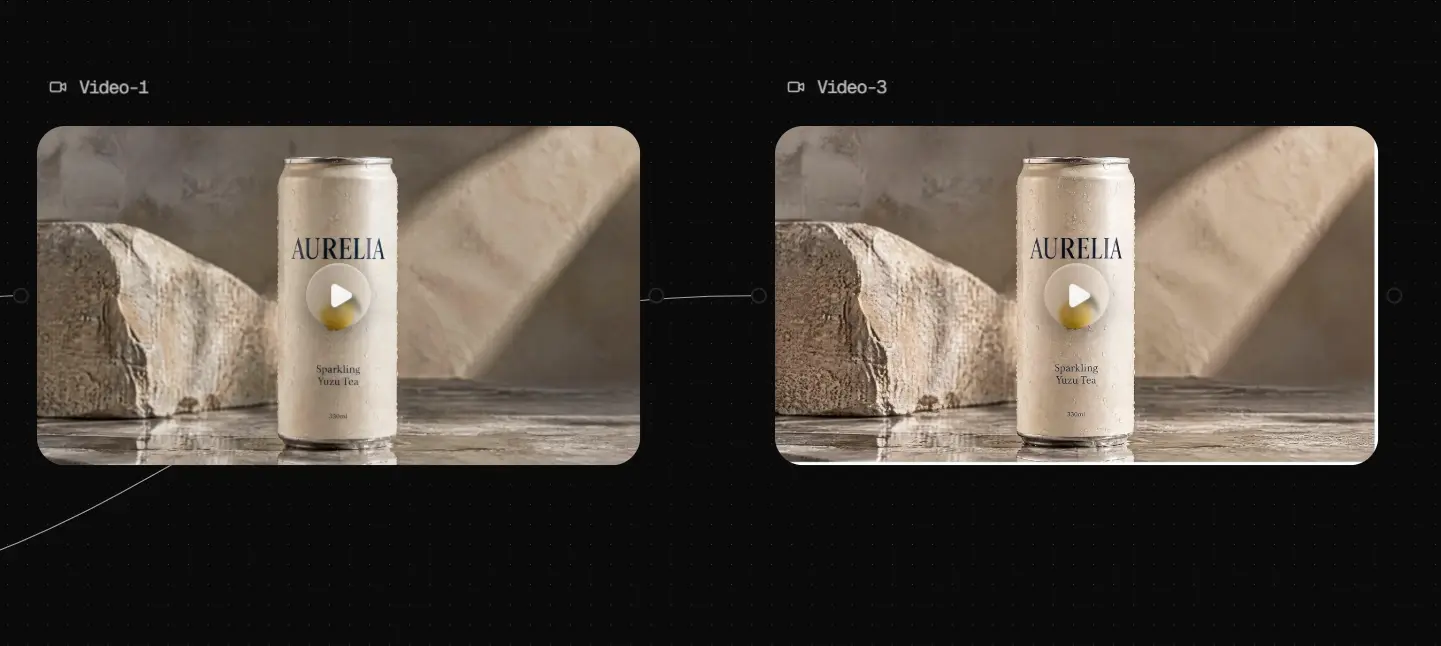
I started from a clean AURELIA hero image with warm commercial lighting, a stone surface, condensation on the can, and minimal camera motion.
Both models produced footage I could work with.
Seedance 2.5 kept the product stable and delivered a clean commercial-looking result. Veo 3.1 also preserved the main product structure well enough for this kind of shot.
The difference was small enough that I would not choose a model based on this test alone.
Veo did show one behavior that became more important later. It introduced extra water movement around the can even though that was not the main purpose of the prompt.
That made the frame feel more active, but it also showed that Veo was more willing to add secondary motion.
Test 2 — Veo 3.1 Added More Creative Motion
The second test pushed the models toward a more conceptual ad idea.
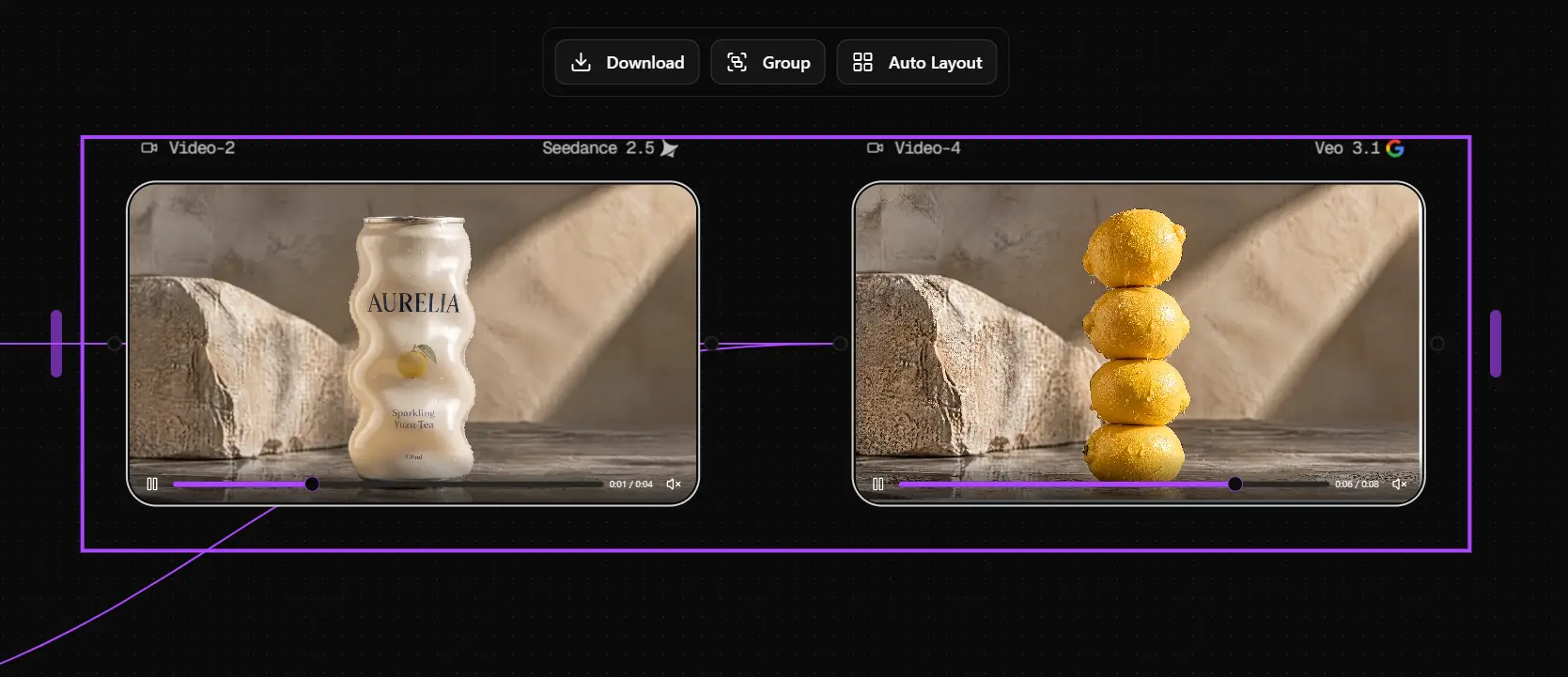
I created a transformation where the AURELIA can changed into a vertical stack of four lemons while the background and overall commercial scene stayed consistent.
Veo 3.1 completed the transformation and also introduced secondary water motion around the lemons.
I had already seen the same pattern in the hero shot, where it added extra water movement around the can.
Veo did not only complete the requested transformation. It also introduced secondary motion that made the frame feel more visually active.
That can be useful in concept-led ads. Extra motion can make a generated shot feel less like an animated still.
The tradeoff is control.
If a brand has already approved the composition and wants one exact transformation, extra visual invention may become another thing to fix.
Seedance 2.5 felt more restrained. It stayed closer to the planned visual direction and added less beyond the brief.
In this test, Veo 3.1 was the better fit for a more expressive concept shot. Seedance 2.5 was the better fit when I wanted tighter control over the planned visual.
Test 3 — Veo 3.1 Was Stronger for Directed Camera Motion
The final test was the most useful one.
Instead of using a simple push-in, I gave the shot a clear rhythm:
- a short stable opening
- a stronger push-in
- a clockwise orbit
- faster movement through the middle
- a gradual slowdown
- a controlled landing on the final frame
I used a first frame and a final frame so both models had a clear start and endpoint.
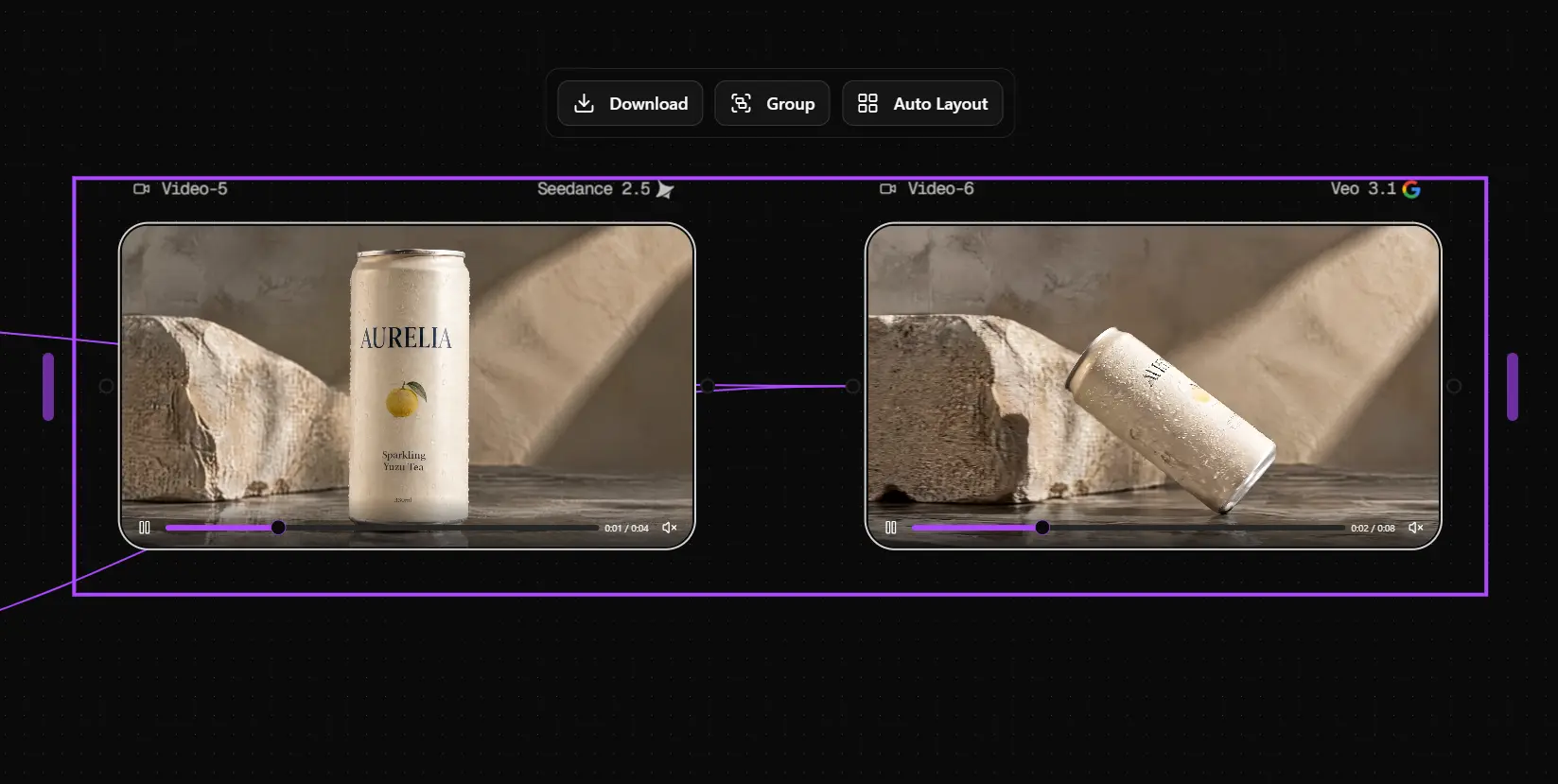
Veo 3.1 interpreted the movement more aggressively. The can rotated toward the camera, moved into a stronger hero position, and then settled into place.
The result felt like a designed commercial move rather than a simple transition between two images.
Seedance 2.5 handled the same task more literally. It moved toward the final frame with a slower, more restrained transition. The motion felt more linear and less dramatic.
Veo 3.1 was more interpretive. Seedance 2.5 was more literal.
For bold camera language, I preferred Veo 3.1 in this test. For a more predictable frame-to-frame execution, Seedance 2.5 felt easier to control.
Generation Time Did Not Decide the Better Fit
I also recorded generation time during the project.
Model | Test output | Approx. generation time |
Seedance 2.5 | 4 seconds, 1080p | 3.5 minutes |
Veo 3.1 | 8 seconds, 4K | 4.5 minutes |
These numbers are not a controlled speed benchmark. The clips had different durations and resolutions, so the raw times are not directly comparable.
More importantly, generation speed was not the most useful production metric.
A faster result still wastes time if the product changes, the movement fails, or the clip needs several rerolls. For product ads, time to a usable clip matters more than generation time alone.
Seedance 2.5 vs Veo 3.1: Which Fits Different Product Ad Needs?
The tests did not produce one universal winner.
They showed two different approaches to the creative brief.
Product ad need | Better fit in my test | Why |
Simple hero product shot | Either | Both produced usable baseline footage |
Creative product concepts | Veo 3.1 | Added more secondary motion and visual interpretation |
Bold camera movement | Veo 3.1 | Produced a more expressive commercial move |
Tight frame-to-frame control | Seedance 2.5 | Followed the planned transition more literally |
Reusing a saved product asset in my Astorie setup | Seedance 2.5 | I could reference @AURELIA directly |
The last point is specific to the setup I used in Astorie.
Seedance 2.5 was easier to use with the saved @AURELIA Element. Veo 3.1 relied more on the supplied first and final frames in this project.
That workflow difference did not decide visual quality, but it did affect setup time.
A Good Generation Still Needs a Product-Ad QA Pass
A generation does not need to be perfect before it becomes useful.
If the product, movement, lighting, and timing are already right, I would not reroll the whole clip because of one local problem.
For example, if a strong Veo camera move adds too much water around the can, that is a narrower problem than rebuilding the entire shot.
The better production decision is often simple:
change the unwanted detail, preserve everything that already works.
For a product ad, I would still check:
- logo and brand name
- packaging text
- product proportions
- illustrated product details
- unwanted label drift
- extra objects or motion
- changes introduced during editing
Product consistency is not the same as product accuracy.
A model can keep the same incorrect version of a can across every frame. The shot may look stable while the SKU itself is wrong.
For AURELIA, I still checked the brand name, yuzu illustration, can shape, and small packaging text before treating a clip as finished.
Final Takeaway
The simple hero shot did not separate Seedance 2.5 and Veo 3.1 very much.
The harder tests did.
Veo 3.1 was more interpretive in my tests. Seedance 2.5 was more literal.
Veo made more sense when I wanted the model to contribute motion and camera personality. Seedance made more sense when I wanted the result to stay closer to the planned frames.
Once basic image quality is good enough, the more useful question is:
How much creative responsibility do you want the model to take?
FAQ
Which is better for product ads, Seedance 2.5 or Veo 3.1?
It depends on the shot.
In my tests, Veo 3.1 was a better fit for creative transformation and expressive camera motion. Seedance 2.5 was a better fit when I wanted a more literal transition and tighter control over the planned visual.
Which model was better for product consistency?
Both preserved AURELIA well enough in the simple hero test.
More complex motion made product stability harder to judge. I would still verify the packaging frame by frame before using either result in a real campaign.
Should I generate a full product ad in one prompt?
I would not make that my default.
For this project, I planned the shots first, generated each clip separately, and treated them as footage for a later edit.
That makes it easier to replace one failed shot, protect product consistency, and choose the model that fits each type of motion.
Related reading
Runway Gen4 vs Veo vs Kling: Practical Video Production Comparison
Practical comparison for AI video production choices across Runway Gen4, Google Veo, and Kling.
7 Best Photoroom Alternatives in 2026 (Tested for Ecommerce Photography)
Do you need a Photoroom alternative that goes beyond simple background cutouts and batch image processing? Try these 7 tools and pick the one that best matches your AI product photography use cases.
6 Ideogram Alternatives for Killer AI Image Generation
Here are 6 tried and tested Ideogram alternatives that work best for prompt accuracy, text, image realism, character consistency and are intelligent enough to render real-world scenarios and logic.
Ready to try it on the canvas?
Open Astorie and fan your prompt across every frontier model in one workflow.