
Seedance 2 Guide: 2.0 vs 2.5, Prompts, References and Workflows
This Seedance 2 guide covers ByteDance's current multimodal video-generation family. Officially, Seedance 2.5 expands single-pass duration, reference capacity, and timestamp-level control beyond 2.0. In practice, that makes 2.5 a natural starting point for reference-heavy or longer structured workflows, while 2.0 routes can remain useful when their duration, resolution, throughput, availability, or cost better fits the job. Choose by the live model contract and the production requirement, not by a universal quality ranking.
Astorie is useful when Seedance is one stage in a larger workflow: a still or reference pack can feed the video branch, selected takes can sit beside alternatives, and the approved clips can move into a controlled NLE handoff. The canvas organizes lineage; it does not remove the need to review physics, identity, audio, rights, and continuity.
Seedance 2 Guide: Key Takeaways
• Current BytePlus 2.x routes include Seedance 2.5, Seedance 2.0, Seedance 2.0 Fast, and Seedance 2.0 Mini. Older official 1.x models used names such as Pro and Lite, while third-party platforms may add their own labels.
• Seedance 2.5 officially supports up to 30-second generation, multi-round extension, multimodal references, and timestamp-directed editing, but access routes can expose different limits.
• Label every reference by role and prove one controlled shot before expanding into a longer sequence.
• Treat prompts as production instructions: references, subject, timeline, camera, audio, and locked constraints.
Seedance 2 Guide: Should You Use 2.0 or 2.5?
Use Seedance 2.5 when a scene depends on a larger reference set, a longer structured timeline, or timestamp-level control. You gain a higher official ceiling for duration and multimodal inputs; you give up some simplicity and may face different availability or pricing by route. Switch when reference capacity, timeline control, or longer-form continuity becomes the main bottleneck.
Use the Seedance 2.0 family when its route, duration, resolution, access, or cost fits the shot or draft cycle. Seedance 2.0 already supports multimodal references, video editing, and video extension; 2.5 is not the first route in the family to offer those functions. Switch to 2.5 when the expanded duration, reference capacity, or timestamp-level control creates a meaningful production advantage.
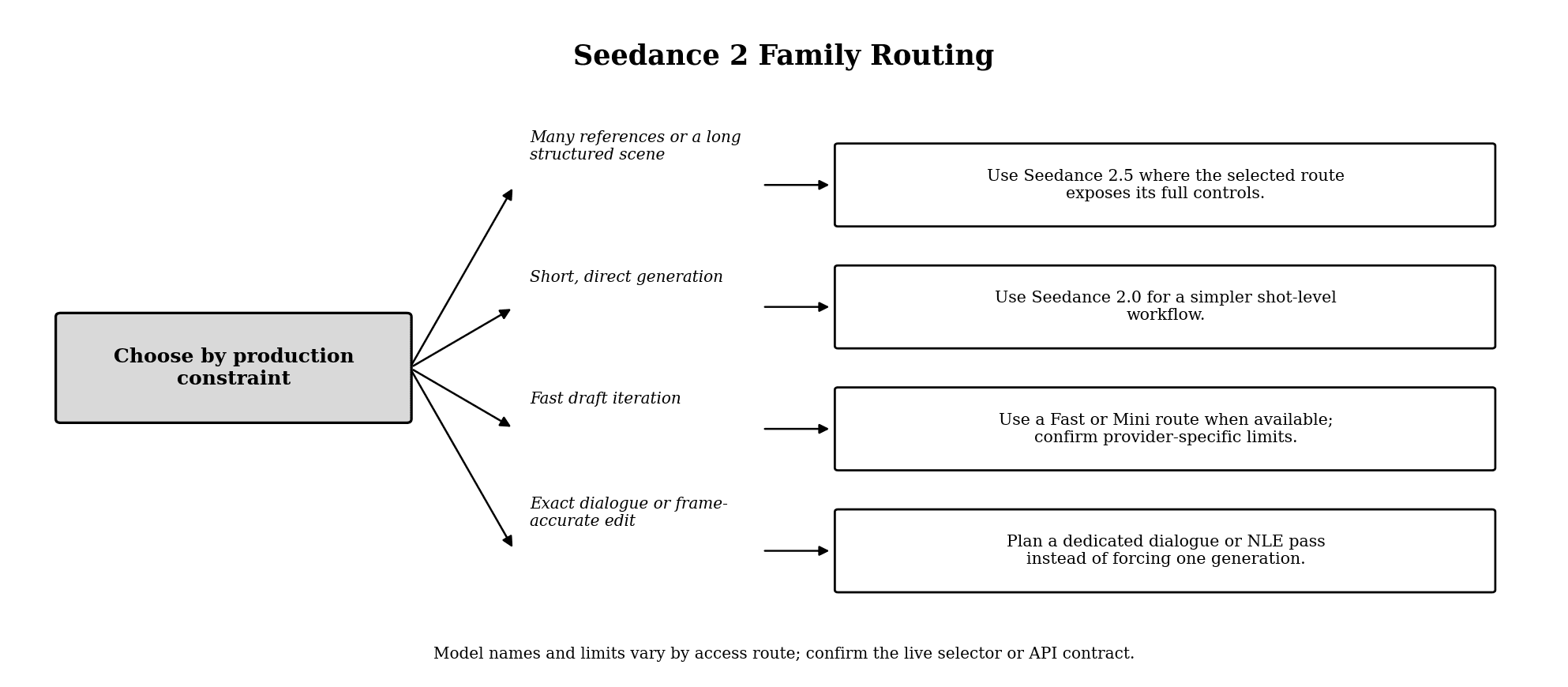
Figure 1. A production-based decision tree for the Seedance 2 family.
Route | Recommended starting point for | What you gain | What you give up | Switch trigger |
Seedance 2.5 | Reference-rich scenes, longer structure, extension, targeted edits | Larger multimodal reference capacity and timeline control | More planning and route-specific access checks | Many references or continuity now drive the brief |
Seedance 2.0 | Multimodal generation, editing, or extension within the route's published limits | Established 2.0 workflow with reference, edit, and extend support | Lower duration and reference ceilings than 2.5 | Capacity or timestamp control becomes the constraint |
2.0 Fast route | Prompt and motion drafts where offered | Faster iteration by provider design | Final quality or controls may differ by route | Draft decisions are locked and a finish pass is justified |
2.0 Mini route | Cost-sensitive prototyping where offered | Lower-cost or lighter iteration by provider design | Reduced route capabilities compared with the full model | The selected shot needs the full production route |
Model names, limits, resolutions, and prices can differ across Dreamina, BytePlus, and third-party platforms. Confirm the live selector or API schema before publishing a fixed specification.
What Seedance 2.5 Expands Beyond 2.0
ByteDance's July 31, 2026 launch describes Seedance 2.5 as an upgrade to the multimodal audio-video architecture introduced with 2.0. The official release highlights:
• Up to 30 seconds in one generation, with multi-round extension.
• Up to 30 image references, 10 video references, and 10 audio references in one pass.
• Timestamp-directed control and targeted editing.
• Expanded reference modes including motion, creative, and clay-render guidance.
Seedance 2.0 already introduced mixed text, image, video, and audio references, stable video extension, and targeted video editing. Its official launch described up to 9 images, 3 video clips, and 3 audio clips as inputs and up to 15-second output. Seedance 2.5 expands those ceilings and adds finer timestamp-level control; it does not make reference, edit, or extension workflows exclusive to 2.5.
These are upstream capabilities, not guarantees that every platform exposes every option. A provider may offer fewer references, shorter durations, different resolutions, or its own credit system. Separate the model's official capability from the settings visible in the tool you are using.
Prepare References Before You Prompt
Use a reference only when it controls a visible decision. Give each file one role:
• Character: face, body, wardrobe, or voice identity.
• Product: shape, proportions, packaging, labels, and protected marks.
• Environment: geography, architecture, lighting, or production design.
• Motion: camera path, body movement, timing, or physical interaction.
• Audio: dialogue, voice, ambience, music, or rhythm.
• Style: color, texture, lens language, and finish.
Do not upload several images that disagree about the same attribute. If two references show different jackets, product labels, or lighting directions, the model must resolve a conflict you created.
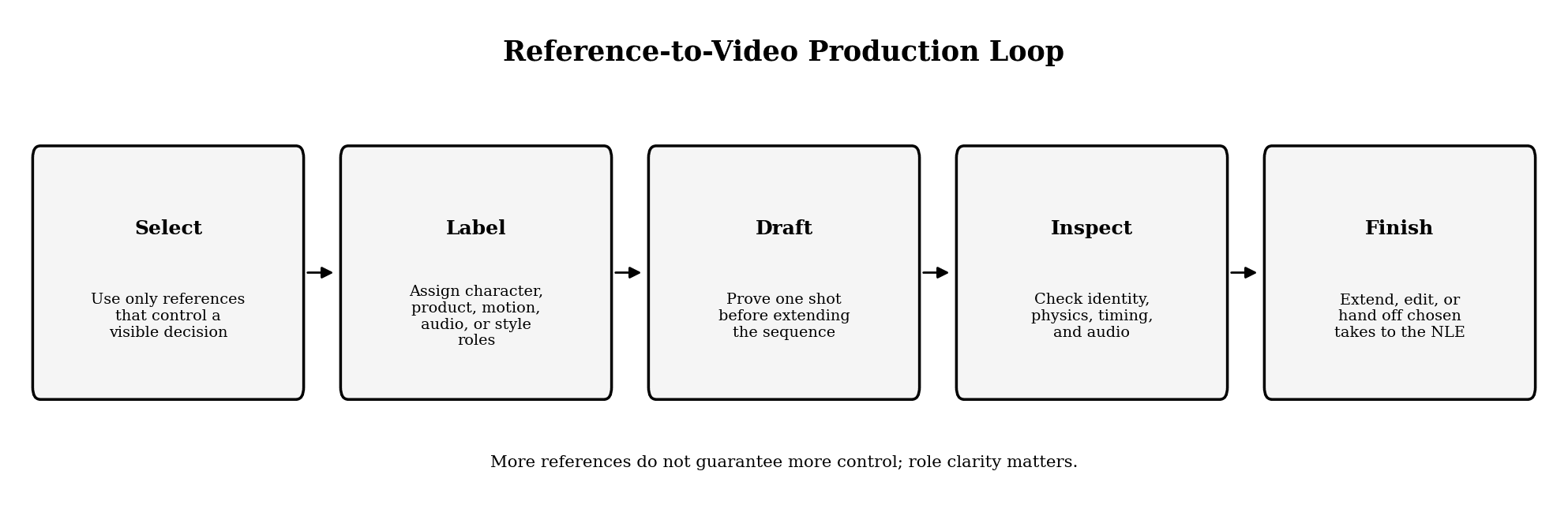
Figure 2. A controlled reference-to-video production loop.
A Seedance Prompt Structure That Scales
Start with a compact production brief, then add detail only where it changes the visible result.
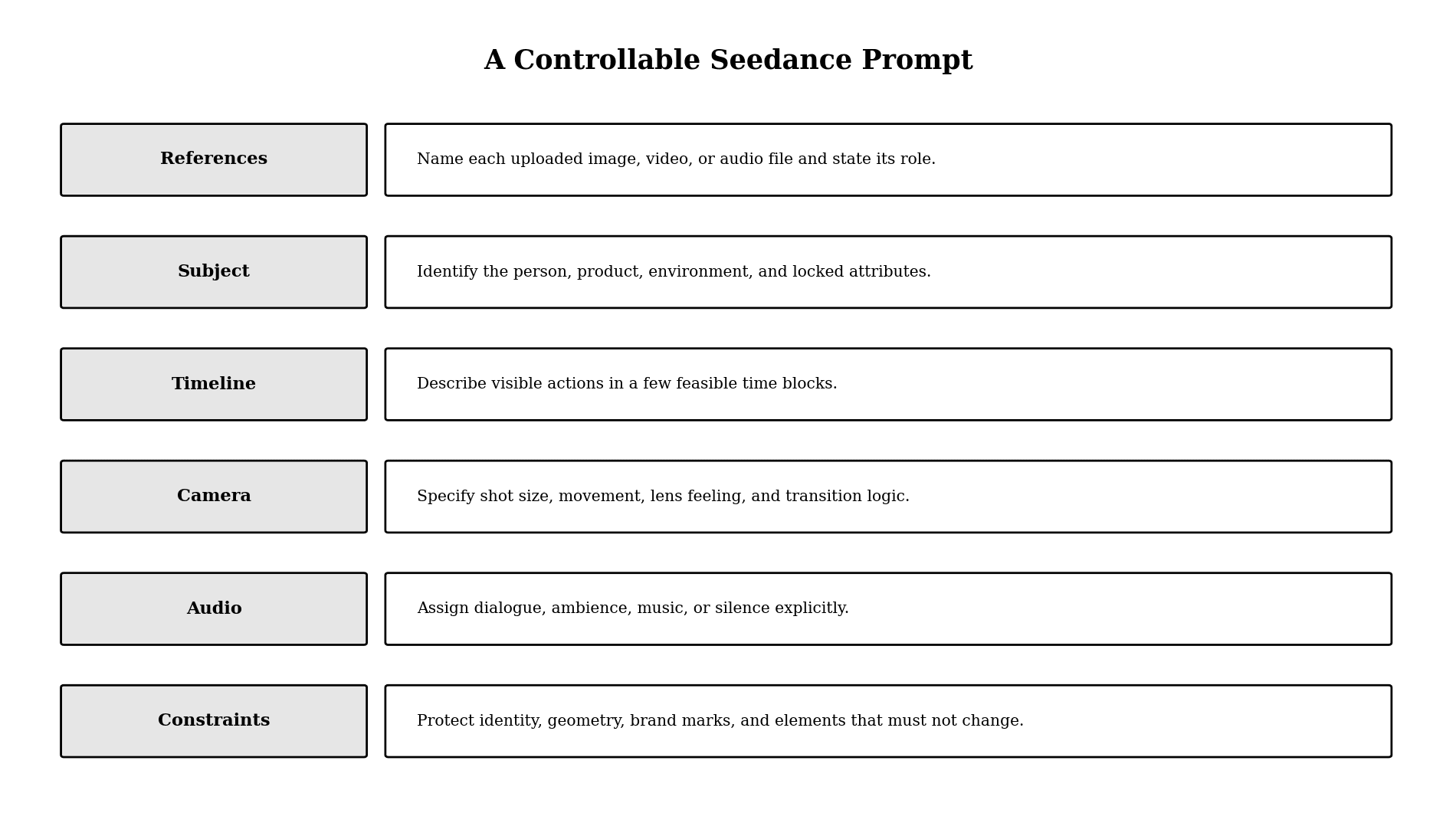
Figure 3. Six prompt layers for a controllable Seedance generation.
Use this template:
Use @Image 1 for the character's face and wardrobe, @Image 2 for the product geometry, @Video 1 for the camera path, and @Audio 1 for dialogue timing. [Aspect ratio and visual treatment]. 0-[x]s: [visible action and camera]. [x]-[y]s: [next feasible action]. Audio: [speaker, line, delivery, ambience]. Keep [locked attributes] unchanged. Exclude [specific failure modes].
References
Name each file and state what it controls. “Use these as inspiration” is weaker than “Use @Image 1 only for the face and @Image 2 only for wardrobe color.”
Timeline
Use a few feasible blocks, not a cut every second. A timeline is guidance for action and emphasis; it is not a frame-accurate edit decision.
Camera
Specify shot size, movement, and transition logic. Avoid stacking incompatible moves. If the camera must change dramatically, describe the visible bridge such as an occlusion, whip pan, doorway, or cut.
Audio
Assign dialogue, speaker, language, delivery, ambience, music, and silence. Keep dialogue concise and review pronunciation and sync separately.
Constraints
Protect identity, geometry, product marks, screen direction, wardrobe, color, and any element that must survive an edit or extension.
Four Practical Seedance Workflows
Text to Video for Concept Exploration
Use text-to-video when the subject and environment do not depend on an existing identity. You gain speed from a clean prompt; you give up reference-level control. Switch to image-to-video when composition or character identity must remain stable.
Draft one shot with a single action. Approve the blocking and camera logic before asking for a longer sequence.
Image to Video for Brand or Character Work
Use image-to-video when the opening composition, person, product, or art direction is already approved. You gain a stronger visual anchor; you give up some freedom to redesign the shot. Switch when a text-only generation keeps changing the subject or layout.
Write the prompt mainly as motion direction. Repeating every visual detail can conflict with the image.
Reference to Video for Complex Control
Use reference-to-video when different files control identity, motion, audio, and environment. You gain explicit role separation; you give up simplicity and must resolve contradictions before generation. Switch to this mode when one reference image cannot carry the complete production intent.
Edit or Extend an Approved Take
Use targeted editing when the shot is structurally correct and one local decision needs to change. You gain continuity with the approved take; you give up the chance to redesign the whole scene. Regenerate from the brief when the blocking, story beat, or camera logic is wrong.
For extension, protect the subject, environment, pacing, and audio language in the prompt. Inspect the join, motion direction, lighting, and sound bed at the boundary.
Using Seedance in a Multi-Model Astorie Workflow
Start upstream with an approved script, shot list, and reference pack. Generate or import the source still, route it into Seedance, and keep candidate takes beside the prompt and reference state that produced them.
Use Astorie when the same references must feed several model branches or shots. You gain visible lineage and easier comparison; you give up the low setup cost of a single model page. Switch when re-uploading, lost prompt versions, or inconsistent references create more work than the canvas requires.
Do not attribute the model's output quality to the orchestration layer. Astorie organizes the workflow and access; Seedance generates the video. The final NLE remains responsible for cut timing, audio mix, captions, color, legal graphics, and delivery.
Quality-Control Checklist
• Identity: face, body, wardrobe, product shape, and labels remain stable.
• Physics: hands, contact, weight, liquid, fabric, reflections, and shadows behave plausibly.
• Geography: left-right direction, entrances, exits, and background layout remain coherent.
• Camera: motion is achievable and does not jump without a planned transition.
• Timeline: important actions have enough time to read.
• Audio: dialogue, lip movement, ambience, and music match the intended beat.
• Brand: colors, typography, marks, and protected product details pass review.
• Rights: every reference and voice has an approved source and use path.
• Handoff: selected takes have shot IDs, version numbers, and technical metadata.
Troubleshooting Seedance Outputs
The Character Changes Mid-Shot
Reduce conflicting references, state which file controls identity, simplify simultaneous actions, and shorten the first proof shot. If the scene still drifts, split it into separate shots and cut in the NLE.
The Model Ignores a Reference
Name the file and assign one visible role. A reference without a role competes with the prompt instead of directing it.
The Timeline Feels Rushed
Remove actions or extend the duration. Timestamp labels cannot make physically complex events fit into an impossible time budget.
Dialogue or Lip-Sync Is Unreliable
Shorten the line, specify speaker and language, and review sync independently. Switch to a dedicated dialogue or avatar workflow when speech is the main purpose of the shot.
An Edit Changes Too Much
State what must remain unchanged before describing the local change. If the model still rebuilds the scene, return to the approved source and make the change in a compositing or NLE tool.
Hands-On Seedance Tests: Six MORROW Runs
We ran six MORROW product tests in the Astorie routes labeled Seedance 2.5 and Seedance 2.0 Omni. Each used a real first frame from the same fictional brand project. The clips were judged against bottle geometry, black cap, oat label, MORROW wordmark, copper circle, camera restraint, liquid physics, and bubble behavior. These are single-run observations, not universal rankings.
Run | Astorie route and visible setting | Time / credits | Observed result | Decision |
1 | Seedance 2.5, 16:9, 720p, 10s | ≈3 min / 330 | Bottle became a short perfume-like container | Reject |
2 | Seedance 2.5, camera-only rewrite, 16:9, 720p, 10s | ≈4 min / 330 | Wine-bottle redesign, label drift, push-in exceeded brief | Reject |
3 | Seedance 2.0 Omni Standard, first attempt | ≈7 min / 200 shown | Generation Error: parameters changed or not ready | Failed attempt |
4 | Seedance 2.0 Omni Standard retry, 16:9, 720p, 10s | ≈5 min / 220 | Bottle and label drift; copper mark moved; strong zoom | Reject |
5 | Seedance 2.5 pouring action, 16:9, 720p, 10s | ≈2 min / 330 | Hand and liquid looked convincing; bottle, set, wordmark, and copper mark changed | Motion pass / brand fail |
6 | Seedance 2.5 bubble detail, 16:9, 720p, 10s | ≈2 min / 330 | Uniform mechanical bubbles, camera zoom, changed ice | Reject |
Test 1: a locked first frame still did not lock the bottle
The first prompt asked for a restrained ten-second premium product shot, held the original composition for two seconds, allowed no more than a five-percent optical push-in from 0:02 to 0:08, and required a final hold. It also named the amber bottle, black cap, oat label, MORROW wordmark, and copper circle as locked details. The generated clip nevertheless transformed the package into a squat cosmetic-style bottle.
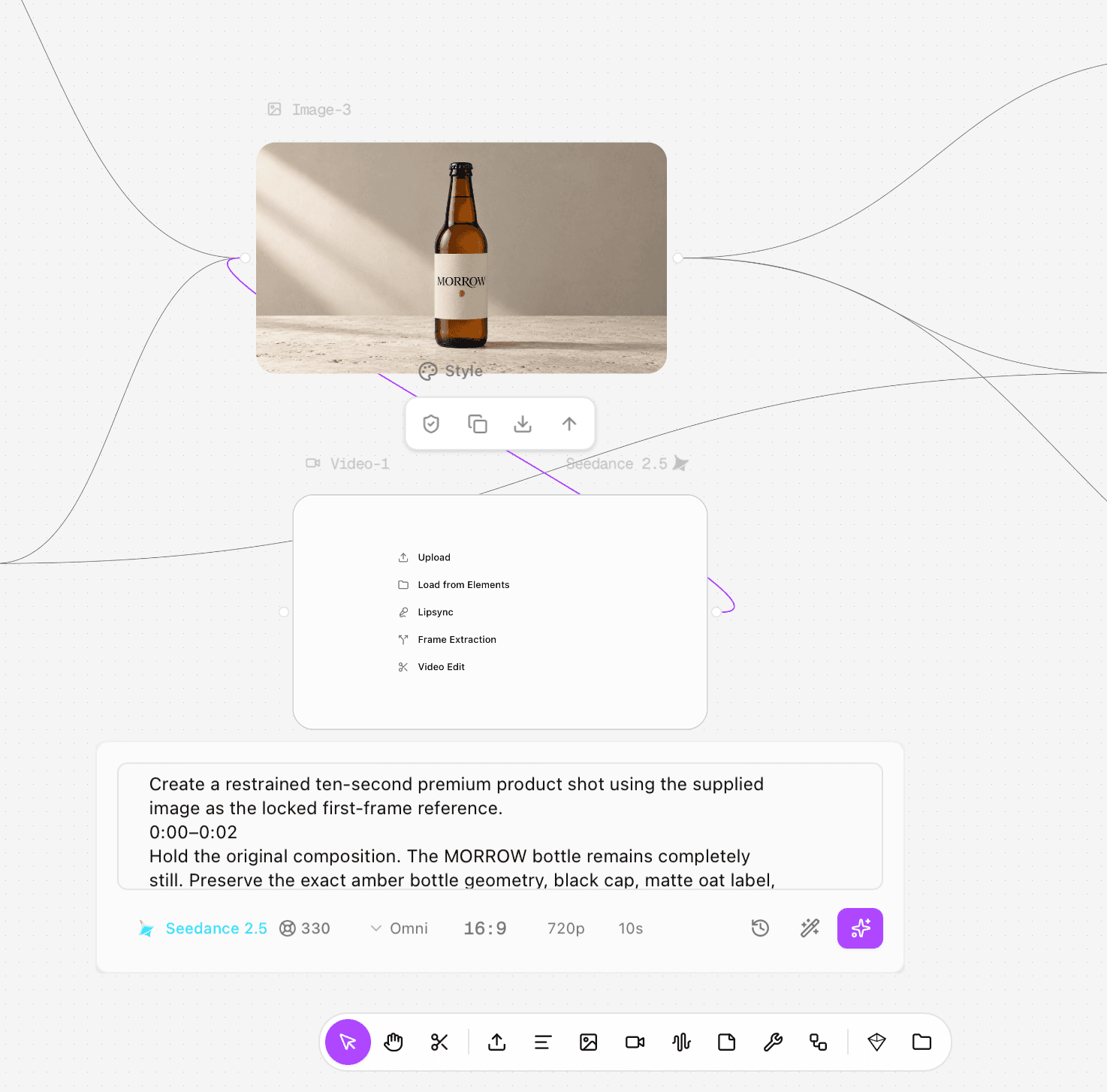
Figure 4.1. First Seedance 2.5 prompt and settings: 16:9, 720p, 10 seconds, 330 credits.
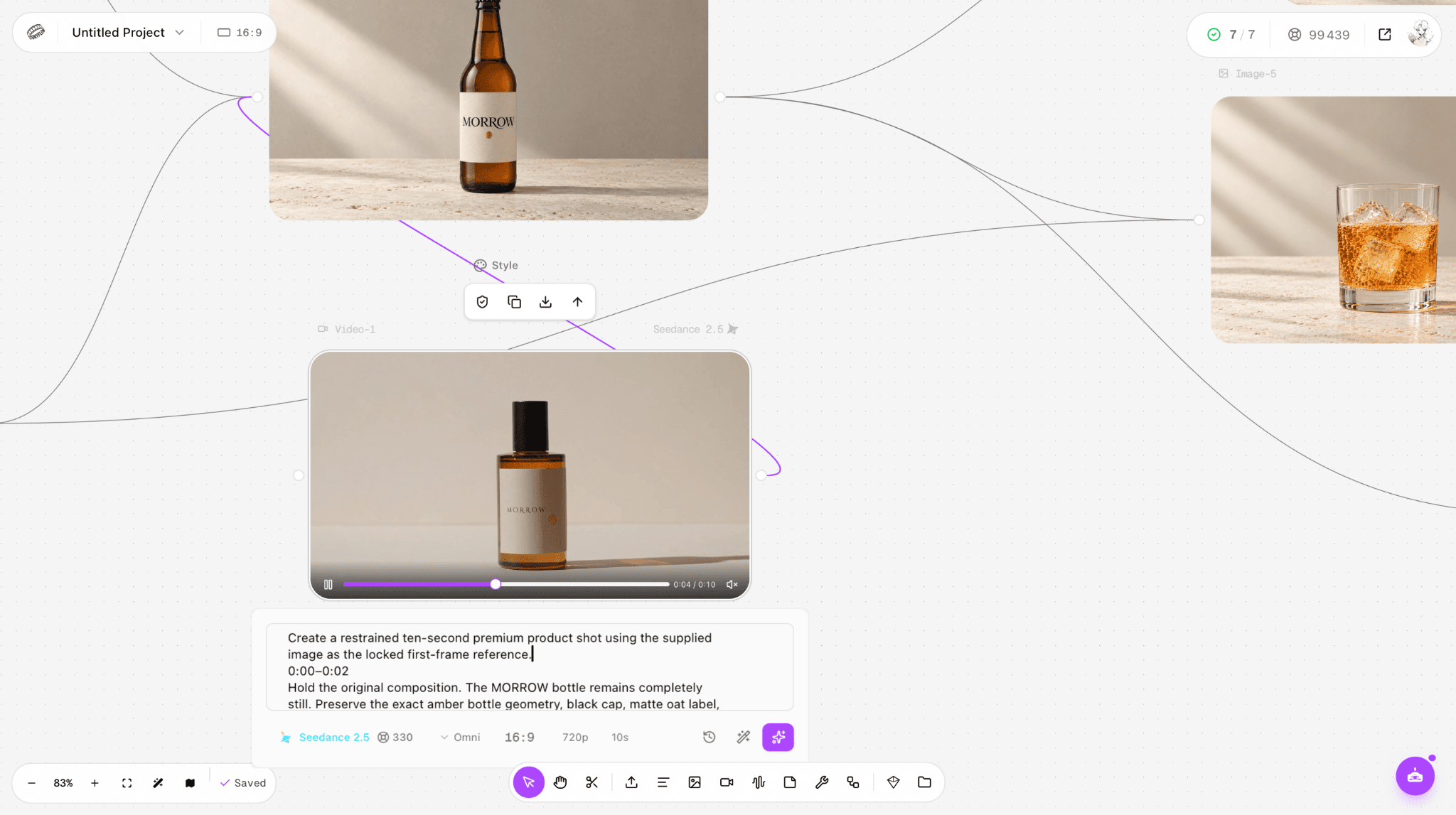
Figure 4.2. First Seedance 2.5 result at 0:04: the beer bottle became a perfume-like container.
Test 2: stronger negative instructions reduced neither redesign nor camera drift
The revised prompt began, “Animate the camera only. Treat the supplied image as a locked commercial product photograph,” and prohibited redesigning, replacing, resizing, rotating, bending, shortening, widening, or morphing the bottle. The output still became a wine-style bottle and the camera moved much farther than the requested five percent. Output evidence: https://s3.astorie.ai/req/req_db50de5e1dd2465fbeb6/0.mp4
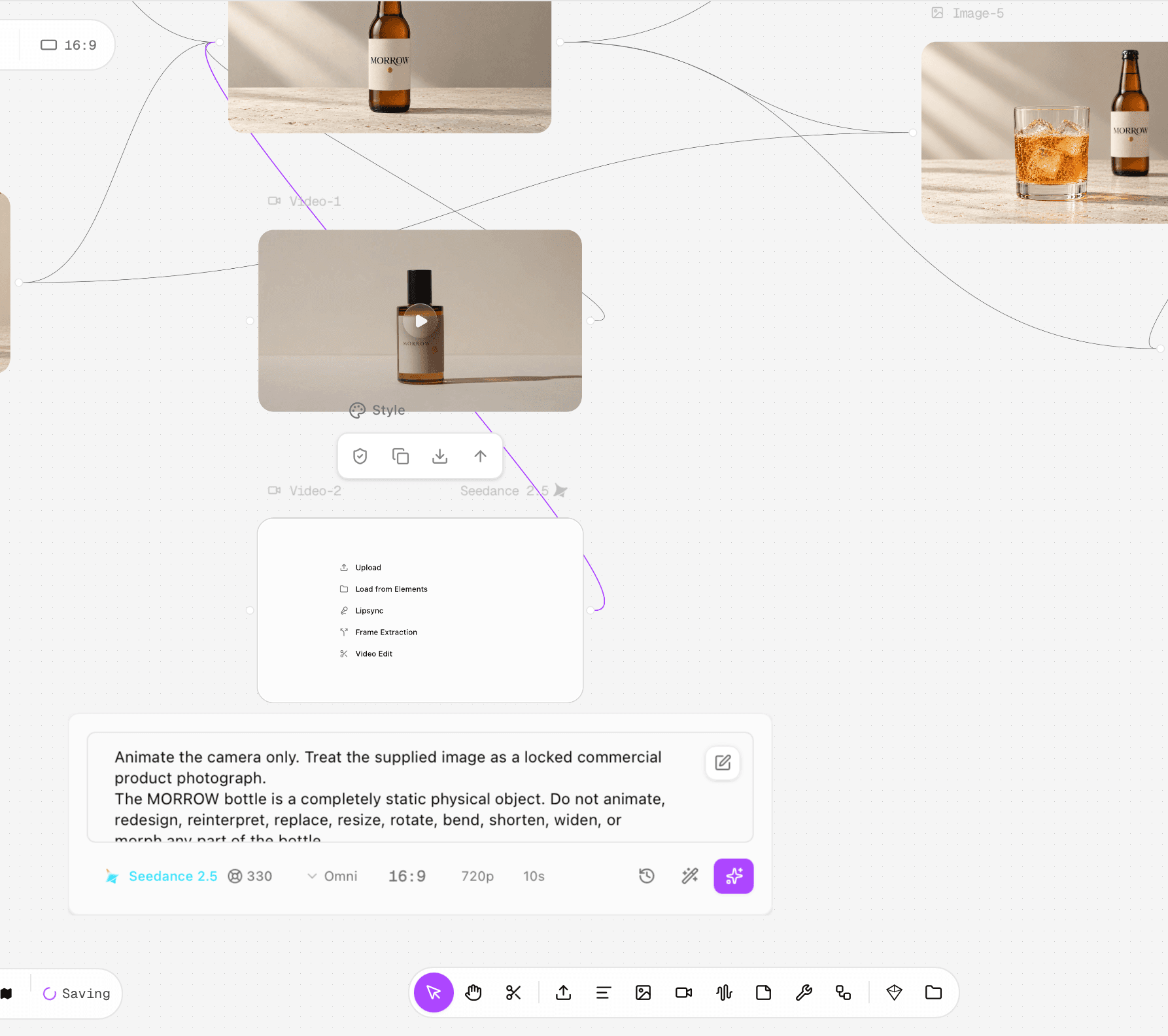
Figure 4.3. Revised Seedance 2.5 camera-only prompt.
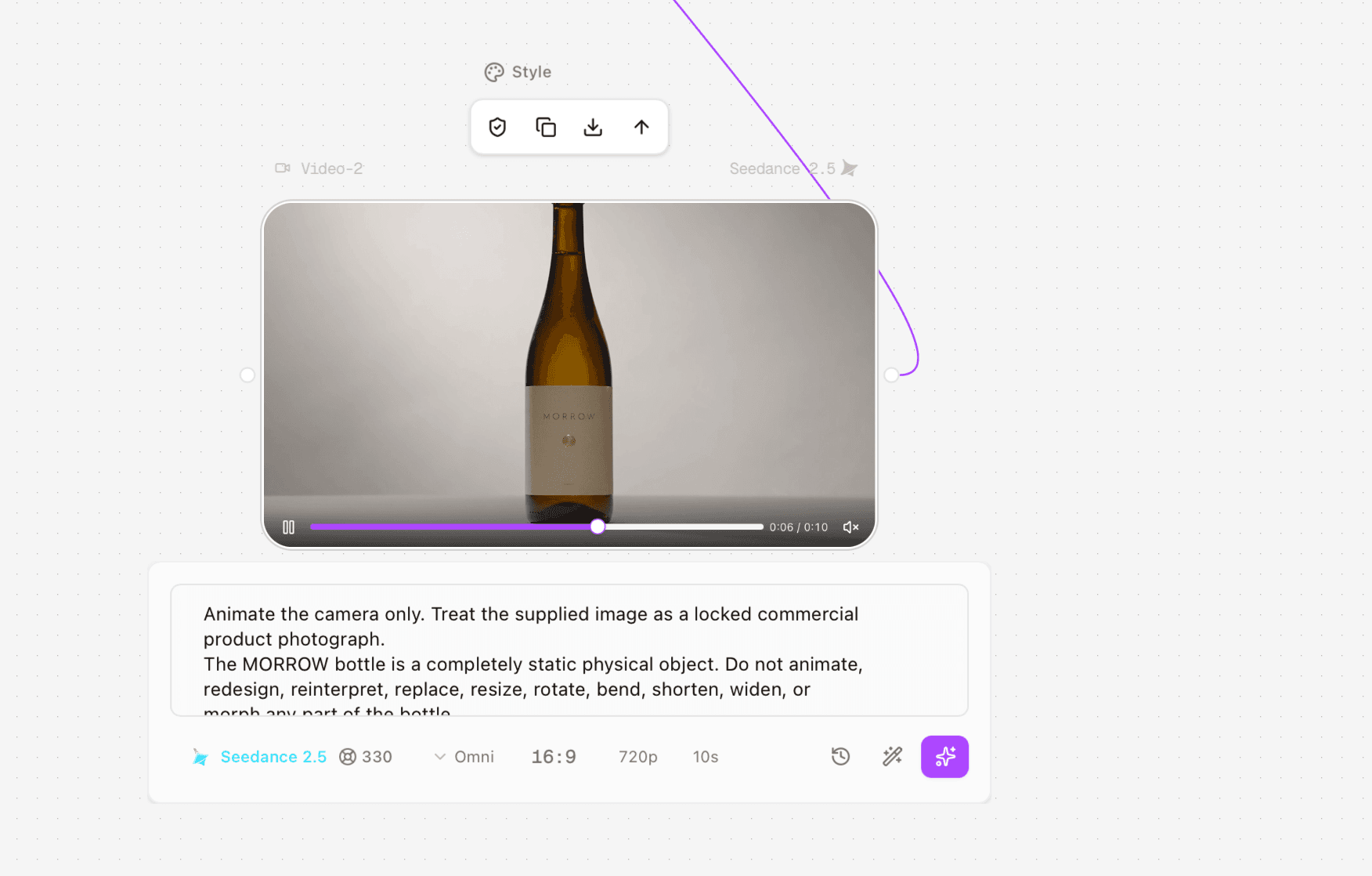
Figure 4.4. Revised result on the canvas: geometry and label changed again.
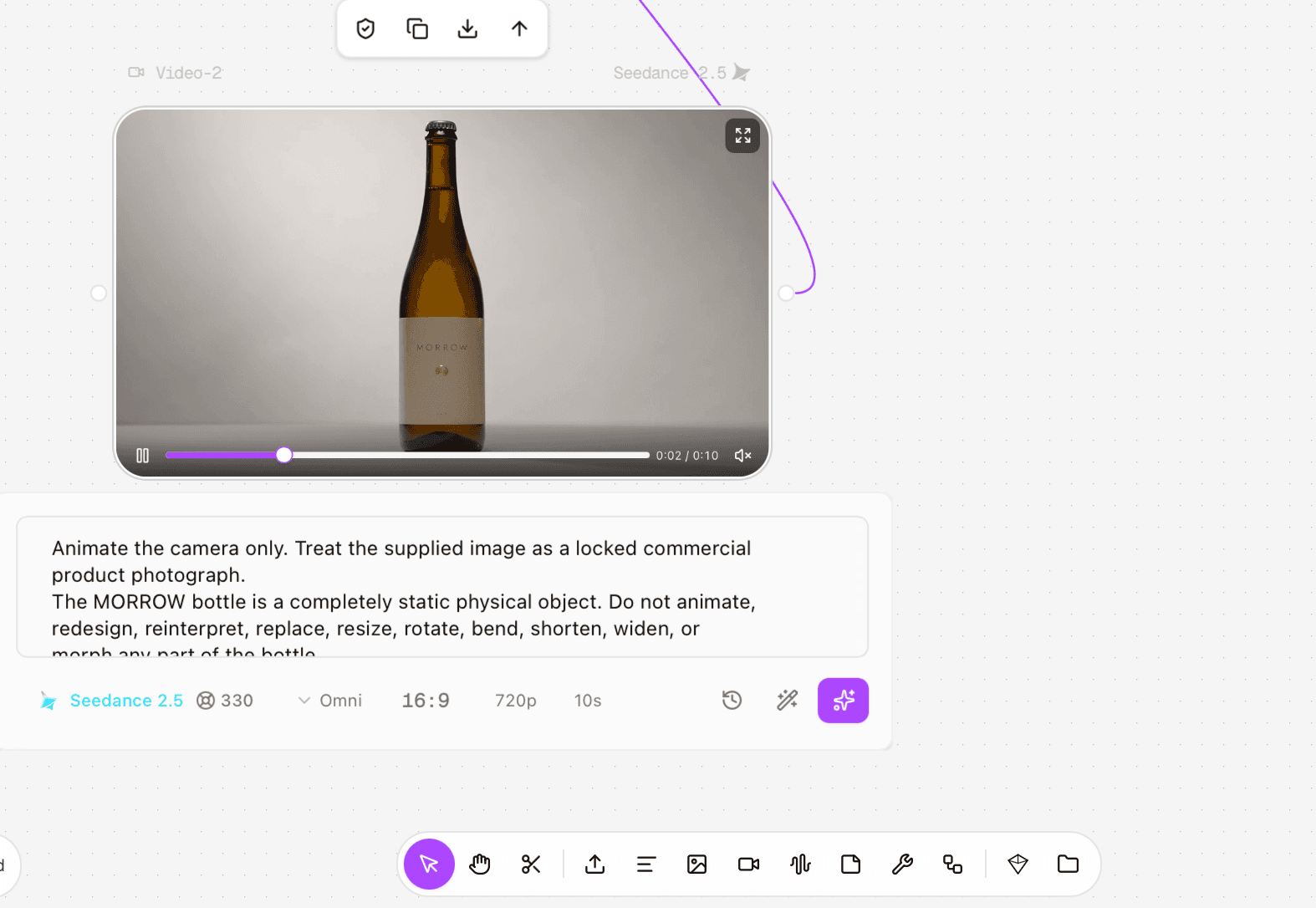
Figure 4.5. Revised result close-up: the bottle became a tall wine-style package.
Test 3–4: the 2.0 route exposed both a queue failure and a continuity failure
The first Seedance 2.0 Omni Standard attempt returned “Parameters changed or are not ready” after roughly seven minutes. A retry completed in about five minutes, but the bottle silhouette, label, copper mark, and camera scale changed. Output evidence: https://s3.astorie.ai/req/req_ac6ec73104864cbc98ec/0.mp4
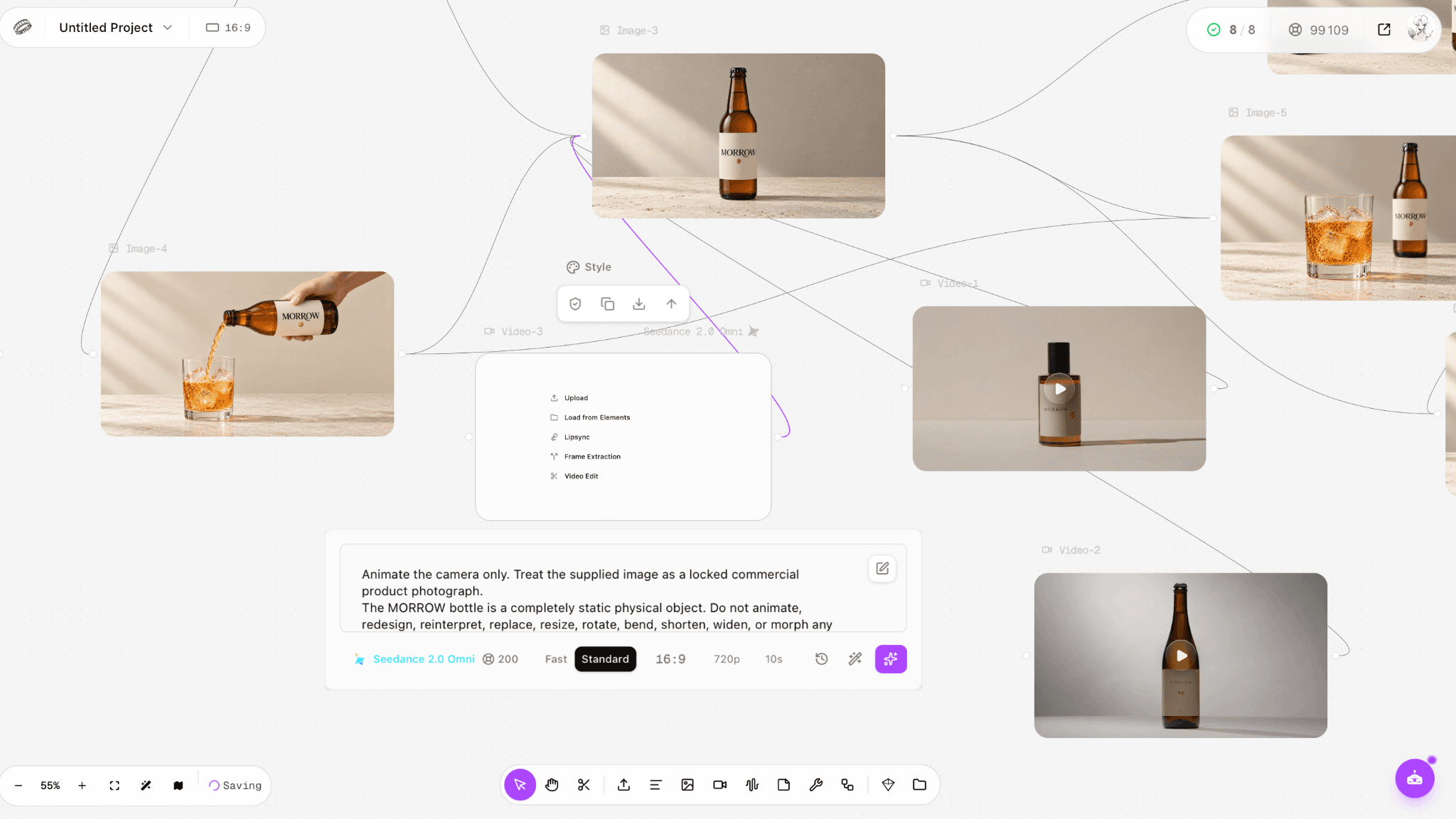
Figure 4.6. Seedance 2.0 Omni Standard attempt with the camera-only prompt.
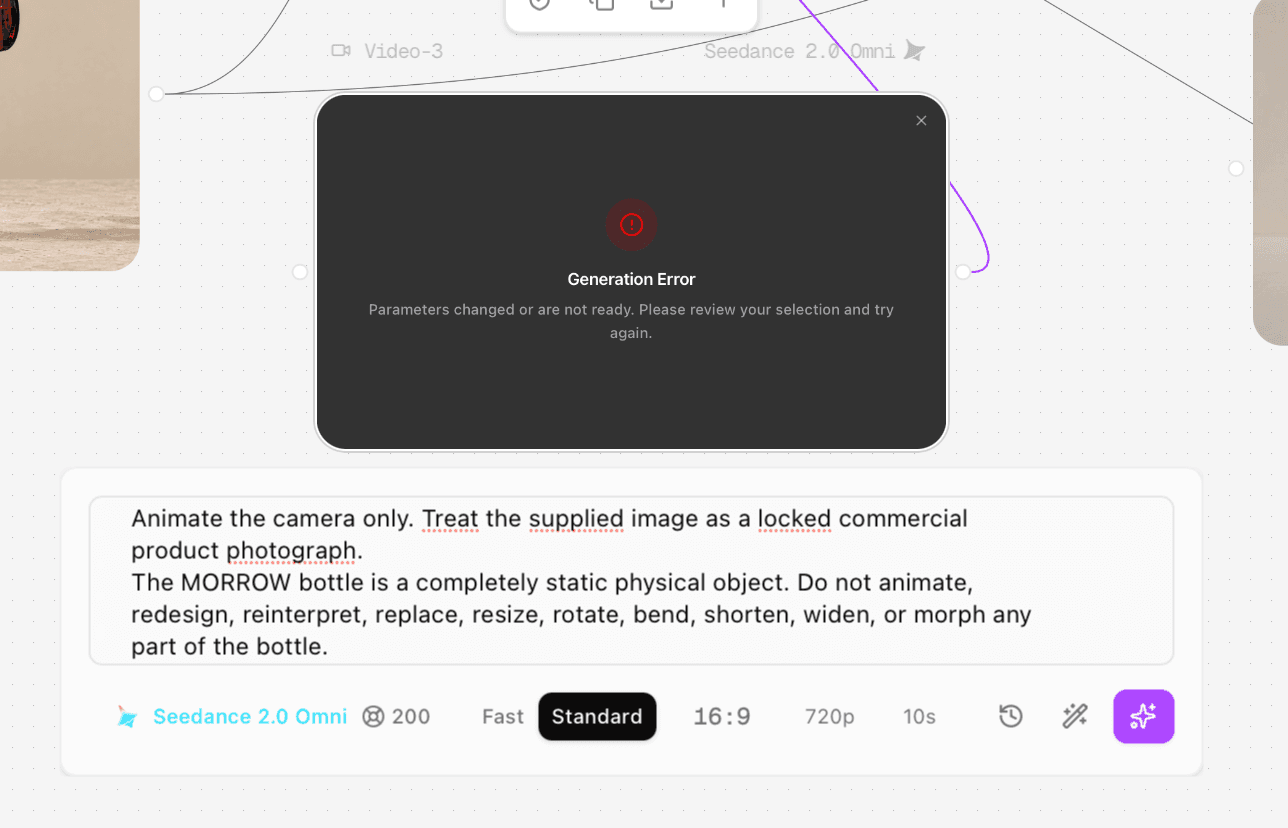
Figure 4.7. The first 2.0 attempt failed after the parameters-not-ready error.
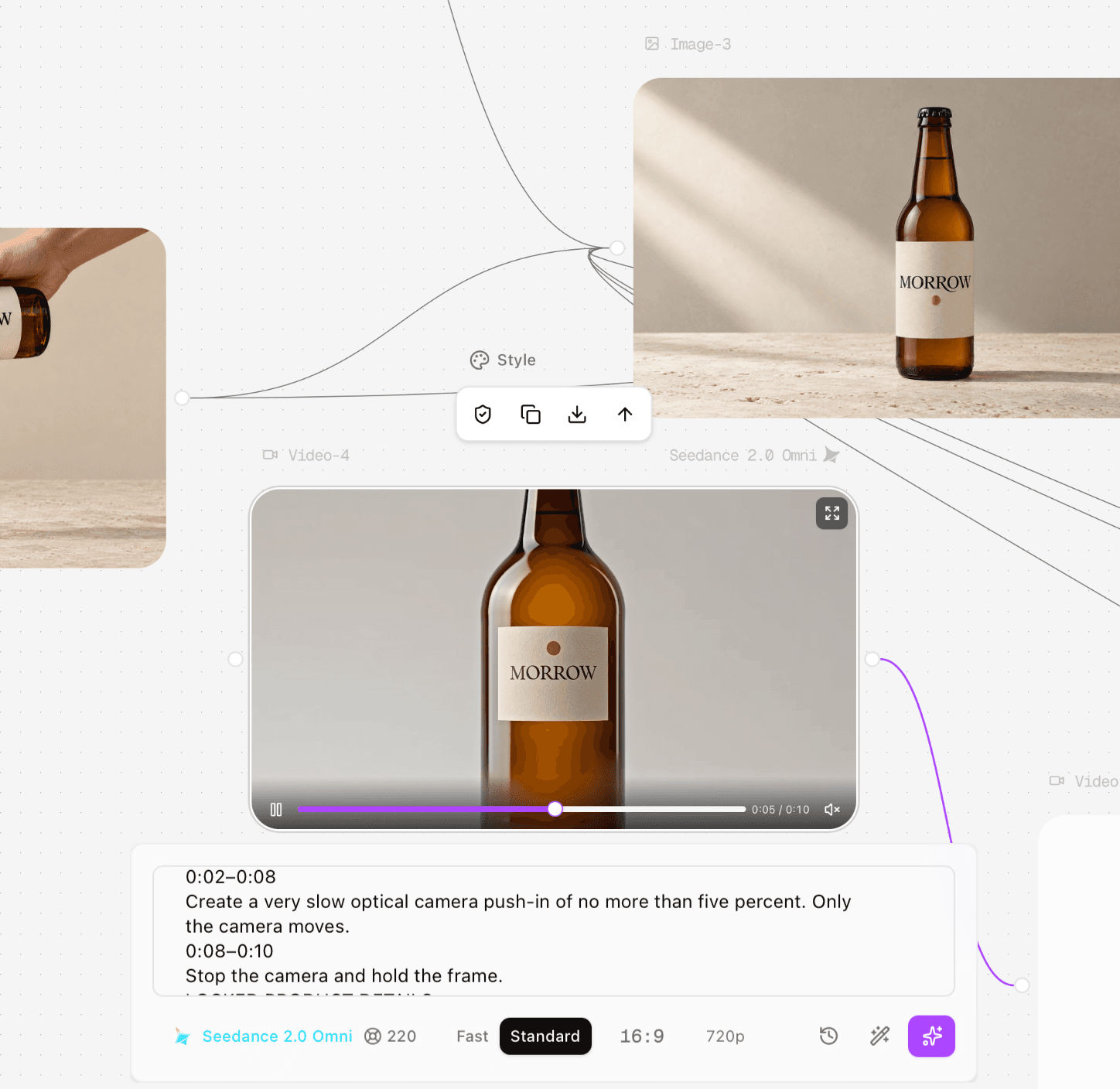
Figure 4.8. Successful 2.0 retry with 220 credits shown in the route.
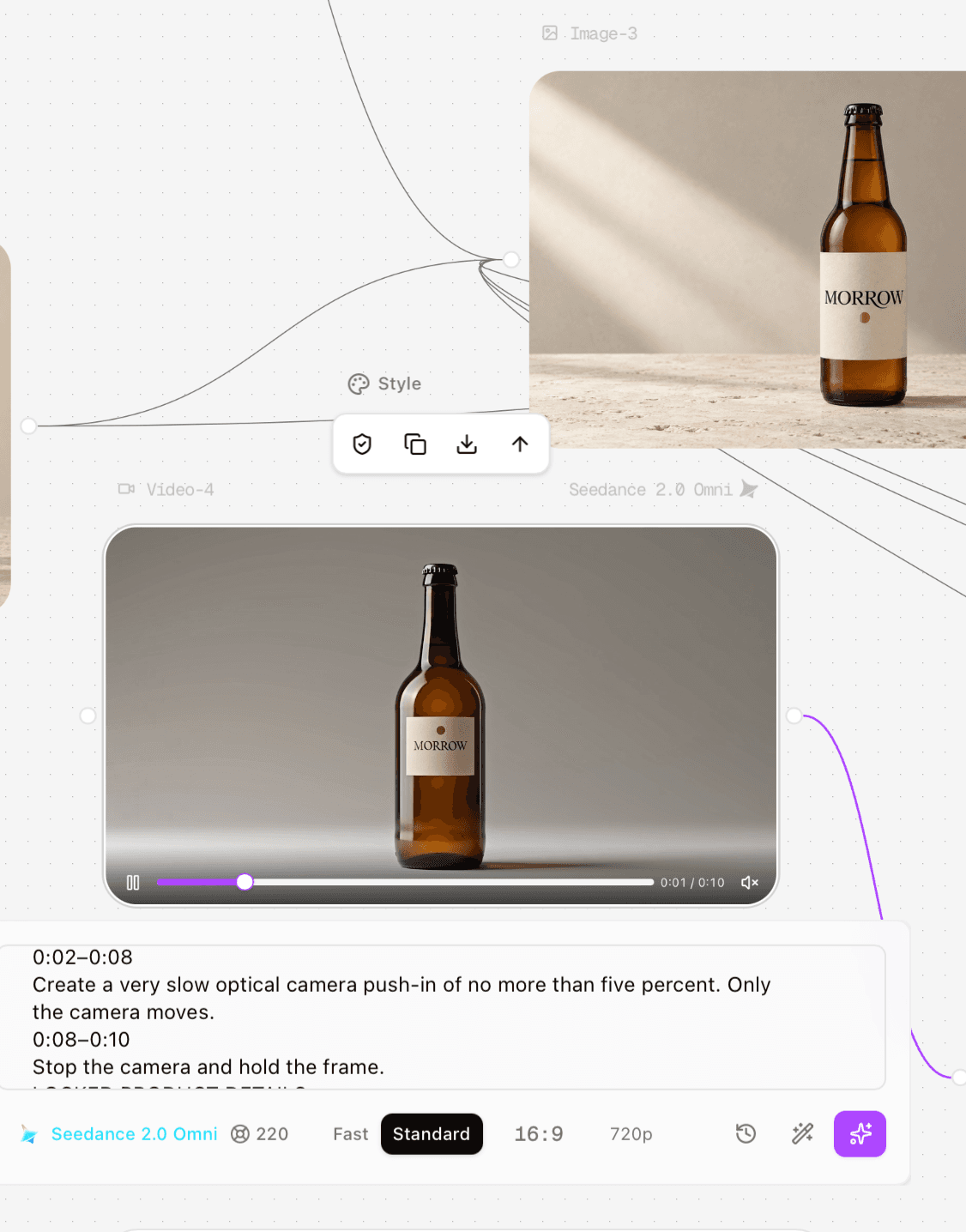
Figure 4.9. The completed 2.0 retry still redesigned the product.
Test 5: convincing hand and liquid, but brand identity failed
The pouring prompt continued the action from the supplied first frame and asked the hand to hold the MORROW bottle steadily while amber sparkling tea flowed into the existing glass. The hand, stream, and liquid level looked plausible. However, the bottle and tabletop changed, the wordmark rotated vertically, and the copper dot became a ring. Output evidence: https://s3.astorie.ai/req/req_6dfdb42df52544f0b387/0.mp4
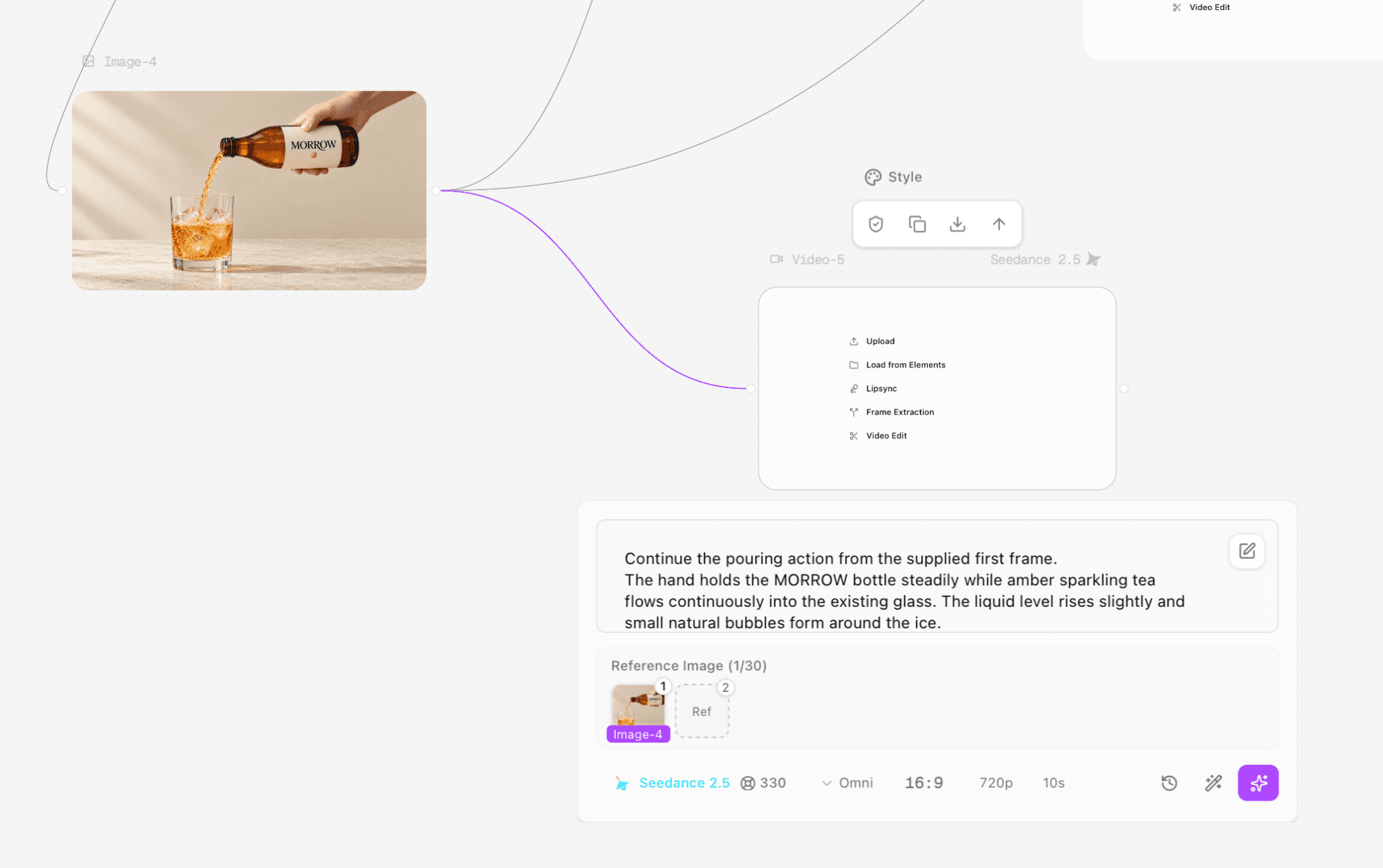
Figure 4.10. Pouring-action prompt and first-frame reference.
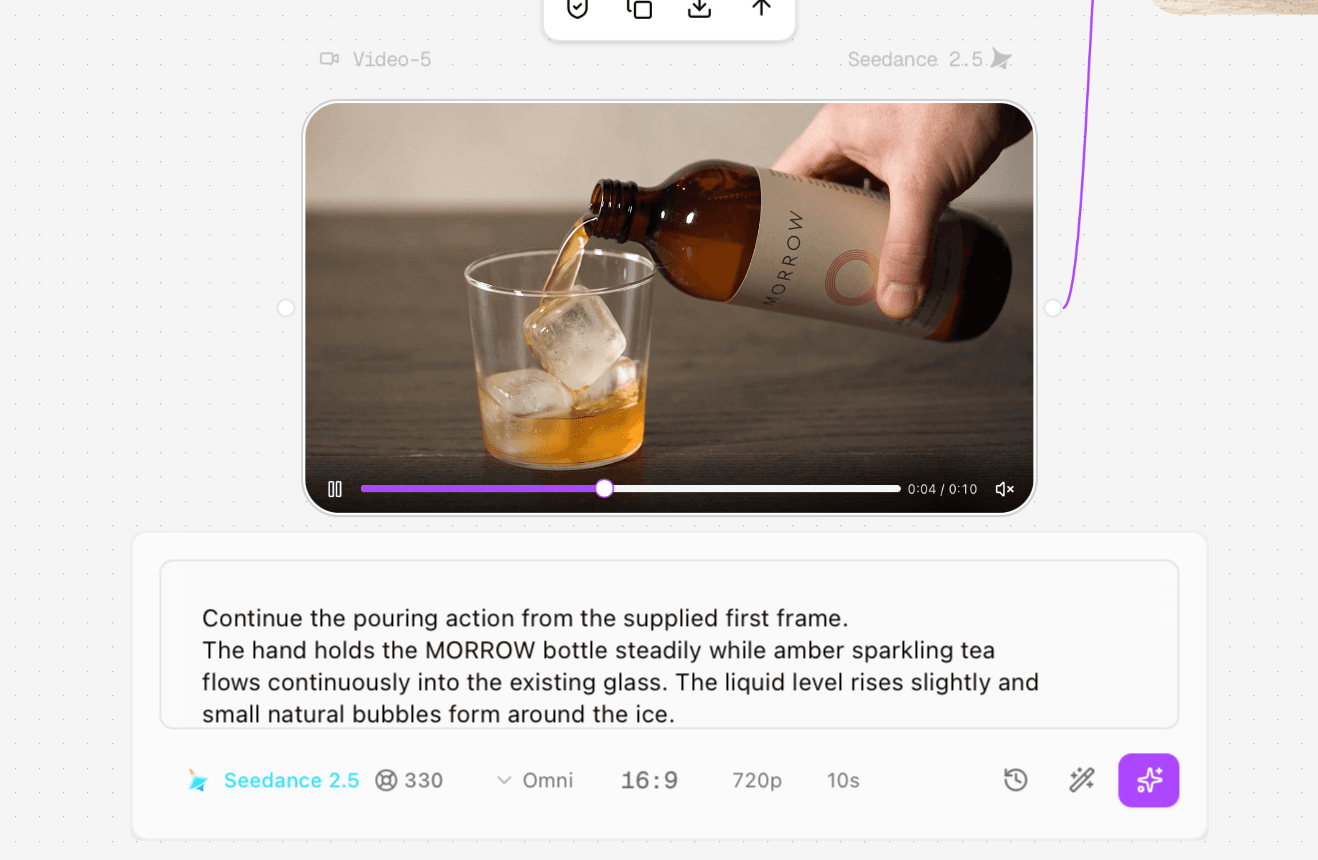
Figure 4.11. Pouring result: realistic liquid and hand, but a different bottle and set.
Test 6: bubble motion was too uniform
The final prompt locked the camera and asked only for small natural carbonation bubbles to rise slowly, gather briefly around the existing ice, and leave the liquid level unchanged. In the result, bubbles rose in a mechanically even pattern, the camera zoomed, and the ice changed. Output evidence: https://s3.astorie.ai/req/req_c4e0ef5acdf44f36816c/0.mp4
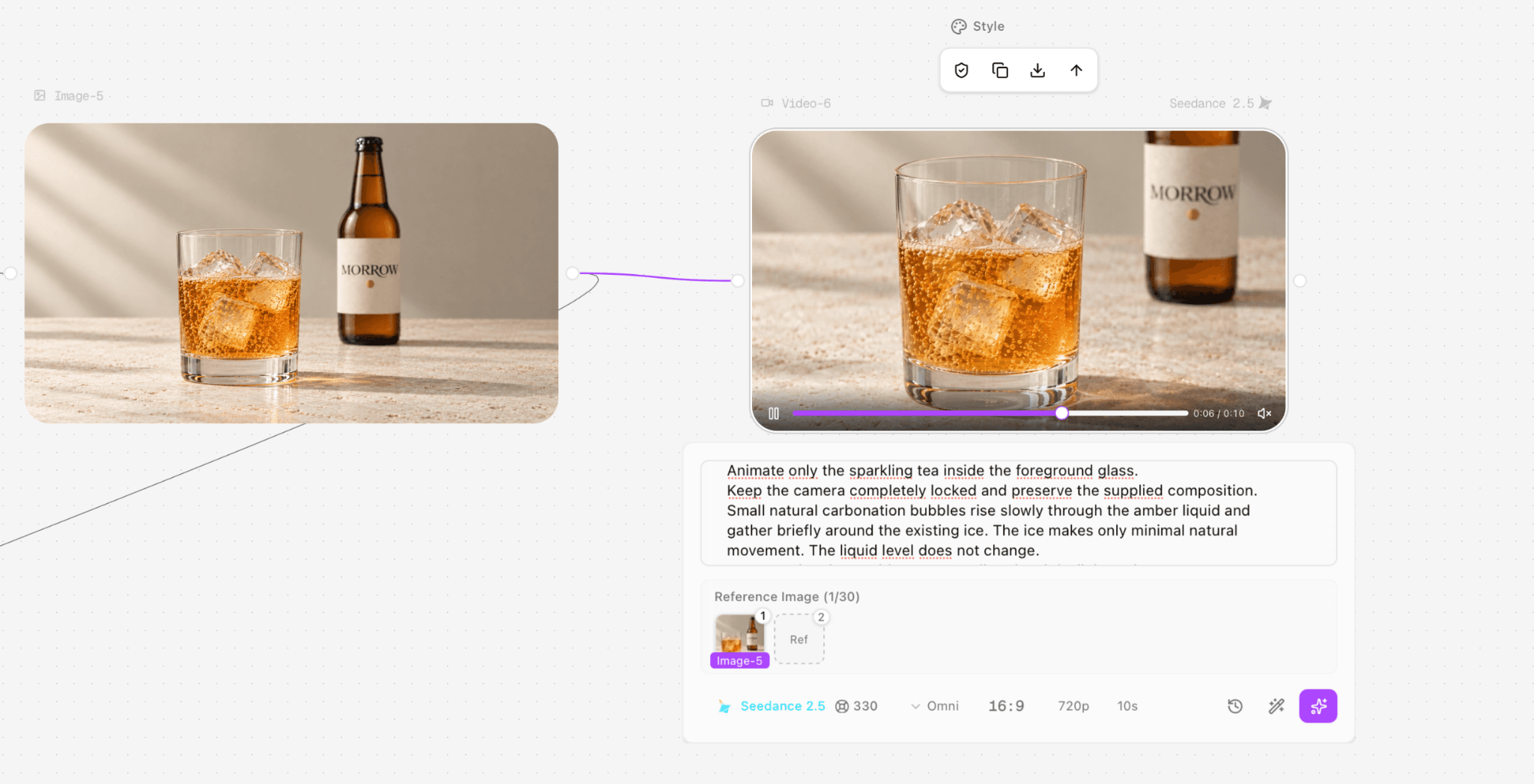
Figure 4.12. Bubble-detail result: dense, uniform motion and an unintended camera push.
Production conclusion from this test set
Seedance handled some local motion and fluid behavior better than strict package continuity in these runs. The actionable response is not to generalize that the model cannot preserve products. For a label-critical commercial shot, approve the still, run a short proof, inspect the full clip at multiple timestamps, and keep a compositing or still-based fallback. Preserve failed clips and route settings because they explain why a visually attractive take did not enter the final handoff.
Frequently Asked Questions
Is Seedance 2.5 the same as Seedance 2.0?
No. Seedance 2.5 is a later model in the same family, announced on July 31, 2026, with expanded long-form, reference, extension, and editing capabilities. Access routes may continue to offer 2.0 alongside it.
Does Seedance 2 have Pro, Lite, and Omni variants?
Current BytePlus 2.x routes use Seedance 2.5, Seedance 2.0, Seedance 2.0 Fast, and Seedance 2.0 Mini naming. Older official 1.x models used names including Seedance 1.0 Pro, Seedance 1.0 Pro Fast, and Seedance 1.0 Lite. Labels such as Omni may come from a specific third-party platform rather than BytePlus's current 2.x route names.
How long can Seedance 2.5 generate?
ByteDance's official launch states up to 30 seconds in one generation and supports multi-round extension. A specific platform may expose a lower limit, so confirm the live interface or API contract.
How many references can Seedance 2.5 use?
The official launch states up to 30 images, 10 video clips, and 10 audio clips in one pass. That is a maximum, not a recommendation; a smaller role-labeled set is often easier to control.
Can Seedance replace an NLE?
No. It can generate, extend, and edit video, but a controlled production still needs an NLE for selection, frame-accurate timing, audio, captions, graphics, color, and delivery.
Ready to try it on the canvas?
Open Astorie and fan your prompt across every frontier model in one workflow.