

10 Best Wonder Dynamics Alternatives in 2026 for AI Motion Capture and Character Animation
The best Wonder Dynamics alternatives in 2026 are DeepMotion Animate 3D for fast browser-based video-to-motion and Rokoko Vision 3.0 for a mocap workflow that can grow into Rokoko Studio and hardware capture. Wonder Studio—now Autodesk Flow Studio—still combines markerless body, face, and hand capture with camera tracking, clean plates, character passes, lighting, compositing, and editable scene export, so most alternatives replace one stage rather than the whole system.
Key takeaways
- DeepMotion Animate 3D is the best starting point for fast browser-based video-to-motion when the required deliverable is retargetable FBX or BVH animation.
- Rokoko Vision 3.0 provides a mocap workflow that can expand into Rokoko Studio, cleanup tools, suits, gloves, and hardware capture.
- Move One suits single-camera iPhone capture, while Plask is better for collaborative browser-based mocap, storage, retargeting, and scene sharing.
- Cascadeur is a cleanup companion for correcting contacts, balance, motion arcs, and penetration after capture rather than a complete actor-replacement system.
- Autodesk Flow Studio remains the stronger choice when the workflow requires automatic CG actor replacement, camera tracking, clean plates, lighting, compositing, and editable scene export in one system.
Choose by the deliverable you actually need. If the handoff is an FBX or BVH animation, a specialist may be faster and cheaper. If the job is automatic CG actor replacement inside live-action footage, Flow Studio remains the reference point and a multi-tool replacement can create more work than it removes.
The Short Answer: Which Wonder Dynamics Alternative Should You Choose?
Need | Start with | Flow Studio stage replaced | Why switch | Main trade-off |
Browser video-to-mocap | DeepMotion Animate 3D | Mocap + retargetable animation | Low setup barrier; body, face, hand, and multi-person options | No camera solve, clean plates, lighting, or composite |
Mocap that can scale into hardware | Rokoko Vision 3.0 | Mocap + retargeting | Create-to-Studio workflow; suits and gloves can be added later | Studio handoff; VFX scene work stays external |
Single-camera iPhone capture | Move One | Mobile mocap | Record and process on an iPhone with published credit costs | One pipeline stage; no actor replacement |
Collaborative browser workspace | Plask | Mocap + retargeting | Sharing, storage, scene controls, and multi-person capture | Not a camera-tracked live-action VFX pipeline |
Mocap cleanup | Cascadeur | Retargeting + cleanup | Fix contacts, balance, arcs, and penetration after capture | Companion only; it does not replace capture or compositing |
Open-source downstream stack | Blender | Camera/animation/light/composite/export | Maximum control with no license fee | Manual assembly, specialist skills, and more handoffs |
Wonder Dynamics Alternatives at a Glance
Alternative | Type and scope | Switch when… | What you gain / give up | Pricing or access |
1. DeepMotion Animate 3D | Video-to-mocap specialist | You need retargetable motion, not a finished VFX shot | Fast browser solve / no scene reconstruction | Free: 25 credits/mo, noncommercial; Starter $9/mo billed annually |
2. Rokoko Vision 3.0 | Video mocap + Studio ecosystem | You may later add cleanup tools or Rokoko hardware | Scalable ecosystem / desktop handoff | Free: 30 sec/mo; Basic $10 annual or $12 monthly |
3. Move One | Mobile mocap specialist | The performer can capture with an iPhone | Mobile capture / no live-action VFX assembly | 30 free one-time credits; Starter $18/mo + VAT |
4. Plask | Collaborative web mocap | Sharing and browser retargeting matter | Team workspace / narrower VFX scope | Free: 15 sec/day; Standard $18/mo billed yearly |
5. QuickMagic | Video/text-to-motion specialist | You want a low-friction motion draft with broad export presets | Many export targets / plan-dependent formats and storage | Free; Basic $11.90/mo billed yearly |
6. Cascadeur | Pipeline-stage cleanup companion | Raw mocap needs contact and physics cleanup | Animation control / no automated actor replacement | Free noncommercial; paid Indie/Pro use regional pricing |
7. Reallusion iClone | Character-production environment | You need editable character, camera, facial, and scene work | Broader production control / more setup and add-ons | Personal access; paid subscription and perpetual options |
8. MetaHuman Animator | Digital-human performance workflow | The target is a MetaHuman in Unreal Engine | High-fidelity human pipeline / not generic CG replacement | Unreal terms: free below $1M revenue; other uses vary |
9. Blender | Technical/open-source VFX stack | You can assemble capture, tracking, lighting, and compositing manually | Control and extensibility / steepest learning curve | Free and open source |
10. Adobe Mixamo | Rigging and animation-library companion | You need to rig a biped or apply stock animation | Fast rig/retarget step / no video mocap or VFX scene solve | Free with Adobe ID; access restrictions apply |
Pricing and access were checked against official pages on September 12, 2026. Taxes, local currency, promotions, signed-in allowances, and license eligibility can change; verify the live plan before publication.
Pipeline Matrix: Which Flow Studio Stages Does Each Tool Replace?
Tool | Mocap | Camera tracking | Clean plates | Retargeting | Lighting | Compositing | USD / scene export |
Autodesk Flow Studio | Built in | Built in | Built in | Built in | Built in | Built in | USD + elements |
DeepMotion | Yes | No | No | Yes | No | No | No |
Rokoko Vision | Yes | No | No | Yes, in Studio | No | No | No |
Move One | Yes | No | No | Export workflow | No | No | No |
Plask | Yes | No | No | Yes | Basic scene lights | Video render only | No |
QuickMagic | Yes | No | No | Export presets | No | No | No |
Cascadeur | Cleanup stage | No | No | Yes | No | No | USD animation |
iClone | Via tools/plugins | Scene cameras only | No | Yes | Yes | Partial | USD/scene options |
MetaHuman + Unreal | Digital-human capture | No automatic solve | No | MetaHuman-focused | Yes | Partial | Engine pipeline |
Blender | External/add-on | Yes | Manual | Yes | Yes | Yes | USD + scene files |
Adobe Mixamo | No | No | No | Humanoid mapping | No | No | No (FBX export) |
“Partial,” “external,” and similar labels are deliberate: an editor or 3D engine may cover a downstream stage without reproducing Flow Studio’s automatic live-action analysis.
Why Autodesk Flow Studio Is Difficult to Replace Directly
A mocap solver answers one question: how did the performer move? Flow Studio also analyzes how the camera moved, creates clean plates and masks, places and lights a CG character, composites that character into the plate, and exports editable elements. A tool can be excellent at motion capture while leaving six later tasks untouched.
That distinction changes the buying decision. A specialist stack offers more control over each component, but it also introduces file transfers, skeleton mapping, color and lighting handoffs, storage in multiple systems, and separate licenses. The relevant comparison is therefore stage coverage and total production effort—not the price of a mocap minute alone.
How We Compared the First Two Alternatives
The supplied hands-on material compares the shared mocap stage, not the complete Flow Studio pipeline. The input was a ten-second, single-performer, full-body clip shot at 30 fps with a fixed camera, visible feet, and steady light. The action included a neutral pose, one side step, a 90-degree turn, an arm reach, and a return to neutral. We kept the first result, used default or single-person settings, avoided manual cleanup before evaluation, and checked the route to FBX export.
We reviewed body tracking, foot contact, joint stability, occlusion recovery, editing controls, retarget/export options, processing steps, and the applications needed after the solve. We did not treat absent camera tracking, clean plates, lighting, compositing, or USD scene export as solver failures; those are scope differences documented in the matrix.
1. DeepMotion Animate 3D — Best Browser-Based Video-to-Mocap Alternative
Choose DeepMotion when Flow Studio’s integrated VFX stages are unnecessary and the deliverable is retargetable character motion from ordinary video. Animate 3D covers body tracking and can add face, hand, or multi-person tracking, but it is a mocap specialist rather than an automatic live-action actor-replacement system.
The gain is a low-friction browser workflow, common animation exports, custom-character support, and correction tools. The loss is everything around the solve: camera reconstruction, clean plates, shot lighting, compositing, and an assembled 3D scene remain separate work.
Pricing and access: the current Freemium plan includes 25 animation credits per month, a 20-second clip limit, 1080p/30 fps input limits, and personal noncommercial licensing. Starter costs $9 per month when billed annually and adds 180 credits. DeepMotion states that one body-animation second uses one credit; face and hand tracking each add 0.5 credit per second.
In our test, we uploaded the agreed ten-second, single-performer, fixed-camera clip and reviewed the first solve without manual cleanup. DeepMotion produced a usable 3D preview, but the motion showed visible geometry penetration or clipping in parts of the take. Editing was less straightforward than generating the initial solve. The Rotoscope Pose Editor exposed joint controls and made frame-level correction possible, yet the supplied test notes report that pose adjustments did not resolve the difficult frames cleanly. That makes DeepMotion a fast first pass for mocap, not a substitute for animation cleanup. These screenshots document the first result and correction interface; they do not establish camera tracking, clean plates, lighting, compositing, or scene export.
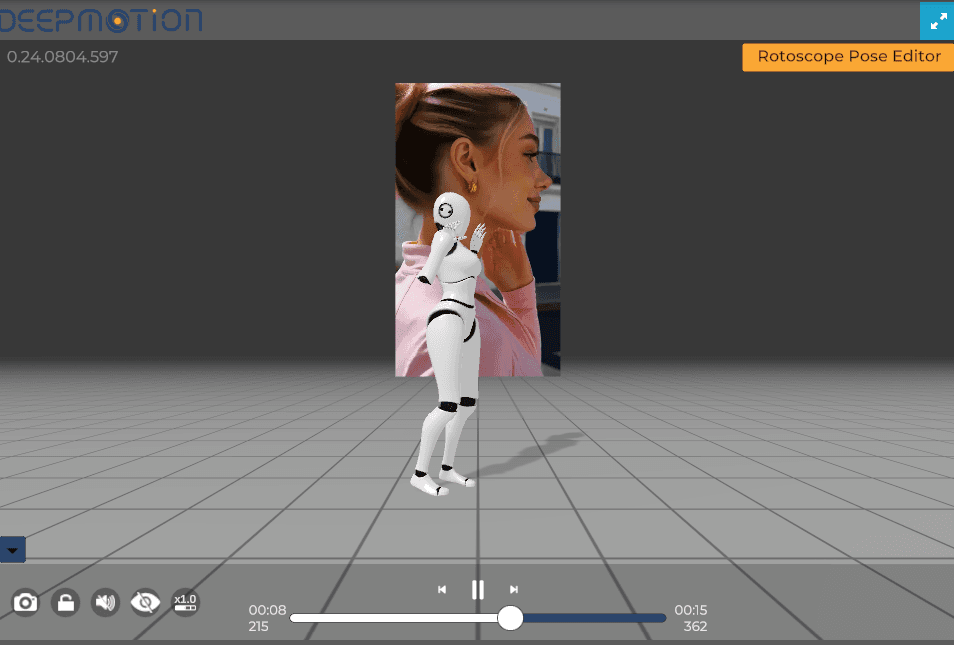
Figure 1. DeepMotion’s first 3D motion preview shown beside the source performer.
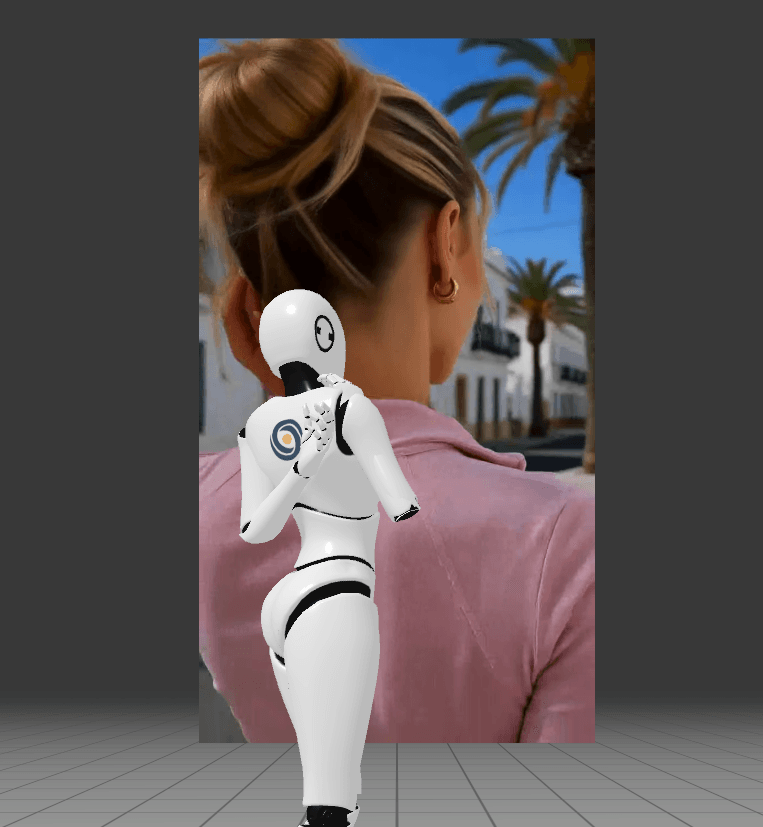
Figure 2. A second view of the uncleaned DeepMotion result used to inspect body alignment.
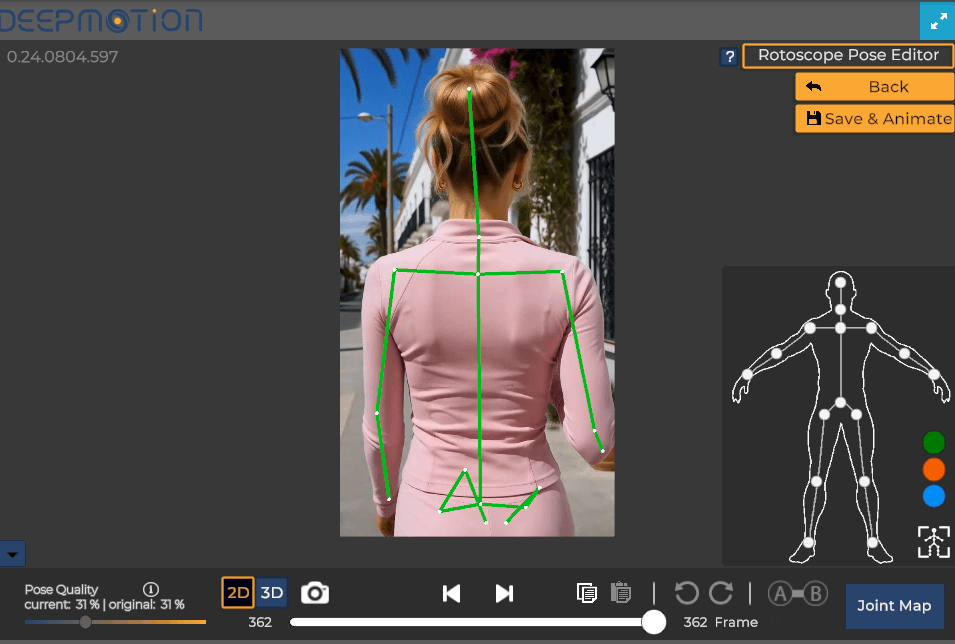
Figure 3. The Rotoscope Pose Editor exposes frame-level joint controls for corrections.
Official source: DeepMotion Animate 3D pricing
2. Rokoko Vision 3.0 — Best Mocap Alternative With an Upgrade Path
Pick Rokoko Vision when you want AI video capture now but may later need Studio cleanup, custom-character retargeting, live integrations, or Rokoko suits and gloves. Vision 3.0 lives in the web-based Rokoko Create platform; review, editing, retargeting, and final export continue in Rokoko Studio.
This is a stronger ecosystem path than a stand-alone solver, but it still replaces only Flow Studio’s motion stage. Rokoko’s current documentation says Vision 3.0 uses uploaded monocular video, does not support finger tracking at launch, and no longer offers webcam recording or the previous dual-camera workflow.
Pricing and access: Starter is free and includes 30 seconds of Vision processing per month plus FBX export. Basic includes 600 seconds per month and costs $10 per month billed annually or $12 month-to-month; it adds custom-character retargeting and BVH export. Higher Studio plans increase processing, integrations, collaboration, and API-related features.
In our test, upload and processing began in Rokoko Create, but the generated motion had to be opened in Rokoko Studio for proper inspection and export. The supplied notes judged the resulting body motion positively. The workflow was therefore one handoff longer than a fully browser-based preview, although an export path was available on the free account. The process screenshots show the queued and completed web job; the Studio capture shows the skeleton result; the export panel records FBX as available while BVH and CSV were locked in that account state. This is evidence about the tested account and first result, not a claim that Vision replaces Flow Studio’s camera solve, clean plates, lighting, compositing, or USD scene.
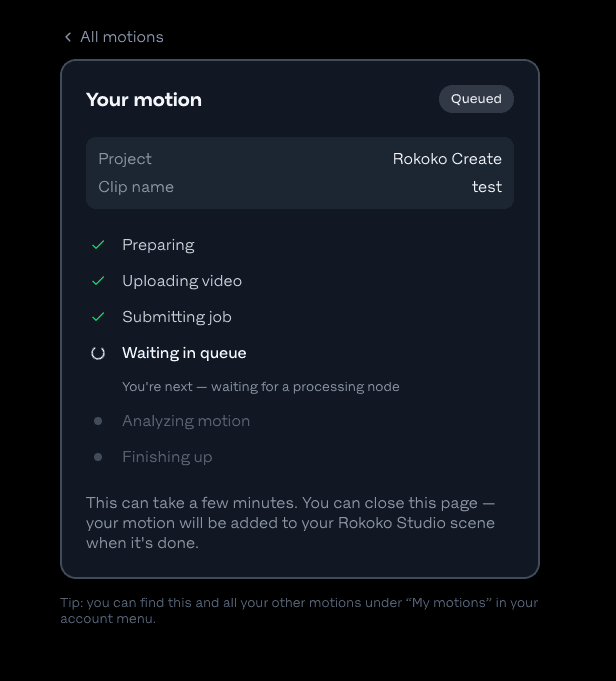
Figure 4. Rokoko Create processing the uploaded test clip.
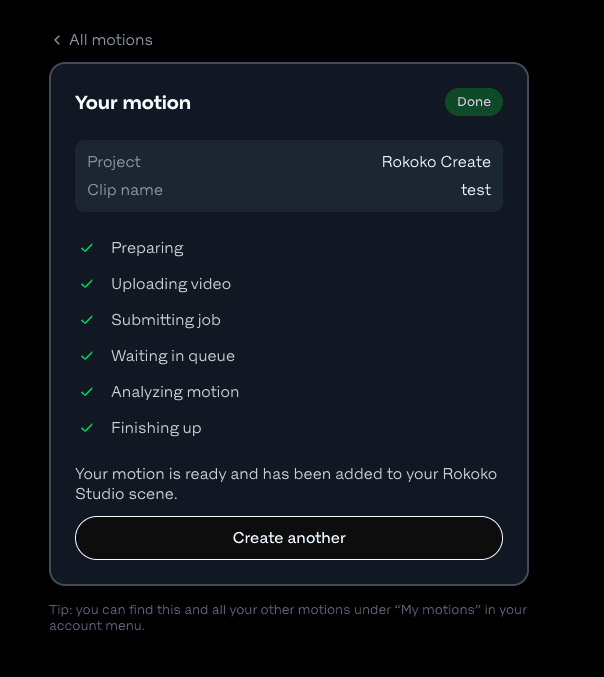
Figure 5. Rokoko Create marks the motion as ready in Studio.
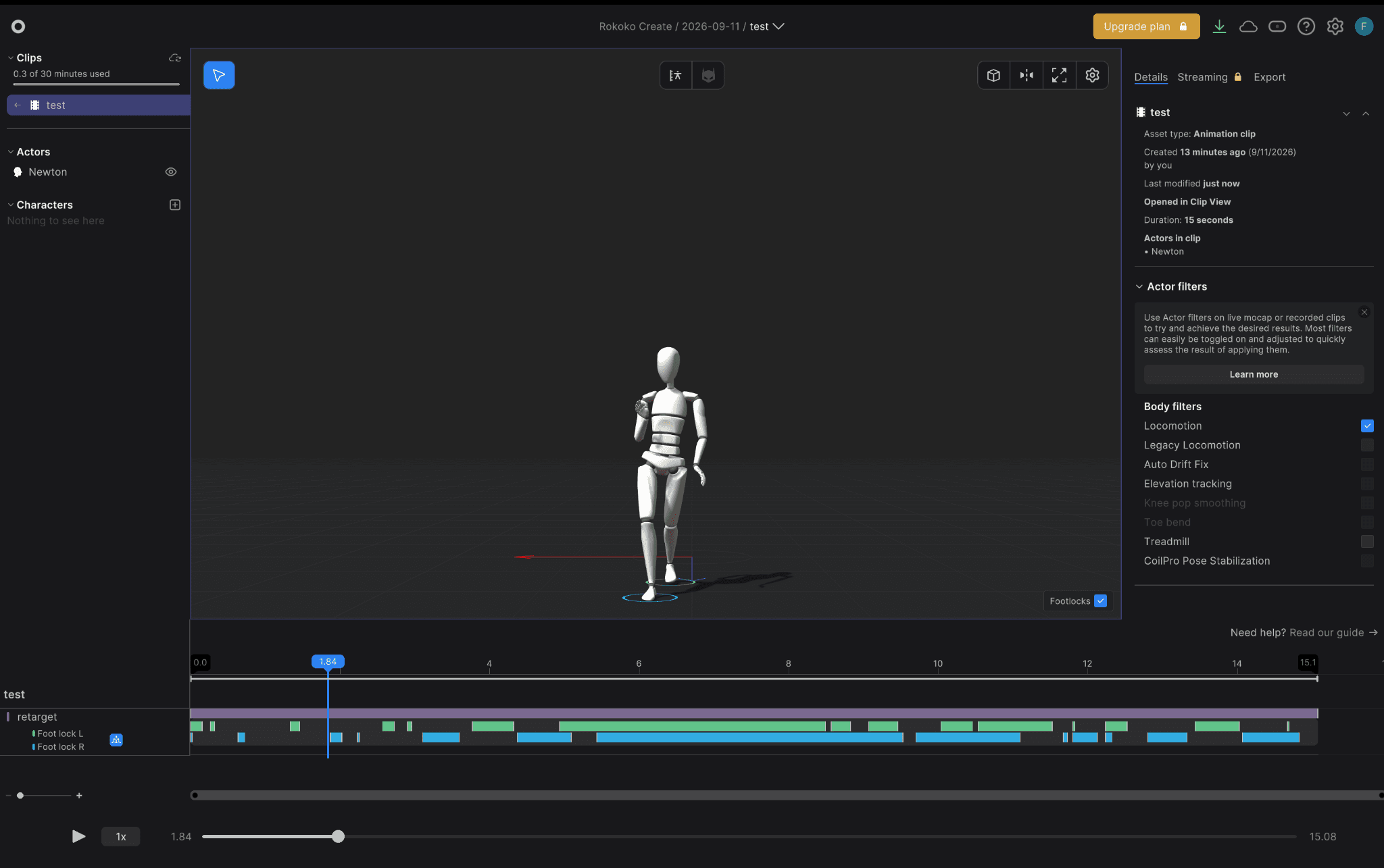
Figure 6. The generated body motion opened in Rokoko Studio for review.
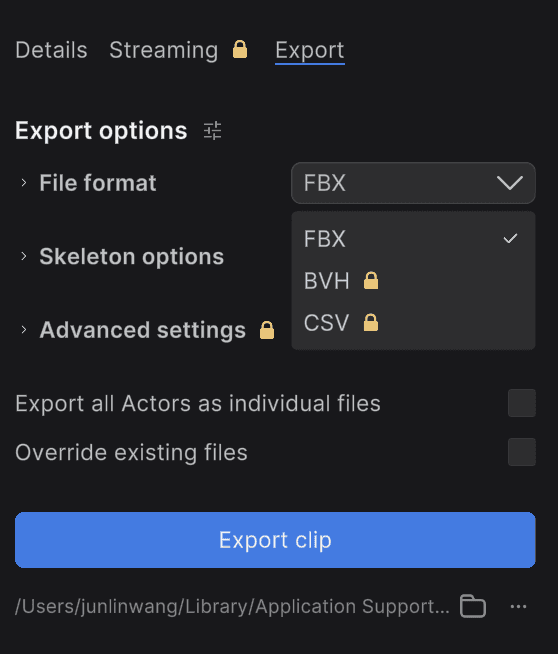
Figure 7. The tested free-account export panel shows FBX available and other formats locked.
Official source: Rokoko Vision 3.0 plans and workflow
3. Move One — Best for Single-Camera iPhone Motion Capture
Move One is the better switch when capture must happen on an iPhone and the team wants a clear person-second credit model. It turns single-camera recordings into 3D animation data, so it replaces Flow Studio’s mobile mocap stage—not the camera solve, clean plate, lighting, or compositing stages.
You gain a purpose-built capture app and portable production setup. You give up browser-agnostic input and the assembled live-action-to-CG shot. Plan for retargeting, cleanup, character work, and rendering elsewhere.
Pricing and access: the Free plan includes 30 one-time credits and allows clips up to 30 seconds. Starter is $18 per month plus VAT with 60 monthly credits and clips up to 60 seconds. Move AI states that Gen 1 costs one credit per person-second and Gen 2 costs two; monthly credits do not roll over.
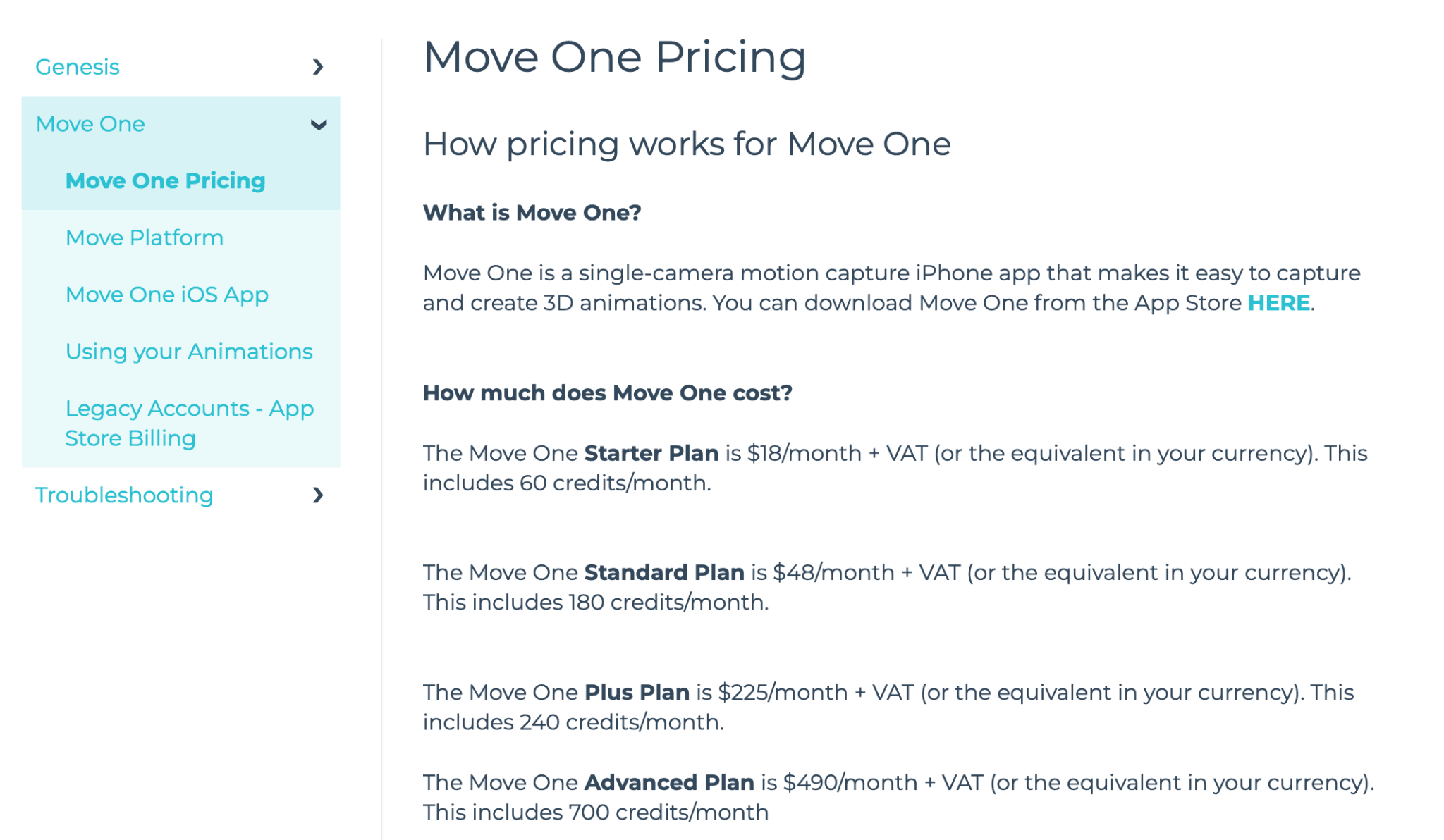
Figure 8. Move One’s official pricing page supplied with the original draft; the live figures were rechecked on September 12, 2026.
Official source: Move One pricing
4. Plask — Best Collaborative Browser Mocap Workspace
Choose Plask when Flow Studio’s broad VFX automation matters less than browser collaboration around motion capture, retargeting, sharing, and simple scene setup. Plask supports full-body and hand capture, multi-person mocap, common animation exports, scene sharing, real-time collaboration, and basic automatic camera and lighting controls.
Those scene controls do not amount to Flow Studio-style reconstruction of a live-action camera or automatic clean plates. The gain is a more collaborative motion workspace; the trade-off is that a finished actor-replacement shot still needs a downstream VFX tool.
Pricing and access: Free includes a 15-second daily mocap limit, 1 GB storage, and FBX, GLB, and BVH export. Standard is $18 per month billed yearly with ten minutes of capture per month and a seven-day trial. Pro is $50 per month billed yearly with one hour per month.
Official source: Plask pricing
5. QuickMagic — Best for Low-Friction Motion Experiments
QuickMagic is worth switching to when the priority is quickly turning video or text into editable motion and exporting to many character pipelines. It supports body, hand, and facial-motion options plus single- and multi-subject workflows, but availability varies by plan and workflow.
The upside is low-friction experimentation and broad export presets for FBX, BVH, Unreal, Mixamo, iClone, Roblox, and other targets. The downside is plan-dependent output, storage, and commercial licensing—and no automatic clean plate, camera reconstruction, or final live-action composite.
Pricing and access: Free includes 50 V Coins, a 30-second single-video limit, 50 MB uploads, 15-day asset storage, and FBX export; commercial licensing is not included. Basic is currently $11.90 per month billed yearly with 200 credits, longer clips, more export formats, and commercial use. API access uses separate pricing.
Official source: QuickMagic pricing
6. Cascadeur — Best Pipeline-Stage Alternative for Mocap Cleanup
Use Cascadeur after capture when foot sliding, knee pops, balance, arcs, or geometry penetration have become the bottleneck. It is a pipeline-stage companion, not a direct Wonder Dynamics replacement: it cleans, retargets, and authors character animation but does not automatically reconstruct and composite a live-action shot.
Cascadeur’s value is editable animation. Animation unbaking, AutoPosing, physics tools, retargeting, and common 3D formats provide far more control than accepting a raw solver result. That control also means extra time and another application in the pipeline.
Pricing and access: Cascadeur Free is limited to noncommercial use and CASC export. Indie and Pro enable commercial work and broader animation export under different eligibility rules; the official store localizes prices by region. Annual Indie and Pro subscriptions also provide perpetual builds for versions released during the active term.
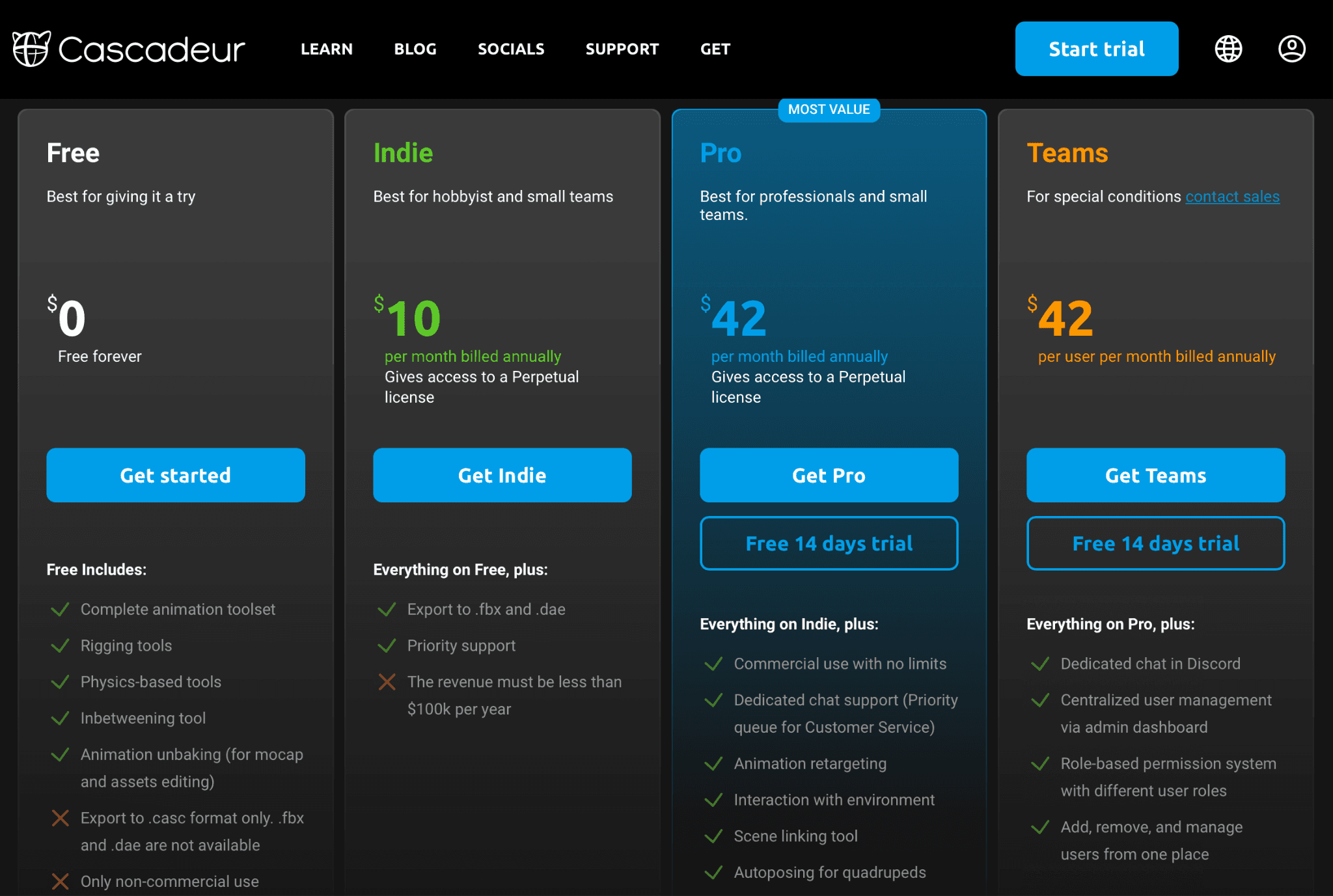
Figure 9. Cascadeur plan comparison retained from the original draft; prices can be promotional or region-specific, so use the live local plan page.
Official source: Cascadeur plans
7. Reallusion iClone — Best for Editable Character Production
Move to iClone when the bottleneck is not motion extraction alone but the lack of an editable character-production environment. iClone combines body and facial animation, mocap connections, motion correction, cameras, lighting, real-time scene work, rendering, and links to Character Creator and Unreal Engine.
That broader scope can replace several downstream handoffs, yet it remains more hands-on than Flow Studio. Capture devices, video-mocap tools, character assets, and add-ons can affect the real cost, and iClone does not automatically derive a live-action clean plate and camera solve from the same uploaded clip.
Pricing and access: iClone Personal has no time limit and exposes the animation, production, and rendering tools, but restricts 3D export time. Paid subscription and perpetual-license options unlock a fuller pipeline; price depends on the selected license, plugins, and companion products.
Official source: Reallusion iClone
8. MetaHuman Animator — Best for High-Fidelity Digital Humans
Choose MetaHuman Animator when the target is a high-fidelity digital human in Unreal Engine, not an arbitrary CG character replacing an actor in any shot. The current MetaHuman framework captures nuanced performance and connects directly to Unreal’s real-time cameras, lighting, animation, and rendering tools.
MetaHuman 5.8 extends established facial workflows to the body, but the scope remains character-specific. You gain a deep real-time digital-human pipeline; you give up Flow Studio’s general upload-and-replace workflow and must manage capture, scene construction, retargeting, and rendering decisions yourself.
Pricing and access: Unreal Engine is free for individuals and small businesses below $1 million in annual gross revenue. Different royalty or seat rules apply above relevant thresholds and by product type; the current seat price shown by Epic is $1,850 per user per year. Check the license for the intended commercial project.
Official source: MetaHuman
Official source: Unreal Engine licensing
9. Blender — Best Open-Source Custom VFX Pipeline
Blender makes sense when a technical team wants to own the downstream pipeline and can replace automation with craft. It covers camera tracking, rigging, animation, retargeting, lighting, rendering, compositing, and USD-related interchange, and it can receive motion from the specialist tools above.
The benefit is control, extensibility, and no software subscription. The cost is manual integration: Blender does not take one uploaded plate and automatically produce the same actor replacement, clean plates, tracked camera, character passes, and finished composite as Flow Studio.
Pricing and access: Blender is free and open source on Windows, macOS, and Linux. Hardware, render time, training, artists, add-ons, and cloud rendering can still dominate the total cost of a production pipeline.
Official source: Blender
10. Adobe Mixamo — Best Free Rigging and Animation-Library Companion
Use Mixamo when the problem is getting a bipedal humanoid rigged or applying a ready-made animation—not extracting a performer from footage. It can auto-rig supported humanoids, map uploaded rigs, apply library motions, and export the result for a 3D tool.
That makes Mixamo a useful retargeting and prototyping companion, but a weak direct alternative to Flow Studio. It provides no video mocap, camera tracking, clean plates, lighting, compositing, or scene reconstruction, and it stores only the last-used character in the online service.
Pricing and access: Mixamo is free with an Adobe ID and Adobe permits its characters and animations in personal, commercial, and nonprofit projects. Adobe says Mixamo is unavailable to Enterprise and Federated IDs and to users whose Adobe account country code is China. The auto-rigger is limited to bipedal humanoids.
Official source: Adobe Mixamo FAQ
What Do You Lose When Switching From Autodesk Flow Studio?
The main loss is not a single feature. It is the shared project context that lets one system analyze footage and produce multiple coordinated outputs from it.
Automatic actor replacement: a mocap skeleton alone does not place, light, occlude, and composite a CG character into the plate.
A matched camera and plate package: specialist solvers generally do not generate the camera track, clean plate, alpha masks, and character passes from the same job.
Editable scene handoff: Flow Studio can export coordinated elements and USD-based scenes to major 3D tools; a replacement stack may require FBX, separate cameras, manual scale checks, and relinking.
One credit, storage, and review system: multiple tools introduce separate accounts, plan limits, asset-retention rules, and approvals.
Lower coordination cost: every extra export creates a chance for frame rate, skeleton, coordinate-system, naming, or color-management errors.
Do not migrate if the project depends on automatic camera solving, clean plates, coordinated USD scene export, or rapid actor replacement and the team does not already have a reliable tracking and compositing stack. In that case, the apparent savings from a cheaper mocap tool can disappear in manual handoffs.
Where Astorie Fits—and Where It Does Not
Astorie is not a Wonder Dynamics alternative for editable 3D motion or VFX scene reconstruction. It can support a different job: organizing character references, concept frames, generative image-to-video shots, audio, and revisions on a connected canvas for previs and creative exploration.
Use that workflow only when the deliverable can change from editable mocap and scene data to 2D concept or generative video. Astorie does not extract a skeleton, solve a camera, create a clean plate, retarget 3D motion, or export a reconstructed USD scene, so it is intentionally outside the Top 10 ranking.
Official source: Astorie
How to Choose a Wonder Dynamics Alternative
Start with the output. If another artist needs FBX or BVH, compare DeepMotion, Rokoko, Move One, Plask, and QuickMagic. If they need a finished VFX shot, price the whole stack.
Match the capture environment. Use Move One for iPhone-first capture; use a browser solver for uploaded video; move toward hardware when occlusion, real-time capture, or several performers become important.
Budget for cleanup. Fast turns, occlusion, floor contact, and hand detail can expose solver limits. Cascadeur, iClone, Blender, or Rokoko Studio may become necessary after capture.
Verify the export on the exact plan. A free preview is not useful if the required file format, custom retarget, commercial license, or video length is paywalled.
Count handoffs, not just subscription prices. Capture, retarget, camera solve, clean plate, lighting, compositing, and scene export can each add another tool and owner.
When Autodesk Flow Studio Is Still the Better Choice
Flow Studio is still the better choice when the goal is automatic CG actor replacement in live-action footage and the team needs several coordinated outputs—not just a skeleton. Autodesk’s current Free tier includes 300 monthly credits, up to 30 seconds of AI mocap or 15 seconds of Live Action/Animation at the published credit rates, a 720p maximum export, 1 GB storage, and one tracked actor per project.
Paid tiers increase credits, resolution, storage, upload size, custom characters, and actor count. More important than the allowance is the integrated scope: motion capture, camera tracking, clean plates, alpha masks, character passes, lighting/compositing, and USD-based scene transfer remain inside one service.
Official source: Autodesk Flow Studio tier comparison
Frequently Asked Questions
What happened to Wonder Studio?
Wonder Studio was renamed Autodesk Flow Studio after Autodesk acquired Wonder Dynamics. Current product and support pages use the Flow Studio name, while “Wonder Dynamics alternatives” remains the common search term.
What is the closest Wonder Dynamics alternative?
DeepMotion and Rokoko are the closest options for the video-to-mocap stage. No tool in this list is an exact one-product replacement for Flow Studio’s combination of motion capture, camera tracking, clean plates, lighting, compositing, and editable scene export.
What is the best free Wonder Dynamics alternative?
Rokoko Vision is the strongest free starting point when you need an exportable mocap workflow: Starter includes 30 seconds of Vision processing per month and FBX export. DeepMotion, Plask, QuickMagic, Blender, and Mixamo also offer free access, but their clip, license, format, storage, or scope limits differ.
Can Blender replace Wonder Studio?
Blender can replace many downstream stages—camera tracking, animation, lighting, rendering, compositing, and scene interchange—but it does not automate the entire uploaded-footage-to-CG-character workflow. Expect to add a mocap solver and perform more manual setup.
Which alternative supports hand or finger capture?
DeepMotion and Plask advertise hand-tracking options, and QuickMagic lists hand-motion workflows. Rokoko Vision 3.0 does not support finger tracking at launch; Rokoko directs users to Smartgloves II for finger capture. Verify the plan, input requirements, and target skeleton before relying on hand data.
Can Mixamo replace Flow Studio for character animation?
Mixamo can rig a supported bipedal humanoid and apply library animation, but it does not derive motion from live-action video or reconstruct a shot. Treat it as a free rigging and animation-library step, not a full Flow Studio replacement.
Final Take
DeepMotion is the fastest first test for browser video-to-motion; Rokoko is the better first test when the workflow may expand into Studio and hardware capture. Choose a specialist only if the required handoff is motion data. When camera solve, clean plates, lighting, compositing, and scene export are part of the same deliverable, staying with Flow Studio—or budgeting a deliberate multi-tool pipeline—is the more honest comparison.
Related reading
Runway Gen4 vs Veo vs Kling: Practical Video Production Comparison
Practical comparison for AI video production choices across Runway Gen4, Google Veo, and Kling.
7 Best Photoroom Alternatives in 2026 (Tested for Ecommerce Photography)
Do you need a Photoroom alternative that goes beyond simple background cutouts and batch image processing? Try these 7 tools and pick the one that best matches your AI product photography use cases.
6 Ideogram Alternatives for Killer AI Image Generation
Here are 6 tried and tested Ideogram alternatives that work best for prompt accuracy, text, image realism, character consistency and are intelligent enough to render real-world scenarios and logic.
Ready to try it on the canvas?
Open Astorie and fan your prompt across every frontier model in one workflow.