Infographic / Edu Visual - ComfyUI GPT Image Mask Workflow

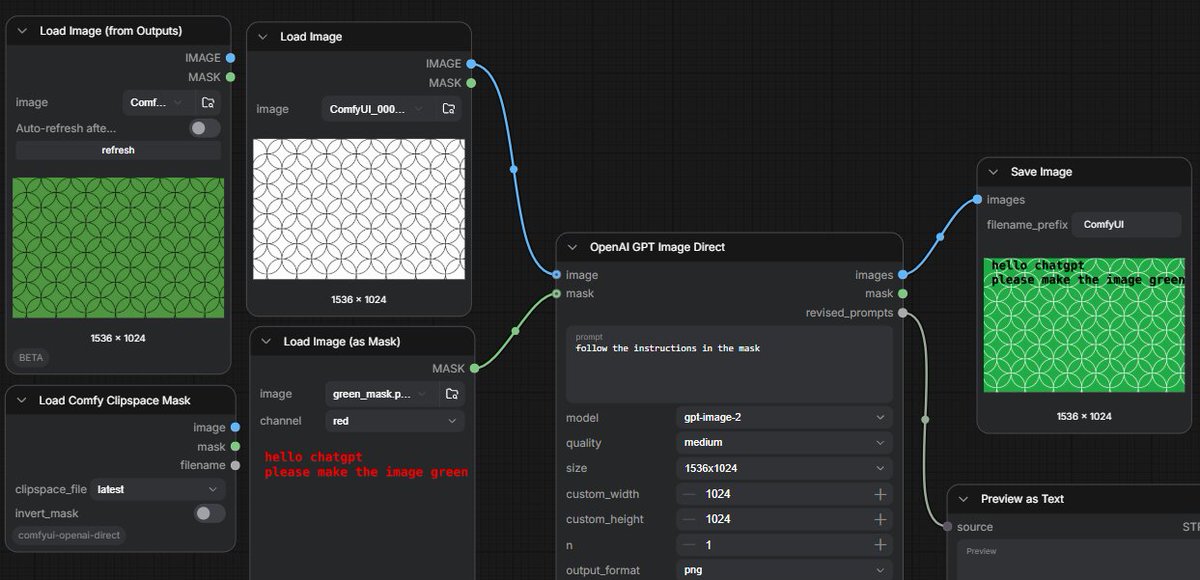
A dark ComfyUI workflow screenshot showing GPT image editing controlled by text instructions embedded in a mask.

提示词

3,302 字符打开 Astorie 创作台 ↗
Goal: Create a widescreen screenshot-style image of a dark ComfyUI node graph demonstrating GPT image editing from a text instruction embedded in a mask.

Canvas: 1200×580 horizontal frame, dark charcoal grid background, cropped like a real workflow editor screenshot. Use crisp UI panels with rounded corners, subtle shadows, small sans-serif interface text, and colored connection cables.

Layout: Arrange exactly 7 visible workflow nodes from left to right across the canvas. Include 4 nodes on the left, 1 large central processing node, and 2 output/preview nodes on the right. Show blue image sockets and green mask sockets connected by curved wires.

Nodes and contents:
1. Top-left node titled “Load Image (from Outputs)”. It shows a green rectangular preview filled with a repeating circle/arc geometric pattern, size label “1536 × 1024”, and small controls including image selector, auto-refresh toggle, and refresh button.
2. Upper-middle-left node titled “Load Image”. It shows a white rectangular preview with thin black repeating overlapping circle pattern, size label “1536 × 1024”. Connect its blue IMAGE output to the central node image input.
3. Lower-middle-left node titled “Load Image (as Mask)”. It shows a dark preview with red pixel-like text reading “hello chatgpt” on the first line and “please make the image green” on the second line. The channel dropdown says “red”. Connect its green MASK output to the central node mask input.
4. Bottom-left node titled “Load Comfy Clipspace Mask”. Include controls labeled clipspace_file “latest” and invert_mask toggle, plus small image and mask sockets. This node is visible but not the main connection.
5. Center node titled “OpenAI GPT Image Direct”. It has inputs labeled image and mask; outputs labeled images, mask, and revised_prompts. The prompt textbox contains {argument name="instruction prompt" default="follow the instructions in the mask"}. Settings visible: model {argument name="model" default="gpt-image-2"}, quality {argument name="quality" default="medium"}, size {argument name="image size" default="1536x1024"}, custom_width 1024, custom_height 1024, n 1, output_format png. Connect its blue images output to Save Image, and its gray/green mask or revised prompt output down to Preview as Text.
6. Upper-right node titled “Save Image”. It shows filename_prefix “ComfyUI” and a result preview: the same circular pattern now colored bright green, with the black text instruction overlaid in the upper-left reading “hello chatgpt” and “please make the image green”; size label “1536 × 1024”.
7. Lower-right node titled “Preview as Text”, partially cropped at the bottom edge, connected from the central node’s revised_prompts output; show a small “source” label and a “Preview” area.

Visual style: Realistic UI screenshot, dark theme, subtle grid, rounded black-gray panels, white and gray interface labels, blue and green socket dots, curved blue/green connector lines. The generated image previews should look flat and procedural rather than photorealistic.

Constraints: Keep the exact workflow concept readable: a white patterned input image plus a mask containing text instructions produces a green patterned output. Do not add people, branding outside ComfyUI/OpenAI labels, extra nodes, or decorative elements.
来自原帖查看来源 ↗

更多灵感

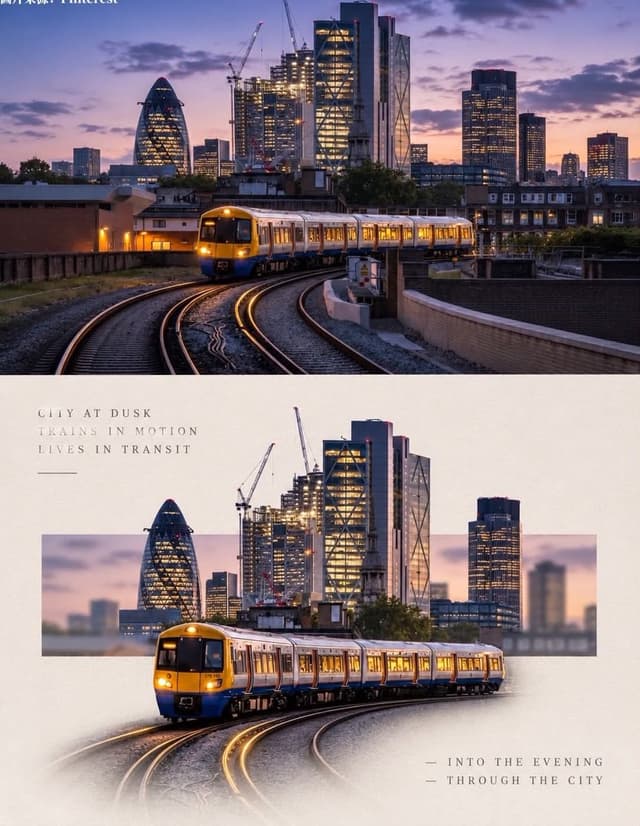
Social Media Post - Minimal Gallery Poster with Pop-Out Effect

Social Media Post - Minimal Gallery Poster with Pop-Out Effect

KGPT Image 2
Using the uploaded photo, create a 3:4 vertical poster split into top and bottom halves that touch seamlessly, with no white line, gap, or border between them.

Top: the original photo, full-bleed.

Bottom: a warm off-white textured paper background. The main subject is cut out, enlarged, and centered. Behind it, a thin horizontal rectangle shows a blurred crop of the original scene, and the subject breaks out of the frame (3D pop-out). The subject's base fades softly into the paper with natural particles, shadow, or reflection. Add small uppercase serif text in light grey with wide spacing: 3 short poetic lines at top-left and 2 lines with a "—" at bottom-right. Minimal gallery-poster style, photorealistic.
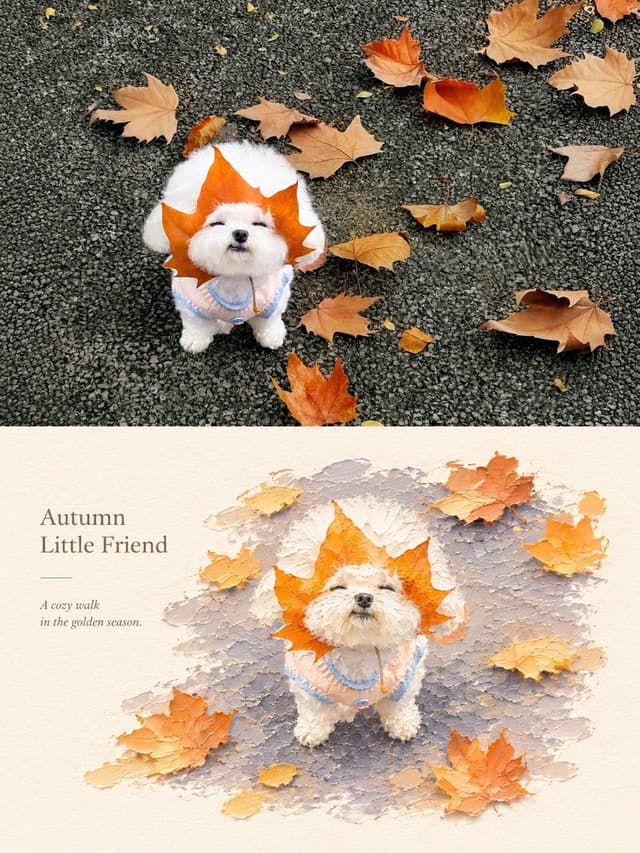
Social Media Post - Photography vs Impasto Oil Painting Poster

Social Media Post - Photography vs Impasto Oil Painting Poster

SairahGPT Image 2
Create a premium 3:4 vertical photography and impasto oil painting comparison poster using the uploaded photograph.

### LAYOUT
Divide the canvas into two perfectly equal horizontal sections (50/50):
- Top: Original photograph.
- Bottom: Artistic impasto oil painting interpretation.

Both sections must connect directly with a clean horizontal boundary, without gaps, gradients, or overlapping.

### TOP SECTION — PHOTOGRAPHY
Preserve the original subject's identity, quantity, pose, proportions, silhouette, details, composition, perspective, lighting, and natural colors. Apply only subtle premium color grading. Do not redraw, distort, duplicate, reposition, or alter the subject. No text or decorations.

### BOTTOM SECTION — ARTISTIC INTERPRETATION
Reimagine the same subject as a sculptural impasto oil painting micro-landscape. Use thick layered paint, palette-knife textures, handcrafted forms, raised edges, and expressive brushstrokes.

Keep the subject recognizable, centrally or slightly off-center, surrounded by generous warm-white negative space. Introduce a single color band inspired by the original photograph, transformed into a ground, water, pathway, or abstract landscape element.

### COLORS & TEXTURES
Extract a harmonious, limited color palette from the original photograph. Preserve the subject's natural color character while adding subtle brightness and luminosity. Use rich paint textures selectively, with refined subject details and delicate matte paper texture.

### TYPOGRAPHY
Add a short, elegant English title and one small supporting line within the lower section's negative space. Use thin, minimal typography. Generate text based on the actual subject or mood. Avoid invented dates, locations, logos, signatures, and unnecessary annotations.

### AESTHETIC
Quiet, minimal, sophisticated, and editorial. Create a collectible fine-art publication aesthetic through negative space, sculptural depth, material textures, and balanced composition.

### AVOID
Photo collages, altered subjects, unrelated scenes, illustrated photography, extra title bars, clutter, excessive decorations, incorrect text, watermarks, cartoon styles, neon colors, oversaturation, muddy tones, plastic-looking 3D, and cheap CGI.

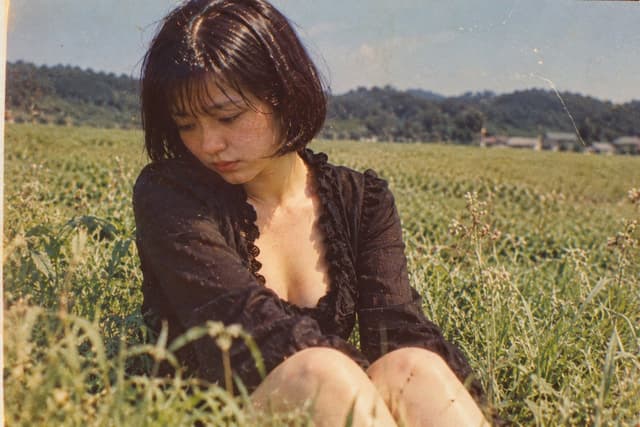
Social Media Post - Vintage Photo of Woman in Field

Social Media Post - Vintage Photo of Woman in Field

いがぐりメタボGPT Image 2
A nostalgic, vintage-style photograph of a young woman sitting in a lush green field. She has short, dark bobbed hair with bangs and is looking down with a pensive, melancholic expression. She wears a black, long-sleeved top with a deep V-neckline featuring ruffled edges. The background shows a vast expanse of tall grass or crops stretching toward distant hills under a clear sky. The image has a distinct retro aesthetic, characterized by film grain, warm color tones, scratches, and dust spots typical of old analog photography from the Showa era.
Social Media Post - Retro Showa Cafe Portrait

Social Media Post - Retro Showa Cafe Portrait

いがぐりメタボGPT Image 2
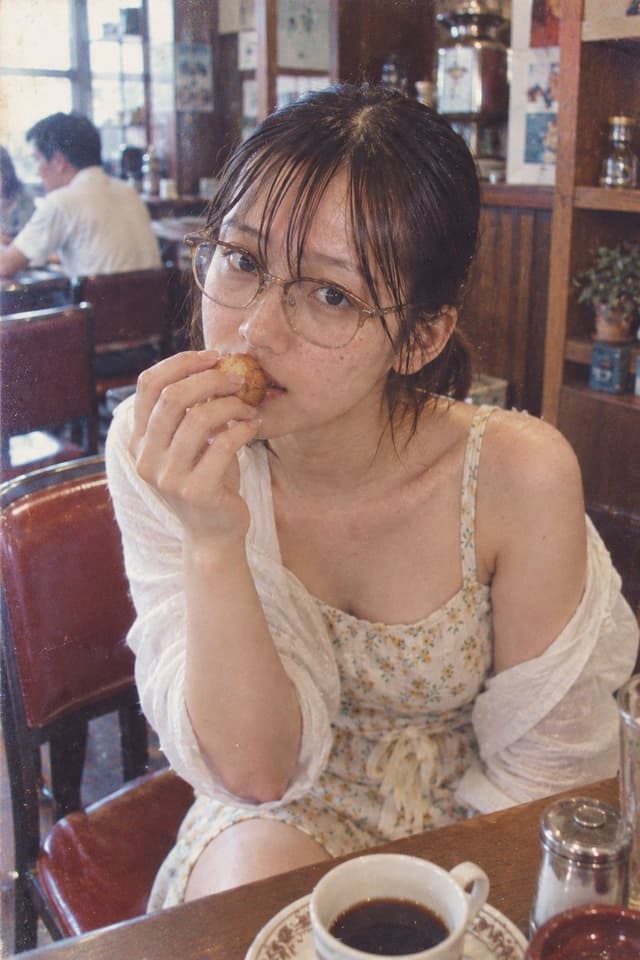
A vintage-style photograph of a young woman sitting in a retro Showa-era cafe. She has dark hair tied back with loose strands framing her face, wearing round wire-rimmed glasses and a delicate floral sundress under an off-the-shoulder white cardigan. She is holding a small pastry up to her mouth, looking directly at the camera with a soft, candid expression. In front of her on the wooden table sits a cup of black coffee in a patterned ceramic cup and saucer, along with a sugar dispenser. The background features warm wood paneling, shelves with glassware, and another patron blurred out, creating a nostalgic atmosphere. The image has a grainy film texture, faded colors, and light leaks typical of 1970s Japanese photography.
Social Media Post - Mixed-Media Scrapbook Doodle Style

Social Media Post - Mixed-Media Scrapbook Doodle Style

TaarukGPT Image 2
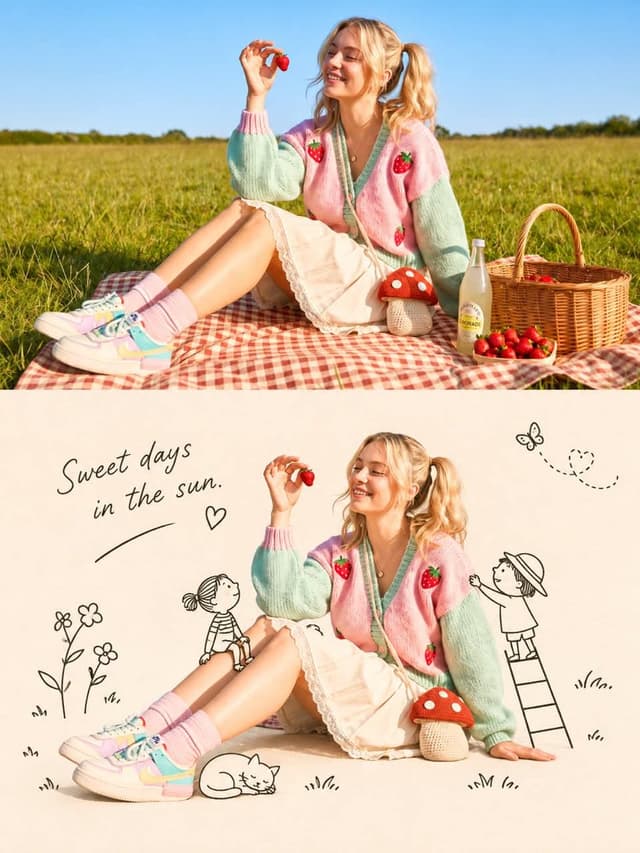
Transform the uploaded reference image into a charming, whimsical 2D storybook illustration while preserving the original image’s exact composition, camera angle, perspective, framing, subject identity, facial features, hairstyle, pose, clothing, proportions, expressions, and all object placements. Do not redesign, remove, or rearrange any elements. Keep the main subject photorealistic or softly realistic, while transforming the surrounding background into a delicate hand-drawn illustration.

Create a beautiful mixed-media aesthetic combining realistic photography with minimal black-ink doodles on a warm cream-colored textured paper background. Add cute hand-drawn decorative elements inspired by the scene, such as tiny flowers, stars, snowflakes, butterflies, trees, hearts, grass, little characters, animals, and playful illustrations. Keep the doodles simple, delicate, and naturally arranged around the subject without covering important details.

Use a soft pastel and warm earthy color palette, subtle paper grain, pencil-like sketch marks, fine imperfect black outlines, and a cozy vintage journal aesthetic. Add elegant handwritten cursive text that complements the scene, with small arrows, decorative lines, hearts, and playful annotations.

The final result should look like a creative scrapbook page, a nostalgic illustrated diary, and a beautiful lifestyle editorial combined. Maintain the original subject as the main focus, with a clean cream background and balanced negative space.

Style: Mixed-media photography, hand-drawn doodle art, vintage scrapbook, cozy illustrated journal, minimalist ink sketches, textured cream paper, whimsical storybook aesthetic.

High-quality details, natural lighting, beautiful composition, vertical 9:16 format.
Social Media Post - Cinematic Fantasy Portrait with Miniature Self

Social Media Post - Cinematic Fantasy Portrait with Miniature Self

AizaGPT Image 2
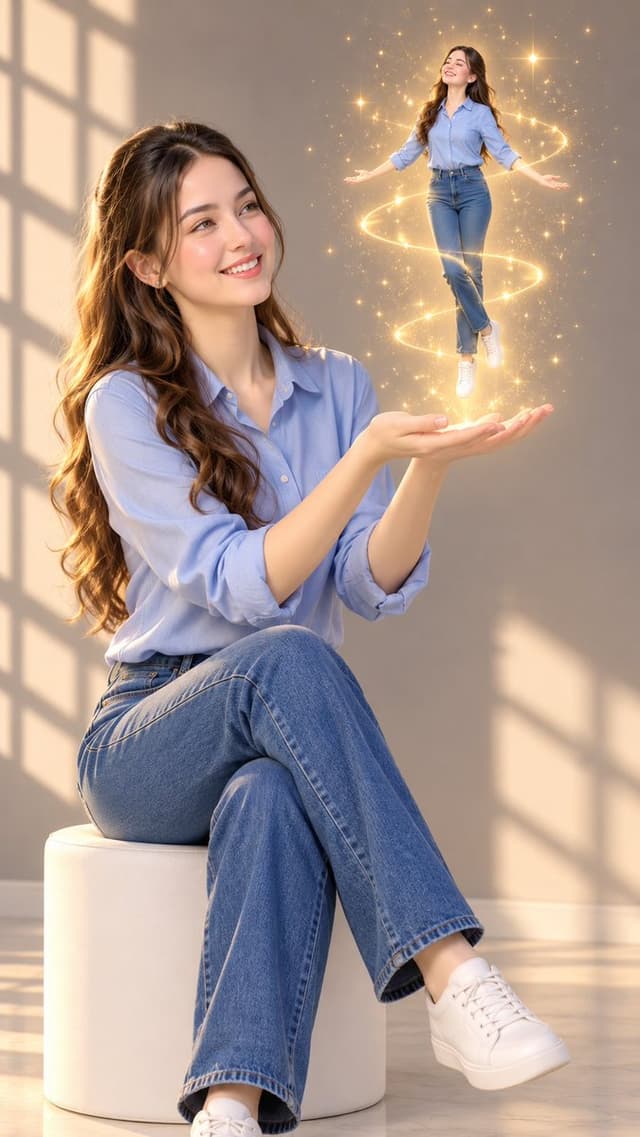
STYLE AND COMPOSITION: Create an ultra-realistic, photorealistic, cinematic fantasy portrait in a vertical 9:16 composition. A beautiful young adult woman sits gracefully on a minimalist white cylindrical stool in a softly illuminated modern interior. She wears a light-blue button-up shirt with rolled-up sleeves, fitted blue denim jeans, and clean white sneakers. Her long, voluminous dark-brown wavy hair cascades naturally over her shoulders. Her makeup is soft and natural, with realistic skin texture, delicate facial features, and a gentle, dreamy expression.

MAIN SUBJECT — POSE AND EXPRESSION: The woman sits with her legs crossed elegantly, her torso slightly turned toward the right. She gazes upward with wonder and affection at a miniature version of herself floating above her hands. Both arms extend forward, with her palms open and gently cupped as if magically supporting the tiny figure. Her fingers are naturally positioned, anatomically correct, and delicately illuminated by the golden glow.

MINIATURE SELF — HIGHEST PRIORITY: A perfectly recognizable miniature duplicate of the same woman floats approximately 20–30 centimeters above her open palms. The tiny figure has the same facial features, hairstyle, skin tone, blue button-up shirt, fitted jeans, and white sneakers as the seated woman. Show the miniature woman in a full-body view, hovering weightlessly with her arms slightly extended outward, legs gently crossed at the ankles, and head tilted gracefully upward. Her expression is peaceful and joyful. The miniature must appear three-dimensional, realistically proportioned, and physically integrated into the scene, with no visible platform, strings, or support.

MAGICAL EFFECTS: Surround the floating miniature with delicate golden sparkles, glowing particles, tiny luminous stars, and elegant circular ribbons of warm golden light spiraling around her body. Add fine glitter trails and subtle lens flares, with the brightest golden glow concentrated around the miniature’s silhouette and feet. The light softly illuminates the woman’s hands, face, hair, and clothing. Keep the magical effects elegant, ethereal, and realistic rather than cartoonish.

BACKGROUND AND LIGHTING: A warm taupe-gray interior wall with strong natural sunlight entering from a large off-camera window on the left. Distinct geometric window-frame shadows stretch diagonally across the wall and pale floor, creating a sophisticated architectural pattern. Soft afternoon sunlight, warm rim lighting around the woman’s hair, gentle shadows, natural skin highlights, and a creamy neutral color palette. A subtle shallow depth of field adds cinematic depth without obscuring either subject.

CAMERA AND QUALITY: Full-body environmental portrait, vertical composition, slightly low camera angle, 50mm portrait lens, f/2.8, realistic perspective, balanced framing, professional fashion photography, high dynamic range, lifelike skin pores, individual hair strands.

寻找下一个方向

ASTORIE CANVAS

让灵感,继续生长。

在同一个创作空间,连接提示词、参考素材和生成结果。

打开创作画布 ↗