

Eyeline Match: Diagnose and Fix Disconnected AI Dialogue Shots

An eyeline match connects a person's look with the person or object shown in the next shot. To fix disconnected AI dialogue shots, compare gaze direction, target height and screen position at the cut, then choose compatible portions of the clips. If no usable portion exists, replace the shot or add coverage that establishes the intended target.
A matching face and background do not establish a matching look. The eyes can drift after a convincing first frame, and a close-up that works alone can point toward the wrong place when cut against its partner.
Eyeline match begins with a person and a target
The Columbia Film Language Glossary defines the relationship as a continuity cut that makes a character appear to look at the object in the next shot. For dialogue, each actor becomes the other actor's target. The viewer needs a plausible relationship between those looks, not a mathematical mirror image.
For a two-person scene, establish where both people sit before judging the singles. In Clara's bookstore reference, the woman sits on the left and the man on the right, facing one another across a table at approximately the same height. That establishes the expected relationship: her offscreen look is generally rightward, and his is generally leftward.
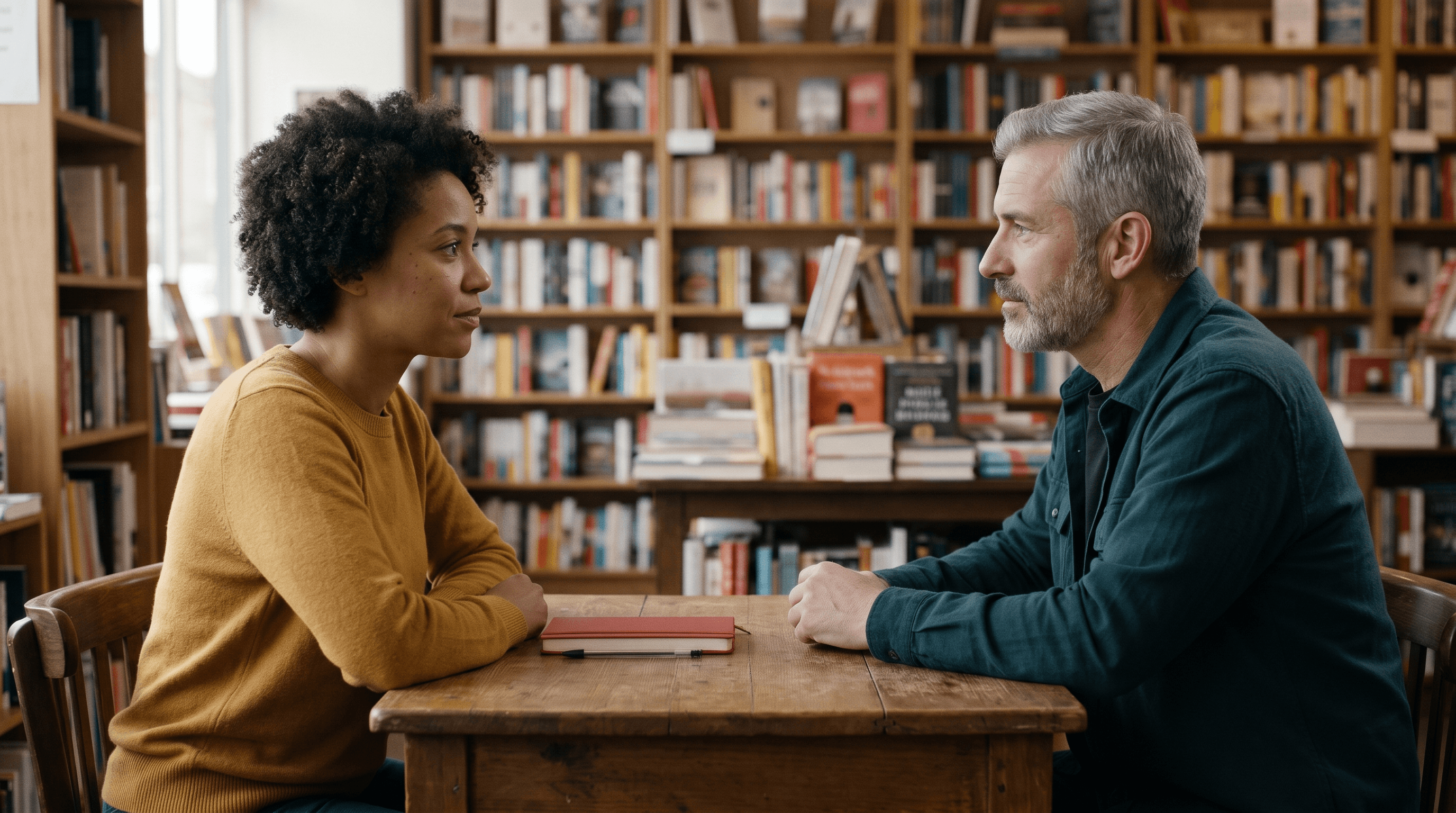
Figure 1. Clara’s two-person reference establishes the woman on screen left and the man on screen right, facing each other across a bookstore table.
Keep this check separate from the wider continuity editing rules. An action match can work while the eyes point above the partner; reciprocal eyelines can work while a hand action repeats. Check each relationship on its own terms.
Diagnose three different kinds of mismatch
Direction, vertical angle and framing interact, but they answer different questions. Read them together before deciding that a shot needs regeneration.
Check | Ask this at the cut | Typical fault |
|---|---|---|
Direction | Does the outgoing look point toward the intended offscreen partner? | Both singles look away from the shared space |
Target height | Is the look plausibly aimed at the partner's eyes or chosen object? | A seated listener looks above the other person's head |
Screen position and space | Does the framing leave room in the direction of the look? | The face is pressed against the frame edge it looks toward |
Change over time | Does the look still work immediately before and after the cut? | A good first frame becomes an upward glance later |
Eye position within the frame is a framing clue, not a direct measurement of the offscreen target's height. Different lens angles and camera heights can place two people's eyes at different vertical coordinates while their looks remain plausible. Do not drag one image until both eye lines sit on a ruler and assume the spatial problem is solved.
Compare the paired singles against the master
Clara generated separate stills of the woman and man from the two-person reference. The woman occupies the left portion of her single and looks toward screen right. The man occupies the right portion of his single and looks left. He is framed a little tighter and his eyes sit slightly higher in the image; the pair is a useful starting candidate rather than a verified camera-geometry reconstruction.
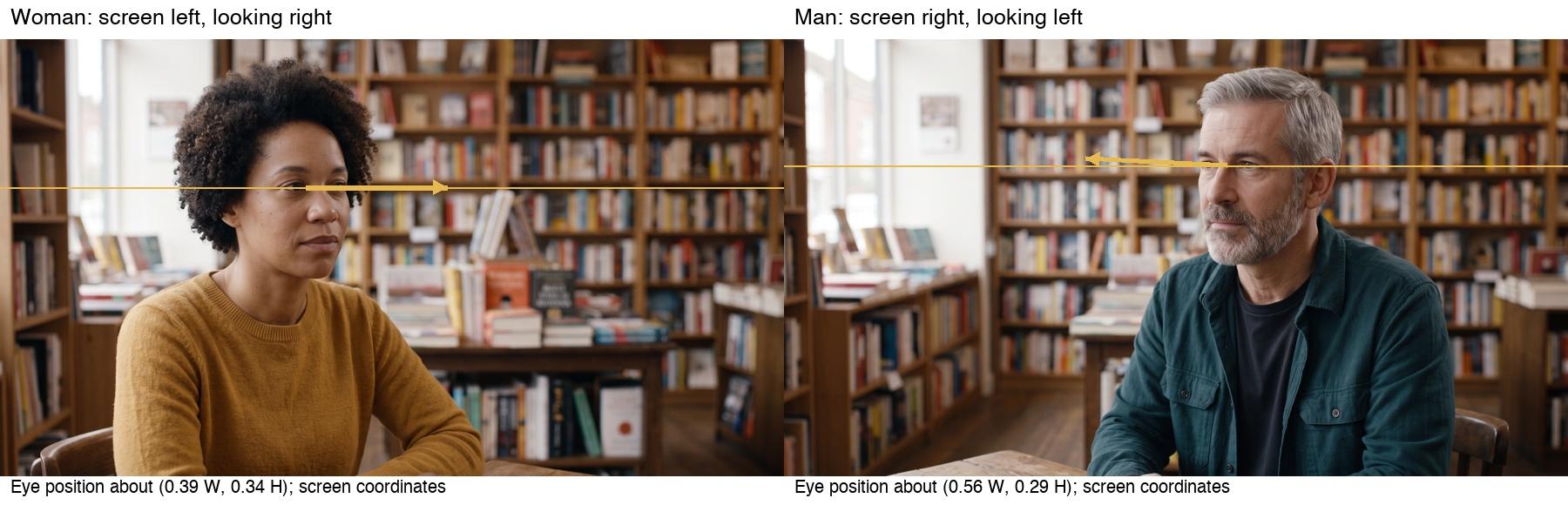
Figure 2. Analytical overlays on Clara’s separate singles mark broad gaze direction and approximate normalized eye position. Arrows are editorial annotations, not measured 3D sightlines.
Use an overlay to mark the eye position and broad gaze direction. Draw the arrows from the visible eyes toward the implied target, and label the left and right edges of the frame. This avoids the ambiguous note “he should look the other way,” which could mean actor-left, camera-left or screen-left.
A deliberately constructed height mismatch
Clara also generated a teaching example from the male single. The prompt requested a direction and height mismatch, but the actual image still looks toward screen left while looking noticeably upward. It therefore illustrates an elevated target, not a successful reversal to screen right.
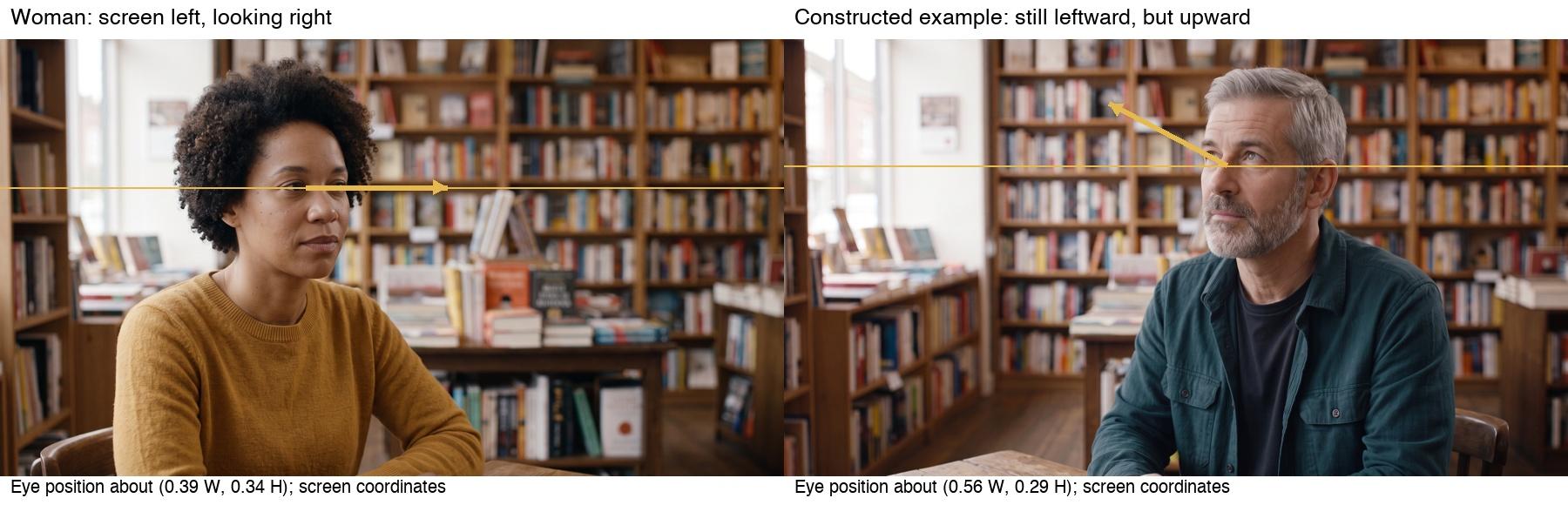
Figure 3. The deliberately constructed male example still looks leftward but upward. Replacing it with the earlier male single addresses this selected height mismatch; no automatic eye repair is demonstrated.
For the established seated partner, use the original male single as the replacement candidate. That corrects the intended selection by changing shots; it does not demonstrate that an AI eye-editing tool repaired the same frame. If the story actually calls for him to notice something overhead, the upward look could be valid, but the following shot must establish that target.
Check the moving clips before choosing the cut
The still pair does not tell you whether the eyes hold their targets through a shot. Clara animated each single separately using Kling O3, STD, Single, 5s, with the corresponding still as its Start Frame. The End Frame and Elements slots were empty in the supplied setup. These are two independent performances, not synchronized coverage of one filmed exchange.
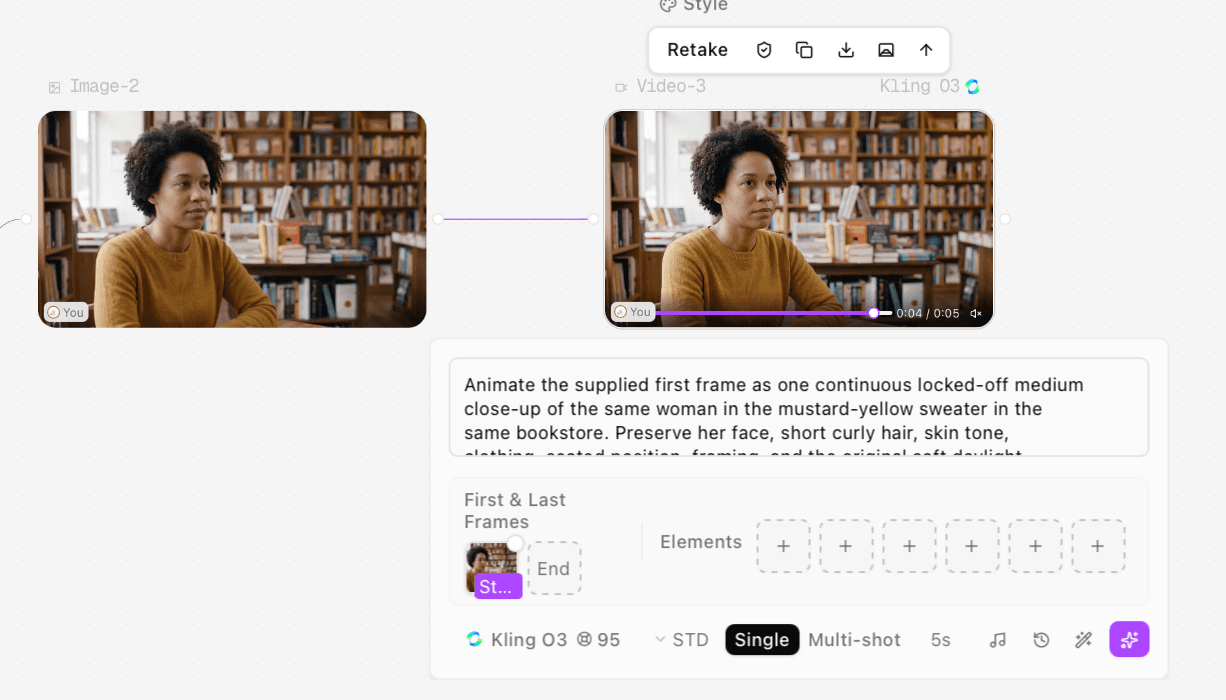
Figure 4. Clara’s female motion setup uses the supplied single as Start Frame in Kling O3 STD, Single, 5s. End Frame and Elements are empty; the result is an independent animation.
Original female motion export; the later upward gaze matters when selecting the outgoing range.
Original male motion export; compare the early leftward gaze and inspect later foreground changes.
In the woman's clip, the earlier portion broadly maintains the rightward look. Around 2.75–3.6 seconds, the eyes turn upward before lowering again. Blinks occur too, so a closed eyelid should not be mistaken for a changed target. In the man's later frames, a light triangular or book-like edge enters at the lower left. A useful early segment does not mean the whole five-second export is equally suitable.
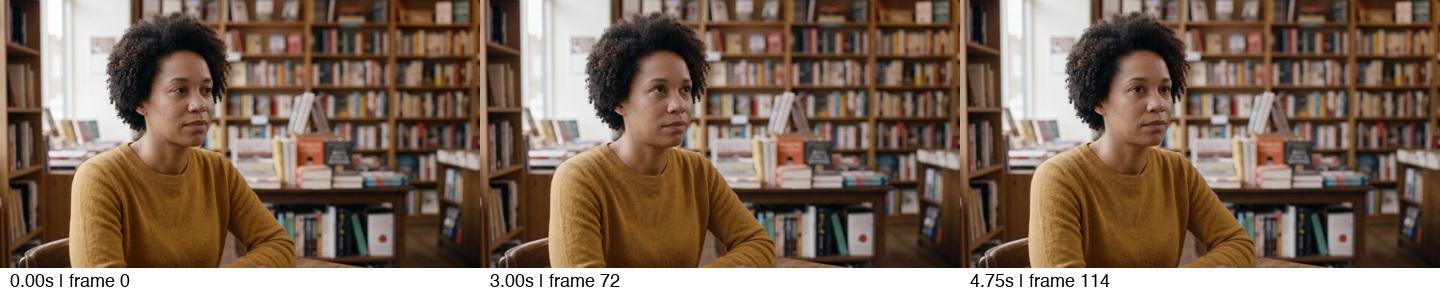
Figure 5. Extracted frames show the woman’s later upward glance. Multiple adjacent frames help distinguish an actual gaze change from a blink.
Mark usable ranges on the timeline. Judge an eye movement from several adjacent frames rather than one uncertain pupil position. Then inspect the outgoing shot's final frame and the incoming shot's first frame together, followed by the moving join with a short lead-in and tail.
Fix the join with the smallest change that works
1 Select a compatible segment
First try trimming before the unwanted eye movement. Keep enough time for the intended listening beat; a spatially neat cut is not useful if it removes the emotional or spoken beat the scene needs.
For a visual comparison, we assembled two five-second cuts from Clara's exports. Both cut to the same early male segment after 2.5 seconds. The selected candidate uses the woman's first 60 frames. The mismatch demonstration uses her frames 28–87, so the outgoing image includes the later upward look.
Assembly | Woman source frames | Man source frames | Join |
|---|---|---|---|
Selected candidate | 0–59 | 0–59 | Hard cut at 2.500s |
Gaze mismatch demonstration | 28–87 | 0–59 | Hard cut at 2.500s |
Frame numbers are zero-based at 24 fps. Each assembly contains 120 frames. No gaze correction, crop, resize or retiming was applied; the clips were re-encoded for the comparison. Audio was deliberately omitted.
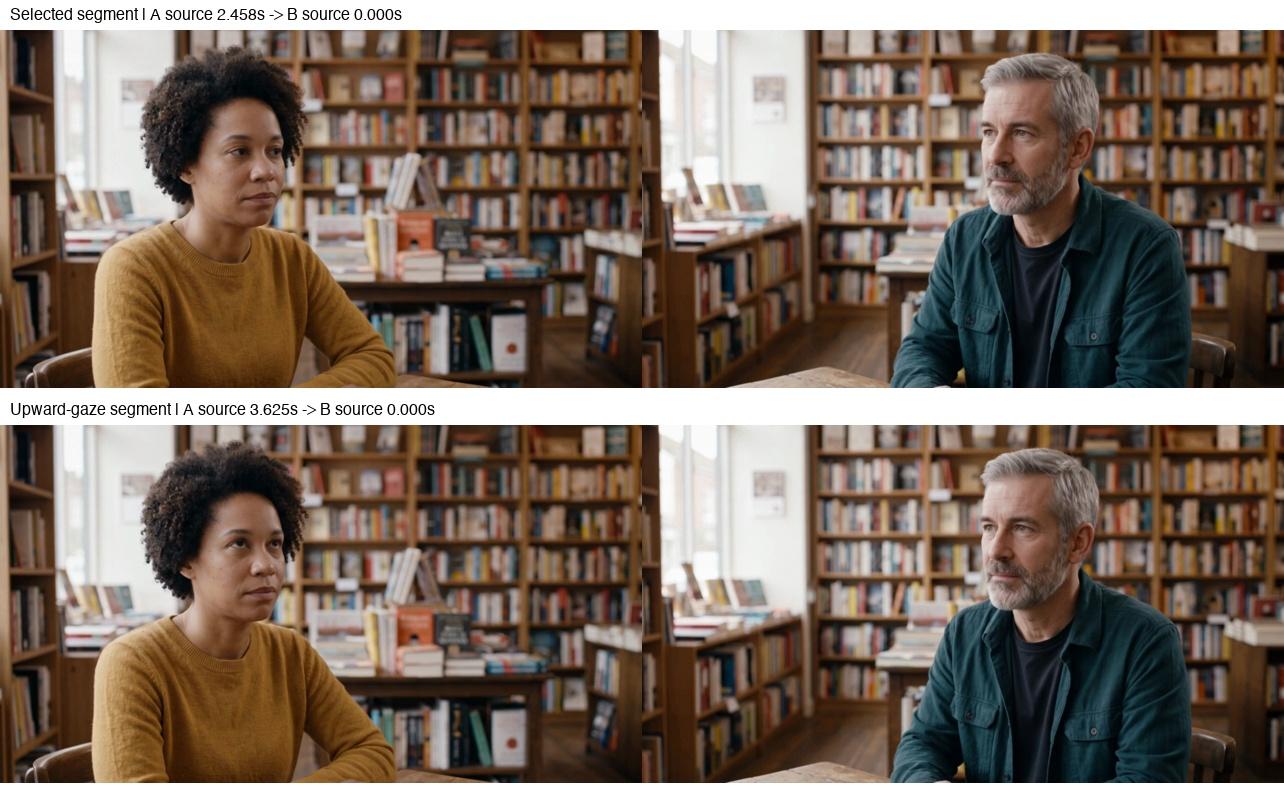
Figure 6. Outgoing and incoming frames from two locally assembled cuts. The selected version uses the earlier female range; the mismatch version includes the later upward look. These are edit-selection demonstrations.
Selected-range candidate: woman frames 0–59 then man frames 0–59. Hard cut at 2.500s; audio intentionally omitted.
Intentional editing mismatch: woman frames 28–87 then the same male range. Audio intentionally omitted.
This changes which performance reaches the cut. It does not establish that the selected join has passed a full-speed viewing, acting or dialogue-sync review. Use it as a candidate and test the scene's rhythm in your timeline.
2 Replace an incompatible single
If every useful part of a clip points toward the wrong target, replace that single. Use the established two-person reference and a plain spatial instruction: “Woman remains seated on screen left, looking offscreen right toward the seated man's eyes.” Keep the camera side and intended target explicit. Generate only the missing coverage, then check the moving result again.
That is a recommended next step when trimming cannot work; it was not a further corrective video run in this test. A better still does not prove that its animated version will hold the look.
3 Add coverage when the target is unclear
Use a two-shot, an over-the-shoulder angle or an insert of the intended object when the audience needs spatial information. If the man looks upward, an overhead sign or standing person could explain it, but inventing that target changes the scene. Confirm the story intention before adding it.
A cutaway can bridge an awkward transition, but returning to the same incompatible close-up leaves the underlying relationship unresolved. For genuinely missing angles, plan connected shots from the established scene rather than requesting an unrelated close-up.
4 Reframe only for a framing problem
A modest crop can improve look room or balance shot size. It cannot rotate the eyeballs toward a different target or repair an incompatible camera axis. Check resolution and headroom after reframing. Avoid horizontally flipping a shot without reviewing asymmetric clothing, text, lighting and scene geography.
Make the review note specific
Write “At the outgoing cut, the woman looks above the seated man's eye level; use the earlier rightward-looking range or supply a new single.” That gives the editor a time, a relationship and a remedy. “Eyeline feels off” leaves the target unspecified.
Save the last outgoing and first incoming frames together. You can extract comparison frames for discussion, but approve the moving join in context. The decision should account for gaze, performance timing and the scene's intended attention shift.
Frequently asked questions
Must both people's eyes sit at the same height in the frame
No. Framing and camera position affect that coordinate. Their looks need to imply plausible targets in the established space.
Can a blink fix an eyeline mismatch
A blink can hide a brief transition, but it does not change the look's target before or after it. Check the surrounding frames.
Should I regenerate both actors when one look drifts
Start with the smallest repair: choose another range, replace the faulty single or add the missing angle. Regenerating both can discard coverage that already works.
Test method and sources
Clara supplied four original stills, two original motion exports and their Astorie screenshots. The master UI shows Nano Banana 2; the singles and constructed mismatch show Nano Banana 2.1 Premium, Medium, Web Off, 16:9, 2K, PNG, one result. These are the visible host labels. Each motion export is 1284 × 716, 24 fps and 121 frames, approximately 5.042 seconds, with no audio stream.
All original video frames were software-decoded and examined in chronological contact sheets, with selected larger views. The new cut exports were fully decoded and their boundary frames inspected. No real-time playback, dialogue performance or sound review is claimed. Clara confirmed all provided prompts were used unchanged on November 13, 2026; generation dates, total run counts, elapsed times and actual charges were not separately recorded. The still mismatch was intentional; the later gaze movement was observed in the supplied motion clip. Sources were checked November 13, 2026.
Ready to try it on the canvas?
Open Astorie and fan your prompt across every frontier model in one workflow.