

GPT Image 2.5 Flare vs Sunburst: Which Model Should You Use?
Facts checked September 11, 2026. This launch preview uses official OpenAI documentation and supplied screenshots. It does not claim an independent same-prompt benchmark.
Choose GPT-Image-2.5 Flare when speed, frequent iteration, and production volume matter most. Choose GPT-Image-2.5 Sunburst when an edit must preserve details precisely or the job needs OpenAI’s most capable image-generation model. If you are unsure, start with Flare and move the task to Sunburst only when Flare misses a defined quality or editing requirement.
Astorie can make that decision easier to document. Keep the brief, reference images, acceptance checklist, and model outputs on one canvas, then compare speed, API usage, and pass rate. If Flare or Sunburst is not listed in the current Astorie model selector, generate through the OpenAI API and upload the outputs as image nodes for review.
OpenAI introduced ChatGPT Images 2.5 on September 8, 2026, with a focus on sharper detail, faster generation, and more precise editing.
GPT Image 2.5 Flare vs Sunburst at a Glance
Decision factor | GPT-Image-2.5 Flare | GPT-Image-2.5 Sunburst |
Official position | Fast, high-quality everyday image generation | OpenAI’s most capable model for image generation and editing |
Start here when | Latency, iteration speed, or volume is the main constraint | Editing precision or the required quality bar is the main constraint |
Typical work | Concepts, variants, social assets, rapid interactive edits | Detailed edits, complex layouts, brand-critical final assets |
API access | Generation and editing through the Images API and Responses API | Generation and editing through the Images API and Responses API |
Quality options | auto, low, medium, high, xhigh, max | auto, low, medium, high, xhigh, max |
Transparent background | Supported with PNG or WebP | Supported with PNG or WebP |
Published token rates | Same as Sunburst | Same as Flare |
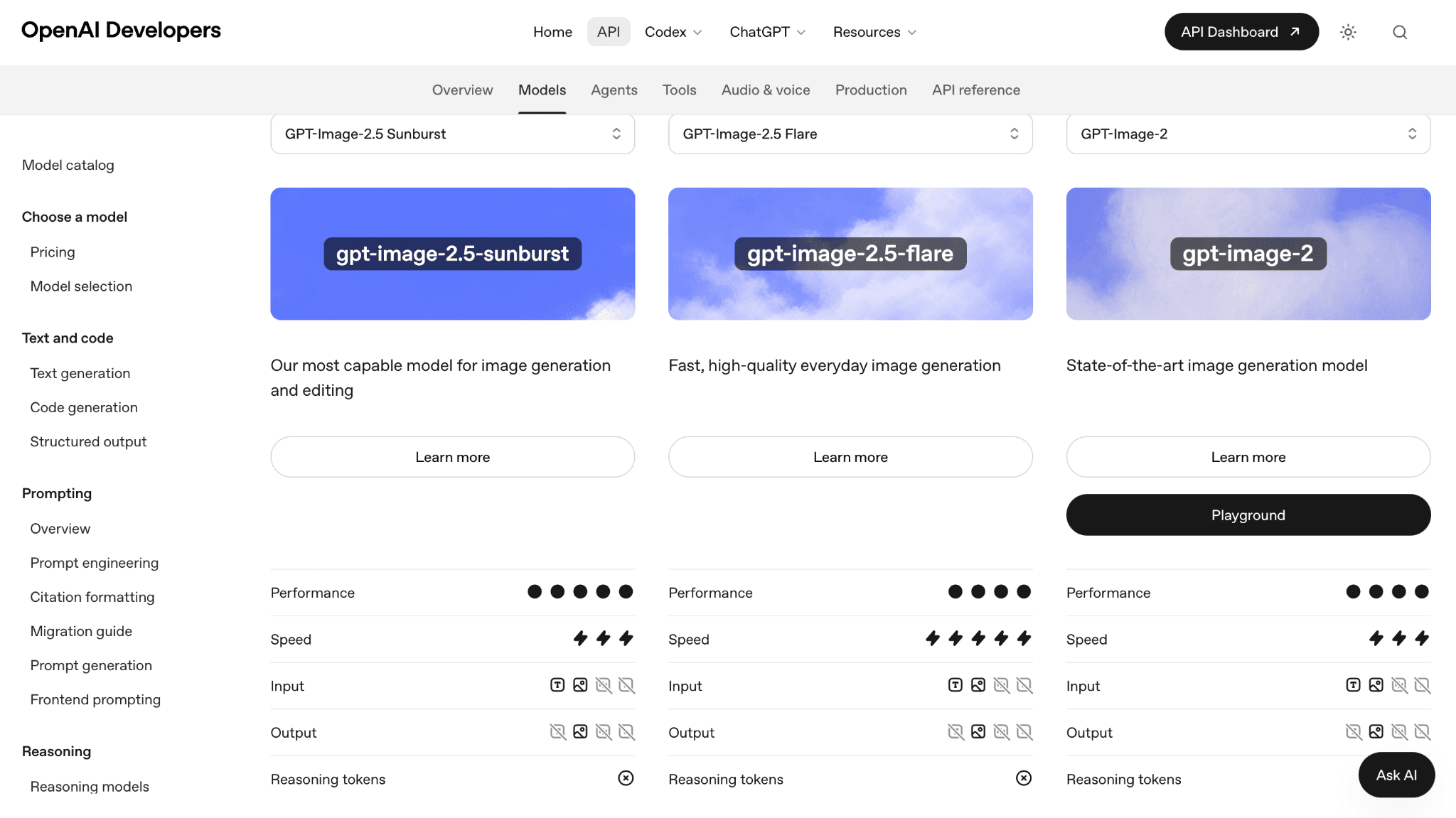
OpenAI’s model catalog describes Sunburst as the most capable model and Flare as the fast option for high-quality everyday image generation.
Choose Flare When Speed Is the Main Constraint
Flare is the practical default for workflows in which waiting time slows down the work itself. It suits rapid concept exploration, frequent variants, social graphics, product-catalog drafts, and interactive edits where a person is reviewing each result and immediately changing the prompt.
Its official description does not mean every Flare output will be good enough for every final asset. Set an acceptance bar before rollout. If Flare meets that bar, its speed-first profile makes it the simpler production choice. If it repeatedly misses edit locality, reference preservation, text accuracy, or layout requirements, test Sunburst on those specific failures.
Choose Sunburst When Editing Precision Is the Main Constraint
Sunburst is OpenAI’s most capable GPT Image 2.5 model for generation and editing. OpenAI specifically recommends it when editing precision matters most. That makes it the safer starting point for a tightly controlled product-photo change, a layout with dependent elements, a preservation-heavy edit, or a final asset with a quality requirement that Flare has not met.
Sunburst should not be treated as an automatic winner for every prompt. A more capable model can still produce an unacceptable result, and a slower or higher-effort route is wasteful when Flare already passes. Use Sunburst for a stated requirement, not as a prestige label.
What Flare and Sunburst Have in Common
Both generate and edit images from text prompts and image inputs.
Both can be called directly through the Images API or selected as the image-generation tool in the Responses API.
Both support output controls for size, quality, format, compression, and background.
Both support low, medium, high, xhigh, max, and auto quality settings.
Both support recommended square, portrait, and landscape sizes as well as valid custom dimensions.
Both can return transparent PNG or WebP output when transparency is requested.
Both use the same published text-input, cached-input, image-input, and image-output token rates.
These shared controls matter because a fair comparison must hold them constant. Comparing Flare at Low quality with Sunburst at Max quality measures two changes at once and cannot isolate the model difference.
Same Token Rates Do Not Guarantee the Same Final Cost
OpenAI lists the same unit prices for both models: $8 per million image-input tokens, $2 per million cached image-input tokens, $30 per million image-output tokens, $5 per million text-input tokens, and $1.25 per million cached text-input tokens.
Actual cost can still differ. OpenAI advises teams to read the response usage because token consumption can change by model and quality setting. Retries also matter. A route that needs three attempts to produce one accepted asset can cost more than a route that passes on the first attempt, even when their token prices are identical.
Cost measure | What to record | Why it matters |
Cost per request | Text input, image input, and image output tokens | Shows the invoice cost of one call |
Cost per accepted image | Total call cost divided by approved outputs | Includes retries and rejected versions |
Review cost | Human review time per accepted output | Captures time saved or lost through iteration |
End-to-end latency | Submission to approved asset | Measures the production constraint that users actually feel |
Choose the Model Before You Choose the Quality Setting
Model and quality answer different questions. Model choice selects the capability and speed profile. Quality controls how much rendering work the selected model is asked to perform. Size, background, format, and compression are additional output decisions.
Decision order | Question to answer | Available choices |
1 Model | Is speed or editing precision the binding constraint? | Flare or Sunburst |
2 Quality | How much output effort does this asset need? | low, medium, high, xhigh, max, auto |
3 Size | Which aspect ratio and dimensions are required? | recommended or valid custom dimensions |
4 Background | Must the result preserve transparency? | transparent, opaque, auto |
5 Format | Which file type fits delivery and latency? | PNG, JPEG, or WebP |
Which Model Fits Common Creative Jobs
Creative job | Start with | Switch only when |
Rapid concept variations | Flare | A selected direction needs a precision-sensitive final edit |
Social posts and thumbnails | Flare | Text or layout requirements fail the acceptance check |
High-volume asset production | Flare | Rejected-output cost offsets the speed advantage |
Interactive image editing | Flare | Local changes disturb elements that should remain fixed |
Product-photo refinement | Sunburst | Flare passes the same preservation criteria with better latency |
Complex layout correction | Sunburst | Flare handles the same layout reliably |
Brand-critical final asset | Sunburst | A controlled comparison shows no useful quality advantage |
Run a Six Task Comparison Before Production
A useful evaluation should represent the work you plan to ship. Use the same prompt, image inputs, dimensions, quality, output format, and acceptance criteria for both models. Run enough repetitions to separate a pattern from a single lucky result.
Test task | What it reveals | Example pass condition |
Text-heavy graphic | Text clarity and placement | Required words are correct and legible |
Local object edit | Edit locality | Target changes while unrelated areas remain stable |
Reference-based subject | Subject preservation | Identity and defining details remain recognizable |
Structured composition | Layout control | Objects appear in the required positions and counts |
Repeated brand character | Cross-output consistency | Approved character details remain consistent |
Twenty-variant batch | Throughput and approval rate | Latency and accepted-output cost meet the production limit |
For each task, record median latency, output-token usage, number of retries, and pass or fail. Do not score vague “beauty” unless the team defines what that means for the asset. A product photo may require label accuracy and material detail; a social graphic may value turnaround more than small texture differences.
How to Compare the Models in Astorie
1. Create a Text node with the prompt, required dimensions, quality setting, and acceptance checklist.
2. Upload the same reference images once and connect them to both model branches or to the external API workflow.
3. Label every result with the model, quality, size, timestamp, and reported token usage.
4. Place Flare and Sunburst outputs side by side and mark each acceptance item as pass or fail.
5. Keep the winning route as a reusable workflow only after it passes the representative task set.
This keeps the comparison attached to the actual brief instead of relying on screenshots from unrelated prompts. When a model is unavailable in the Astorie selector, upload the API results and use the same canvas for review and documentation.
How to Migrate from GPT Image 2
OpenAI’s migration logic starts with the quality bar of the current workflow. It does not require every team to choose the same model.
Current workflow | First model to test | Decision rule |
GPT Image 2 already meets the quality requirement | Flare | Switch if Flare retains acceptable quality and improves latency |
GPT Image 2 misses a demanding quality requirement | Sunburst | First confirm that Sunburst meets the requirement |
Sunburst meets the requirement | Flare with the same prompt and inputs | Use Flare only if it also passes and improves latency |
Neither model meets the requirement | Keep the current route or revise the workflow | Do not migrate until the task or acceptance bar changes |
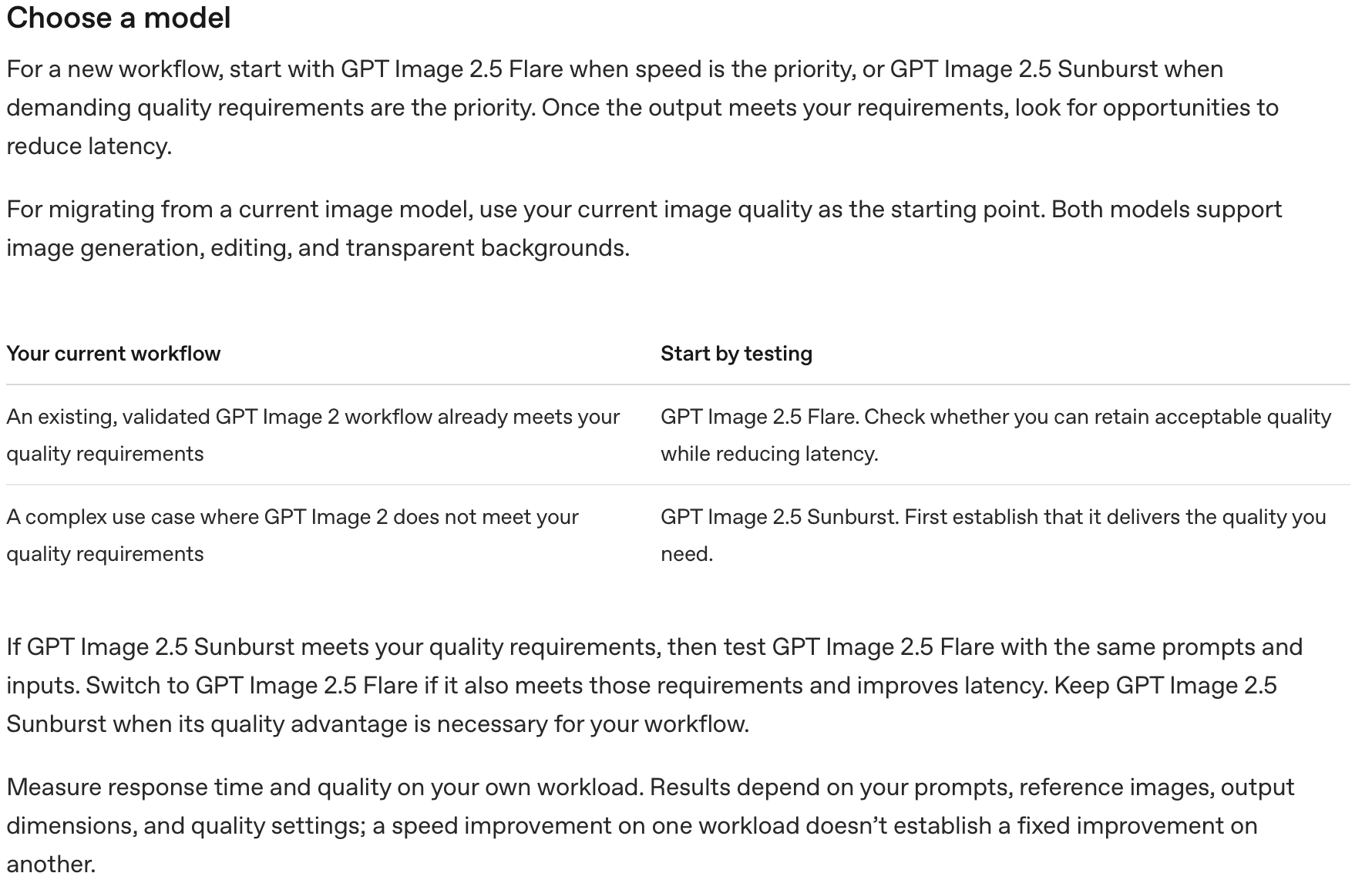
OpenAI recommends Flare when speed is the priority and Sunburst when demanding quality or editing precision is the priority, followed by workload-specific validation.
Limits That Apply to Both Models
OpenAI documents several limits for GPT Image models. Complex prompts may take up to two minutes. Text can still be misplaced or unclear. Recurring characters and brand elements may drift across generations, and layout-sensitive compositions may not place every element exactly as requested. Prompts and outputs are also subject to content moderation.
These limits should shape the acceptance checklist. If exact text, repeatable characters, or pixel-level placement is mandatory, plan for review and conventional editing after generation. A model change alone does not remove the need for quality control.
Frequently Asked Questions
Which is better GPT Image 2.5 Flare or Sunburst
Flare is the better default for speed and repeated generation. Sunburst is the stronger starting point for precision-sensitive edits and tasks that need OpenAI’s most capable image model.
Which model is faster
Flare. OpenAI describes it as the fast model for high-quality everyday generation. Measure latency on your own prompts because request complexity and settings also affect response time.
Which model is cheaper
Their published token rates are identical. Actual cost per accepted image can differ because token use, quality settings, retries, and workflow steps can differ.
Can both models edit existing images
Yes. Both support image generation and editing through the Images API and the image-generation tool in the Responses API.
Do both models support transparent backgrounds
Yes. Request a transparent background and use PNG or WebP output.
Does Max quality make Flare the same as Sunburst
No. Max is a quality setting inside each model. Model choice and quality setting remain separate decisions.
Can I choose Flare or Sunburst inside ChatGPT
Flare and Sunburst are explicit API model IDs. The ChatGPT Images 2.5 consumer experience may not expose the same selector.
Should every production team start with Flare
Start with Flare when speed matters or the workload is unknown. Start with Sunburst when a demanding edit or quality requirement is already known. In either case, test against a written acceptance checklist.
Final Recommendation
Use Flare as the production default for fast iteration and routine generation. Use Sunburst when a specific editing or quality requirement calls for the more capable model. For important workflows, compare both models with identical inputs and settings, then choose the one with the lowest cost and latency per accepted output.
Official Sources
OpenAI model catalog | OpenAI image generation guide | OpenAI API pricing | OpenAI model selection guide | Astorie
Ready to try it on the canvas?
Open Astorie and fan your prompt across every frontier model in one workflow.