
GPT Image 2.5 Quality Settings Tested
GPT Image 2.5 quality settings range from Low to Max, but High is the best default for a final image while Medium is the better economical choice for exploration. XHigh and Max are worth switching to only when close inspection reveals a specific fine-detail problem that High does not solve; in our single watercolor test, their full-frame improvement was modest while Max used four times the Astorie credits of High.
Astorie makes that tradeoff visible in one canvas: the same prompt can be generated at each quality tier, inspected beside the model, size, format, credit cost, and output, then carried into editing or video nodes. That context matters because “quality” is a compute setting, not a promise that every higher tier will look subjectively better.
GPT Image 2.5 quality settings at a glance
Setting | Best use | What you gain | What you give up | Switch trigger |
Low | Thumbnails and rough composition checks | Lowest credit cost and usually short waits | Soft fine detail; weaker edge definition | Move to Medium when the composition is approved |
Medium | Prompt exploration and ordinary social assets | Good balance of texture, coherence, and cost | Less confidence in tiny foliage, fabric, and faces | Move to High when the image becomes a final deliverable |
High | Default final generation | Stronger detail without extreme cost | More credits than Medium; still not artifact-proof | Move higher only after zooming in and naming a defect |
XHigh | Detail-critical final assets | More compute for difficult micro-detail | Higher cost with potentially subtle visible return | Use when High fails on a specific region and the asset justifies it |
Max | High-stakes hero art or last-resort difficult prompts | Highest available quality budget | Largest credit and latency penalty; no guaranteed visual win | Use only when XHigh is visibly insufficient or rework costs more than generation |
OpenAI officially exposes auto, low, medium, high, xhigh, and max for both GPT Image 2.5 Flare and Sunburst. The prompting guide also warns that a higher quality setting does not guarantee a better result for every prompt. Model choice, prompt clarity, references, dimensions, and output format remain separate variables.
Our same-prompt five-tier test
We generated the same 16:9 Chinese historical watercolor scene through GPT Image 2.5 Flare in Astorie. The prompt, subject, visual direction, opaque background, and PNG output stayed constant. The main comparison used 2K output; a separate early Low run at 1K reinforced the same softness trend but is not used in the timing table. Each tier was run once, so the elapsed times describe these jobs, not a statistically stable speed benchmark.
Quality | Astorie credits | Observed time | Observed result |
Low | 5 | About 20 seconds | Clearly softer willow strands; stronger wash-like watercolor texture |
Medium | 10 | About 10–15 seconds | Good full-frame balance; faster than Low in this run, showing queue noise |
High | 20 | About 30 seconds | Best practical default; cleaner detail without extreme cost |
XHigh | 35 | About 30 seconds | Small full-frame difference from High in this scene |
Max | 80 | About 60 seconds | High detail retention, but no proportional four-times visual gain over High |
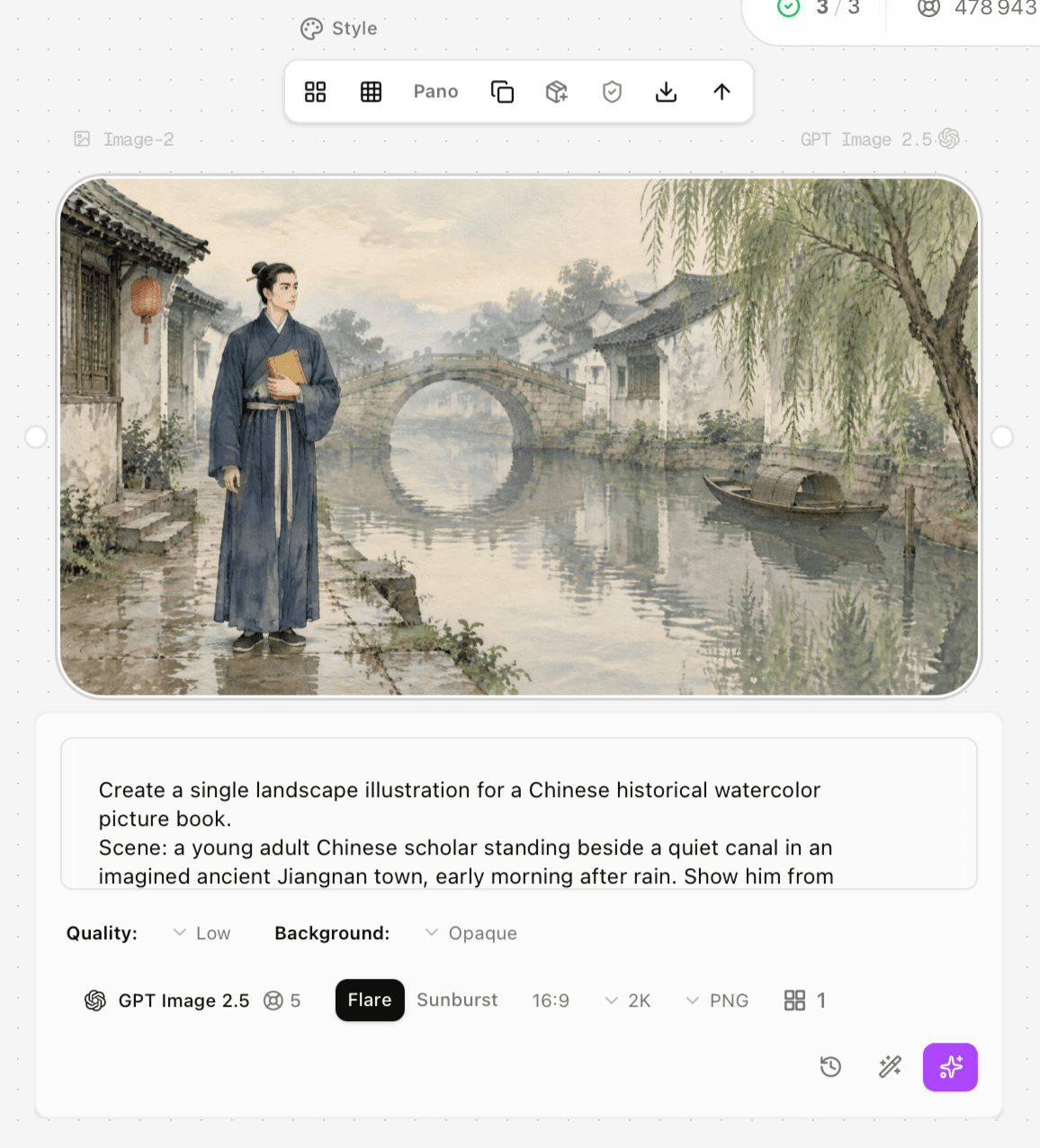
Figure 1. Low at 2K in Astorie used 5 credits. The willow detail is visibly softer, while the wash texture reads more strongly as watercolor.
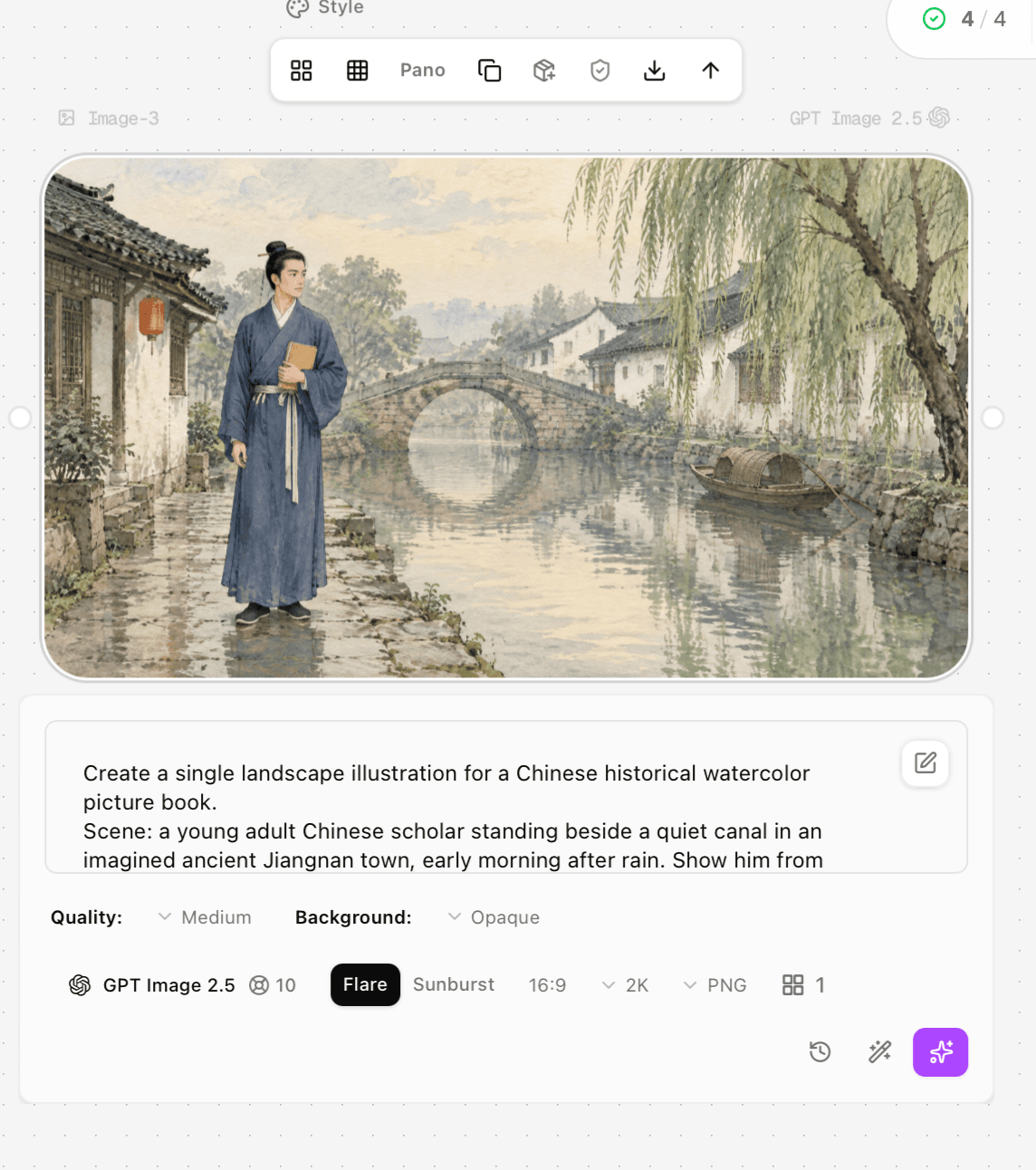
Figure 2. Medium at 2K used 10 credits and completed in roughly 10–15 seconds in this run.
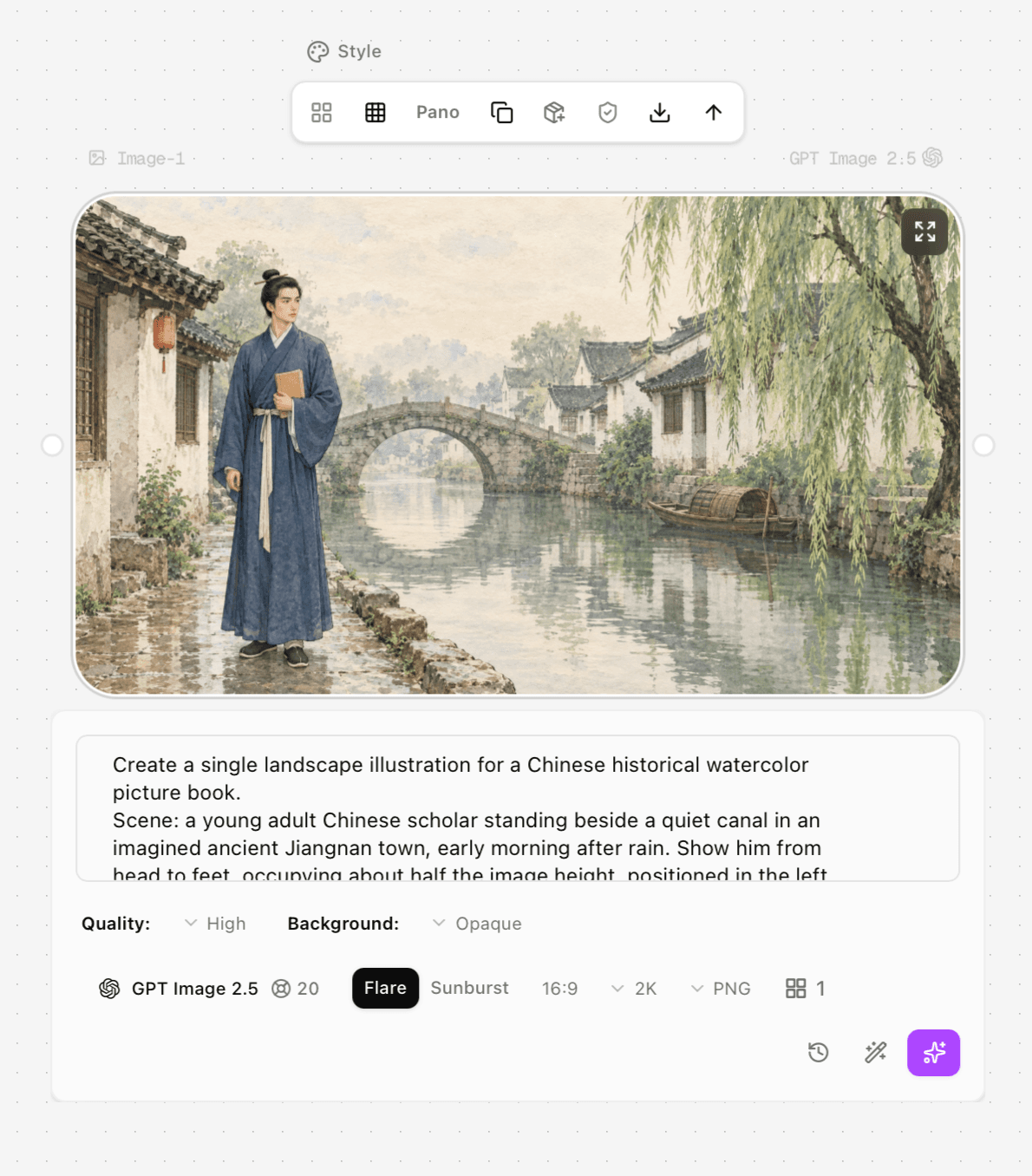
Figure 3. High at 2K used 20 credits and completed in about 30 seconds. It is the most defensible default for this workflow.
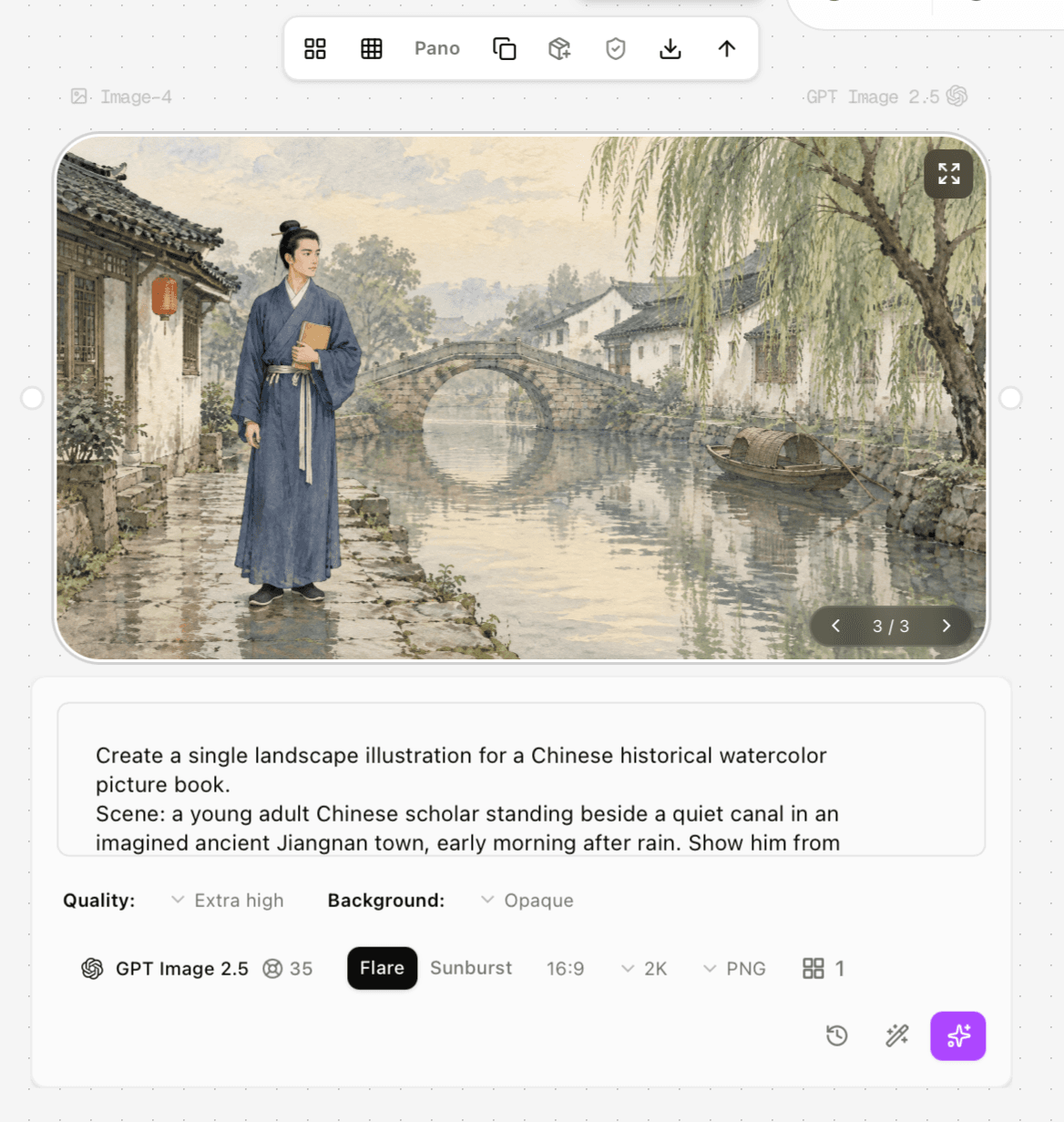
Figure 4. XHigh at 2K used 35 credits and completed in about 30 seconds. The full-frame improvement over High was subtle.
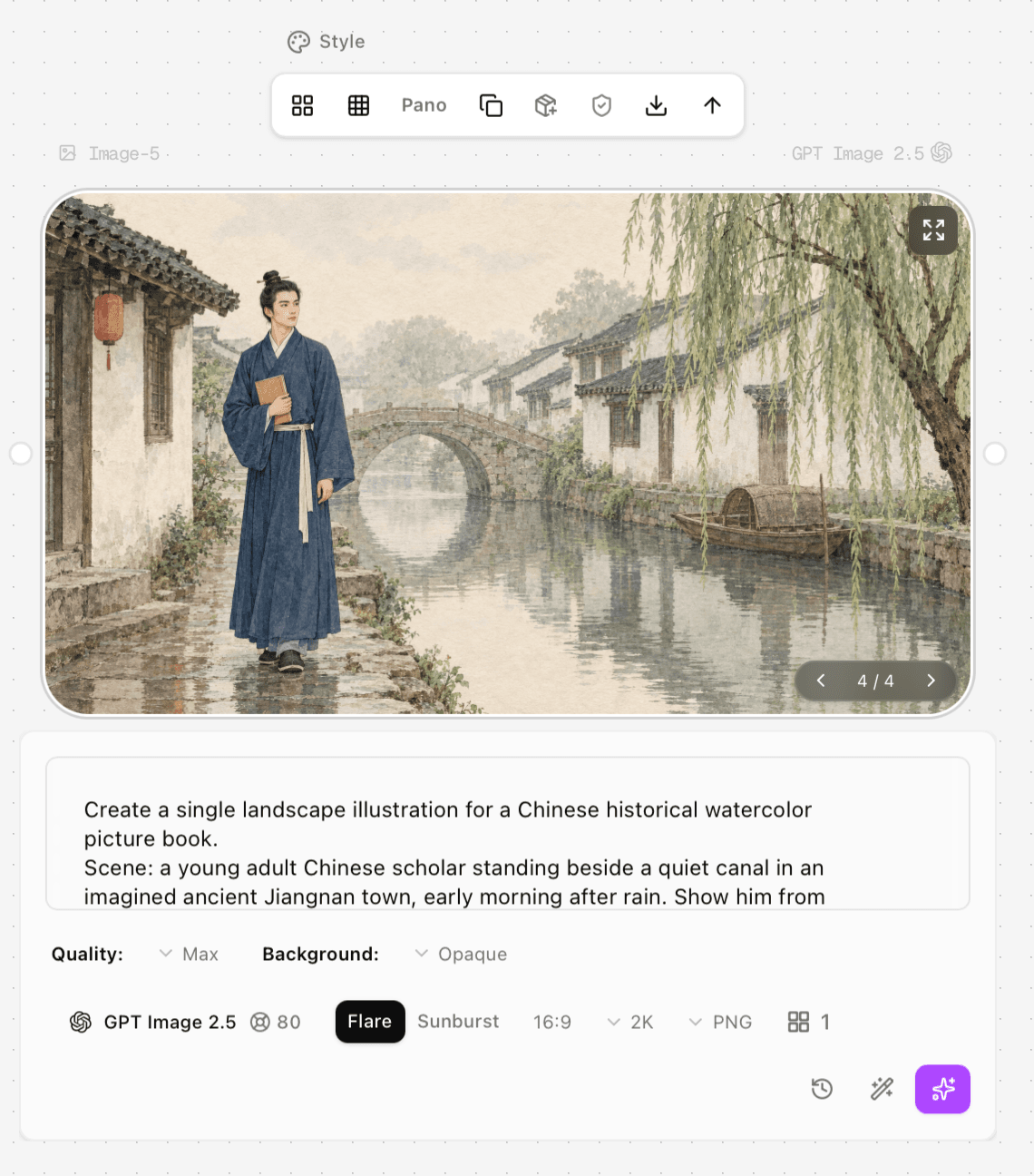
Figure 5. Max at 2K used 80 credits and completed in about 60 seconds. Cost increased much faster than the visible full-frame difference.
What the quality setting actually changes
Quality controls how much generation effort the model can spend. It is most likely to matter in places where the image must reconcile many small constraints: facial features, fingers, fabric weave, fine foliage, tiny lettering, reflective surfaces, or dense product geometry. It does not independently set pixel dimensions. A 2K Low image and a 2K Max image can share the same canvas size while differing in rendered detail and stability.
The watercolor prompt also exposes a real evaluation trap: softness can be stylistically desirable. Our Low result lost leaf separation, yet its diffusion made the image feel more traditionally painted. A technically “better” tier may therefore be a worse aesthetic match. Judge against the brief, not just sharpness.
A cost-efficient quality workflow
Lock the model, prompt, reference images, aspect ratio, dimensions, background, and format before comparing quality.
Start at Medium when composition and visual direction are still changing. Reject weak concepts before paying for fine detail.
Generate the selected concept at High and inspect at 100–200% for faces, hands, text, edges, repeated patterns, and reference fidelity.
Name the defect before moving to XHigh. If the problem is composition or instruction following, revise the prompt or reference instead of buying more quality.
Use Max only when the image is a high-value final asset and a localized defect persists after prompt and model checks.
This mirrors OpenAI’s official guidance: hold the other variables constant, raise quality only when required, and test whether a lower setting still passes. It also explains why one job finishing faster than a nominally lower tier is not proof of a speed advantage; queue and service variation can dominate a one-run comparison.
When should you switch models instead of quality tiers
Stay on Flare when you need rapid iteration and the image already follows the brief. Switch to Sunburst when edit precision, difficult composition, or subject preservation matters more than speed. The replacement benefit is a more capable model rather than simply more compute on the same model; the migration loss is slower generation and the possibility that the visual interpretation changes. The switch trigger is specific: High or XHigh Flare repeatedly misses the same structural instruction after the prompt and references are already clear.
OpenAI describes Flare as the faster everyday default and Sunburst as the premium model for maximum precision. Community comparisons also report stronger composition hold from Sunburst, but those posts are anecdotal and should be treated as a reason to run an A/B test, not as proof that Sunburst always wins.
Limitations of this test
Each setting was generated once; the test cannot separate tier effects from random generation variation.
The subject was a forgiving watercolor scene. Typography, photorealistic skin, diagrams, and products may reveal larger differences.
Astorie credit values describe the interface shown on the test date. OpenAI API token pricing is a separate billing system.
Visual judgments were made from the delivered frames and screenshots. They do not establish a universal ranking for every prompt.
Frequently asked questions
Does Max guarantee the best image
No. Max supplies the largest quality budget, but OpenAI explicitly notes that higher quality does not guarantee a better result for every prompt. Style preference and generation variance still matter.
Does quality change resolution
No. Quality and dimensions are independent controls. Choose the output size for delivery requirements and the quality tier for rendering effort.
Which setting should most teams use
Use Medium for exploration and High for final output. Switch upward only when a zoomed inspection identifies a defect that higher compute can plausibly solve.
Why did Medium finish faster than Low in the test
A single elapsed time includes queue and service variation. It should not be read as a stable tier-speed ranking. Repeated runs would be required for that claim.
The practical answer
Choose High as the default final GPT Image 2.5 setting, Medium for iteration, and XHigh or Max only after a concrete inspection failure. That policy preserves most of the visible benefit while preventing quality settings from becoming an expensive substitute for prompt, reference, or model decisions.
Sources
Official documentation is the authority for current product facts. Community links are included only as anecdotal reports and are not treated as controlled benchmarks.
OpenAI — Introducing ChatGPT Images 2.5
OpenAI — GPT Image 2.5 Flare model and pricing
OpenAI — GPT Image 2.5 Sunburst model and pricing
OpenAI — Image generation guide
OpenAI — Image prompting guide
Reddit community comparison — Flare and Sunburst quality and edit chain
Reddit community timing report — five Flare quality settings
Ready to try it on the canvas?
Open Astorie and fan your prompt across every frontier model in one workflow.