

GPT Image 2.5 Review: What Actually Improved
We tested GPT Image 2.5 against GPT Image 2, Nano Banana 2 Premium, and Midjourney V7 to see what actually improved in generation speed, prompt following, text rendering, editing, and visual consistency.
Key takeaways
- GPT Image 2.5 showed its clearest gains in speed, prompt following, text rendering, editing consistency, and control rather than raw image quality.
- In our Kyoto poster test, GPT Image 2.5 finished in 40 seconds versus 63 seconds for GPT Image 2.
- In our Kyoto poster test, GPT Image 2.5 finished in 40 seconds versus 63 seconds for GPT Image 2.
- Midjourney V7 produced the stronger aesthetic result in our fashion test, while GPT Image 2.5 followed the requested details more closely.
- GPT Image 2.5 preserved source images more consistently during targeted edits across both editing tests.
GPT Image 2.5 is OpenAI's latest image generation and editing model family. It brings faster generation, better editing, and stronger visual consistency.
But is it a real upgrade?
We tested GPT Image 2.5 across image generation and editing tasks, and compared its outputs with GPT Image 2, Nano Banana 2 Premium, and Midjourney V7.
GPT Image 2.5 is a practical upgrade for users who want more control over their images. In our tests, it delivered strong prompt following, more consistent editing, and faster generation than GPT Image 2.
What Is GPT Image 2.5?
GPT Image 2.5 is OpenAI's latest family of image generation and editing models. It accepts both text and image inputs.
There are two API models: GPT-Image-2.5 Flare and GPT-Image-2.5 Sunburst.
Model | Best for | Main strength |
GPT-Image-2.5 Flare | Everyday image generation and high-volume work | Speed |
GPT-Image-2.5 Sunburst | Detailed generation and editing | Precision |
Flare is the faster option for everyday image creation. Sunburst is OpenAI's most capable model for image generation and editing.
Both support quality settings from low to max. They also share the same published API token rates.
OpenAI also uses Images 2.5 in ChatGPT. The ChatGPT experience and the API models belong to the same new generation, but they are different ways to access it.
How We Tested GPT Image 2.5
We tested GPT Image 2.5 through the web version of ChatGPT, where Flare and Sunburst are not presented as separate model options. Our results therefore reflect the ChatGPT Images 2.5 experience.
Generation time was measured from submitting the prompt to receiving the completed image. The scores below are qualitative ratings based on the individual outputs shown in this article rather than averages across a large benchmark.
That means these results should be treated as practical examples, not universal rankings.
GPT Image 2.5 vs GPT Image 2
GPT Image 2 is OpenAI's previous flagship image model and the direct predecessor to GPT Image 2.5. Comparing the two gives us the clearest look at what OpenAI has actually improved in this update.
We used the same prompt to see how visible these improvements are.
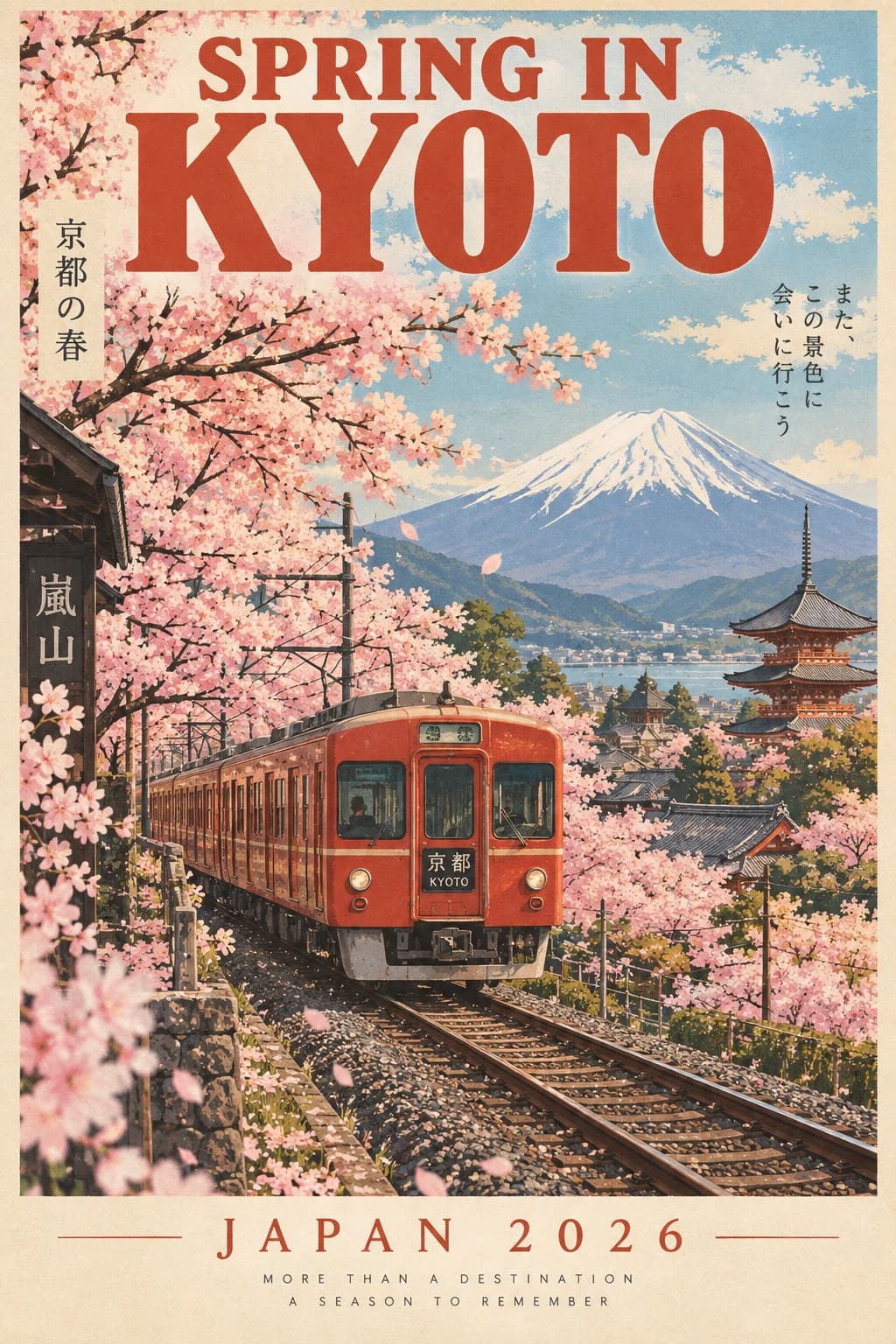
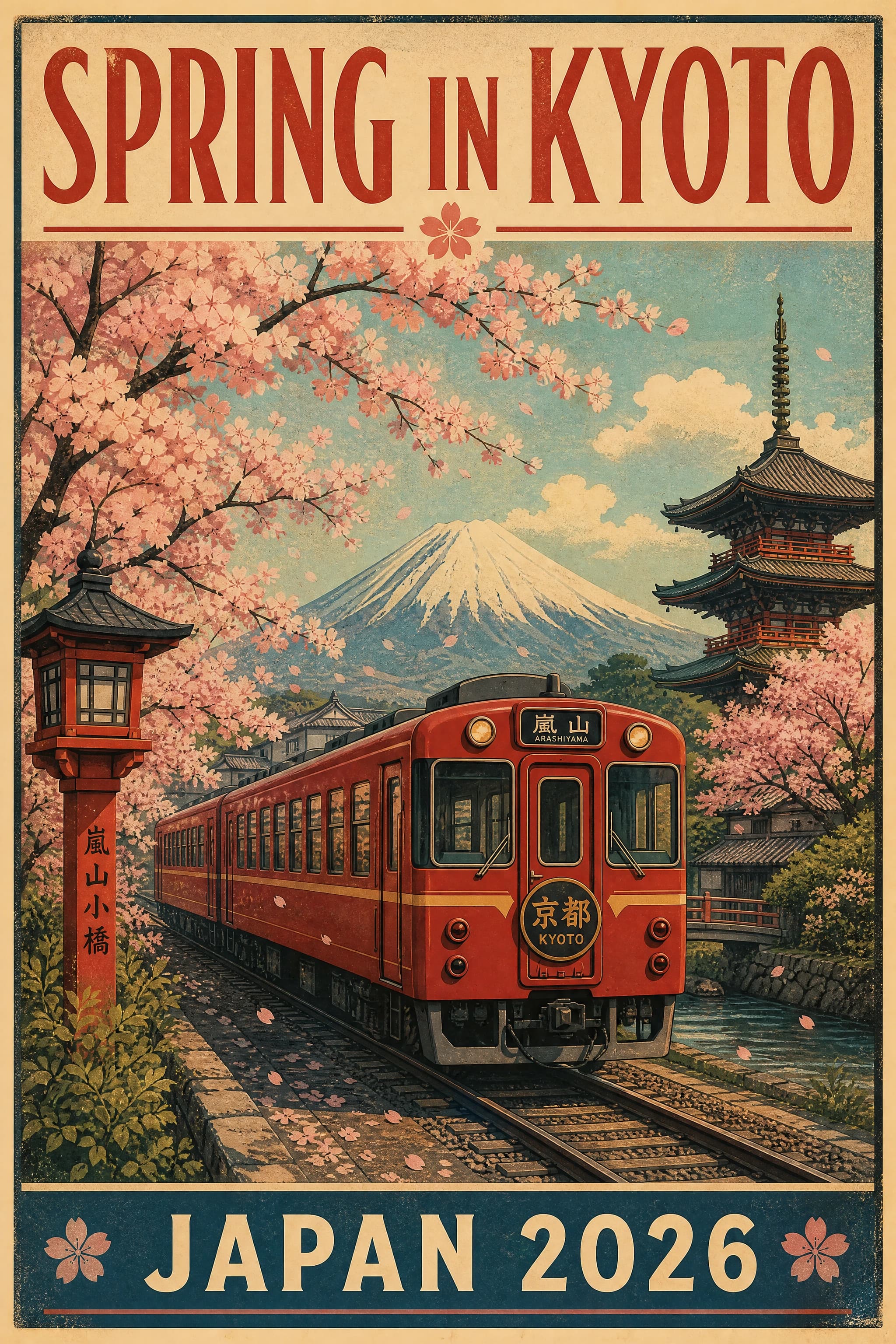
Prompt: "Create a retro travel poster for Kyoto in spring. Show a red train passing under cherry blossoms, with Mount Fuji in the distance. Add the headline 'SPRING IN KYOTO'at the top and 'JAPAN 2026'at the bottom."
GPT Image 2.5
GPT Image 2
Comparison | GPT Image 2.5 | GPT Image 2 |
Image quality | 5 | 5 |
Prompt following | 5 | 5 |
Text rendering | 5 | 4 |
Visual consistency | 5 | 4 |
Generation speed | 40s | 1min3s |
Both models produced strong images, and the difference in raw image quality was relatively small.
The clearer improvement was speed. GPT Image 2.5 completed our test in 40 seconds versus 63 seconds for GPT Image 2, making it about 37% faster in this run.
GPT Image 2.5 also produced cleaner text and a more consistent overall design.
GPT Image 2.5 vs Nano Banana 2 Premium
Nano Banana 2 Premium is one of the image generation options available in Astorie.
It focuses on fast generation while handling detailed prompts, text, and complex compositions, making it a useful alternative to GPT Image 2.5 for everyday creative work.
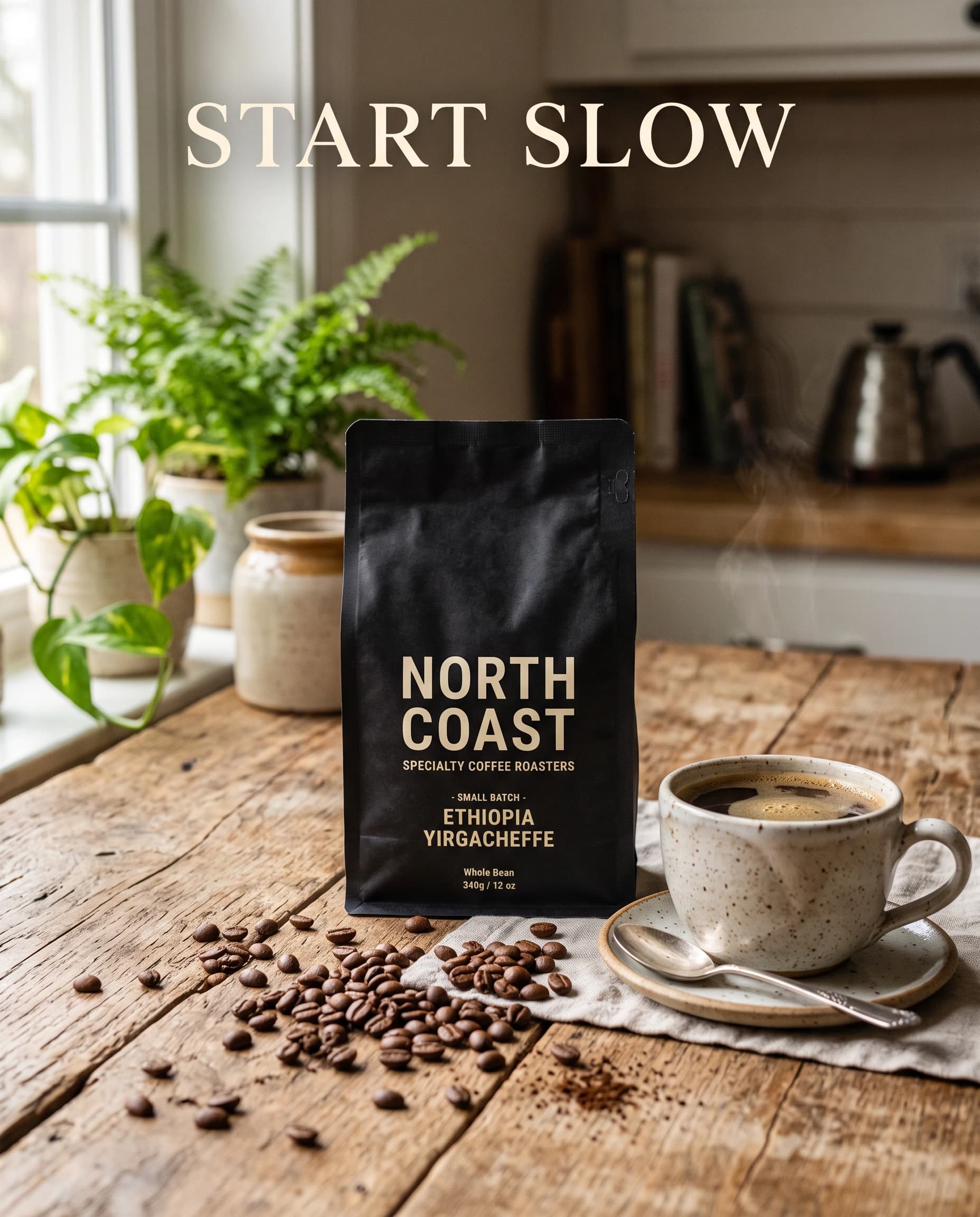
We gave both models the same product advertising task.
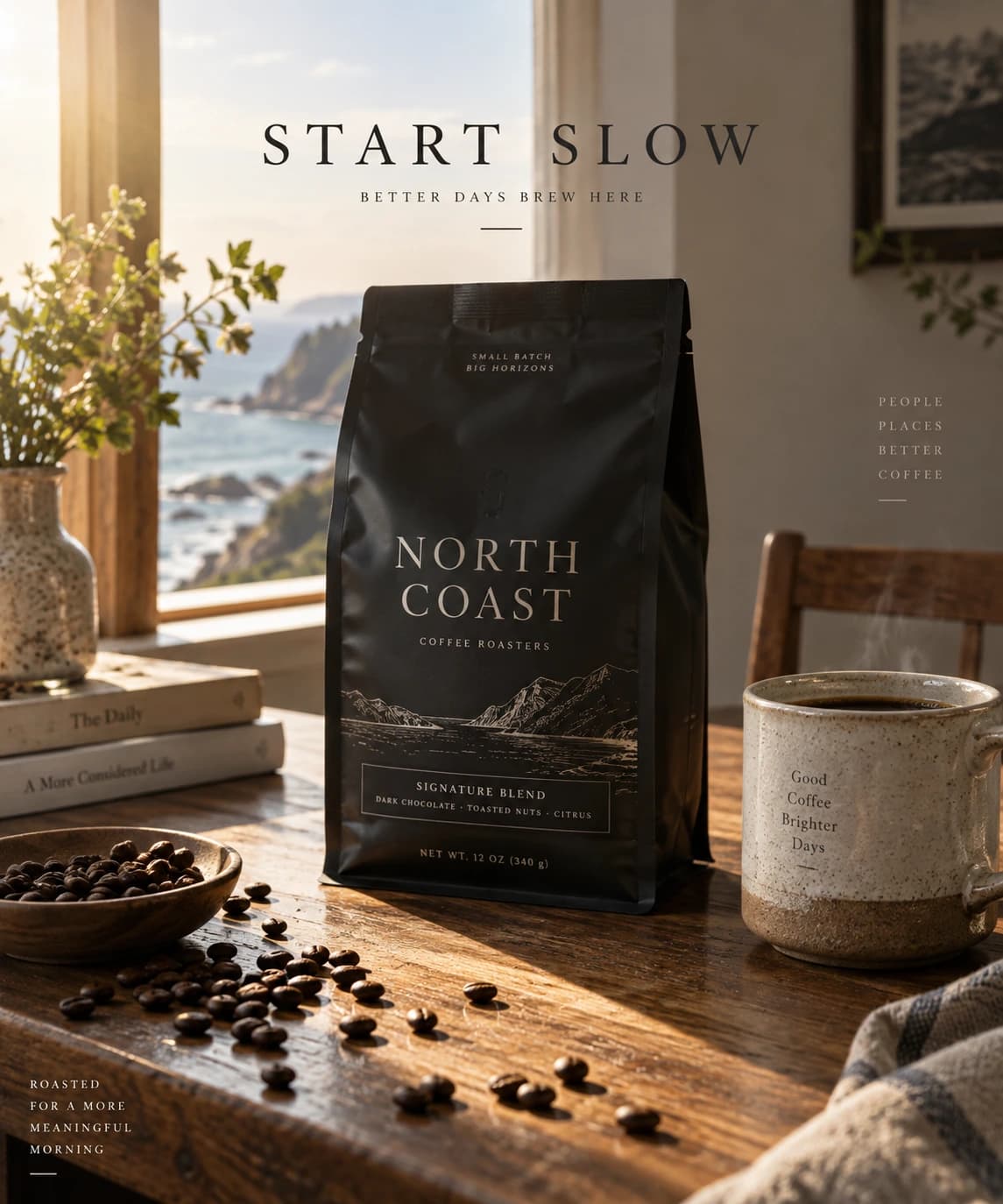
Prompt: "Create a premium coffee advertisement. Place a matte black coffee bag labeled 'NORTH COAST'on a wooden table. Add a ceramic cup on the right and scattered coffee beans in the foreground. Morning sunlight enters from the left. Add the text 'START SLOW'at the top. Photorealistic product photography."
GPT Image 2.5
Nano Banana 2 Premium
Comparison | GPT Image 2.5 | Nano Banana 2 |
Image quality | 5 | 4 |
Prompt following | 5 | 3.5 |
Text rendering | 5 | 4 |
Product detail | 5 | 3.5 |
Composition | 4.5 | 3 |
Generation speed | 40s | 17s |
GPT Image 2.5 produced the more controlled result in this test. It performed better in text rendering, product detail, and overall prompt adherence.
Nano Banana 2 had a clear advantage in speed. It finished in 17 seconds, compared with 40 seconds for GPT Image 2.5.
That makes the trade-off relatively clear in this example: GPT Image 2.5 offered stronger control, while Nano Banana 2 delivered a result much faster.
GPT Image 2.5 vs Midjourney V7
Midjourney has long been known for visually polished and stylized image generation.
For this comparison, we used Midjourney V7 because it is the version currently available in Astorie. Midjourney has since released newer models, so this test should not be interpreted as a comparison with the latest Midjourney model.
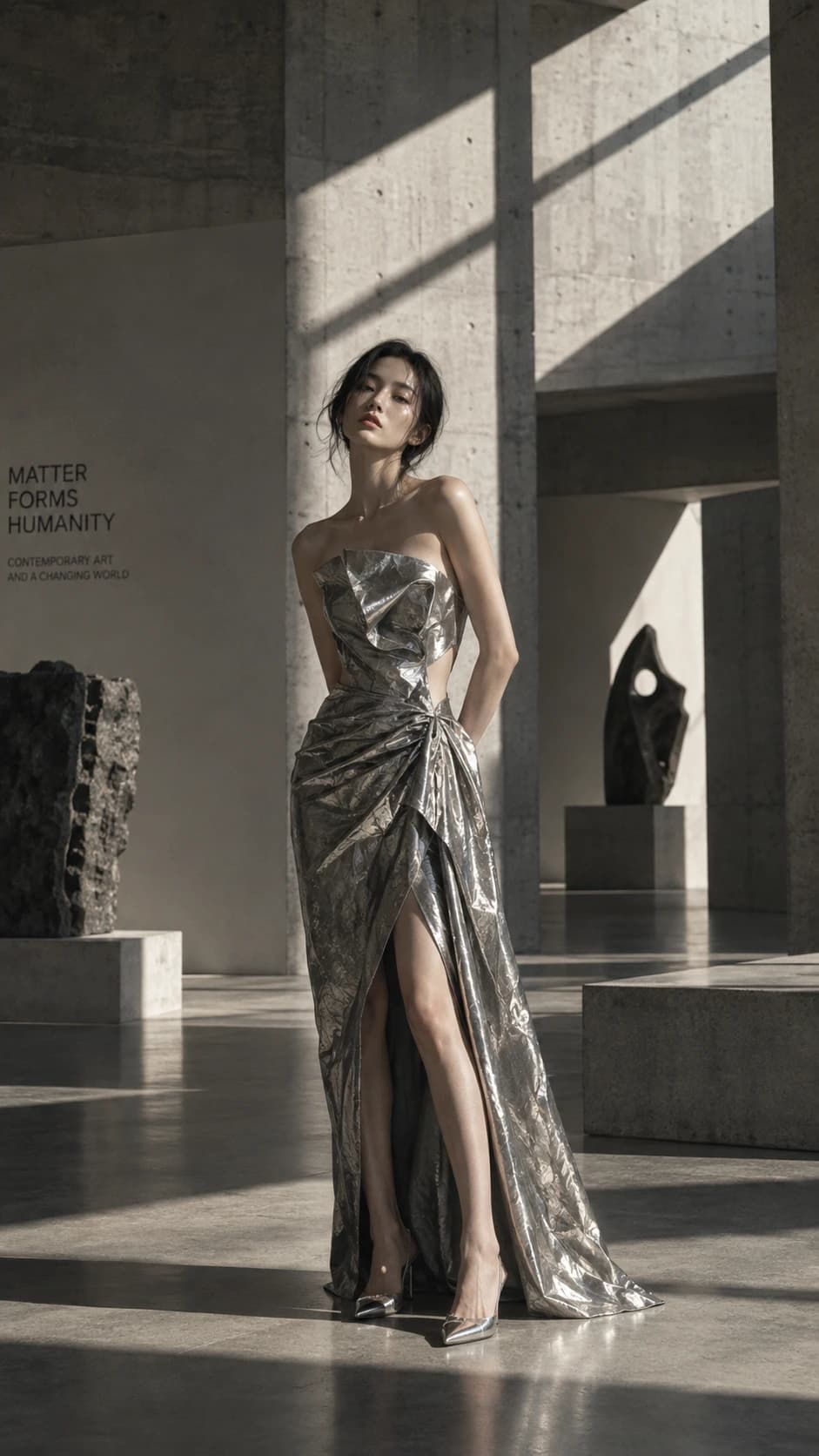
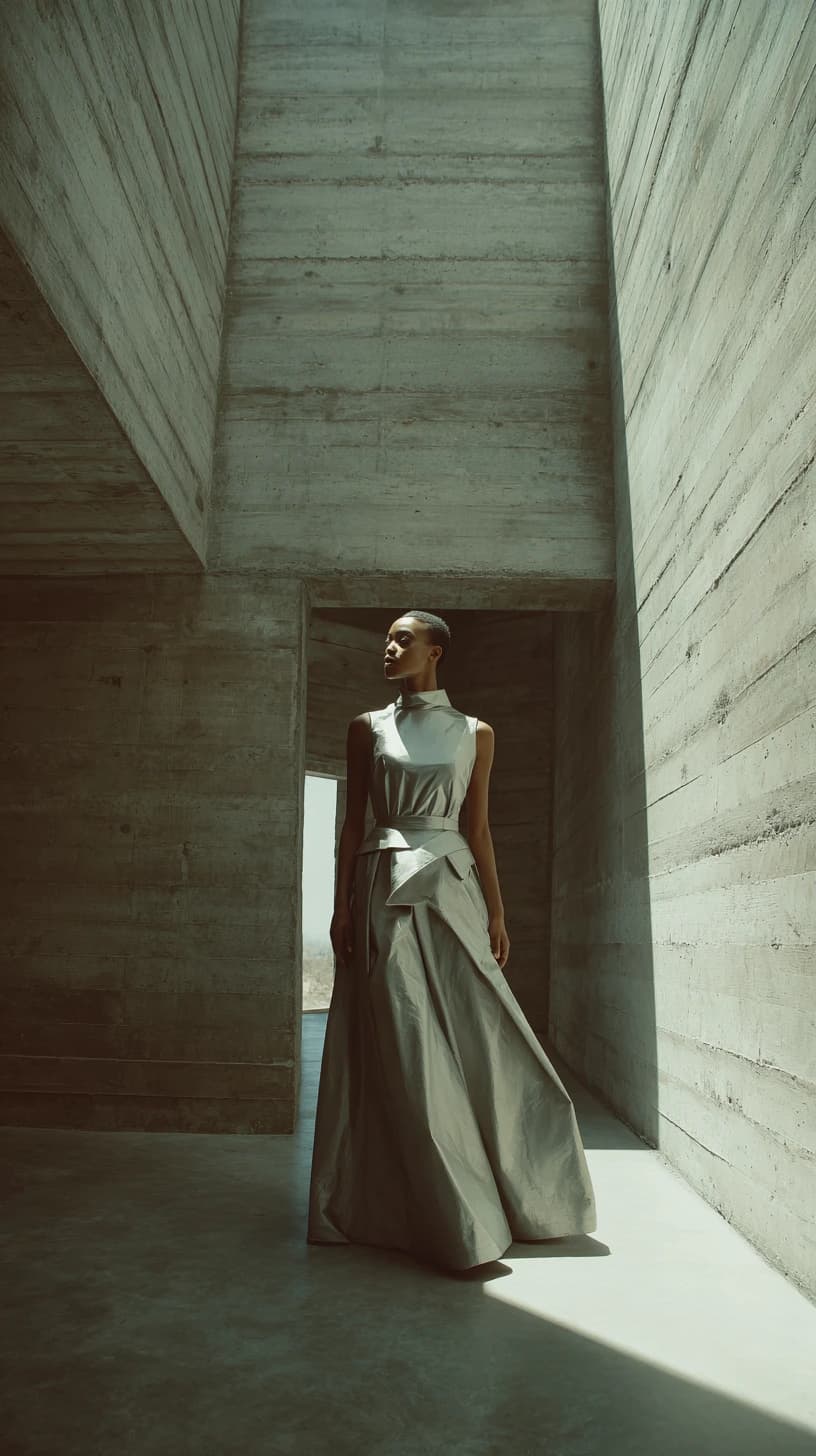
We chose an editorial fashion prompt where aesthetics and composition matter as much as instruction following.
Prompt: "Editorial fashion photograph of a woman wearing a sculptural silver dress in a brutalist concrete gallery. Hard afternoon sunlight creates geometric shadows across the room. Full-body composition, muted colors, subtle film grain, high-fashion magazine photography."
GPT Image 2.5
Midjourney V7
Comparison | GPT Image 2.5 | Midjourney V7 |
Image quality | 4 | 4 |
Aesthetics | 3 | 4 |
Prompt following | 4 | 3.5 |
Composition | 3 | 4 |
Detail | 4 | 4 |
Generation speed | 50s | 1min39s |
Midjourney V7 produced the stronger aesthetic result in this test, particularly in composition and overall visual style.
GPT Image 2.5 followed the requested instructions slightly more closely and generated the image much faster.
This reflects a broader difference in how the two tools may fit into a creative workflow. Midjourney can be useful when you want to explore visual directions, while GPT Image 2.5 may be more suitable when the prompt contains specific elements that need to be followed closely.
How Good Is GPT Image 2.5 at Image Editing?
Editing revealed a clearer difference between the two generations.
To make the comparison more balanced, we used two source images: one originally generated by GPT Image 2.5 and one generated by GPT Image 2. We then asked both models to edit both images using the same instruction.
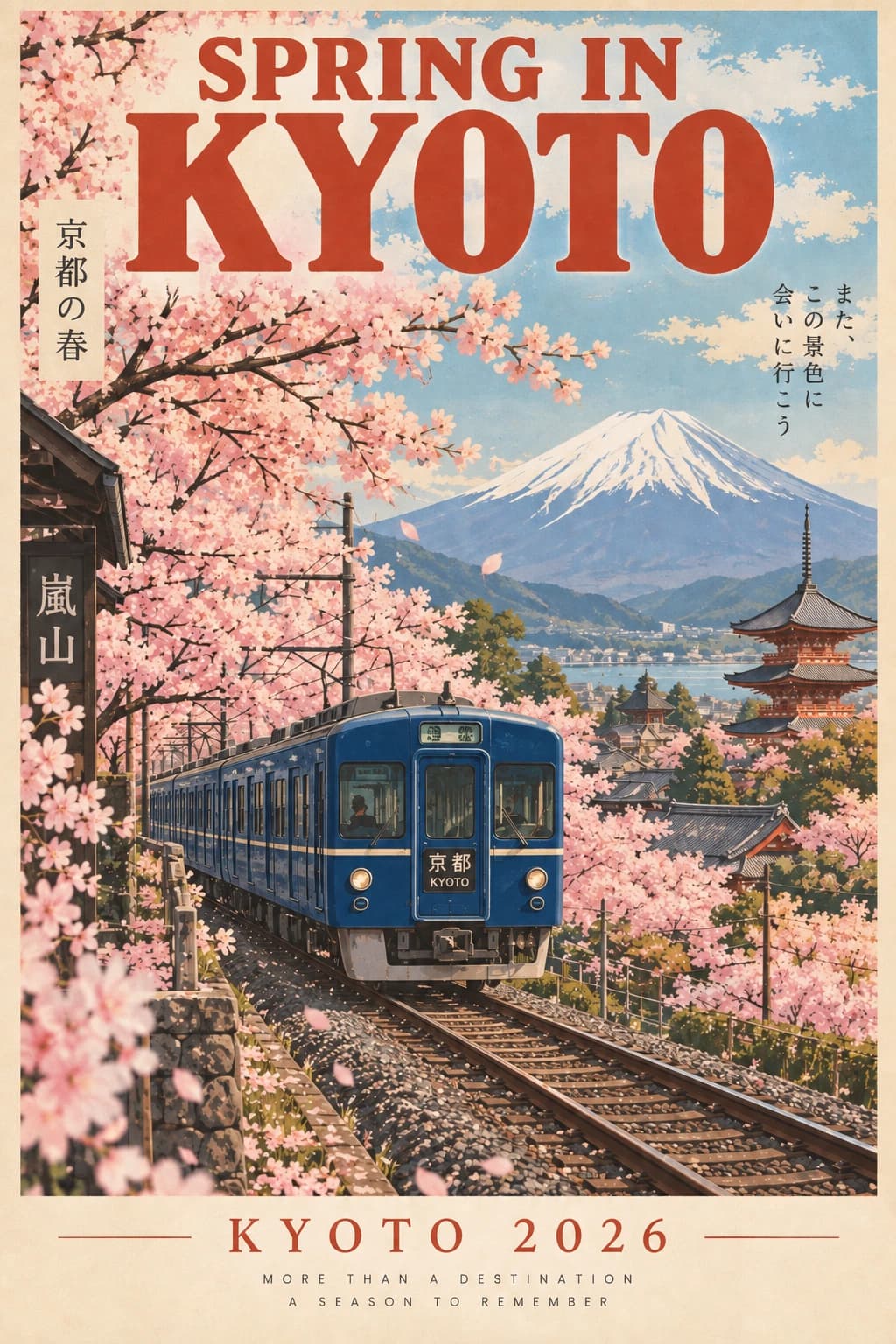
Prompt: "Edit this travel poster: Change the red train to deep blue and replace the bottom text 'JAPAN 2026'with 'KYOTO 2026'. Keep the headline 'SPRING IN KYOTO'unchanged. Preserve the cherry blossoms, Mount Fuji, landscape, poster style, colors, typography, train position, and overall composition as closely as possible. Do not change any other elements."
Source image 1 (generated by GPT Image 2.5) → GPT Image 2.5 edit / GPT Image 2 edit
source image 1
GPT Image 2.5 edit
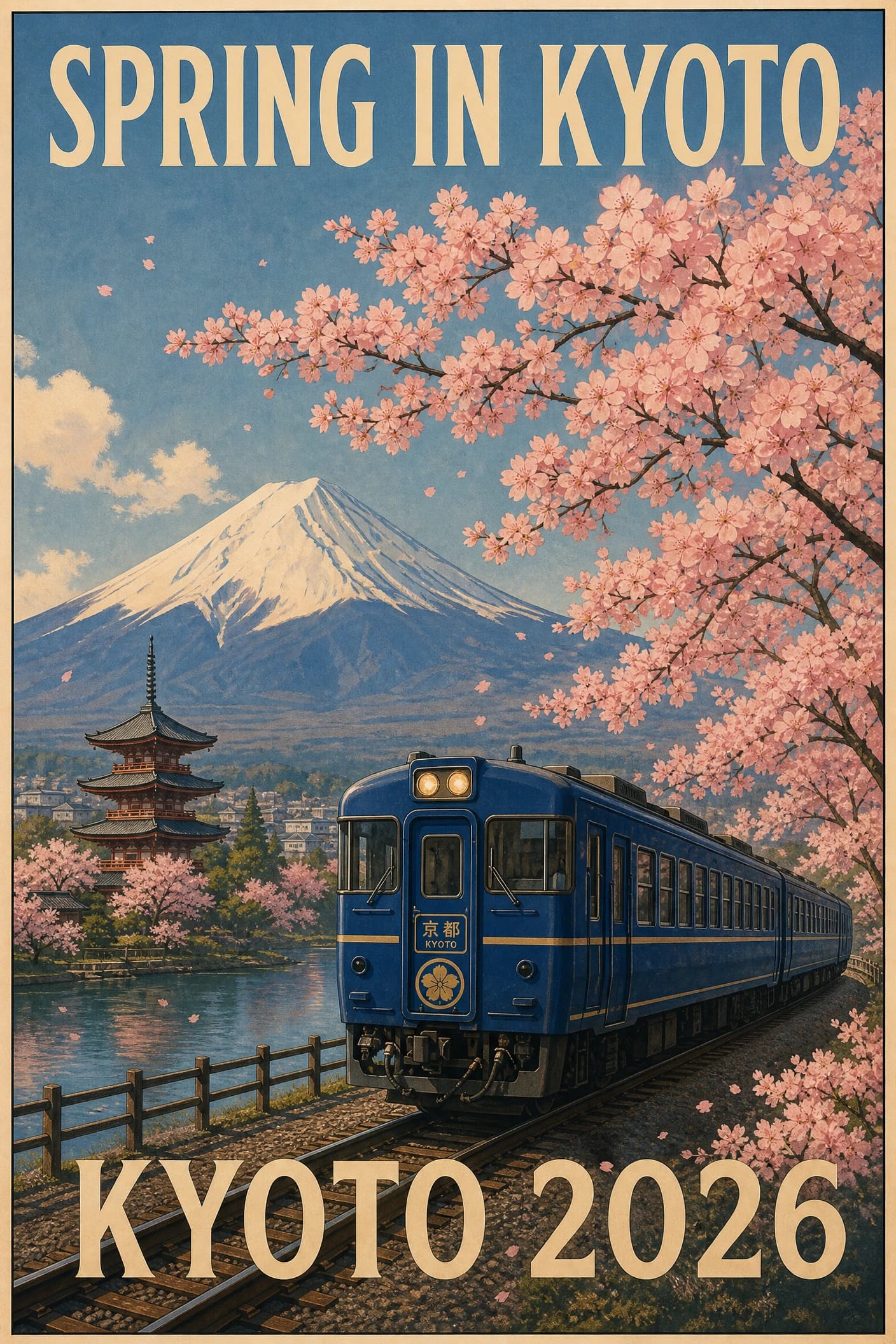
GPT Image 2 edit
Source image 2 (generated by GPT Image 2)→ GPT Image 2.5 edit / GPT Image 2 edit
source image 2
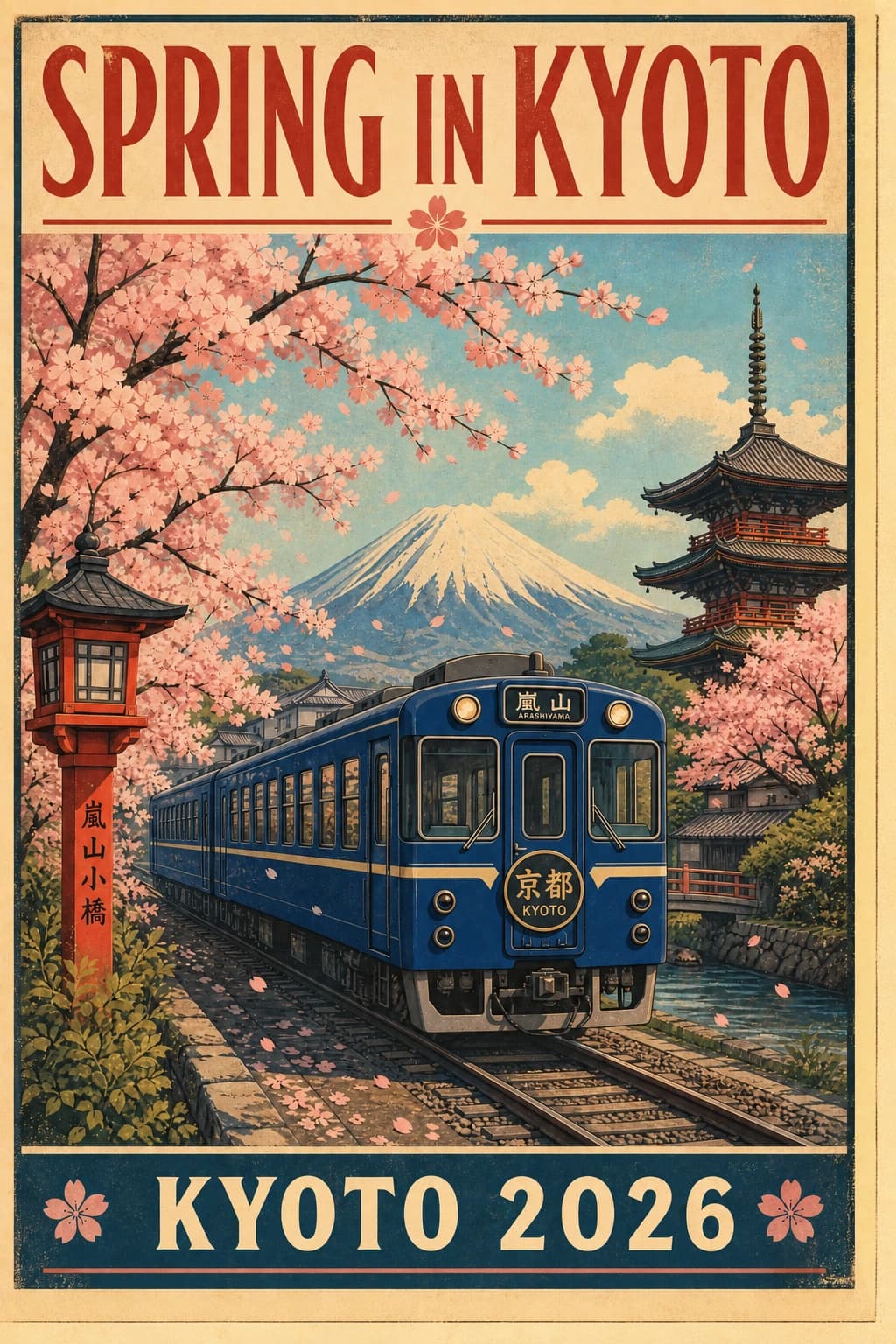
GPT Image 2.5 edit
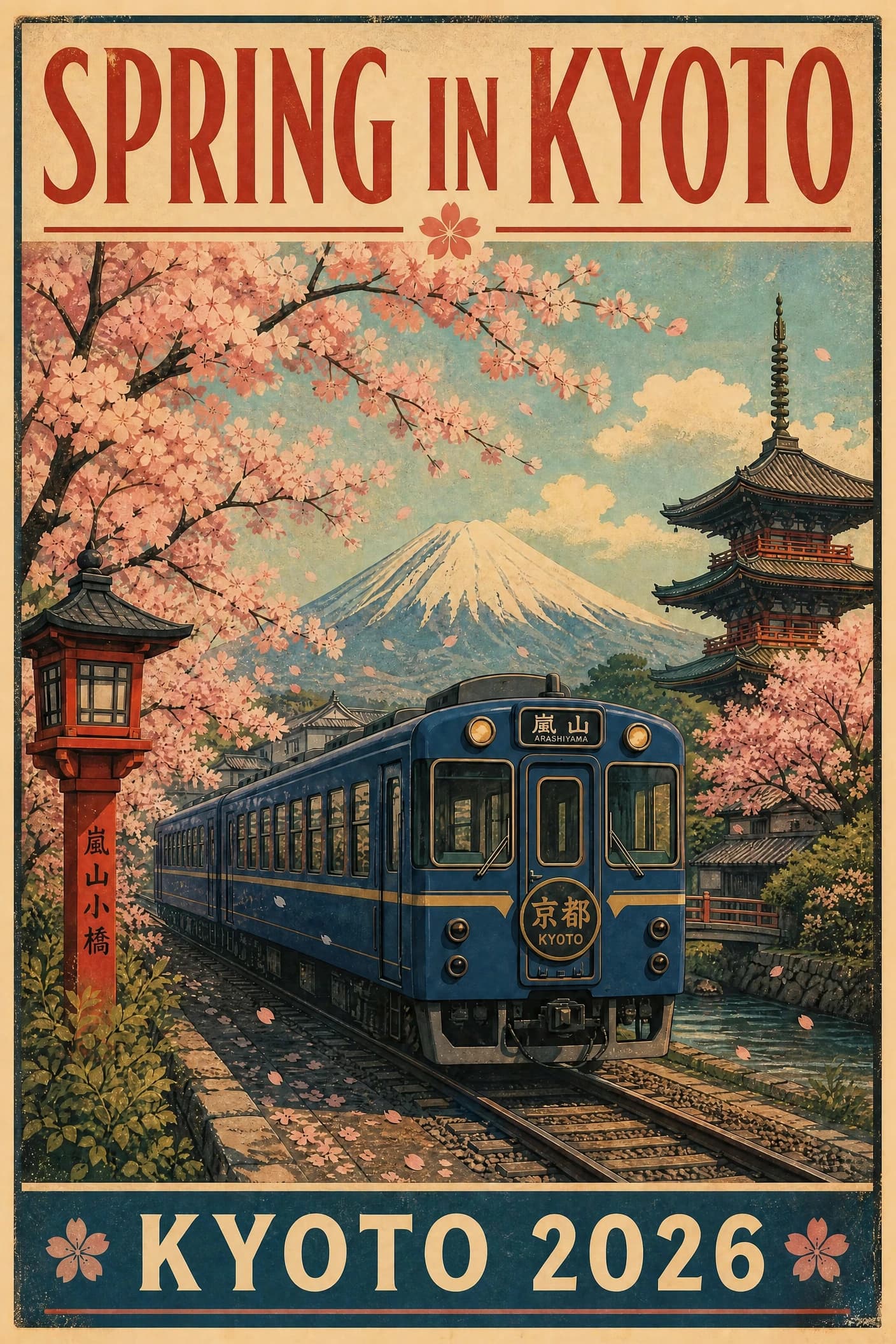
GPT Image 2 edit
Editing comparison | GPT Image 2.5 | GPT Image 2 |
Edit accuracy | 5 | 5 |
Text editing | 5 | 5 |
Subject preservation | 5 | 4 |
Composition consistency | 5 | 3.5 |
Preservation across inputs | 5 | 3 |
Unwanted changes | Very minor | Varies by input |
Both models completed the requested edits, but GPT Image 2.5 preserved the source images more consistently. It changed the train color and bottom text while keeping the original layout, typography, landscape, and train position largely intact across both inputs. GPT Image 2 also preserved its own source image well, but introduced much larger compositional changes when editing the image originally generated by GPT Image 2.5.
Conclusion: GPT Image 2.5 showed stronger preservation across different source images, making targeted edits without unnecessarily changing the rest of the design.
What Are the Limitations of GPT Image 2.5?
GPT Image 2.5 performed well across our tests, but it was not the best model in every category.
First, better instruction following does not automatically mean better aesthetics. Midjourney V7 produced the more visually striking fashion image in our test.
Second, GPT Image 2.5 is not always the fastest option. Nano Banana 2 completed our product image test in 17 seconds, less than half the 40 seconds required by GPT Image 2.5.
Finally, our comparisons use individual outputs rather than a large multi-prompt benchmark. Image generation contains variation, so a different run may produce a different result.
These tests are better understood as examples of each model's strengths and trade-offs than as absolute rankings.
GPT Image 2.5 Pricing and Access
GPT Image 2.5 is available through OpenAI's API. Images 2.5 is also available in ChatGPT.
Flare and Sunburst currently have the same published API token rates.
Model | Text input | Image input | Image output |
GPT-Image-2.5 Flare | $5 / 1M tokens | $8 / 1M tokens | $30 / 1M tokens |
GPT-Image-2.5 Sunburst | $5 / 1M tokens | $8 / 1M tokens | $30 / 1M tokens |
Actual cost depends on token usage and generation settings.
Flare is the natural starting point when speed matters. Sunburst is designed for workflows where editing precision matters more.
Which AI Image Model Should You Use?
There is no single best image generator for every task.
Based on the tests in this article, the right choice depends on what you care about most.
If you care most about... | Best fit from our tests |
Controlled image generation | GPT Image 2.5 |
Instruction following | GPT Image 2.5 |
Text inside images | GPT Image 2.5 |
Editing images | GPT Image 2.5 |
Fast generation | Nano Banana 2 |
Aesthetic exploration | Midjourney V7 |
GPT Image 2.5 is especially compelling when your prompt contains several specific requirements that need to survive into the final image.
Nano Banana 2 makes more sense when speed is the priority.
Midjourney V7 remains attractive for users who care more about visual interpretation and aesthetic experimentation.
Compare AI Image Models in Astorie
Our tests show why using one image model for every task is not always ideal. GPT Image 2.5 offered stronger control, Nano Banana 2 was faster, and Midjourney V7 produced the stronger aesthetic result in our tests.
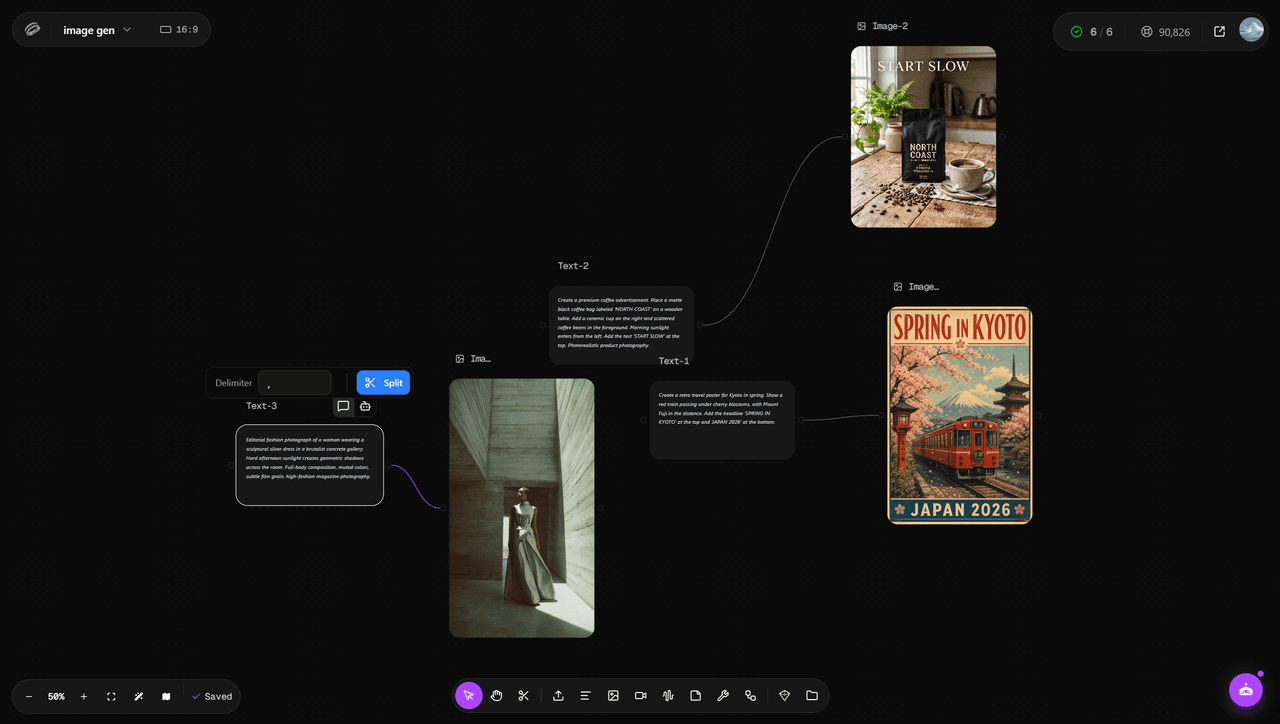
Astorie brings these models into the same workspace, making it easier to compare outputs and choose the right model for each creative task.
GPT Image 2.5 FAQ
Is GPT Image 2.5 free?
It depends on how you access it.
API usage is paid based on token consumption. Images 2.5 is also available through ChatGPT, where access and usage depend on the plan and product limits that apply to your account.
Can GPT Image 2.5 edit existing images?
Yes.
Both GPT-Image-2.5 Flare and Sunburst accept image inputs and support image editing. Sunburst is specifically designed for workflows where editing precision matters more.
Does GPT Image 2.5 support reference images?
Yes.
GPT Image 2.5 accepts image inputs, allowing existing images to be used as part of generation and editing workflows.
What is the difference between GPT Image 2.5 Flare and Sunburst?
Flare focuses on fast, high-quality everyday generation.
Sunburst is designed for more precise generation and editing, particularly when detailed image control matters.
Both currently share the same published API token rates.
Is GPT Image 2.5 better than GPT Image 2?
In our test, GPT Image 2.5 was faster and produced better text rendering and visual consistency, while raw image quality was relatively similar.
For our Kyoto poster, GPT Image 2.5 finished in 40 seconds compared with 63 seconds for GPT Image 2.
The biggest upgrade therefore appears to be workflow efficiency and control rather than a dramatic increase in basic image quality.
Can I use GPT Image 2.5 through the API?
Yes.
OpenAI offers both GPT-Image-2.5 Flare and GPT-Image-2.5 Sunburst through its API.
Final Verdict: Is GPT Image 2.5 Worth Using?
GPT Image 2.5 is a meaningful upgrade, but not because every image suddenly looks dramatically better.
In our GPT Image 2 comparison, raw image quality was similar. The more noticeable improvements were speed, text rendering, visual consistency, and control.
Its competitors still have clear strengths. Nano Banana 2 was significantly faster in our product test, while Midjourney V7 produced the stronger aesthetic result in our fashion comparison.
That makes GPT Image 2.5 most compelling for users who want an image model to follow detailed instructions reliably rather than simply produce the most visually surprising result.
GPT Image 2.5 is less about dramatically prettier images and more about making image generation easier to control.
Related reading
Seedance 2 Handbook: Variants, Best Workflows, and How to Use It on Astorie
Hands-on guide to Seedance 2 — variants, strengths, and the production workflows it fits on Astorie's canvas.
GPT Image 2 Guide: Workflows, Strengths, and Where It Fits on Astorie
How GPT Image 2 fits product, text, and reference image workflows on Astorie's multi-model canvas.
Nano Banana 2 Workflows for Multi-Image Reference and Character Consistency
Multi-image reference and character consistency workflows on Astorie using Nano Banana 2.
Ready to try it on the canvas?
Open Astorie and fan your prompt across every frontier model in one workflow.