

Kling 3 Guide: 3.0 vs O3, Reference, Edit & Video Reference
Learn how to choose between Kling 3.0, O3, O3 Reference, Video Edit, and Video Reference based on what you want the next generation to preserve.
Quick Answer
Choose the Kling 3 workflow based on what you want the next generation to preserve.
Use Kling 3.0 or Kling O3 when you are starting mainly from a text prompt.
Use O3 Reference when you want a character or visual identity to carry into a new shot.
Use O3 Video Edit when you already like a video and only want to change selected details.
Use O3 Video Reference when you want a new generation to follow the movement or camera structure of another clip.
In Astorie, Kling Video 3.0 Omni appears as Kling O3. Both Video 3.0 and Video 3.0 Omni belong to Kling's 3.0 model series.
Which Kling 3 Variant Should You Use?
A useful way to choose is to start with the material you already have.
What you have | What you want to do | Best starting point |
A text prompt | Create a new video from scratch | Kling 3.0 or O3 |
A character image or Element | Bring the same character into a new scene | O3 Reference |
A video you mostly want to keep | Change a few visual details | O3 Video Edit |
A video with motion or camera work you like | Use that structure to guide a new video | O3 Video Reference |
The key is not to ask which model sounds more advanced.
Choose based on what you need to preserve.
What Can Kling 3 Actually Do?
Kling 3 is broader than the four workflows tested in this guide. The 3.0 model family also adds controls for longer, more structured video generation.
Capability | What it helps you do | Where it matters |
Text-to-video | Create new shots mainly from a prompt | Kling 3.0 and O3 |
Image and reference inputs | Guide subjects, characters, objects, or visual appearance | Especially useful in O3 reference workflows |
Multi-Shot | Generate multiple planned shots in one video | Both 3.0 and O3 |
Native Audio | Generate dialogue, ambience, or other audio with the video | Both 3.0 and O3 |
Flexible 3–15 second duration | Control clip length beyond fixed 5- or 10-second outputs | Both 3.0 and O3 |
Start and end frames | Guide how a video begins and finishes | Useful for planned motion and transitions |
Element references | Carry characters or objects across generations | Especially useful for consistency workflows |
Video Edit and Video Reference | Preserve or transform information from existing footage | O3 workflows |
You do not need every control for every project.
The tests below focus on a more practical question: which workflow should you choose when you already know what part of the next generation needs to stay consistent?
Kling 3.0 vs O3 for Prompt-First Video Generation
I started by testing Kling 3.0 and O3 with the exact same text prompt.
The goal was simple: see whether one model handled a basic action-and-camera instruction more reliably than the other.
What I Tested
Both generations used:
- 16:9 aspect ratio
- STD quality
- 5-second duration
- The same prompt
The prompt was:
"A bicycle courier in a bright red rain jacket rides through a narrow seaside market at dusk. She swerves gently around a stack of wooden crates while keeping both hands on the handlebars. The camera tracks alongside her at the same speed in one continuous shot. Market awnings flutter naturally in the coastal wind. Realistic human movement, grounded cinematic photography, natural motion blur. No cuts."
The prompt included two things I wanted to watch closely.
First, the courier needed to move around the wooden crates. Second, the camera was supposed to track beside her.
What Happened
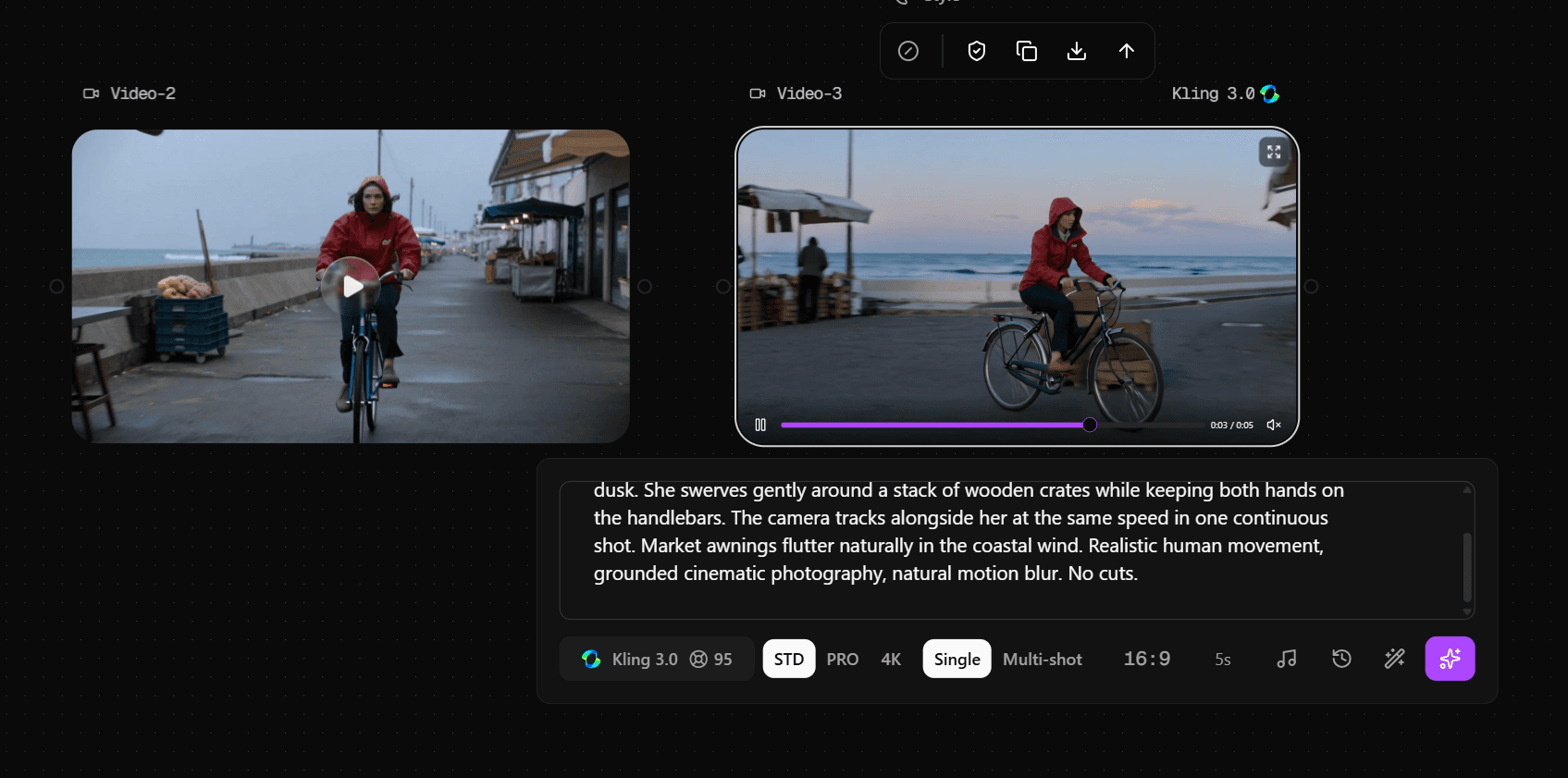
Both models understood the main action.
The cyclist moved through the market and avoided the crates in both generations. Neither result completely failed the basic choreography.
The side-tracking camera instruction was less convincing. Both videos had some sense of tracking movement, but neither followed the requested camera path especially well.
The clearest difference was generation time.
In this test:
- O3 finished in 51 seconds
- Kling 3.0 took 2 minutes 29 seconds
Both generations used 95 Astorie credits under these exact settings.
That does not mean O3 will always be almost three times faster. This was one matched test.
What it does show is that I did not see a dramatic difference in basic prompt following in this simple shot. O3 happened to finish much faster, while the cost was the same in this run.
What I Would Choose
If you are making a straightforward video from text, I would not assume that one of these models is automatically the better choice.
Run the shot that matters to you and judge the result.
A model can understand the subject and action while still missing the camera behavior you wanted.
When to Use O3 Reference for Character Consistency
Character reference is useful when you do not want to redesign a person from scratch in every scene.
But my test also showed why character consistency should not be treated as a single pass-or-fail idea.
I created a character named Nora and saved her as a reusable reference.
Her key design features included:
- Short black hair
- Bright yellow headphones
- A cobalt-blue utility jacket
- Dark pants
- A small silver nose ring
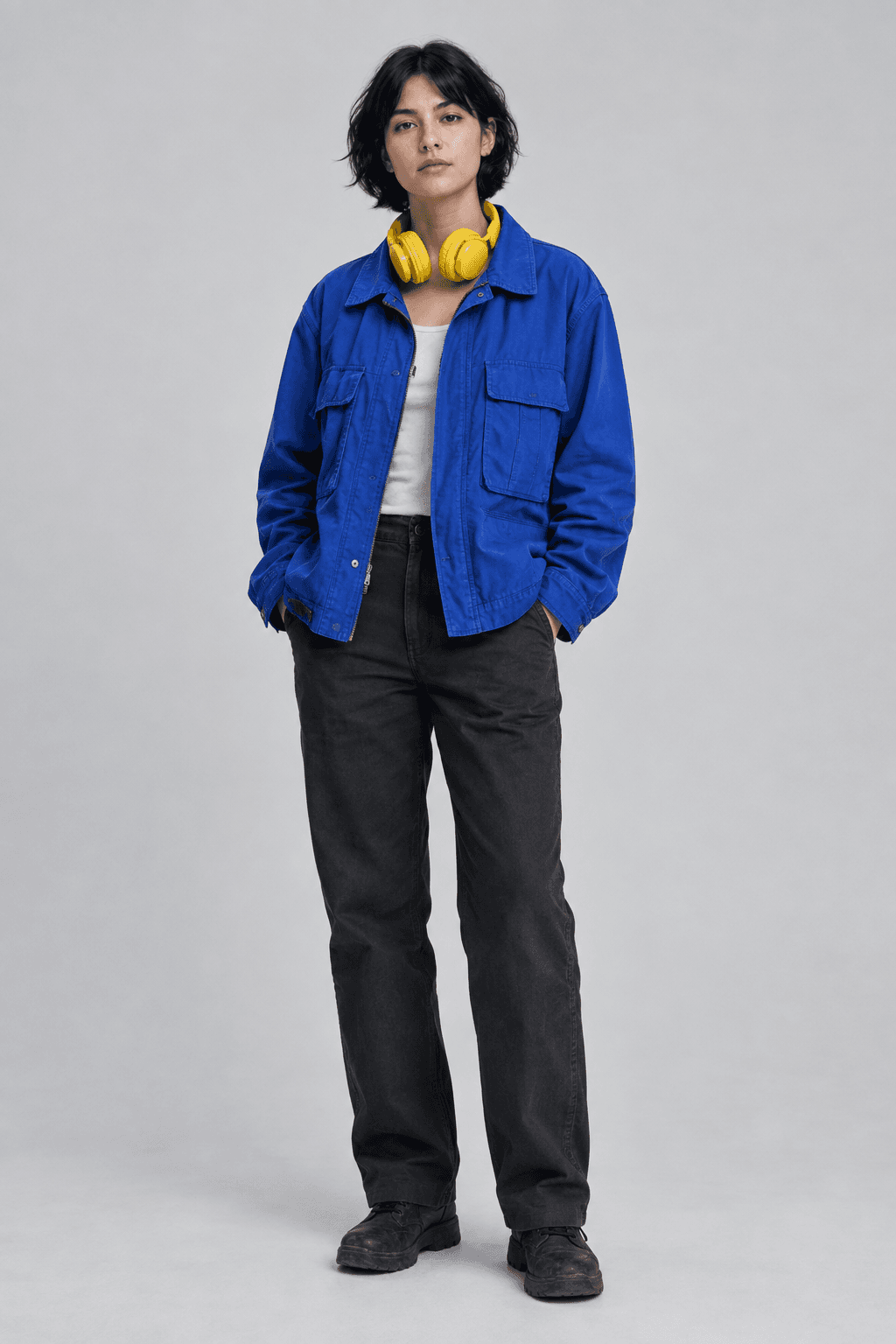
I intentionally started with just one reference image.
That let me see how much the model could preserve before adding more reference material.
My First Nora Test
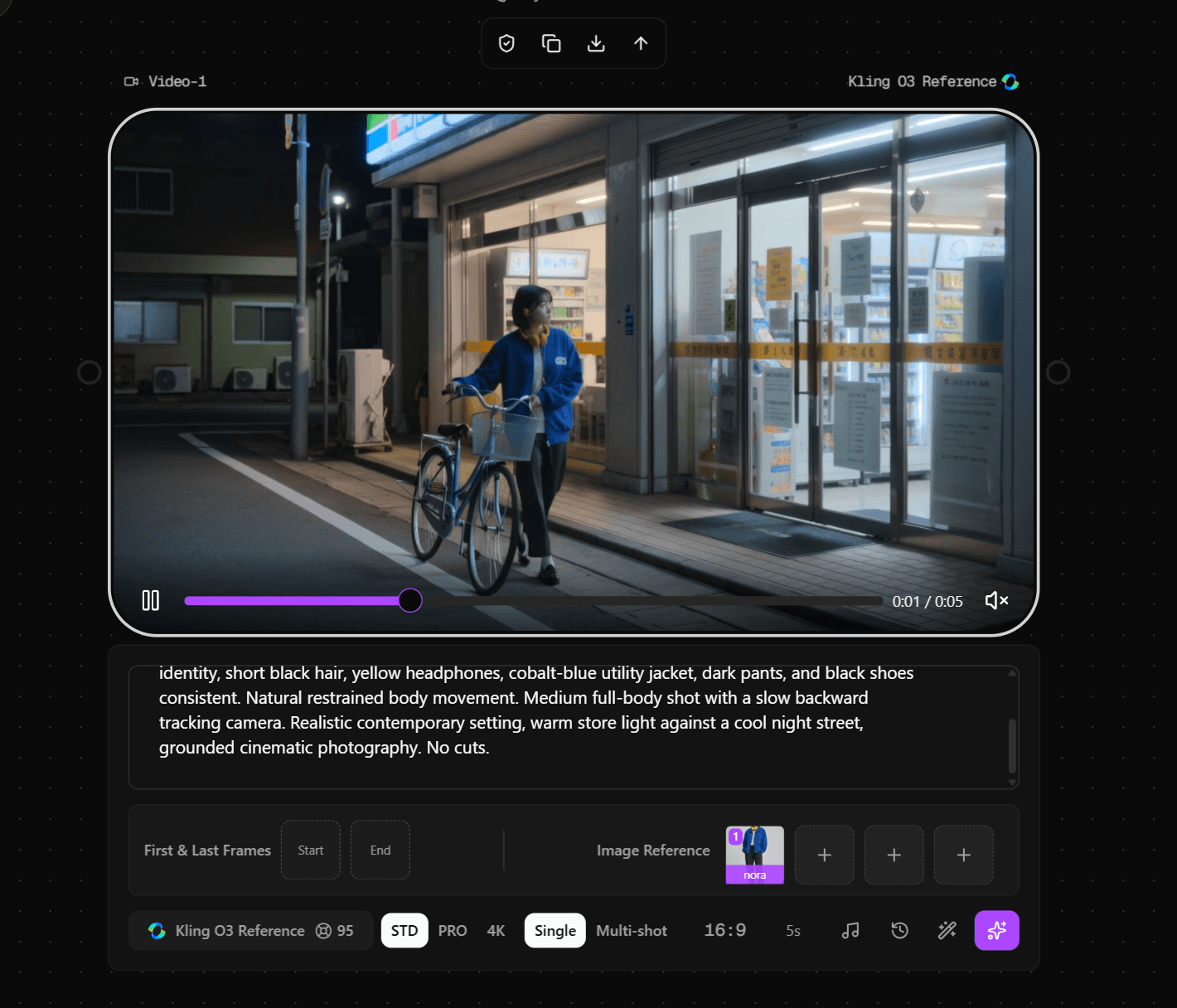
I placed Nora outside a convenience store at night.
The generated character still looked like the same broad design concept.
Her short dark hair remained. The yellow headphones were recognizable. The jacket stayed blue, and the overall outfit had a similar visual identity.
However, the face changed noticeably.
The jacket structure also shifted. Some clothing details were simplified or redesigned.
Because the shot showed most of her body, the nose ring was too small to judge clearly.
At that point, there were two possible explanations.
Either the model had lost the facial identity, or the face was simply too small in the frame to evaluate properly.
So I ran one closer shot.
The Close-Up Made the Difference Clear
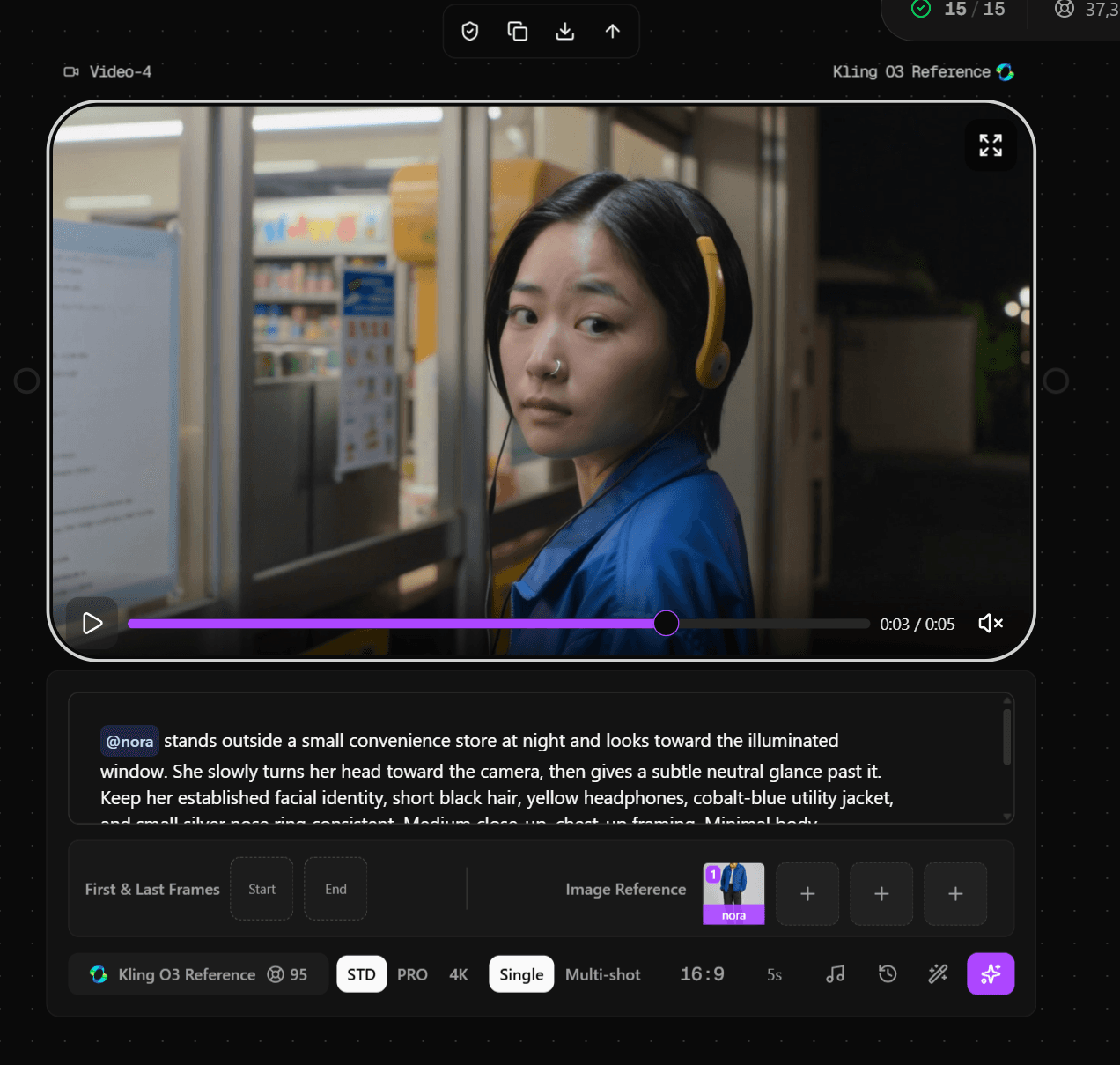
In the closer generation, the nose ring appeared.
That confirmed that small details can become easier to preserve when they are actually visible at the final shot scale.
But the face still looked clearly different from the original reference.
That changed how I think about O3 Reference.
The model preserved Nora's recognizable design cues better than her exact facial identity.
Her hairstyle, headphones, jacket color, and nose ring helped the character remain visually recognizable.
The specific face did not stay locked.
Visual Identity Is Not the Same as Facial Identity
This distinction matters when you evaluate character consistency.
Visual identity can include:
- Hairstyle
- Clothing colors
- Accessories
- Silhouette
- Signature design features
Facial identity is more specific:
- Face shape
- Eye and nose structure
- Feature proportions
- Exact likeness
A character can remain recognizable at the design level while still drifting at the face level.
That is exactly what happened in my Nora test.
When O3 Reference Makes Sense
I would use O3 Reference when the character needs to stay recognizable across different scenes.
It can make sense for a recurring visual character, branded mascot, or story character whose styling matters.
I would not assume that one reference image gives you an exact face lock.
If exact facial likeness is critical, check the final result at the same framing you plan to publish.
O3 Video Edit vs Video Reference: The Difference That Actually Matters
These two options sound similar, but my test showed that they solve very different problems.
I used the same bicycle courier clip as the source for both.
That source video already had:
- A cyclist
- A bicycle
- A market environment
- Forward movement
- A continuous moving camera
Then I gave the two workflows different goals.
O3 Video Edit: Keep the Clip, Change Selected Parts
For Video Edit, I wanted to keep the original video structure.
I only asked for two changes:
- Change the red rain jacket to deep forest green
- Change the dusk scene into a rainy night
Everything else was supposed to stay the same.
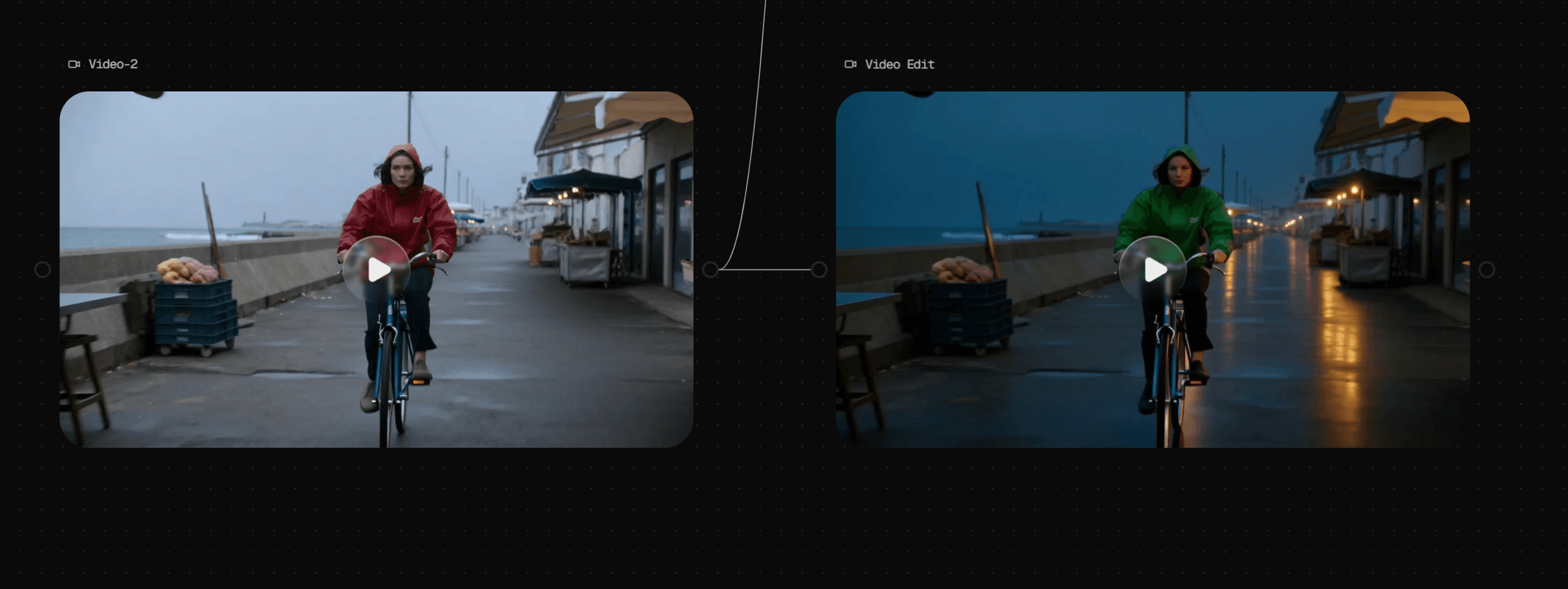
The edit worked very cleanly.
The jacket changed color. The scene became darker and wetter, with more night lighting and reflections.
But the cyclist remained.
The bicycle remained.
The riding motion, framing, general composition, and camera movement also stayed close to the original clip.
That is the clearest way I would describe Video Edit:
Use it when the source is the video you want to keep.
You are not asking the model to invent a new clip from scratch. You are asking it to transform selected parts of a clip that already works.
This makes it useful for changes such as wardrobe, lighting, weather, or visual treatment.
O3 Video Reference: Borrow the Structure of the Source
Video Reference is most useful when the source video's motion, pacing, subject trajectory, or camera structure matters.
That is the role I tested here.
The workflow can also combine video guidance with additional image or Element references when you need more control over appearance, characters, or other visual details.
For this test, however, I deliberately pushed the text prompt against the structure of the source video.
I asked for:
- A new young man
- A beige work jacket
- A vintage motorcycle
- A narrow city street at night
I wanted the source clip to guide the pacing and camera behavior, but not to dictate every object in the new scene.
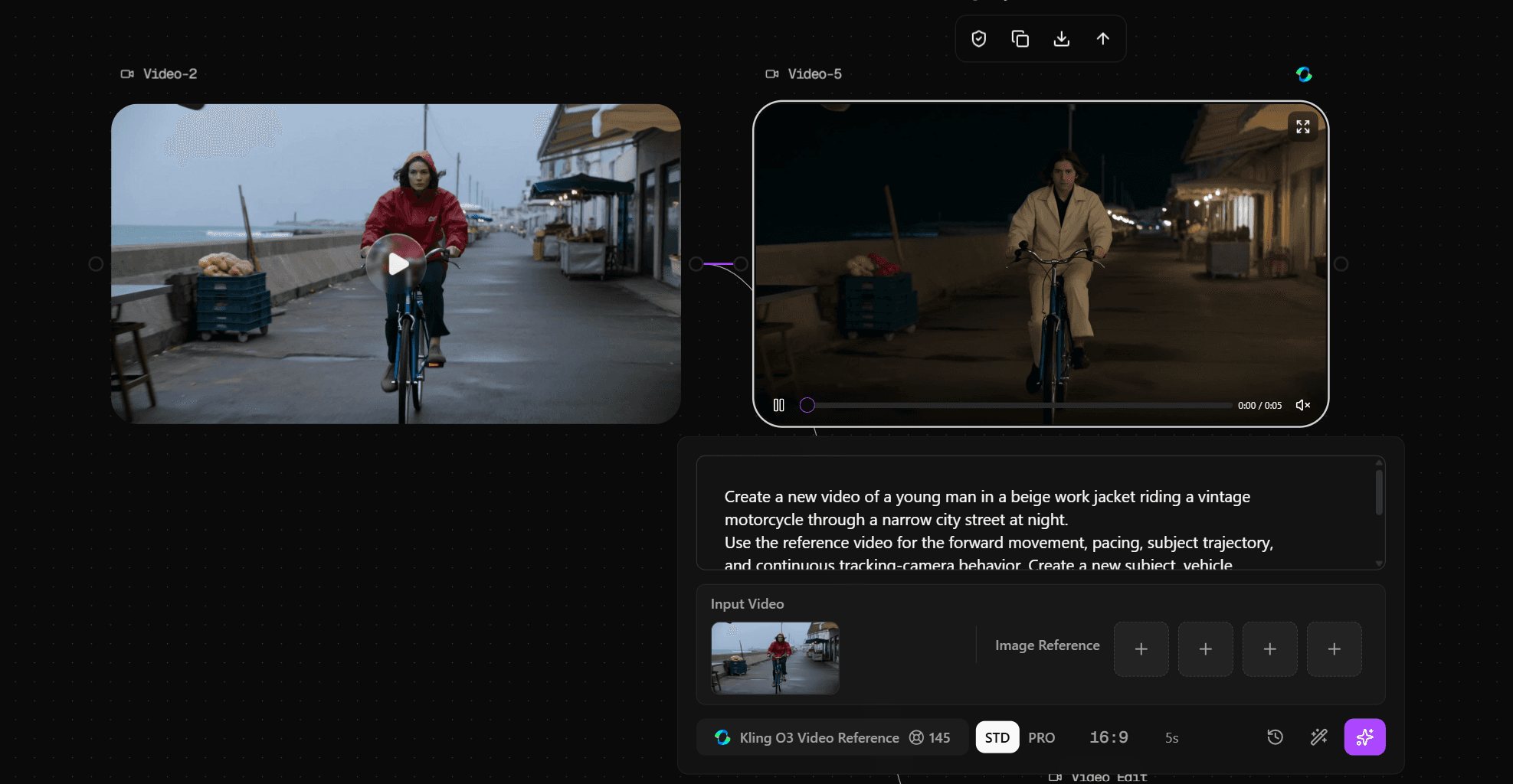
The result was revealing.
The person changed.
The environment changed.
But the bicycle stayed.
The movement rhythm was also very similar to the source. The subject followed a similar path, and the camera trajectory stayed close to the original video.
Even though I clearly asked for a motorcycle, the generated subject was still riding a bicycle.
That tells us something important.
The reference video can act as a strong structural constraint.
It is not just a loose visual suggestion.
In my test, the source influenced the new generation strongly enough to override part of the text prompt.
When Video Reference Makes Sense
Use Video Reference when you like the movement, pacing, subject trajectory, or camera behavior of an existing clip.
You can also combine the reference video with additional visual references when you want to guide who or what appears in the new generation.
It makes less sense when you want to replace almost every structural element in that clip.
If the vehicle, action, composition, and scene all need to become completely different, starting from a new generation may be easier.
A Simple Rule for Choosing Between Reference, Edit, and Video Reference
If the model list starts to feel confusing, use this decision flow.
Do you want a completely new shot from text?
Start with Kling 3.0 or O3.
Do you want the same character in another scene?
Use O3 Reference.
Do you want to keep the existing video and only change part of it?
Use O3 Video Edit.
Do you want a new generation to follow the motion or camera structure of another clip?
Use O3 Video Reference.
A shorter way to remember it is:
Prompt = what to create.
Reference = who or what to carry over.
Edit = what to change.
Video Reference = how the new clip should move.
That last rule is deliberately simplified. Video Reference can also work with added visual references, but the reference video's motion and cinematic structure are the main reason to choose this workflow over the others.
That distinction is more useful than trying to rank every variant from strongest to weakest.
What My Tests Revealed About Kling 3 Control
The most useful lessons came from the parts that did not work perfectly.
Camera Instructions Can Be Weaker Than Subject Instructions
Both Kling 3.0 and O3 understood that the cyclist needed to move around the wooden crates.
The side-tracking camera instruction was less precise.
That means a shot can succeed at subject choreography while still missing the exact camera behavior.
Character Reference Can Preserve Design Without Locking the Face
Nora remained recognizable through her hair, headphones, jacket, and nose ring.
Her exact facial identity did not remain stable.
That is why I would judge character consistency in layers instead of giving it one overall score.
A Source Video Can Overpower Conflicting Prompt Details
In my Video Reference test, the prompt asked for a motorcycle.
The model kept the bicycle.
At the same time, it retained the source motion and camera structure very well.
That is useful if those are the things you want to preserve. It becomes a limitation if you want to rebuild the shot completely.
How I Would Choose Kling 3 for Common Use Cases
For a short cinematic shot built mainly from text, I would start with Kling 3.0 or O3.
For a recurring character in different scenes, I would use O3 Reference and check facial identity separately from clothing and styling.
For changing wardrobe, weather, lighting, or other selected parts of an existing clip, O3 Video Edit is the more natural choice.
For reusing the motion, pacing, or camera behavior of an existing video, I would use O3 Video Reference.
If I wanted to replace the subject, vehicle, action, environment, and composition all at once, I would probably start fresh instead of forcing Video Reference to abandon most of its source structure.
Cost and Speed: Check the Workflow You Actually Use
Video generation costs can change across platforms and settings, so I would not treat one credit number as universal.
In my Astorie tests:
- Kling 3.0, 5s STD: 95 credits
- O3, 5s STD: 95 credits
- O3 Video Reference, 5s STD: 145 credits
These were the values shown for my actual generations on Astorie.
The matched Kling 3.0 and O3 test also showed a large difference in generation time:
- O3: 51 seconds
- Kling 3.0: 2 minutes 29 seconds
Again, this was one test.
It is useful as first-hand workflow data, not as a universal benchmark.
Final Recommendation
The best Kling 3 workflow depends less on which variant sounds more advanced and more on what you want the next generation to preserve.
Text-first generation starts from an idea. Character Reference carries visual identity. Video Edit keeps an existing clip while changing selected details. Video Reference carries motion and camera structure into a new generation.
My tests also showed the tradeoff behind that control: the more strongly you reference an existing asset, the more carefully you need to decide which parts of it you actually want the model to preserve.
FAQ
Is Kling O3 part of Kling 3?
Yes. In Astorie, O3 is the label used for Kling Video 3.0 Omni. Kling officially lists Video 3.0 and Video 3.0 Omni under its 3.0 model series.
Older models such as O1 and Kling 2.x are outside the scope of this guide.
What can Kling Video 3.0 do?
The Kling 3.0 model family supports text- and image-guided video generation, Multi-Shot generation, Native Audio, flexible 3–15 second durations, and start/end frame control.
Its reference capabilities can also help carry characters, objects, or other visual information across generations.
The exact controls available depend on the Kling 3 workflow and the platform where you access it.
Is Kling 3.0 better than O3?
Not in every situation.
In my matched 5-second STD test, both handled the main subject action successfully. Neither followed the side-tracking camera instruction especially well.
O3 finished faster in that test, but one result is not enough to call it universally faster or better.
Can O3 Reference keep the exact same face?
Do not assume it will.
In my single-reference Nora test, the model preserved recognizable styling cues, including her hair, headphones, jacket color, and nose ring.
Her facial identity still changed noticeably.
What is the difference between O3 Video Edit and Video Reference?
Use Video Edit when you want to keep the source clip and change selected details.
Use Video Reference when you want a new generation to borrow movement, pacing, or camera structure from the source.
In my test, Video Reference preserved the source structure strongly enough that a bicycle remained even after the prompt asked for a motorcycle.
Related reading
Seedance 2 Handbook: Variants, Best Workflows, and How to Use It on Astorie
Hands-on guide to Seedance 2 — variants, strengths, and the production workflows it fits on Astorie's canvas.
GPT Image 2 Guide: Workflows, Strengths, and Where It Fits on Astorie
How GPT Image 2 fits product, text, and reference image workflows on Astorie's multi-model canvas.
Nano Banana 2 Workflows for Multi-Image Reference and Character Consistency
Multi-image reference and character consistency workflows on Astorie using Nano Banana 2.
Ready to try it on the canvas?
Open Astorie and fan your prompt across every frontier model in one workflow.