

How to Create AI Skincare Product Photography
AI skincare photography should preserve the real packaging and the product’s visible texture while changing the setting and lighting. Start from separate references for the closed container and any exposed formula, then inspect labels, proportions, hinges and material finish before publishing.
AI skincare photography: choose a packaging shot and a texture shot
A skincare image set usually needs two different jobs: identify the product and communicate its visible formula. A bathroom scene can give a sealed lotion context. It cannot reveal what the lotion looks like outside the bottle. Plan the two shots separately and use the right reference for each.
Shot | Reference needed | Keep accurate |
Closed packaging | Complete real product photograph | Silhouette, label, cap and material finish |
Exposed formula | Real photo of the actual product texture | Color, surface, fill and visible consistency |
Open container | Reference with the lid open | Hinge, mirror, clasp and opening angle |
Application | Real instructions plus appropriate reference | Dispensing method; no invented skin outcome |
1. Identify the products and material constraints
Clara used Buly Lait Virginal Rose de Damas for the sealed-body-milk scene and Baume des Muses Ivoire for the exposed-balm example. These are separate products with different formulas. The body milk must not be represented by the balm’s solid surface. Their official pages establish identity; the supplied photographs establish the visible details used in each prompt [1–2].
The Baume des Muses Ivoire page contains an especially useful qualification: the ivory case is matte in reality even though the product visual can look shiny [2]. That means matching the reference’s reflections is not enough for final material accuracy. Ask for a matte exterior and check it against the official finish description.
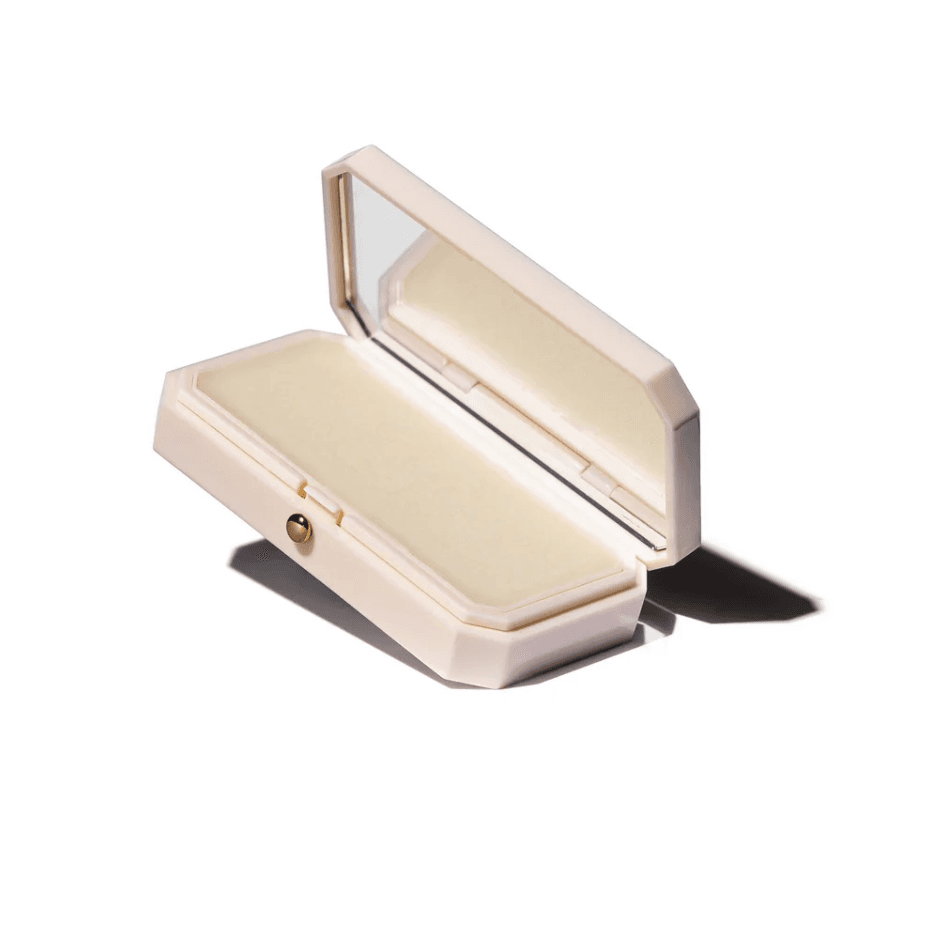
Figure 1. Original source reference supplied by Clara: open Baume des Muses Ivoire, showing the solid balm, mirror, hinge and clasp.
2. Create the closed-bottle scene
Create a canvas project in Astorie and upload the original Lait Virginal photograph. Add an image-generation node and connect the reference. Select GPT Image 2.5, 3:4, one image and PNG. Clara’s visible settings were Extra high, Auto background and the 4K preset; the supplied download is 1533 × 2048 pixels.
Describe the shelf, background and light without adding claims about the formula. Ask for the complete bottle, a straight-on view and a readable front label. Place the towel behind and separate from the bottle. A source arrow or hard studio shadow should not survive into the new scene.
Reusable scene template — adapt before running:
Photograph the supplied closed body-milk bottle upright on a pale limestone shelf. Preserve its proportions, opaque white body, metallic spherical cap and blue label design. Keep the whole bottle visible, front-facing. Add a folded ivory towel behind it, separate from the product, against a warm off-white plaster wall. Use soft upper-left window light, readable label illumination and a subtle contact shadow. No extra products, added wording, spilled lotion, droplets or open cap. Portrait 3:4.
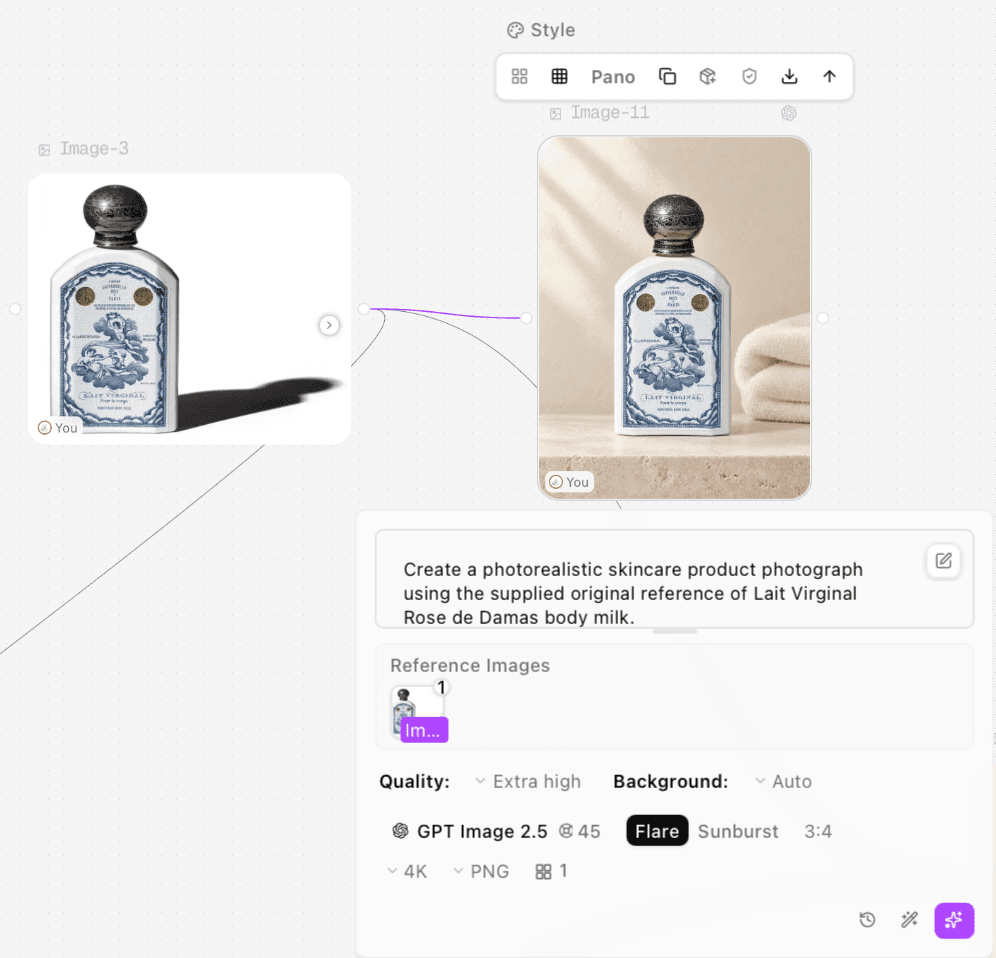
Figure 2. Clara’s body-milk reference connection and recorded GPT Image 2.5 settings for Image-11.
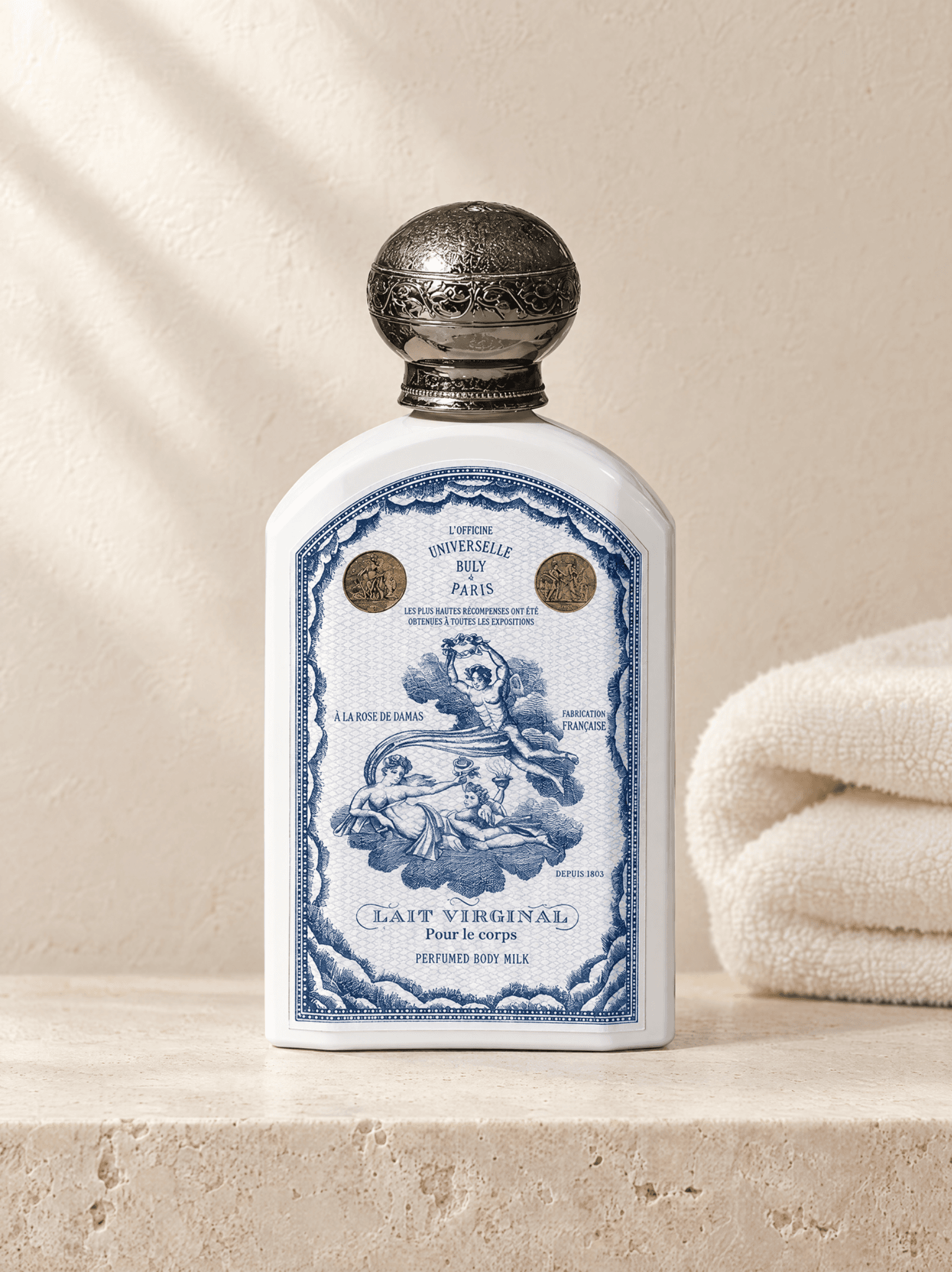
Figure 3. Image-11: generated bathroom-shelf scene with complete closed packaging and a separate towel. Fine illustration and cap details are redrawn.
3. Treat solid balm as solid balm
Upload the open balm photograph as a new reference node. Connect it to its own generation node rather than deriving an open container from the closed body milk. Match the original viewing angle and lid position. Keep the pale, level balm in its compartment: no whipped peaks, drips, scoops or liquid sheen.
Clara’s balm node used GPT Image 2.5, 1:1, one image, PNG, Extra high, Auto background and the 4K preset. The supplied square export is 2048 × 2048 pixels. The requested macro view changes the background and lighting while retaining the visible compact structure.
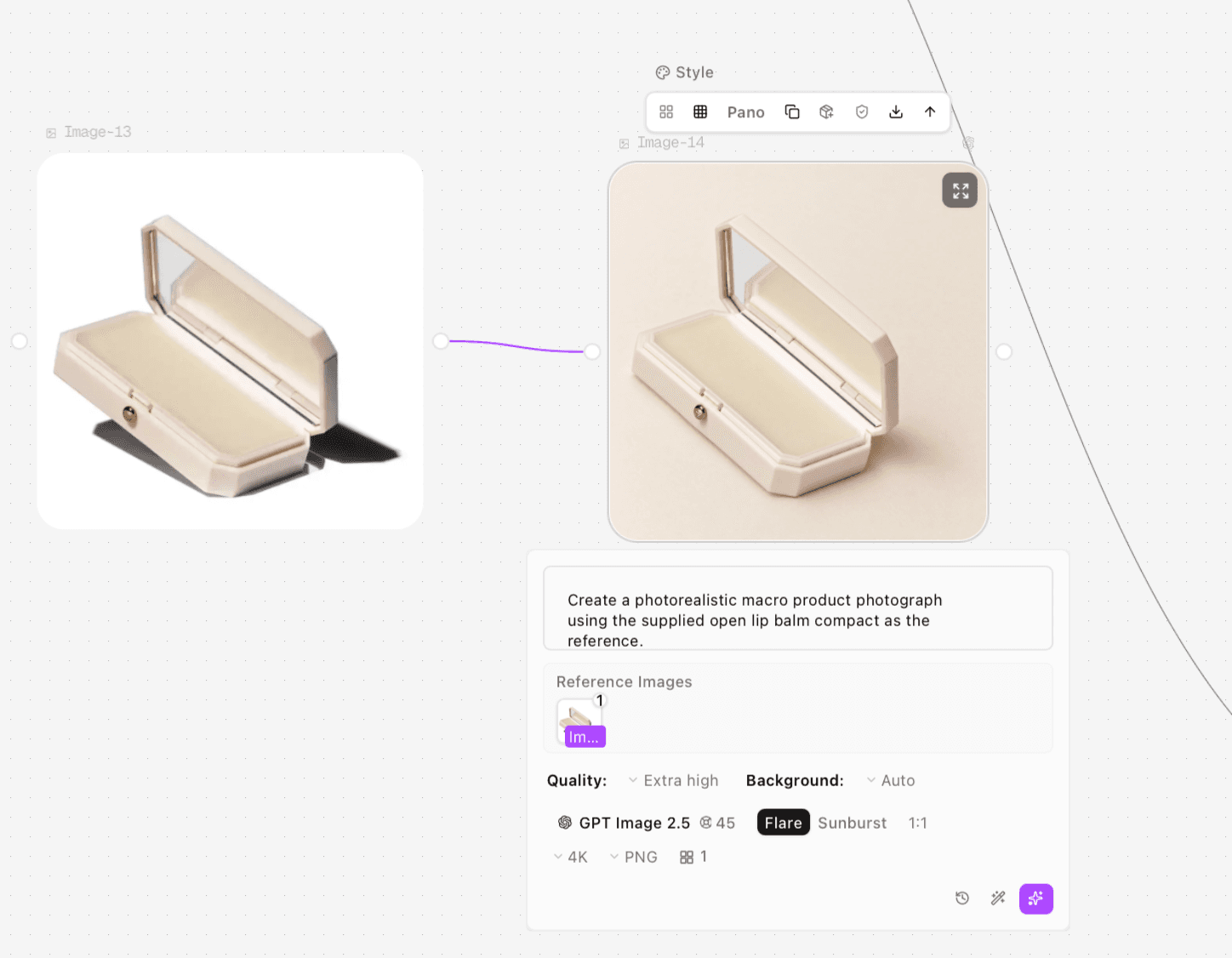
Figure 4. Recorded original balm reference, Image-14 result and square image-node settings.
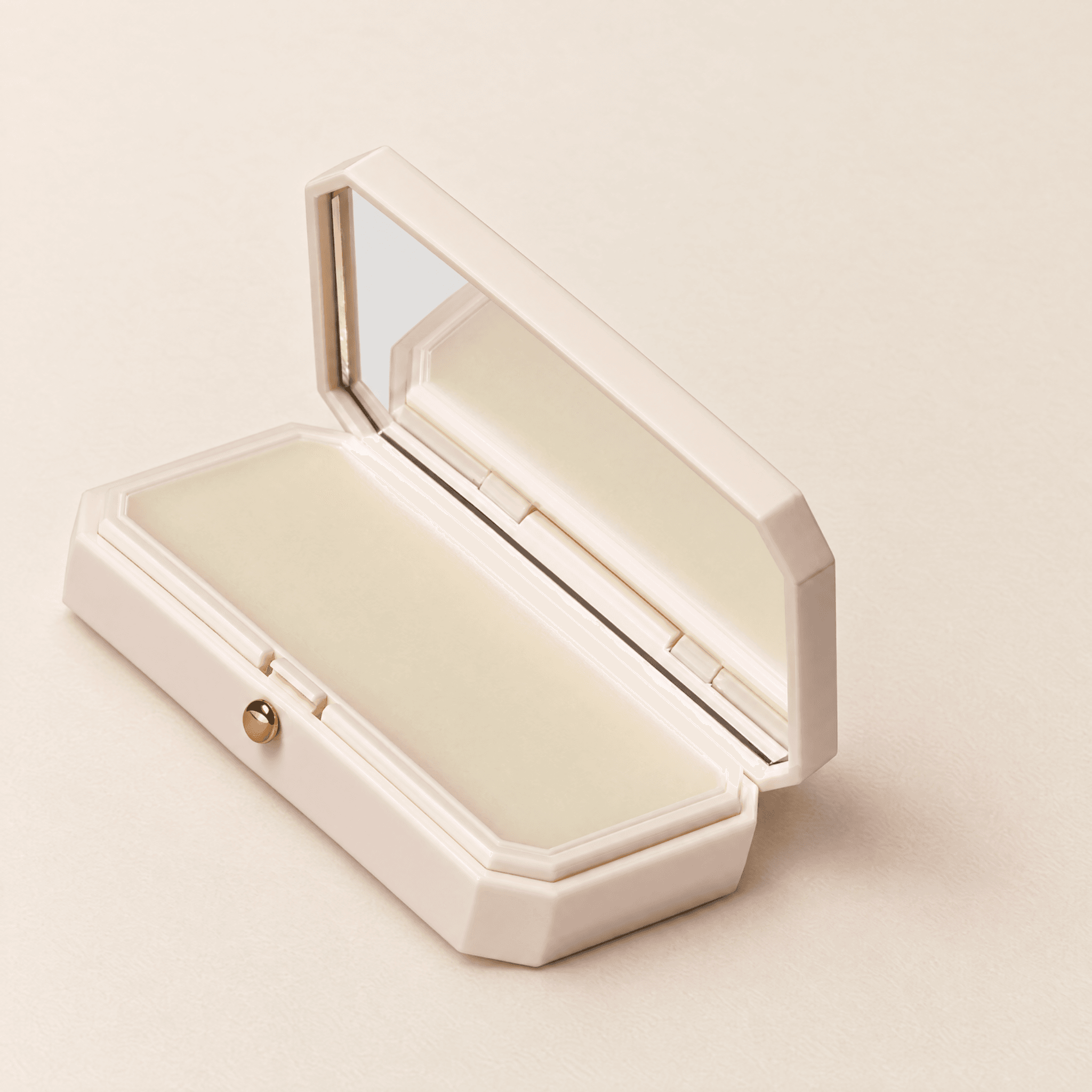
Figure 5. Image-14: the exposed balm remains pale and level, with the open mirror and clasp visible. The exterior is glossier than the official matte-finish description.
Image-14 avoids invented cream swirls and keeps the broad compact arrangement. However, the hinge and edges are redrawn, and the exterior has noticeable shine. The official matte-finish qualification was checked after this generation. A matte-case correction has not been rerun; it must not be described as solved.
4. Prepare a real lotion texture reference
For a lotion or cream swatch, photograph that exact formula separately under neutral light. Include a close view of its surface and a wider view that shows the amount and container. Record only visible cues such as color, translucency and whether the sample holds a ridge. A still image does not measure viscosity or hydration.
Connect the real lotion sample and its own package as distinct reference inputs. Assign their roles in the prompt: one establishes packaging, the other establishes the exposed formula. Ask for a modest swatch beside the closed container without merging the textures. Compare the generated surface with the real sample before approval. This is a proposed workflow; the earlier balm output does not validate it, and Baume des Muses must not stand in for Lait Virginal.
5. Correct the brief before another attempt
Suggested finish correction — not rerun:
Use the original Baume des Muses Ivoire reference for geometry. Keep the open lid angle, mirror, gold clasp and pale level balm. Render the ivory exterior case with a matte, low-sheen finish, as specified by the manufacturer. Reduce glossy highlights only on the case. Preserve the mirror’s reflectivity and the gold clasp’s metallic highlight. No cream peaks, scoops, melting or added objects.
If exact hinges or embossed marks are important, retain the real compact in a composite and generate only the surrounding scene. A single product view cannot certify hidden construction or a different opening angle. For a dispensed lotion shot, obtain a photograph of the actual lotion before describing its spread or viscosity.
6. Run the visual acceptance check
Area | Check |
Label | Product name, manufacturer name and fine print against the original |
Shape | Bottle width-to-height ratio, cap size and base |
Formula | Balm stays in the compartment with a level solid surface |
Mechanism | Hinge joins lid and base; mirror does not add impossible objects |
Finish | Matte case stays matte; mirror and clasp keep their distinct materials |
Lighting | Towel, product and shelf share a believable light direction |
Review the node’s quote and reference thumbnail before generation. Inspect a viewable result at full size, then use the toolbar download control to save the original PNG. Check file dimensions and packaging again outside the canvas. If a label changes, do not hide it behind props; replace the real label or product in a controlled finishing step.
Choose an image that matches the intended use
The useful distinction is between a believable image and a verified product representation. Keep the first for exploring art direction, and require the second for final packaging and formula details.
Test record and output settings
Clara supplied Image-11 and Image-14 from Astorie on 20 October 2026. The visible model label is GPT Image 2.5, with Extra high, Auto background, PNG, one result per displayed node and the 4K preset. The body-milk image uses 3:4 and measures 1533 × 2048 pixels; the balm image uses 1:1 and measures 2048 × 2048. Both preserve broad product identity, but fine packaging details change. The generated balm case is shinier than the manufacturer’s matte description. The suggested matte correction and lotion-swatch workflow were not run.
The screenshots preserve reference connections, visible settings and prompt excerpts. Complete original prompts, total attempts and retries, processing time, status history and confirmed debits are not present in the supplied record. The visible 45-credit control is not a billing receipt. Every reusable prompt in this guide is a suggested template; it is not the original input for the displayed outputs. The 4K preset is an interface selection, not the measured export size.
FAQ
Can a lip balm support a skincare photography tutorial?
Yes, as a lip-care example with its own identity and reference. It cannot stand in for a cream or body lotion.
Can AI show how hydrating a product is?
An image can illustrate packaging or use, but this workflow does not measure hydration or prove a skin benefit. Use substantiated claims separately from image styling.
What if the official photo and finish description differ?
Follow the verified description for the physical finish and use additional real photographs if needed. Here, the manufacturer explicitly identifies a matte ivory case.
Astorie can keep the closed-packaging and exposed-formula branches in one project: https://astorie.ai/tools/ai-canvas-workflow. Keep their references and captions separate so a later edit cannot mix the products.
Ready to try it on the canvas?
Open Astorie and fan your prompt across every frontier model in one workflow.