

How to Create Amazon Listing Images With AI
AI-generated editorial cover illustrating product-image preparation; it is not an Amazon listing or compliance certificate.
Create Amazon listing images with AI by separating the main product photograph from supporting gallery images, anchoring every asset to the real item and checking each export before upload. Keep the main image tied to a photograph of the actual product; use generated scenes as candidates for secondary images, with their own accuracy review.
This guide uses Astorie to prepare and inspect image candidates. Clara supplied a natural-wood pepper mill reference, a white-background generation and a kitchen-scene generation on October 26. The test illustrates where AI can develop presentation and where a seller still needs the original photograph, measured specifications and Amazon's current requirements.
Plan Amazon listing images with AI by image role
Decide what each image must explain before choosing a background. The main image helps shoppers recognize what is for sale. Secondary images can answer questions about use, details, scale and included contents. A+ Content is a separate publishing surface with its own modules and eligibility; it is not simply another listing-gallery slot.
Image role | Information to communicate | Reliable source material |
Main product image | Exact item and sale quantity | Photograph of the actual item |
Lifestyle image | Relevant place or use situation | Product photograph plus a plausible scene brief |
Detail image | A fastening, control, texture or marking | A sharp real close-up of that feature |
Dimensions image | Actual physical size | Verified measurements and a suitable product photograph |
Included contents | What the customer receives | Photograph or verified inventory of the sold package |
This is an editorial planning list, not a fixed number of images required for every category. Do not make a scene or a bundle more impressive by adding equipment, accessories or components that the customer will not receive.
Check the main image requirements first
Amazon's published seller guidance calls for a professional photograph of the actual product, a pure white main-image background and a product that fills at least 85 percent of the frame. It also excludes added promotional elements and confusing presentation. Category rules can add conditions, so check the current Product Image Requirements and the style guide for your marketplace before publishing. [1]
Main-image check | What to verify |
Product identity | Correct item, color, configuration and sale quantity |
Background | Pure white RGB 255, 255, 255 in the background region |
Framing | Complete product and appropriate frame coverage |
Added graphics | No promotional text, badges, watermarks or borders |
Product detail | Authentic markings and construction remain accurate |
Do not interpret a white-background prompt as proof that a file meets those conditions. Genuine branding on the photographed item is different from an added promotional overlay. A generated reconstruction is also different from retaining the real photographed product while cleaning its surrounding background.
The public Amazon photography guide lists accepted still-image formats and a longest-side range of 500 to 10,000 pixels. It recommends larger images for zoom and prefers JPEG. [2] Choose a working export large enough for its destination, then check the current category requirements rather than treating an AI tool's resolution label as approval.
Prepare an accurate product reference
Collect a complete, well-lit photograph and genuine detail views of the physical product. Use your own assets or images you are authorized to use. A low-resolution web screenshot can demonstrate a workflow, but it is a weak source for checking small lettering or reconstructing a precision component.
The supplied reference for this case is 464 × 996 pixels. The official Peugeot product page identifies the natural-wood Paris u'Select pepper mill in the 22 cm configuration as SKU 23317. [3] The reference shows the whole product, but its small logo and adjustment marks are too soft for a definitive fine-detail comparison.
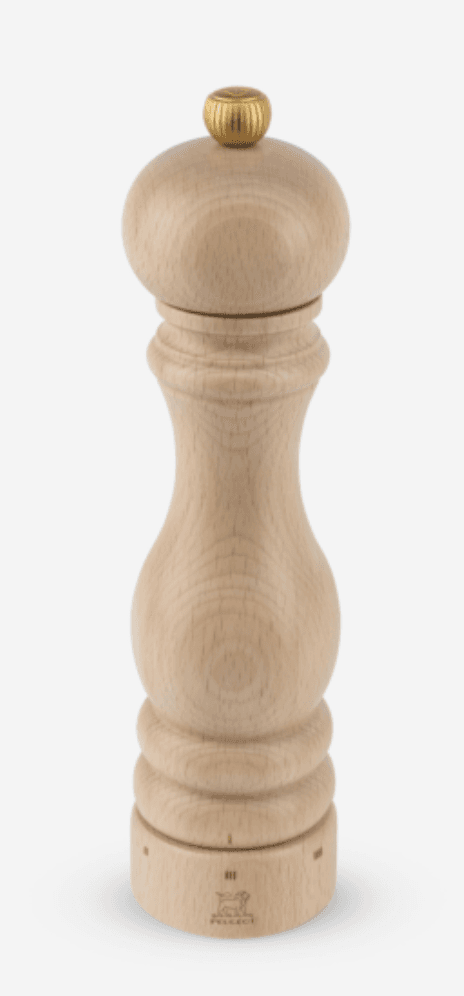
Figure 1. Supplied pepper mill reference, retained at its original file resolution. It supports a broad shape check, not a certified engraving or scale audit.
Record the product features that must remain unchanged: silhouette, wood finish, top knob, genuine branding and adjustment ring. Keep measurements in a separate verified record; do not estimate them from a generated scene.
Prepare the main image candidate
1 Create the project and connect the source
Open Astorie, create a canvas project and import the original photograph as an image node. Add an image generation node, connect the source to it and confirm the reference thumbnail in Reference Images. Keep the original available for side-by-side inspection.
2 Record the settings and run the candidate
The white-background test used the interface label GPT Image 2.5, Flare, Extra high quality, Auto background, 9:16, the 2K option, PNG and one result per request. Its downloaded dimensions are 1152 × 2048. Square is a useful gallery-planning choice for many sellers, but the retained candidate was vertical; that fact should remain in the record.
The following complete original input was supplied directly in this session.
Prepare a clean product-only image from the uploaded photograph. Preserve the original pepper mill, including its natural wood finish, silhouette, top knob, branding and adjustment ring. Keep one complete mill upright and centered on a pure white background. Do not redesign or reconstruct the product. No props, added text, badges, borders or additional products. Keep the top and base fully inside the frame.
Use the purple generation control, wait for the completed image and select the version to inspect. Check the displayed quote before starting and record the actual charge from the completed task or usage history separately.
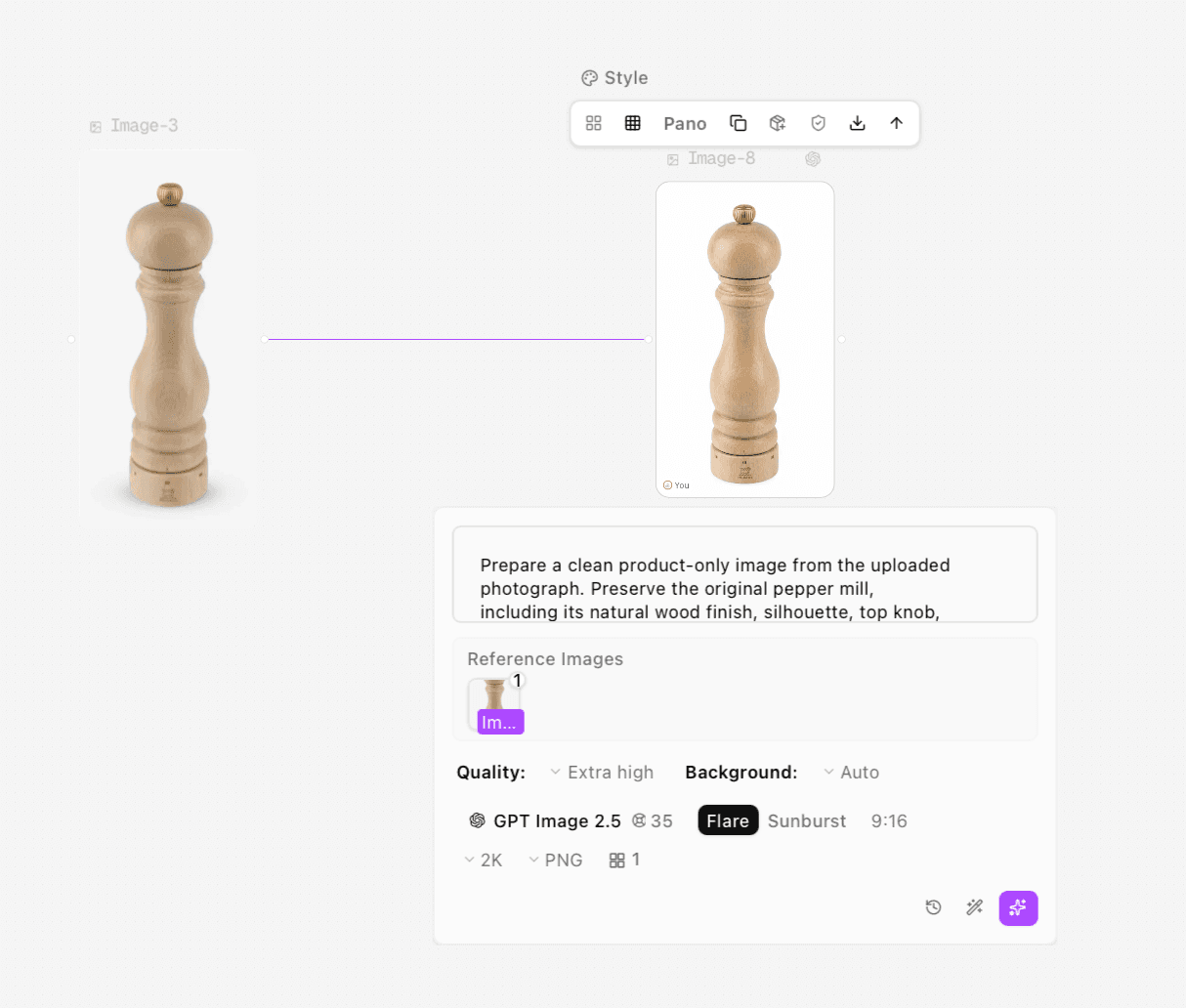
Figure 2. Original reference connected to the white-background generation. The actual ratio is 9:16 and the panel displays a 35-credit quote.
3 Separate a polished candidate from an approved main image
The output is complete and centered, but its wood grain has been redrawn. A background sample from the left side is RGB 254, 254, 254, while other sampled corners also contain near-white values. That is enough to reject a claim that the generated background is uniformly pure white; it is not a measurement of the whole image.
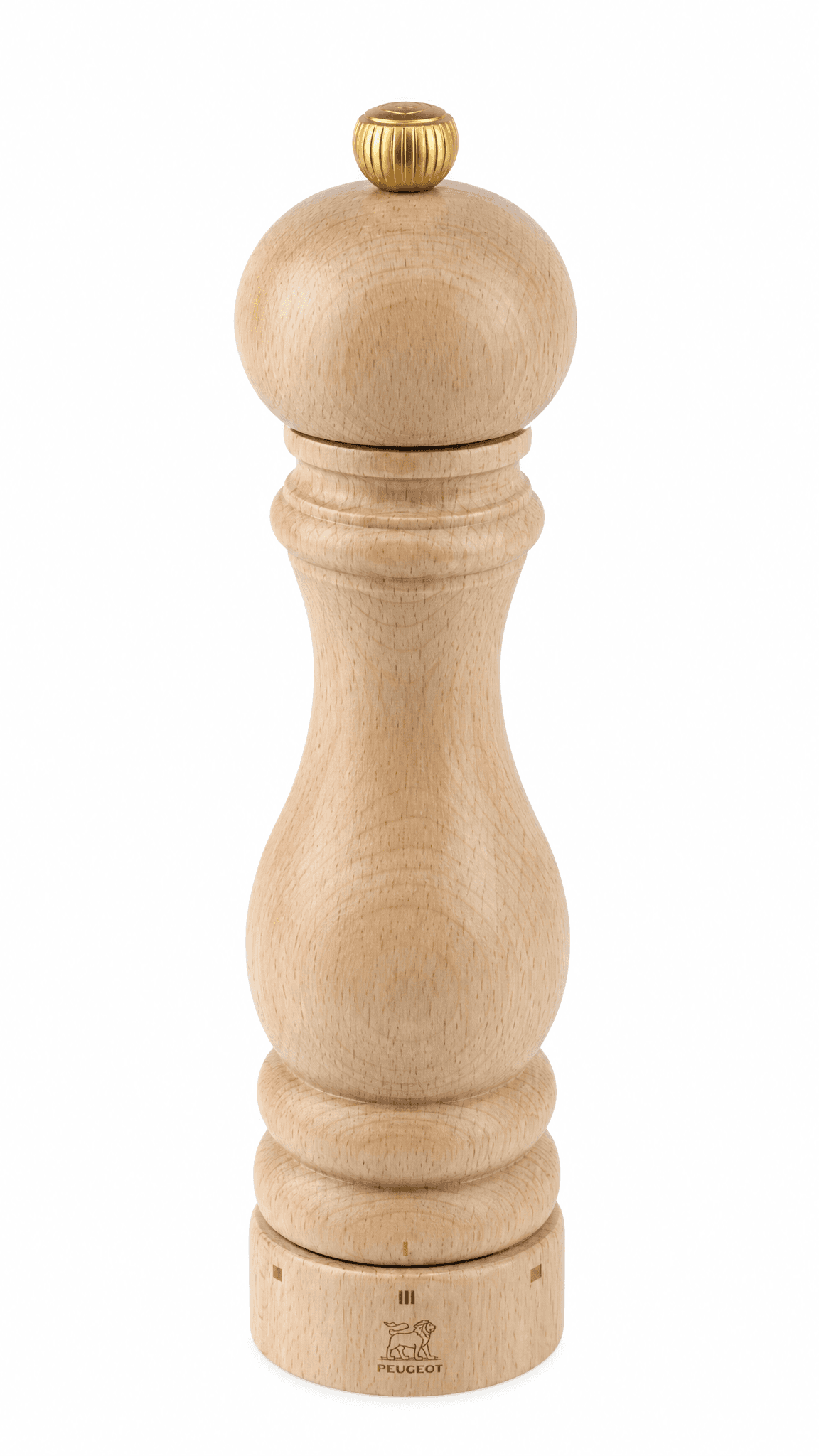
Figure 3. Generated white-background candidate. Wood-grain changes and sampled near-white pixels mean it is not presented as a ready-to-publish main image.
For a production main image, return to a sufficiently sharp photograph and use the following preservation route. This is a recommended production workflow, not an additional test completed in Astorie.
Duplicate the real product photograph and keep the untouched original.
Isolate the photographed product with a suitable mask or background-removal tool. Inspect the knob, curved outline and base edges at full size; retain the actual product pixels.
Place the cutout on an RGB 255, 255, 255 canvas. Resize proportionally and adjust the composition without stretching or clipping the item.
Export the final file, sample several background areas and compare the product details with the original. Take a better photograph if an essential marking remains unreadable.
Create a secondary lifestyle image
Branch another image node from the original product photograph. Give this node the job of explaining a kitchen setting, rather than making a second main image. Keep the sale item visible and make the surrounding objects clearly contextual.
For this run, Clara selected the same model and quality, 1:1, the 2K option and PNG. The downloaded image is 2048 × 2048 pixels. Untested example prompt to adapt:
Create a realistic secondary ecommerce listing photograph using the uploaded pepper mill as the product reference. Preserve its natural wood color, silhouette, top knob, branding and bottom adjustment ring. Place one complete mill upright on a light kitchen countertop beside a plate of prepared vegetables. Use soft daylight from the left and believable contact shadows. Keep the top and base fully visible. No hands, extra mills, attached accessories, text overlays or promotional claims.
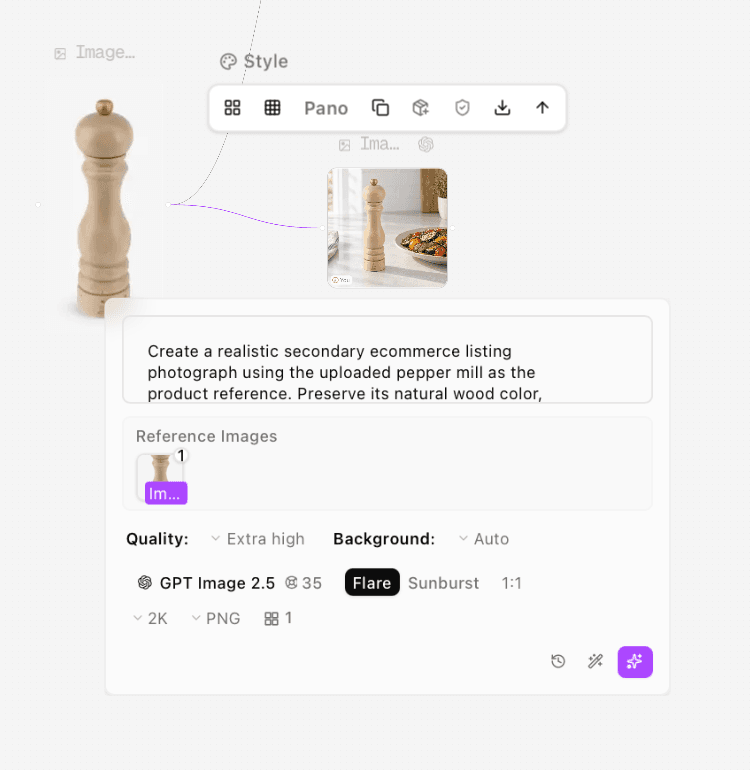
Figure 4. Kitchen-scene node using the original product reference, with 1:1 output settings.
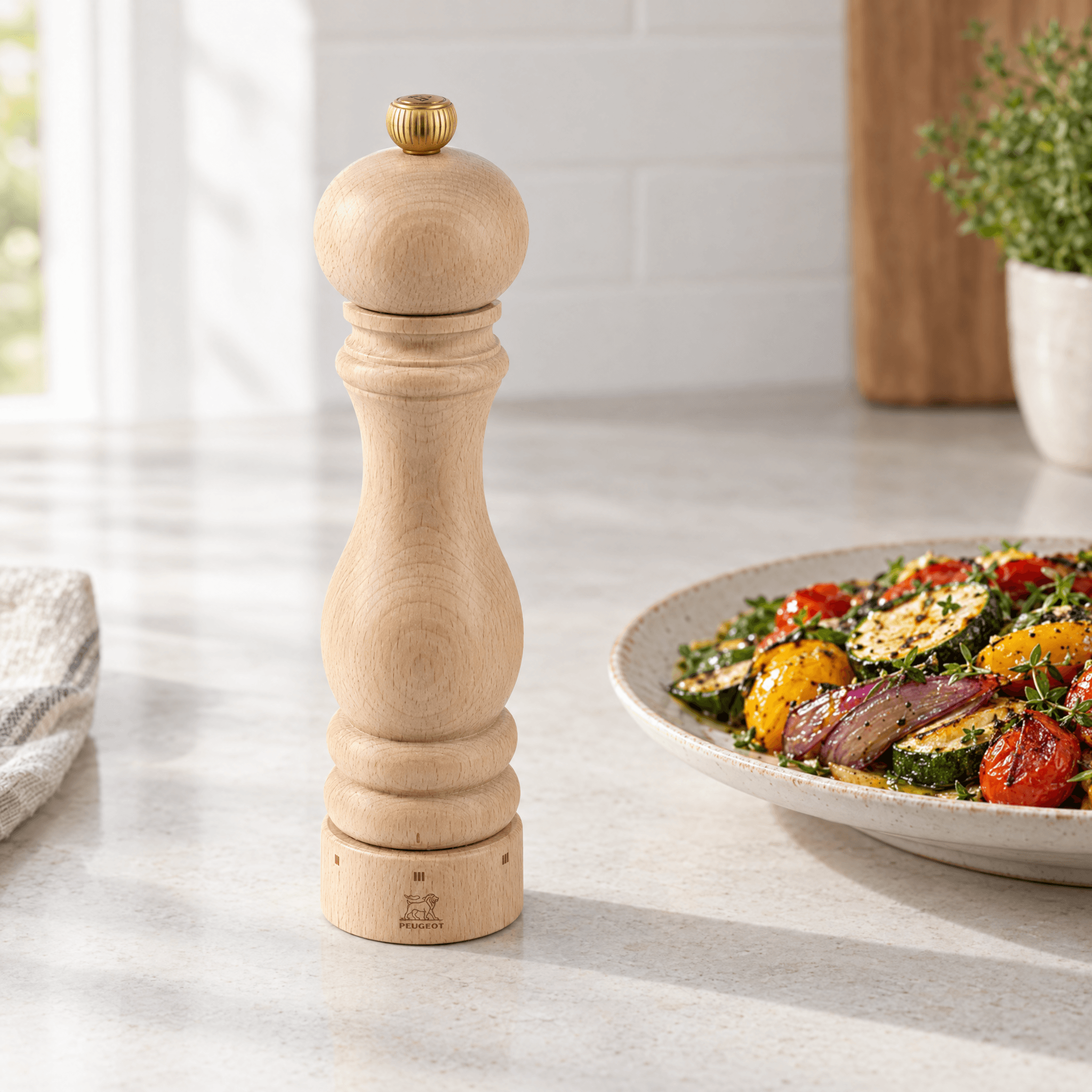
Figure 5. Kitchen candidate with the complete mill beside prepared vegetables. It demonstrates contextual generation, not Amazon approval or verified fine-detail preservation.
Inspect the result against the original item. Check the material, knob, base, markings and scale relative to the plate. Do not use the generated kitchen to substantiate an unverified capacity, included accessory, food-safety property or performance claim.
Make detail and dimension images from verified facts
For details, crop a sharp real photograph or take a new close-up. Generating a clearer-looking adjustment ring can create new marks rather than reveal the real ones. The low-resolution reference in this case does not support a purchase-grade macro image, so no invented detail photograph is presented.
For a dimensions panel, obtain measurements from the item or verified specifications, then add the labels in an editing or layout tool. Keep typography editable until it is checked. Use only claims you can substantiate and review the rules for the intended image slot. These are recommended production steps, not additional tested outputs.
Export and review before uploading
Download the selected image version from the image toolbar. Open the exported file, check its actual dimensions and compare the product with the original again. Keep the unedited master, candidate and final approved file separate. Prepare a supported upload format and inspect the final conversion, especially around small labels and edges.
In Seller Central, locate the relevant listing and open its Edit flow. In the listing's image-management section, assign the real-product main photograph and approved secondary assets to their intended positions, then save or submit the changes. Review the processing result and the resulting listing; use any rejection reason to identify the specific correction needed. The supplied test stops at exported image files; no Seller Central upload or approval was performed.
For a general introduction to reference-based photography, see Astorie's AI product photography guide. [4] A dedicated listing workflow adds the slot-by-slot factual and platform review that a general scene-generation tutorial does not provide.
Common problems and fixes
Problem | Practical response | Acceptance check |
Background looks white but samples near-white | Finish the background with an appropriate editing workflow | Sample several background regions outside the product and its edge |
Product grain or markings change | Return to the actual photograph | Construction and markings match the sale item |
A detail is unreadable in the reference | Photograph that detail again | Source contains the information being shown |
Scene suggests extra items are included | Simplify the scene and verify the product presentation | Sale quantity and included contents are unambiguous |
Image is rejected after upload | Read the specific rejection reason and current category rules | Corrected file passes the relevant review rather than merely looking better |
FAQS
Can I use AI for Amazon listing images
AI can help develop supporting scenes and image candidates, but the seller must still verify the real product and the requirements for each slot. The white-background output in this case was not established as a compliant main image.
Can a lifestyle image replace the main image
Treat the main image and contextual gallery assets as separate jobs. Follow the current rules for your marketplace and category rather than assuming an attractive scene can occupy any slot.
Do I need square images
A square working canvas makes it easier to build a coordinated gallery. That is the recommendation used for the kitchen example, not a statement that every Amazon image must be square.
Can AI create a missing product angle or measurement
It can invent a plausible view, which is different from documenting the actual item. Use real photographs for unseen construction and verified measurements for dimension labels.
Does generating an image guarantee Amazon acceptance
No. Review the actual file against the current rules for its slot and category, upload it through the relevant listing and check the processing result. A generation finishing successfully does not establish marketplace acceptance.
Ready to try it on the canvas?
Open Astorie and fan your prompt across every frontier model in one workflow.