

How to Create Product Comparison Images With AI
Create product comparison images by verifying the facts first, matching the products’ angle and adding a short, parallel set of labels. Check the generated text separately from the original packaging and never use invented dimensions or performance scores.
Product comparison images: decide what the buyer needs to compare
A useful comparison answers one decision. For two body-care products, that might be formula type and application. For a device, it may be supported ports and battery capacity. Keep the fields identical across columns, and include shared values when they matter. If both products contain 190 ml, an honest comparison shows 190 ml twice rather than inventing a size difference.
Comparison purpose | Appropriate visual treatment |
Different formulas | Matched product photographs plus verified texture and application labels |
Different capacities | Verified volume labels; do not infer bottle size from separate photographs |
Different physical dimensions | Use measured dimensions and a calibrated scale layout |
Different performance | Use comparable documented tests; omit invented ratings |
1. Build the fact sheet before the image
Clara’s example compares Buly Huile Antique Rose de Damas body oil with Lait Virginal Rose de Damas body milk. Official pages identify both as 190 ml. The oil page describes a dry-touch formula and recommends application to slightly damp skin after a shower or bath. The body milk page describes a lightweight lotion and recommends use after bathing [1–2]. These are manufacturer descriptions, not an independent assessment of skin benefits.
Field | Huile Antique | Lait Virginal |
Scent name | Rose de Damas | Rose de Damas |
Volume | 190 ml | 190 ml |
Product type | Perfumed body oil | Perfumed body milk |
Short texture description | Dry-touch finish | Lightweight lotion |
Application wording | Apply to slightly damp skin | Apply after bathing |
2. Connect two original product references
Create an Astorie project and upload a complete source photograph for each product. Add an image-generation node and connect the oil and body milk directly. Do not reuse a three-product AI image if you can return to the real sources. That avoids carrying forward packaging errors from a previous generation.
Select the model shown in the record, GPT Image 2.5, and choose 16:9 for two balanced columns. Clara selected Extra high, Auto background, the 4K preset, PNG and one result. The downloaded files supplied for this article are 2048 × 1152 pixels; verify your own downloaded dimensions.
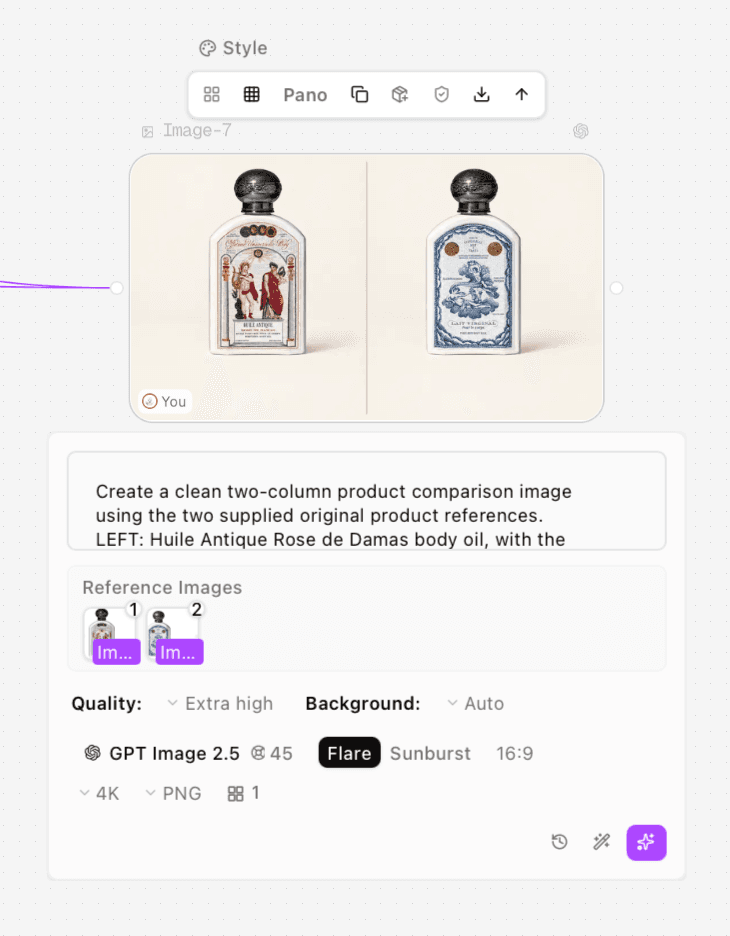
Figure 1. Clara’s two-reference setup and Image-7 output. The run settings show GPT Image 2.5 and 16:9.
3. Generate a text-free comparison base
Specify a shared camera angle, background and light direction. Align the bases and leave a deliberate text area below each item. Equal prominence is an editorial layout choice; it is not proof that the products have equal height. Keep individual bottle proportions instead of stretching one to match the other.
Reusable base-image template — adapt before running:
Create a two-column comparison from the supplied original product references. Place the body oil on the left and the body milk on the right. Show one of each, upright, front-facing and fully visible on the same warm ivory surface. Preserve their separate silhouettes, cap designs and labels. Align the bases and give them balanced visual prominence. Add a thin beige central divider and leave space below each bottle. No added text, ratings, props or extra products. Landscape 16:9.
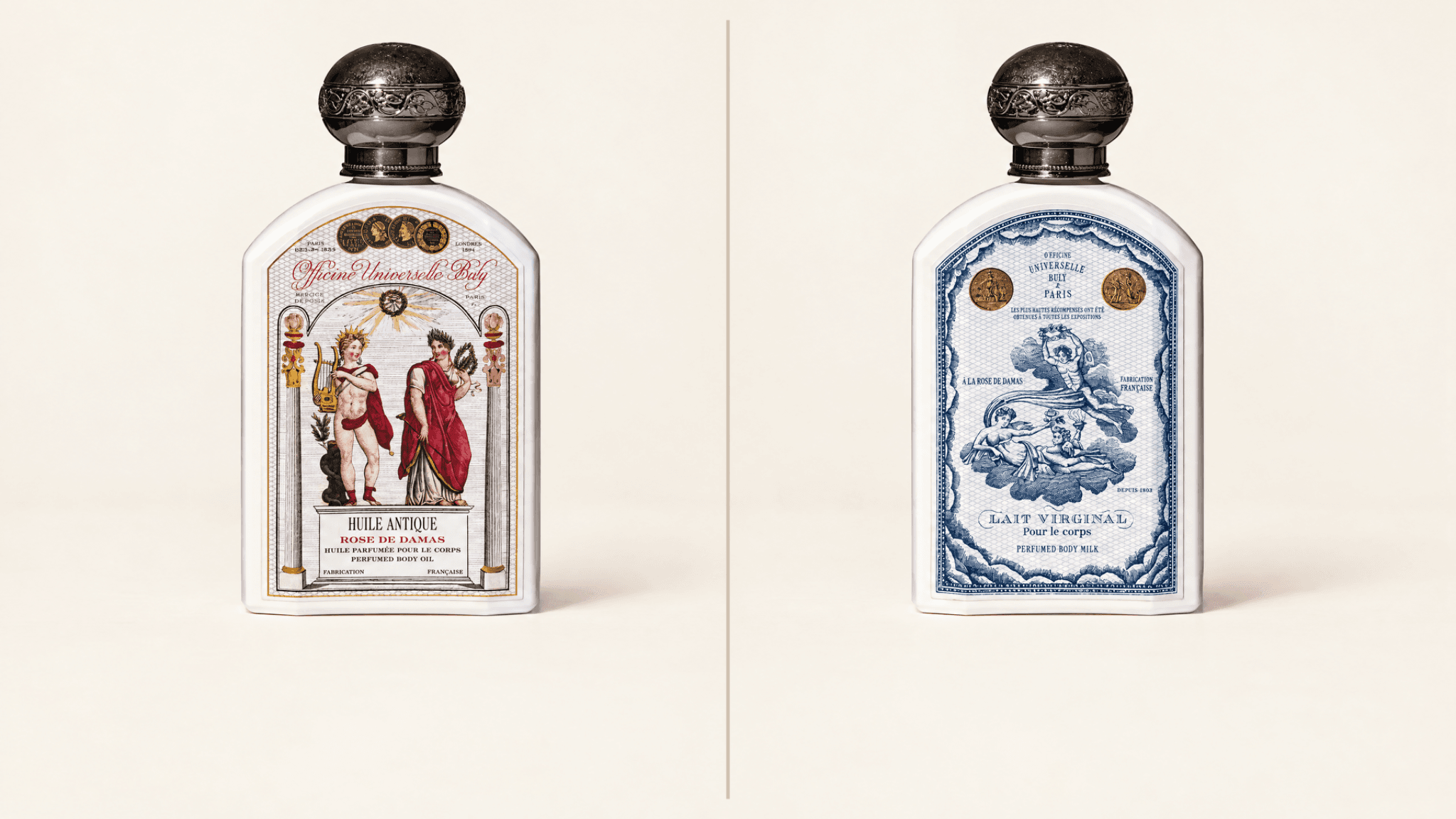
Figure 2. Image-7: text-free comparison base with matched framing and a central divider. It is not a calibrated size chart.
4. Add concise, parallel comparison copy
Branch from the base image. Put the same number of information lines beneath each product: name, scent, capacity and category, texture, then use. A matching type hierarchy makes differences easier to scan. Avoid a long list on one side and a short slogan on the other.
Left column copy | Right column copy |
Huile Antique | Lait Virginal |
Rose de Damas | Rose de Damas |
190 ml • Body oil | 190 ml • Body milk |
Dry-touch finish | Lightweight lotion |
Apply to slightly damp skin | Apply after bathing |
Ask for dark text, matching type sizes and line spacing, and no overlap with products. In a final production layout, editable text layers offer a more reliable correction path than repeatedly regenerating the whole image.
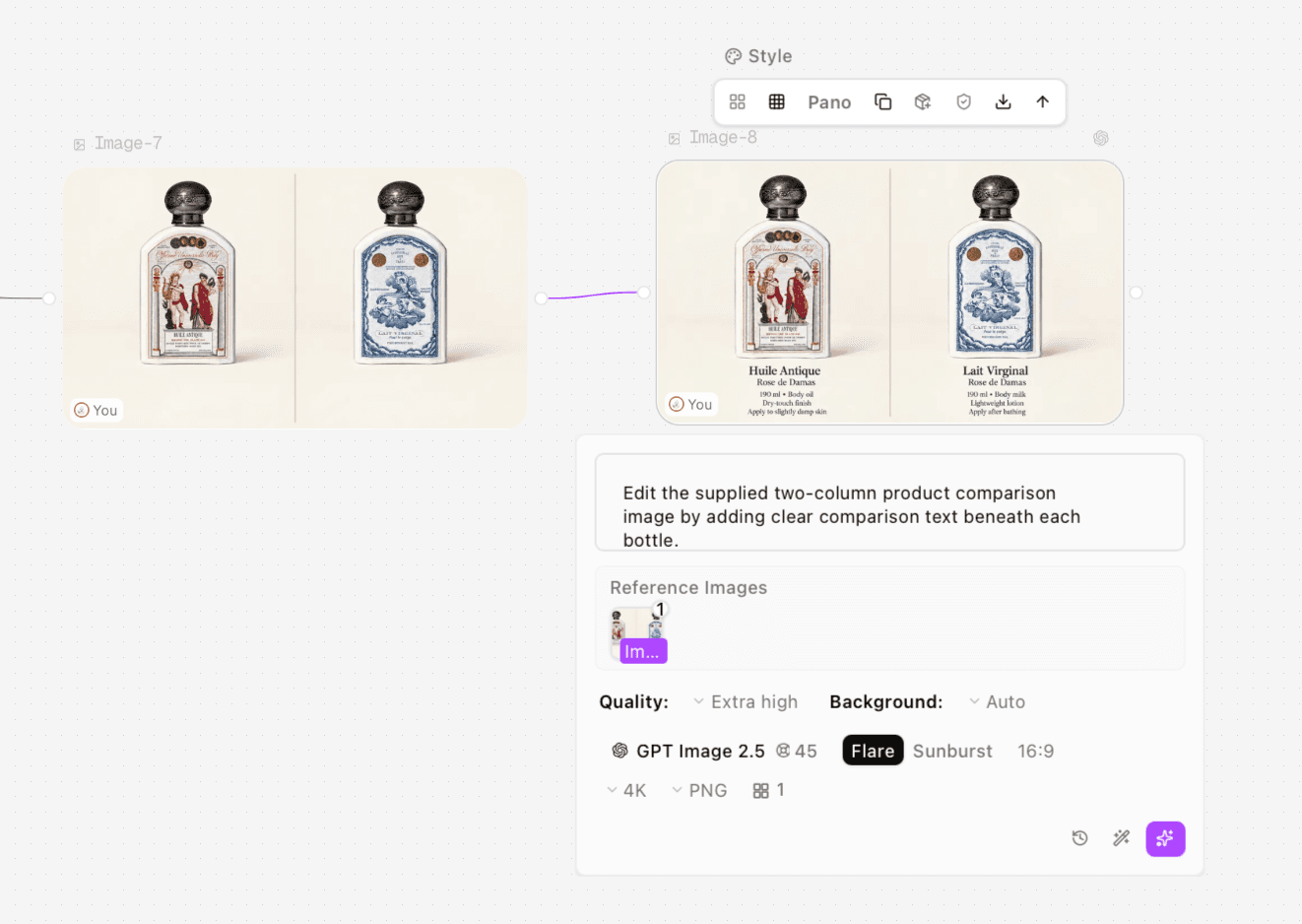
Figure 3. Recorded branch adding comparison copy to Image-7. The screenshot preserves the prompt excerpt and selected settings.
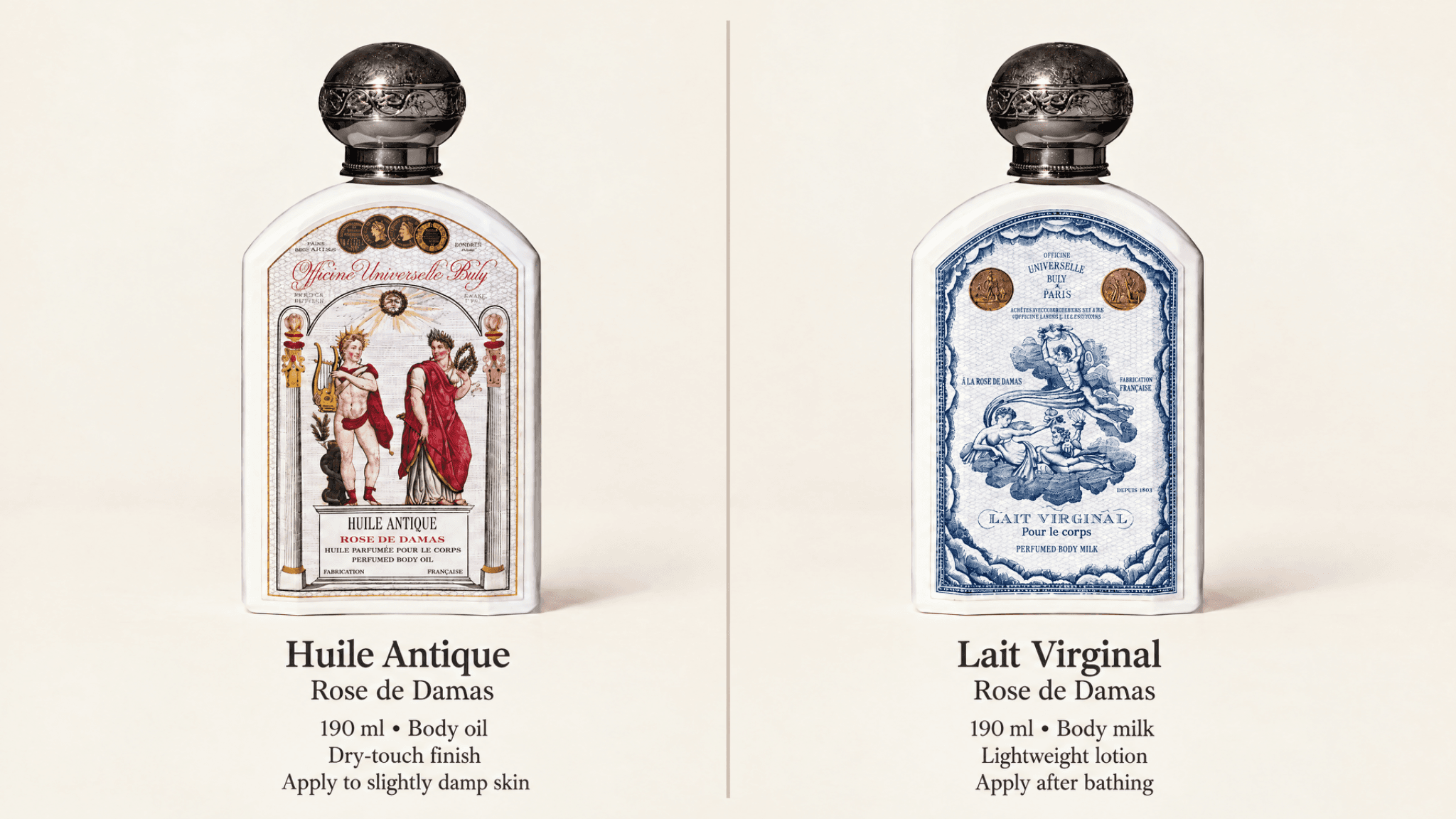
Figure 4. Image-8: added comparison wording is correctly assigned, including 190 ml on both sides. Fine label text inside the bottles has changed.
5. Validate meaning, then typography
First check factual association: the oil description must sit under the oil, the body milk description under the body milk. Then inspect every digit, unit and spelling at full resolution. Finally, check the presentation at its intended page width. If the copy becomes too small, shorten it or switch to a stacked design instead of shrinking everything.
Clara’s added text in Image-8 matches the short fact sheet. However, adding the copy also changed fine lettering on the existing labels. Correct added text does not certify correct packaging. For a commercial listing, place the real bottle cutouts and editable comparison copy over the approved background.
Acceptance check | Reject when |
Facts | A volume, product type or application is assigned to the wrong product. |
Fair framing | One item has stronger lighting or a more flattering angle without a reason. |
Scale | Unmeasured render height is presented as physical size. |
Readability | Units or application lines cannot be read at the intended display width. |
Packaging | Brand names or regulated copy have been replaced by invented lettering. |
6. Finish exact packaging and editable text
Recommended production finish — not part of Clara’s recorded generation sequence: use the approved AI scene as a layout guide, then build the final comparison in an editor that supports separate image and text layers. This gives you a way to correct a specification without asking AI to redraw both products.
First, isolate each real bottle from its original source and place it on a separate layer. Keep the aspect ratio locked while resizing. Align the bases and balance visual prominence; use measured dimensions only if the image will claim physical scale.
Next, recreate the short comparison copy as editable text. Use the same field order and type hierarchy for both columns, then proofread every name, number and unit against the fact sheet. Check cap edges, contact shadows and the divider at the final display size. Retain an editable master and export a PNG copy.
7. Run, download and retain the source
Check the connected thumbnails and current quote before using the generation control. Review the result and any visible error or status message before retrying. Use the download icon in the image-node toolbar to save the PNG. Keep the text-free base, the annotated version and the fact sheet together so a later specification change can be corrected without rebuilding the visual.
Test record and output settings
Clara supplied Image-7 and Image-8 from Astorie on 20 October 2026. They show the comparison base and its added-copy branch, using the visible GPT Image 2.5 label, 16:9, Extra high, Auto background, PNG, one result per displayed node and the 4K preset. Both original exports are 2048 × 1152 pixels. Added comparison copy matches the fact sheet, while fine packaging lettering changes. This is a two-output example, not a repeatability study.
The screenshots preserve reference connections, visible settings and prompt excerpts. Complete original prompts, total attempts and retries, processing time, status history and confirmed debits are not present in the supplied record. The visible 45-credit control is not a billing receipt. Every reusable prompt in this guide is a suggested template; it is not the original input for the displayed outputs. The 4K preset is an interface selection, not the measured export size.
FAQ
Can AI invent the comparison table from product photographs?
Do not rely on it for facts. Read the official product specifications or your approved product database first, then provide the exact copy to render.
Do the bottles need to be the same height?
They need balanced framing, not forced proportions. If physical scale is part of the comparison, use measurements and a controlled layout rather than generated relative sizing.
What if one field is the same?
Show the shared value when it helps the decision. Here, equal 190 ml volumes keep attention on formula and use instead of a false capacity difference.
For arranging related references and revisions on one canvas, see Astorie’s connected workflow guide: https://astorie.ai/tools/ai-canvas-workflow. Keep this page focused on the comparison; use a separate single-product infographic when the task is explaining one product in depth.
Ready to try it on the canvas?
Open Astorie and fan your prompt across every frontier model in one workflow.