GPT Image 2 prompts

Browse GPT Image 2 prompts for fashion portraits and graphic compositions. Compare how each prompt describes its subject and the way the image is arranged.

Explore prompts

10,009 prompts

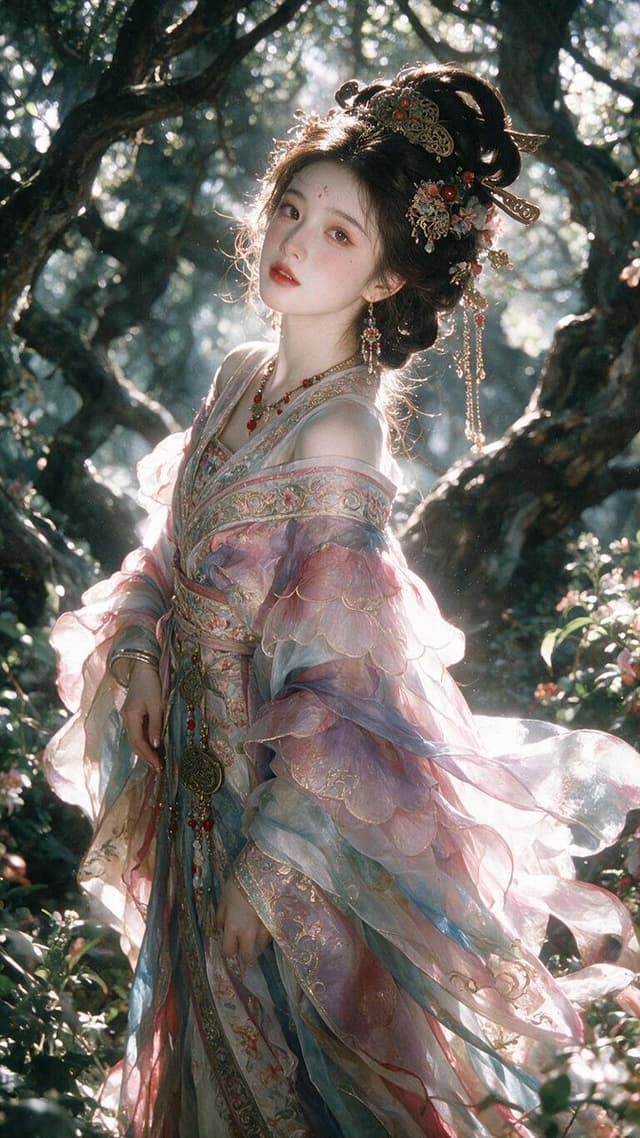
Profile / Avatar - Enchanted Hanfu Forest Goddess — output

Profile / Avatar - Enchanted Hanfu Forest Goddess

AnionAIGPT Image 2
Create a vertical cinematic fantasy portrait of {argument name="character name" default="a beautiful ancient Chinese forest goddess"} standing among twisted dark tree branches in a sun-dappled woodland. She is a young ethereal woman with porcelain skin, soft red lips, delicate makeup, a small forehead ornament, and a calm slightly wistful gaze looking toward the camera with her head gently tilted. Her {argument name="hair color" default="dark brown-black"} hair is styled in an elaborate high Tang/Song-inspired updo with ornate gold filigree hairpins, red beads, floral ornaments, dangling chains, and long jeweled earrings. Dress her in an opulent translucent hanfu in {argument name="robe colors" default="pale pink, misty blue, lavender, and warm cream"}, with layered sheer gauze sleeves, embroidered floral borders, gold thread patterns, beaded tassels, and a flowing sash; the fabric should glow where backlit and ripple softly as if caught by a light breeze. Place her three-quarter length in the center, body angled slightly left, one hand relaxed near her waist and the other lowered along the robe. The forest should feel enchanted and ancient: gnarled black-brown branches framing her like an arch, small leaves and blossoms, deep green shadows, bright white sunlight streaming from behind her head and shoulders, sparkling bokeh, volumetric haze, rim light around her hair and sleeves, and a dreamy film-photography texture. Use shallow depth of field, realistic skin detail, high-fashion editorial composition, soft bloom, subtle grain, natural lens flare, delicate pastel highlights, and rich shadow contrast. No text, no watermark, no modern objects, no extra people.
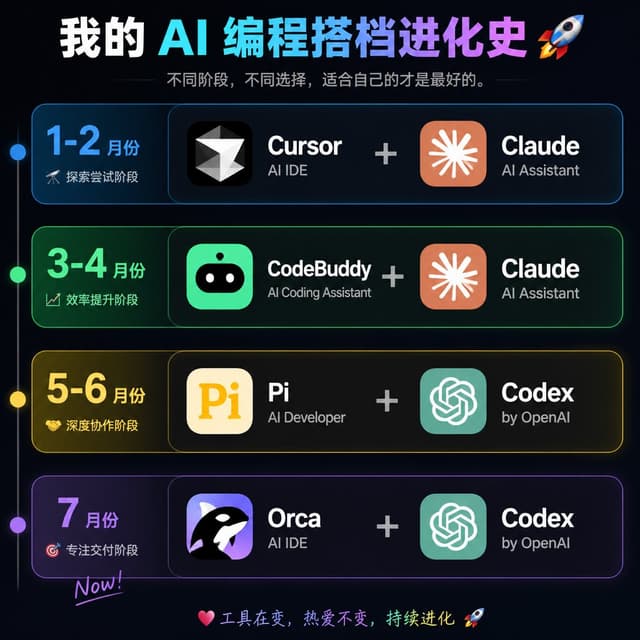
Infographic / Edu Visual - AI Coding Partner Timeline — output

Infographic / Edu Visual - AI Coding Partner Timeline

Indie FoxGPT Image 2
Goal: Create a dark neon Chinese timeline infographic poster showing the evolution history of an AI programming partner stack, with four horizontal stage cards and paired software tools.

Canvas: Square 1:1 image, about 768×768 px, black-to-deep-navy background with subtle glow, thin neon strokes, high-contrast modern tech aesthetic.

Header: Large bold Chinese headline at the top: {argument name="headline text" default="我的 AI 编程搭档进化史 🚀"}. Use a white-to-cyan-to-purple gradient emphasis across the AI/programming words. Under it, add a smaller gray subtitle: {argument name="subtitle text" default="不同阶段,不同选择,适合自己的才是最好的。"} with thin horizontal divider lines on both sides.

Layout: Four stacked rounded rectangular timeline cards, evenly spaced vertically. A thin vertical timeline line runs down the far left with exactly 4 glowing circular nodes aligned to the 4 rows: blue, green, yellow, purple. Each row has a left date/stage block and a larger right tools block. The right block shows exactly 2 app tiles separated by a large plus sign.

Rows: Use exactly 4 rows. Row 1 is blue and labeled {argument name="row one text" default="1-2 月份|探索尝试阶段"}; tools are Cursor + Claude. Row 2 is green and labeled {argument name="row two text" default="3-4 月份|效率提升阶段"}; tools are CodeBuddy + Claude. Row 3 is yellow and labeled {argument name="row three text" default="5-6 月份|深度协作阶段"}; tools are Pi + Codex. Row 4 is purple and labeled {argument name="row four text" default="7 月份|专注交付阶段|Now!"}; tools are Orca + Codex.

App tiles and icons: Create exactly 8 app icon/name groups total: 1) Cursor, black rounded-square icon with a white faceted diamond/cursor mark, sublabel “AI IDE”; 2) Claude, orange rounded-square icon with a white radial starburst, sublabel “AI Assistant”; 3) CodeBuddy, bright green rounded-square icon with a cute black robot face and white eyes, sublabel “AI Coding Assistant”; 4) Claude, same as above; 5) Pi, cream rounded-square icon with large yellow “Pi”, sublabel “AI Developer”; 6) Codex, teal rounded-square OpenAI knot style icon, sublabel “by OpenAI”; 7) Orca, purple rounded-square icon with a black-and-white orca whale, sublabel “AI IDE”; 8) Codex, same as above. Tool names are large bold white text; sublabels are smaller light gray text. Plus signs are large, centered, and light gray.

Footer: At the bottom center, add a small colorful handwritten-style line: “💗 工具在变,热爱不变,持续进化 🚀”.

Visual style: Cyber UI dashboard look, rounded cards with translucent dark fill, colored neon borders matching each row, soft outer glows, crisp typography, clean alignment, no clutter, no watermark.
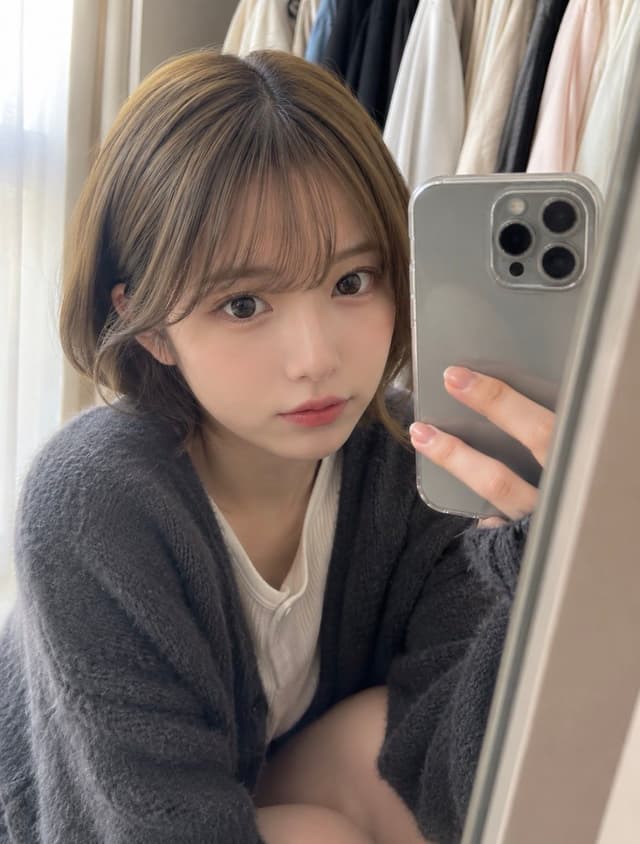
Profile / Avatar - Natural Closet Mirror Selfie — output

Profile / Avatar - Natural Closet Mirror Selfie

ギンGPT Image 2
Create a photorealistic vertical smartphone mirror selfie that looks like a natural post on X: an adult {argument name="subject age and ethnicity" default="Japanese woman in her 20s"} casually taking a photo while choosing clothes in a closet. She is close to the mirror, framed from head to upper thighs, sitting or crouching slightly with a relaxed posture, holding a silver triple-camera smartphone in her right hand so the phone partly covers the right side of the image. She has {argument name="hair style and color" default="soft light-brown shoulder-length bob with airy bangs"}, large natural eyes, subtle everyday makeup, smooth skin, and a calm, slightly shy neutral expression while looking at the phone screen/mirror. Outfit: modest casual loungewear, exactly 2 visible clothing pieces: a fluffy dark charcoal-gray cardigan and a white ribbed T-shirt underneath; no glamorous styling, no revealing pose, no gravure look. Background: a real closet area with exactly 6 visible hanging garments in soft neutral tones: cream, blue-gray, white, beige, black, and pale pink; sheer white curtain on the left with gentle morning daylight. Composition should feel unposed and domestic, with soft natural lighting, shallow depth of field, realistic mirror edge visible on the right, slight smartphone-camera softness, authentic skin texture, and no added text, watermark, studio lighting, or overly polished fashion-shoot atmosphere. Use {argument name="mood" default="quiet morning, natural, approachable everyday feeling"}.
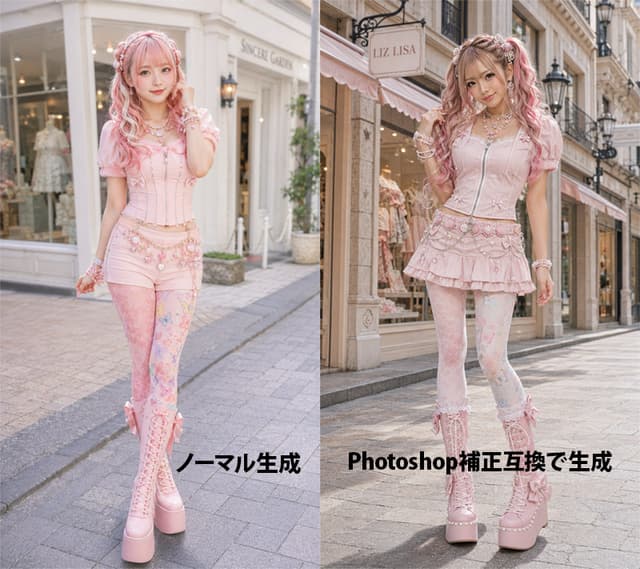
Product Marketing - Pink Lolita Color Correction Comparison — output

Product Marketing - Pink Lolita Color Correction Comparison

AI lady collection@生成AIGPT Image 2
Goal: Create a side-by-side comparison image showing an AI-generated fashion portrait before and after Photoshop-style color correction, featuring the same young woman in pastel pink sweet lolita/gyaru street fashion on a European boutique shopping street.

Canvas: Landscape 4:3 image, split exactly into two equal vertical panels with a hard center divide. Photorealistic fashion editorial style, full-body subject in both panels, street-level perspective, shallow depth of field, soft daylight.

Left panel: Show the uncorrected version labeled in bold black Japanese text near the bottom: 「ノーマル生成」. The model stands in front of a bright cream-white boutique facade with large display windows and a pale sign. Overall color is slightly flat, pale, low-contrast, airy, and softly washed out. The model faces forward with a gentle smile, one hand near her hair, wearing a pastel pink corset top with puff sleeves, pink short bottoms, decorative waist chains, patterned pastel tights, and tall pink lace-up platform boots.

Right panel: Show the corrected version labeled in bold black mixed text near the bottom: 「Photoshop補正互換で生成」. The same model stands on a similar elegant shopping street in front of a boutique with a visible hanging sign reading {argument name="shop sign text" default="LIZ LISA"}. The lighting and color correction should look more polished: warmer highlights, richer contrast, clearer skin tones, slightly deeper shadows, brighter pinks, crisp details, and a more professional retouched fashion-photo finish. The model poses with one hand in her hair and one leg slightly bent, smiling at the camera.

Subject details: A cute young Japanese fashion model with fair skin, long wavy twin-tail hair in {argument name="hair color" default="pink blonde"}, soft bangs, ribbons and pearl hair accessories, glossy idol-like makeup, large bright eyes, and a friendly expression. Outfit color theme is {argument name="outfit color theme" default="pastel pink"}. Include many kawaii accessories: layered pearl necklaces, bracelets, bows, lace, floral charms, decorative belt chains, and platform boots.

Visible text: Exactly 2 large bottom labels: left label 「ノーマル生成」 and right label 「Photoshop補正互換で生成」. Keep the labels bold, black, horizontal, and placed over the pavement area without outlines.

Constraints: Make both panels look like variations of the same fashion shoot, not a collage of unrelated characters. Use realistic anatomy, full-body framing, no extra logos except the boutique sign, no watermark, no additional captions, no borders other than the central split.
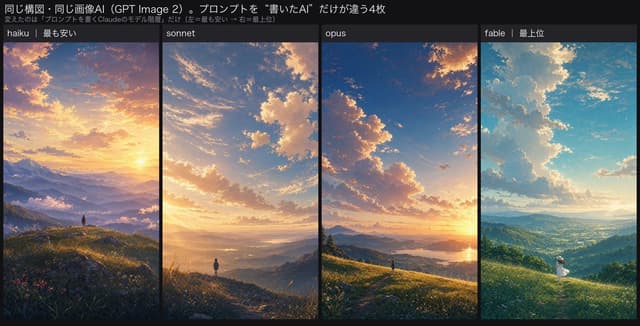
Infographic / Edu Visual - Four-Panel AI Landscape Comparison — output

Infographic / Edu Visual - Four-Panel AI Landscape Comparison

AI Video ProjectGPT Image 2
Goal: Create a wide comparison graphic showing how four prompt-writing AI model tiers produce the same landscape scene in GPT Image 2, with a dark editorial UI frame and Japanese headline text.

Canvas: Extra-wide horizontal banner, approximately 2:1 aspect ratio, black/dark charcoal background, clean social-media comparison layout. Use thin black dividers between image columns and a compact top title area.

Top text: Large white Japanese headline: {argument name="headline text" default="同じ構図・同じ画像AI(GPT Image 2)。プロンプトを“書いたAI”だけが違う4枚"}. Under it, add a smaller gray subtitle: {argument name="subtitle text" default="変えたのは「プロンプトを書くClaudeのモデル階層」だけ(左=最も安い → 右=最上位)"}.

Layout: Four equal vertical landscape panels placed side by side, each with a small dark label bar at the top. Use exactly 4 panels, ordered left to right:
1. Label: “haiku | 最も安い” — a dramatic semi-realistic anime landscape at golden sunset, high mountain range in the distance, layered misty valleys, wildflower-covered rocky foreground, a tiny solitary person standing on a ridge, warm orange-purple clouds, slightly over-embellished cinematic atmosphere.
2. Label: “sonnet” — cleaner and more elegant sunset mountain valley, broad sky with soft glowing cumulus clouds, golden light spilling across rolling hills, a small lone figure on a ridge path, balanced composition, polished anime background style.
3. Label: “opus” — high-quality but restrained sunset vista, deep blue sky fading to orange near the horizon, large illuminated cloud formations, grassy hillside foreground, distant lake or reflective water, tiny figure near the bottom center, premium but conventional scenic framing.
4. Label: “fable | 最上位” — emotionally directed bright morning or late-afternoon landscape, turquoise-blue sky, towering luminous white clouds, sunbeams over a vast green valley, a small person in a white dress and hat standing in meadow grass at lower right, more narrative and poetic mood.

Visual style: Refined Japanese anime background art blended with painterly cinematic lighting, highly detailed skies and atmospheric perspective. Keep all four panels similar in composition and subject matter so the comparison feels controlled, but vary mood and art direction per label. Use crisp white text, dark label bars, no logos, no watermark.

Constraints: Preserve exactly 4 image panels and exactly these 4 visible panel labels. Make the title and subtitle legible. Keep the overall image looking like a posted comparison chart rather than a standalone landscape collage.
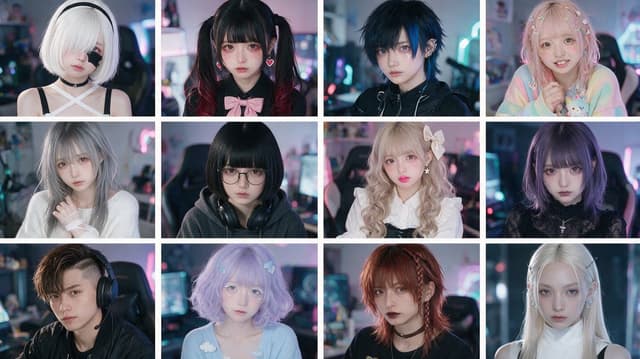
Profile / Avatar - Cyber-Kawaii Influencer Portrait Grid — output

Profile / Avatar - Cyber-Kawaii Influencer Portrait Grid

SHINPI【AI系】GPT Image 2
Create a photorealistic 3-by-4 comparison grid of exactly 12 fictional Gen Z influencer portraits, all shot as close-up bust portraits in the same neon-lit gaming bedroom or streamer room environment. Use a 16:9 horizontal canvas with thin white gutters separating the tiles, soft shallow depth of field, cinematic RGB monitor glow, pastel pink and cyan bokeh, realistic skin texture, high-fashion cosplay styling, and a polished social-media portrait aesthetic. Each person faces the camera or slightly angles toward it, with moody studio lighting and no text or logos.

Layout: 12 equal rectangular portrait tiles arranged in exactly 3 rows and 4 columns.

Subjects, counted left to right, top to bottom:
1. Pale young woman with short white bob hair covering one eye, black headband, black choker, white crisscross halter top with black straps, doll-like expression.
2. Young woman with black twin tails fading to dark red, straight bangs, pink heart earrings, black blouse with a large pale pink bow, soft sad expression.
3. Androgynous young person with messy dark navy-blue short hair, blue eyes, black techwear jacket, ear cuff jewelry, cool serious expression.
4. Sweet pastel girl with long wavy pink-blonde hair decorated with many tiny butterfly clips, rainbow pastel cardigan, holding a small plush toy, cheerful smile.
5. Silver-gray-haired young woman in a loose white knit sweater, soft melancholic gaze, hand near her chest.
6. Dark-haired young woman with blunt black bob and straight bangs, round glasses, oversized dark hoodie, large black headphones around her neck, introverted expression.
7. Blonde curly lolita-style girl with big pale bow hair accessory, white frilled blouse, black pinafore straps, glossy pink lips, delicate doll makeup.
8. Purple bob-haired gothic girl with straight bangs, black lace high-neck top, small silver pendant necklace, intense serious stare.
9. Young man with asymmetrical brown undercut hair, black shirt, large gaming headset with microphone, seated in a gaming chair, confident neutral expression.
10. Pastel lavender bob-haired girl with soft bangs, blue hair clips, baby-blue sweater with small cloud decorations, dreamy ethereal look.
11. Red-haired punk girl with layered shaggy hair and a small braid, black choker, dark lipstick, black top, rebellious expression.
12. Ice-blonde elegant girl with very long straight hair, hair clips near both temples, white sleeveless turtleneck with black straps, pale icy makeup, calm piercing gaze.

Overall style: ultra-realistic influencer variation sheet, Japanese kawaii and cyber-goth fashion mix, anime-inspired styling but real human faces, high-end portrait photography, 35mm lens look, shallow focus, detailed eyes, soft facial retouching, atmospheric LED lighting. Customize the overall theme as {argument name="influencer theme" default="fictional Japanese cyber-kawaii gaming influencers"}, the room setting as {argument name="background setting" default="neon-lit gaming bedroom"}, the lighting palette as {argument name="lighting colors" default="pastel pink and cyan RGB glow"}, the portrait realism as {argument name="visual style" default="photorealistic high-fashion cosplay portrait photography"}, and the grid format as {argument name="grid format" default="3 rows by 4 columns with thin white gutters"}.
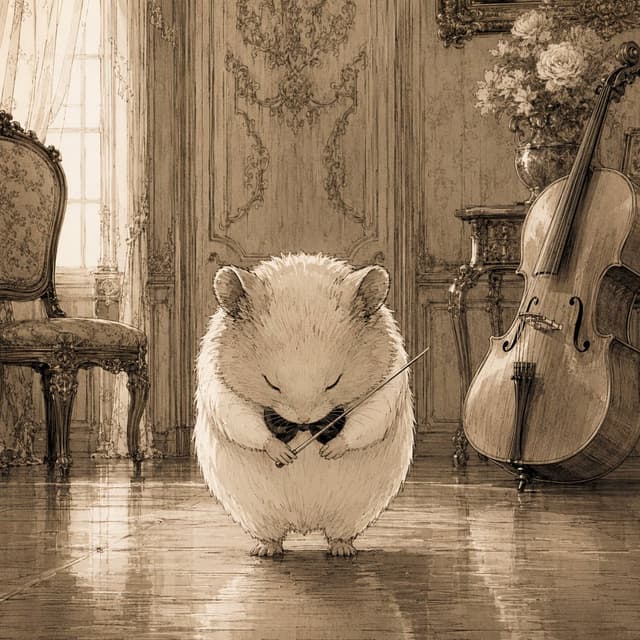
Comic / Storyboard - Sepia Hamster Violinist Salon — output

Comic / Storyboard - Sepia Hamster Violinist Salon

🐹🐹GPT Image 2
Create a square sepia-toned storybook illustration of {argument name="main character" default="a fluffy cream-colored hamster"} standing in the center of an elegant old European music salon, eyes gently closed and head bowed as if finishing a performance. The hamster is round, soft, and very detailed with fine ink hatching, tiny paws, small ears, and a calm solemn expression, holding a delicate violin bow across its chest with a tiny dark violin or instrument tucked near its paws. The setting is a richly decorated classical room with polished reflective wooden floors, tall paneled walls covered in ornate rococo carvings, a bright window with sheer curtains on the left, and antique furniture. Include exactly 3 prominent background objects: an ornate upholstered chair on the left, a large cello leaning upright on the right, and a vase of pale flowers on a small carved table behind the cello. Use warm monochrome beige, brown, and cream tones, like an antique pencil-and-ink wash drawing with soft backlighting, subtle floor reflections, intricate linework, nostalgic atmosphere, and no visible text or modern objects.
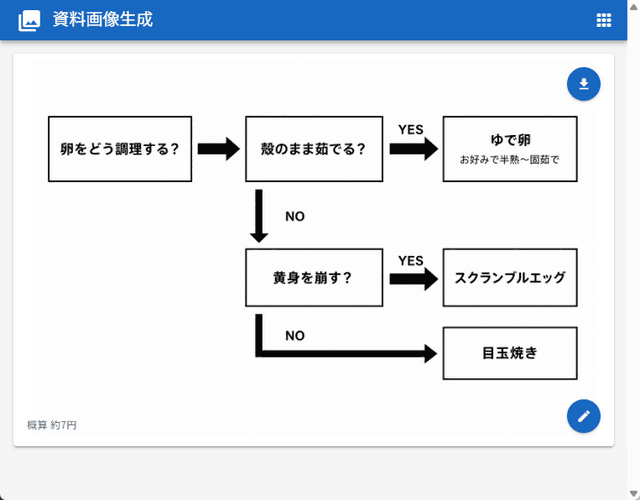
Infographic / Edu Visual - Japanese Egg Cooking Flowchart UI — output

Infographic / Edu Visual - Japanese Egg Cooking Flowchart UI

Tanaka SeigoGPT Image 2
Goal: Create a clean web-app screenshot showing a generated document image: a simple Japanese decision flowchart for how to cook eggs.

Canvas: 762×596 px desktop browser/app view. Light gray page background with a bright blue top app bar spanning the full width. The app bar contains a small white image icon at far left, the Japanese title {argument name="app title" default="資料画像生成"} in white, and a small white grid/menu icon at the far right. A subtle scrollbar is visible on the right edge.

Main card layout: Center a large white rounded rectangle card with a faint drop shadow, about 718×468 px, starting below the blue header. Inside the card is a black-and-white flowchart on a white field, leaving generous margins. Add two floating circular blue action buttons on the right side of the card: one near the upper-right with a white download arrow icon, and one near the lower-right with a white pencil/edit icon.

Flowchart elements: Use exactly 6 rectangular outlined boxes with white fill and black borders, connected by exactly 5 thick black arrows. All text is Japanese and bold black unless noted.
1. Left box: 「卵をどう調理する?」
2. Top middle box: 「殻のまま茹でる?」
3. Top right box: main text 「ゆで卵」 with smaller subtitle 「お好みで半熟〜固茹で」
4. Middle lower box: 「黄身を崩す?」
5. Middle right box: 「スクランブルエッグ」
6. Bottom right box: 「目玉焼き」

Flowchart connections and labels: A right-pointing arrow connects box 1 to box 2. From box 2, a right-pointing arrow labeled 「YES」 above it connects to box 3. From box 2, a downward arrow labeled 「NO」 to the right descends to box 4. From box 4, a right-pointing arrow labeled 「YES」 above it connects to box 5. From box 4, a thick path goes downward then right, labeled 「NO」 near the turn, ending with a right-pointing arrow into box 6.

Footer text: At the lower-left inside the card, add small gray Japanese text {argument name="cost note" default="概算 約7円"}.

Visual style: Minimal monochrome flowchart, clean sans-serif Japanese UI font, thick black arrows, crisp rectangular outlines, lots of white space, realistic screenshot-like UI rendering. Avoid extra boxes, extra icons, decorative colors inside the chart, watermarks, or additional explanatory text.
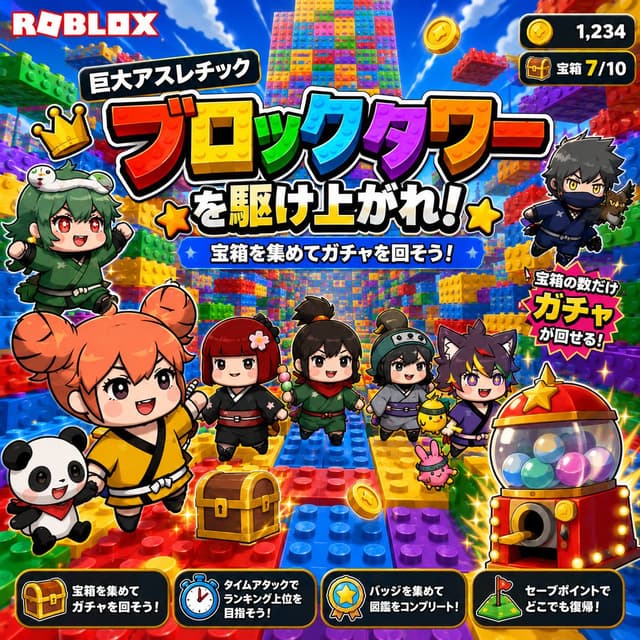
YouTube Thumbnail - Roblox Block Tower Thumbnail — output

YouTube Thumbnail - Roblox Block Tower Thumbnail

さっかん|2026年Robloxの夏☀️🎮GPT Image 2
Goal: Create a bright square Roblox-style promotional game thumbnail for {argument name="game title" default="巨大アスレチック ブロックタワーを駆け上がれ!"}, an exciting block-tower obby where players climb a giant toy-brick tower and collect treasure chests to spin a gacha.

Canvas: Square 1:1 thumbnail, 768x768 or larger, ultra-saturated colors, high-contrast mobile-game advertising composition, thick white and black sticker outlines around every character and text element.

Layout: Put the red-and-white ROBLOX logo at the top left. Fill the background with a huge vertical tower made from colorful LEGO-like plastic studs and brick platforms, receding upward into a blue sky with clouds. Place the main Japanese headline across the upper-middle in giant layered text: a small black rounded label reading 「巨大アスレチック」 above enormous rainbow block letters reading 「ブロックタワー」, followed by bold white text with black outline reading 「を駆け上がれ!」 with yellow star icons on both sides. Under the title, add a blue banner with white text: 「宝箱を集めてガチャを回そう!」. Add two game HUD counters at the top right: exactly 2 rounded black panels, one showing a gold coin icon and 「1,234」, the other showing a treasure chest icon and 「宝箱 7/10」.

Characters and objects: Include exactly 8 main visible characters: 1 cheerful orange-haired chibi girl in a yellow martial-arts outfit running in the foreground, 1 smiling panda companion at bottom left, 1 green-haired crowned chibi girl in a green outfit on the left, 1 red-kimono chibi girl near center, 1 black-haired ponytail chibi adventurer in green at center, 1 gray-helmet chibi girl with a small round helmet to the right of center, 1 purple wolf-eared chibi boy on the right, and 1 dark ninja boy flying at the upper right holding a small black cat. Include exactly 3 small pet/mascot creatures near the right group: a tiny black cat with the ninja, a yellow chick-like mascot, and a pink bunny-like mascot. Add exactly 1 golden treasure chest in the lower center foreground and exactly 1 red-and-gold capsule gacha machine at the lower right filled with multicolored balls and topped with a gold star. Scatter a few sparkling gold coins and star effects around the scene.

Callouts and UI: Add a jagged red-yellow burst callout near the gacha machine reading 「宝箱の数だけ ガチャが回せる!」. Along the bottom edge, add exactly 4 black rounded instruction cards with orange outlines and icons: 1 chest icon card reading 「宝箱を集めて ガチャを回そう!」, 1 stopwatch icon card reading 「タイムアタックで ランキング上位を目指そう!」, 1 badge icon card reading 「バッジを集めて 図鑑をコンプリート!」, and 1 checkpoint flag icon card reading 「セーブポイントで どこでも復帰!」.

Visual style: Roblox-inspired toy-block world, glossy 3D plastic bricks, chibi anime characters with oversized heads, big expressive eyes, joyful adventurous expressions, dynamic running poses, cartoon lighting, sparkle effects, strong drop shadows, thick outlines, vivid red yellow green blue purple palette, busy but readable YouTube thumbnail composition.

Constraints: Keep all visible text in Japanese exactly as specified, make the headline the dominant focal point, use exactly 8 main characters, exactly 3 small pet mascots, exactly 2 top-right HUD counters, and exactly 4 bottom instruction cards. No photorealism, no watermark, no extra logos beyond ROBLOX.
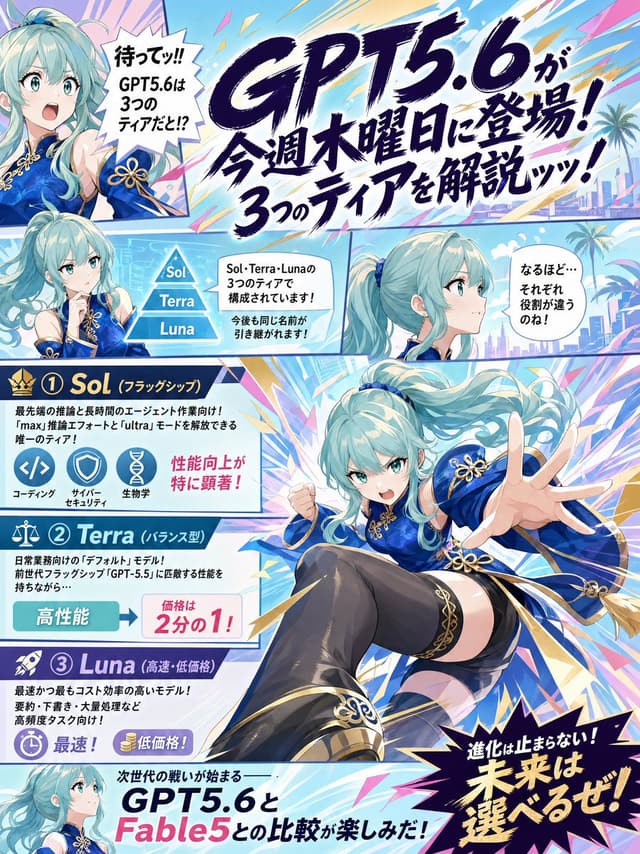
Infographic / Edu Visual - GPT5.6 Manga Tier Explainer — output

Infographic / Edu Visual - GPT5.6 Manga Tier Explainer

チビクロ🧩AI錬金術士GPT Image 2
Goal: Create a colorful vertical Japanese manga explainer page announcing {argument name="model name" default="GPT5.6"} and explaining its three tiers, with energetic shonen magazine composition, anime character reactions, and dense infographic panels.

Canvas: Portrait 3:4 poster, full bleed, high-resolution digital anime illustration. Use bright cyan, sky blue, white, navy, magenta, yellow, and gold with explosive speed lines, diagonal comic borders, lightning shards, starbursts, and a futuristic tropical city background with palm trees in some panels.

Layout: Divide the page into exactly 6 comic/infographic areas: 1 large top headline banner, 1 small upper-left reaction portrait panel, 1 middle-left tier diagram panel, 1 middle-right side-profile dialogue panel, 1 large central action character panel overlapping the tier cards, and 1 bottom comparison teaser strip. Use thick manga panel borders and angled separations.

Main character: A single recurring anime girl appears exactly 5 times across the page. She has long flowing aqua-turquoise twin-tail hair, teal eyes, pale skin, and a vivid royal-blue Chinese-inspired fantasy dress with gold trim, gold flower-knot ornaments, detached sleeve details, black thigh-high stockings, and ornate black-and-gold boots. Her five appearances are: 1) upper-left surprised bust portrait, mouth open, one hand raised; 2) left-middle thoughtful bust portrait with hand near chin; 3) middle-right calm side-profile bust looking right; 4) large central dynamic full-body action pose lunging toward the viewer with one hand extended and one fist clenched; 5) bottom-left small smiling profile portrait.

Text content: Use Japanese manga typography and keep the most prominent text as {argument name="main headline text" default="GPT5.6が今週木曜日に登場!3つのティアを解説ッッ!"}. Add a spiky upper-left speech bubble with {argument name="surprised speech text" default="待ってッ!! GPT5.6は3つのティアだと!?"}. Add a middle explanatory bubble about Sol, Terra, and Luna being three tiers and names possibly continuing in the future. Add a right speech bubble saying the roles seem different. Add a bottom teaser line comparing {argument name="comparison model" default="Fable5"} with GPT5.6. Add a large black starburst at bottom right with {argument name="closing slogan" default="進化は止まらない!未来は選べるぜ!"}.

Tier infographic: Include exactly 3 stacked tier cards on the left, numbered and labeled: 1) Sol, flagship tier, crown icon, dark navy header, described as the most advanced inference and long-agent-work model, with three circular icons labeled coding, cyber security, and life sciences, plus a pink note that performance improvements are especially noticeable; 2) Terra, balanced tier, scale icon, teal header, described as the everyday default model inheriting GPT-5.5-level balanced ability, with a high-performance badge and a price note showing half price; 3) Luna, high-speed/low-price tier, rocket icon, purple header, described as fastest and lowest cost, suited to high-volume and frequent tasks, with stopwatch and coin icons for fastest and low price.

Visual style: Polished GPT-image anime manga poster, crisp line art, glossy cel shading, dramatic foreshortening, expressive faces, dense but readable layout, handwritten brush-style Japanese headline, clean infographic icons, energetic promotional tech-news tone.

Constraints: Count and show exactly 3 tiers named Sol, Terra, and Luna; exactly 5 depictions of the same character; exactly 3 icons in the Sol card; no extra characters; no logos or watermarks; preserve a clean magazine-page composition with readable Japanese text.
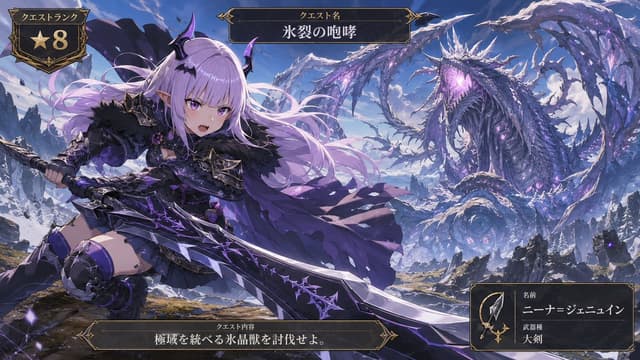
Comic / Storyboard - Anime Ice Dragon Hunt Quest Screen — output

Comic / Storyboard - Anime Ice Dragon Hunt Quest Screen

ニーナ=ジェニュイン@AIイラスト娘GPT Image 2
Goal: Create a cinematic anime fantasy RPG quest screen showing a young demon-like hunter challenging a colossal ice dragon in a frozen mountain wilderness.

Canvas: Wide 16:9 game UI illustration, high-detail anime key art, dramatic perspective, crisp fantasy rendering, violet and icy blue color palette, snowy peaks under a bright blue sky.

Main subject: In the left foreground, show {argument name="character name" default="Nina Jenewine"}, a fierce petite anime hunter girl with very long flowing {argument name="hair color" default="pale lavender"} hair, purple eyes, pointed elf ears, small black-and-purple demon horns, and a confident open-mouthed battle expression. She wears dark gothic hunter armor: black fur shoulder mantle, purple-black chest armor, short black skirt, armored thigh-high boots, gauntlets, bat-wing accents, spiked trim, violet gemstones, and a tattered flowing purple cape. Pose her low and dynamic as if lunging forward, gripping an enormous jagged greatsword with both hands. The greatsword is oversized, black steel and silver with glowing purple runic cracks and thorn-like ornamentation, extending diagonally across the lower half of the image.

Monster and environment: In the right background, show one gigantic serpentine ice crystal dragon, vastly larger than the hunter, coiled through the sky and mountains. It has a long body, wing-like icy fins, many jagged frozen spines, dark blue scales, luminous violet crystal growths, and a roaring open mouth glowing purple. Surround it with blowing snow, ice shards, ruined rocky cliffs, distant snowy mountains, and scattered purple magical particles. Emphasize scale: the dragon fills the upper-right half while the hunter dominates the left foreground.

UI layout: Add exactly 4 ornate dark fantasy game interface panels with gold filigree borders. Panel 1: top-left quest rank badge, shield-shaped, containing the Japanese label 「クエストランク」 and a large gold star with the number 「8」. Panel 2: top-center title plaque with the Japanese label 「クエスト名」 and the quest title {argument name="quest title" default="氷裂の咆哮"}. Panel 3: bottom-center objective plaque with the Japanese label 「クエスト内容」 and objective text {argument name="objective text" default="極域を統べる氷晶獣を討伐せよ。"}. Panel 4: bottom-right hunter information card containing a small spear-and-sword icon, the Japanese labels 「名前」 and 「武器種」, the displayed name {argument name="displayed hunter name" default="ニーナ=ジェニュイン"}, and weapon type 「大剣」.

Visual style: Premium Japanese mobile RPG / monster hunting quest splash screen, ornate medieval UI, dark gold borders, epic action composition, high contrast lighting, detailed fabric and armor, glowing purple magic, snow mist, painterly anime finish.

Constraints: Keep the image text legible and placed inside the four specified UI panels only. Do not add extra UI cards, extra characters, watermarks, logos, or modern objects.
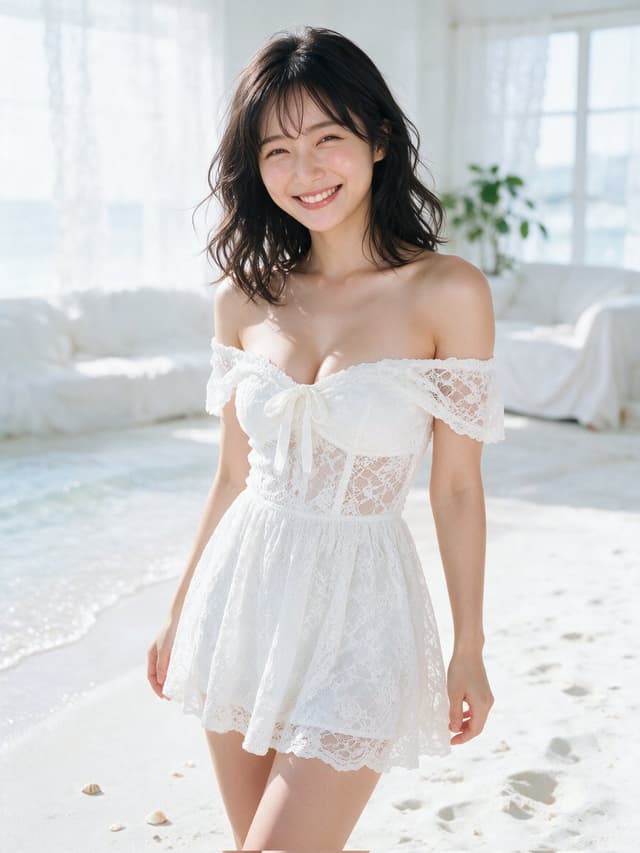
Profile / Avatar - Sunlit White Lace Beach Portrait — output

Profile / Avatar - Sunlit White Lace Beach Portrait

SSSS.CRYPTOMAN⚡️AIGPT Image 2
Create a photorealistic vertical portrait of a cheerful young Japanese woman standing on a bright indoor beach-like studio set. She has {argument name="hair color" default="dark brown to black"}, shoulder-length softly wavy hair with wispy bangs, natural makeup, warm skin, and a genuine wide smile while looking directly at the camera. She wears a delicate {argument name="dress style" default="white off-shoulder lace mini dress"} with scalloped lace sleeves, a fitted lace bodice, a small front bow at the bust, and a short airy skirt. Pose her in a relaxed three-quarter standing posture with arms naturally at her sides, framed from upper thighs to head. The setting is an all-white sunlit room with white sand on the floor, faint footprints, a few small seashells, a softly curving waterline or shallow pool at the left edge, sheer white curtains, large bright windows, a white draped sofa or lounge in the background, and a small green houseplant near the window. Use high-key natural daylight, soft backlight, gentle shadows, shallow depth of field, clean pastel whites and pale blue highlights, realistic skin texture, 35mm fashion photography look, crisp focus on the face, dreamy airy summer atmosphere, no text, no watermark, no extra people.
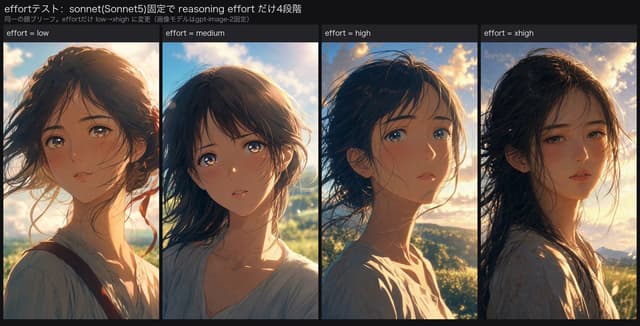
Infographic / Edu Visual - Reasoning Effort Anime Comparison — output

Infographic / Edu Visual - Reasoning Effort Anime Comparison

AI Video ProjectGPT Image 2
Goal: Create a wide social-media comparison graphic showing an AI image generation experiment about reasoning effort. The graphic compares four anime-style portrait outputs side by side while keeping the character brief consistent.

Canvas: Horizontal 1200×675 style image with a dark charcoal background, like a tweet attachment or experiment result slide. Use a clean, compact layout with thin black gutters between panels.

Header text: At the top left, show the Japanese title 「effortテスト: sonnet(Sonnet5)固定で reasoning effort だけ4段階」 in white. Directly underneath, in smaller gray text, show 「同一の顔ブリーフ。effortだけ low→xhigh に変更(画像モデルはgpt-image-2固定)」.

Layout: Below the header, create exactly 4 equal vertical portrait panels arranged left to right. Each panel has a narrow dark label bar at the top with white text. The labels are exactly 4: “effort = low”, “effort = medium”, “effort = high”, and “effort = xhigh”.

Subject details: In every panel, depict the same young anime woman, about 18–22 years old, with {argument name="hair color" default="dark brown to black"} windblown shoulder-length hair, soft delicate facial features, large reflective eyes, a slightly melancholic or thoughtful expression, natural skin tones, and a loose pale blouse. Keep her identity consistent across all 4 panels but allow slight variations in angle, expression, and lighting.

Panel contents: Panel 1 “effort = low” shows her in a warm sunset close-up, facing slightly left of camera, hair blowing across her face, wearing a light blouse with a visible dark strap and subtle red ribbon accent. Panel 2 “effort = medium” shows her centered, looking toward the viewer with glossy eyes, soft backlit sky and greenery behind her, hair swept around her cheeks. Panel 3 “effort = high” shows her in a three-quarter profile, turned toward the right with blue eyes catching the light, dramatic golden clouds behind her, and stronger rim light on her face and neck. Panel 4 “effort = xhigh” shows her slightly more realistic and moody, turned left with half-lidded eyes, long dark hair blown across her face, warm sunset over distant hills, and a pale patterned blouse.

Visual style: High-quality cinematic anime illustration, painterly semi-realistic rendering, warm golden-hour backlight, detailed hair strands, glowing sky, soft atmospheric depth, subtle filmic contrast, consistent color palette of amber sunlight, blue sky, and dark hair. The overall impression should be that all four outputs are similarly high quality with no obvious winner.

Constraints: Use exactly 4 portrait panels and exactly the 4 labels listed above. Preserve the Japanese header text exactly. Do not add logos, watermarks, extra captions, charts, arrows, or additional panels.
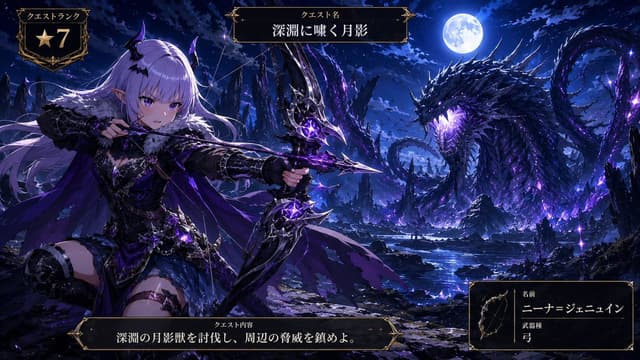
Comic / Storyboard - Anime Monster Hunter Quest Card — output

Comic / Storyboard - Anime Monster Hunter Quest Card

ニーナ=ジェニュイン@AIイラスト娘GPT Image 2
Goal: Create a dramatic anime fantasy game quest-card key visual for a monster-hunting scene, styled like a high-rank RPG hunt announcement.

Canvas: Wide cinematic 16:9 illustration, dark blue and violet night palette, ultra-detailed anime rendering, high contrast moonlight, glowing purple magic, ornate black-and-gold fantasy UI frames overlaid on the artwork.

Main scene: On the left foreground, show one female dark-elf archer hunter named {argument name="character name" default="ニーナ=ジェニュイン"}. She has long flowing {argument name="hair color" default="silver-lavender hair"}, pointed elf ears, small black-purple demon horns, violet eyes, and a fierce focused expression. She wears black gothic fantasy armor with fur around the shoulders, layered leather and metal pieces, thigh armor, purple cloak ribbons, and luminous amethyst accents. She is kneeling or bracing in an action pose, drawing a large ornate black bow with jagged metallic limbs and glowing violet crystal cores; the arrow is aimed toward the monster on the right.

Monster and environment: On the right midground/background, depict exactly one colossal abyssal moon-shadow dragon or serpent beast rising from a rocky lake. It has a long coiling body, jagged black scales, many sharp spines, a horned head, glowing purple eyes and mouth, and violet energy cracks radiating through its body. Place it under a bright full moon in a stormy night sky. The setting is a ruined obsidian canyon with sharp rock spires, reflective dark water, scattered purple crystals, magical sparks, mist, and moonlit clouds.

UI overlay: Include exactly 4 separate ornate fantasy interface panels with black interiors, thin gold borders, corner flourishes, and Japanese text. Panel 1 is the top-left quest rank badge, labeled 「クエストランク」 and showing one gold star icon followed by the large number 「7」. Panel 2 is centered near the top, labeled 「クエスト名」 with the quest title {argument name="quest title" default="深淵に嘯く月影"}. Panel 3 is a long bottom-center quest objective bar, labeled 「クエスト内容」 and containing {argument name="quest objective" default="深淵の月影獣を討伐し、周辺の脅威を鎮めよ。"}. Panel 4 is the bottom-right hunter info card with a small bow icon on the left, the label 「名前」 above the character name, and the label 「武器種」 above 「弓」.

Style constraints: Make the illustration polished, high-detail, fantasy anime concept-art quality, with sharp linework, dramatic lighting, deep blues and purples, gold UI trim, no watermark, no modern objects. Keep the archer and dragon clearly separated left and right, and ensure the UI text is legible and integrated like an official game quest screen.
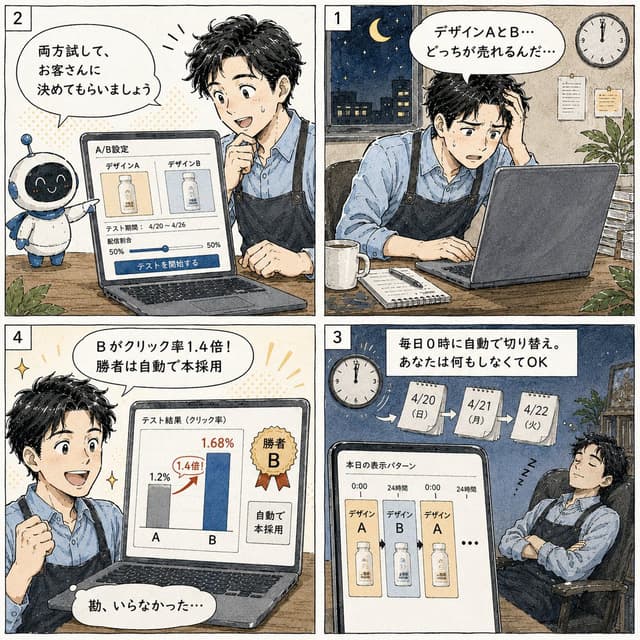
Comic / Storyboard - Japanese Manga A/B Testing Comic — output

Comic / Storyboard - Japanese Manga A/B Testing Comic

楽天ABテスト完全自動化サービス@イージークリエイティブGPT Image 2
Goal: Create a square 2x2 Japanese manga-style promotional comic explaining an automated A/B testing feature for a landing page. Use {argument name="feature topic" default="A/B testing automation"} as the product theme, with an approachable small-business SaaS feeling.

Canvas: Square image, four equal comic panels separated by thick black gutters, arranged in reading order with small white panel-number boxes: 1 at top right, 2 at top left, 3 at bottom right, 4 at bottom left. Hand-drawn ink outlines, warm watercolor shading, off-white paper texture, subtle screen-tone dots, clean readable Japanese lettering in speech bubbles and UI cards.

Main character: A young Japanese male designer, about late 20s to early 30s, short messy black hair, expressive face, wearing a light blue button-up shirt and a dark navy apron. Keep him consistent in all panels. Include a cute small robot assistant in panel 2: round black screen face with glowing eyes, white body, blue ear-like side parts, small antenna, friendly mascot pose.

Panel 1, top right: Nighttime office scene. The designer sits at a desk using a laptop, looking worried and tired, one hand in his hair. Outside the window is a dark city skyline with a crescent moon and stars. Wall clock shows midnight. Desk includes a white mug, notebook, pen, and papers. Speech bubble text: 「デザインAとB… どっちが売れるんだ…」.

Panel 2, top left: Bright decision/setup scene. The robot stands beside the desk and gestures toward the laptop. The designer leans in, smiling with interest and touching his chin. Laptop screen shows an A/B settings interface with exactly two design cards labeled 「デザインA」 and 「デザインB」, a test period line 「4/20~4/26」, a traffic split slider showing 50% and 50%, and a large blue button labeled 「テストを開始する」. Speech bubble text: 「両方試して、お客さんに決めてもらいましょう」.

Panel 3, bottom right: Automation scene at night. The designer sleeps peacefully in an office chair with arms folded, “Z” marks near him, while the laptop/tablet screen in the foreground shows the daily display pattern. Include a clock at midnight and three hanging calendar pages labeled exactly: 「4/20(日)」, 「4/21(月)」, 「4/22(火)」 with arrows between them. Screen title: 「本日の表示パターン」. The screen shows exactly three product-display cards in sequence labeled デザインA, デザインB, デザインA, then an ellipsis. Top caption box text: 「毎日0時に自動で切り替え。あなたは何もしなくてOK」.

Panel 4, bottom left: Results/winner scene. The designer is excited, smiling, and raising a fist. Laptop screen displays a results chart titled 「テスト結果(クリック率)」 with exactly two vertical bars labeled A and B. A is gray at 1.2%, B is blue at 1.68%, with a red upward arrow and badge reading 「1.4倍!」. Include a gold ribbon badge reading 「勝者B」 and a side note on the screen reading 「自動で本採用」. Speech bubble text: 「Bがクリック率1.4倍! 勝者は自動で本採用」. Small bottom reaction bubble: 「勘、いらなかった…」.

Visual style: Japanese web manga / educational SaaS comic, friendly and polished, clear panel composition, expressive faces, soft watercolor colors, cream paper background, detailed but uncluttered office props, legible UI mockups on laptop screens.

Constraints: Use exactly 4 panels and exactly the numbered panel order described. Preserve all Japanese text exactly as specified. Do not add extra panels, extra characters besides the designer and the one robot mascot, watermarks, logos, or unrelated captions.
Product Marketing - Kaiju Roller Coaster Poster — output

Product Marketing - Kaiju Roller Coaster Poster

アマドウマGPT Image 2
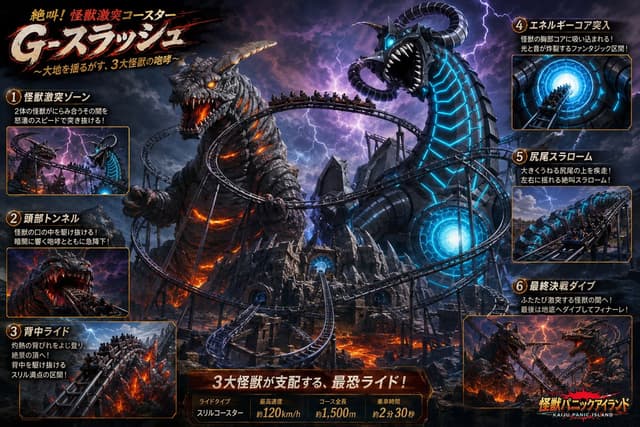
Goal: Create a dramatic Japanese theme-park advertisement poster for a monster battle roller coaster called {argument name="ride name" default="G-スプラッシュ"}, with the subtitle 「〜大地を揺るがす、3大怪獣の咆哮〜」 and the small top tagline 「絶叫!怪獣激突コースター」.

Canvas: Wide 16:9 cinematic poster, dark high-contrast fantasy disaster lighting, stormy purple-black sky with lightning, fiery lava below, orange and cyan glow effects, dense action composition.

Main scene: A huge roller coaster twists through a volcanic kaiju island. Show exactly 2 dominant giant monsters in the center: 1) a rocky Godzilla-like lava monster on the left with glowing orange cracks, burning eyes, horned/armored head, open roaring mouth, and molten lava light inside its body; 2) a black biomechanical sea-serpent/dragon monster on the right with bright cyan glowing circuit-like stripes, a huge open mouth with white fangs, glowing blue eyes, and curled horn-like tentacles. The roller coaster track loops between and around both monsters, with multiple trains full of tiny screaming riders. Add jagged ruins, steel supports, a glowing blue energy core doorway in the central fortress, lava rivers, smoke, sparks, and lightning.

Layout: Use an information-dense theme-park ride brochure layout. Put the large brush-stroke Japanese title in the upper left, off-white letters with red shadow and black splatter strokes. Add exactly 6 numbered feature callout panels around the edges, each with an orange border, a circular gold number badge, a Japanese heading, 1–2 short Japanese description lines, and a small inset image. Count and label the panels as follows: 1 「怪獣激突ゾーン」 showing the coaster rushing between the two monsters; 2 「頭部トンネル」 showing the train diving into the lava monster’s open mouth; 3 「背中ライド」 showing the train climbing along the fiery monster’s back; 4 「エネルギーコア突入」 showing a train entering a bright blue circular energy tunnel; 5 「尻尾スラローム」 showing the train slaloming around a large swinging monster tail; 6 「最終決戦ダイブ」 showing the final plunge between battling monsters.

Bottom information bar: Centered along the bottom, create a red-brown metallic plaque with the headline 「3大怪獣が支配する、最恐ライド!」. Beneath it, include exactly 4 stat boxes: 「ライドタイプ」 with 「スリルコースター」, 「最高速度」 with 「約120km/h」, 「コース全長」 with 「約1,500m」, and 「乗車時間」 with 「約2分30秒」. In the lower right corner, place a fiery park logo reading {argument name="park logo text" default="怪獣パニックアイランド"} with small English text 「KAIJU PANIC ISLAND」 underneath.

Visual style: Hyper-detailed AI concept art, cinematic key art, Japanese amusement park poster, realistic monsters, dynamic perspective, dramatic rim lighting, motion blur on coaster trains, sparks and embers, sharp readable typography, gold-orange panel borders, dark fantasy disaster palette with lava orange and electric cyan accents.

Constraints: Keep exactly 6 numbered callout panels and exactly 4 bottom stat boxes. Make all Japanese text large enough to read. Do not add extra logos, watermarks, QR codes, or unrelated characters.
Comic / Storyboard - Anime Lantern Girl Character Sheet — output

Comic / Storyboard - Anime Lantern Girl Character Sheet

A.I.WarperGPT Image 2
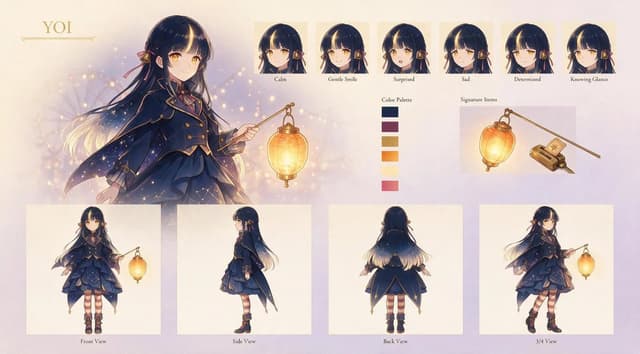
Goal: Create an elegant anime character design sheet for {argument name="character name" default="YOI"}, a young magical lantern-bearer girl with a refined twilight fantasy aesthetic.

Canvas: Wide horizontal character sheet, about 16:9, soft cream parchment background with pale lavender and peach gradients, subtle bokeh lights, faint sparkles, and a delicate gold ornamental nameplate in the upper left.

Main illustration: On the left half, show a large three-quarter portrait/full upper-body illustration of the character holding a glowing hanging lantern from a thin golden wand. She has {argument name="hair color" default="very dark navy-black hair with warm blonde glowing tips"}, long flowing hair, straight bangs, golden amber eyes, and small ribbon-and-bell hair ornaments. Her expression is calm and gentle. The lantern emits warm yellow-orange light that softly illuminates her face, hand, and outfit.

Character outfit: Design a layered dark navy magical school-uniform-inspired outfit with gold trim, brass buttons, a short capelet/cloak that fades into starry sparkles, a structured jacket, layered ruffled skirt, burgundy ribbon accents, striped burgundy-and-cream stockings, and black ankle boots with gold details. The overall motif should feel celestial, lantern-lit, antique, and slightly Victorian.

Top row expression sheet: Include exactly 6 small headshot panels arranged horizontally across the upper right, each with a cream square background and a small label underneath. The 6 expressions are: 1. Calm, 2. Gentle Smile, 3. Surprised, 4. Sad, 5. Determined, 6. Knowing Glance. Keep the same character, hair ornaments, bangs, and lighting style consistent in every expression.

Color palette: Place a vertical color palette near the center-right labeled “Color Palette.” Include exactly 6 rectangular swatches: 1. deep navy, 2. muted burgundy, 3. antique gold, 4. warm orange, 5. pale cream-yellow, 6. rose pink.

Signature items: Add a labeled section “Signature Items” on the upper right with exactly 2 objects: 1. the glowing oval paper lantern hanging from a slim gold wand, 2. a small antique rectangular charm/book-like device with a star emblem and attached cord. Render them as neat item illustrations on a pale panel.

Bottom model sheet: Along the bottom, include exactly 4 full-body turnaround panels on clean cream rectangles, each labeled underneath: 1. Front View, 2. Side View, 3. Back View, 4. 3/4 View. The front view shows the lantern wand held outward; the side view emphasizes the cape silhouette; the back view shows the long hair gradient and starry cloak; the 3/4 view shows a dynamic walking pose with the lantern.

Visual style: Polished Japanese anime concept art, soft painterly rendering, delicate linework, glowing highlights, gold accents, warm magical lighting, high detail but airy composition, premium character reference sheet presentation.

Constraints: Use only the visible English labels described above, keep the layout clean and balanced, avoid extra characters, avoid logos or watermarks, and preserve the exact counts of 6 expressions, 6 color swatches, 2 signature items, and 4 full-body views.
Product Marketing - Toyama Takayama Sushi Airport — output

Product Marketing - Toyama Takayama Sushi Airport

achel_b8🍣♨GPT Image 2
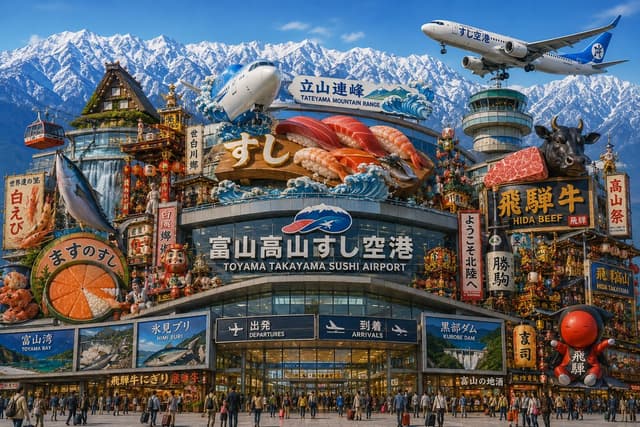
Create an ultra-detailed, photorealistic yet hyperreal travel-poster image of a fantastical Japanese regional airport terminal that combines Toyama and Takayama tourism into one overwhelming landmark. The main building is a glass-and-steel airport façade labeled in large Japanese and English text “富山高山すし空港” and “TOYAMA TAKAYAMA SUSHI AIRPORT,” with two dark entrance boards below reading “出発 DEPARTURES” and “到着 ARRIVALS.” Above the terminal, build a giant rooftop sushi display with exactly 5 oversized nigiri pieces: tuna, salmon, shrimp, fatty tuna, and another red fish, with a large gold “すし” sign in front and stylized blue ocean waves around it. Behind it, add a sign reading “立山連峰 / TATEYAMA MOUNTAIN RANGE,” and fill the entire background with dramatic snow-covered Japanese Alps under a clear blue sky. Show exactly 2 airplanes: one large plane nose emerging behind the sushi sign near the center-left, and one passenger jet flying at the upper right with Japanese lettering on the fuselage. Include exactly 1 airport control tower on the right side. Surround the airport with dense, colorful regional festival and food imagery: a gassho-zukuri thatched-roof house at upper left, a red-and-black cable car at far left, ornate Takayama festival floats with lanterns and dolls, Daruma dolls, vertical banners, seafood signs, and souvenir-shop-like storefronts. Add exactly 6 prominent regional attraction or food signboards around the façade: “白えび” with a shrimp illustration, “ますのすし” with a round salmon sushi cross-section, “富山湾 TOYAMA BAY,” “氷見ブリ HIMI BURI,” “黒部ダム KUROBE DAM,” and “飛騨牛 HIDA BEEF” with a black cow head and a slab of marbled beef. Put many travelers with suitcases and crowds in front of the entrance for scale. Use saturated colors, crisp daylight, extreme detail, commercial tourism-advertising composition, wide 16:9 aspect ratio, no blank areas, no watermark.
Comic / Storyboard - Sleepy Blonde Cartoon Girl — output

Comic / Storyboard - Sleepy Blonde Cartoon Girl

しゅんち(小柴俊太郎)@神戸AI漫画家GPT Image 2
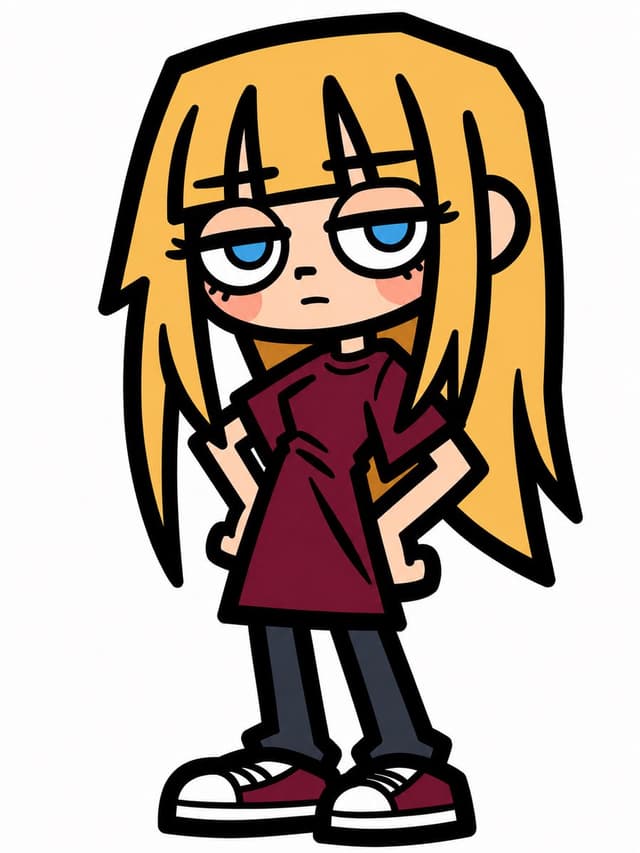
Create a simple full-body cartoon character illustration on a plain white background: a stylized teenage girl with an unimpressed, sleepy expression, drawn in a bold 2D vector-like comic style with very thick black outlines and flat colors. She has very long straight {argument name="hair color" default="golden blonde"} hair that frames her face and extends past her shoulders with angular pointed ends, heavy straight bangs with separated vertical strands, pale skin, half-lidded large blue eyes, tiny nose, small flat mouth, and soft pink blush circles on both cheeks. Her pose is slightly slouched and asymmetrical, standing front-facing with her head large compared to her body, arms bent down at her sides, small hands, narrow legs, and oversized shoes. Dress her in an oversized short-sleeve {argument name="shirt color" default="dark burgundy"} T-shirt, dark charcoal skinny pants, and chunky low-top sneakers with white toe caps, white soles, black outlines, and burgundy side panels. Use a deliberately rough, hand-drawn cartoon look with simplified anatomy, exaggerated proportions, minimal shading, clean white negative space, no text, no props, no background scenery, and no watermark.
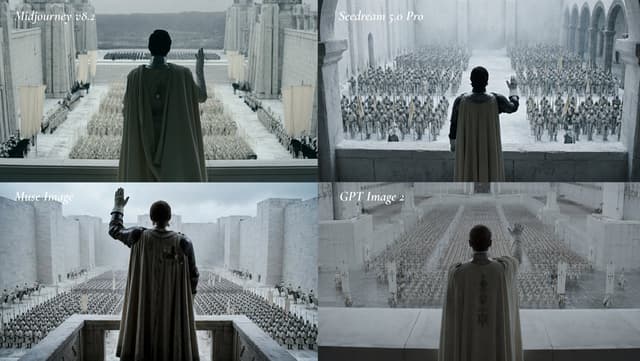
Social Media Post - Cinematic AI Model Comparison Grid — output

Social Media Post - Cinematic AI Model Comparison Grid

VGPT Image 2
Goal: Create a cinematic 2x2 comparison grid showing the same epic fantasy scene rendered by four image models, with each quadrant labeled in elegant white italic serif text.

Canvas: Wide 16:9 image, approximately 1200x675, divided into exactly 4 equal panels in a clean 2x2 layout with no borders beyond the natural panel seams.

Layout: The four panels are arranged as follows: top-left labeled “Midjourney v8.2”, top-right labeled “Seedream 5.0 Pro”, bottom-left labeled “Muse Image”, bottom-right labeled “GPT Image 2”. Place each label near the upper-left corner of its panel in small white italic serif typography.

Subject and scene: In every panel, show the same composition concept: a lone ruler or commander seen from behind, standing on a high stone balcony or terrace, raising one hand in salute over a vast assembled army in a monumental pale stone fortress city. The figure wears a long dark-gray or muted olive cloak/cape over armor, with the back of the head visible, facing away from the viewer toward the army. The architecture is massive, cold, and ancient: white-gray stone walls, tall towers, arches, colonnades, courtyards, and ceremonial banners. The army consists of thousands of small soldiers arranged in orderly ranks across the courtyard, with some mounted riders or standard bearers visible near the sides. The mood is solemn, imperial, and cinematic, like a fantasy war film.

Panel-specific details: Count exactly 4 panels. Panel 1, “Midjourney v8.2”: central cloaked ruler on a balcony, very symmetrical grand courtyard, distant mountains beyond the fortress, rows of soldiers and banners, cool desaturated blue-gray lighting. Panel 2, “Seedream 5.0 Pro”: closer balcony view with arched colonnade on the right, dense crowd of soldiers filling the courtyard, misty pale stone atmosphere, commander raises the right hand. Panel 3, “Muse Image”: lower-left view with commander slightly larger and darker, raised gloved hand, high rectangular stone parapet, enormous army in grid formation below, fortress walls stretching into the distance under cloudy sky. Panel 4, “GPT Image 2”: hazier and softer view, commander centered with embroidered cape back, raised hand partly translucent or motion-blurred, army in long converging ranks, white stone pillars and banners in the foreground.

Visual style: Photorealistic cinematic still, high fantasy epic scale, desaturated cold color grading, foggy atmospheric perspective, soft overcast light, pale stone textures, subtle film grain, serious dramatic tone, no modern objects.

Customizable core prompt for the scene: depict {argument name="main character" default="a cloaked ruler in armor"} overlooking {argument name="army description" default="a vast army of thousands arranged in ceremonial ranks"} inside {argument name="location" default="a monumental white-stone fantasy fortress city"}, with {argument name="lighting" default="cold desaturated overcast cinematic lighting"} and labels comparing {argument name="model labels" default="Midjourney v8.2, Seedream 5.0 Pro, Muse Image, GPT Image 2"}.

Constraints: Keep the same scene type in all four panels, preserve the exact 2x2 comparison layout and the exact 4 labels, avoid extra captions, avoid logos, avoid watermarks, avoid bright saturated colors, and keep the image cinematic rather than illustrative.
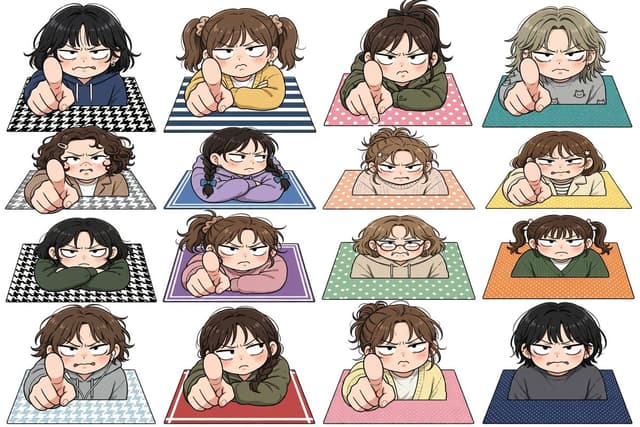
Game Asset - Annoyed Chibi Sticker Sheet — output

Game Asset - Annoyed Chibi Sticker Sheet

小猫遊りょう(たかにゃし・りょう)GPT Image 2
Create a clean white-background anime sticker-sheet illustration showing exactly 16 chibi-style annoyed people popping up from rectangular patterned mats, arranged in a precise 4 columns by 4 rows grid. Each character is cropped at the torso behind the mat edge, with oversized heads, rosy cheeks, heavy-lidded angry eyes, small frowning mouths, expressive messy hair, thick black line art, soft cel shading, and a cute but confrontational mood. Several characters thrust an oversized index finger toward the viewer in strong foreshortened perspective as if scolding or saying “you”; others glare with folded arms or a slumped irritated posture. Use no text, no speech bubbles, no watermark, and keep generous white spacing between all stickers. The 16 discrete characters are: 1) black short wavy hair, navy hoodie, pointing, black-and-white houndstooth mat; 2) brown twin ponytails, yellow sweater, pointing, blue-and-white striped mat; 3) dark brown high ponytail, olive hoodie, pointing, pink polka-dot mat; 4) ash-blond short hair, gray cat-print shirt, pointing, teal dotted mat; 5) curly dark-brown bob with hair clips, tan jacket, pointing, gray houndstooth mat; 6) black hair in two braids, lavender sweatshirt, arms folded, blue double-border mat; 7) messy light-brown bun, cream sweater, arms crossed on peach polka-dot mat; 8) brown bob with star hair clips, cream cardigan over striped shirt, pointing, yellow dotted mat; 9) black bob, dark green hoodie, arms crossed, black-and-white houndstooth mat; 10) brown ponytail, pink sweatshirt, pointing, purple bordered mat; 11) light-brown wavy bob with round glasses, beige hoodie, worried-annoyed expression, mint polka-dot mat; 12) brown twin pigtails, dark green cardigan, flat unimpressed stare, orange dotted mat; 13) tousled brown hair, gray hoodie, pointing, pale blue houndstooth mat; 14) dark brown ponytail, olive hoodie, pointing, red mat with thin white border; 15) messy brown bun, pale yellow cardigan, pointing, pink dotted mat; 16) short black hair, charcoal sweatshirt, blushing scowl, navy dotted mat. Overall style: Japanese kawaii manga character sheet, sticker illustration, crisp outlines, flat white background, soft pastel clothing and mats, consistent scale and perspective across all 16 characters.
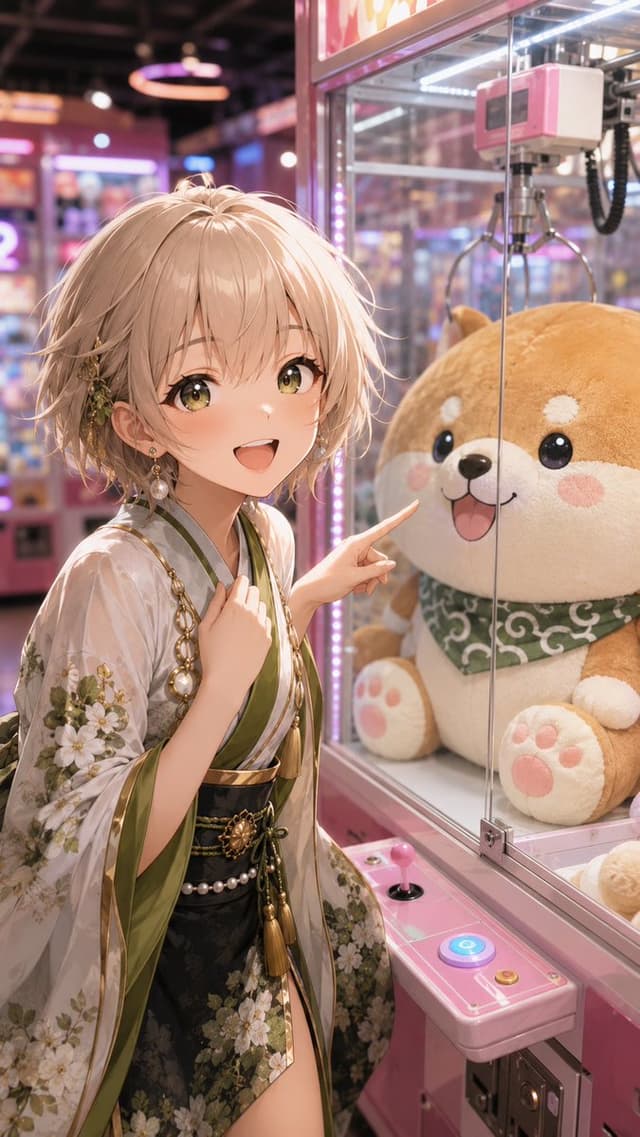
Comic / Storyboard - Anime Girl at Claw Machine — output

Comic / Storyboard - Anime Girl at Claw Machine

essan | AIクリエイターGPT Image 2
Create a vertical 9:16 anime-style illustration set inside a colorful Japanese arcade. Show a cheerful young woman, {argument name="character name" default="unnamed anime girl"}, standing close to a pink claw machine and pointing excitedly at a giant plush shiba inu prize inside the glass cabinet. She has short tousled {argument name="hair color" default="champagne blonde"} hair with soft layered bangs, bright golden-green eyes, fair skin, rosy cheeks, and an open joyful smile. Dress her in an elegant modern kimono outfit: translucent white outer sleeves with detailed white floral patterns, olive-green trim, a black floral skirt layer, gold chains, pearl accents, tassels, a dark obi belt, dangling pearl earrings, and a small botanical hair ornament near one ear. The claw machine should be glossy pink with glass panels, LED strip lighting, a joystick and glowing blue button on the control panel, and a metal claw hanging above the plush. The plush should be oversized, round, tan-and-cream, smiling, with blush cheeks, paw pads, and a green patterned bandana. Use a close medium composition with the girl on the left and the plush on the right, her fingertip nearly touching the glass. Background: softly blurred neon arcade with pink, purple, and blue bokeh lights, prize machines, reflections, and warm overhead glow. Visual style: polished high-detail anime key visual, cinematic lighting, soft depth of field, glossy reflections, delicate hair strands, intricate fabric embroidery, vibrant but pastel arcade colors, cute and inviting mood. No text, no watermark, no extra characters.
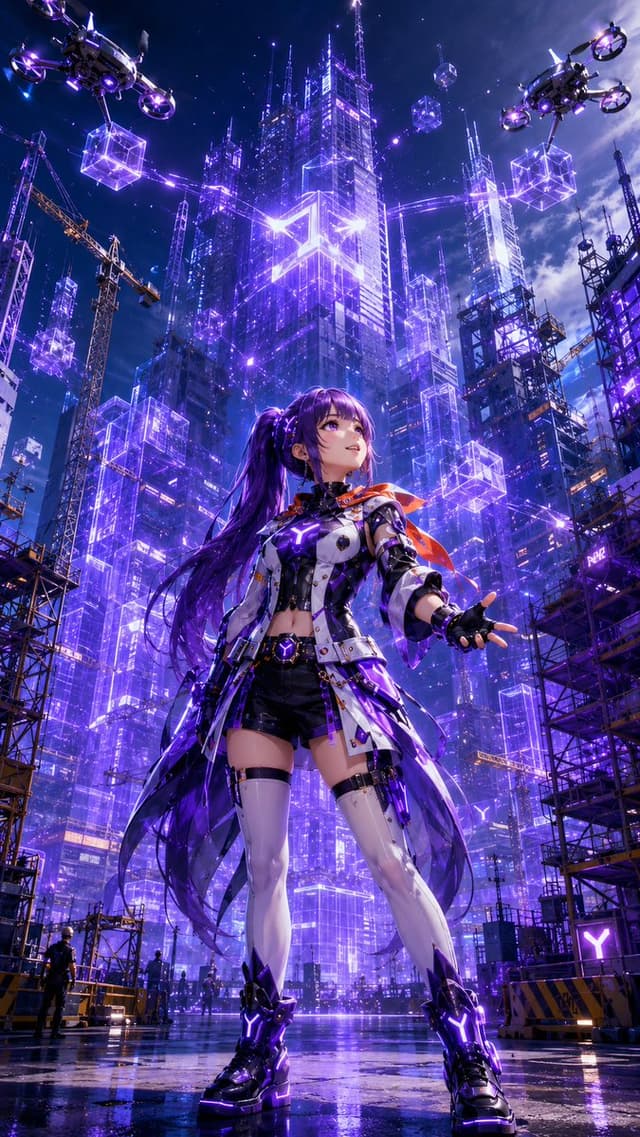
Game Asset - Cyberpunk Anime Heroine Megacity — output

Game Asset - Cyberpunk Anime Heroine Megacity

essan | AIクリエイターGPT Image 2
Create a vertical 9:16 cinematic anime sci-fi key visual of {argument name="character name" default="a futuristic cyberpunk heroine"} standing full-body in the foreground of a rain-slick construction plaza at night, viewed from a dramatic low angle. Character consistency is the top priority: a young anime woman with {argument name="hair color" default="deep violet"} very long twin-tail hair flowing behind her, violet eyes, a confident upward gaze, and a slight heroic smile. She wears a white, black, and metallic futuristic combat jacket with glowing purple circuitry, black shorts, asymmetrical white thigh-high armored stockings, black fingerless gloves, chunky black cyber boots with bright purple Y-shaped lights, belts, straps, small tech pouches, and a translucent dark-purple coat tail or energy cape; add a small orange-red scarf or ribbon fluttering at her shoulder for contrast. Her left arm reaches outward as if controlling holograms, while her stance is wide and powerful. The environment is a towering cyberpunk megacity under construction, filled with glass skyscrapers outlined in intense neon purple and blue light, holographic wireframe architecture, transparent glowing cube modules, cranes, scaffolding, antenna spires, and starry storm clouds. Include exactly 2 large quadcopter cargo drones in the sky, one at the upper left and one at the upper right, each carrying 1 glowing purple wireframe cube beneath it. Include 8 distinct floating holographic cube modules around the city skyline, varying in size and distance, plus many thin purple laser guide lines connecting buildings. Include 3 visible construction cranes, dark scaffolding towers on both sides, and 3 tiny human worker silhouettes near the bottom to emphasize scale. The wet ground must mirror the purple city lights and the character’s boots. Use {argument name="primary neon color" default="electric violet"} as the dominant glow, with blue highlights and small orange construction lights. Style: ultra-detailed Japanese anime illustration, glossy cyberpunk rendering, sharp linework, high contrast, volumetric light beams, lens flares, reflective rain puddles, intricate mechanical costume details, epic poster composition, no text, no watermark, no logo.
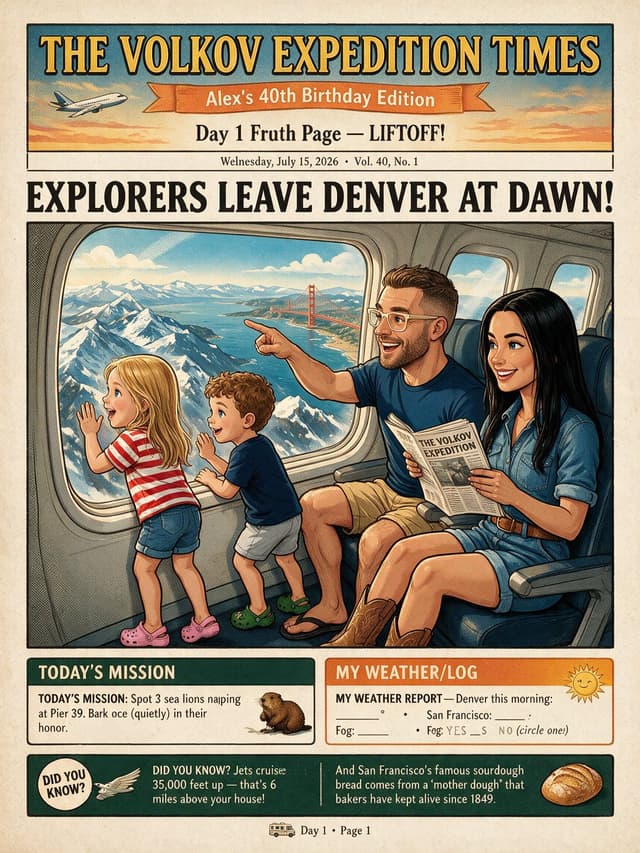
Comic / Storyboard - Vintage Family Expedition Newspaper — output

Comic / Storyboard - Vintage Family Expedition Newspaper

Alex Volkov @ AI EngineerGPT Image 2
Goal: Create a vintage illustrated front page of a personalized expedition newspaper for a family trip, titled {argument name="newspaper title" default="THE VOLKOV EXPEDITION TIMES"}, with a warm 1950s adventure-comic look and aged paper texture.

Canvas: Vertical newspaper page, approximately 4:5 ratio, cream newsprint background with subtle speckles, black ink borders, muted teal, orange, yellow, and red accents. Use bold woodblock-style serif typography for headlines and hand-inked editorial illustration shading.

Top masthead: Large dark teal rectangle with golden serif title text reading “THE VOLKOV EXPEDITION TIMES.” Under it, an orange ribbon banner reading {argument name="edition banner" default="Alex’s 40th Birthday Edition"}. Add a small airplane icon on the left flying through a sunset sky. Below the ribbon, centered subheadline reads “Day 1 Fruth Page — LIFTOFF!” and a small dateline line reads “Wednesday, July 15, 2026 • Vol. 40, No. 1.”

Main headline: Huge all-caps black newspaper headline across the page: {argument name="main headline" default="EXPLORERS LEAVE DENVER AT DAWN!"}

Main illustration: A large framed comic-style scene inside an airplane cabin. Show exactly 4 family members seated or standing by the airplane windows: 1 blonde little girl in a red-and-white striped shirt, denim shorts, and pink clogs standing at the window with one hand raised; 1 curly-haired little boy in a navy shirt, light shorts, and green clogs leaning toward the window; 1 smiling adult man with short brown hair, beard, glasses, navy shirt, tan shorts, sandals, pointing excitedly out the window while holding a small newspaper; 1 smiling adult woman with long black hair, denim shirt dress, brown belt, and cowboy boots seated beside him holding the same newspaper. Through the large airplane window, show snowy mountain peaks, blue water, clouds, and a clearly visible red Golden Gate Bridge in the distance, mixing travel landmarks in a whimsical way. The airplane interior should include blue seats, window frames, cabin wall panels, and warm sunlight.

Bottom information boxes: Include exactly 3 lower content areas. First box on the left titled “TODAY’S MISSION,” dark green header, with text: “TODAY’S MISSION: Spot 3 sea lions napping at Pier 39. Bark once (quietly) in their honor.” Add a small sea lion illustration. Second box on the right titled “MY WEATHER/LOG,” orange header, with a cheerful sun icon and a form-like weather report that says “MY WEATHER REPORT — Denver this morning:” followed by blank lines for temperature, San Francisco, and fog yes/no. Third box spans the bottom in dark green and contains exactly 2 fact blurbs separated by a vertical line: left blurb with a circular “DID YOU KNOW?” badge and a small bird/wing icon, reading “Jets cruise 35,000 feet up — that’s 6 miles above your house!”; right blurb with a sourdough bread illustration, reading “And San Francisco’s famous sourdough bread comes from a ‘mother dough’ that bakers have kept alive since 1849.”

Footer: Small centered footer with a tiny bus icon and text “Day 1 • Page 1.”

Constraints: Keep all text legible and arranged like a printed newspaper front page. Use exactly 4 people, exactly 3 lower content areas, exactly 2 fact blurbs, exactly 1 airplane icon, exactly 1 sea lion illustration, exactly 1 sun icon, exactly 1 sourdough bread illustration, and exactly 1 tiny bus icon. Do not add extra panels, extra characters, logos, watermarks, QR codes, or modern UI elements.
Browse by model, style or topic

Find your next direction

ASTORIE CANVAS

Take the idea further.

Bring your prompts, references and results together in one creative space.

Open your canvas ↗