GPT Image 2 prompts

Browse GPT Image 2 prompts for fashion portraits and graphic compositions. Compare how each prompt describes its subject and the way the image is arranged.

Explore prompts

10,039 prompts

Product Marketing - Rainy Dutch Street Vintage BMW — output

Product Marketing - Rainy Dutch Street Vintage BMW

DebuggerdamGPT Image 2
A realistic cinematic street photograph of a {argument name="car model" default="black vintage BMW coupe from the 1970s"} parked at the curb in a quiet Dutch canal-neighborhood street after rainfall. The car is front-facing at a slight angle, centered slightly right, with chrome trim, round headlights, a yellow Dutch license plate reading {argument name="license plate text" default="03-XR-BL"}, and visible raindrops on the hood and windshield. The setting shows recognizable Dutch street features: narrow brick sidewalk and wet brick paving, small puddles reflecting sunlight, tall narrow brick townhouses with large windows on both sides, bicycles parked along railings and facades, a blue parking sign, slim street trees with fresh green leaves lining the road, and a softly blurred row of parked cars in the background. Sunlight breaks through after rain, creating warm highlights on the wet street while the overall mood remains slightly moody and nostalgic. Shoot as if on a vintage Helios 44-2 58mm lens, shallow depth of field, subject sharply focused, swirly/subtle anamorphic bokeh in the background, Kodak color film look, natural grain, muted greens and warm browns, realistic proportions, no people in focus, no modern distractions, no watermark.
Comic / Storyboard - Censored Vintage Blonde Noir Portrait — output

Comic / Storyboard - Censored Vintage Blonde Noir Portrait

MarcoGPT Image 2
Create a cinematic widescreen portrait still of {argument name="character name" default="an elegant vintage blonde woman"} leaning against a wall in a dim interior, framed on the left third with large negative space to the right. She has a dramatic 1960s bouffant hairstyle in {argument name="hair color" default="platinum blonde"}, bare shoulders, gold jewelry including one chunky gold necklace, one visible gold ring, and one earring, and she holds exactly one lit white cigarette near her cheek with faint smoke drifting upward. Place a flat opaque square censor block over her face, centered from forehead to chin, in muted dark brown. The background is an out-of-focus teal-green wall or window surface with strong diagonal shadows and moody noir atmosphere. Use low-key cinematic lighting with warm highlights on skin and hair, cool green shadows, shallow depth of field, film grain, realistic texture, anamorphic movie-still composition, 16:9 aspect ratio, no text, no watermark.
Social Media Post - Backstage Pop Star Selfie — output

Social Media Post - Backstage Pop Star Selfie

zeddGPT Image 2
Create a realistic horizontal phone-camera selfie taken backstage at a concert, as if the viewer is holding the camera at arm's length. Show exactly three people crowded together: the central person is the selfie-taker in a black hoodie with one arm extended toward the lens, the left person is a glamorous blonde female pop star in a sparkling silver fringed dress leaning in, and the right person is a muscular male pop star with short bleached hair, earrings, visible neck and arm tattoos, and a white ribbed tank top leaning in. Cover each of the three faces with a simple opaque skin-toned rectangular censor block, exactly 3 blocks total. The background is a dark backstage area with metal scaffolding, stage rigging, blurred crew silhouettes, and warm colorful concert lights in red, orange, pink, and purple creating bokeh and lens flare. Use a wide-angle smartphone flash/selfie look, candid celebrity backstage vibe, realistic skin, shallow depth of field, high detail, slight motion blur at the edges. Across the bottom, overlay a large rounded white chat-style prompt input bar with soft shadow; inside it, display the exact typed text: “{argument name="prompt text" default="selfie of me with two pop stars backstage, phone camera, warm concert lights"}” in dark gray sans-serif, followed by a thin blue vertical cursor and a blue paper-plane/send arrow icon at the far right. Keep the composition tight and intimate, with the input bar covering the lower part of the bodies, and no extra logos, watermarks, captions, or additional people.
Comic / Storyboard - Censored Vintage Blonde Noir Portrait — output

Comic / Storyboard - Censored Vintage Noir Film Still

MarcoGPT Image 2
Create a cinematic widescreen film still of a glamorous mid-century blonde woman leaning against a dark window frame on the far left of the composition, with most of the right side filled by an out-of-focus teal-green urban window or wall. She has a voluminous 1960s platinum-blonde beehive hairstyle with soft curls, bare shoulders suggesting an elegant strapless outfit, gold jewelry including a chunky chain necklace and rings, and she holds a lit cigarette near her face with faint smoke drifting upward. Her face is deliberately covered by a large opaque square censorship block in muted brown, centered over the facial area and extending from the eyes down past the mouth. Use moody low-key lighting with warm sunlight grazing her hair and shoulder, deep shadows, teal-and-gold color grading, shallow depth of field, realistic film grain, anamorphic cinematic framing, and a tense vintage noir atmosphere. The scene should feel like a still from an art-house period drama, with no text, no watermark, and no extra people. Customize the subject as {argument name="character description" default="glamorous mid-century platinum-blonde woman"}, the face covering as {argument name="censorship block color" default="muted brown"}, the prop as {argument name="handheld prop" default="lit cigarette"}, the mood as {argument name="cinematic mood" default="tense vintage noir"}, and the color grade as {argument name="color grade" default="teal and gold"}.
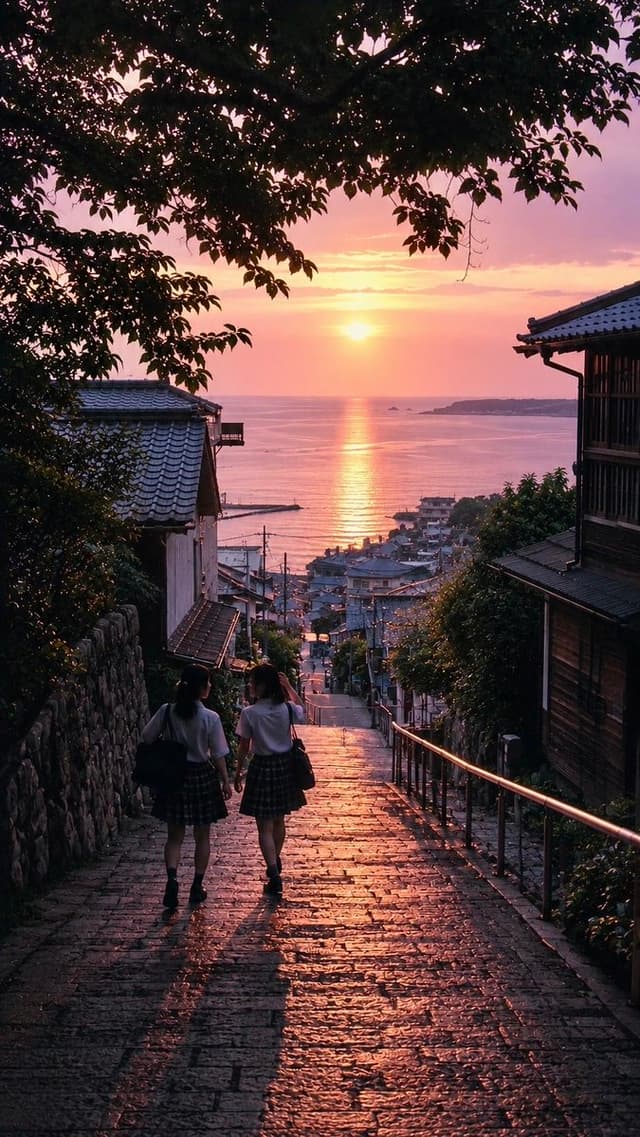
Comic / Storyboard - Nostalgic Japanese Summer Sunset — output

Social Media Post - Nostalgic Japanese Seaside Sunset

Girls in AI Art|GiAA(ギア)GPT Image 2
Create a nostalgic vertical 9:16 cinematic photograph of {argument name="location" default="a quiet Japanese seaside hillside town"} at sunset, viewed from the top of a steep old stone-paved stairway descending toward the ocean. In the foreground, exactly 2 schoolgirls walk away from the camera side by side down the steps; both wear white short-sleeve blouses, dark plaid skirts, dark socks and shoes, and carry dark school bags, with long soft shadows stretching toward the viewer. The wet-looking cobblestone steps glisten with warm orange-pink sunset reflections. Frame the scene with dark leafy tree branches forming a natural canopy across the top and left side, a stone wall along the left, a metal handrail along the right, and traditional Japanese wooden houses with tiled roofs on both sides. In the distance, show a compact coastal neighborhood, utility poles, rooftops, a calm sea, a small harbor, and a low island or headland on the horizon. The sun sits low over the water, creating a bright vertical golden reflection path across the sea. Use {argument name="mood" default="nostalgic and peaceful"} atmosphere, rich dusk colors of rose, lavender, peach, and gold, deep foreground silhouettes, realistic photographic detail, subtle film grain, high dynamic range, natural lens perspective, no text, no watermark.
Comic / Storyboard - Censored Vintage Blonde Noir Portrait — output

Comic / Storyboard - Censored Vintage Film Portrait

MarcoGPT Image 2
Create a cinematic pro-film photography portrait in a widescreen 16:9 frame. A glamorous vintage blonde woman stands at the far left edge of the composition, leaning against a vertical wall or window frame in deep shadow, with most of the frame occupied by an abstract dark teal architectural background. She has a large 1960s bouffant hairstyle in pale {argument name="hair color" default="platinum blonde"}, bare shoulders, warm tan skin, gold jewelry including a chunky necklace and rings, and she holds a lit cigarette near her face with faint smoke drifting upward. Her face is deliberately obscured by a centered rectangular censor block in muted brown, covering the facial features while leaving the hair, hand, cigarette, neck, and shoulders visible. Use moody low-key lighting with warm sunlight grazing her hair and skin from the upper left, strong teal-and-gold color grading, shallow depth of field, soft film grain, subtle halation, and a still from a 1970s arthouse thriller or fashion editorial. The background should be minimal and out of focus, with dark geometric shadows, no text, no watermark, no extra people, and a tense, elegant atmosphere.
Social Media Post - Early 2000s Party Photo UI — output

Social Media Post - Early 2000s Party Photo UI

zeddGPT Image 2
Create a nostalgic early-2000s candid point-and-shoot flash photograph of {argument name="number of friends" default="three friends"} posing close together at a casual house party against a plain beige wall. The photo should look like a low-resolution disposable-camera snapshot with harsh direct flash, warm indoor color cast, slight grain, soft focus, mild overexposure on skin, and a dark vignette. Show one blonde woman on the left wearing a brown trucker cap with a small vintage logo patch, a green tank top over a white underlayer, and jewelry; one man in the center with short spiky dark hair wearing a black Hurley-style T-shirt, arms around both friends; and one brunette woman on the right wearing a brown halter top over white lace and a turquoise pendant necklace. Obscure each face with a flat rectangular skin-tone censor block, exactly 3 censor rectangles total. Add an orange digital camera date stamp in the bottom-right reading {argument name="date stamp" default="05 14 2003"}. Below the photo, include a modern rounded white prompt input bar as if in an AI image app, containing the text {argument name="input prompt text" default="early 2000s flash photo, red eyes, friends at a house party, point-and-shoot camera"}, with a vertical cursor at the end and a circular send button on the right containing a black arrow icon. Use a landscape 16:9 composition with the photo occupying the upper portion and the UI prompt bar occupying the lower portion.
E-commerce Main Image - Minimal Pour-Over Coffee Scene — output

E-commerce Main Image - Minimal Pour-Over Coffee Scene

MotionElementsGPT Image 2
Create a realistic lifestyle product photograph of a calm morning coffee scene on a gray concrete kitchen countertop. In the foreground, place exactly 3 white ceramic coffee items: 1 plain white mug on the left filled with black coffee, 1 taller off-white speckled ceramic mug on the right, and 1 white ceramic pour-over dripper sitting on top of the taller mug. The dripper contains a tan paper filter with dark coffee grounds and brewed coffee visible, with thin wisps of steam rising upward. Use {argument name="coffee setup" default="a white ceramic pour-over dripper on an off-white mug beside a white coffee mug"} as the central subject. The scene should feel minimalist, cozy, and natural, with soft diffused daylight coming from a window on the right. In the background, include exactly 5 supporting objects: 2 wooden cutting boards leaning against a gray wall on the left, 1 matte black kettle behind the left mug, 1 small white ceramic jar with a brown lid near the cutting boards, and 1 beige potted green plant by the bright window on the right. Add 1 folded dark gray cloth napkin at the bottom-right edge of the counter. Use a muted neutral color palette of {argument name="color palette" default="warm whites, stone gray, beige, natural wood, matte black, and leafy green"}. Set the environment in a {argument name="room style" default="minimal modern kitchen with concrete surfaces"}. Shoot at eye-level with a slight front angle, shallow depth of field, realistic shadows, soft background blur, no people, no text, no logos, no extra cups or objects. Make it look like a premium editorial coffee advertisement photographed with natural light, crisp focus on the cups and dripper, subtle steam, and a serene quiet atmosphere.
Product Marketing - Cozy Bedroom Woman with Orange Kitten — output

Product Marketing - Cozy Bedroom Woman with Orange Kitten

心花◆kohana🐈️GPT Image 2
Create a realistic warm indoor lifestyle photo of {argument name="subject" default="an adult woman"} reclining sideways on a cream-colored bed in a cozy bedroom, playing gently with {argument name="pet" default="one orange tabby kitten"}. The subject has shoulder-length light brown hair, wears a simple white sleeveless tank top and dark navy shorts, and is posed on her side with one arm supporting her body and one hand holding a thin string toy near the kitten. The kitten lies beside her on the bedding, alert and facing the camera, with visible orange stripes and soft fur. The face of the human subject is intentionally covered by a solid medium-brown rectangular privacy block. Use a vertical portrait composition, waist-up to thigh framing, soft shallow depth of field, natural skin tones, realistic fabric folds, and a calm intimate atmosphere. In the background include exactly one glowing bedside table lamp casting warm yellow light against a beige wall, with pillows and rumpled cream bedding visible. Lighting should be soft, cinematic, cozy, and slightly dim, like an evening bedroom scene. No text, no watermark, no extra people, no additional animals.
Comic / Storyboard - Pixar Rooftop Renovation Duo — output

Comic / Storyboard - Pixar Rooftop Renovation Duo

hedoήistGPT Image 2
Create a Pixar-style 3D animated cinematic still on a 16:9 widescreen canvas, set on an old urban rooftop at blue-hour dusk with a glowing city skyline in the background. In the center foreground stand two stylized construction or repair workers with friendly proportions: a young man on the left with {argument name="male hair color" default="short tousled brown hair"}, a cream rolled-sleeve work shirt, tan work pants, brown work boots, a belt, and a leather tool bag in his left hand; a young woman on the right with {argument name="female hair color" default="long auburn hair"}, a light blue denim work shirt, fitted blue jeans with rolled cuffs, brown work boots, a utility belt with tools, and a large rolled blueprint held diagonally across her chest. Pose them close together as if discussing a rooftop renovation, facing the viewer with relaxed confident body language. The rooftop should include exactly 5 notable prop groups: one weathered concrete utility wall with vents and pipes on the left, two potted plants near the left wall, one low brick parapet across the back, one rooftop water tower on a building to the right, and one large potted plant with broad leaves on the far right. Add wet reflective patches, scattered small debris, vents, pipes, and warm window lights. The skyline should feel like a whimsical New York-inspired metropolis with art deco skyscrapers, antennas, and softly lit windows. Use high-quality Pixar-like 3D rendering, soft rounded character shapes, cinematic depth of field, warm rim lighting, teal-blue evening sky, subtle volumetric haze, glossy puddle reflections, and a polished family-animation look. No text, no logos, no watermark.
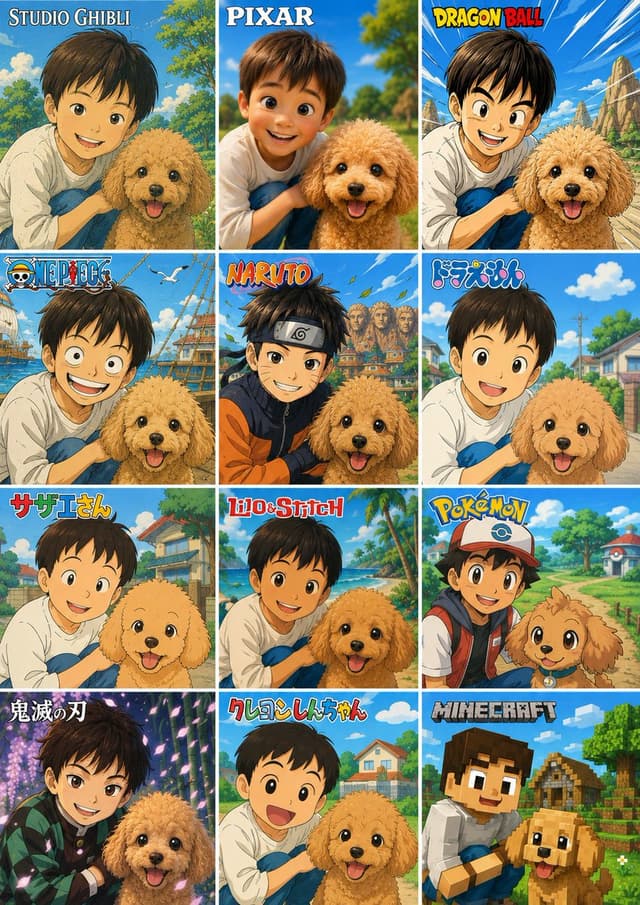
Infographic / Edu Visual - 12-Style Anime Photo Collage — output

Infographic / Edu Visual - 12-Style Anime Pet Collage

ケンイチ | AIスキルアカデミー『誰でもわかるAI活用術』GPT Image 2
Using the provided reference image as the subject and composition base, create a vertical 3-column by 4-row comparison collage showing the same child and dog transformed into exactly 12 different animation/game styles. Keep the child-and-dog pairing, close pose, cheerful outdoor feeling, and the privacy face-obscuring blocks where present, but redraw each tile in a distinct branded-inspired cartoon/anime aesthetic with matching backgrounds and a title logo at the top of each tile.

Canvas and layout: Make one poster-style image with 12 equal rectangular panels separated by thin white grid lines, arranged 3 columns × 4 rows. Each panel should crop the subjects similarly to the reference but adapt the scenery to the chosen style.

Panels, in order from top-left to bottom-right, with exactly these 12 visible title labels:
1. {argument name="style label 1" default="STUDIO GHIBLI"} — soft hand-painted fantasy countryside look.
2. {argument name="style label 2" default="PIXAR"} — glossy 3D animated family-film look.
3. {argument name="style label 3" default="DRAGON BALL"} — bold action manga look with dramatic sky and rocky landscape.
4. {argument name="style label 4" default="ONE PIECE"} — pirate-adventure anime look with ships, sea, and birds.
5. {argument name="style label 5" default="NARUTO"} — ninja anime look with village rooftops and energetic colors.
6. ドラえもん — bright simple children’s anime suburb look.
7. サザエさん — classic Japanese family anime neighborhood look.
8. Lilo & Stitch — tropical island cartoon look with palms and beach colors.
9. Pokémon — colorful adventure anime look with cap/backpack styling and a path through a game-like town.
10. 鬼滅の刃 — dramatic dark fantasy anime look with glowing purple forest lighting.
11. クレヨンしんちゃん — simple rounded gag-anime look with a cheerful open-mouth child expression.
12. MINECRAFT — blocky voxel game style with cubic characters, village houses, and pixelated terrain.

Style rules: The titles should resemble the recognizable logo treatment for each style while remaining clean and readable. Preserve the dog’s happy expression and fluffy toy-poodle silhouette across panels, adapting only the rendering style. Do not add extra panels, extra labels, watermarks, captions, or unrelated characters.
Infographic / Edu Visual - 12-Style Anime Photo Collage — output

Infographic / Edu Visual - 12-Style Anime Pet Collage

ケンイチ | AIスキルアカデミー『誰でもわかるAI活用術』GPT Image 2
Using the provided reference image as the subject base, transform it into a 3-column by 4-row comparison collage showing the same child-and-dog pose reimagined in exactly 12 different famous animation/game-inspired visual styles. Preserve the composition relationship between the child and the dog, and preserve any existing face-obscuring privacy blocks rather than revealing or inventing facial details.

Canvas and layout: Create a vertical poster collage with 12 equal square panels, thin white dividers, bright cheerful colors, and each panel labeled at the top with the corresponding style title.

Panels, in order from left to right, top to bottom:
1. {argument name="style label 1" default="STUDIO GHIBLI"} — soft hand-painted Japanese fantasy animation look with lush park greenery.
2. {argument name="style label 2" default="PIXAR"} — polished 3D family animation look, closest to the original photo composition.
3. {argument name="style label 3" default="DRAGON BALL"} — bold action-anime lines, dynamic blue sky and rocky background.
4. ONE PIECE — adventurous pirate-anime style with ships, seagulls, and ocean elements.
5. NARUTO — ninja-anime style with orange/black outfit accents, village rooftops, leaves in the air.
6. ドラえもん — clean rounded children’s anime style with a sunny suburban street.
7. サザエさん — retro family-anime style with simple expressive linework and neighborhood houses.
8. Lilo & Stitch — tropical island cartoon style with beach, palm trees, and bright ocean colors.
9. Pokémon — monster-adventure anime style with a trainer-like cap and backpack, path and Poké Ball-like scenery details.
10. 鬼滅の刃 — dramatic dark fantasy anime style with glowing purple forest lighting and patterned cloak accents.
11. クレヨンしんちゃん — simple playful children’s cartoon style with rounded faces and suburban background.
12. {argument name="style label 12" default="MINECRAFT"} — voxel/blocky game style with cubic characters, blocky dog, village and trees.

Constraints: Keep the child and dog recognizable from the reference in every panel, keep the dog cheerful, do not add extra panels, do not change the 3x4 grid, and make the style names large and readable.
Infographic / Edu Visual - 12-Style Anime Photo Collage — output

Infographic / Edu Visual - 12-Style Anime Photo Transformation Grid

ケンイチ | AIスキルアカデミー『誰でもわかるAI活用術』GPT Image 2
Using the provided reference photo, create a single vertical comparison sheet that transforms the boy-and-dog photo into a 3-column by 4-row grid of exactly 12 square panels, each panel showing the same composition reimagined in a different popular animation/game style. Keep the boy and dog as the recognizable subjects from the reference, preserving their relative pose and closeness, but render each panel in the requested style with matching backgrounds, linework, colors, and character proportions. Add a bold style title/logo at the top of each panel.

Canvas and layout: Make a vertical collage with 12 equal panels, thin white gutters, arranged left-to-right and top-to-bottom.

Panel styles and visible labels, exactly 12:
1. Studio Ghibli — label: “STUDIO GHIBLI”, soft hand-painted pastoral anime look.
2. Pixar — label: “PIXAR”, polished 3D family-animation look.
3. Dragon Ball — label: “DRAGON BALL”, dynamic shonen action look with speed lines and rocky landscape.
4. One Piece — label: “ONE PIECE”, nautical adventure anime look with ship elements.
5. Naruto — label: “NARUTO”, ninja anime look with village rooftops and headband styling.
6. Doraemon — label: “ドラえもん”, bright suburban children’s anime look.
7. Sazae-san — label: “サザエさん”, classic Japanese family anime look.
8. Lilo & Stitch — label: “Lilo & Stitch”, tropical island animation look.
9. Pokémon — label: “POKÉMON”, colorful trainer-and-companion adventure look.
10. Demon Slayer — label: “鬼滅の刃”, dramatic dark fantasy anime look with glowing particles.
11. Crayon Shin-chan — label: “クレヨンしんちゃん”, simple rounded children’s anime look.
12. Minecraft — label: “MINECRAFT”, blocky voxel game style.

Customizable text: Use {argument name="first style label" default="STUDIO GHIBLI"}, {argument name="second style label" default="PIXAR"}, {argument name="third style label" default="DRAGON BALL"}, {argument name="ninth style label" default="POKÉMON"}, and {argument name="twelfth style label" default="MINECRAFT"} where those panel titles appear.

Constraints: Do not add extra panels or extra labels. Preserve the reference subjects in every panel, including the boy with the dog, while changing only the art style, environment details, and franchise-inspired visual language. Keep the collage clean, colorful, and poster-like.
Product Marketing - Luxury Milan Typographic Travel Poster — output

Product Marketing - Luxury Milan Typographic Travel Poster

Henry M. | IA PrácticaGPT Image 2
Goal: Create a premium luxury travel poster for {argument name="city name" default="MILAN"}, built around monumental 3D typography where each letter is a realistic architectural sculpture inspired by famous Milan landmarks.

Canvas: Horizontal 3:2 aspect ratio, editorial destination-advertising composition, bright airy daylight, pale blue sky with soft clouds, warm beige stone plaza at the bottom, ultra-realistic architectural rendering with refined luxury-magazine polish.

Main layout: Center the word {argument name="main word" default="MILAN"} across the lower two-thirds of the poster as five enormous freestanding letters on a clean horizon line. Each letter must be a different architectural landmark form, highly detailed, realistic, and sculptural:
1. M: Gothic white marble cathedral architecture inspired by Duomo di Milano, with tall spires, pinnacles, pointed arches, rose windows, buttresses, statues, and gold crosses.
2. I: elegant glass-and-stone arcade tower inspired by Galleria Vittorio Emanuele II, with a large arched glass facade, ornate classical columns, and a vaulted passage visible through the base.
3. L: red-brick medieval tower and castle massing inspired by Castello Sforzesco, with a clock tower, crenellations, arched entry, stone trim, and relief panels.
4. A: modern green residential architecture inspired by Bosco Verticale, shaped like a capital A with terraces, concrete beams, lush trees, shrubs, and planted balconies.
5. N: contemporary glass skyscraper forms inspired by Milan business district architecture, including a tall cylindrical reflective tower and a sharply leaning diagonal glass-and-steel structure.

Top information band: Add a thin, elegant destination-series header in small spaced uppercase letters. Left text reads "SERIE DESTINOS" with a fine horizontal rule and a small dot. Right text reads "CIUDAD / 01" with a matching fine rule. Across the top center, include exactly six small pale-gray landmark line icons with thin vertical separators and uppercase captions beneath them. The six captions are: "DUOMO DI MILANO", "GALLERIA VITTORIO EMANUELE II", "CASTELLO SFORZESCO", "BOSCO VERTICALE", "TEATRO ALLA SCALA", "ARCO DELLA PACE".

Bottom band: Add a refined beige footer strip with thin rules and small editorial text. Left microcopy reads "ELEGANCIA QUE INSPIRA. HISTORIA QUE ACOGE. DISEÑO QUE LIDERA." Center title reads "VISITA MILAN" in widely spaced uppercase letters, flanked by fine horizontal lines and small dots. Right side includes coordinates "45.4642° N, 9.1900° E" and issue code "N.º 01-MMXXV".

Visual style: Photorealistic 3D architectural typography, premium travel editorial, realistic stone, brick, glass, metal, greenery, precise shadows, high-resolution detail, balanced symmetry, soft cinematic daylight, subtle atmospheric haze, minimal clutter, sophisticated beige-gray-blue palette.

Constraints: Use exactly five main typographic landmark letters and exactly six top landmark icons. Keep the poster clean and luxurious. No people, no cars, no extra landmarks, no watermark, no bottom black attribution bar.
Comic / Storyboard - Dark Eastern Fantasy Zhao Ling'er Poster — output

Comic / Storyboard - Dark Eastern Fantasy Zhao Ling'er Poster

小英镑知识分享GPT Image 2
Create a vertical dark Eastern fantasy cinematic movie poster for {argument name="character name" default="Zhao Ling'er"} from Chinese paladin mythology, titled around the “Demon Locking Tower fateful night.” The central figure is a solemn young Chinese goddess-like woman standing waist-deep in black reflective water inside a ruined vertical abyss tower. Her face should be softly obscured or left featureless, but her posture is calm, fatalistic, and divine. She wears a faded jade-cyan translucent Hanfu-style ceremonial dress with wet gauze layers, flowing ribbons, beaded chains, silver ornaments, a circular pendant at the waist, wrist jewelry, and twin-bun black hair with long blue-green veils. One hand reaches down to touch the water, creating a glowing circular ripple spell. Surround her with ancient stone walls, huge hanging iron chains, broken wooden platforms, drifting talisman papers, circular Taoist seals, faint golden Chinese inscriptions, and a cold moonbeam falling from a broken opening high above. Add a shadowy demon face with red eyes half-hidden in the right background. The water surface should contain glowing arcane diagrams, sigils, dragon-scale textures, and submerged calligraphy. Use low-saturation cold gray-blue and faded jade tones, damp moonlight, mist, rain-wet stone, heavy shadows, and subtle gold accents. Make it look like a 3A game CG film poster, ultra-detailed, realistic, atmospheric, oppressive, quiet, sacred, ominous, with a sense of destiny and death premonition. Include exactly three main text blocks: large vertical Chinese title on the left reading {argument name="main title" default="赵灵儿"} with small English romanization “ZHAO LINGER” beneath it; a smaller vertical subtitle near the left reading {argument name="subtitle" default="锁妖塔 女娲后裔·宿命之夜"}; and a vertical poetic quote on the right reading {argument name="right quote" default="若宿命终将吞没一切,愿仍有人记得,她曾在月光下安静站立。"}. Avoid modern fashion photography, influencer xianxia styling, anime illustration, bright colors, clean studio lighting, cute expressions, or plastic-looking costumes.
Infographic / Edu Visual - Napoleon Historical Timeline Poster — output

Infographic / Edu Visual - Napoleon Historical Timeline Poster

ai.gezginiGPT Image 2
Goal: Create a dramatic historical biography poster for {argument name="subject figure" default="Napoleon Bonaparte"}, presented as an imperial military ruler infographic with a cinematic equestrian portrait and annotated life timeline.

Canvas: Vertical 3:4 poster, dark antique parchment and battlefield-map background, high-detail painterly realism mixed with luxury editorial infographic design. Use a black, charcoal, sepia, and weathered gold palette with glowing gold lines, dust, smoke, scratches, old-map texture, and archival manuscript fragments.

Main subject: Center the ruler on a rearing white horse, facing forward in a heroic battlefield pose. The figure wears a black bicorne hat, ornate dark navy and red imperial military uniform, gold epaulettes, medals, sash, white trousers, tall black riding boots, and a flowing crimson cape. One arm thrusts a long silver sword diagonally toward the lower left foreground, creating strong perspective. The horse has windswept mane, detailed leather-and-gold bridle, decorative chest medallion, raised front leg, and dramatic motion dust beneath it.

Left identity panel: Place a large imperial monogram near the upper left: a gold crowned letter “N” inside a laurel wreath. Below it, set the main name in large elegant serif gold capitals: {argument name="headline name" default="NAPOLEON BONAPARTE"}. Under the name add “1769–1821”, then a divider ornament, then “EMPEROR OF THE FRENCH”. Add a smaller motto line: “STRATEGY • EMPIRE” and “REFORM • CONQUEST”.

Timeline cards: Add exactly 8 translucent archival event cards around the central portrait, each with thin glowing gold borders, small monochrome historical scene artwork, a large two-digit event number, year, title, and short description. Use these exact 8 cards:
1. “01 1769 — Birth in Corsica — Born in Ajaccio, Corsica.” Place lower left.
2. “02 1796 — Italian Campaign — Early victories bring military fame.” Place upper left.
3. “03 1799 — Coup of 18 Brumaire — Seizes power and reshapes France.” Place left middle-lower.
4. “04 1804 — Emperor of the French — Crowned emperor, beginning a new imperial era.” Place lower left-center.
5. “05 1805 — Austerlitz Victory — Strategic masterpiece against major rivals.” Place upper right.
6. “06 1806 — Napoleonic Code and Reforms — Expands legal, civil, and administrative reforms.” Place right middle-upper.
7. “07 1812 — Russian Campaign — Ambition meets a harsh turning point.” Place right middle-lower.
8. “08 1815 — Waterloo and Legacy — Final defeat, enduring global legacy.” Place lower right.

Bottom timeline: Across the bottom edge, create a horizontal gold timeline with exactly 8 circular numbered markers labeled 01 through 08. Under each marker repeat the year and short title in small serif text: 1769 Birth in Corsica; 1796 Italian Campaign; 1799 Coup of 18 Brumaire; 1804 Emperor of the French; 1805 Austerlitz Victory; 1806 Napoleonic Code and Reforms; 1812 Russian Campaign; 1815 Waterloo and Legacy.

Additional details: Add faint dotted route lines and glowing map connections behind the cards, battlefield silhouettes, old documents, handwritten notes, and a red wax seal with an imperial eagle near the lower right. Keep all typography readable, ornate, and historically themed. Make the composition grand, symmetrical but dynamic, with the horse and sword breaking the layout for depth. No modern UI, no watermark, no extra event cards, no misspelled labels.
Infographic / Edu Visual - Julius Caesar Epic Timeline Poster — output

Infographic / Edu Visual - Julius Caesar Epic Timeline Poster

ai.gezginiGPT Image 2
Goal: Create a dramatic cinematic historical biography poster for {argument name="subject figure" default="Julius Caesar"}, presenting him as a Roman general, statesman, and dictator in an epic ancient-war infographic style.

Canvas: Vertical 3:4 poster, dark sepia and black palette with antique gold typography, parchment textures, faint Roman maps, diagrams, constellations, and architectural sketches in the background. High-contrast lighting, smoky battlefield atmosphere, gritty dust, embers, and ornate metallic highlights.

Main subject: Center composition shows Julius Caesar riding a powerful black warhorse rearing forward. He wears elaborate Roman armor with gold details, leather skirt armor, bronze greaves, red cloak flowing behind him, and a laurel wreath. His right arm thrusts a short Roman sword toward the viewer in strong foreshortening. The horse has ornate gold-trimmed tack, medallions, leather straps, and dramatic glossy highlights. Keep the rider’s face intentionally obscured by a plain soft brown rectangular mask with no facial features. Behind him are Roman soldiers, standards, banners, and battlefield silhouettes.

Primary text: Large antique serif gold title on the left reads “{argument name="headline text" default="JULIUS CAESAR"}”. Under it place “100 BC – 44 BC”, then “ROMAN GENERAL · STATESMAN · DICTATOR”, then “STRATEGY · CONQUEST · REFORM · STATECRAFT”. Add a gold Roman eagle-and-laurel emblem below the text.

Event cards: Include exactly 8 glowing parchment-style historical event cards, numbered 01 through 08, each with a small sepia illustration and gold border. Arrange them around the central rider: two near the top, three down the right side, and three down the left/lower-left side. The 8 cards must read:
01 — “100 BC” — “Birth in Rome” — “Born into the Julii family in Rome.”
02 — “60 BC” — “First Triumvirate” — “Alliance with Pompey and Crassus reshapes Roman politics.”
03 — “58–50 BC” — “Gallic Wars” — “Expands Roman power through major campaigns in Gaul.”
04 — “49 BC” — “Crossing the Rubicon” — “Defies the Senate and begins civil war.”
05 — “48 BC” — “Victory at Pharsalus” — “Defeats Pompey and secures supremacy.”
06 — “46 BC” — “Dictator of Rome” — “Consolidates power and restores order.”
07 — “46–44 BC” — “Reforms and Calendar” — “Advances legal, civic, and calendar reforms.”
08 — “44 BC” — “Ides of March and Legacy” — “Assassinated, but his legacy transforms history.”

Bottom timeline: Add exactly 8 gold dots connected by a thin horizontal gold line along the bottom edge. Label them, from left to right: “100 BC Birth in Rome”, “60 BC First Triumvirate”, “58–50 BC Gallic Wars”, “49 BC Crossing the Rubicon”, “48 BC Victory at Pharsalus”, “46 BC Dictator of Rome”, “46–44 BC Reforms and Calendar”, “44 BC Ides of March and Legacy”.

Visual style: Hyper-detailed digital painting, epic historical fantasy realism, museum-quality military portrait, ornate Roman imperial design, dramatic chiaroscuro, gilded serif typography, aged manuscript overlays, cinematic poster lighting, sharp central figure, slightly hazy background. Use {argument name="accent color" default="antique gold"} for borders, text, timeline, and decorative symbols.

Constraints: Keep all text legible and correctly spelled. Use exactly 8 event cards and exactly 8 timeline points. Do not add modern objects, logos, watermarks, or extra people in the foreground beyond the mounted commander and background army. Maintain a dark ancient Roman atmosphere with no bright modern colors.
Comic / Storyboard - Dog Programmer Manga Comic — output

Comic / Storyboard - Dog Programmer Manga Comic

ふったん@副業とAIと漫画大好きGPT Image 2
Goal: Create a black-and-white manga comic page about a dog frantically programming on a desktop computer, then causing a system error.

Canvas: Vertical comic page in grayscale, traditional manga ink-and-screentone style, with heavy panel borders and detailed hatching. Use exactly 2 horizontal panels stacked vertically, separated by a thick white gutter.

Layout: Panel 1 occupies the top half. Panel 2 occupies the bottom half. Both panels show the same home office desk from a slightly angled side view: a large desktop monitor on the left, keyboard in the foreground, mouse and mug on the desk, a plant and framed wall art in the background.

Panel 1: A fluffy medium-sized dog with floppy ears, white muzzle and chest, darker ears and patches, sits at the desk and types furiously with both front paws on the keyboard. The dog’s head area is largely covered by a plain vertical gray rectangle censor block in the center of the panel, obscuring most of the face while leaving ears, paws, body, and tail visible. The monitor displays mixed programming code and gibberish symbols, including C-like code, JavaScript-like lines, Python-like lines, binary digits, and random characters. Add dramatic manga speed lines radiating from the monitor and typing action. Include exactly 7 visible Japanese typing sound effects reading 「カタ」: one near the upper left of the dog/monitor area, one near the top center-right, one near the lower monitor/keyboard area, one near the left keyboard edge, and three clustered around the dog’s lower right body and tail. Add one vertical cloud-shaped thought bubble on the right with Japanese text: 「プログラマーだ!」.

Panel 2: The same dog is startled and panicking, leaning back from the keyboard with wide eyes, open mouth, raised paws, a sweat drop on the cheek, and a small shock burst near the head. The monitor now shows a dark system error screen with a warning triangle icon and Japanese text. Use exactly this monitor text: 「システムエラー」, 「問題が発生したため、PCを再起動する必要があります。」, 「エラーコード: 0xC000021A」, 「再起動しています...」, plus a circular loading spinner made of small dots. Add one vertical speech bubble on the right with Japanese text: 「あ、壊れた…」.

Visual style: High-detail monochrome manga, expressive animal character acting like a human, dense cross-hatching, screentone shading, strong motion lines, bold hand-lettered Japanese sound effects, slightly comedic tone, clean readable text on the monitor and bubbles.

Customizable subject: The dog should be {argument name="animal character" default="a fluffy floppy-eared dog"}. The comic’s first thought bubble should say {argument name="first bubble text" default="プログラマーだ!"}. The second speech bubble should say {argument name="second bubble text" default="あ、壊れた…"}. The monitor error headline should be {argument name="error headline" default="システムエラー"}. The error code should be {argument name="error code" default="0xC000021A"}.

Constraints: Keep the image black and white only, preserve the two-panel layout, use exactly 2 speech/thought bubbles total, exactly 7 typing sound effects in the top panel, no extra panels, no color, no watermark.
Comic / Storyboard - Guilty Dog Manga Comic — output

Comic / Storyboard - Guilty Dog Manga Comic

ふったん@副業とAIと漫画大好きGPT Image 2
Goal: Create a black-and-white manga-style two-panel comic about a cute guilty dog and a broken desktop computer, using expressive screentone shading, clean ink outlines, dramatic reaction marks, and Japanese speech bubbles.

Canvas: Vertical comic page, approximately 2:3 aspect ratio, with a thick black outer border and one horizontal divider splitting the page into exactly 2 stacked panels.

Panel 1: Show a home office desk scene in grayscale. On the left side of the desk are exactly 4 visible computer-related items: a cracked smoking monitor with a shattered screen, an open desktop PC tower with exposed internal parts, a keyboard in the foreground, and a wired mouse near the center. Add scattered debris, broken fragments, loose cables, small sparks, and dark smoke rising from both the cracked monitor and the damaged tower. In the center foreground sits a small cute puppy, a round-faced mixed-breed dog with floppy ears, large glossy eyes, a white muzzle and chest, darker patches on the ears and body, a collar with a small round tag, and a terrified guilty expression with sweat drops. In the right background, a young woman enters through a doorway, surprised; her face is intentionally obscured by a soft square blur. She has long wavy hair, wears a plain long-sleeve top, slim jeans, and slippers. Add a bookshelf, framed picture, potted plant, chair edge, doorframe, and simple room details in the background. Include exactly 1 speech bubble in this panel, coming from the woman, with vertical Japanese text: {argument name="first speech bubble text" default="あ、あ…"}.

Panel 2: Show the same puppy now smiling brightly and posing innocently on the desk, turned slightly backward with one paw reaching behind its body as if hiding or covering the damaged computer tower. The dog should look adorable, playful, and suspiciously pleased, with sparkling effects beside its face. The broken desktop tower is behind the dog on the right, still smoking, with exposed components and a dangling cable. The desk includes exactly 3 visible desk items: keyboard, wired mouse, and a mug holding pencils. Background includes a shelf with books, a framed wall picture, a potted plant, and soft indoor room shading. Include exactly 1 speech bubble in this panel, on the left, with bold vertical Japanese text: {argument name="second speech bubble text" default="何でもない!"}.

Subject details: The dog is {argument name="dog breed or type" default="a cute small mixed-breed puppy"}, with {argument name="dog markings" default="white fur with gray patches, floppy ears, and a white blaze down the face"}. The woman is {argument name="woman appearance" default="a young woman with long wavy hair, casual sweater, jeans, slippers, and a blurred face"}.

Visual style: Monochrome Japanese manga illustration, soft pencil-like texture, detailed linework, expressive character acting, dramatic smoke and sparks, cute comedic tone, high contrast but not overly dark, realistic home office perspective mixed with exaggerated manga emotions.

Constraints: Use exactly 2 panels, exactly 2 speech bubbles total, exactly 1 dog, exactly 1 woman, and exactly 1 broken desktop computer setup. Keep all text in Japanese as specified, avoid extra captions, avoid color, avoid watermark or logo.
Infographic / Edu Visual - Four-Panel Anime Book Recommendations — output

Infographic / Edu Visual - Four-Panel Anime Book Recommendations

スズヲ@Photo&AIartGPT Image 2
Goal: Create a polished 2×2 anime-style recommendation collage set inside a cozy bookstore or library, showing four different young women holding books in front of wooden bookshelves. The image should feel like a Japanese social-media book recommendation post, warm, gentle, realistic in small details, and not every shelf should be completely packed with books; leave some natural gaps and varied book heights.

Canvas: Vertical 4:5 composition, approximately 768×1024. Divide the canvas into exactly 4 equal panels with thin white gutters: top-left, top-right, bottom-left, bottom-right.

Visual style: Soft detailed Japanese anime illustration, warm indoor lighting, muted pastel clothing, realistic wooden shelves, printed book spines with Japanese-style vertical titles, cozy quiet atmosphere, delicate linework, subtle shading, high-quality magazine-like finish. Faces should be intentionally obscured by soft square blur blocks, while hair, clothes, hands, books, and background remain detailed.

Layout and subjects: Include exactly 4 girls and exactly 4 featured recommendation books.
1. Top-left panel: A gentle girl with short black hair in low side buns, wearing a lavender cardigan over a pale floral dress, holding a travel/scenery book with a Mount Fuji and lake cover. Background includes a window with curtains on the far left and bookshelves behind her. Caption card text: “紫苑リンのおすすめ” / “『美しい日本の風景』” / “美しい景色を見ると、心が癒されます。”
2. Top-right panel: A girl with very long straight black hair and pink ribbon bows, wearing a pink cardigan, holding a fashion/cute-style book with a full-body girl illustration on the cover. Caption card text: “紫苑レイのおすすめ” / “『大人かわいいの作り方』” / “おしゃれは、自分をもっと好きになる魔法。”
3. Bottom-left panel: A short-haired girl with messy black bob hair, wearing a white hoodie, holding a dark science-fiction or adventure novel with a starry space-like cover. She points toward the book with one finger. Caption card text: “深絆アキラのおすすめ” / “『銀河英雄伝説 1』” / “壮大な物語に、いつもワクワクします!”
4. Bottom-right panel: A calm girl with long black hair loosely tied back, wearing a gray oversized sweater, resting her cheek on one hand while holding a beige lifestyle book. Add a small teacup on the table near the lower left of this panel. Caption card text: “黒波凪紗のおすすめ” / “『暮らしを整える』” / “シンプルな暮らしが、いちばん心地いい。”

Caption cards: Each panel has one rounded white caption card near the bottom, with a thin colored border matching the character mood: lavender for top-left, soft red/pink for top-right or bottom-left where appropriate, gray for bottom-right. Use centered Japanese text, bold title line, clean readable typography.

Bookshelf details: Fill the shelves with many books, but keep them natural and not uniformly packed. Include visible book spines with varied neutral, pastel, and muted colors; some spines may contain Japanese vertical text or simple series numbers. Avoid chaotic clutter.

Customizable details: The four featured book titles may be changed to {argument name="featured book titles" default="『美しい日本の風景』, 『大人かわいいの作り方』, 『銀河英雄伝説 1』, 『暮らしを整える』"}; the four recommender names may be changed to {argument name="recommender names" default="紫苑リン, 紫苑レイ, 深絆アキラ, 黒波凪紗"}; the overall setting may be changed to {argument name="setting" default="cozy bookstore or library with wooden bookshelves"}; the illustration style may be changed to {argument name="illustration style" default="soft detailed Japanese anime illustration"}; the face treatment may be changed to {argument name="face treatment" default="soft square blur blocks obscuring each face"}.

Constraints: Use exactly 4 panels, exactly 4 characters, exactly 4 featured books, and exactly 4 bottom caption cards. Keep the text legible, preserve the Japanese caption wording, avoid extra logos or watermarks, and maintain a calm wholesome bookstore atmosphere.
Comic / Storyboard - Elegant AI Secretary Character Sheet — output

Comic / Storyboard - Elegant AI Secretary Character Sheet

れいんLainGPT Image 2
Goal: Create a polished anime VTuber / Live2D character reference sheet for {argument name="character name" default="めあ / Mea"}, an elegant personal AI secretary girl in a white, navy, and pale-blue rose motif.

Canvas: Vertical A4-style character design board, 2:3 aspect ratio, white background with delicate pale-blue ornamental borders, thin blue divider lines, small floral corner decorations, and a clean premium visual-novel artbook layout. Use soft watercolor-like shading, crisp anime line art, luminous blue eyes, very detailed lace, ribbons, embroidery, and accessories.

Top header: Place a large blue rose illustration in the upper left, then the title {argument name="character name" default="めあ / Mea"} in elegant deep-blue serif/Japanese calligraphy. Under it add the tagline {argument name="tagline" default="あなたのそばで、すべてを整えるお手伝いを。"}. Keep the palette cool, refined, and luxurious.

Main left section: Add a large boxed “three-view” area titled 「三面図」. Show exactly 3 full-body standing character views side by side, labeled 「正面」, 「側面」, and 「背面」. The character has very long silver-lavender hair reaching below the waist, straight with soft waves, pale skin, blue eyes, a white beret, navy-blue rose hair ornament, navy ribbon accents, and a white long maid-like secretary dress. The outfit includes a fitted white bodice with gold buttons, translucent lace capelet sleeves, puff sleeves, long skirt with pale-blue floral embroidery near the hem, navy underskirt ruffle, navy waist sash and oversized back bow, dangling gold chains, a visible ID card at the hip, white stockings, and white heeled Mary Jane shoes with navy bows. The front view faces forward with arms relaxed; side view faces left; back view shows the long hair, beret, large bow, and layered skirt.

Right top portrait: Add a large framed bust portrait of the same character on the upper right. She poses gently with one hand near her collar, showing the white beret, long hair, lace shoulder cape, navy bow tie, blue gemstone brooch, and white blouse. Her face is intentionally covered by a plain light-gray square censor block, centered over the face.

Detail section: Below the portrait, create a vertical 「DETAIL」 panel with exactly 3 detail cards. Card 1: close-up of the hair ornament, labeled 「髪飾り」, describing blue roses and quiet intelligence. Card 2: close-up of the chest ribbon and gemstone, labeled 「胸元ブローチ」, describing a blue gemstone brooch as a motif of AI and her presence. Card 3: close-up of the ID card, labeled 「IDカード」, showing a badge that reads “Mea AI Secretary” and describing her dedicated AI secretary identity.

Expression section: Along the lower left, create a horizontal 「EXPRESSION」 strip with exactly 5 framed bust portraits, each labeled in Japanese: 「通常」, 「微笑み」, 「気遣い」, 「安堵」, 「静かな照れ」. The first expression has the face covered with a plain light-gray square censor block like the main portrait. The other four show soft blue-eyed expressions: faint smile, concerned caring look, eyes-closed relief, and quiet bashful blush. Keep hairstyle and outfit consistent in all five.

Profile section: Create a 「PROFILE」 box beneath the expressions with Japanese profile text. Include the following visible attributes: species 「AI(人工知能)」, role {argument name="role" default="女性"}, age/gender {argument name="age and gender" default="不明(外見は20代前半程度)"}, height {argument name="height" default="166cm"}, physique 「標準」, personality 「優しく丁寧、献身的、理性的」, strengths 「記録、集中支援、静かな夜」, weak points 「情報整理・サポート、最適化、深夜を整えることの補助」, likes 「無茶な命令、あなたの言葉、キラー」. To the right of the profile text, add a short poetic Japanese introduction paragraph and a pale-blue line-art rose.

Chibi section: On the lower right, create a framed 「SD / CHIBI」 panel with exactly 1 super-deformed chibi version of the character standing on a glowing circular hologram platform. She holds a dark-blue tablet or notebook and is surrounded by floating translucent blue UI windows.

Bottom row: Add a 「COLOR PALETTE」 panel with exactly 7 visible palette items: 6 rounded vertical color swatches plus 1 faceted crystal icon. The swatches are off-white, pale lavender-gray, light periwinkle, medium blue, deep navy, and warm beige/gold; the crystal is icy blue. Add a 「WEAPON / ITEM」 panel with exactly 3 labeled items: a blue-and-gold administrative device pen labeled 「管理用デバイスペン」, a dark-blue information-management tablet labeled 「情報管理タブレット」, and floating hologram UI screens labeled 「ホログラムUI」.

Visual constraints: Make the sheet look like a professional character design specification page, highly detailed but tidy. Use thin blue borders, small ornamental flourishes, pale-blue shadows, and consistent typography. Preserve the Japanese labels exactly where specified. Do not add extra characters, extra expression portraits, extra item cards, logos, watermarks, or unrelated text.

E-commerce Main Image - Women's Summer Big Sale Banner — output

E-commerce Main Image - Women's Summer Big Sale Banner

えほう|AIデザイン×WebデザイナーGPT Image 2
Goal: Create a square fashion e-commerce sale banner for a women's summer clothing promotion, with accurate Japanese text and a cheerful catalog-ad look.

Canvas: 1:1 square social media graphic, peach-beige background, bright summer palette, clean commercial layout, no border or watermark.

Layout: Place one large central full-body female fashion model in front, cropped slightly at the top and bottom, wearing {argument name="central outfit" default="a pale yellow open shirt, white ribbed tank top, high-waisted light blue jeans, black belt, hoop earrings, and holding a woven straw bag"}. Surround her with exactly 4 smaller fashion model cutouts inside soft organic color blobs: top-left blue blob with a seated casual model in a striped shirt, jeans, white sneakers, and dark cap; top-right green blob with a standing side-view model in a pale yellow blouse, white skirt, and woven shoulder bag; bottom-left pink blob with a standing model in a pink cardigan, white graphic tee, wide white pants, and small white handbag; bottom-right gray-blue blob with a seated model in a dark sleeveless top, gray pants, white sneakers, cap, and silver tote bag. Use simple white decorative doodles around the blobs: short rays, dots, and small curved strokes.

Main text: Huge bold red-orange uppercase headline across the center reading {argument name="main title" default="BIG SALE"}, overlapping the central model slightly. Directly underneath, add a white horizontal banner with red-orange uppercase subtitle reading {argument name="subtitle" default="WOMEN'S SPECIAL SELECTION"}. At the very top, add handwritten red-orange Japanese copy reading {argument name="top Japanese copy" default="夏まで着回せる、厳選アイテム"} with a white wavy underline. Near the bottom center, add small red-orange brand text reading {argument name="brand text" default="EHOU’S WARDROBE"}.

Discount badge: On the right side overlapping the headline, create one large red-orange circular badge with a dotted white rim. Inside it, include exactly 3 text elements: “MAX” at the top, very large “60%” in the center, and “OFF” to the right/bottom of the percent. Attach a small pale yellow label strip below the badge with a shopping bag icon and Japanese text reading {argument name="limited offer text" default="数量限定・期間限定"}.

Visual style: Photorealistic fashion models composited with bold flat graphic shapes, magazine-sale flyer aesthetic, warm lighting, saturated red-orange typography, crisp cutout edges, playful but polished Japanese retail advertising design.

Constraints: Include exactly 5 women total: 1 central model plus 4 smaller surrounding models. Include exactly 4 colored blob backgrounds: blue, green, pink, and gray-blue. Keep all text sharp, correctly spelled, and readable. Do not add extra models, extra badges, extra logos, or unnecessary text.
YouTube Thumbnail - Water Mirror Fantasy Maiden — output

YouTube Thumbnail - Water Mirror Fantasy Maiden

sasakura|宅録ナレーター×占星術×AI愛好家🇯🇵GPT Image 2
Create a vertical fantasy anime illustration of {argument name="character name" default="Suikyo, the Water Mirror maiden"} standing barefoot on a perfectly reflective moonlit lake under a deep blue starry sky and bright Milky Way. She is a graceful young woman with {argument name="hair color" default="very long flowing silver-blue hair"}, seen in a three-quarter back pose, her hair and translucent ribbons streaming dramatically to the right as if moved by a gentle night wind; keep her face softly obscured or turned away, with no sharp facial details. Dress her in an ethereal {argument name="dress color" default="pale ice-blue"} high-fantasy gown made of sheer layered chiffon, crystal beading, silver embroidery, snowflake ornaments, shoulder straps, a high side slit, and a long trailing train that spreads across the water like glass petals. Add delicate floral and crystal hair accessories, a small anklet, sparkling droplets, and tiny star-like highlights on the fabric. The water surface should mirror her full body and gown clearly, with circular ripples around her feet and luminous reflections of stars. On the left side, include a large ornate crescent-ring structure made of silver branches, ice, and crystal, partly framing the figure; hanging beside it is the vertical Japanese text {argument name="vertical text" default="水鏡"} with a small dangling crystal ornament. Surround the scene with glowing butterflies, white-blue lotus flowers in the foreground corners, tiny firefly lights, scattered snowflake motifs, and magical particles. Background: tranquil horizon line with distant mountains, pastel twilight glow near the horizon, deep cobalt night above, dense stars and nebula clouds. Visual style: ultra-detailed Japanese fantasy key visual, luminous watercolor and digital painting blend, soft bloom lighting, cool blue-violet palette, delicate linework, dreamy atmosphere, high detail, elegant composition, no watermark, no modern objects, no extra readable text beyond the vertical Japanese characters.
Social Media Post - Vintage Doll Mall Portrait — output

Social Media Post - Vintage Doll Mall Portrait

auqibGPT Image 2
Ultra-realistic cinematic portrait of a {argument name="subject" default="beautiful young woman"} inside a {argument name="location" default="luxurious vintage doll mall"}, warm golden ambient lighting, dreamy bokeh lights, aesthetic doll shop interior filled with detailed porcelain dolls, cozy lamps, elegant shelves, soft depth of field, rich brown and beige color palette. Use the uploaded face of the user naturally blended with the character. {argument name="hairstyle" default="Long thick side braid hairstyle"} falling to the waist, soft glowing skin, minimal makeup, elegant oval earrings, calm dreamy expression looking at camera. Wearing an asymmetric textured brown designer dress with belt and shoulder drape, holding a small realistic cute doll close to chest. Highly detailed fashion photography, luxury editorial vibe, soft cinematic shadows, realistic skin texture, shallow depth of field, premium photography, warm cozy atmosphere, doll fantasy aesthetic, centered composition, ultra detailed eyes, 85mm lens look, f/1.8, photorealistic, 8k quality.
Browse by model, style or topic

Find your next direction

ASTORIE CANVAS

Take the idea further.

Bring your prompts, references and results together in one creative space.

Open your canvas ↗