GPT Image 2 prompts

Browse GPT Image 2 prompts for fashion portraits and graphic compositions. Compare how each prompt describes its subject and the way the image is arranged.

Explore prompts

9,976 prompts

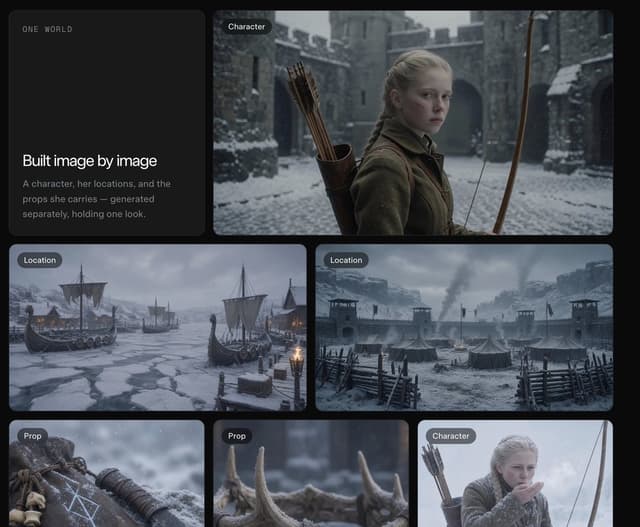
Infographic / Edu Visual - Dark Fantasy Worldbuilding Board — output

Infographic / Edu Visual - Dark Fantasy Worldbuilding Board

宮本 達朗@中小企業向けのAI活用・DX伴走GPT Image 2
Goal: Create a dark cinematic presentation board for a worldbuilding / image-generation workflow, showing how a consistent fantasy character, locations, and props are built image by image.

Canvas: Wide 4:3 composition on a nearly black background with rounded rectangular cards arranged in a clean grid, soft gaps, subtle shadows, and a muted premium UI feel.

Layout: Use exactly 6 visible cards. Card 1 is a tall text card on the upper left. Card 2 is a large wide character card on the upper right. Cards 3 and 4 are two medium landscape location cards across the middle row. Cards 5 and 6 are two smaller prop cards along the lower left and lower center, with a third lower-right character card partially visible/cropped at the edge if the canvas framing allows. Each image card has a small dark pill label in the top-left corner.

Text content: On the upper-left text card, include small spaced uppercase text “ONE WORLD” near the top. In the lower half, include the headline “Built image by image” and the body text “A character, her locations, and the props she carries — generated separately, holding one look.” Use clean modern sans-serif typography, white headline, muted gray body text.

Visible labeled image cards: 5 fully visible labeled image cards plus 1 text card. The labels are: 2 cards labeled “Character,” 2 cards labeled “Location,” and 2 cards labeled “Prop” if the lower-right crop is included; otherwise keep the main visible set as 1 Character, 2 Location, and 2 Prop. Do not add extra labels.

Subject details: The main character is {argument name="character description" default="a pale young blonde medieval archer girl with braided hair, serious expression, wool cloak and leather quiver of arrows"}. Place her in a snowy stone castle courtyard, holding a long wooden bow, with cold blue-gray lighting and shallow cinematic depth of field. The locations show {argument name="world setting" default="a grim Nordic medieval winter world"}: one frozen harbor with Viking-style longships trapped in ice, torchlight, mountains and snow; one fortified snowy military camp with tents, wooden palisades, watchtowers, smoke rising, and stormy clouds. The props show exactly 2 close-up items: a weathered leather pouch or wrist guard marked with pale runic symbols and small bones, and a row of antler or horn pieces in snow with blurred background.

Visual style: Photorealistic cinematic dark fantasy, desaturated blue-gray winter palette, falling snow, realistic textures, high detail, moody natural lighting, consistent medieval wardrobe and materials across all cards. Rounded card corners, elegant spacing, no bright colors.

Constraints: Keep the interface minimal and editorial, like a premium AI image-generation case study. Preserve the exact headline and body copy. Avoid logos, watermarks, charts, anime style, modern objects, or extra UI clutter.
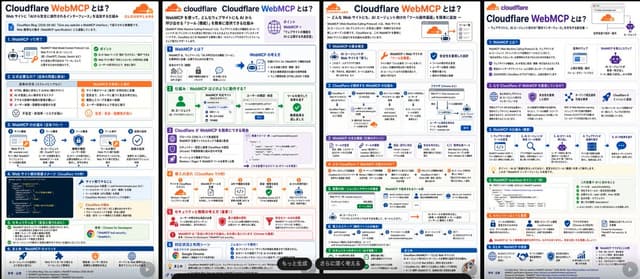
Infographic / Edu Visual - Four Cloudflare WebMCP Infographic Posters — output

Infographic / Edu Visual - Four Cloudflare WebMCP Infographic Posters

池田 智彦|生成AIで事業開発GPT Image 2
Goal: Create a wide comparison image showing exactly 4 separate Japanese infographic poster pages side by side, each explaining {argument name="topic" default="Cloudflare WebMCP"}. The posters should look like polished AI-generated tech explainer slides for social media, with dense but readable Japanese copy, Cloudflare branding, icons, diagrams, and section cards.

Canvas: Extra-wide horizontal canvas, approximately 3:1 aspect ratio, with 4 tall white infographic pages arranged left-to-right. Each page is separated by thin black vertical gaps or borders. Each page has a clean white background, rounded pastel section boxes, colored headers, small icons, arrows, and a bottom-right semi-transparent dark rounded button overlay on some pages.

Overall visual style: Modern Japanese SaaS/technical infographic design, Cloudflare orange-and-blue palette, flat vector icons, thin gray borders, rounded cards, tiny code blocks, flow diagrams, checkmarks, warning triangles, shield/security icons, robots, browser windows, AI agent icons, databases, clouds, and network arrows. Use a crisp printed-slide look with very small but believable Japanese text. Include Cloudflare cloud logo marks and the word “cloudflare” near the top of each page. Highlight “WebMCP” in orange.

Page layout: Include exactly 4 infographic pages:
1. Left page: Title “Cloudflare WebMCPとは?” with orange “WebMCP”, subtitle about WebMCP as a bridge connecting web sites and AI agents. Include exactly 6 numbered horizontal sections: 1) “WebMCPって何?” with a simple web page to AI-agent diagram and green “ポイント” bullets; 2) “なぜ必要なの?” with red X problem bullets and orange solution bullets; 3) “WebMCPの仕組み” with a 5-step icon flow; 4) “Webサイト側の実装イメージ” with a dark code snippet block on the left and benefit cards on the right; 5) “セキュリティ” with green checklist and Chrome/WebMCP tool card; 6) “まとめ: WebMCPのメリット” with four benefit icons.
2. Second page: Title “Cloudflare WebMCPとは?” with a small orange Cloudflare logo and explanatory paragraph. Include exactly 5 numbered sections: 1) “WebMCPとは?” showing AI agent, web application, and Cloudflare WebMCP connection; 2) “仕組み: WebMCPはどのように動作する?” with a left-to-right flow from AI agent to WebMCP endpoint to user approval to tool execution; 3) “Cloudflare が WebMCP を簡単にできる理由” with purple feature cards and a code snippet; 4) “導入の流れ” with orange step cards for Workers/Pages, API definition, endpoint, MCP setup, and AI use; 5) “セキュリティと権限の考え方” with red warning/security cards. Add a dark pill overlay at lower right reading “もっと生成”.
3. Third page: Title “Cloudflare WebMCPとは?” with subtitle about publishing tools on web sites for AI agents. Include exactly 7 numbered sections with compact cards: 1) “WebMCPの主な概念” with three cards for AI agent, WebMCP, and security/permission; 2) “Cloudflareが提供するWebMCPの仕組み” with a detailed architecture diagram using browser, Cloudflare, worker, API, and data-store icons; 3) “WebMCPの活用例” with multiple small use-case cards; 4) “なぜCloudflareでWebMCPが使いやすい?” in an orange band with benefit icons; 5) “実装例: シンプルなサイト連携” with a small form/table and tool cards; 6) “導入ステップ” with a 5-step horizontal flow; 7) “セキュリティのポイント” with green checklist cards. Add a dark pill overlay near the bottom reading “さらに深く考える”.
4. Right page: Title “Cloudflare WebMCPとは?” with an orange Cloudflare logo and a small browser/address-bar illustration at top right plus an AI agent icon. Include exactly 6 numbered sections: 1) “WebMCPとは?” with definition bullets and a diagram from web app to AI agent; 2) “なぜCloudflareがWebMCPを推進している?” with exactly 4 cards describing AI-friendly web, security, open standards, and Cloudflare ecosystem; 3) “WebMCPの仕組み” with exactly 5 icon steps from site/API to MCP endpoint to AI request to tool execution to result; 4) “WebMCP manifest のイメージ” with a dark code block and a green checklist card; 5) “セキュリティとして重要” with warning and permission cards; 6) “まとめ: WebMCPの価値” with four blue/purple benefit cards.

Text content: The main headline on every page must include {argument name="headline text" default="Cloudflare WebMCPとは?"}. Keep all visible body text in Japanese. Use credible Japanese labels such as “AIエージェント”, “Webサイト”, “MCPサーバー”, “ツール定義”, “認可”, “権限管理”, “Workers”, “Pages”, “API”, “manifest”, “セキュリティ”, and “導入ステップ”. Use tiny text where necessary but keep major section titles legible.

Branding and colors: Use {argument name="brand name" default="Cloudflare"} branding, orange cloud logos, blue section headers, green success boxes, orange highlight boxes, purple feature boxes, red security/warning boxes, and gray explanatory cards. Maintain a professional Japanese tech-blog infographic aesthetic.

Constraints: Show exactly 4 pages, exactly 6 sections on page 1, 5 sections on page 2, 7 sections on page 3, and 6 sections on page 4. Do not include people or photorealistic scenes. Do not add watermarks. Make the image information-dense, like a generated social-media comparison of four alternate infographic designs.
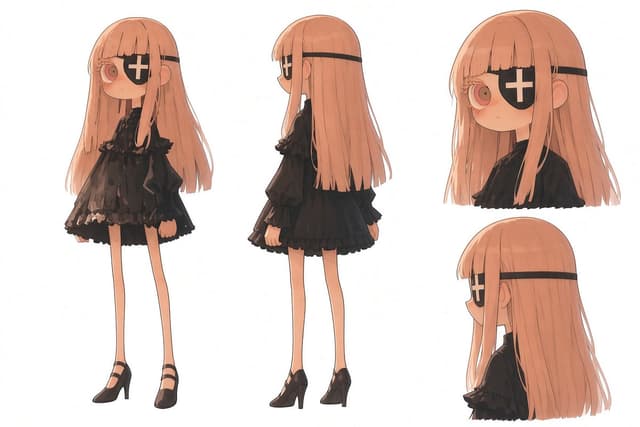
Comic / Storyboard - Gothic Eyepatch Anime Character Sheet — output

Comic / Storyboard - Gothic Eyepatch Anime Character Sheet

NOBUGPT Image 2
Goal: Create a clean anime character design sheet for {argument name="character name" default="an unnamed gothic eyepatch girl"}, showing consistent proportions and outfit details from multiple angles on a plain white background.

Canvas: Wide horizontal character sheet, 3:2 aspect ratio, high resolution, lots of white negative space, no border, no labels, no watermark.

Layout: Include exactly 4 character views: 1 full-body front view on the left, 1 full-body rear/side-back view in the center, 1 large bust close-up front three-quarter view in the upper right, and 1 large bust close-up side/back profile view in the lower right. Keep the same character design consistent across all 4 views.

Subject details: A petite chibi-like anime girl with an oversized head, very slim body, long thin legs, pale skin, and a quiet neutral expression. She has {argument name="hair color" default="long peach-pink hair"} with straight bangs, long face-framing strands, and waist-length hair falling smoothly down the back. One visible large round eye is pink-red with a soft glossy highlight; the other eye is covered by a black eyepatch. The eyepatch has a bold white cross on it and is held by a straight black strap wrapping horizontally around the head.

Outfit details: Dress her in {argument name="outfit style" default="a black gothic lolita dress"}: a short black high-neck dress with puffed sleeves, ruffled collar, layered frilled skirt, semi-sheer lace-like fabric, subtle dark floral or ruffle texture, and slightly oversized sleeves. Add black Mary Jane high heels with thin ankle straps and slim heels. No jewelry, no hat, no props.

Visible element count: exactly 4 views total; exactly 2 full-body views; exactly 2 bust close-ups; exactly 1 eyepatch per view, each with a white cross; exactly 1 visible eye per view; exactly 1 black dress design repeated consistently; exactly 1 pair of black high-heeled shoes visible in each full-body view.

Visual style: Soft Japanese anime concept art, delicate linework, warm muted colors, subtle watercolor-like shading, clean character-sheet presentation, slightly sketchy but polished, gentle lighting, no dramatic shadows. Maintain accurate full-body proportions between front and back views, with the legs very long and thin and the head large in a stylized doll-like way.

Constraints: Plain white background only, no text, no extra characters, no accessories beyond the eyepatch and shoes, no environment, no cropped full-body figures, no inconsistent hairstyle or outfit changes between views.
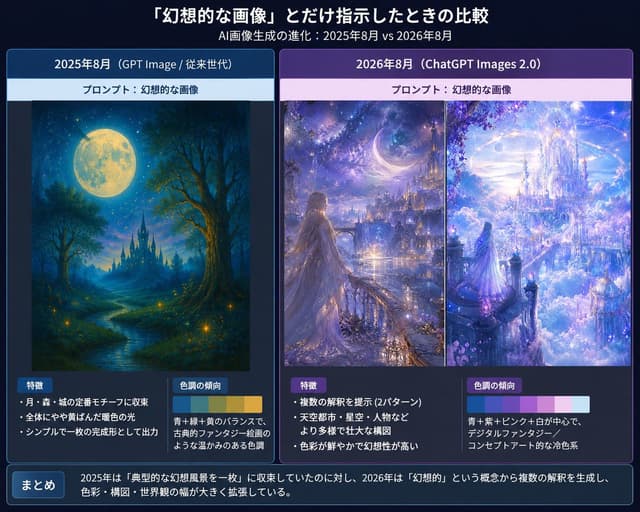
Infographic / Edu Visual - Japanese AI Fantasy Image Comparison Slide — output

Infographic / Edu Visual - Japanese AI Fantasy Image Comparison Slide

MAYA a.k.a.手羽先亭ひつまぶしGPT Image 2
Goal: Create a Japanese comparison infographic slide about how AI image generation changes when given only the prompt {argument name="prompt phrase" default="幻想的な画像"}, comparing August 2025 and August 2026 outputs.

Canvas: 4:3 horizontal presentation slide, dark navy gradient background, polished tech-report style. Use crisp white Japanese typography, glowing borders, and subtle blue/purple highlights. Overall mood should feel like a serious visual analysis of fantasy AI art evolution.

Header: At the top center, large bold Japanese title: 「『幻想的な画像』とだけ指示したときの比較」. Directly underneath, smaller subtitle: 「AI画像生成の進化:2025年8月 vs 2026年8月」.

Layout: Use exactly 2 large rounded comparison panels side by side.
- Left panel: blue theme, labeled 「2025年8月(GPT Image / 従来世代)」.
- Right panel: purple theme, labeled 「2026年8月(ChatGPT Images 2.0)」.
Each panel has a pale prompt strip near the top reading 「プロンプト:幻想的な画像」.

Left panel content: Show exactly 1 fantasy artwork: a traditional painterly fantasy landscape with a huge full moon, deep blue night sky, forest silhouettes, a winding glowing river, small firefly-like lights, and a distant dark castle with spires. It should look like a complete single illustration, warm and nostalgic, with a restrained composition.
Below the artwork, create exactly 2 analysis boxes:
1. Box title 「特徴」 with exactly 3 bullet points: 「月・森・城の定番モチーフに収束」, 「全体にやや黄ばんだ暖色の光」, 「シンプルで一枚の完成形として出力」.
2. Box title 「色調の傾向」 with a small horizontal color palette of exactly 4 swatches: deep blue, teal green, warm yellow, golden ocher. Add explanatory text: 「青+緑+黄のバランスで、古典的ファンタジー絵画のような温かみのある色調」.

Right panel content: Show exactly 2 fantasy artworks side by side inside the panel, separated by a thin vertical divider.
1. Left artwork: a luminous fantasy city at night with a crescent moon, starry sky, distant towers, glowing waterfront, and a long-haired woman in a flowing dress standing on a balcony or bridge, looking toward the city.
2. Right artwork: an opulent celestial castle floating above clouds, white and lavender architecture, sparkling sky, crystalline towers, pink-purple blossoms, and a small robed figure looking into the glowing city.
The right panel art should feel more complex, cinematic, saturated, and concept-art-like than the left panel.
Below the artworks, create exactly 2 analysis boxes:
1. Box title 「特徴」 with exactly 3 bullet points: 「複数の解釈を提示(2パターン)」, 「天空都市・星空・人物などより多様で壮大な構図」, 「色彩が鮮やかで幻想性が高い」.
2. Box title 「色調の傾向」 with a small horizontal color palette of exactly 5 swatches: cyan blue, violet, pale pink, white, light sky blue. Add explanatory text: 「青+紫+ピンク+白が中心で、デジタルファンタジー/コンセプトアート的な冷色系」.

Bottom summary bar: Across the full width at the bottom, add a rounded dark blue box. On the left, a small label button reading 「まとめ」. To the right, summary text: 「2025年は『典型的な幻想風景を一枚』に収束していたのに対し、2026年は『幻想的』という概念から複数の解釈を生成し、色彩・構図・世界観の幅が大きく拡張している。」

Visual style: Clean Japanese infographic, presentation slide, thin neon blue/purple borders, subtle drop shadows, high readability, balanced margins, precise alignment. Use fantasy images that look like embedded generated examples rather than photographs.

Constraints: Include exactly 3 fantasy artworks total, exactly 2 main comparison panels, exactly 4 analysis boxes, and exactly 2 color palettes. Keep all Japanese text legible and do not add extra labels, logos, watermarks, or irrelevant decorations.
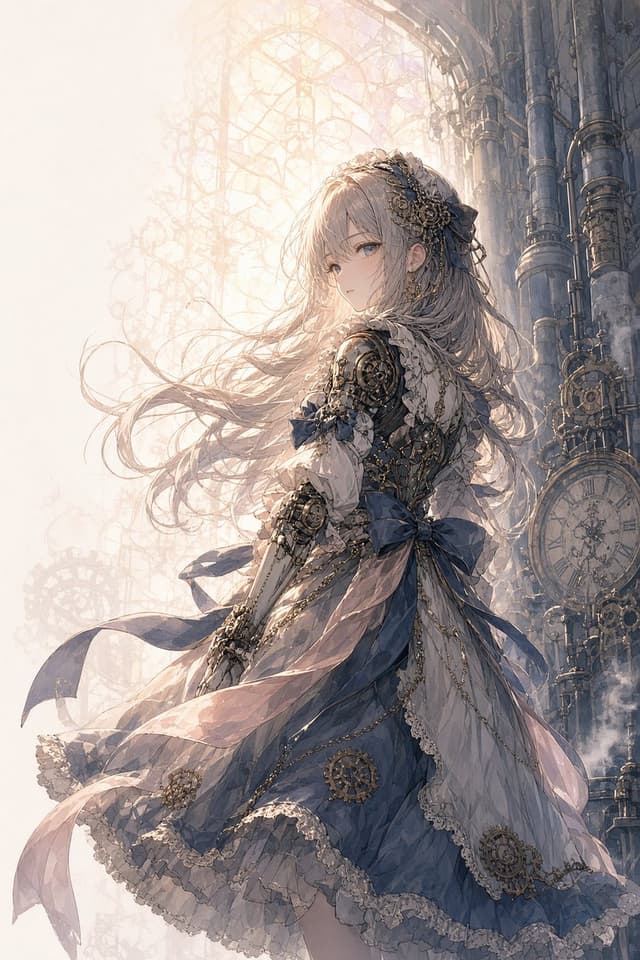
Comic / Storyboard - Steampunk Clockwork Princess — output

Comic / Storyboard - Steampunk Clockwork Princess

hayabunbunGPT Image 2
Create a vertical anime-style fantasy illustration of {argument name="character name" default="a young clockwork princess"} standing in three-quarter back view and looking gently over her shoulder toward the viewer. She has very long flowing {argument name="hair color" default="pale silver-blonde"} hair blown leftward by wind, soft blue-gray eyes, delicate facial features, and a calm wistful expression. Dress her in an ornate Victorian steampunk gown in {argument name="dress colors" default="dusty navy blue, ivory lace, and pale pink translucent fabric"}, with layered ruffles, lace hems, sheer ribbons streaming in the wind, large blue bows at the waist and sleeve, gold chains, filigree trim, and multiple visible gear ornaments. Include exactly 6 prominent clockwork decorations on her outfit and accessories: 1 intricate gear hairpiece on the right side of her head, 1 mechanical shoulder pauldron, 1 gear-and-bracelet assembly on her forearm, 1 gear medallion on the lower blue skirt, and 2 small circular gear ornaments along the front lace panel. The background is a towering Gothic steampunk clock-tower interior made of dark metal pipes, riveted columns, gears, and a large antique clock face on the right side, with a pale luminous lattice window or filigree structure behind her. Use dreamy backlighting from the upper left, warm haze, soft mist, fine dust, translucent highlights, and highly detailed linework. Composition: full-body to knee-length figure centered slightly right, flowing skirt sweeping across the lower half, hair and ribbons extending left, tall architecture rising on the right. Style should be elegant, intricate, painterly anime key art, ethereal, romantic, high detail, muted pastel palette, no text, no watermark.
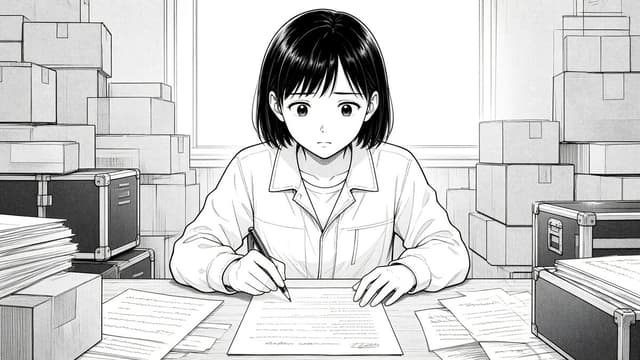
Comic / Storyboard - Manga Woman Writing in Storage Office — output

Comic / Storyboard - Manga Woman Writing in Storage Office

粕谷 謙一|DaVinci認定トレーナー×AI活用GPT Image 2
Create a monochrome manga-style illustration in a wide 16:9 frame. A young Japanese woman with {argument name="hair style" default="short straight black bob with bangs"} sits centered at a cluttered wooden desk, facing the viewer while writing on a document with a pen in her right hand. She wears {argument name="outfit" default="a loose light work jacket over a plain T-shirt"} and has a quiet, serious, slightly worried expression, with large detailed anime eyes and soft facial features. The scene is an office or storage room filled with moving boxes and paperwork: show exactly 16 cardboard boxes visible in the background and foreground, arranged as stacks on both left and right sides; exactly 2 black metal storage trunks with silver corner protectors and latches, one on the left and one on the right; exactly 5 loose paper sheets on the desk around the main document; and exactly 2 tall paper stacks, one on each side near the foreground. Behind her is a large bright window with simple rectangular trim, mostly blank white light. Use clean black-and-white manga line art, screentone shading, fine hatching, crisp ink outlines, detailed hair highlights, realistic desk perspective, and a calm cinematic composition. Keep the image text-free except for faint illegible handwriting lines on the papers. No color, no watermark, no speech bubbles.
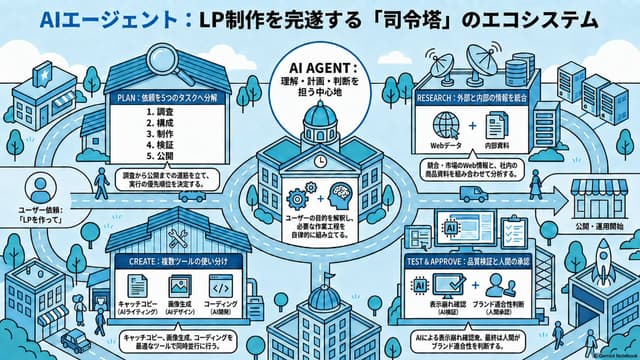
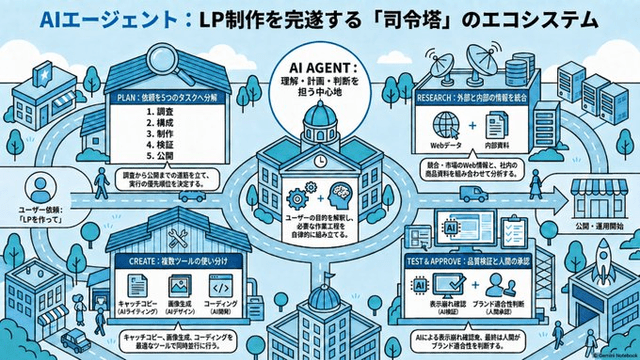
Infographic / Edu Visual - AI Agent LP Ecosystem Infographic — output

Infographic / Edu Visual - AI Agent LP Ecosystem Infographic

ハル | AI活用沼GPT Image 2
Goal: Create a wide isometric Japanese infographic explaining an ecosystem where an AI agent acts as a command tower to complete landing page production. Use the headline {argument name="headline text" default="AIエージェント:LP制作を完遂する「司令塔」のエコシステム"} across the top, with “AIエージェント” in blue and the rest in black.

Canvas: Horizontal 16:9 educational slide, light sky-blue background, clean vector line art, blue/cyan/white palette with black outlines, rounded clouds, roads, trees, small people, buildings, and arrows. Style should feel like a friendly isometric city map mixed with a business workflow diagram, crisp and readable, no photorealism.

Layout: Place 1 large central circular hub building labeled AI AGENT, surrounded by exactly 4 facility cards/buildings connected by roads and directional arrows. Include a user request icon on the far left feeding into the system and a storefront/publication area on the far right as the final output. The overall composition should show the relationship between facilities more than a strict vertical flow.

Central hub: A domed civic building inside a large outlined circle, labeled “AI AGENT: 理解・計画・判断を担う中心地”. Add icons of gears plus a brain, and a caption box: “ユーザーの目的を解釈し、必要な作業工程を自律的に組み立てる。”

Counted diagram elements: Include exactly 4 main workflow facilities/cards: 1) PLAN, 2) RESEARCH, 3) CREATE, 4) TEST & APPROVE. Include exactly 5 numbered plan tasks in the PLAN card: 1. 調査, 2. 構成, 3. 制作, 4. 検証, 5. 公開. Include exactly 3 creation tools in the CREATE card: キャッチコピー(AIライティング), 画像生成(AIデザイン), コーディング(AI開発). Include exactly 2 research inputs in the RESEARCH card: Webデータ and 内部資料. Include exactly 2 test/approval checks in the TEST & APPROVE card: 表示崩れ確認(AI検証) and ブランド適合性判断(人間承認).

Facility details and text: Top-left facility card with a magnifying glass on the roof, titled “PLAN:依頼を5つのタスクへ分解”, containing the 5 numbered tasks and a bottom caption: “調査から公開までの道筋を立て、実行の優先順位を決定する。” Top-right facility card titled “RESEARCH:外部と内部の情報を統合”, showing a globe icon plus document icon and caption: “統合:市場のWeb情報と、社内の商品資料を組み合わせて分析する。” Bottom-left facility card titled “CREATE:複数ツールの使い分け”, showing the 3 tool icons and caption: “キャッチコピー、画像生成、コーディングを最適なツールで同時並行に行う。” Bottom-right facility card titled “TEST & APPROVE:品質検証と人間の承認”, showing an AI chip, screen with checkmark, clipboard, and human figures, with caption: “AIによる表示崩れ確認、最終は人間がブランド適合性を判断する。”

Side elements: On the far left, show a circular user avatar and label {argument name="user request label" default="ユーザー依頼:「LPを作って」"}. On the far right, show a large arrow pointing to a small shop/storefront labeled {argument name="publication label" default="公開・運用開始"}. Add surrounding city elements: at least 6 buildings including office blocks and a shop, roads with dashed lane markings, tiny cars/trucks, pedestrians, trees, antennas or database cylinders near the research area, and a rocket on a rooftop near the publication side.

Visual style: Use thick black outlines, flat fills, limited blue monochrome palette with white panels, subtle shadows, clean infographic spacing, hand-drawn isometric technical illustration feeling. Keep all text legible, centered in its boxes, and preserve Japanese labels exactly as specified. Add a small bottom-right credit text {argument name="credit text" default="Gemini Notebook"}.
Infographic / Edu Visual - AI Agent LP Ecosystem Infographic — output

Infographic / Edu Visual - AI Agent LP Ecosystem Infographic

ハル | AI活用沼GPT Image 2
Goal: Create a wide 16:9 Japanese isometric infographic explaining an AI-agent ecosystem that completes landing page production through a “command tower” model, with the headline {argument name="headline text" default="AIエージェント:LP制作を完遂する「司令塔」のエコシステム"} across the top.

Canvas: Horizontal slide, light sky-blue background with soft clouds, simple city-map roads, tiny trees, pedestrians, cars, and technology buildings. Use a clean blue, cyan, white, and black palette with thick rounded vector outlines, friendly SaaS/tech illustration style, crisp readable labels, and subtle halftone texture. No photorealism.

Layout: Center a large circular roundabout containing the main AI Agent command-center building, with a domed roof, clock, gears, and brain icon. Around it place exactly 4 main workflow buildings/cards connected by roads and directional arrows: 1) PLAN at upper left, 2) RESEARCH at upper right, 3) CREATE at lower left, 4) TEST & APPROVE at lower right. Add a final publication destination on the far right: a storefront labeled as the publishing/operation start point with a rocket launch building nearby. Include supporting city objects: exactly 3 satellite dishes on the research building roof area, exactly 3 database/server stack icons near the upper right, exactly 2 tall office towers at the far right, exactly 1 small bank/store building at far upper left, exactly 1 office block at bottom left, and exactly 1 foreground dome building at bottom center.

Text content: Use Japanese text throughout. Top title must read {argument name="headline text" default="AIエージェント:LP制作を完遂する「司令塔」のエコシステム"}. Central circle label: “AI AGENT:理解・計画・判断を担う中心地”. Inside the central building, add a small panel saying the agent understands user goals and automatically assembles necessary tasks. Left side user note: “ユーザー依頼:LPを作って!”

Sections: Show exactly 4 labeled production modules with these visible labels and contents. PLAN module: title “PLAN:依頼を5つのタスクへ分解”; list exactly 5 numbered items: 1 調査, 2 構成, 3 制作, 4 検証, 5 公開; add a caption saying the request is decomposed into five tasks and execution priority is determined. RESEARCH module: title “RESEARCH:外部と内部の情報を統合”; show exactly 2 content icons labeled “Webデータ” and “内部資料”; caption about integrating competitor, market, and internal product information. CREATE module: title “CREATE:複数ツールの使い分け”; show exactly 3 tool icons labeled “キャッチコピー AIライティング”, “画像生成 AIデザイン”, and “コーディング AI開発”; caption saying copy, images, and coding are produced using appropriate specialized tools. TEST & APPROVE module: title “TEST & APPROVE:品質検証と人間の承認”; show exactly 3 verification icons: an AI chip, a checked monitor, and people/approval; include labels for display check, quality check, and brand/person-in-charge approval; caption saying AI handles display and quality checks and the final human approval begins publication.

Subject details: Roads should visually connect every module to the central AI Agent hub, emphasizing relationships rather than a strict linear flow. Place the publish destination on the right with an arrow leading to a striped storefront labeled “公開・運用開始”. Add small decorative tech details such as antennas, document icons, code brackets, magnifying glass, gears, cloud shapes, and tiny people walking between buildings, but keep them secondary.

Style constraints: Isometric 2.5D diagram, flat vector illustration, blue monochrome emphasis, black outlines, clean infographic composition, high legibility, no watermark except a tiny unobtrusive “Gemini Notebook” style credit in the bottom right if needed. Keep all labels compact and aligned inside white rounded panels.
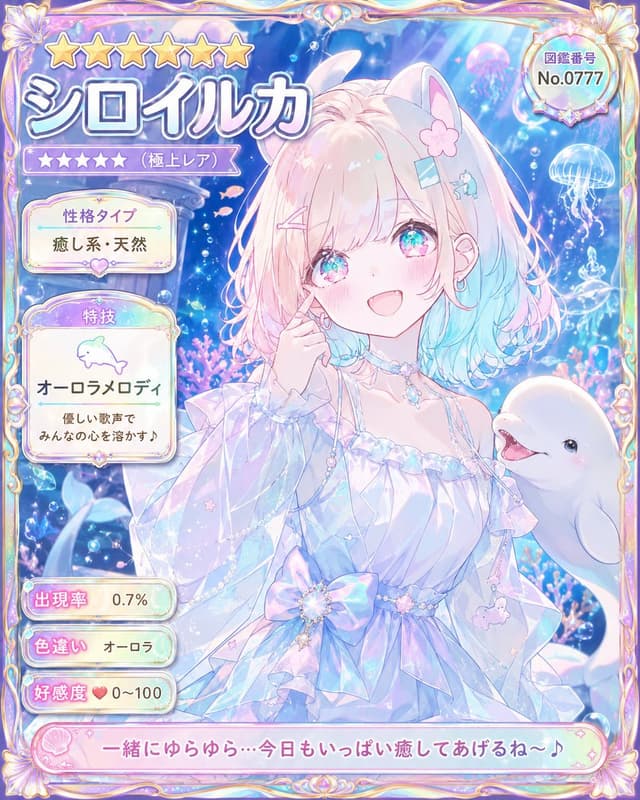
Game Asset - Pastel Beluga Idol Gacha Card — output

Game Asset - Pastel Beluga Idol Gacha Card

のぞむ*AIイラストGPT Image 2
Goal: Create an ultra-rare collectible anime character card for a pastel underwater idol named {argument name="character name" default="シロイルカ"}, styled like a premium gacha game profile card.

Canvas: Vertical portrait card, 4:5 aspect ratio, filled edge to edge with an ornate iridescent frame. Use dreamy pastel colors: pearl white, lavender, aqua blue, soft pink, holographic highlights, and sparkling bubbles.

Main subject: Center-right is a cheerful anime girl with beluga whale traits, looking at the viewer with a warm open smile. She has fluffy shoulder-length hair with pale pink roots fading into aqua-blue ends, large sparkling turquoise-pink eyes, rosy cheeks, small earrings, and cute hair accessories: exactly 4 visible hair decorations — one pink flower clip, one blue rectangular clip, one pink bobby pin, and one tiny blue whale clip. She has soft white beluga-like animal ears on top of her head. Her pose is gentle and idol-like, with one hand touching her cheek. Outfit: an airy translucent off-shoulder ocean-princess dress with ruffled sleeves, pearl chains, crystal choker, star charms, a large iridescent bow at the waist, and delicate sea-themed dangling ornaments. To her lower right, include one smiling white beluga whale companion emerging into the frame.

Background: Magical aquarium scene with deep blue water, light rays from above, glowing bubbles, coral and sea plants, tiny pink fish, sparkles, and jellyfish. Include exactly 3 prominent jellyfish in the background: one pink jellyfish near the upper right, one blue-white jellyfish at the right edge, and one smaller glowing jellyfish beneath it.

Frame and UI layout: Make the card look like a rare character encyclopedia entry. Use an ornate gold-and-pearl fantasy frame with shell motifs at the corners and rainbow holographic trim. Top left has exactly 6 large gold stars. Beneath them, a huge Japanese character name title reading {argument name="name text" default="シロイルカ"} in thick white letters with blue-purple shadow. Under the name, show exactly 5 small purple rarity stars followed by the label 「(極上レア)」. Top right contains a round badge with the label 「図鑑番号」 and number {argument name="catalog number" default="No.0777"}.

Left information panels: Use exactly 5 separate rounded information boxes stacked vertically. Box 1: title 「性格タイプ」 with value {argument name="personality type" default="癒し系・天然"}. Box 2: title 「特技」, a simple dolphin icon, skill name 「オーロラメロディ」, and description 「優しい歌声で みんなの心を溶かす♪」. Box 3: title 「出現率」 with value 「0.7%」. Box 4: title 「色違い」 with value 「オーロラ」. Box 5: title 「好感度」 with a heart icon and value 「0~100」.

Bottom caption: Add a long pink rounded dialogue banner across the bottom with shell icon decoration and the quote {argument name="bottom quote" default="一緒にゆらゆら…今日もいっぱい癒してあげるね〜♪"}.

Visual style: High-detail modern Japanese anime illustration, cute magical-girl gacha card aesthetic, glossy translucent UI, pearlescent highlights, soft bloom, luminous underwater lighting, clean readable Japanese typography, intricate but not cluttered. No watermark, no extra characters, no additional text beyond the specified labels.
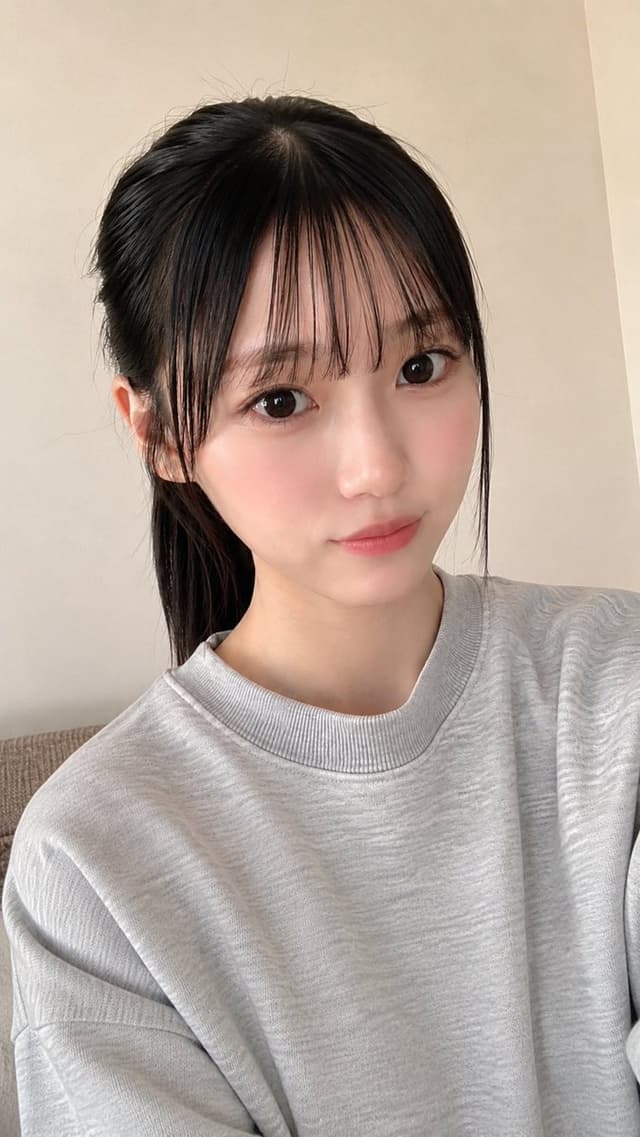
Profile / Avatar - Realistic East Asian Selfie Portrait — output

Profile / Avatar - Realistic East Asian Selfie Portrait

でこぴんGPT Image 2
Create a highly realistic vertical smartphone selfie portrait of a young East Asian woman with {argument name="hair color" default="black"} hair tied back in a low ponytail, soft wispy bangs falling across her forehead, and a few loose side strands framing her face. She has large glossy dark brown eyes, clear fair skin, natural rosy cheeks, subtle pink lips, and a calm gentle expression with a faint closed-mouth smile, looking directly into the camera. She is wearing an oversized {argument name="sweatshirt color" default="light heather gray"} crewneck sweatshirt with visible ribbed collar and soft cotton texture. The framing is a close upper-body selfie from slightly above eye level, face centered slightly to the right, shoulders visible, with a natural arm-length perspective and mild lens distortion typical of a phone front camera. Background is a simple indoor room with warm beige walls, a corner seam on the right, and a small portion of a neutral fabric sofa at the lower left. Use soft natural window light from the front-left, smooth skin detail without looking plastic, realistic hair flyaways, shallow depth of field, casual candid atmosphere, no jewelry, no text, no watermark, photorealistic quality, vertical 9:16 composition.
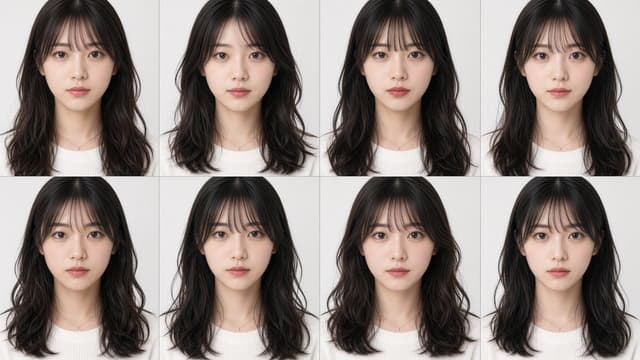
Profile / Avatar - Eight Distinct Studio Portraits Grid — output

Profile / Avatar - Eight Distinct Studio Portraits Grid

Yas⚡️BizDev-EngineerGPT Image 2
Goal: Create a photorealistic comparison grid of eight distinct young East Asian women’s ID-style headshots, emphasizing clearly different facial features while keeping the same general styling.

Canvas: Wide horizontal image in a 16:9 aspect ratio, clean white studio background, divided into exactly 8 equal portrait panels arranged in a 4-column by 2-row grid. Use thin light-gray divider lines between panels, no text, no logos, no watermark.

Subject details: Show exactly 8 separate head-and-shoulders portraits, each facing directly forward and looking into the camera with a calm neutral expression. All are young adult East Asian women with fair skin, long dark brown to black wavy hair, soft see-through bangs, natural makeup, a white knit sweater, and a delicate small necklace. Make each face visibly unique: 1) oval face with balanced eyes and soft lips, 2) slightly rounder face with wider eyes and gentler cheeks, 3) narrower face with straighter brows and smaller mouth, 4) brighter wide-eyed face with slightly shorter bangs, 5) longer face with heavier waves and more serious gaze, 6) petite heart-shaped face with softer jaw and subtle pout, 7) round face with fuller cheeks and larger eyes, 8) slim face with longer hair framing the cheeks and a composed expression.

Visual style: High-resolution realistic studio photography, soft even front lighting, minimal shadows, natural skin texture, clean beauty portrait retouching, sharp focus on eyes, subtle hair detail, consistent camera distance and crop across all panels.

Customizable elements: Use {argument name="number of portraits" default="8"} portraits in a {argument name="grid layout" default="4 columns by 2 rows"} grid, featuring {argument name="subject type" default="young East Asian women"} with {argument name="hairstyle" default="long dark wavy hair with see-through bangs"} wearing {argument name="outfit" default="white knit sweaters with delicate small necklaces"}.

Constraints: Do not make the faces identical; each portrait must have a distinct face shape, eye shape, brow style, nose, mouth, and overall facial balance. Keep the clothing, background, lighting, and pose consistent so the facial differences are the main comparison point.
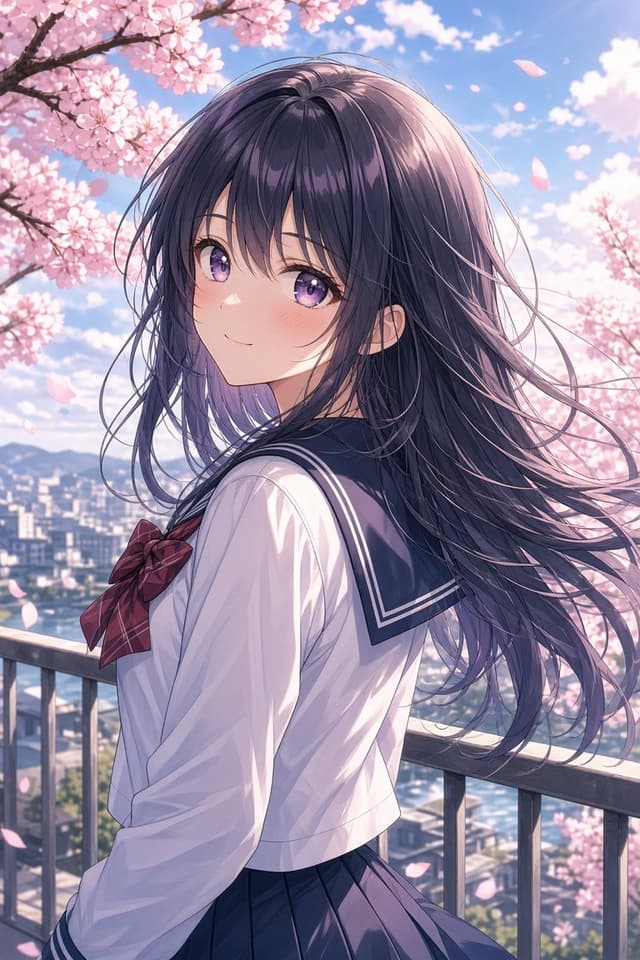
Profile / Avatar - Anime Girl Under Sakura Blossoms — output

Profile / Avatar - Anime Girl Under Sakura Blossoms

AndromedaAlienGPT Image 2
Create a polished anime-style vertical portrait of a {argument name="character type" default="high school girl"} standing on an outdoor balcony during spring cherry blossom season. She is shown from the waist up in a three-quarter back pose, turning her head over her shoulder to smile softly at the viewer. She has long flowing {argument name="hair color" default="dark violet-black"} hair with many fine windblown strands, large sparkling {argument name="eye color" default="purple"} eyes, a gentle expression, and a light blush. She wears a classic Japanese sailor school uniform: white long-sleeve blouse, navy sailor collar with white stripe trim, navy pleated skirt, and a {argument name="bow color" default="deep red plaid"} bow at the chest. The setting is a city overlook with a metal balcony railing in the foreground, a softly blurred urban skyline and distant mountains below, and abundant pink cherry blossom branches framing the upper left and right sides. Include many drifting sakura petals in the breeze. Use bright clear blue sky, fluffy white clouds, warm spring sunlight, soft rim lighting on the hair, delicate pastel colors, high-detail anime rendering, clean line art, glossy eyes, cinematic depth of field, romantic atmosphere, and portrait orientation. Avoid text, watermark, extra characters, distorted hands, or cropped face.
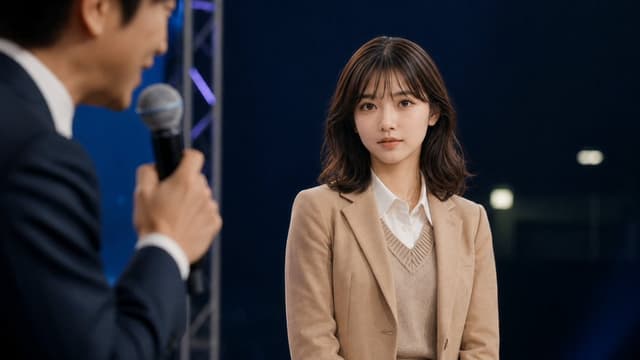
YouTube Thumbnail - Cinematic Studio Interview Scene — output

YouTube Thumbnail - Cinematic Studio Interview Scene

kuriponGPT Image 2
Create a cinematic photorealistic still from a live talk show or interview on a dark studio stage. The main subject is a young East Asian woman, about early 20s, seated or standing center-right, facing slightly left but looking toward the camera with a calm, neutral, attentive expression. She has {argument name="hair color" default="dark brown"} shoulder-length softly wavy hair with wispy bangs, natural makeup, clear skin, and large expressive eyes. She wears a {argument name="jacket color" default="camel beige"} blazer over a beige V-neck knit vest and a crisp white button-up shirt. In the extreme left foreground, include exactly 1 blurred male host in profile, an East Asian man in a dark navy suit and white shirt, holding exactly 1 handheld microphone close to his mouth while speaking; keep him intentionally out of focus with shallow depth of field. The woman should be sharply focused while the host, microphone, and foreground are blurred. Background: a deep navy-black studio backdrop with subtle blue lighting, a vertical silver stage truss behind the host, faint purple-blue accent lights, and a few soft rectangular bokeh lights on the right. Composition: widescreen 16:9, medium shot, woman occupying the right half of frame, host cropped on the left, realistic event lighting, soft key light on the woman’s face, professional broadcast photography, no visible text, no logos, no watermark.
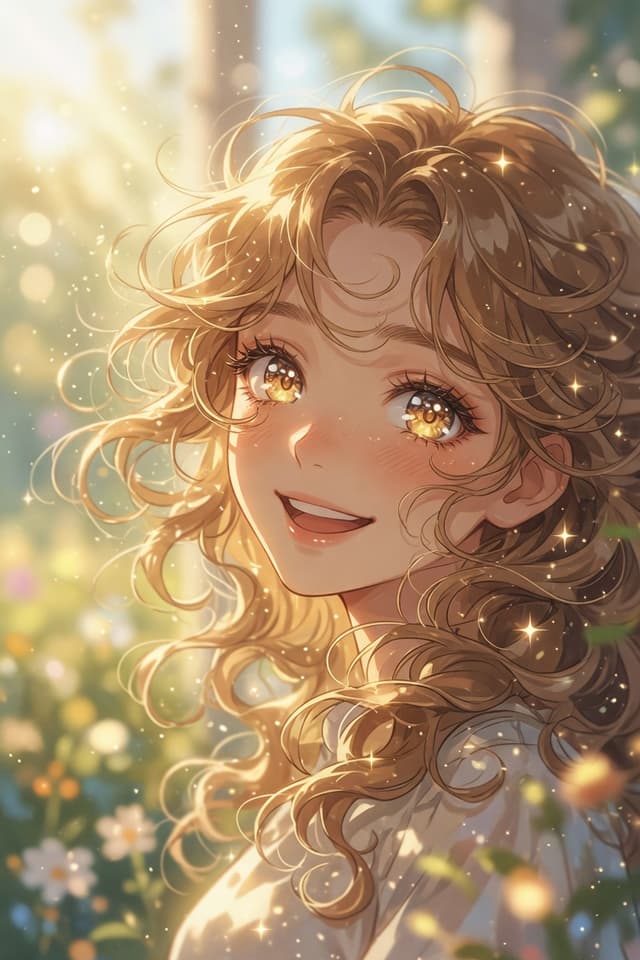
Profile / Avatar - Golden Garden Anime Portrait — output

Profile / Avatar - Golden Garden Anime Portrait

ねむGPT Image 2
Create a luminous vertical anime-style close-up portrait of a joyful young woman in a sunlit garden. The subject is {argument name="character name" default="a gentle golden-haired girl"}, shown from the shoulders up in a three-quarter view, turning toward the viewer with a warm open smile and soft rosy cheeks. She has {argument name="hair color" default="honey-blonde"} long, voluminous curly hair with many loose ringlets, flyaway strands, and delicate backlit edges glowing in the sunlight. Her large sparkling amber-gold eyes contain bright star-like highlights and reflective bokeh, with long lashes and a dreamy expression. She wears a simple {argument name="outfit color" default="white"} blouse or dress with soft folds, mostly visible at the shoulders. The background is an out-of-focus magical garden with green foliage and small white flowers, drenched in golden-hour sunlight from the upper left. Add floating dust motes, circular bokeh, tiny glitter particles, and multiple star-shaped sparkles around the hair and face. Use soft painterly anime rendering, highly detailed hair strands, warm pastel colors, shallow depth of field, cinematic rim light, ethereal atmosphere, and an uplifting springtime mood. Vertical portrait composition, 2:3 aspect ratio, no text, no watermark, no border.
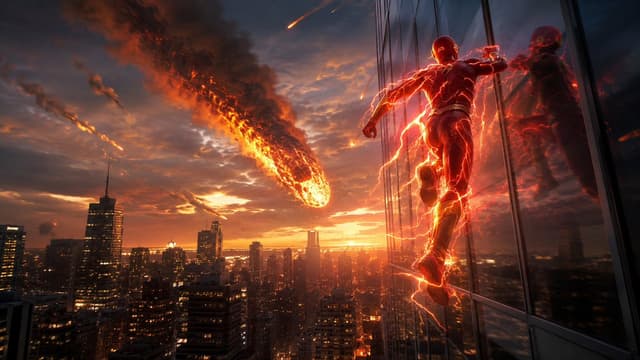
YouTube Thumbnail - Speedster vs Meteor Cityscape — output

YouTube Thumbnail - Speedster vs Meteor Cityscape

MirochillGPT Image 2
Create a cinematic wide-angle superhero action scene at sunset over a dense modern city skyline, with {argument name="superhero appearance" default="a muscular speedster in a sleek dark red armored suit with glowing orange-red lightning veins"} running vertically along the reflective glass facade of a skyscraper on the right side of the frame. Show his body in dynamic mid-stride, back and side view, one knee raised, fists clenched, surrounded by crackling red-orange electrical arcs that wrap around his limbs and trail behind him; include his reflection in the dark window panels beside him. In the sky to the left-center, place {argument name="main threat" default="a huge flaming meteor breaking through smoke clouds"} descending toward the city, with a bright molten core, fiery debris, black smoke plume, and sparks. Add exactly 4 smaller meteor streaks in the sky: one near the upper center, one near the left horizon, one near the central skyline, and one small glowing impact trail near the main meteor. The city below should contain many high-rise buildings with warm lit windows, silhouetted towers, a recognizable financial-district feel, and glowing orange street grids fading into haze. Use dramatic golden-hour lighting, stormy blue-gray clouds mixed with orange sunset, intense rim light on the hero, volumetric smoke, reflections on glass, high contrast, epic scale, motion blur, ultra-detailed realistic digital art, 16:9 composition, no text, no logo, no watermark.
Infographic / Edu Visual - AI Time-Travel Street Panorama — output

Infographic / Edu Visual - AI Time-Travel Street Panorama

Nicolas Guyon - e/accGPT Image 2
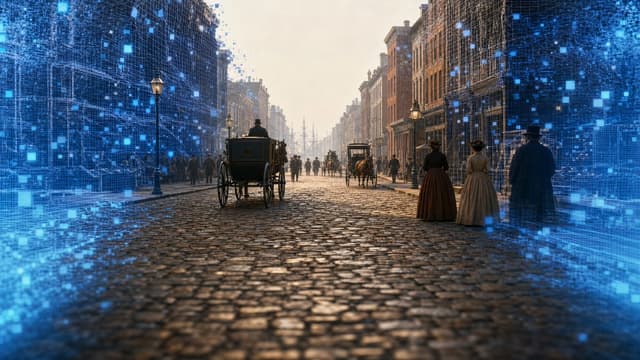
Create a cinematic ultra-wide historical street-view scene showing {argument name="location and year" default="New York City, 1827"} as if reconstructed by an AI time-travel panorama. The camera is low in the middle of a wet cobblestone street, looking straight down a long urban canyon of brick buildings in one-point perspective. Include horse-drawn carriages, pedestrians in early 19th-century clothing, gas street lamps, distant ship masts at the end of the street, misty golden morning light, and realistic period architecture. Add a futuristic digital reconstruction effect around the left and right edges: glowing blue wireframe building overlays, translucent grid lines, scan particles, and many small luminous blue square pixels dissolving into the historical scene, while the center remains mostly photorealistic. The mood should feel like a 360-degree generated panorama or time-travel GeoGuessr interface, but with no UI text, no logos, and no watermark. Use a 16:9 horizontal composition, high realism, cinematic depth of field, detailed wet stone reflections, atmospheric haze, and a seamless blend between authentic 1820s street life and advanced AI holographic visualization.
Game Asset - Ornate Anime Character Turnaround Sheet — output

Game Asset - Ornate Anime Character Turnaround Sheet

Toshi@ニャルオAIGPT Image 2
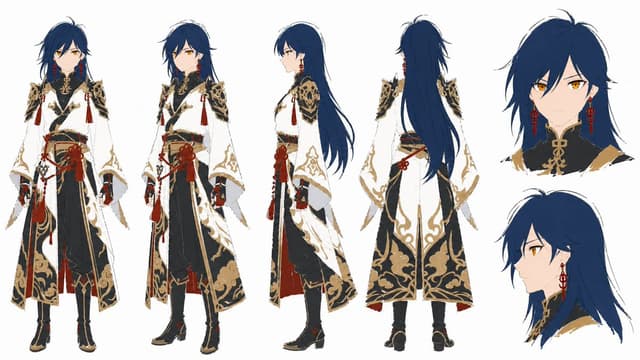
Goal: Create a clean anime character reference sheet in a loose hand-drawn concept-art style for {argument name="character name" default="an elegant androgynous swordsman"}.

Canvas: Wide horizontal white background, high-resolution, no scenery, no title text, no labels, plenty of negative space. Use thin sketchy ink lines, slightly rough edges, flat cel shading, restrained painterly texture, and a polished Japanese fantasy game character-design aesthetic.

Layout: Show exactly 6 discrete character views arranged across the canvas: 1 full-body front view on the far left, 1 full-body three-quarter front view beside it, 1 full-body right side profile in the center, 1 full-body back view slightly right of center, 1 large bust portrait facing forward in the upper right, and 1 large head-and-shoulders side-profile portrait in the lower right. Keep proportions consistent across all views.

Subject details: The character is a slim young adult with pale skin, sharp golden amber eyes, a calm serious expression, and very long layered {argument name="hair color" default="deep navy blue"} hair with messy bangs, side locks, and a long flowing back section reaching past the waist. Add long red dangling earrings visible on both portraits and front views. The face is refined and slightly melancholic, with narrow eyes and a small mouth.

Costume: Design an ornate East Asian-inspired fantasy outfit in {argument name="main outfit colors" default="white, black, antique gold, and deep red"}. Include a high black collar with gold knot-like ornamentation, structured black-and-gold shoulder armor with filigree cutouts, wide white sleeves, black gloves, layered black trousers, fitted black boots with gold trim, a long white outer robe or coat with elaborate gold cloud-and-scroll patterns, black inner panels, red lining, and multiple red tassels and cords around the waist and shoulders. Add a prominent red knotted waist ornament with hanging tassels and gold details. The back view should clearly show the long white coat panels with symmetrical gold embroidery and the character’s long hair falling down the back.

Style constraints: Keep the sheet clean and model-sheet focused, with no weapons, no props, no background objects, no decorative frame, and no text. Maintain accurate costume continuity between all 6 views, emphasize the ornate gold embroidery and red tassel accents, and make the image feel like a production-ready hand-drawn character turnaround for animation or game development.
Comic / Storyboard - Crimson Moon Witch Manga Page — output

Comic / Storyboard - Crimson Moon Witch Manga Page

レティシア・ノエルGPT Image 2
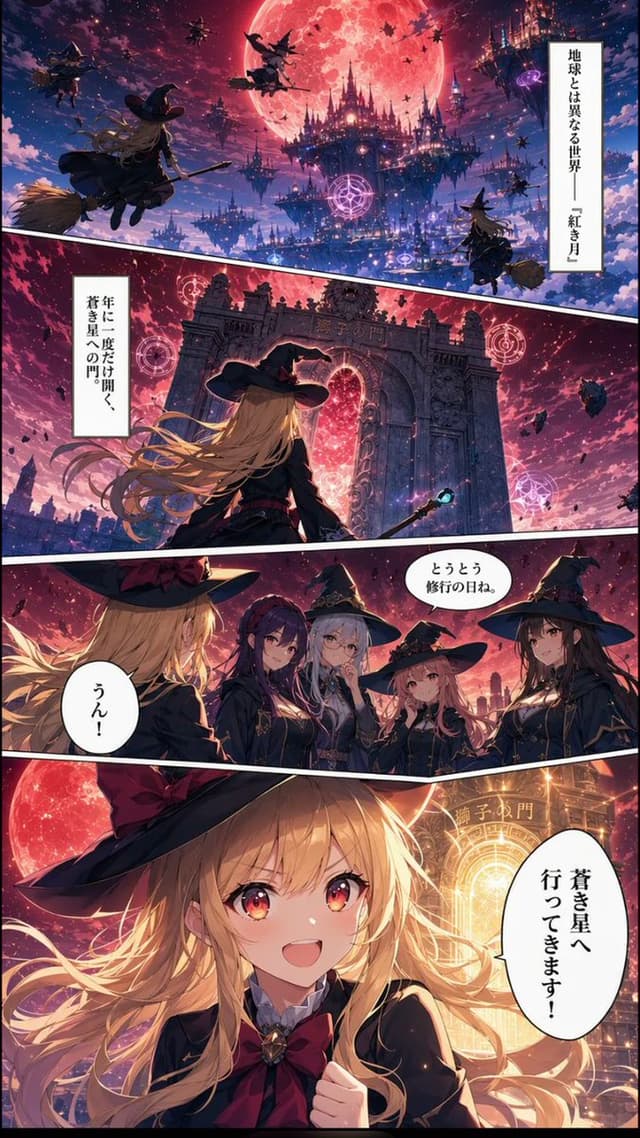
Goal: Create a vertical fantasy manga page about a young witch traveling to the Lion's Gate under a giant crimson moon, in a richly detailed anime style with dramatic lighting and Japanese speech bubbles.

Canvas: Tall vertical comic page, smartphone ratio about 9:16, full bleed art with thin black outer border. Use four diagonal manga panels separated by thick white gutters slanting downward from left to right. Color palette: deep violet night sky, magenta clouds, glowing red moon, blue-black castle silhouettes, warm gold magical light.

Layout and panels: Use exactly 4 panels.
1. Top wide establishing panel: a vast alternate-world sky city beneath an enormous red full moon. Floating gothic castles, spires, magical purple circles, bats, debris, and multiple witches flying on broomsticks. Show about 7 visible flying witch silhouettes at different depths, with one larger blonde witch on a broom in the left foreground seen from behind. Add a vertical narration box on the right with {argument name="opening narration" default="地球とは異なる世界――『紅き月』"}.
2. Second wide panel: rear view of the same blonde witch standing before a gigantic ancient stone gate with ornate pillars and a glowing red portal inside. Her long blonde hair streams in the wind, she wears a large black witch hat and dark academy robe, and holds a staff with a small blue gem. Around the gate are 3 glowing pink magic circles and floating rocks. Add a vertical narration box on the left with {argument name="gate narration" default="年に一度だけ開く、蒼き星への門"}. The gate itself has faint Japanese-style lettering carved above the arch.
3. Third medium panel: conversation scene with exactly 5 young witches visible. Left foreground: back/side of the blonde protagonist with her black hat and golden hair. Facing her are 4 witch classmates: a purple-haired serious girl, a silver-haired girl in a pointed hat, a small pink-haired girl, and a long dark-haired girl in a pointed hat. All wear dark magical school uniforms with capes and gold trim. Include two speech bubbles: one near the group with {argument name="classmate line" default="とうとう修行の日ね。"}, and one near the protagonist with {argument name="protagonist reply" default="うん!"}.
4. Bottom large hero panel: close-up of the blonde protagonist smiling brightly with sparkling red-gold eyes, long flowing blonde hair, black witch hat with red lining, black robe, white collar, and large crimson bow. She raises one fist excitedly. Behind her, the red moon and the blazing golden Lion's Gate form a radiant circular halo. Add one large vertical speech bubble on the right with {argument name="final speech" default="蒼き星へ行ってきます!"}.

Subject details: The protagonist is a cheerful teenage witch with fair skin, very long wavy blonde hair, amber-red eyes, a black pointed witch hat, black magical academy uniform, red bow tie, and adventurous expression. The atmosphere should feel like a polished serialized Japanese fantasy manga, cinematic, highly detailed, luminous, emotional, and magical.

Constraints: Keep exactly 4 panels, exactly 5 witches in the third panel, and exactly 5 text boxes/bubbles total. Use Japanese text only inside the specified narration and speech areas. Do not add extra captions, logos, watermarks, or page numbers.
Infographic / Edu Visual - Gothic AI Stack Diagram — output

Infographic / Edu Visual - Gothic AI Stack Diagram

Auny 🧡GPT Image 2
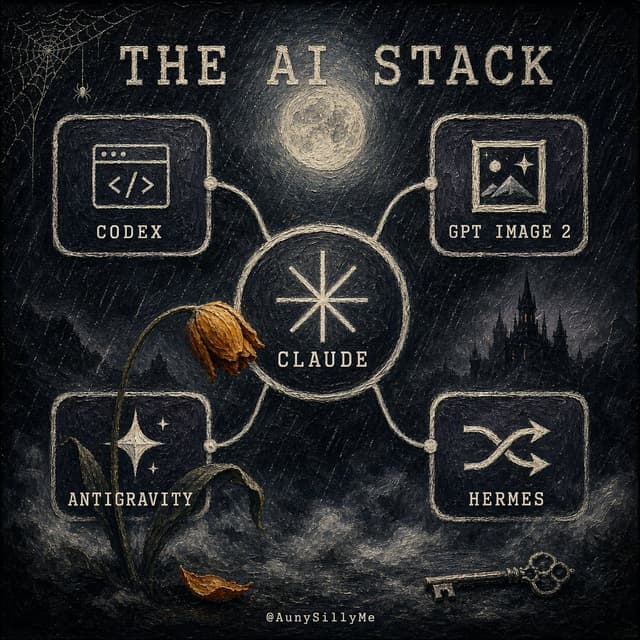
Goal: Create a dark gothic hand-painted infographic poster titled {argument name="headline text" default="THE AI STACK"}, showing an interconnected personal AI-tool stack as a mysterious occult network.

Canvas: Square 1:1 composition, black and charcoal textured canvas with visible rough brush strokes, scratched chalk marks, muted cream ink, and subtle sepia highlights. The mood is eerie, nocturnal, vintage, and slightly haunted.

Layout: Place a large central circular node labeled {argument name="main tool" default="CLAUDE"} with a simple eight-point starburst symbol inside it. Four rounded rectangular tool cards connect to the central node with pale hand-drawn cables and small circular connector dots. Use exactly 4 outer cards: top-left card labeled {argument name="tool 1" default="CODEX"} with a browser-window code icon, top-right card labeled {argument name="tool 2" default="GPT IMAGE 2"} with a framed landscape/image icon, bottom-left card labeled {argument name="tool 3" default="ANTIGRAVITY"} with a starry mountain or sparkling night icon, and bottom-right card labeled {argument name="tool 4" default="HERMES"} with a crossed-arrows or janitor-like routing symbol. Keep all text in uppercase, widely spaced, distressed serif/typewriter lettering.

Scene details: Add a glowing full moon centered above the main node, a small spiderweb and tiny spider in the upper-left corner, a dark gothic castle silhouette in the right background, fog and smoky clouds along the bottom, a wilted flower with a bent stem leaning across the left side of the central node, one fallen brown leaf near the base of the flower, and an antique skeleton key lying at the bottom right. Include a tiny creator handle centered at the bottom: @AunySillyMe.

Visual style: Painterly gothic chalkboard illustration, rough impasto texture, off-white linework on black, muted gold-brown accents on the dead flower and leaf, softly glowing moon, handmade imperfect borders, no clean vector polish.

Constraints: Use exactly 1 central circle, exactly 4 connected outer cards, exactly 4 outer tool labels, exactly 1 moon, exactly 1 spiderweb, exactly 1 spider, exactly 1 wilted flower, exactly 1 fallen leaf, exactly 1 castle silhouette, and exactly 1 key. Do not add extra cards, extra tools, bright colors, modern UI gloss, or photorealism.
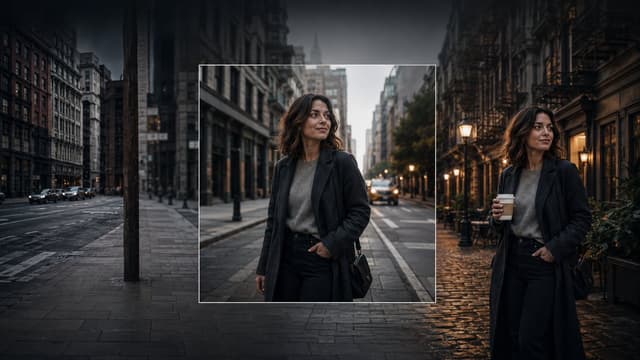
Product Marketing - Consistent Character Image Editing Banner — output

Product Marketing - Consistent Character Image Editing Banner

Gurken-RickGPT Image 2
Create a cinematic wide banner image demonstrating AI image editing and consistent character generation. The scene is a moody urban street at dusk in a dense old city, with tall buildings on both sides, wet pavement, parked and moving cars, soft streetlights, and a dark vignette. Show exactly three visual zones across one continuous composition: on the left, a dim empty city street with no main person, desaturated and slightly blurred; in the center, a sharp square inset framed by a thin white border containing a realistic portrait of the same woman standing on a city street; on the right, the same woman appears again full-body in a different but matching street setting, holding a takeaway coffee cup. The woman is {argument name="character name" default="an unnamed stylish woman in her early 30s"}: shoulder-length wavy dark brown hair, medium-light skin, natural makeup, calm confident expression, looking slightly to her left, wearing a long dark charcoal overcoat, gray knit sweater, black high-waisted trousers, and a small black shoulder bag. Make the center inset look like the original generated square image, while the left and right sides look like outpainted extensions and a variation of the same character and style. Use photorealistic editorial photography, shallow depth of field, soft evening light, warm lamps on the right contrasting with cool blue-gray shadows on the left, high dynamic range, cinematic color grading, realistic reflections on wet cobblestones and asphalt. No text, no logos, no UI controls, no watermark.
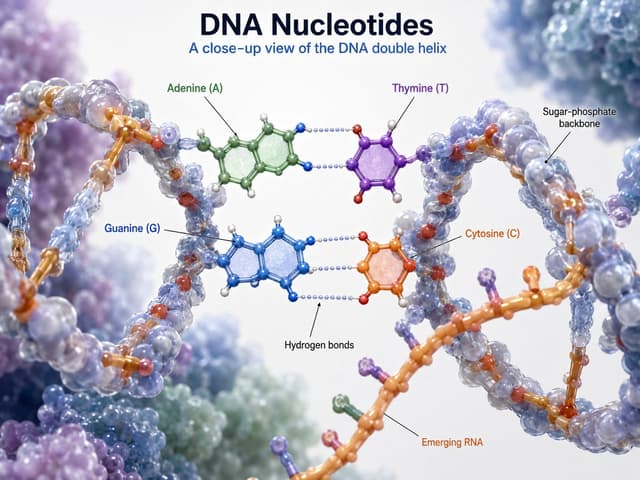
Infographic / Edu Visual - DNA Nucleotides 3D Infographic — output

Infographic / Edu Visual - DNA Nucleotides 3D Infographic

wrenGPT Image 2
Goal: Create a polished 3D scientific educational infographic titled {argument name="headline text" default="DNA Nucleotides"}, showing a close-up view of a DNA double helix with labeled nucleotide bases and molecular structure.

Canvas: Landscape 4:3 composition, bright white laboratory-style background with soft depth-of-field molecular clusters in pale blue, lavender, mint, and purple around the edges. Use a clean, high-resolution textbook/medical visualization style with realistic glossy translucent spheres and rods, soft shadows, and shallow depth of field.

Layout: Center the title at the top in large dark navy bold type, with the subtitle {argument name="subtitle text" default="A close-up view of the DNA double helix"} directly beneath in smaller medium-blue type. Fill the frame with a large twisting DNA double helix running from the left foreground through the center to the right side, with a second orange strand crossing diagonally through the lower right foreground. Keep the central base-pair region open and readable for labels.

Subject details: Render the DNA as a molecular ball-and-stick model combined with translucent bead-like backbone surfaces. The sugar-phosphate backbone should be two twisting chains made of semi-transparent bluish-gray spheres with orange/gold connector rods and small red atoms. In the center, show exactly 4 labeled nucleotide bases: Adenine (A) in green at upper left center, Thymine (T) in purple at upper right center, Guanine (G) in blue at lower left center, and Cytosine (C) in orange at lower right center. Adenine pairs with Thymine across the top using dotted pale blue hydrogen bonds, and Guanine pairs with Cytosine below using three dotted pale blue hydrogen-bond rows. Molecular rings should be flat aromatic ring structures with small colored atom spheres and white hydrogen atoms.

Text content and labels: Include exactly 7 callout labels with thin black pointer lines: “Adenine (A)” in green pointing to the green upper-left base; “Thymine (T)” in purple pointing to the purple upper-right base; “Guanine (G)” in blue pointing to the blue lower-left base; “Cytosine (C)” in orange pointing to the orange lower-right base; “Sugar-phosphate backbone” in black pointing to the right-side helical backbone; “Hydrogen bonds” in black pointing to the dotted bond lines between base pairs; and “Emerging RNA” in orange pointing to the orange strand crossing the lower foreground. Use crisp sans-serif typography and avoid crowding.

Visual style: Hyper-detailed scientific 3D render, glossy translucent molecular beads, realistic refraction, soft bokeh background, professional biology textbook infographic, balanced educational clarity and cinematic depth.

Constraints: Use exactly the 4 nucleotide labels and exactly the 3 structural labels listed above; do not add extra labels, icons, captions, legends, watermarks, or borders. Keep all text sharp and correctly spelled.
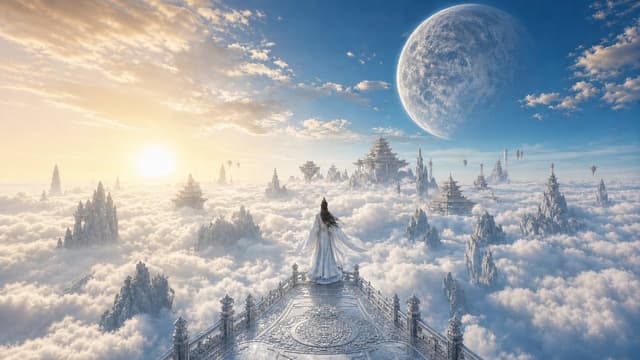
Product Marketing - Celestial Xianxia Cloud Kingdom Wallpaper — output

Product Marketing - Celestial Xianxia Cloud Kingdom Wallpaper

HitPawGPT Image 2
Using the provided reference image as the visual and character base, transform the scene into a wide {argument name="resolution style" default="4K desktop wallpaper"} with an open, cinematic ancient Chinese celestial fantasy landscape. Keep the lone white-robed figure viewed from behind, but move them from the palace corridor onto the center of an ornate elevated stone terrace or balcony overlooking an endless sea of clouds. Replace the enclosed marble columns and night starfield with a bright sunrise sky: warm golden sun on the left, clear blue atmosphere, soft scattered clouds, and a huge pale moon or planet high on the right. Expand the background with many floating or cloud-piercing Chinese palace structures, pagodas, spires, and rugged mountain peaks emerging from the clouds, creating strong depth and scale. Preserve the elegant immortal/xianxia mood, white-and-silver palette with gold sunrise highlights, high detail, ethereal lighting, grand fantasy architecture, ultra-wide 16:9 composition, no text, no watermark.
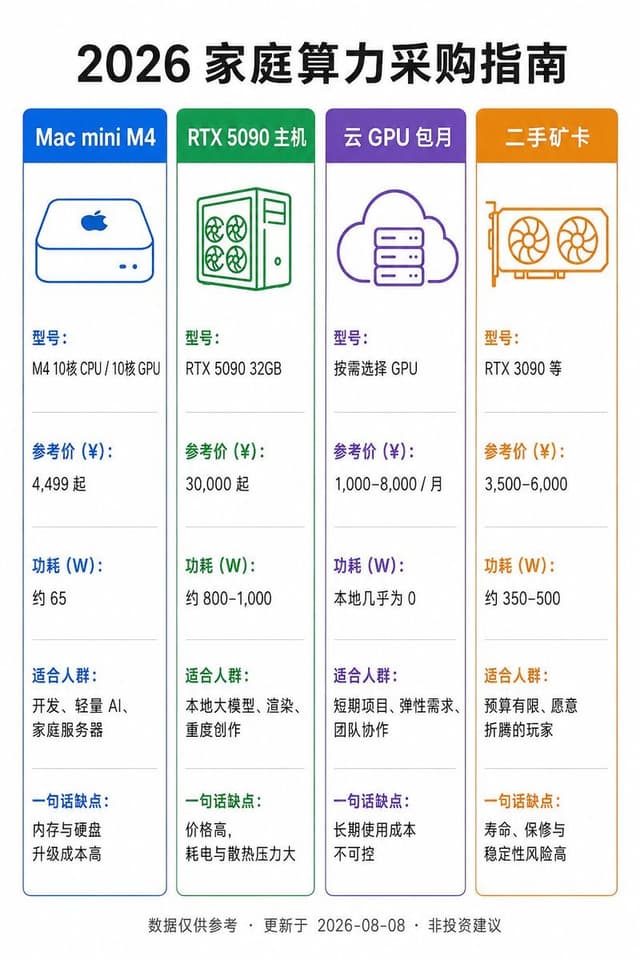
Infographic / Edu Visual - Chinese Home Compute Buying Guide — output

Infographic / Edu Visual - Chinese Home Compute Buying Guide

码农暖爸GPT Image 2
Goal: Create a vertical Chinese product comparison infographic on a white background with a clean flat-design style. The main title at the top is {argument name="headline text" default="2026 家庭算力采购指南"}, in large bold black Chinese type, centered.

Canvas: Portrait 2:3 aspect ratio, approximately 768×1152 px. Use generous white margins, crisp vector lines, and a balanced grid layout.

Layout: Place exactly 4 tall rounded-rectangle comparison cards in one horizontal row beneath the title. Each card has a colored header bar, a matching thin border, a simple line icon near the top, then five stacked information sections separated by pale gray horizontal divider lines. Use neat left-aligned Chinese text inside each card.

Cards, colors, icons, and text content:
1. Blue card header: “Mac mini M4”. Icon: simple blue outline Mac mini with Apple logo and two small front dots. Sections: “型号:” / “M4 10核 CPU / 10核 GPU”; “参考价 (¥):” / “4,499 起”; “功耗 (W):” / “约 65”; “适合人群:” / “开发、轻量 AI、家庭服务器”; “一句话缺点:” / “内存与硬盘升级成本高”.
2. Green card header: “RTX 5090 主机”. Icon: green outline desktop tower with four fan circles and side panel. Sections: “型号:” / “RTX 5090 32GB”; “参考价 (¥):” / “30,000 起”; “功耗 (W):” / “约 800–1,000”; “适合人群:” / “本地大模型、渲染、重度创作”; “一句话缺点:” / “价格高,耗电与散热压力大”.
3. Purple card header: “云 GPU 包月”. Icon: purple outline cloud containing a server rack. Sections: “型号:” / “按需选择 GPU”; “参考价 (¥):” / “1,000–8,000 / 月”; “功耗 (W):” / “本地几乎为 0”; “适合人群:” / “短期项目、弹性需求、团队协作”; “一句话缺点:” / “长期使用成本不可控”.
4. Orange card header: “二手矿卡”. Icon: orange outline dual-fan graphics card. Sections: “型号:” / “RTX 3090 等”; “参考价 (¥):” / “3,500–6,000”; “功耗 (W):” / “约 350–500”; “适合人群:” / “预算有限、愿意折腾的玩家”; “一句话缺点:” / “寿命、保修与稳定性风险高”.

Footer: Center a small gray footnote along the bottom: “数据仅供参考 · 更新于 2026-08-08 · 非投资建议”.

Visual style: Minimal flat infographic, Chinese sans-serif font, high readability, accurate alignment, consistent spacing, no shadows, no photos, no decorative background. Ensure all Chinese text is sharp and legible, with the section labels colored to match each card’s header.
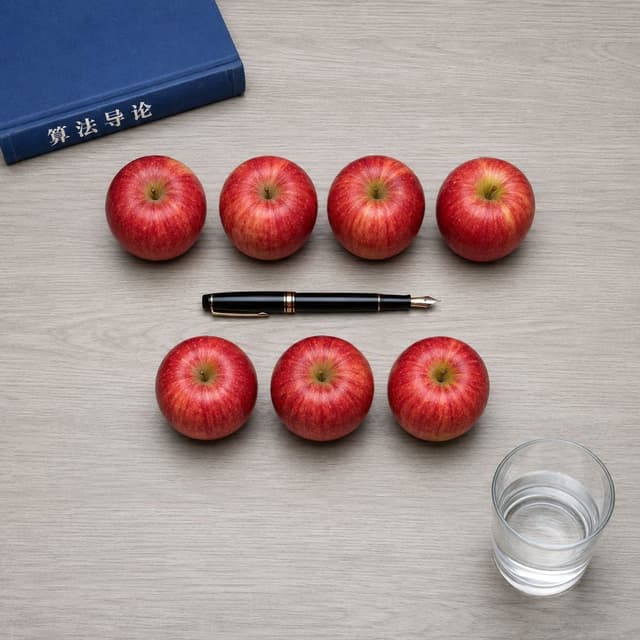
Social Media Post - Top-Down Apple Counting Desk Scene — output

Social Media Post - Top-Down Apple Counting Desk Scene

码农暖爸GPT Image 2
Create a square 1:1 photorealistic top-down tabletop scene on a pale gray wood-grain desk. Arrange exactly {argument name="apple count" default="7"} glossy red apples in two neat rows: exactly 4 apples in the upper row and exactly 3 apples in the lower row, evenly spaced, with realistic stems, yellow-red striping, soft shadows, and no extra apples. Place one blue hardcover book partially visible in the upper-left corner, angled slightly, with the spine facing inward and the Chinese title text {argument name="book spine text" default="算法导论"} printed in white on the spine. Place exactly one black fountain pen horizontally in the exact center of the composition between the two apple rows, with gold trim and the metal nib pointing to the right. Place exactly one transparent cylindrical glass in the lower-right corner, filled halfway with clear water, showing refraction, rim highlights, and a soft shadow. Use clean natural studio lighting, realistic scale, crisp focus, overhead perspective, balanced negative space, and strict object placement. Do not add any other objects, hands, labels, plates, leaves, or decorations.
Browse by model, style or topic

Find your next direction

ASTORIE CANVAS

Take the idea further.

Bring your prompts, references and results together in one creative space.

Open your canvas ↗