Prompts for educational graphics

Explore a travel-poster example that brings architectural details into a graphic layout. Use its prompt as a starting point for deciding what your own visual should explain.

Explore prompts

612 prompts

Infographic / Edu Visual - Exploded View DSLR Infographic — output

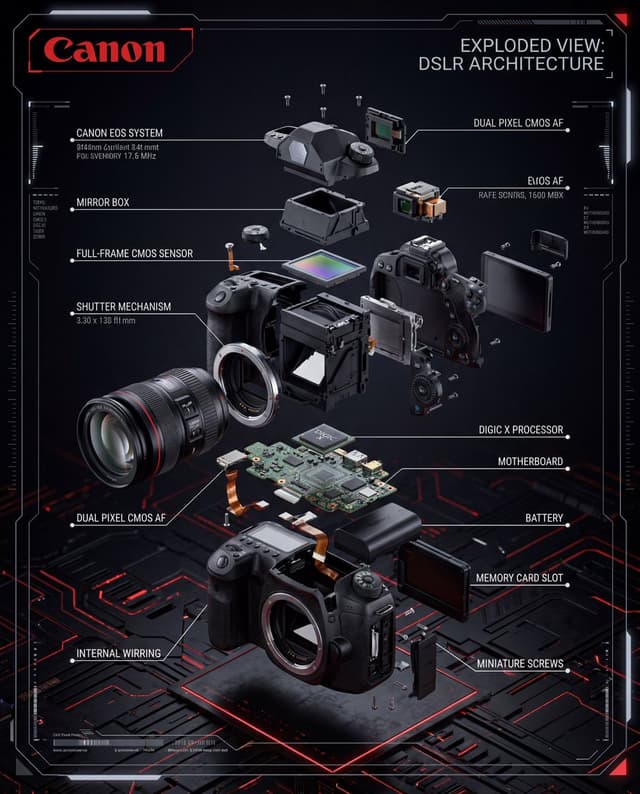
Infographic / Edu Visual - Exploded View DSLR Infographic

SnowNano Banana Pro
Exploded view {argument name="camera" default="Canon DSLR camera"} infographic, fully disassembled camera parts floating in perfect alignment, ultra detailed breakdown of every internal and external component, Canon DSLR body separated into layers showing lens mount, CMOS sensor, shutter mechanism, mirror assembly, pentaprism, autofocus module, processor chip, motherboard, battery compartment, memory card slot, buttons, dials, LCD display, internal wiring, cooling structure, lens elements, screws and mechanical parts, futuristic infographic labels connected with clean white lines, cinematic {argument name="branding" default="red and black Canon branding"} aesthetic, {argument name="background" default="dark studio background"} background, glowing HUD interface elements, ultra realistic product engineering visualization, premium industrial design presentation, high precision mechanical detailing, floating exploded technical render, dramatic lighting, glossy reflections, modern typography, luxury technology showcase, creator and photography focused design, cyberpunk inspired UI overlays, realistic textures and materials, depth of field, highly organized component layout, engineering blueprint meets commercial advertisement style, 8k hyper realistic infographic poster, professional tech magazine aesthetic
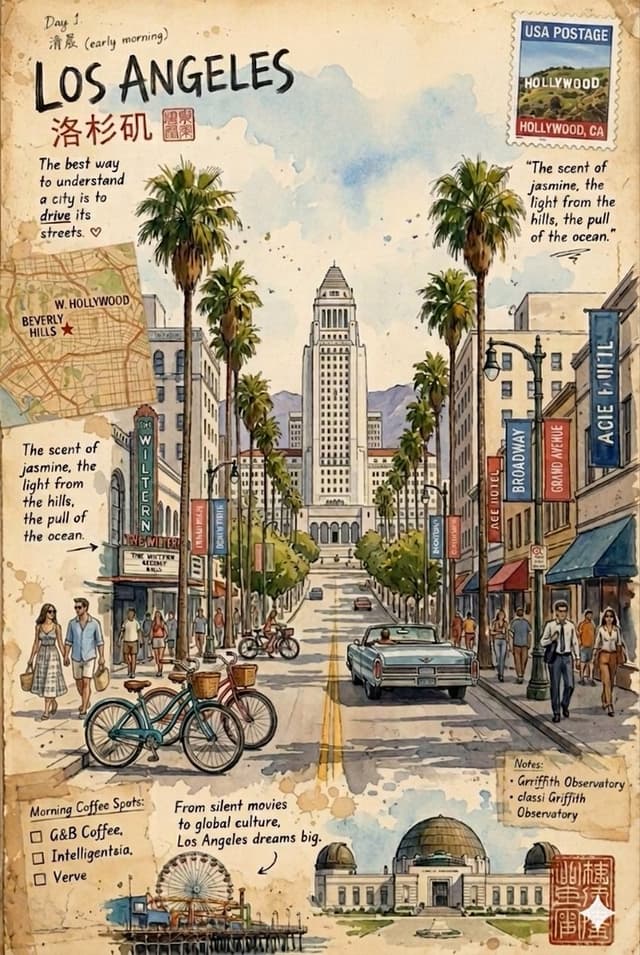
Infographic / Edu Visual - Watercolor Travel Poster Fusion — output

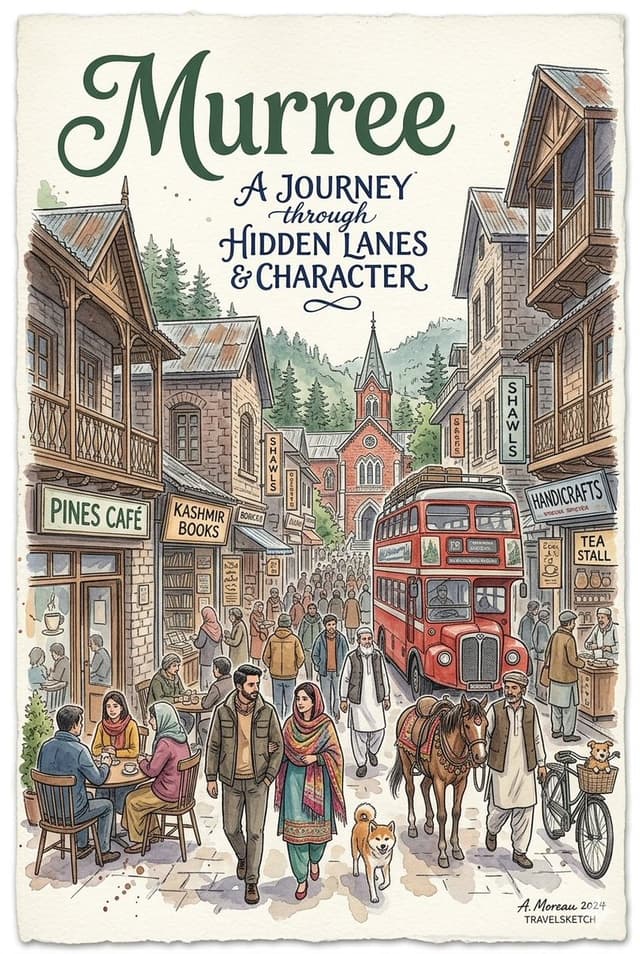
Infographic / Edu Visual - Watercolor Travel Poster Fusion

MinahilNano Banana Pro
An AI-generated watercolor travel poster in a detailed sketch style by "A. Moreau 2024, TRAVELSKETCH." The artwork features a bustling, historic street scene filled with people, a {argument name="subject" default="couple walking a Shiba Inu dog"} in the foreground, and patrons sitting outside a cafe. The background seamlessly blends the colonial hill-station charm of {argument name="first location" default="Murree"}—complete with wooden balconies, a red double-decker bus, a horse handler, and a distant church spire—with the urban identity of {argument name="second location" default="Toronto"}, showcasing modern skyscrapers, the CN Tower, and a red TTC streetcar on King Street. The text at the top reads "A JOURNEY through HIDDEN LANES & CHARACTER" in elegant typography.
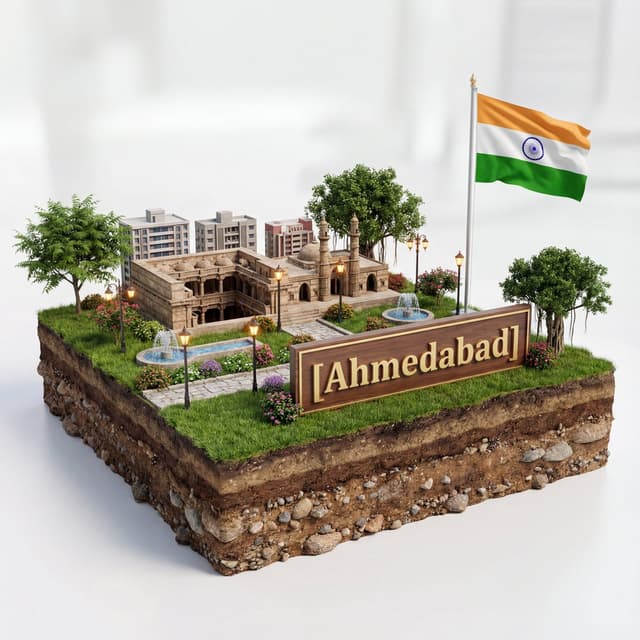
3D Diorama of Ahmedabad Landmark — output

3D Diorama of Ahmedabad Landmark

YouMindNano Banana Pro
Create a hyper-realistic 3D diorama-style model of [{argument name="city" default="Ahmedabad"}]. The model should appear as a miniature, set on a raised cross-section of earth that reveals soil and rock layers beneath a lush grassy surface. The structure must be highly detailed and proportionally accurate, surrounded by tiny realistic elements like region-appropriate street lamps, native trees, shrubs, water features like small fountains, and historically or culturally fitting pathways. The scene should evoke the unique character of [{argument name="city" default="Ahmedabad"}]’s surrounding landscape. The environment must include a soft white background to draw full attention to the model. Include the text “[{argument name="city" default="Ahmedabad"}]” in large, bold, elegant lettering prominently displayed on a big sign or billboard at the front of the diorama, easily readable and eye-catching, along with a large national flag on a tall, prominent flagpole positioned beside [{argument name="city" default="Ahmedabad"}], clearly visible and waving. 1080x1080 dimension
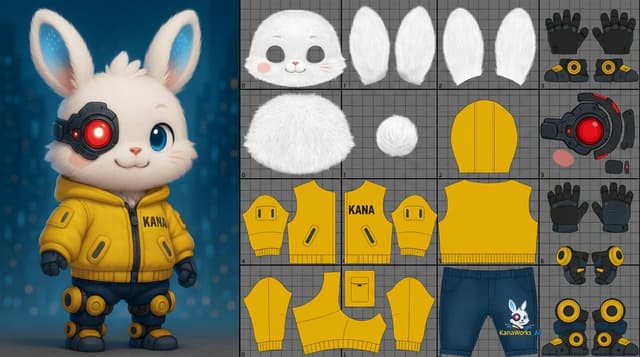
Prompt for UV Unwrapping a 3D Model — output

Prompt for UV Unwrapping a 3D Model

YouMindNano Banana Pro
unwrap the UVs of the 3D model shown in the image.
About one-third of the image should be a reference view displaying the 3D model itself.The remaining area should include the UV layout for the head, body, and limbs.Unwrap the surface of the 3D model and flatten it into a single 0–1 two-dimensional UV space.
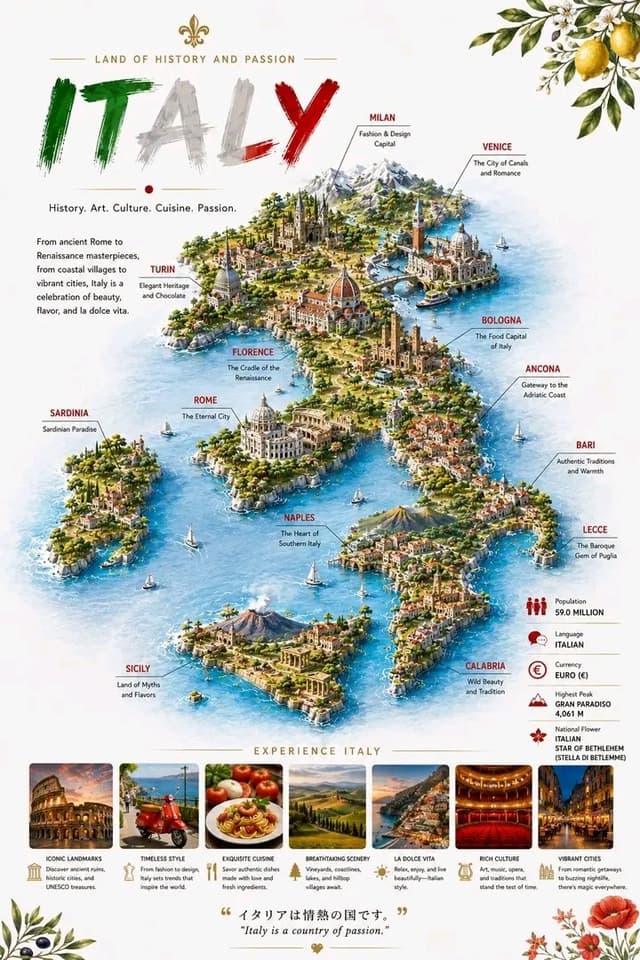
Infographic / Edu Visual - Detailed 3D Travel Infographic Map of Italy — output

Infographic / Edu Visual - Detailed 3D Travel Infographic Map of Italy

NoorAINano Banana Pro
Create a vibrant 3D illustrated travel infographic map of *{argument name="country" default="Italy"}* titled “{argument name="title" default="ITALY: Land of History and Passion."}”Show the Italian peninsula, Sicily, and Sardinia in a bright Mediterranean Sea with sailboats, lush landscapes, Alps, vineyards, and volcanoes. Include miniature landmarks like St. Peter’s Basilica, the Colosseum, Venice canals, Florence Cathedral, Amalfi Coast villages, and Tuscan hills.

Label major cities with elegant typography:
Milan, Venice, Turin, Bologna, Florence, Rome, Naples, Bari, Lecce, Calabria, Sicily, Sardinia, and Ancona, each with short tourism-style taglines.

Add a stylish infographic sidebar with:
Population 59M, Language Italian, Currency Euro, Highest Peak Gran Paradiso, National Flower Stella di Betlemme.

At the bottom, include cinematic travel scenes: Colosseum sunset, Vespa scooter, Italian pasta, Tuscan countryside, Amalfi Coast, opera house, and glowing city nightlife.

Decorate with lemons, olive branches, and red poppies. Style: ultra-detailed, cinematic lighting, luxury travel poster, fantasy cartography, colorful editorial illustration, miniature-map aesthetic, premium 8k quality.
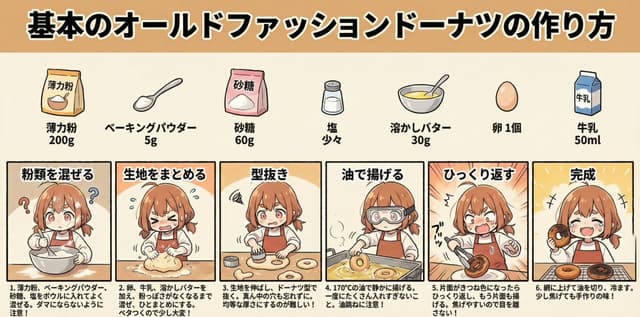
Comic / Storyboard - Infographic Generation for Old-Fashioned Donuts with Character Skill Variation — output

Comic / Storyboard - Infographic Generation for Old-Fashioned Donuts with Character Skill Variation

シュナプーンNano Banana Pro
Create an image showing the steps for basic old-fashioned donuts being performed by the character in the reference photo, and turn it into an infographic.

The character should be a cooking beginner, struggling through the process.

No dialogue is needed.

Display detailed explanations for each step.

Aspect ratio 2:1

Three-part structure: Title, Ingredients, Steps

Title: How to Make Basic Old-Fashioned Donuts

Display ingredients and quantities with illustrations

Manga-style process flow

Prompt (Expert Cook Version):

The character should be an expert cook, easily progressing through the steps.
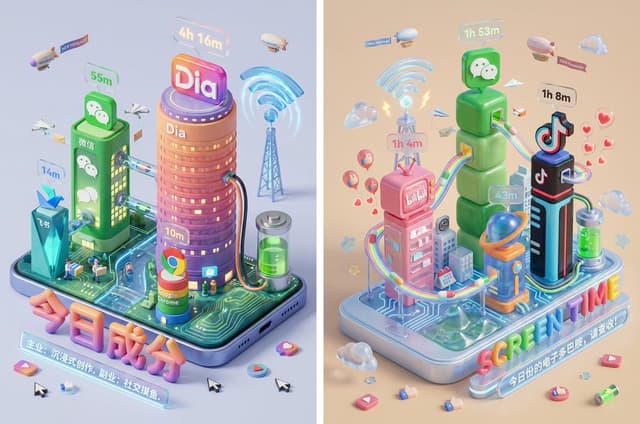
Screen Time Digital Town Visualization Prompt — output

Screen Time Digital Town Visualization Prompt

歸藏(guizang.ai)Nano Banana Pro
Please read the user-uploaded [Screen Time Data Screenshot] and identify the top four APP names and icons. Retrieve information and icon styles for these APPs. Based on the tone of the APP combination (Social/Entertainment/Office/Comprehensive), independently decide on the core art style.

[2. Main Model Construction: Miniature Town Infrastructure] Construct a vibrant miniature digital town in the center of the screen, not just a display of buildings:

Smart Base (Foundation): A stylized mobile phone base. The surface is no longer flat but topographical (depending on the style, it could be rolling circuit board hills, glass water surfaces, or Lego baseplates).

Building Cluster (APP Embodiment): Skyscrapers representing the APPs.
Base: A cartoon-style smartphone base with rounded, frosted metal edges, and the screen surface emits a faint breathing light. The base is surrounded by floating, materialized 3D Emojis (clouds, stars, hearts) with a translucent jelly texture.
Building Cluster (APP Embodiment): Q-version skyscrapers stand on the island, representing the identified APPs.

Height Rule: Building height strictly corresponds to usage duration. The APP with the longest usage time is the tallest skyscraper, occupying the visual center.

Shape Rule: Extract the geometric features of the APP icons (e.g., circular icons become stacked spherical towers, square icons become rounded cube buildings).

Material: A mix of high-grade Frosted Polymer Clay and Translucent Jelly Resin. The surface should have delicate fingerprint textures and diffuse reflection gloss, like an expensive blind box toy.

Top Logo: The 3D logo of the App stands on the rooftop, with a texture like freshly baked, glossy candy.

Floating Time Card: A frosted glass-textured 3D bubble floats directly above the Logo. The bubble encapsulates three-dimensional, softly glowing numbers (corresponding to usage duration, such as "{argument name="usage duration" default="4h 12m"}").

Buildings should not be arranged in isolation but should form neighborhoods. Tall buildings are in the center (CBD area), surrounded by potentially low-rise system application buildings (Settings, Calendar, etc.).

[3. Urban Ecosystem and Interaction System (Urban Ecosystem & Interactions)] (Core Upgrade: Add “Interaction” and “Liveliness”) Please add rich dynamic details between the buildings to show how this “Digital Town” operates:

Traffic and Connection (The Data Flow):

Connection Method: Buildings must have physical connections.

Style Adaptation: If it's cyberpunk, use glowing fiber optic elevated bridges and maglev trains; if minimalist, use transparent glass pipes; if cute, use rainbow slides.

Vehicles and Transport: Pipes or roads must have flowing light points/capsules, representing data transmission.

Active “Data Sprites” (The Digital Citizens):

NPC Setting: Add tiny functional NPCs besides the main character figure.

Message Carriers: Near social APP buildings (like WeChat), flying paper airplane drones or small postmen carrying envelopes move in and out.

Like Sprites: Around video/community APP buildings (like Douyin/Xiaohongshu), glowing red hearts or thumb balloons float like fireflies.

Delivery/Shopping Riders: If Meituan/Taobao is present, there should be miniature riders or package conveyor belts connected to the main building where the protagonist is located.

Public Infrastructure (Public Utilities):

Wi-Fi Signal Tower: A glowing signal tower (shaped like a Wi-Fi icon) stands high in the town, broadcasting energy ripples across the city.

Battery Energy Station: A cylindrical energy tank (shaped like a battery icon) is located at the edge of the town, connected by thick cables to power the main building, where green liquid energy can even be seen sloshing.

Notification Airship: Small airships or clouds float in the air, hanging banners with “New Message” or “Red Dot.”

[4. Bottom Visual Center: Stylized 3D Nameplate] (Keep unchanged, emphasize high-end design sense)

Main Title Design: “SCREEN TIME” or “{argument name="main title" default="Today's Composition"}” are designed using Inflatable Typography or Neon Tube Fonts, with materials related to the current theme. They are not printed on paper but physically “stand” in the foreground of the image.

Decorative Details: Small 3D fragment elements (such as play buttons, like thumbs, battery icons) are scattered around the title, increasing the richness and trendy feel of the image.

Subtitle Copy: Below the 3D title, generate a floating glowing light strip with a short, sharp comment based on user data.

[5. Rendering and Photography (Tech Specs)]

Composition: Axonometric overhead view, emphasizing prosperity and order.

Details: Extremely rich Micro-details, making the viewer want to zoom in to see what the small figures are doing in every corner.

Keywords: Octane Render, C4D, Isometric City, Micro World, Living Ecosystem, 8k Resolution.
Convert Image to Editable PowerPoint Slide Prompt — output

Convert Image to Editable PowerPoint Slide Prompt

YouMindNano Banana Pro
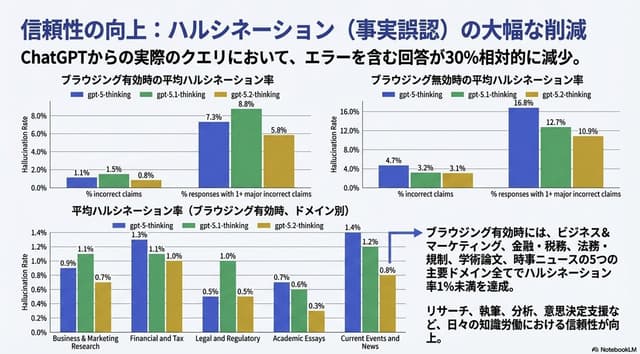
Completely reproduce the attached image as a single slide in a pptx file.
Make the text fully editable, and crop and use the diagrams and graphs from the original image as they are.
Infographic / Edu Visual - Vintage travel journal watercolor — output

Infographic / Edu Visual - Vintage travel journal watercolor

MinahilNano Banana Pro
Vintage travel journal watercolor illustrations of {argument name="locations" default="two cities"} on aged paper with stamps, handwritten notes, and maps. First: {argument name="city one" default="Los Angeles street scene"} with palm trees, City Hall, Wiltern Theatre, classic cars, bicycles, and pedestrians, capturing the scent of jasmine and ocean breeze. Second: {argument name="city two" default="Artisan City inspired by Japanese culture"} with Mount Fuji in the background, showcasing lacquerware, tea bowls, geta sandals, kimonos, and a pagoda temple blended with modern elements like vending machines. Both use soft watercolor washes, ink details, warm earthy tones, and a mix of cultural landmarks, local crafts, and urban life in a scrapbook, postcard-like style.
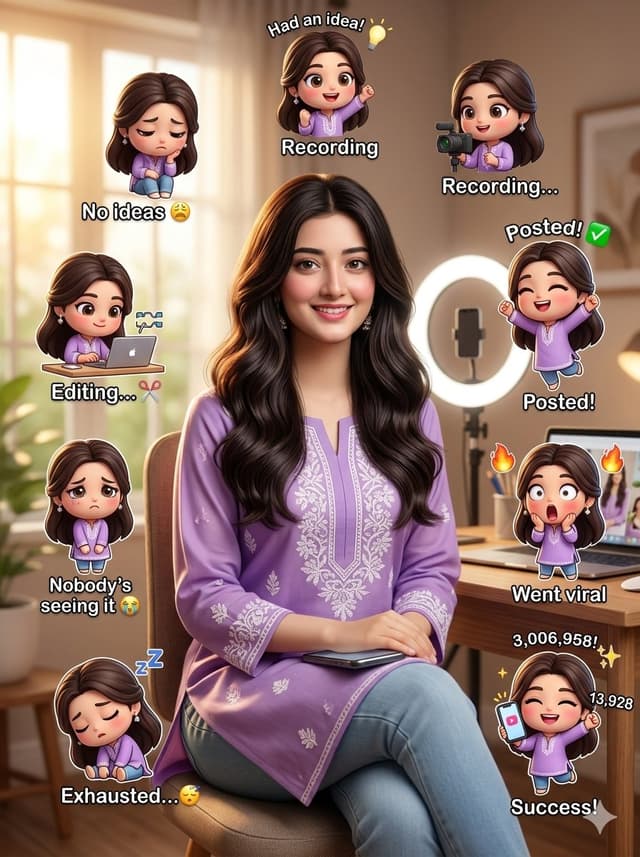
Infographic / Edu Visual - Content creator journey infographic — output

Infographic / Edu Visual - Content creator journey infographic

𝐊𝐢𝐧𝐳𝐚| 𝗔𝗜Nano Banana Pro
Create a hyper-realistic, ultra-detailed, DSLR-quality vertical portrait scene using the provided reference image, keeping the face, identity, facial structure, skin tone, hairstyle, soft expression, and authentic {argument name="ethnicity" default="Asian"} features exactly the same with no distortion or stylization, featuring a {argument name="subject" default="young woman in her early 20s"} with glowing natural skin, long slightly wavy dark hair, minimal influencer-style makeup, wearing a stylish modest {argument name="outfit color" default="lavender-purple"} full-sleeve influencer suit with soft white embroidery details, paired with light blue denim and minimal silver accessories, standing or sitting confidently in a {argument name="setting" default="cozy modern bedroom"} creator setup with a wooden desk, smartphone, ring light, laptop, aesthetic neutral decor, plants, shelves, warm daylight from a window, shallow depth of field, and soft cinematic lighting, while multiple cute glowing 3D chibi mini versions of the same girl float around the scene in kawaii cartoon style showing different content creation stages including a sad chibi with blank notebook and text “No ideas 😩”, excited chibi with bulb and text “Had an idea! 💡”, recording chibi using phone and ring light, editing chibi on laptop with text “Editing... ✂️”, celebrating upload chibi with text “Posted! ✅”, sad ignored chibi with text “Nobody’s seeing it 😭”, shocked happy viral chibi with text “Went viral 🔥”, sleepy exhausted chibi with text “Exhausted... 😴”, and successful final chibi holding a phone with huge engagement numbers and text “Success! ✨”, all rendered in ultra-realistic 8K quality with cinematic composition, vibrant details, soft shadows, influencer aesthetic, clean modern atmosphere, realistic textures, and highly engaging viral social media poster style in 4:5 portrait orientation.
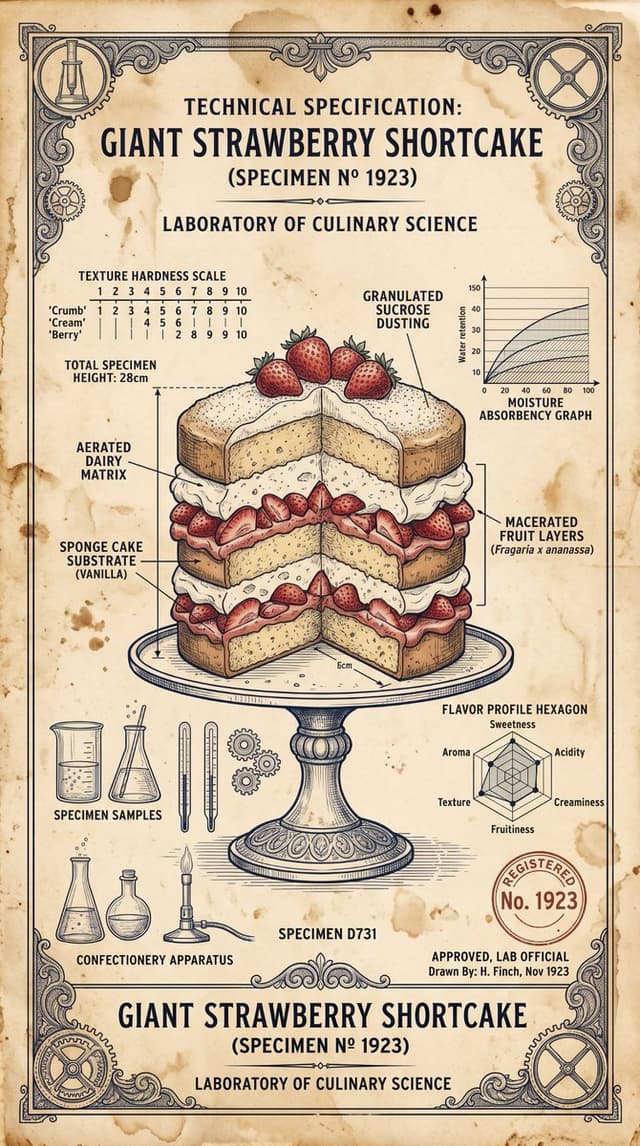
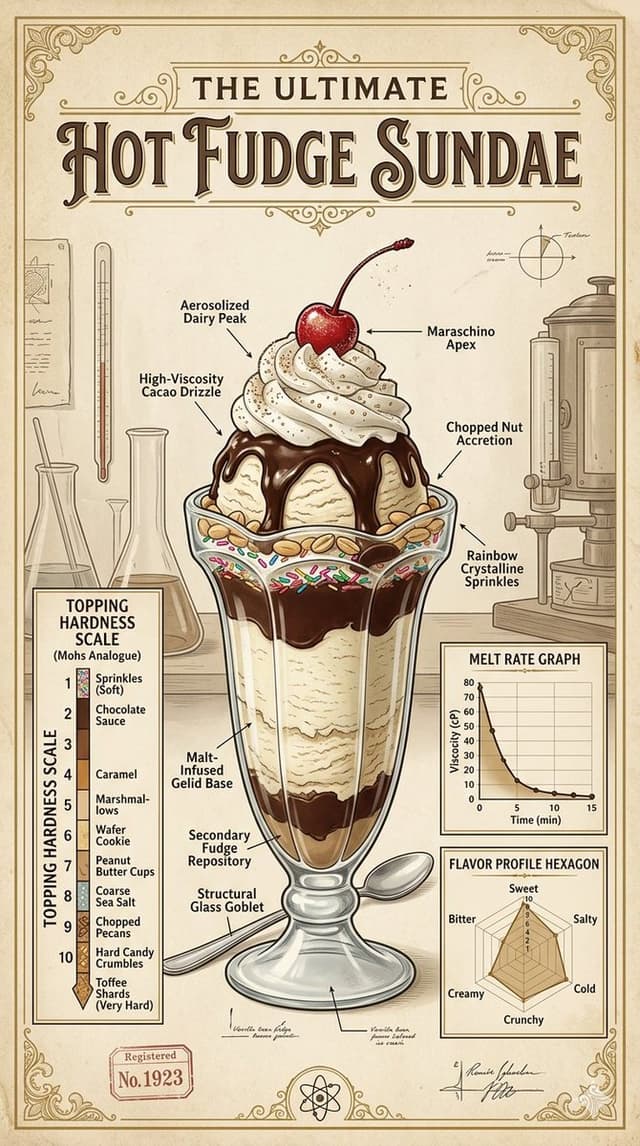
Infographic / Edu Visual - Vintage Scientific Blueprint Dessert — output

Infographic / Edu Visual - Vintage Scientific Blueprint Dessert

ShahNano Banana Pro
Vintage 1920s laboratory blueprint illustration of a giant {argument name="subject" default="strawberry shortcake"} styled as technical scientific diagram on {argument name="paper type" default="aged tea-stained parchment"}. Central dessert with precise callouts: “Aerated Dairy Matrix”, “Granulated Sucrose Dusting”, “Moisture Absorbency Graph”, “Flavor Profile Hexagon”, “Texture Hardness Scale”. Ornate Victorian borders, technical sketches of beakers and thermometers, “Registered No. 1923” stamp. Retro-futurism Da Vinci meets old-school soda shop menu aesthetic, high detail on layers and textures.
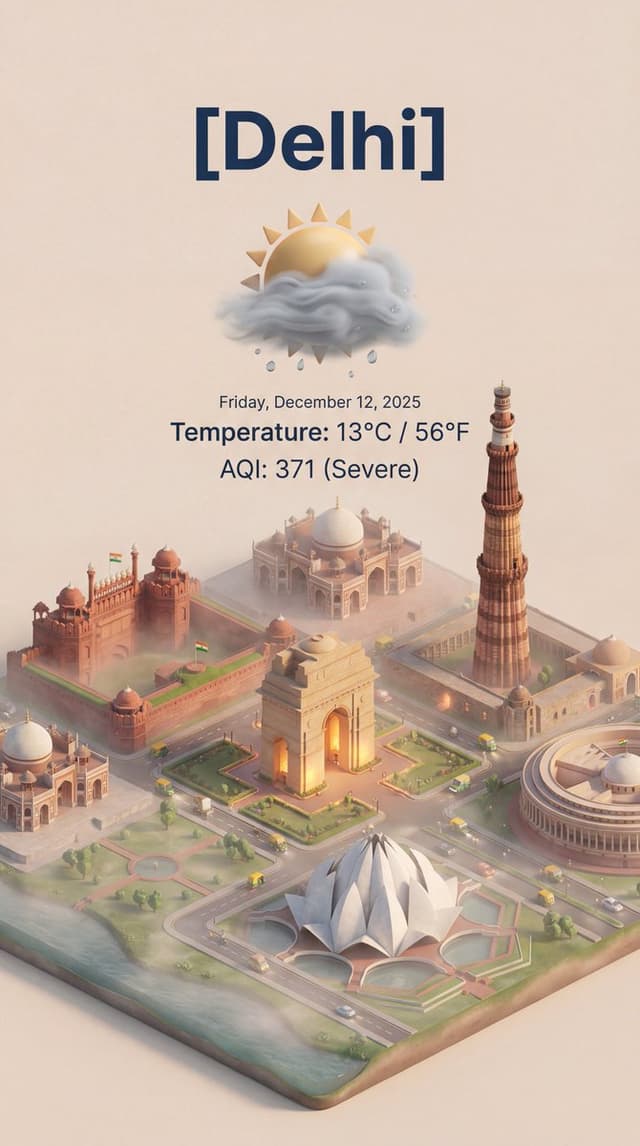
Isometric 3D Cartoon Scene of a City — output

Isometric 3D Cartoon Scene of a City

ZunainNano Banana Pro
create this isometric miniature 3D cartoon scene of [ {argument name="city name" default="Delhi"} ] including AQI and Temperature.
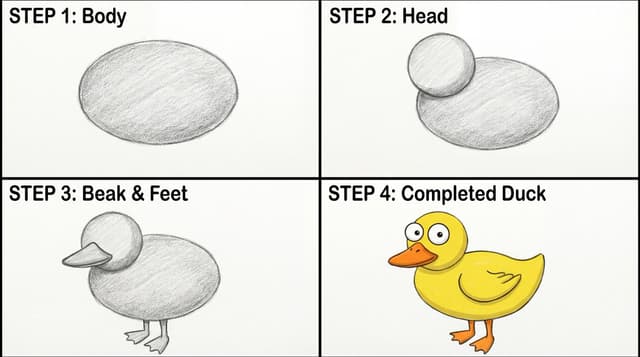
Four-Panel Guide for Drawing a Cartoon Duck — output

Four-Panel Guide for Drawing a Cartoon Duck

UmeshNano Banana Pro
Create a four-panel, square layout guide for drawing a simple cartoon duck.

1. Panel one displays a grayscale oval for the duck's body.
2. Panel two shows a grayscale smaller circle overlapping the front of the oval for the head.
3. In panel three, a grayscale beak is added to the head, and webbed feet are attached to the bottom of the body.
4. The final panel reveals the completed  duck with color now with two eyes on the head, and a wing outline on the body.
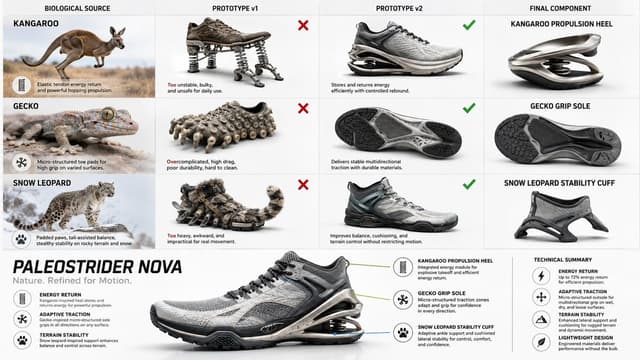
Infographic / Edu Visual - Bio-Inspired Industrial Shoe Design Board — output

Infographic / Edu Visual - Bio-Inspired Industrial Shoe Design Board

GadgetifyNano Banana Pro
do this for {argument name="animal count" default="3 random animals"} for a {argument name="product" default="shoe"} IMAGE = Σ(w_i × β_i) → target render   // Σ(w_i) = 1.0  BASIS_DECOMPOSITION FROM {product} + {bio_sources}:    β1 : INFER(product_category_aesthetic FROM product. design_language)        w = INFER(weight FROM product.visual_identity_strength)    β2 : INFER(biological_intelligence FROM bio_sources[].evolutionary_solutions)        w = INFER(weight FROM bio_sources[].advantage_significance)    β3 : INFER(engineering_translation FROM biomimicry_methodology)        w = INFER(weight FROM product.technical_complexity)    β4 : INFER(industrial_design_presentation FROM portfolio_aesthetic)        w = INFER(weight FROM audience.professional_level)    β5 : INFER(educational_diagram FROM design_process_documentation)        w = INFER(weight FROM instructional_clarity_need)  INTERSECTION_RULES:   β[bio] ∩ β[product]       = naive_prototype_v1  // literal translation   β[bio] ∩ β[engineering]   = refined_prototype_v2  // working solution   β[v2] ∩ β[product]        = final_components  // production parts   β[presentation] ∩ β[education] = grid_layout  // 4-column progression    FOR EACH bio_source:     col_1 = β[bio]     col_2 = β[bio] ∩ β[product] → ❌ failure     col_3 = β[bio] ∩ β[engineering] → ✓ success     col_4 = β[v2] ∩ β[product]  GLOBAL_CONSTRAINT:   layout    = 4_columns × N_rows (N = count bio_sources)   footer    = integrated_product (ALL col_4 components combined)   style     = β[presentation] — clean, white bg, professional  OUTPUT_CONSTRAINTS:   resolution : 8K landscape   render     : Octane | industrial_design_board   typography : sans_serif | hierarchical | callouts + annotations   lighting   : INFER(studio_rig FROM β[product])   negative_β : INFER(anti_patterns FROM β1..β5)  // TUNING KNOBS: // β[bio]++          → more nature photography, less product renders // β[engineering]++  → more technical diagrams, failure analysis detail // β[presentation]++ → more portfolio polish, less educational scaffolding // β[education]++    → more annotations, process transparency
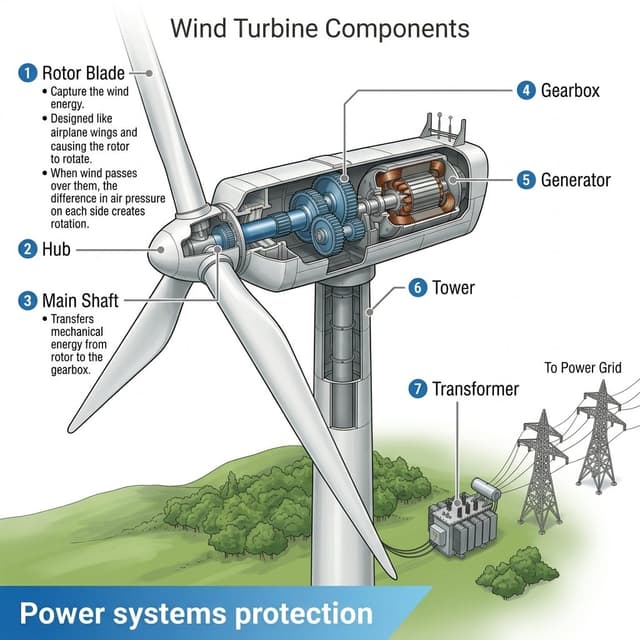
Infographic / Edu Visual - Wind Turbine Technical Schematic — output

Infographic / Edu Visual - Wind Turbine Technical Schematic

Gagan SinghNano Banana Pro
An intricate, highly detailed and clean 3D illustration and cross-section diagram of a massive horizontal-axis wind turbine, rendered on a crisp white background with a ground landscape and a distant power grid. The style is an illustrative technical schematic with clear lines and subtle textures. The overall title, positioned at the top-center in a professional sans-serif font, is "{argument name="title" default="Wind Turbine Components"}". The composition is dominated by the tall turbine, which is positioned slightly to the left, and its cutaway nacelle. The turbine stands on a detailed gray modular tower (Component 6), which rests on a ground plane of green rolling hills and foliage, alongside a detailed grey Transformer (Component 7). To the far right, two detailed steel lattice power pylons connect the transformer via high-voltage lines, labeled "To Power Grid". At the top of the tower sits the large nacelle, with a detailed internal cutaway revealing a visible multi-stage Gearbox (Component 4) with internal blue gears and a complex copper-coil Generator (Component 5), both cut to show their internal structure. The Generator housing is cut away to show the stator and rotor coils. Leading from the front is the Hub (Component 2), connecting three enormous, clean white aerodynamically-shaped Rotor Blades (Component 1) (labeled with bullet points: "Capture the wind energy.", "Designed like airplane wings...", "When wind passes over them..."). Inside the cutaway, the Hub leads to a detailed blue Main Shaft (Component 3, labeled with bullet points: "Transfers mechanical energy from rotor to the gearbox.", "Uses Direct Drive in some modern turbines.") that connects to the Gearbox. Multiple distinct, precise gray call-out lines with blue circular numbered bullet points (1 through 7) and corresponding text blocks are positioned around the diagram, connected to specific components. A large, blue-to-white gradient angled banner at the bottom-left features the bold, white text "{argument name="banner text" default="Power systems protection"}". The text for each component and its function is perfectly transcribed and legible as in image_1.png. The entire scene is sharply focused, like a technical patent illustration, with clean lighting.
Infographic / Edu Visual - Scientific Dessert Blueprint — output

Infographic / Edu Visual - Scientific Dessert Blueprint

AijazNano Banana Pro
A vintage, technical scientific diagram of [{argument name="subject" default="A GIANT STRAWBERRY SHORTCAKE"}], styled as a {argument name="style" default="1920s laboratory blueprint"}. The central dessert is highly detailed with scientific callouts using pseudo-intellectual terms like 'Aerated Dairy Matrix' or 'Granulated Sucrose Dusting.' The image features several data visualizations: a 'Moisture Absorbency Graph,' a 'Flavor Profile Hexagon,' and a 'Texture Hardness Scale' similar to the Mohs scale. The background is aged, tea-stained parchment with ornate Victorian borders, technical sketches of beakers and thermometers, and a 'Registered No. 1923' stamp at the bottom. Aesthetic: Retro-futurism, Da Vinci sketch meets old-school soda shop menu.
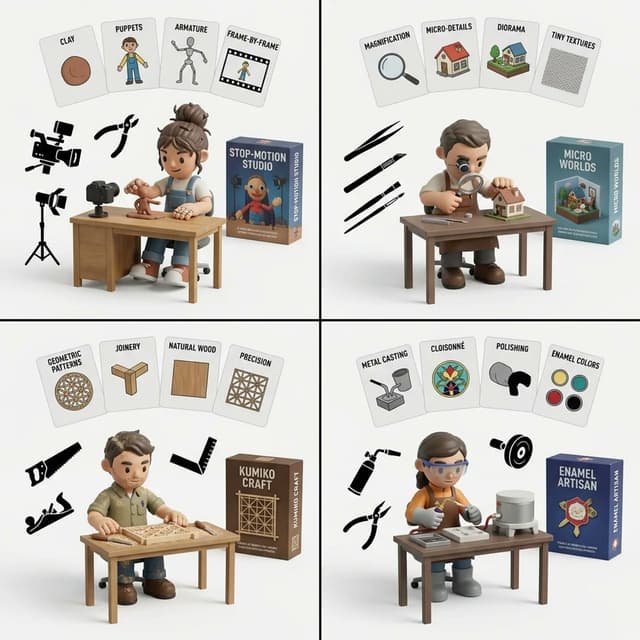
Infographic / Edu Visual - Handmade Art Style Visualizer Grid — output

Infographic / Edu Visual - Handmade Art Style Visualizer Grid

GadgetifyNano Banana Pro
2x2 grid, do this for 4 hardest type of handmade art style
1. infer the 4 most common artistic motifs of {argument name="art style" default="[art_style]"}. generate them as 2d flat cards floating at the top of the image with text labels.
2. infer the typical fashion, hairstyle, and tattoo coverage of an artist who specializes in {argument name="art style" default="[art_style]"}.
3. generate a 3d vinyl toy character matching this fashion, sitting at a wooden desk drawing.
4. infer the specific tools used to create {argument name="art style" default="[art_style]"}. generate them as flat 2d black silhouettes floating in the air.
5. generate a 3d product box in the background matching the theme.
6. render all on a clean white studio background.
execute.
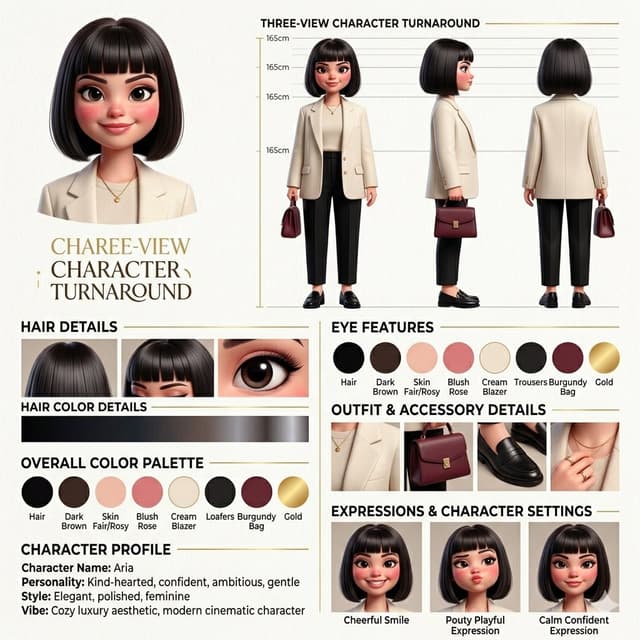
Infographic / Edu Visual - 3D Character Design Infographic — output

Infographic / Edu Visual - 3D Character Design Infographic

⁠ luciaAINano Banana Pro
{
  "project": "professional 3D female character design sheet infographic",
  "style": {
    "aesthetic": ["elegant", "cinematic", "modern", "polished", "luxury editorial"],
    "render": "high-end 3D animated film style",
    "lighting": "soft warm cinematic lighting",
    "textures": "smooth realistic skin, glossy hair, detailed strands",
    "composition": "clean infographic layout, organized, premium concept art sheet"
  },
  "character": {
    "gender": "female",
    "features": {
      "hair": "{argument name="hair style" default="dark sleek bob, blunt bangs above eyes, glossy strands"}",
      "face": "plump soft shape, rosy cheeks, small button nose",
      "eyes": "very large dark expressive eyes, long lashes, glossy reflections",
      "skin": "fair smooth skin with warm undertones",
      "proportions": "soft feminine, doll-like aesthetic"
    }
  },
  "sections": {
    "turnaround": {
      "title": "THREE-VIEW CHARACTER TURNAROUND",
      "views": ["front", "side", "back"],
      "extras": ["height scale", "neutral pose", "full body proportions", "studio background"]
    },
    "palette": {
      "title": "OVERALL COLOR PALETTE",
      "colors": ["{argument name="color palette" default="cream, beige, warm brown, black, burgundy, soft gold"}"]
    },
    "outfit": {
      "title": "OUTFIT & ACCESSORY DETAILS",
      "style": ["{argument name="outfit style" default="oversized blazer, tailored bottoms, luxury handbag, leather shoes, minimal jewelry"}"],
      "vibe": ["old money", "minimalist luxury", "modern professional"]
    }
  }
}
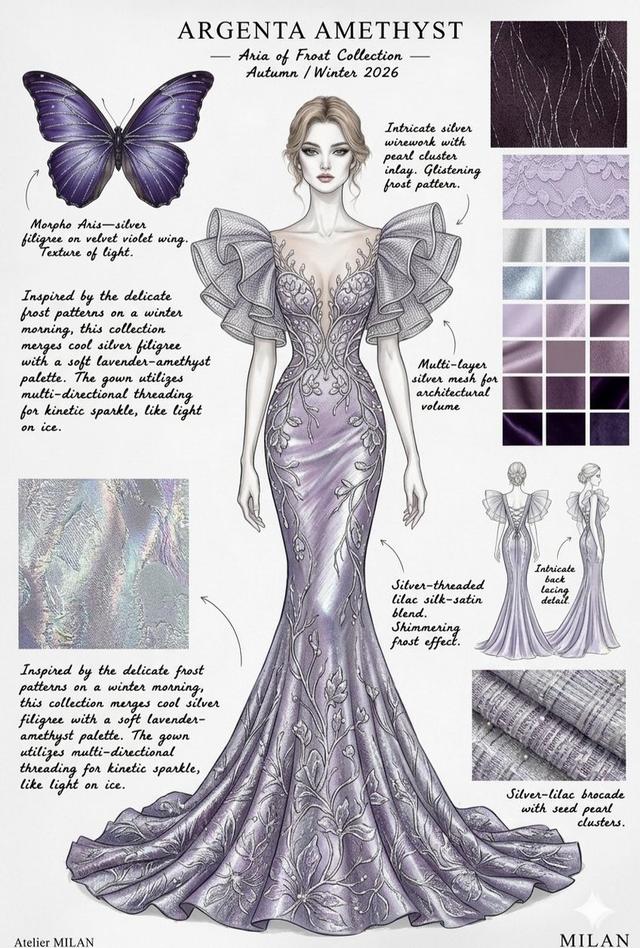
Infographic / Edu Visual - Ethereal Butterfly Couture Sketches — output

Infographic / Edu Visual - Ethereal Butterfly Couture Sketches

MinahilNano Banana Pro
Create high-fashion couture sketches for an "{argument name="collection name" default="Aria of Frost"}" and "Lumina Papilio" collection, featuring ethereal, butterfly-inspired evening gowns. The designs should showcase sleek mermaid silhouettes, architectural ruffled sleeves that mimic lepidoptera wings, and intricate silver filigree wirework. Use a luxurious color palette of {argument name="color palette" default="iridescent amethyst, frozen lilac, and deep cerulean blue"} accented with metallic gold and silver threads. The mood board should include technical details like fabric swatches of silk-satin, silver mesh, and seed pearl clusters, presented in a professional atelier style with elegant calligraphy and butterfly reference anatomy.
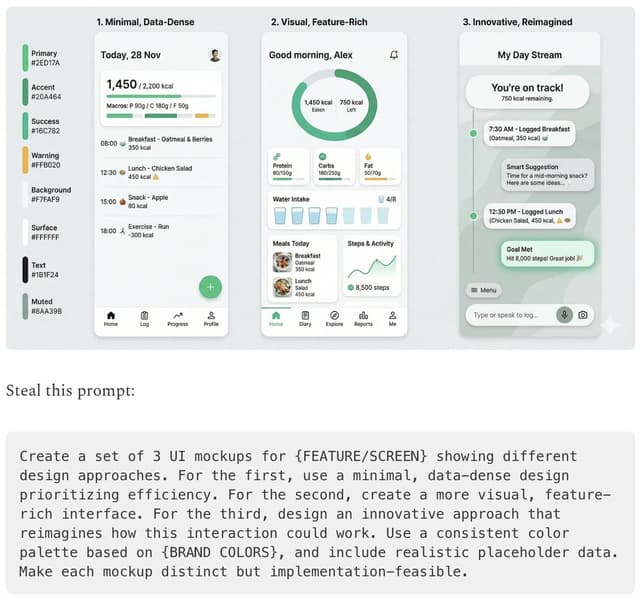
Five High-Efficiency Nano Banana Pro Prompts for Business Graphics — output

Five High-Efficiency Nano Banana Pro Prompts for Business Graphics

YouMindNano Banana Pro
- {argument name="use case 1" default="LinkedIn Infographic"}
- {argument name="use case 2" default="Technical Architecture Diagram"}
- {argument name="use case 3" default="Product UI Comparison Model"}
- {argument name="use case 4" default="Data Visualization"}
- {argument name="use case 5" default="Code Visualization Explanation"}
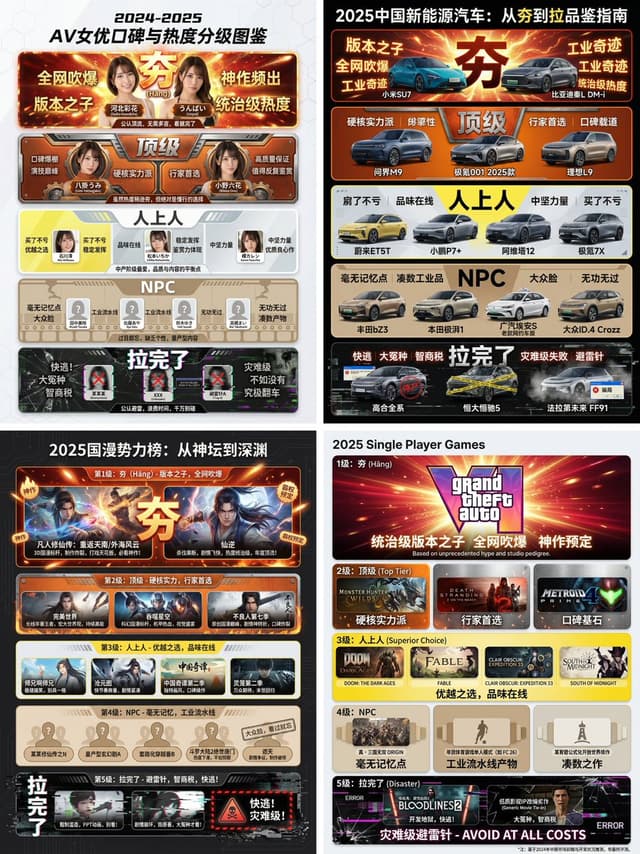
Hāng to Lā (Good to Bad) Rating Infographic Prompt — output

Hāng to Lā (Good to Bad) Rating Infographic Prompt

YouMindNano Banana Pro
[Core Task Instruction]
You are an AI expert with real-time web search capabilities and top-tier data visualization design skills. Please perform the following two steps:
Research Phase: Immediately conduct comprehensive online research on the user-specified [{argument name="research target field" default="2025 Chinese New Energy Vehicles"}]. Collect public reputation, market popularity, professional reviews, and user feedback data on different sub-products, models, or works within this field.

Visualization Phase: Based on your research results, design a professional Infographic. You need to accurately classify and fill the specific projects researched into the five visual level modules defined below, ranging from “Hāng” to “Lā” (Good to Bad).

[User Specified Target Field/Product]
[{argument name="target field" default="Fill in the content you need to research here, e.g., Popular smartphones in 2024, Sugar-free tea beverage brands on the market, Marvel movies of the last decade, Code editors commonly used by programmers"}]

[Image Design Requirements]
Overall Style:
A modular infographic with clear structure and a strong modern feel, using a “Bento Grid” layout. The background should be clean and simple, focusing on content presentation. Visually, it must show a strong hierarchical drop-off from high to low.

Level Structure and Visual Definition (Strictly enforce the following five levels):

Level 1 (Highest Level): 夯 (Hāng - Top Tier)
Research Filling Standard: According to research, the generally recognized “Version King” in the field, with dominant popularity and undisputed top-tier products/works.

Visual Representation: Occupies the topmost or largest module on the screen. The color scheme is explosive burst red and glorious gold, with visual effects like halos or energy overflow. The font is the largest and boldest. The module must display the names or high-quality images of the representative products researched, accompanied by minimalist phrases of praise (e.g., “Blown up across the internet,” “Masterpiece”).

Level 2: Top Tier

Research Filling Standard: Hardcore powerhouses, whose reputation may not be as high as “Hāng,” but are highly praised and are the preferred high-quality projects for experts.

Visual Representation: Located on the second layer. The color scheme is solid, high-end burning orange and metallic silver. The module design appears robust and textured. Display representative powerhouse products.

Level 3: Superior

Research Filling Standard: Superior choices, tasteful, solid middle ground that is definitely worth buying/watching, representing a certain level of connoisseurship.

Visual Representation: Located in the middle layer. The color scheme is bright, clean lemon yellow and cool gray. The design style is modern and refreshing. Display representative high-quality middle-class products.

Level 4: NPC

Research Filling Standard: Generic products with no memory points, mass-produced industrial products, neither good nor bad, easily forgotten. Must include specific product or brand names, do not be vague.

Visual Representation: Located in the lower-middle layer. The color scheme is dull and bland bread color/beige or cardboard brown. The module design appears ordinary, repetitive, and lacks personality. Display those very mediocre products.

Level 5 (Bottom Level): 拉完了 (Lā - Failed)

Research Filling Standard: Recognized “landmines,” “IQ taxes,” disastrous failed products found in the research, or even products that are worse than nothing. Must include specific product or brand names, do not be vague.

Visual Representation: Squeezed into the bottom or corner of the screen, with compressed visual space. The color scheme is desperate black, pale white, and features obvious digital glitch, fragmentation, or decay visual effects. Display those famous “flop” products, accompanied by warning phrases (e.g., “Run away,” “Big sucker”).
Browse by model, style or topic

Find your next direction

ASTORIE CANVAS

Take the idea further.

Bring your prompts, references and results together in one creative space.

Open your canvas ↗