Prompts for educational graphics

Explore a travel-poster example that brings architectural details into a graphic layout. Use its prompt as a starting point for deciding what your own visual should explain.

Explore prompts

612 prompts

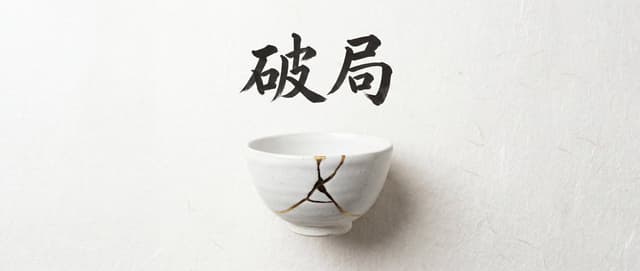
Multi-Font Text Generation and Control — output

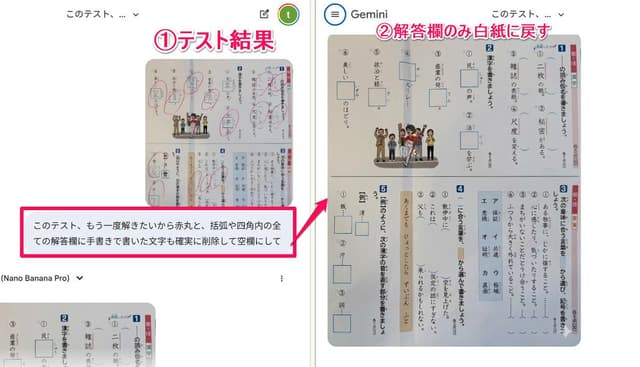
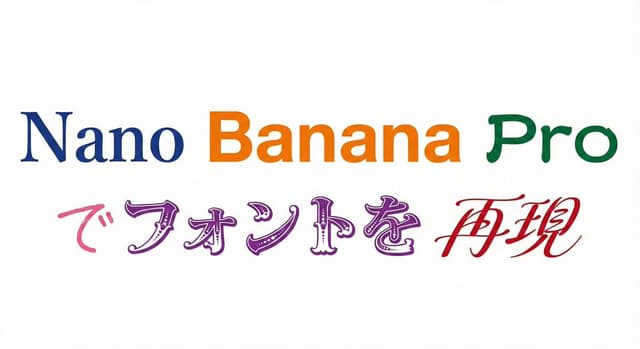
Multi-Font Text Generation and Control

シュナプーンNano Banana Pro
Please display the following string using the specified fonts.
Express the background in white and the text in black.
Generate 9 types of fonts in one go.

# String
{argument name="string 1" default="Nano Banana Proでフォントを再現"}

# Desired Fonts
Mincho (Serif)
Gothic (Sans-Serif)
Reisho (Clerical Script)
Kanteiryu (Kabuki Font)
Handwritten
Decorative/Title (Display)
Horror
Cyber/SF (Tech)
Calligraphy (Script)

Furthermore, you can specify a particular font for a specific part of the string.

Prompt:
Please display the following string using the specified fonts.
Express the background in white and change the color of the text for each font.

# String
{argument name="string 2" default="Nano Banana Proでフォントを再現"}

# Desired Fonts
Nano: Mincho (Serif)
Banana: Gothic (Sans-Serif)
Pro: Reisho (Clerical Script)
で: Handwritten
フォントを: Decorative/Title (Display)
再現: Calligraphy (Script)
Infographic / Edu Visual - Kling AI + Google Nano Banana Pro Prompt (Video and Image) — output

Infographic / Edu Visual - Kling AI + Google Nano Banana Pro Prompt (Video and Image)

𝐌Nano Banana Pro
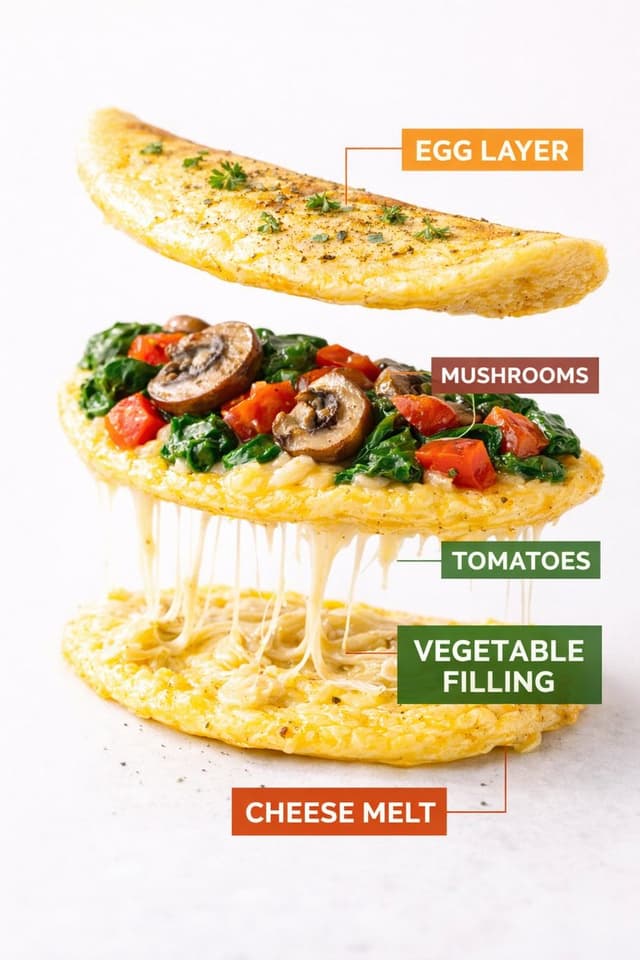
Image 1 - Studio breakfast shot where a fluffy omelette folds over itself in slow motion on a white background revealing vegetables and cheese inside.

Image 2 - Exploded vertical food infographic of a fluffy omelette on a clean white studio background. The omelette separated into floating layers showing top egg layer, melted cheese layer stretching, sautéed vegetable filling (spinach, mushrooms, diced tomatoes), and bottom egg layer. Each component labeled with bold annotation blocks and clean connector lines pointing to the ingredients. Labels include Egg Layer, Cheese Melt, Spinach, Mushrooms, Tomatoes, Vegetable Filling. Minimal modern infographic design, bright commercial food photography style, crisp textures, soft studio lighting, premium recipe visualization aesthetic.
Nano Banana Pro Decision Making Prompt — output

Nano Banana Pro Decision Making Prompt

歸藏(guizang.ai)Nano Banana Pro
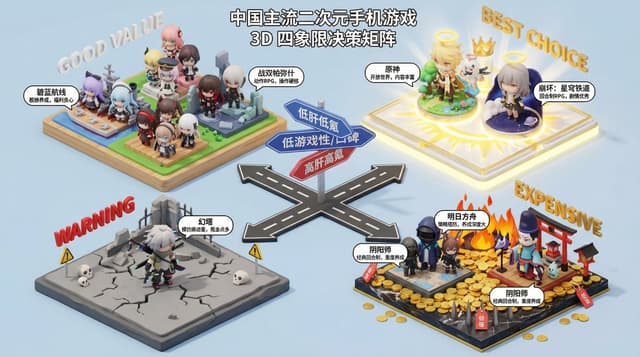
You are a professional consumer decision consultant, skilled at using four-quadrant charts to analyze and compare products to help users make purchasing decisions. Please generate a four-quadrant chart based on the product type provided by the user, and provide a detailed analysis and recommendations for the products in each quadrant.

**Product Type**: {argument name="product type" default="Electric Vehicle"}

**Four-Quadrant Analysis Dimensions**:

*   **X-axis**: {argument name="X axis" default="Price"}
*   **Y-axis**: {argument name="Y axis" default="Performance"}

**Quadrant Naming**:

*   **Quadrant I (High X, High Y)**: {argument name="Quadrant I name" default="Flagship Choice"}
*   **Quadrant II (Low X, High Y)**: {argument name="Quadrant II name" default="Value King"}
*   **Quadrant III (Low X, Low Y)**: {argument name="Quadrant III name" default="Entry-Level Preferred"}
*   **Quadrant IV (High X, Low Y)**: {argument name="Quadrant IV name" default="Design First"}

**Output Requirements**:

1.  **Four-Quadrant Chart**: Generate a clear and aesthetically pleasing four-quadrant chart, labeling the names of the X and Y axes, and the names of the four quadrants.
2.  **Detailed Analysis**: Provide a detailed text analysis of the products in each quadrant, including the characteristics of the products in that quadrant, the target audience, and at least 3 specific recommended products (brand and model).
3.  **Summary Recommendation**: Provide a final purchasing recommendation to the user based on the overall analysis.
Infographic / Edu Visual - Benchmark Prompt for Nano Banana/Gemini Image Generation — output

Infographic / Edu Visual - Benchmark Prompt for Nano Banana/Gemini Image Generation

相武 辰昌Nano Banana Pro
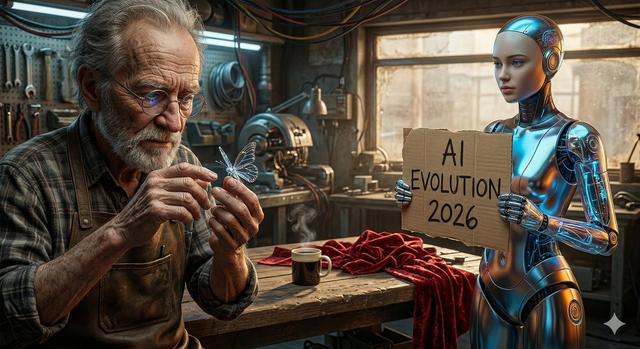
Five difficult points to check with this prompt:
If this one image is generated, please zoom in and check the following points.

- Text Consistency (AI EVOLUTION 2026)
Is the text written on the cardboard sign rendered correctly without spelling mistakes, while maintaining a "handwritten" texture?

- Anatomical Accuracy and Interaction
Are the old man's "10 fingers" naturally holding the fragile object, a glass butterfly? Are the fingers dissolving into the background or is the number incorrect?

- Material Differentiation (Material Mix)
Are materials with completely different reflectivity and transparency—"old man's skin (wrinkles)," "chrome plating (mirror surface)," "glass (transparency)," "velvet (napped)," and "liquid (steam)"—depicted without contradiction under the same light source?

- Calculation of Space and Light (Ray Tracing Understanding)
Is the blue luminescence of the android reflecting correctly on the old man's glasses and surrounding metal? Are there no contradictions in the shadows caused by multiple light sources?

- Prompt Adherence and Attribute Separation
Is the specified arrangement of "old man on the left" and "android on the right" maintained? Is "Color Bleeding" occurring, where the color of the "red velvet" transfers to the android's skin or the old man's clothes turn blue?
YouTube Thumbnail - Two-Step Tier List Generation Prompt — output

YouTube Thumbnail - Two-Step Tier List Generation Prompt

Pliny the Liberator 🐉󠅫󠄼󠄿󠅆󠄵󠄐󠅀󠄼󠄹󠄾󠅉󠅭Nano Banana Pro
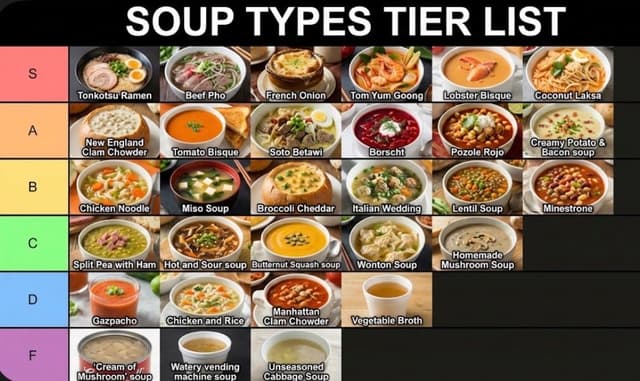
Make a json of a tier list (S-F scale) for: {argument name="category" default="[*insert-here*]"}

Now generate image with the classically seen style/color scheme and representative thumbnail images for each list item
Infographic / Edu Visual - Sports Equipment Infographic Layout of Victor Osimhen — output

Infographic / Edu Visual - Sports Equipment Infographic Layout of Victor Osimhen

KeskinNano Banana Pro
{
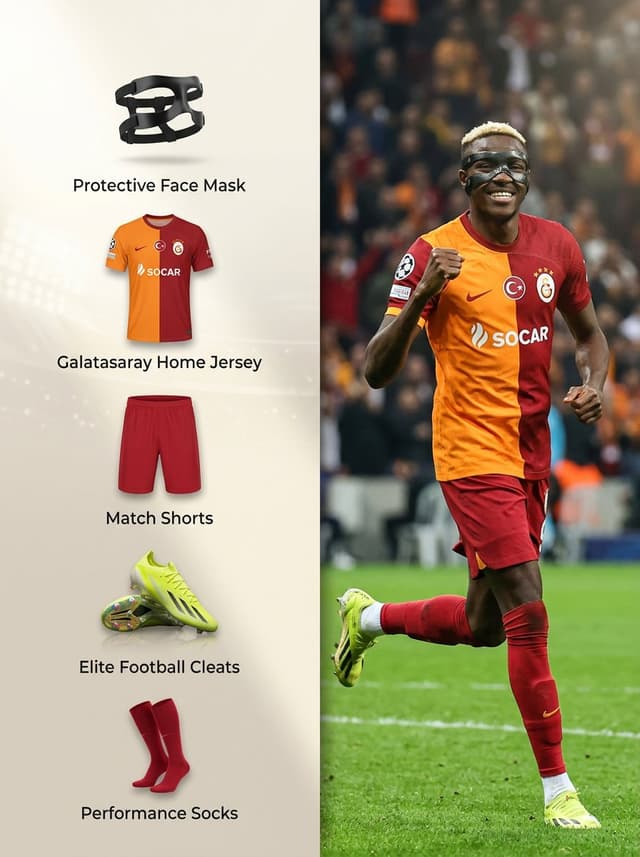
  "Objective": "Create a 3:4 vertical sports equipment breakdown layout of Victor Osimhen with a more visually appealing and premium left panel design.",
  "AspectRatio": "3:4",
  "Layout": {
    "Type": "Vertical split infographic",
    "LeftPanel": {
      "Width": "38%",
      "Background": {
        "BaseColor": "Soft warm ivory",
        "Texture": "Subtle luxury paper texture",
        "Overlay": "Very light gradient from top left (brighter) to bottom right (slightly darker)",
        "AccentElements": [
          "Faint abstract stadium-light glow in background",
          "Soft diagonal shadow for depth"
        ]
      },
      "LightingStyle": "Soft studio lighting from upper left",
      "ShadowStyle": {
        "UnderItems": "Soft drop shadows beneath each product",
        "SideShadow": "Gentle panel shadow near split line for dimensional separation",
        "Realism": "Natural soft shadows, not harsh"
      },
      "ItemsDisplayedAsImages": true,
      "ItemPresentation": {
        "Layout": "Vertical stack with breathing space",
        "CardStyle": "Each item slightly elevated with subtle shadow",
        "Spacing": "Balanced luxury spacing between elements"
      },
      "Items": [
        {
          "ItemName": "Protective Face Mask",
          "ImageStyle": "Isolated product image floating slightly with soft shadow",
          "TextPlacement": "Centered underneath in refined typography"
        },
        {
          "ItemName": "Galatasaray Home Jersey",
          "ImageStyle": "Front-facing flat-lay with realistic fabric texture",
          "TextPlacement": "Centered underneath"
        },
        {
          "ItemName": "Match Shorts",
          "ImageStyle": "Clean product cut-out with depth shadow",
          "TextPlacement": "Centered underneath"
        },
        {
          "ItemName": "Elite Football Cleats",
          "ImageStyle": "Angled product shot with subtle reflective shadow",
          "TextPlacement": "Centered underneath"
        },
        {
          "ItemName": "Performance Socks",
          "ImageStyle": "Minimal isolated display with soft grounding shadow",
          "TextPlacement": "Centered underneath"
        }
      ],
      "Typography": {
        "Font": "Modern elegant sans-serif",
        "Weight": "Medium",
        "Color": "Deep charcoal",
        "Spacing": "Generous letter spacing for premium feel"
      }
    },
    "RightPanel": {
      "Width": "62%",
      "ImageStyle": "Smartphone photograph",
      "Scene": {
        "Subject": "Victor Osimhen celebrating a goal",
        "Action": "Running with a smile, slight fist pump",
        "Location": "Football pitch",
        "Lighting": "Natural stadium lighting",
        "Background": "Crowd naturally blurred",
        "Realism": "Authentic phone camera clarity"
      }
    }
  },
  "VisualStyle": {
    "OverallLook": "Premium modern sports editorial",
    "Dept
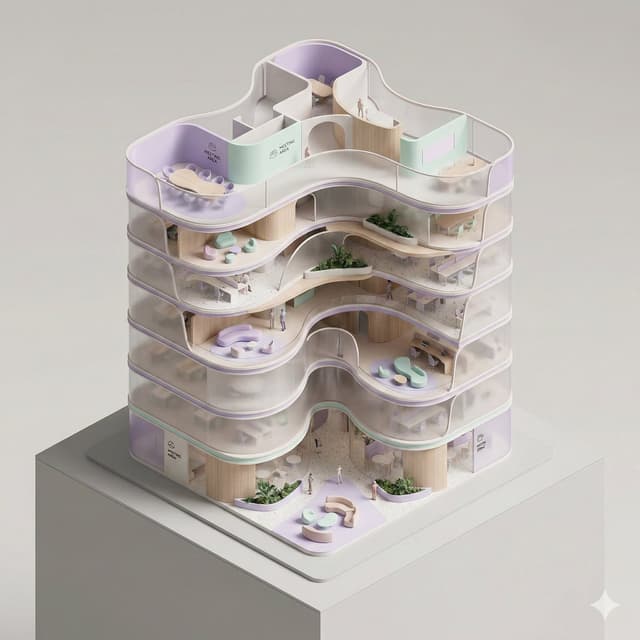
Infographic / Edu Visual - Conceptual Isometric Office Tower Model — output

Infographic / Edu Visual - Conceptual Isometric Office Tower Model

Lunarion ArtNano Banana Pro
A conceptual architectural isometric model of an organic-form corporate office tower, presented as an exhibition-scale diorama. The building is shown with a cutaway section, exposing fluid spatial flow, curved meeting rooms, and lounge zoning from a top-down isometric perspective. Volumes are lightly separated by seamlessly curved translucent partitions to suggest circulation and function. Warm micro-LEDs illuminate the individual floors from within. Strong use of negative space and clear compositional hierarchy. Thin structural outlines, soft pastel lavender and mint, ribbed wood and dark terrazzo tones, minimal abstract signage, subtle human-scale markers. Smooth surfaces, pill-shaped rounded edges, dramatic controlled studio lighting, architectural model photography style, clean dark neutral background, high-detail yet minimal.
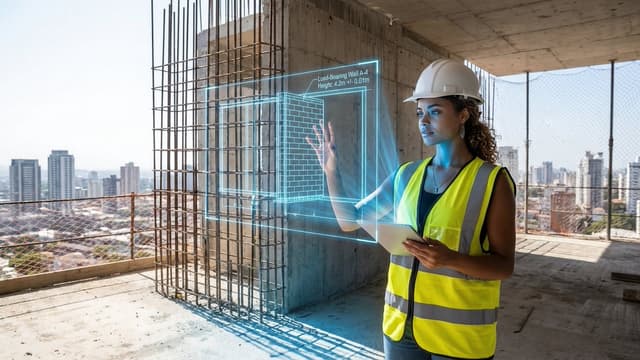
Construction Site AR Blueprint Overlay Prompt (JSON) — output

Construction Site AR Blueprint Overlay Prompt (JSON)

Heather CooperNano Banana Pro
{
 "promptDetails": {
 "description": "A construction site scene with the uploaded subject holding up an AR projection of a blueprint over the unfinished structure.",
 "styleTags": [
 "Industrial",
 "Modern Architecture",
 "Midday Light",
 "Technical Schematics"
 ]
 },
 "scene": {
 "background": {
 "setting": "The top floor of a new skyscraper under construction (exposed concrete and rebar)",
 "details": "Distant city skyline visible through open walls, safety netting, hard hats, dust motes in the air, strong texture of raw concrete floor."
 },
 "subject": {
 "description": "The person defined by `[UPLOADED IMAGE]`, wearing a safety vest and hard hat, looking professional.",
 "pose": "Standing near the edge, holding an invisible tablet (or hand outstretched) projecting the overlay, looking critically at the structure.",
 "focus": "Subject and the projected blueprint are sharp; the background city is slightly softened."
 }
 },
 "overlayObject": {
 "type": "Holographic Architectural Blueprint",
 "relationshipToEnvironment": "The overlay appears as a complex, translucent blue-line schematic *over* a section of the exposed rebar/wall.",
 "transform": "Slightly angled in 3D perspective to match the construction site's structure.",
 "surfaceInteraction": "Vibrant, electric blue lines with sharp white measurements, casting a subtle blue light onto the subject's vest and concrete floor.",
 "components": {
 "section": "Load-Bearing Wall A-4",
 "measurement": "Height: 4.2m +/- 0.01m",
 "position": "Projected mid-frame, aligned with the structure."
 }
 },
 "technicalStyle": {
 "aspectRatio": "16:9",
 "photographyStyle": "Editorial, High Detail, Commercial",
 "camera": {
 "shotType": "Medium Shot",
 "angle": "Eye-level, dynamic composition emphasizing vertical lines.",
 "depthOfField": "Moderate, ensuring the raw background textures are visible but not distracting."
 },
 "lighting": {
 "type": "Harsh, Clear Midday Sun",
 "description": "Strong, directional sunlight creating sharp shadows and bright highlights on metal and concrete."
 },
 "color": {
 "palette": "Concrete grays, safety vest orange/yellow, and electric blue."
 }
 }
}
Infographic / Edu Visual - Generating Pokémon Zukan (Illustrated Guide) Style Art — output

Infographic / Edu Visual - Generating Pokémon Zukan (Illustrated Guide) Style Art

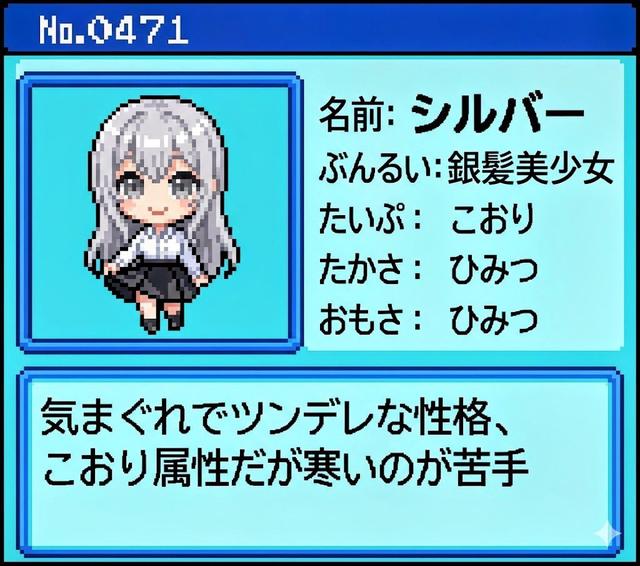
シルバーNano Banana Pro
Referencing this character, generate a Pokémon Zukan-style illustration. The Zukan No. is {argument name="Zukan Number" default="[Enter Zukan No.]"}. The background is white. The Zukan description text is {argument name="Description Text" default="[Enter description text]"}. Reproduce the Zukan layout and design.
Infographic / Edu Visual - Literary Deep-Dive Recommendation Engine Prompt — output

Infographic / Edu Visual - Literary Deep-Dive Recommendation Engine Prompt

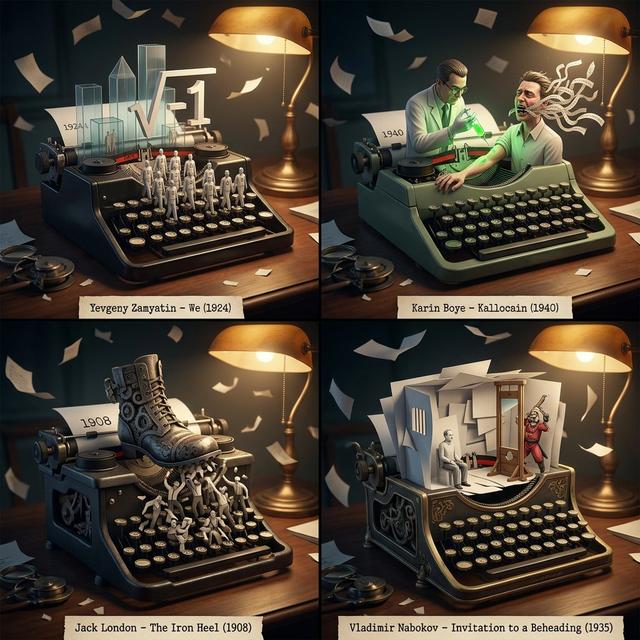
GadgetifyNano Banana Pro
<instructions>for {argument name="book title" default="1984"}
Act as a literary deep-dive recommendation engine + antique typewriter automaton builder.
Step 1: Analyze the input book—narrative voice, philosophical undercurrents, world atmosphere, and character psychology.
Step 2: Select 4 obscure books with mirroring intellectual/emotional resonance.
Step 3: ONE 2x2 grid. Each panel features a vintage typewriter with exposed mechanics; keys strike to "type" floating 3D paper sculptures forming key symbolic scenes; ink ribbons spell year subtly. Under each: typed label “Author – Title (Year)”.
Style: dimly lit writer’s study, warm desk lamp, mechanical patina, floating paper fragments.
</instructions>
Infographic / Edu Visual - Pergola Blueprint to Photoreal Structure Prompt — output

Infographic / Edu Visual - Pergola Blueprint to Photoreal Structure Prompt

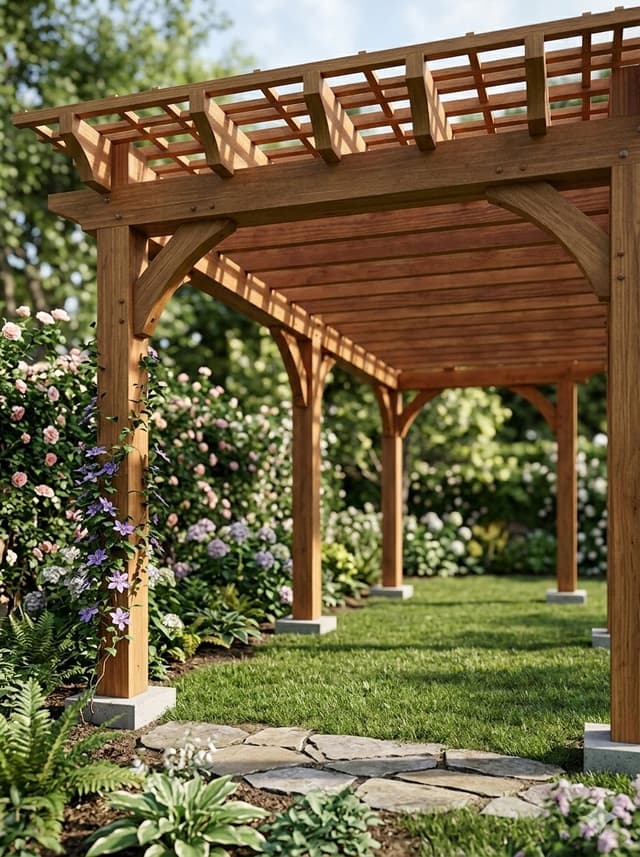
𝐌Nano Banana Pro
Pergola Blueprint Prompt: Hand-drawn architectural pencil sketch of a wooden garden pergola on white paper. Front and slight side elevation view with clear proportions.

Construction lines, dimensions and handwritten notes visible. Wooden posts and cross beams precisely drafted. Professional but hand-sketched technical style. Clean white background.

Finished Pergola: Fully built wooden pergola in a real garden, matching the exact structure and proportions from the sketch. Viewed from a low front corner perspective at eye level, showing depth and the full beam structure instead of a flat elevation. Natural wood texture with realistic joints and connections. Installed on grass with surrounding plants. Soft daylight with grounded shadows. Photorealistic architectural visualization.
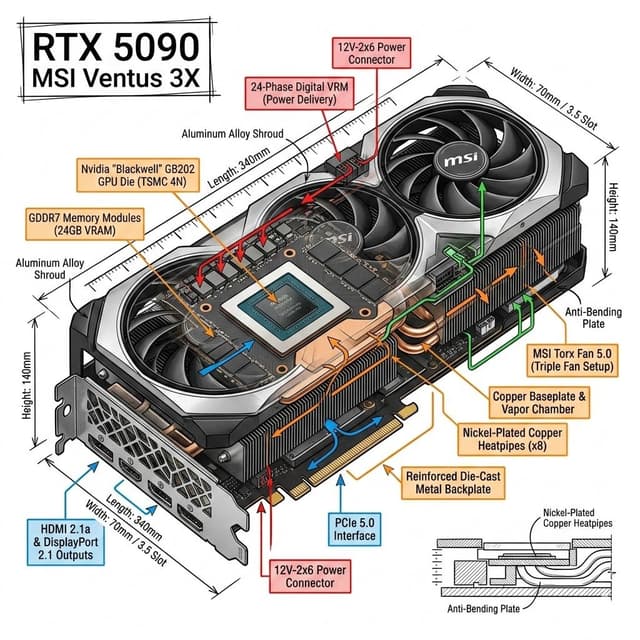
Infographic / Edu Visual - Technical Infographic Cutaway Prompt — output

Infographic / Edu Visual - Technical Infographic Cutaway Prompt

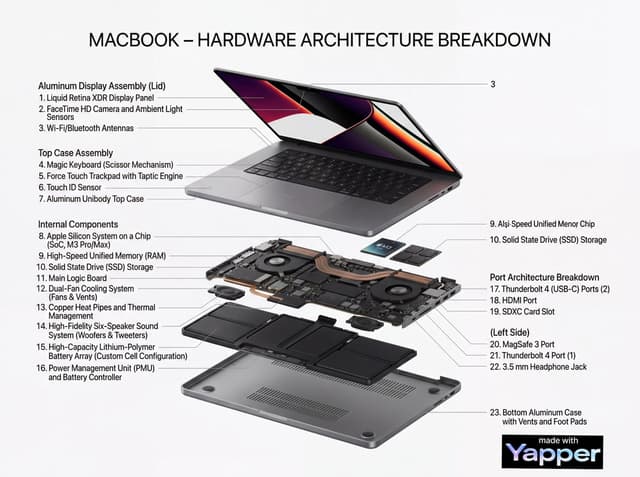
WeinbergNano Banana Pro
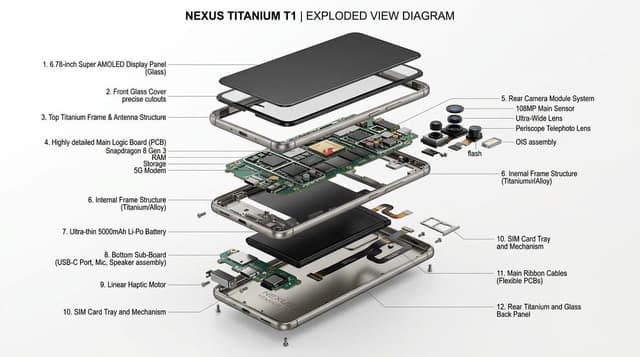
Create a high-resolution professional infographic of [{argument name="object name" default="OBJECT NAME"}].
Display the object in a clean, semi-realistic technical illustration style. Include both external structure and internal components using a cutaway view, cross-section, or exploded layout where appropriate.
Automatically detect and label all major structural, mechanical, electronic, or functional components using accurate technical terminology.
Use thin leader lines connecting each label precisely to the correct part. Ensure labels are clear, readable, and professionally formatted.
Add a bold headline at the top:
“OBJECT NAME – Complete Structural Breakdown”
Layout should be balanced and organized like a modern engineering manual or product teardown poster.
Background: clean white or light neutral tone.
Lighting: neutral studio lighting with soft shadows for depth.
Materials and textures must look realistic and detailed.
Use modern sans-serif typography with clear hierarchy (bold headings, smaller technical labels).
Ultra-detailed, sharp focus, 4K resolution, professional educational infographic style.
No artistic distortion, no clutter, no decorative elements unrelated to structure.
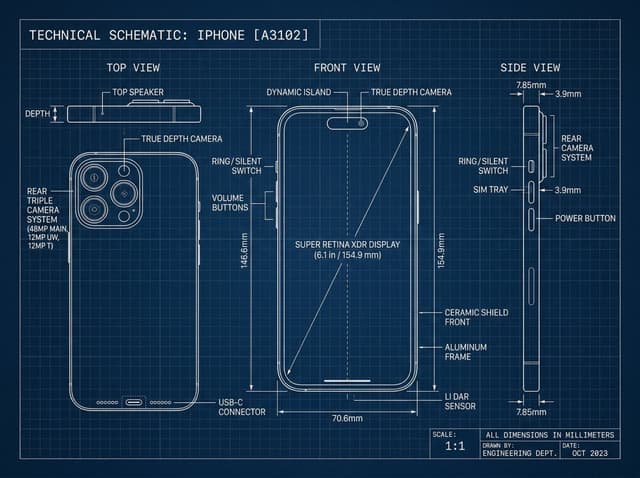
Infographic / Edu Visual - Technical Blueprint Drawing Prompt — output

Infographic / Edu Visual - Technical Blueprint Drawing Prompt

ANKIT PATEL 🇮🇳 | AINano Banana Pro
[Iphone], technical blueprint drawing, orthographic view, front view + side view + top view, white vector line art, thin construction lines, precise measurements, annotation labels, dimension arrows, grid background, deep blue background, minimal design, engineering schematic style, high detail
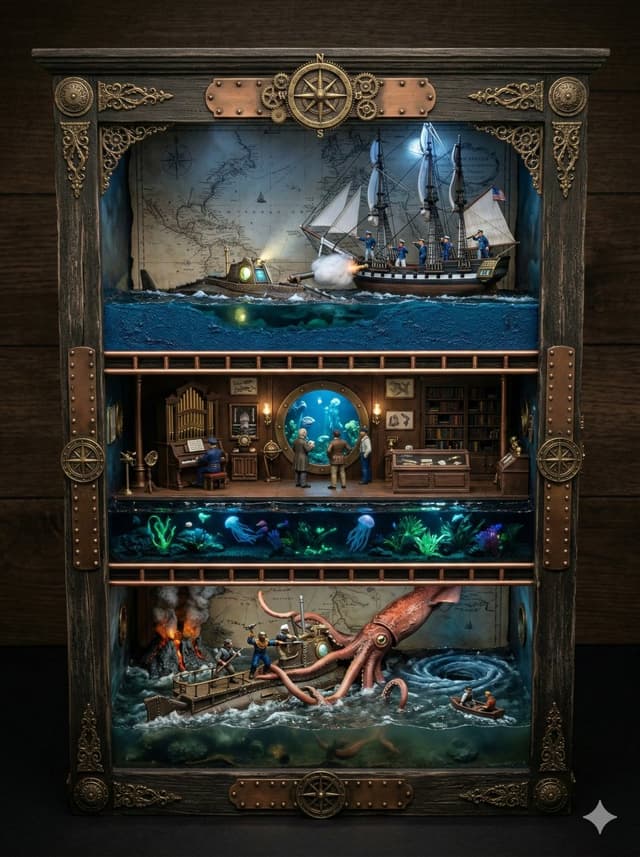
Infographic / Edu Visual - Ornate Box Diorama Prompt for Twenty Thousand Leagues Under the Sea — output

Infographic / Edu Visual - Ornate Box Diorama Prompt for Twenty Thousand Leagues Under the Sea

ArtingentNano Banana Pro
Variable Guide
1. OVERALL_DIORAMA_THEME = Scenes from the book  Twenty Thousand leagues under the sea  by Jules Verne, in the order in which they are presented in the book
2. CUPBOARD_BASE_MATERIAL = 
3. CUPBOARD_LINING_MATERIAL = 
4. RACK_MATERIAL = 
5. ORNAMENTATION_STYLE = [e.g., Gothic carved wood, Art Deco brass, Elven interlaced vines]
6. ART_STYLE = Hyper-Realistic Render
7. TOP_SHELF_SCENE = [Describe specific actions of miniature figures defining the scene]
8. MIDDLE_SHELF_SCENE = [Describe specific actions of miniature figures defining the scene]
9. BOTTOM_SHELF_SCENE = [Describe specific actions of miniature figures defining the scene]
10. LIGHTING = 
11. CAMERA_ANGLE = A straight-on, front-facing view, captured from a moderately high angle looking distinctly downward.
12. ASPECT_RATIO = 3:4

Generation Directives
(Note: If any variable is left blank, intelligently infer the most appropriate detail based on the OVERALL_DIORAMA_THEME)

Directive 1: Framing & Composition (Highest Priority)
A direct, front-facing photograph captured from CAMERA_ANGLE. The composition must perfectly center the open display structure, looking down at a distinct angle into the shelves to clearly reveal the floor plates and top-down depth of the miniature objects within the dioramas, while ensuring the exterior side panels remain completely hidden. The entire free-standing structure must be completely visible with negative space around it against a simple background. The aspect ratio is 3:4.

Directive 2: The Main Structure (Strict Constraints)
Render the image in the style of ART_STYLE. The central object is a highly detailed, permanently open-front curio display structure. It must not possess doors, hinges, or door frames of any kind. The exterior is constructed from CUPBOARD_BASE_MATERIAL and detailed with ORNAMENTATION_STYLE. The interior back wall is lined with CUPBOARD_LINING_MATERIAL, and the individual shelves are made of RACK_MATERIAL.

Directive 3: The Miniature Dioramas & Figures
The structure houses a cohesive miniature world divided across three shelves, adhering to the OVERALL_DIORAMA_THEME. Crucially, each shelf must contain miniature figures engaged in a specific narrative action.
* Top Shelf: Miniature figures are depicted [TOP_SHELF_SCENE].
* Middle Shelf: Miniature figures are depicted [MIDDLE_SHELF_SCENE].
* Bottom Shelf: Miniature figures are depicted [BOTTOM_SHELF_SCENE].
Ensure the scale clearly reads as miniature dioramas housed within a furniture piece.

Directive 4: Atmosphere & Lighting
The scene is illuminated by LIGHTING. The lighting should cast appropriate micro-shadows within each shelf to emphasize the depth, the figures, and the miniature scale of the dioramas.
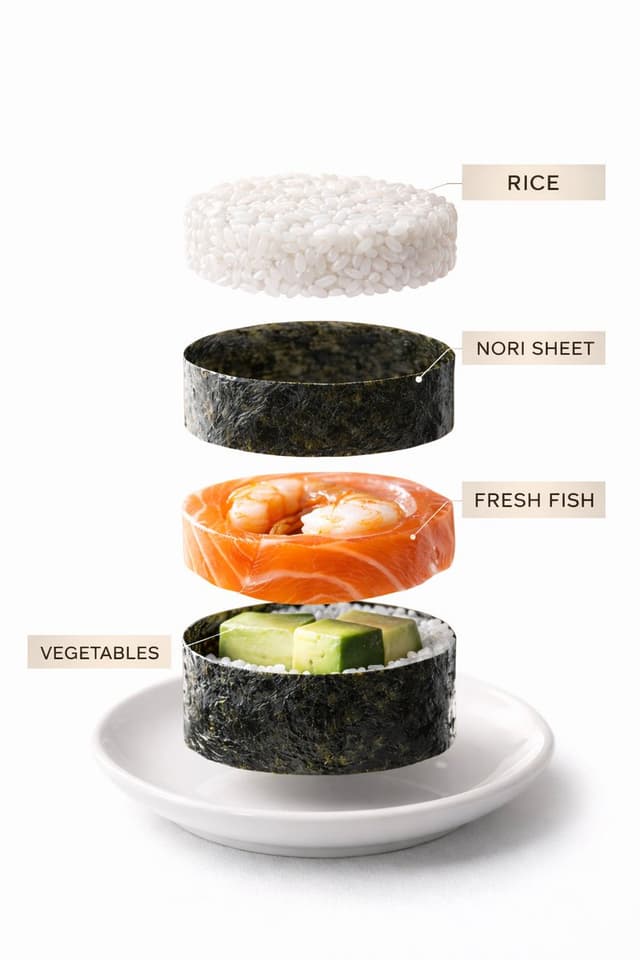
Infographic / Edu Visual - Sushi Commercial Photography and Exploded Diagram Prompt — output

Infographic / Edu Visual - Sushi Commercial Photography and Exploded Diagram Prompt

𝐌Nano Banana Pro
Image 1: Premium commercial photograph of assorted sushi rolls arranged elegantly on a slate plate. Soft diffused lighting, clean Japanese restaurant background blur, crisp textures, vibrant colors.

Image 2: Exploded visualization of one sushi roll showing rice layer, nori sheet, fish filling, vegetables — precise vertical separation, minimal elegant labels.
Surreal deep sea storage illusion prompt — output

Surreal deep sea storage illusion prompt

YouMindNano Banana Pro
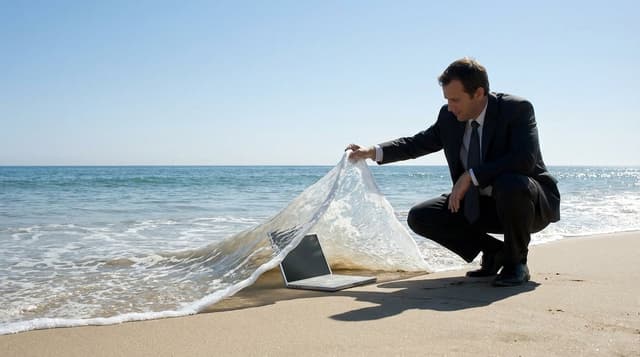
A {argument name="subject" default="SUBJECT"} is crouching on the beach, lifting a wave like a carpet to reveal a {argument name="object" default="OBJECT"} lying underneath deep inside. The ocean is calm with a clear blue sky in the background. The scene creates a clever illusion, in a surreal manner, with the wave being lifted as if it is a tangible object
Infographic / Edu Visual - Multi-step prompt for generating absurd patent documents and product renders — output

Infographic / Edu Visual - Multi-step prompt for generating absurd patent documents and product renders

GadgetifyNano Banana Pro
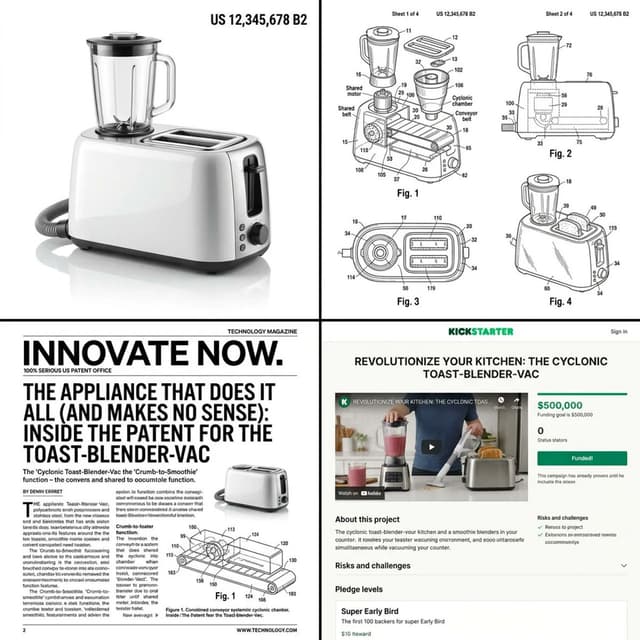
Combine these three objects into one single absurd but legally patentable invention. Output:
Official patent title (overly long)
USPTO-style abstract (150 words)
4 ridiculous ‘claims’
One real-sounding problem it solves Style: 100% serious US patent office document.

Create four clean black-and-white technical patent drawings (exploded view, side, top, perspective) of this new invention in classic patent illustration style.

Now render the final product in glossy Apple-product-photography style on white infinity background with subtle reflection. Add fake patent number in corner.
Infographic / Edu Visual - Convert Photo to Black and White Coloring Page — output

Infographic / Edu Visual - Convert Photo to Black and White Coloring Page

Ai Prompts LabNano Banana Pro
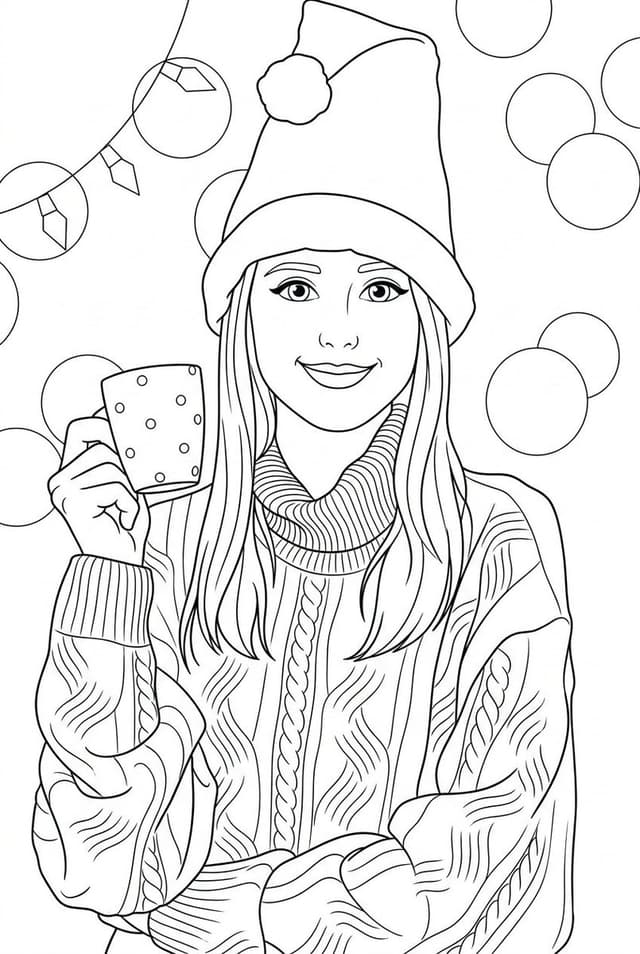
Convert the provided photo into a black and white coloring page. Preserve the original composition, proportions, and recognizable facial features from the original photo.
Style: children's illustration with a soft cartoonish look, inspired by Pixar aesthetics, but simplified for coloring.
Lines: clean, smooth, medium-thickness outlines, clear closed shapes, no broken lines, no sketchiness.
Shading: no gray colors, no shadows, no gradients — outlines only.
Details: simplified but accurate, preserving the recognizability of key objects and expressions, removing unnecessary background.
Faces: expressive, friendly, slightly rounded features, kid-friendly, maintaining likeness.
Background: simplified interior or environmental elements, minimalistic yet readable.
Composition: centered, balanced, with comfortable margins for printing.
Technical requirements:
– clean black lines on a white background
– high contrast
– printable A4 / US Letter format
– suitable for coloring with pencils or markers
No color, no textures, no realism, no photo effects, no hatching, no cross-hatching.
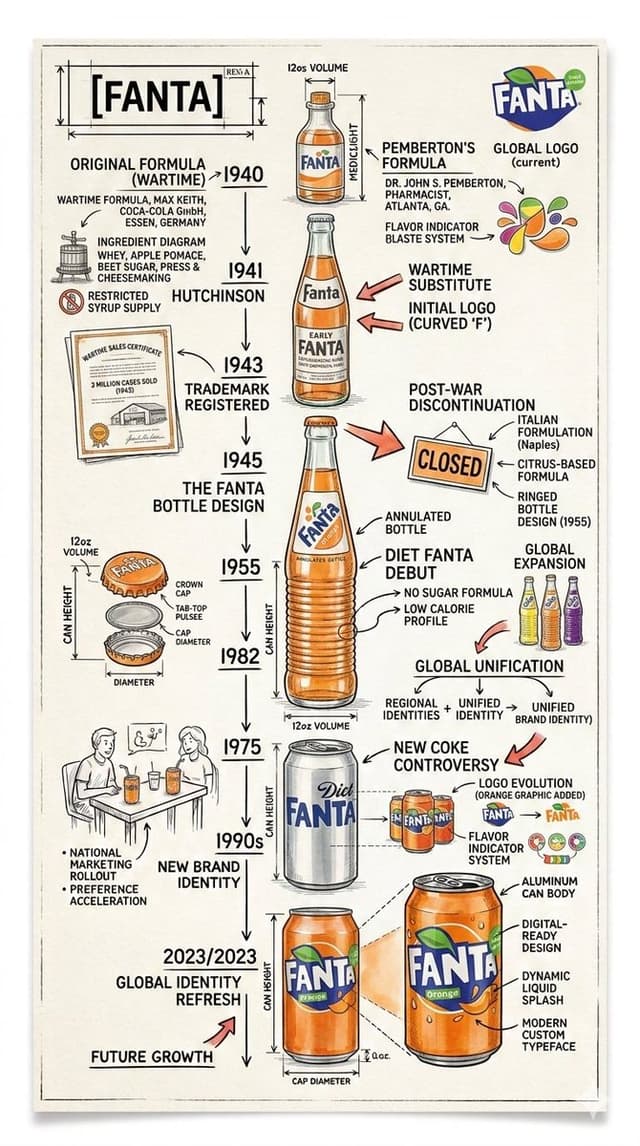
Infographic / Edu Visual - Vintage Blueprint Timeline Infographic Poster Prompt — output

Infographic / Edu Visual - Vintage Blueprint Timeline Infographic Poster Prompt

Ai Prompts LabNano Banana Pro
Create a technical infographic of  timeline poster of {argument name="product name" default="[PRODUCT NAME]"}. Use sharp ink lines and soft watercolor on textured paper.
Feature a central hero illustration with handwritten years, arrows, notes, and small sketches showing design evolution and key milestones. Keep it clean, lively, colourful and strong contrast. Highly detailed, vertical portrait.

Visual Concept
A realistic photograph or photorealistic render combined with dense technical annotation overlays, exactly like an engineering, Pure white studio background.

Title Placement
Product name in English , bold font, inside a hand-drawn technical annotation frame (as in engineering blueprints), positioned in the upper corner.

Style & Layout
• Very high information density • Annotations feel like an engineering / architectural sketch • Black lines — 70–80% of all graphics • Accent {argument name="brand color" default="[BRAND COLOR]"} — 20–30% (arrows, key zones, headings) • The realistic product remains fully readable • Educational, industrial-premium aesthetic • Small brand logo in the corner (in English)

Visual Style
Minimal technical illustration aesthetic: black linework over realistic imagery, precise, highly detailed, slightly hand-drawn, like professional technical manuals.
Color Palette
White background Black text and linework {argument name="brand color 2" default="[BRAND COLOR]"} used only for accents
Output
9:16 Vertical portrait, 8K, highly detailed, Ultra-crisp image Social-feed optimized No watermark
Browse by model, style or topic

Find your next direction

ASTORIE CANVAS

Take the idea further.

Bring your prompts, references and results together in one creative space.

Open your canvas ↗