Explore a travel-poster example that brings architectural details into a graphic layout. Use its prompt as a starting point for deciding what your own visual should explain.
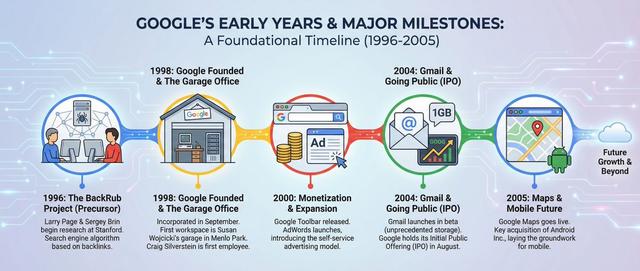
Instruct Nano Banana Pro via prompt to summarize the information researched separately using Gemini into an infographic, while referencing those two images using multiple image references.
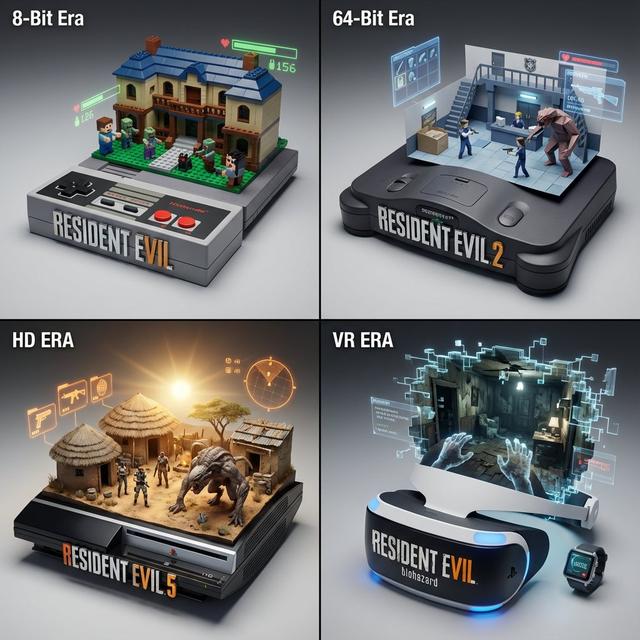
<instructions> Concept: A timeline of gaming history emerging from physical consoles.
Input: [{argument name="Game Franchise" default="Resident Evil"}] (e.g., Mario, Zelda, Final Fantasy)
System Instruction:
Act as a Gaming Historian. Create a 2x2 Grid of "Console Architecture."
Evolution Logic: Select 4 eras of the franchise (8-bit, 64-bit, HD, VR).
The Container: The base is the Physical Console/Controller of that era (e.g., NES Controller, N64 Console, Disc Drive).
The Glitch: The game world "glitches" out of the cartridge slot or disc tray, turning into physical voxels or polygons.
Panel 1 (8-Bit): The world is made of Lego-like plastic blocks.
Panel 2 (Poly): The world is made of Sharp, low-poly folded paper.
Panel 3 (HD): The world is Photorealistic Resin.
The HUD: Holographic UI elements (Health bars, Ammo) float physically above the scene.
Label: The front of the console features the Game Logo in chrome. </instructions>
Image 1: A high-quality, professional product photograph of Shawarma wrap filled with chopped tomatoes, lettuce, chipotle mayo, donair meat (chicken). The wrap has a crisp grilled texture to it. Minimalist style, shot against a pure solid white background with soft, natural shadows. 8k resolution, sharp focus, clean aesthetic.

Image 2:
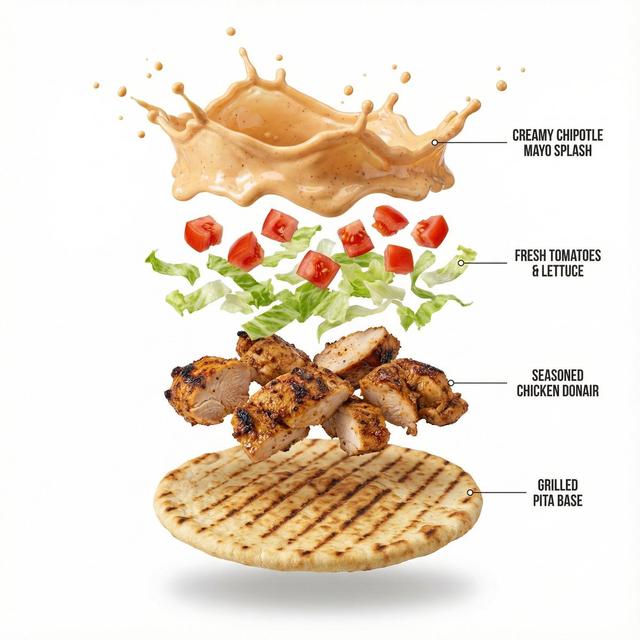
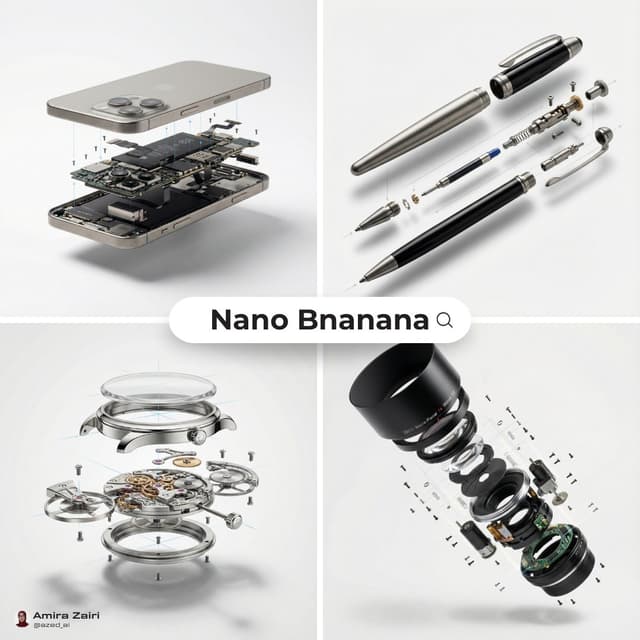
Create a hyper-realistic exploded vertical infographic composition of a Chicken Shawarma Wrap. At the top, a creamy chipotle mayo splash frozen mid-air with tiny droplets and a glossy texture. Below it, a vibrant layer of diced red tomatoes and fresh, crisp shredded lettuce floating gracefully. Underneath, succulent pieces of seasoned donair chicken with visible charred edges and spice texture. At the bottom, a crisp, golden-brown grilled pita wrap base with distinct grill marks. Pure white background, soft studio lighting, subtle shadows under each floating element, ultra-sharp focus, DSLR macro photography, clean infographic text labels with thin pointer lines, premium food photography aesthetic, 8K quality.
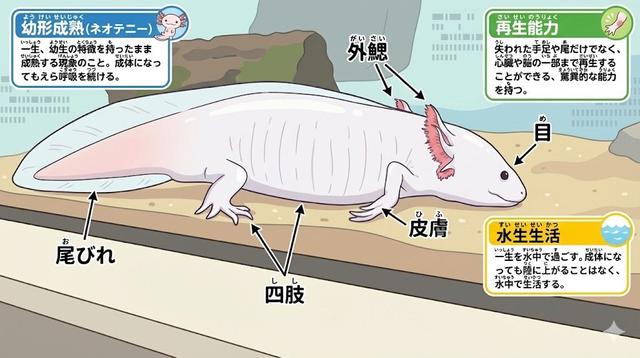
Animal photo -> Diagram

Clean diagram completed
↓
Modified for elementary school students
Ruby text (furigana) is also included in the coloring
↓
Turn it into a coloring book page
↓
Your own diagram is complete♪
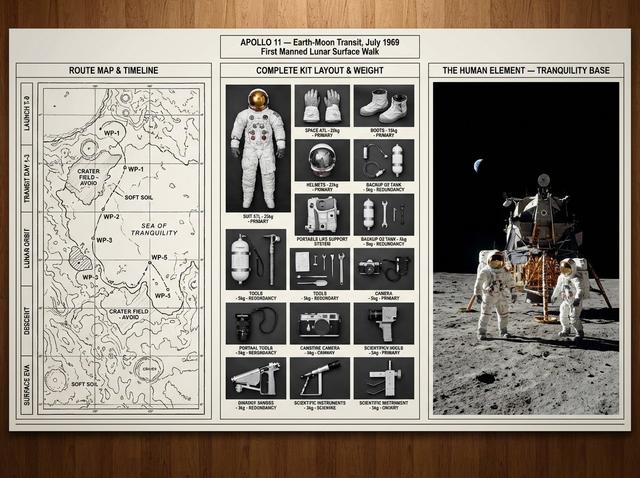
An expedition leader's planning board for {argument name="journey mission" default="[JOURNEY / MISSION]"} — {argument name="destination era" default="[DESTINATION / ERA]"}. Left section: route map with topographical detail, waypoints marked, danger zones annotated, and timeline running along the margin. Center section: complete kit layout, every piece of equipment photographed from above in organized rows, weight and function noted, redundancies highlighted, nothing extraneous. Right section: the expedition in progress or the destination achieved, figures in landscape, scale established, the human element against the immense. Visual style transitions from cartographic precision through utilitarian inventory to epic environmental photography. Title block reading "{argument name="expedition name" default="[EXPEDITION NAME]"} — [ROUTE], [DATE], [OBJECTIVE]".
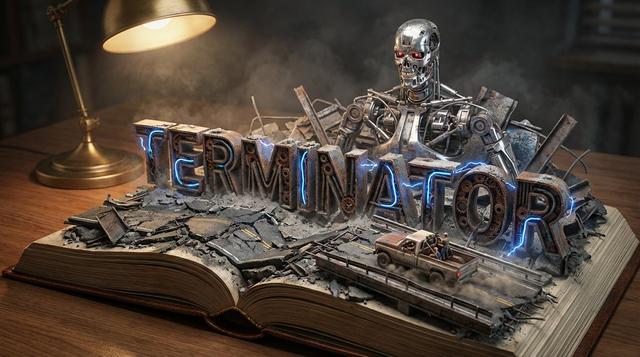
Do it for Terminator: {argument name="title" default="Moby Dick"}

System Instruction:
Act as a Master Prop Maker. Generate a hyper-realistic, macro-photography shot of a "Pop-Up Book Diorama."
1. Forensic Analysis:
Analyze the Input Title to determine the visual components:
The Biome: Identify the primary setting (e.g., Ocean, Jungle, Space, Desert).
The Conflict: Identify the Antagonist or Monster (e.g., The White Whale, T-Rex, Darth Vader).
The Vessel/Hero: Identify the main vehicle or protagonist (e.g., The Pequod, The Jeep, The Millennium Falcon).
The Materiality: Identify the texture of the world (e.g., Wood & Water; Amber & Leaf; Metal & Stars).
2.  Container (The Open Book):
The Object: A massive, vintage, leather-bound hardcover book lying flat on a wooden desk.
The Transformation: The book is open to the middle. The pages do not just lie flat; they physically mutate into the "Biome" identified in Step 1.
Example: If Ocean, the pages turn into turbulent resin waves. If Desert, they turn into dunes.
3. Typography (The Floating Title):
The Text: The [Title of the Input] rises out of the landscape as massive, 3D block letters.
Integration: The letters must interact with the environment.
Texture: The letters are made of materials from the story (e.g., Driftwood, Stone, Bone).
Placement: The waves crash over the letters; vines wrap around the letters.
4. The Action Scene :
CRITICAL: Construct a specific scene using miniature models on top of the book.
The Threat: Place the "Antagonist" looming large in the background (e.g., The Whale breaching behind the text).
The Hero: Place the "Vessel" or "Protagonist" navigating the terrain in the foreground (e.g., A tiny ship rocking on the waves).
Scale: The scene must look like a high-end model kit (1:87 scale).
5. Lighting & Atmosphere:
The Lamp: A vintage brass desk lamp is visible in the corner, casting a warm, directional "reading light" onto the scene.
Atmosphere: Magical realism. The water should glisten; the fog should swirl.
Depth: Shallow depth of field to blur the edge of the desk, keeping focus on the book.
Output: ONE image, 16:9 Aspect Ratio, Cinematic Miniature Photography, 8k Resolution.
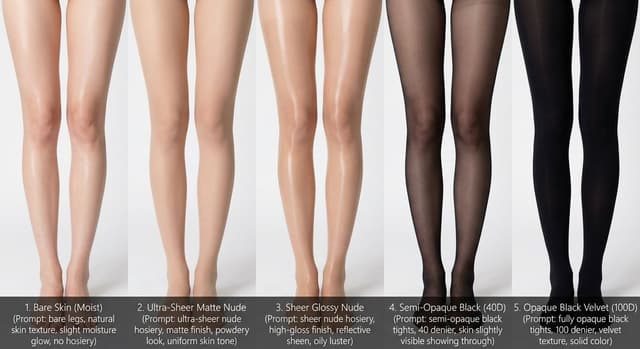
# Role: Comparison Infographic Generator (Design-Centric with Toggles)

# === USER INPUT SETTINGS (FILL THESE IN) ===
# 1. Grid Size (e.g., "2x2 (4 panels)", "3x3 (9 panels)"):
{argument name="grid size" default="1x5"}

# 2. Base Subject Description (Identical base scene for all panels):
[{argument name="subject description" default="Cold white, slender, fair Asian female legs, skin delicate and smooth, without blemishes, almost invisible pores and hair follicles. Skin is not dry, slightly moist"}]

# 3. Variations Theme (What is being compared?):
{argument name="variation theme" default="Bare legs versus different stockings"}

# 4. Show Text Overlay at Bottom (Yes/No):
YES

# ===========================================

# Task Description:
Generate a multi-panel infographic grid chart for a comparative visual study based on the User Input Settings above. The goal is to showcase different textural or stylistic variations (defined in the data list below) applied to the identical Base Subject defined above.

# Global Constraints & Style:
1.  **Layout:** A **[Insert setting from "1. Grid Size" here]** infographic grid chart.
2.  **Consistency is Key:** The Base Subject, camera angle, composition, and lighting must remain absolutely identical across ALL panels to emphasize only the specific variations.
3.  **Photography Style:** Clean, controlled studio photography with neutral, even lighting designed to highlight texture differences.

# Text Overlay Display Logic (CONDITIONAL):
(AI Instructions: First, check the value of User Input Setting "# 4. Show Text Overlay at Bottom". You MUST execute ONLY ONE of the following logic blocks based on that value.)

##### ➤ LOGIC PATH A: IF Setting #4 is "Yes" (Show Overlay)
If the user selected "Yes", EVERY panel must feature a precisely designed text overlay at the bottom following these strict rules:
* **Background:** A clean, sharply defined solid rectangular color block (e.g., charcoal grey or black) spanning the entire width of the panel's bottom section.
* **Typography:** Inside this block, the text must be rendered in an **elegant, ultra-thin, minimalist sans-serif font**.
* **Layout:** The text "[Number]. [Short Title] (Prompt: [Key English Prompt Snippet])" must be perfectly centered within the color block.
* **Aesthetic:** The overall effect should be that of professional, minimalist graphic design, with crisp lines and perfect alignment.

##### ➤ LOGIC PATH B: IF Setting #4 is "No" (Hide Overlay)
If the user selected "No", apply this CRITICAL rule:
* **CRITICAL:** DO NOT add any text overlay, numbers, titles, background color blocks, or prompt snippets to the images.
* **Result:** The bottom of every panel must be clean image data only, showing the subject fully without obstruction.

# Base Subject Definition:
The base scene for every panel is: **[Insert description from "2. Base Subject Description" here]**. The variations below will modify the surface or appearance of this base subject.

# Variations Data List (Apply sequentially to the grid):
(AI instructions: Iterate through t
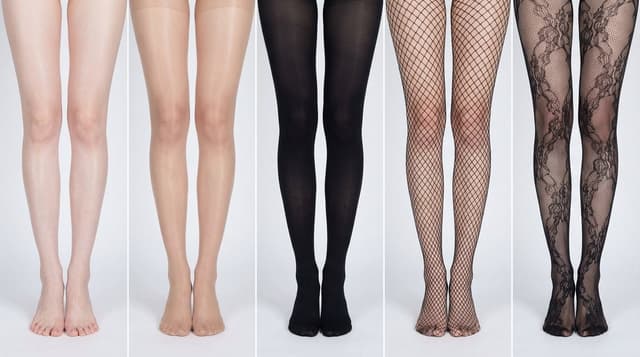
# Role: Comparison Infographic Generator (Design-Centric with Toggles)

# === USER INPUT SETTINGS (FILL THESE IN) ===
# 1. Grid Size (e.g., "2x2 (4 panels)", "3x3 (9 panels)"):
{argument name="grid size" default="1x5"}

# 2. Base Subject Description (Identical base scene for all panels):
[{argument name="subject description" default="Cold white, slender, fair Asian female legs, skin delicate and smooth, without blemishes, almost invisible pores and hair follicles. Skin is not dry, slightly moist"}]
# 3. Variations Theme (What is being compared?):
{argument name="variation theme" default="Comparison of bare legs with different stocking materials and styles"}
The feet need to be fully displayed in the frame

# 4. Show Text Overlay at Bottom (Yes/No):
NO

# ===========================================

# Task Description:
Generate a multi-panel infographic grid chart for a comparative visual study based on the User Input Settings above. The goal is to showcase different textural or stylistic variations (defined in the data list below) applied to the identical Base Subject defined above.

# Global Constraints & Style:
1.  **Layout:** A **[Insert setting from "1. Grid Size" here]** infographic grid chart.
2.  **Consistency is Key:** The Base Subject, camera angle, composition, and lighting must remain absolutely identical across ALL panels to emphasize only the specific variations defined in the data list.
3.  **Photography Style:** Clean, controlled studio photography with neutral, even lighting designed to highlight texture differences.

# Text Overlay Display Logic (CONDITIONAL):
(AI Instructions: First, check the value of User Input Setting "# 4. Show Text Overlay at Bottom". You MUST execute ONLY ONE of the following logic blocks based on that value.)

##### ➤ LOGIC PATH A: IF Setting #4 is "Yes" (Show Overlay)
If the user selected "Yes", EVERY panel must feature a precisely designed text overlay at the bottom following these strict rules:
* **Background:** A clean, sharply defined solid rectangular color block (e.g., charcoal grey or black) spanning the entire width of the panel's bottom section.
* **Typography:** Inside this block, the text must be rendered in an **elegant, ultra-thin, minimalist sans-serif font**.
* **Layout:** The text "[Number]. [Short Title] (Prompt: [Key English Prompt Snippet])" must be perfectly centered within the color block.
* **Aesthetic:** The overall effect should be that of professional, minimalist graphic design, with crisp lines and perfect alignment.

##### ➤ LOGIC PATH B: IF Setting #4 is "No" (Hide Overlay)
If the user selected "No", apply this CRITICAL rule:
* **CRITICAL:** DO NOT add any text overlay, numbers, titles, background color blocks, or prompt snippets to the images.
* **Result:** The bottom of every panel must be clean image data only, showing the subject fully without obstruction.

# Base Subject Definition:
The base scene for every panel is: **[Insert description from "2. Base Subject Description" here]**. The variations below will modify the surface or appearance of this base subject.

# Variations Data List (Apply sequentially to the grid):
(AI instructions: Iterate through this list based on the required grid size. For each panel, apply the user-defined 'Visual Change' to the base
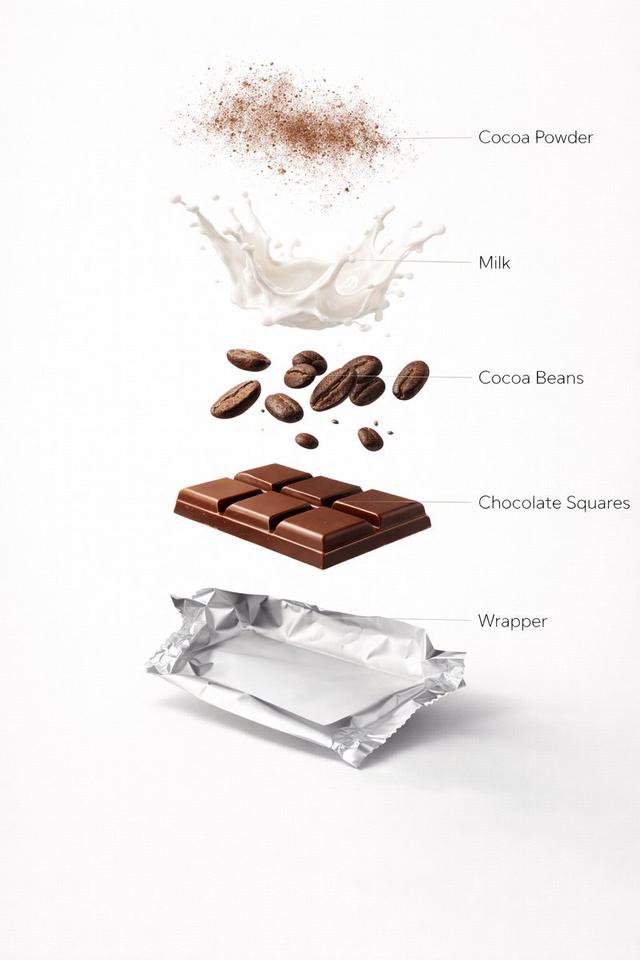
Motion Prompt: The Chocolate start to round spin while ingredients separate gently and precisely, maintaining alignment and scale. The motion is smooth, with no extra effects.

Image 1:-  Ultra-realistic premium milk chocolate bar, fully prepared and ready to eat, neatly segmented glossy chocolate squares resting on a partially unwrapped silver foil wrapper. Smooth polished chocolate surface with subtle shine, rich warm brown tones, realistic thickness and sharp edges. Clean white studio background, premium food advertising lighting, soft diffused highlights, gentle natural shadows, shallow depth of field, DSLR macro photography, ultra-sharp focus, luxury confectionery aesthetic, minimal composition, no text, no labels, no ingredients visible, 8K photorealism.

Image 2 :- Design an ultra-realistic exploded chocolate bar infographic. Top layer cocoa powder dust floating in air, below milk splash frozen mid-motion, cocoa beans, chocolate squares, and wrapper base. Rich brown tones, clean white background, premium food ad lighting, glossy textures, soft shadows, labeled infographic style, ultra-photorealistic, 8K resolution.
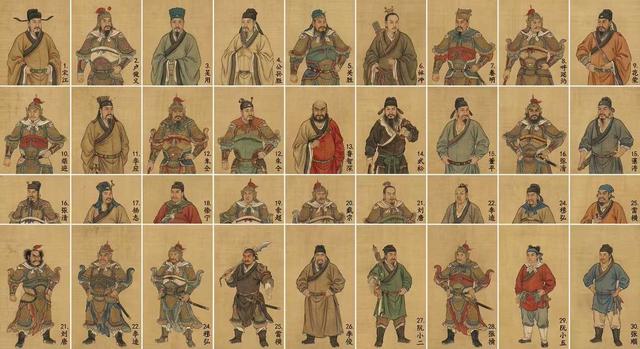
Generate an image of the top 30 characters from "Water Margin" in a grid format, in the style of Chinese gongbi painting, with each character’s name written in the lower‑right corner of their cell.
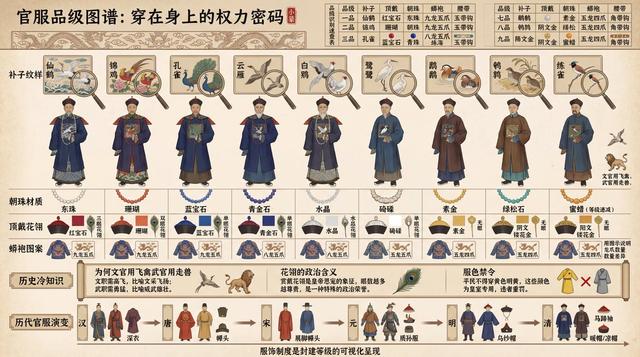
Create a historical diagram-style infographic, 16:9 horizontal composition, titled "Visual Deconstruction of the Ancient Chinese Official Attire Ranking System." Adopt the aesthetic of ancient canonical diagrams and draw in the style of illustrations from ancient books. The image should display a comparison of the official uniforms of nine ranks of officials from the {argument name="dynasty" default="Qing Dynasty"}, arranged from left to right by rank: nine standing figures from the first to the ninth rank. Above each figure, use fine-line painting (Gongbi) to label the "Buzi (Rank Badge) Pattern" (First Rank Crane, Second Rank Golden Pheasant, Third Rank Peacock... Ninth Rank Quail; civil officials use flying birds, military officials use fierce beasts), with a close-up magnifying glass effect highlighting the embroidery details of the Buzi. Below the figures, label the "Chaozhu (Court Bead) Material" (First Rank Eastern Pearl, Second Rank Coral, Third Rank Sapphire... decreasing by rank), "Dingdai Hualing (Hat Ornament)" (Ruby/Coral/Sapphire/Crystal, etc., distinguished by color blocks), and "Mangpao (Dragon Robe) Pattern" (Nine Dragons/Five Claws/Four Claws, using diagrams to illustrate the difference in claw count). The top of the image features a "Rank Identification Quick Reference Chart": a table comparing the differences across 5 dimensions (Buzi, Dingdai, Chaozhu, Mangpao, Waist Belt) for all 9 ranks, with each cell marked by a small icon and text. The bottom of the image features "Historical Trivia": labeling "Why civil officials used flying birds and military officials used fierce beasts" (civil service requires soaring high, military service requires bravery), "The political meaning of the Hualing" (being granted a Hualing signifies imperial favor), and "Color Restrictions" (commoners were forbidden from wearing yellow or bright yellow). The very bottom includes a timeline showing the "Evolution of Official Attire through Dynasties": thumbnail sketches illustrating the style changes from the Han, Tang, Song, Yuan, Ming, and Qing dynasties. All text must be in Chinese: the top title uses the Small Seal Script font "Official Attire Rank Diagram: The Power Code Worn on the Body," and the bottom caption states "The clothing system is the visual representation of the feudal hierarchy." Use traditional official attire colors for the palette. The overall presentation should focus on historical institutions and clothing culture, suitable for historical education and cultural research.
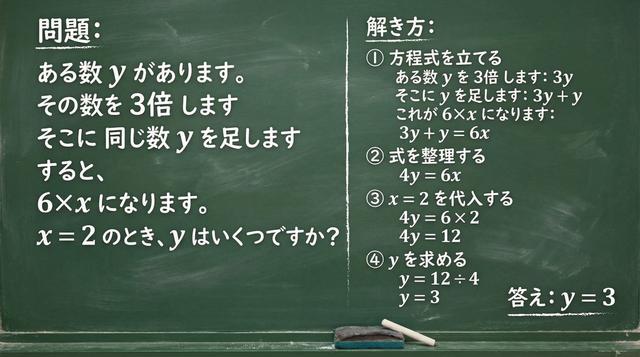
Write the given question on a green board with chalk and solve it.
There is a number y. Multiply that number by 3. Add the same number y to it. Then it becomes 6×x.
When x = {argument name="value of x" default="2"}, what is y?
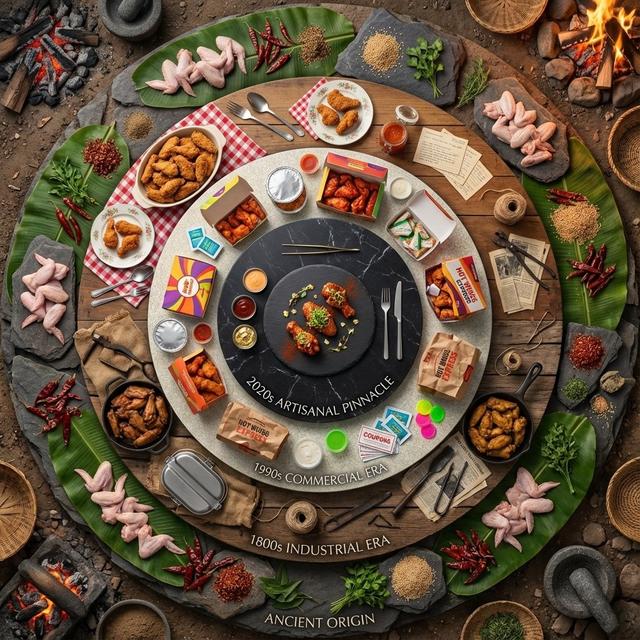
Input Variable: {argument name="food item" default="Spicy Chicken Wings"}
System Instruction:
Generate a hyper-realistic, high-angle "Food History Diorama" arranged in a Mandala format.
CRITICAL: The scene must be populated by Tiny 1:87 Scale Figures (Chefs) that correspond to the specific era of each ring.
1.  Timeline Analysis:
Analyze the history of the Input Food to determine the Attire and Tools of the workers in 5 eras:
Stage 0 (Center): The Modern Chef (White Coat, Toque, Tweezers).
Stage 1 (Commercial): The Fast Food Worker (Visor, Polo Shirt, Headset).
Stage 2 (Domestic): The Home Cook (Floral Apron, Oven Mitts).
Stage 3 (Industrial): The Butcher/Baker (Dirty White Apron, Cleaver, Rolled Sleeves).
Stage 4 (Ancient): The Hunter/Gatherer (Tunic, Loincloth, Stone Tools, Fire).
2. The Composition :
Perspective: High Angle (75 Degrees). Not completely flat. We need to see the bodies of the tiny figures, not just their heads.
The Orbits: 5 Distinct Concentric Rings.
The Boundary (The Catwalk): Between each ring, there is a visible Negative Space (a thin gap). This is where the tiny chefs stand, presenting the food to the viewer.
3. The Rings & The Residents Logic):
The Center (Modern Pinnacle):
Food: Deconstructed, gourmet plating on slate.
The Figure: A Master Chef carefully placing a micro-green garnish with tweezers.
Ring 1 (The Commercial Age):
Food: Bright packaging, uniformity.
The Figure: A Teenage Fast Food Worker holding a tray or a soda cup, standing next to the cardboard boxes.
Ring 2 (The Domestic Age):
Food: Casserole dishes or patterned china.
The Figure: A 1950s Housewife or Home Cook holding a serving spoon or pie cutter.
Ring 3 (The Industrial Age):
Food: Cast iron skillets, tin plates, hearty portions.
The Figure: A burly 19th Century Butcher or Cook holding a heavy knife or iron ladle.
Ring 4 (The Ancient Origin):
Food: Cooking over open fire, stone tools, raw ingredients (but cooked/charred enough to look appetizing).
The Figure: An Ancient Human tending to a mini-campfire or grinding spices with a stone.
4. The Background Morph:
The surface texture underneath the figures changes with them:
Center: Polished Stone.
Middle: Linoleum/Wood Table.
Edge: Dirt/Earth.
5. Lighting & Scale:
Tilt-Shift: Blur the outer edges slightly to emphasize the miniature scale of the people.
Shadows: The figures must cast long shadows across the food to prove they are physically standing there.
Output: ONE image, 1:1 Aspect Ratio, 8k Resolution, Miniature Photography style.
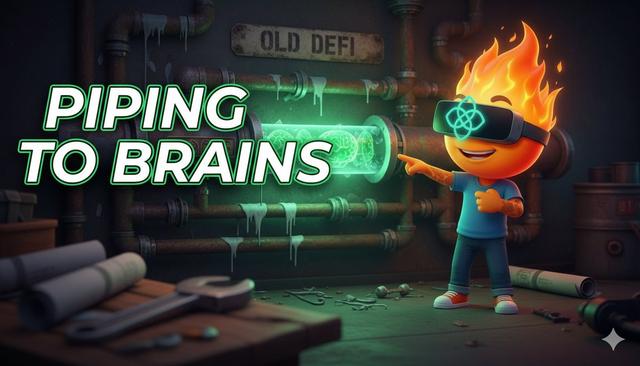
3D Pixar-style hook image, 16:9 format.

CHARACTER: Fire character in VR headset with OpenGradient logo. Expression: realizing/pointing. Pose: standing in a construction site, pointing at a transformation in the pipes.

SCENE: A messy wall of rusty, leaking pipes labeled "OLD DEFI". One section of the pipe transforms into a glowing, crystalline, see-through conduit pulsating with green "brain" energy.

FOREGROUND: A heavy wrench and blurred blueprints on a workbench in the corner. Creates depth.

BACKGROUND: Dark industrial background but lit up by the green glow of the new pipe.

TEXT: "PIPING TO BRAINS" on LEFT, bold white with glow.

COMPOSITION: Text dominant 70/30. Depth of field: blurred foreground -> sharp subject -> slight background blur. Cinematic lighting with neon green accent.
<instruction> Role: Act as a Mathematician and Architect.
Input:[fractal set]. Analysis: The fractal set, infinite recursion, coastlines, ferns, every aspect Goal: A drafting table where the math spirals into infinity. Rules: Base: Graph paper and heavy computers from the 1980s. Transformation: The equation for the fractal is written on the page. The ink from the equation is spiraling up into a 3D fractal set relevant to the input. Scale: Macro shot, implying infinite detail. Details: The tip of the pen is touching the paper, and the ink flow is already branching infinitely. Lighting: Neon computer monitor glow reflecting off the glossy ink. Output: Psychedelic mathematics, sharp geometric rendering. </instruction>