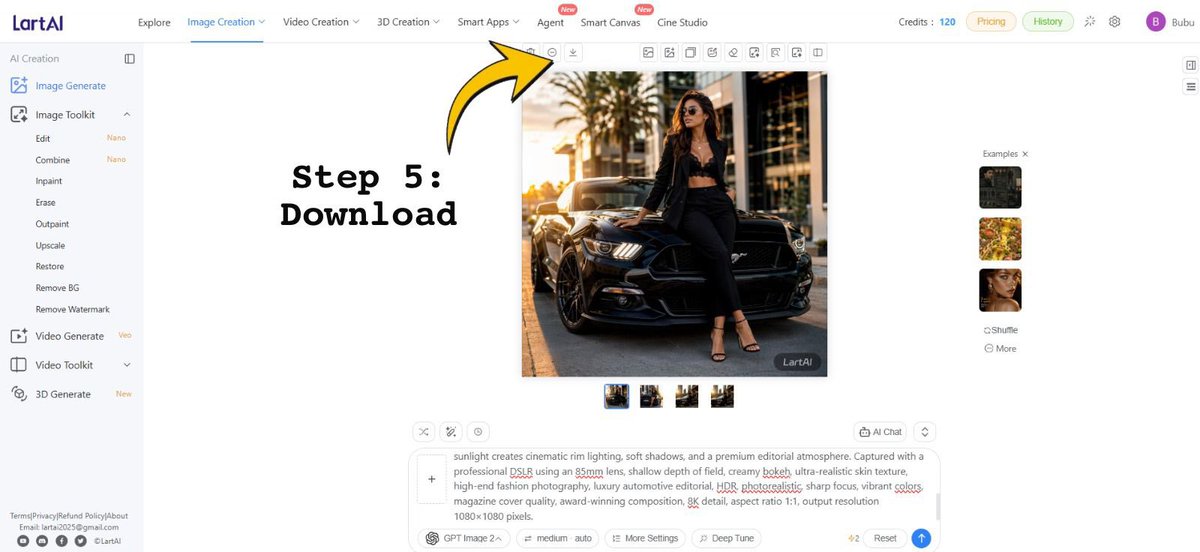
Infographic / Edu Visual - LartAI Download Step Tutorial

Creates a tutorial screenshot of the LartAI image generation interface with a bold Step 5 Download arrow annotation.

Prompt

3,993 charactersOpen Astorie studio ↗
Goal: Create a wide tutorial-style screenshot graphic showing the LartAI image generation web app interface with an instructional overlay for downloading a generated image.

Canvas: 1200×552 horizontal screen capture composition, bright white UI, clean SaaS dashboard look, thin gray dividers, small icons, and lots of empty white space.

Layout: Full browser-app interface. A left sidebar occupies about 12% of the width, a top navigation bar spans the full width, the central workspace contains one large generated square image, and a right examples strip contains small thumbnails. Add a bold annotation on the left-center reading “Step 5: Download” in a black typewriter/monospace font, with a large curved yellow arrow outlined in black pointing upward toward the small download icon in the top toolbar above the generated image.

Top navigation: Show the LartAI logo at top left. Include exactly 7 main navigation items across the top: “Explore”, “Image Creation” highlighted/underlined in blue, “Video Creation”, “3D Creation”, “Smart Apps”, “Agent”, “Smart Canvas”, and “Cine Studio”; place small red “New” badges near Agent and Smart Canvas. On the right, show “Credits: 120”, pill buttons “Pricing” and “History”, small utility icons, and a purple circular avatar with the letter “B” followed by the username {argument name="user name" default="Bubu"}.

Left sidebar: Under the “AI Creation” heading, show exactly 14 visible tool entries: “Image Generate” selected in blue, “Image Toolkit”, “Edit” with a small “Nano” tag, “Combine” with a small “Nano” tag, “Inpaint”, “Erase”, “Outpaint”, “Upscale”, “Restore”, “Remove BG”, “Remove Watermark”, “Video Generate” with a small “Veo” tag, “Video Toolkit”, and “3D Generate” with a small “New” tag. At the bottom, include tiny footer text links and social icons, resembling Terms/Privacy/Refund Policy/About and contact details.

Central generated image: Display a square fashion editorial photo of {argument name="main subject" default="a stylish woman wearing sunglasses, a black blazer, black crop top, black trousers, and strappy heels"} leaning against the front of {argument name="vehicle" default="a glossy black Ford Mustang"} on a city street at golden hour. The subject sits on the car hood/front corner with one leg bent, palm trees and modern buildings in the background, warm cinematic sunlight, realistic shadows, high-end fashion and luxury automotive photography. Add a small dark “LartAI” watermark in the lower-right corner of this generated image.

Toolbar and controls: Above the square image, show a row of small square action icons, with the yellow arrow specifically pointing at the download icon. Beneath the large image, show exactly 4 small square result thumbnails in a row, with the first thumbnail selected using a blue border.

Right examples panel: Show the heading “Examples ×” and exactly 3 stacked example thumbnails: a dark car/fashion image, a yellow floral image, and a woman’s face portrait. Below them show exactly 2 small text controls: “Shuffle” and “More”.

Bottom prompt area: Include a large prompt input box with a plus button at its left and a visible text prompt beginning with “sunlight creates cinematic rim lighting, soft shadows, and a premium editorial atmosphere...” and containing underlined red spellcheck marks on some words. Below it, show controls including “GPT Image 2”, “medium auto”, “More Settings”, “Deep Tune”, a “4/2” indicator, “Reset”, and a blue circular send button.

Text overlay: The annotation text must read exactly {argument name="step label" default="Step 5:\nDownload"}. Use very large black bold typewriter lettering. The arrow should be bright yellow with a thick black outline, curved, and point from the text region toward the top toolbar download button.

Constraints: Preserve the clean web-app screenshot style, keep all UI text in English, use crisp small interface typography, no browser chrome, no extra popups, and no additional instructional steps.

From sourceView source ↗

More to explore

Game Asset - Warhammer Scene: Rylanor vs Fulgrim

Game Asset - Warhammer Scene: Rylanor vs Fulgrim

Mainstream MadnessGPT Image 2
Ancient Rylanor, the Ancient of Rites of the Emperor's Children, makes his final stand deep beneath the burned world of Istvaan III. He is facing Fulgrim, the Daemon Primarch of Slaanesh.
He stands defiant, battered and half-buried in the ruins of a subterranean vault, his surviving honourable soul burning with hatred for the Traitors. Around him lie the bones of his long-dead loyalist brothers.
Game Asset - Halloween Robot at Tokyo Gym

Game Asset - Halloween Robot at Tokyo Gym

カーブミラーGPT Image 2
A photorealistic, vertical full-body shot of a massive, bipedal humanoid robot standing outdoors in front of a modern Japanese municipal sports hall. The robot is constructed from heavy-duty industrial machinery, featuring segmented white and black armor plating, exposed hydraulic pistons, and complex mechanical joints. Its head is a rectangular sensor array with multiple camera lenses and glowing red emergency lights on the shoulders. The robot is decorated for Halloween: it wears a flowing orange cape patterned with black bats and jack-o'-lanterns, and its body is draped with garlands of purple tinsel, small plastic pumpkins, and triangular bunting flags. Several chest plates are labeled with the text "警視庁" (Metropolitan Police Department) and "MPD".

In the foreground, two police officers wearing dark blue uniforms, tactical vests, and helmets stand with their backs to the viewer; their vests also bear the text "警視庁 MPD". To the right, a crowd of civilians includes a woman taking a photo with her smartphone and a child dressed in an orange witch costume with a pointed hat. The background features a large concrete building with glass windows and prominent signage reading "区立総合体育館" (Ward General Gymnasium). A tall vertical banner hangs on the right side of the building, displaying a cartoon pumpkin and the text "ハロウィン スポーツ フェスティバル" (Halloween Sports Festival). The scene is lit by bright, natural daylight under a clear blue sky.
Product Marketing - Olive Green Waxed Canvas Roll-Top Backpack

Product Marketing - Olive Green Waxed Canvas Roll-Top Backpack

SjoltGPT Image 2
A high-resolution product photograph of a dark olive green waxed canvas roll-top backpack. The bag features two vertical tan leather straps with square brass buckles on the front, and a horizontal zippered pocket below them with a brass zipper pull. A matching fabric grab handle is visible at the top center. The backpack sits upright on a light beige stone surface against a plain, textured cream-colored wall background. Soft, diffused daylight illuminates the scene from the left, casting gentle shadows to the right.
Profile / Avatar - Retro American Cartoon Style Image Transformation

Profile / Avatar - Retro American Cartoon Style Image Transformation

SairahGPT Image 2
Transform the exact uploaded image into a full body illustration designed in a 1960s–1980s retro American cartoon style. Preserve the exact subject, facial identity, hairstyle, clothing, accessories, colors, proportions, pose, body language, facial expression, camera angle, framing, composition, perspective, lighting, and every visible detail from the original image. Do not redesign, reinterpret, simplify, replace, or invent any elements. The uploaded image must remain instantly recognizable, changing only the artistic style.

The character should feature exaggerated rubber hose proportions, expressive body language, a slightly oversized head, simplified anatomy, elastic limbs, large classic oval cartoon eyes with simple black pupils, thin expressive eyebrows, rounded hands, clean geometric shapes, and a playful vintage personality while preserving the exact likeness, expression, and silhouette of the original subject.

The illustration features thick bold black outlines, flat solid colors, minimal cel-style shading, subtle vintage film grain texture, slightly desaturated tones like old animation cels, smooth hand-drawn 2D linework, simple color blocking, soft retro print texture, and a classic mid-century American animation aesthetic.

Preserve the original background exactly as shown in the uploaded image unless otherwise specified.

Keep the original composition, framing, perspective, and camera angle exactly the same. Full body should remain visible if it is visible in the original image. High resolution, clean illustration, no realism, no 3D rendering, no anime, no Pixar, no Disney, no modern cartoon style, only authentic 1960s–1980s American retro animation aesthetics.
Profile / Avatar - Retro Showa Halloween Portrait

Profile / Avatar - Retro Showa Halloween Portrait

いがぐりメタボGPT Image 2
A vertical, medium-shot portrait of a young Asian woman with short dark hair and bangs, wearing a homemade Halloween costume consisting of an orange paper pumpkin hat and a matching jagged orange paper collar tied at the neck over a black long-sleeved dress. She is leaning slightly forward, making a peace sign with her right hand near her cheek, while holding a small brown paper bag decorated with a jack-o'-lantern and black cat in her left hand. The background is a narrow, dimly lit retro Japanese alleyway (yokocho) at night, featuring wooden storefronts, glowing lanterns, and blurred figures of other people walking away. On the left, there are hanging paper decorations including a jack-o'-lantern and a white ghost. On the right, a vertical banner reads 'おもちや' (Omo-cha). The image has a strong Showa-era retro aesthetic, characterized by warm, faded colors, visible film grain, scratches, dust spots, and soft focus typical of vintage instant photography.
Profile / Avatar - Retro Halloween Vampire Girl

Profile / Avatar - Retro Halloween Vampire Girl

いがぐりメタボGPT Image 2
A retro-style photograph of a young Asian woman with short, messy dark hair sitting in a vintage floral armchair. She is wearing a beige chunky knit sweater over a plaid skirt, paired with slouchy white socks and brown loafers. A black velvet vampire cape with red satin lining is draped over her shoulders, tied at the neck with a ribbon. Her hands are raised in a playful claw gesture, and she has small fangs visible. The background features Halloween decorations including orange jack-o'-lanterns and black bat cutouts on the wall, along with an old CRT television set to the left. The image has a nostalgic Showa-era aesthetic with warm lighting and film grain.

Find your next direction

ASTORIE CANVAS

Take the idea further.

Bring your prompts, references and results together in one creative space.

Open your canvas ↗