
AI Brand Consistency Workflow: Keep Images, Video, and Audio On-Brand
Brand consistency with AI comes from controlling the inputs, invariants, review criteria, and approved assets across every generation - not from repeating the same adjectives in every prompt. Build one brand continuity contract, translate it into image, video, and audio instructions, then approve each asset against the same identity locks before it enters the next production stage.
Astorie can organize this system on one canvas: approved references can feed separate image and video branches, selected outputs can remain beside their prompts, and workflows can be saved as reusable Templates, called Recipes in Astorie's workflow system. The canvas is the orchestration layer; the brand owner still decides what is locked, what may vary, and which output is approved.
AI Brand Consistency Workflow: Key Takeaways
• Start with a brand continuity contract that separates nonnegotiable identity locks from controlled creative variables.
• Generate images, video, and audio from the same approved source pack, but translate the rules for each medium instead of copying one universal prompt.
• Approve upstream assets before using them as downstream references; a flawed hero image will spread its errors into motion, crops, and campaign variants.
• Repair local defects when identity is intact, but rebuild from the last approved stage when a face, product, logo, or voice drifts.
• Archive prompts, references, model and settings, rights records, outputs, and approval decisions together so consistency survives staff and tool changes.
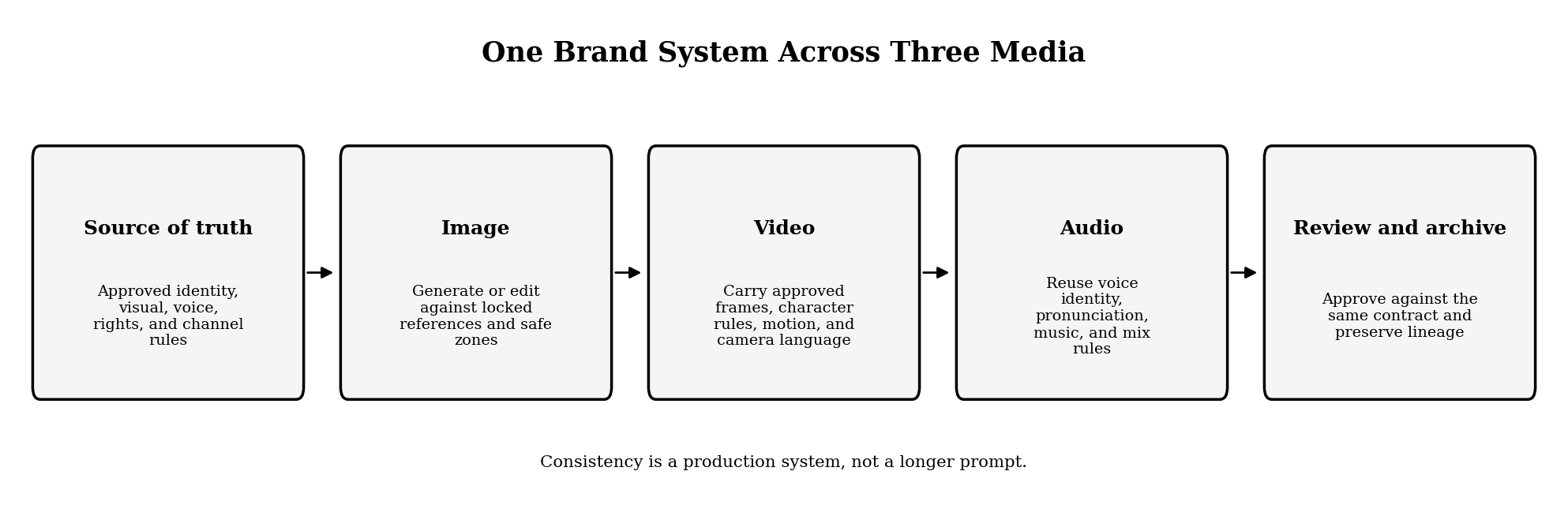
Figure 1. A single brand system feeding image, video, and audio production.
What Does Brand Consistency Mean in an AI Workflow?
Brand consistency means that audiences can recognize the same identity even when format, scene, campaign, or channel changes. It does not mean making every asset identical. A square product image, a vertical social video, and a narrated explainer can vary in composition and pacing while preserving the same product geometry, palette, visual tone, voice identity, and message boundaries.
The practical distinction is between identity locks and controlled variables. Identity locks must survive every output. Controlled variables may change within an approved range. If a rule cannot be translated into something a creator can prompt and a reviewer can inspect, it is too vague to control production.
Build a Brand Continuity Contract Before Generating
A brand continuity contract is a compact production specification shared by image, video, and audio work. It should be stricter than a mood board and shorter than a full brand book. Its job is to tell a generator what must remain stable and tell a reviewer when to stop an asset from moving forward.
Layer | What to record | Example acceptance question |
Identity | Logo rules, product shape, character face, wardrobe locks, spokesperson voice | Would a customer recognize the same product or person? |
Visual style | Palette, typography, lighting family, lens or illustration language, texture | Does the asset belong to the approved visual family without copying one composition? |
Motion | Camera behavior, movement intensity, transition language, screen direction | Does movement reinforce the brand tone rather than fight it? |
Audio | Voice identity, pronunciation, pacing, emotional range, music and sound palette | Does the asset sound like the same brand and pronounce protected terms correctly? |
Channel | Aspect ratio, safe zones, captions, duration, export and accessibility rules | Can this version publish without breaking brand or delivery requirements? |
Governance | Rights, consent, model and settings, version, owner, reviewer, approval status | Can the team explain where the asset came from and who approved it? |
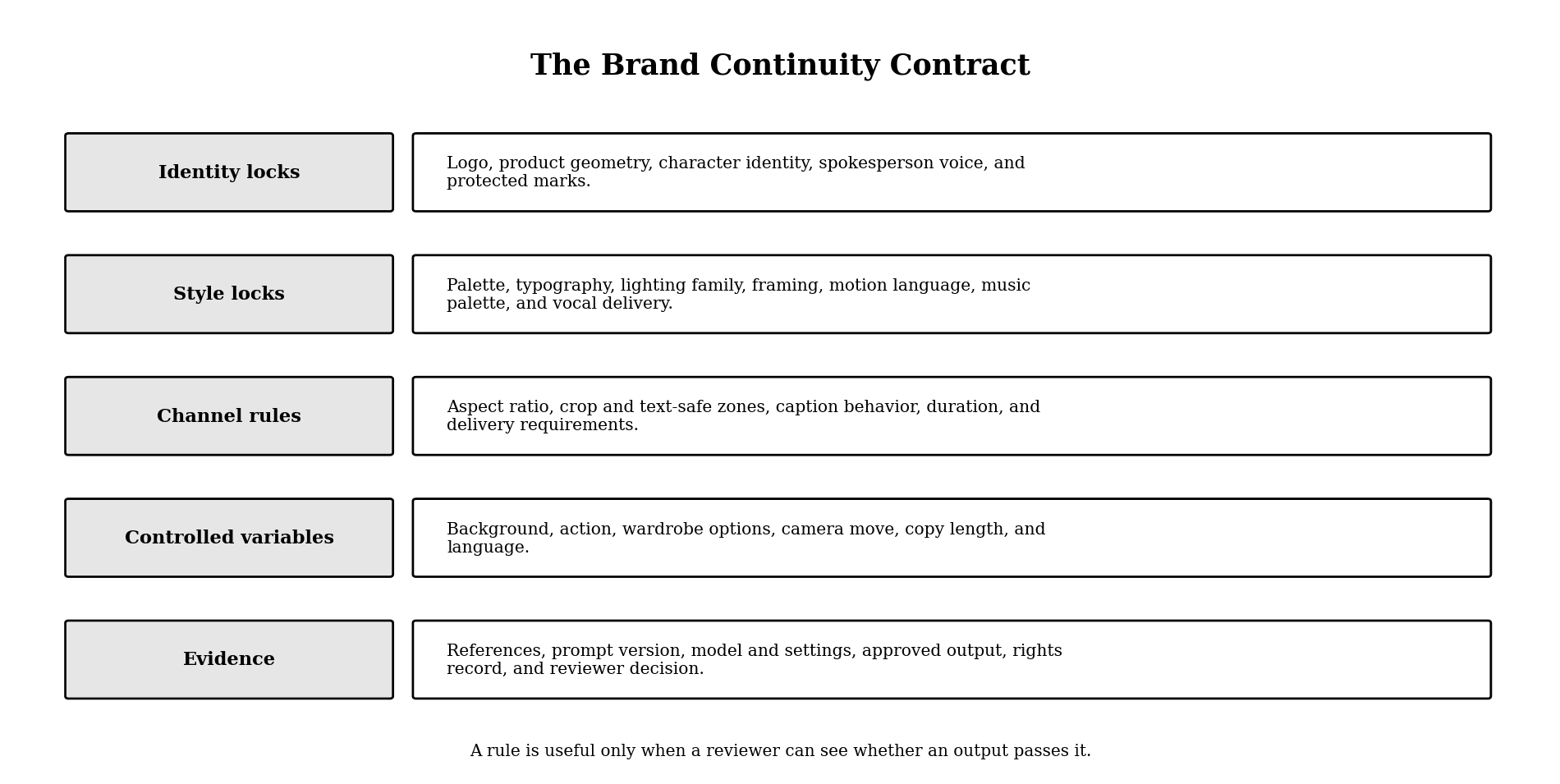
Figure 2. The layers of a usable brand continuity contract.
Use measurable language
Replace “premium,” “cinematic,” or “friendly” with visible or audible instructions. Define the palette, contrast, lighting direction, framing, motion intensity, speaking pace, pronunciation, and prohibited treatments. Keep a small approved and rejected example set so new reviewers can see the boundary.
Weak rule: “Warm, premium, and modern.”
Checkable rule: “Use warm neutrals with low-to-medium contrast, soft directional key light, matte natural textures, no neon colors, slow camera moves, a conversational voice with deliberate pauses, and the approved pronunciation for every product name.” This still leaves creative room, but a reviewer can identify why an asset passes or fails.
Example of a completed continuity contract
The example below is an illustrative specification for a fictional tea brand, not a reported test result.
Layer | Locked rule | Allowed variation | Reject when |
Identity | Wordmark from the approved SVG; amber bottle silhouette and cap geometry unchanged | Bottle angle and crop | Wordmark is redrawn or bottle proportions change |
Palette | Charcoal #24221F, oat #E9E1D2, copper #A8633B | Natural wood and cream backgrounds | Neon colors or cool blue key light dominate |
Visual style | Soft directional daylight, low-to-medium contrast, matte texture, uncluttered negative space | Interior, tabletop, or studio location | Glossy cyberpunk lighting or busy patterned background |
Motion | Slow push, locked-off product shot, or restrained lateral move | One camera move per shot | Whip pans, rapid zooms, or unstable handheld motion |
Audio | Calm conversational delivery, deliberate pauses, approved product pronunciation, acoustic percussion only | Speaker gender and language with approval | Rushed delivery, mispronunciation, or synthetic stutter |
Channel | Protect logo and caption safe zones; recompose when crop would hide the product | Crop, duration, caption treatment | A channel version changes the core claim or protected geometry |
Assign one role to every reference
Label each reference by what it controls: product geometry, character identity, composition, visual style, motion, voice, or sound. Do not ask several files with conflicting colors, wardrobes, logos, or lighting directions to control the same attribute. More references create more control only when their roles do not overlap.
Keep AI Images Consistent Without Freezing the Campaign
Use reference-led generation or editing when an approved image already contains the correct identity. Current image systems can accept image inputs and edit existing assets; the useful production pattern is to preserve the approved subject or layout while changing only a named variable. Reference support improves control, but every output still needs review.
Use this order:
1. Approve a canonical product, character, or style reference at the highest useful resolution.
2. Record the elements that must not change: silhouette, proportions, markings, palette, wardrobe, logo placement, and text-safe areas.
3. Create one campaign master before requesting multiple crops, backgrounds, or localizations.
4. Change one major variable per iteration so the cause of any drift remains visible.
5. Use local editing for a wrong background, prop, label, or crop when the identity already passes.
OpenAI's current image tools support generation from image inputs and editing of existing images. Adobe Firefly Custom Models can capture a brand style, subject, or character for repeated image production, but training adds rights, dataset, access, and governance work. A custom model is a scaling mechanism, not a substitute for approval criteria.
Carry Approved Identity From Images Into AI Video
Start AI video from an approved still or reference pack when the product, character, or art direction must survive motion. Text-only exploration is useful before identity is locked; once a campaign master exists, allowing the video model to redesign it wastes approved work.
Translate the still-image contract into time-based rules:
• Define the opening state, visible action, and end state.
• Lock face, wardrobe, product shape, marks, dominant colors, and screen direction.
• Specify shot size, camera movement, motion intensity, and transition behavior.
• Name what may change during the shot and what must remain unchanged.
• Review the entire clip, including the first and last frames, rather than approving a single attractive frame.
Veo controls depend on the selected model and access route. Current Veo 3.1 documentation supports up to three asset reference images for a person, character, or product, while style-reference controls are model-specific and should be checked against the live route rather than described as a universal Veo feature. Treat native sound as a candidate layer that must pass the audio contract, not as automatically approved brand audio.
Make Audio Part of the Same Brand System
Audio belongs in the consistency system because a recognizable voice, pronunciation, rhythm, and sound palette can identify a brand before a logo appears. Keep the audio contract separate from the visual prompt, then connect both at the asset and approval level.
Define four audio layers:
• Voice identity: speaker or approved synthetic voice, accent, age range, timbre, and allowed emotional range.
• Delivery: pace, pauses, emphasis, energy, and sentence length.
• Language: brand names, product terms, acronyms, numbers, and a pronunciation lexicon for every market.
• Sound world: music family, instrumentation, sonic logo, ambience, effects, prohibited sounds, and destination-specific mix requirements.
For recurring narration, a fixed approved voice reduces casting drift. ElevenLabs currently offers Voice Design and voice cloning routes, including a professional cloning workflow. Use cloned or designed voices only with the necessary rights and consent, keep a human-reviewed pronunciation sample, and reapprove the voice when the language, model, or delivery setting changes materially.
Connect Image, Video, and Audio Without Spreading Errors
The safest cross-media pipeline moves only approved assets downstream. A generated image should not become the first frame of ten videos until identity, product geometry, color, marks, and safe zones have passed review. A generated video should not receive final narration until shot timing and copy are stable.
A practical sequence is:
1. Lock the brief. Define audience, message, channel, identity locks, and owners.
2. Approve the reference pack. Separate identity, style, composition, motion, and audio references.
3. Create the image master. Approve the subject, product, palette, and layout before producing derivatives.
4. Create video shots. Use approved frames and continuity rules; review identity across time.
5. Produce audio. Apply the voice and pronunciation contract to the locked script and edit.
6. Conform and review. Assemble picture, sound, graphics, captions, and localized versions in the finishing environment.
7. Archive lineage. Store the final master with prompts, references, settings, versions, rights, and approval history.
Astorie is most useful in the middle of this sequence, where references branch into model outputs and selected takes need visible lineage. A nonlinear editor, asset manager, or approval system may still be the better finishing authority; the switch should happen at a named stage rather than through ad hoc file passing.
Choose the Right Consistency Method
Each method solves a different bottleneck. Choose by production volume, identity risk, and the cost of rebuilding your current system.
Method | Best-fit scenario | What you gain | What you give up | Switch trigger |
Reference pack plus prompt template | Small teams and varied campaigns with modest volume | Fast setup and broad model choice | More manual review and weaker identity locking | Switch when the same drift survives repeated prompt revisions |
Reference-image editing | Approved campaign master with controlled regional, seasonal, or channel variations | Preserves more of the accepted composition and subject | Less freedom to redesign the scene | Switch back to generation when the required composition changes fundamentally |
Custom image model | High-volume, repeatable style, subject, or character work with clear asset rights | Reusable brand alignment at scale | Training, entitlement, dataset maintenance, and platform dependence | Switch when manual reference routing becomes the production bottleneck |
Reference-led video | Product, character, or art direction must remain recognizable in motion | Stronger continuity from an approved visual anchor | Less freedom than text-only exploration and more review work | Switch when text-to-video keeps redesigning approved identity |
Fixed designed or cloned voice | Recurring narration, localization, or a recognizable spokesperson sound | Repeatable vocal identity and pronunciation workflow | Consent, governance, and reduced casting variety | Switch when speaker or pronunciation drift becomes audible across releases |
Review Brand Consistency With a Stoplight Gate
Review each asset in three passes. First check identity; then medium-specific execution; then delivery and rights. Identity failures are not minor polish issues.
• Green - approve: every identity lock passes; differences are allowed variables or channel adaptations.
• Amber - repair locally: identity passes, but one crop, line, label, timing point, color, pronunciation, or mix element is wrong.
• Red - rebuild from the last approved stage: face, product geometry, logo, protected copy, voice identity, or rights status fails.
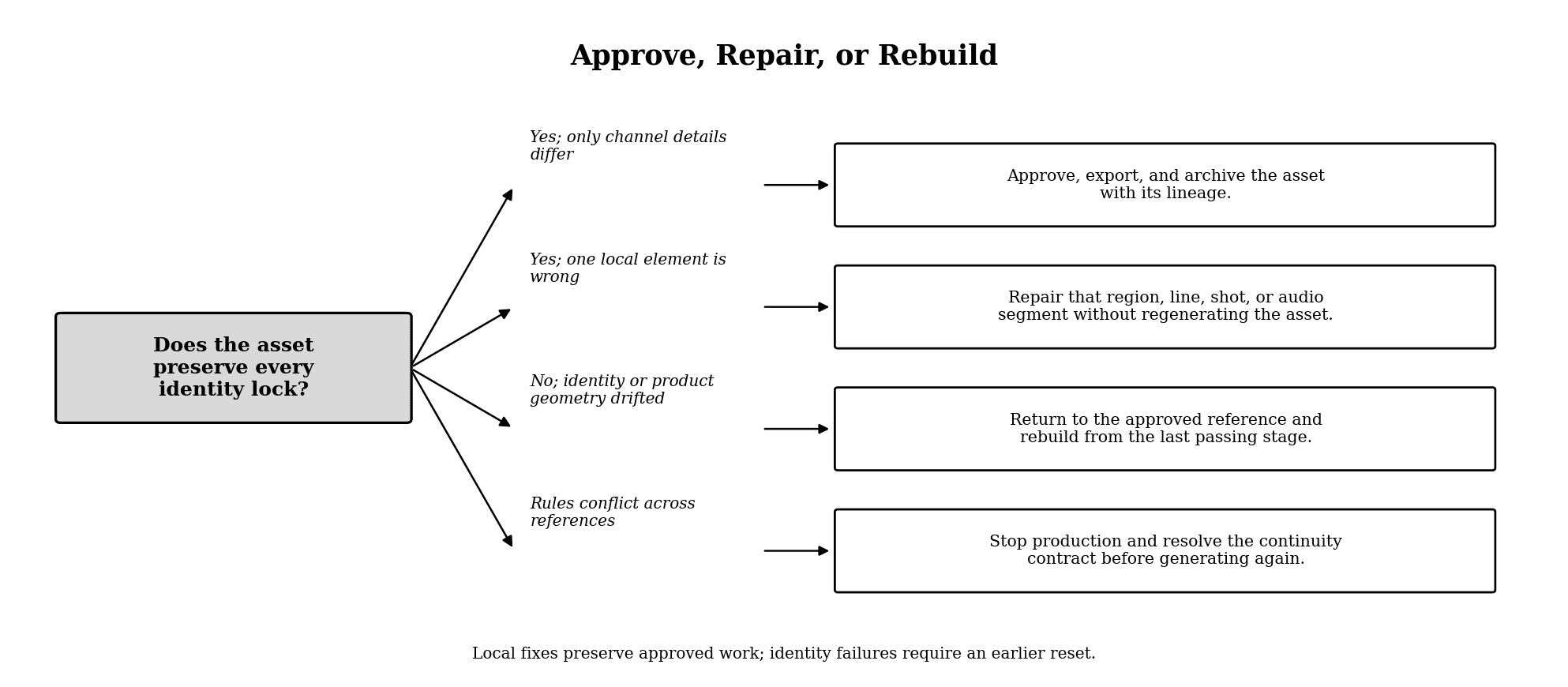
Figure 3. A stoplight-style review loop for generated brand assets.
Keep the review record with the asset. “Looks on-brand” is not enough for a team handoff; record which rules passed, which exception was approved, and which source version the decision used.
Common Failure Modes
One giant prompt replaces the brand system
The result is hard to debug because identity, style, scene, motion, copy, and audio instructions compete. Separate the continuity contract from the shot or asset brief.
The team approves outputs instead of sources
Random generations are compared without first agreeing on the reference pack. The winner becomes a temporary style guide, and the next campaign starts from zero.
A flawed image becomes the video reference
Motion preserves and amplifies the wrong face, product shape, wardrobe, or mark. Approve the still before animation.
Voice is chosen at the end
Late casting changes pacing, shot duration, captions, localization, and music timing. Lock the voice and pronunciation sample before final picture timing.
Regenerating channel variants unnecessarily
Unnecessary regeneration adds identity risk. Create one approved master, then derive crops, durations, captions, and delivery versions whenever the format permits. Recompose or regenerate when the destination changes the creative problem - for example, a dense 16:9 hero may need a purpose-built 9:16 composition, localization may expand copy, or a platform-native concept may require different staging.
Hands-On Case: MORROW Brand Continuity Across Image, Video, and Audio
The MORROW case applied one continuity contract across image, video, narration, and music. The strongest result was not the asset with the most motion; it was the set of assets that preserved the approved bottle, label, palette, tone, pronunciation, and handoff logic.
Audio test: lock pronunciation and pacing with visible settings
The narration route used ElevenLabs TTS Multilingual v2 with the Aria voice. The first settings view showed Stability 0.5, Similarity Boost 0.8, Style 0.0, and Speed 1.0. Because the control moved only in 0.1 increments, the approved test used Stability 0.6 and Speed 0.8 rather than a planned 0.05 step. Similarity Boost remained 0.8 and Style 0.0.
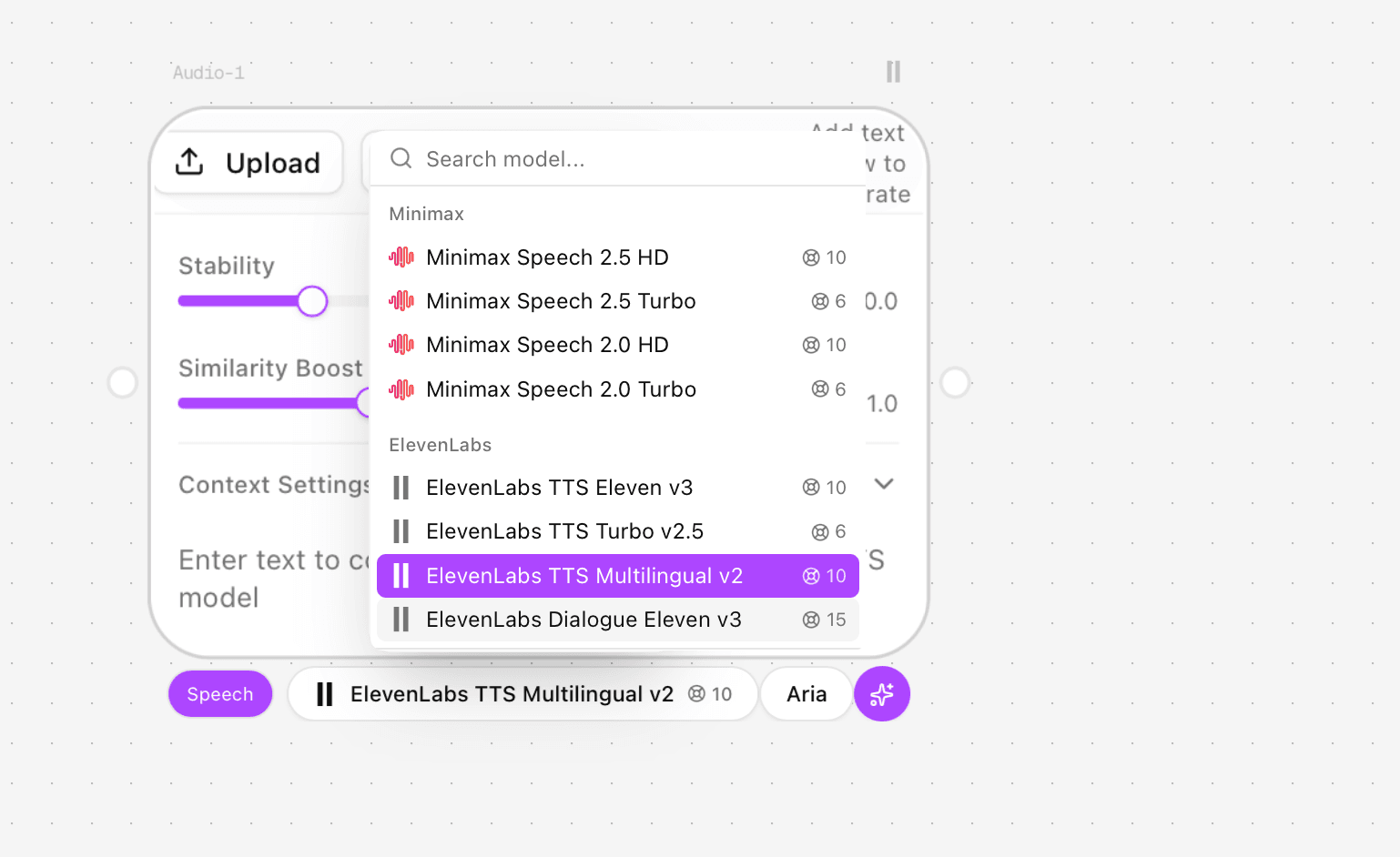
Figure 4.1. Audio model selector with ElevenLabs TTS Multilingual v2 chosen.
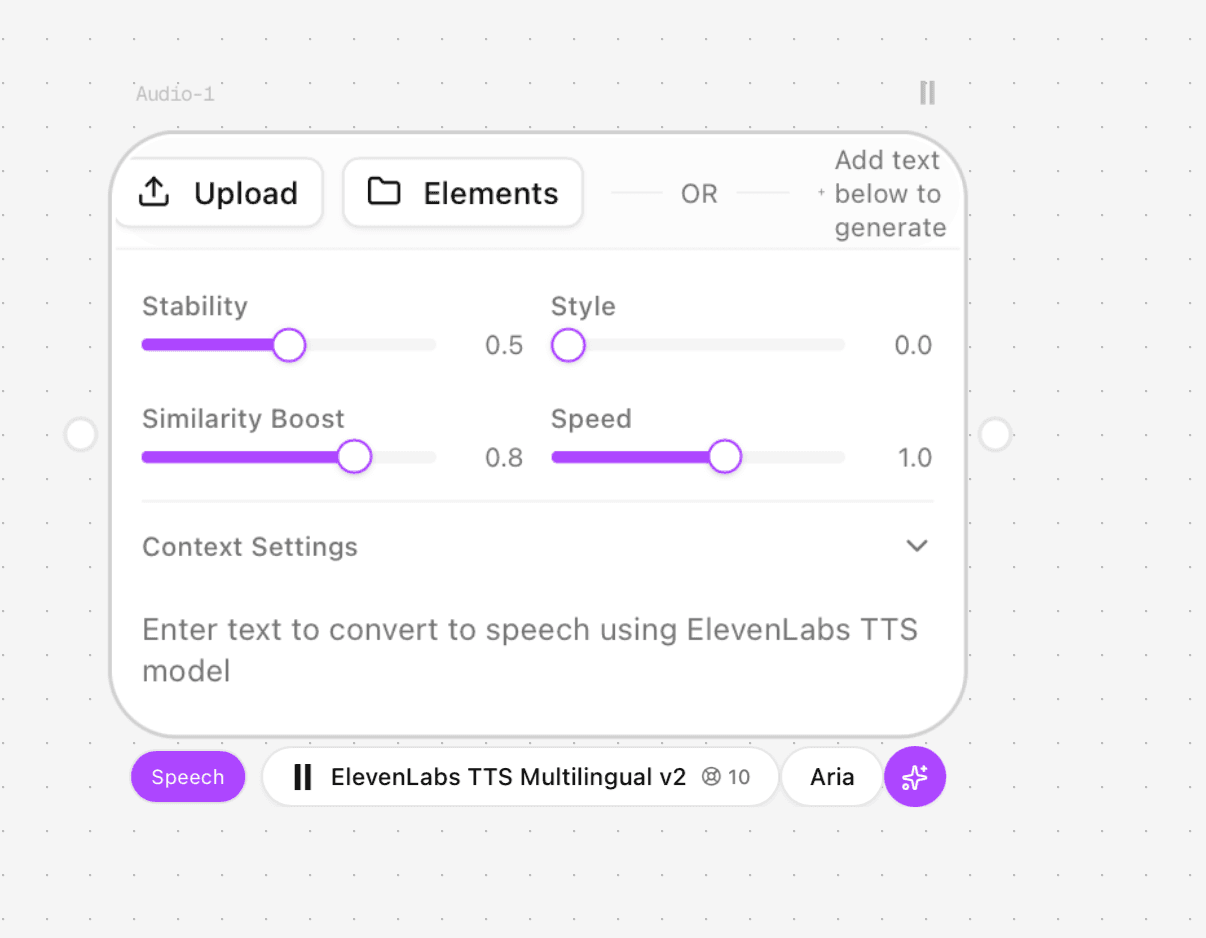
Figure 4.2. Initial TTS settings before the final pacing adjustment.
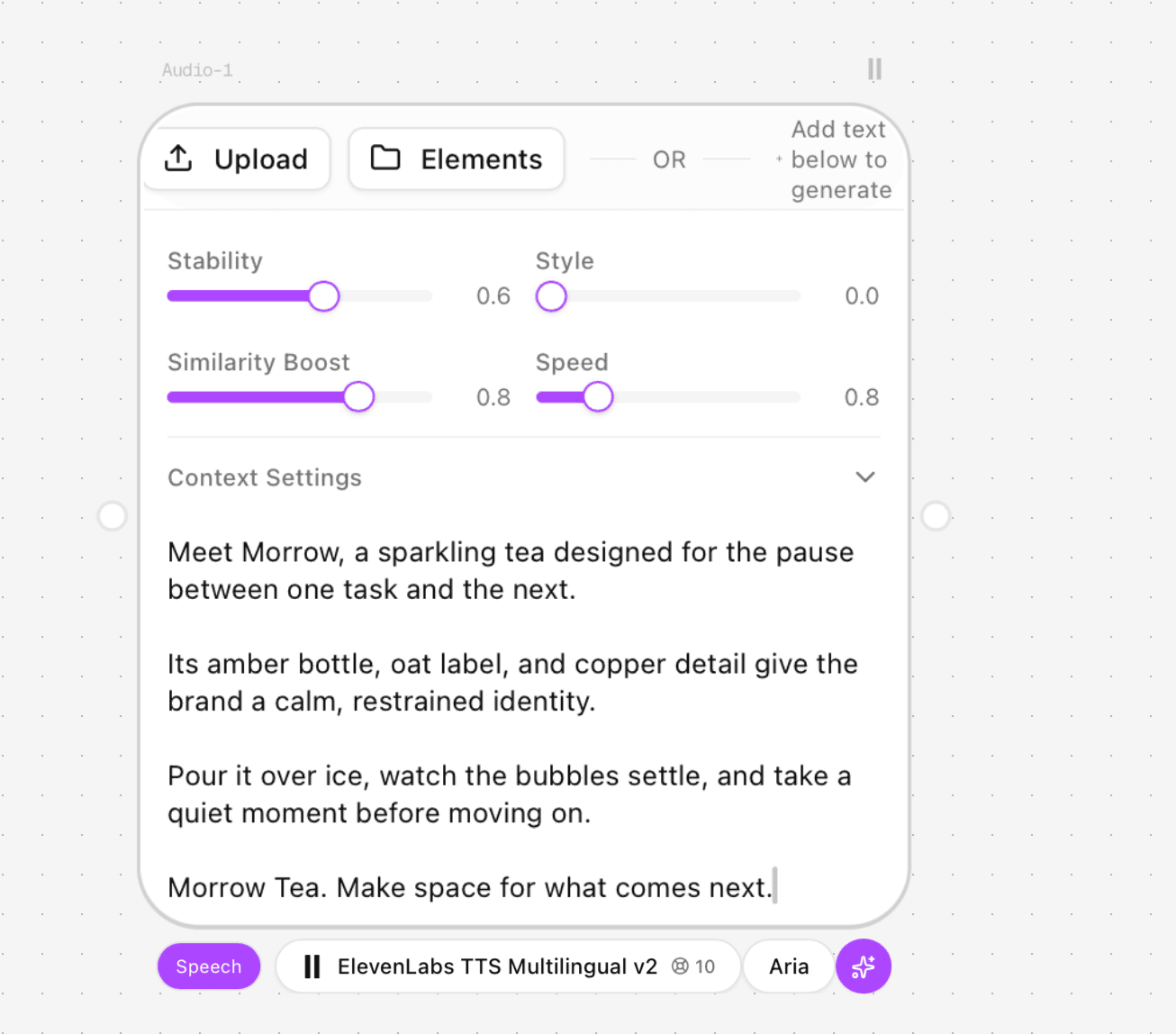
Figure 4.3. Final TTS settings and the locked MORROW narration script.
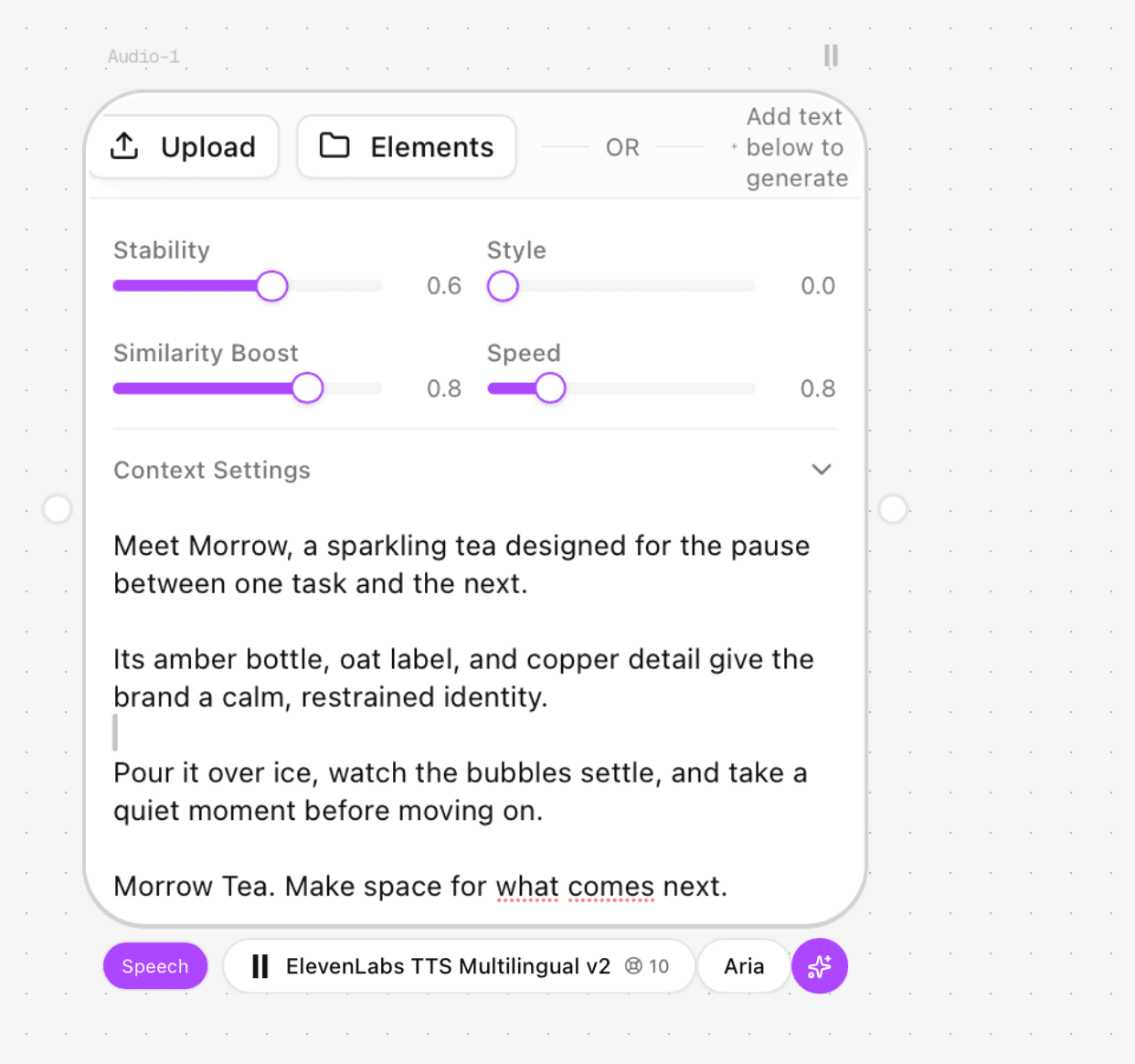
Figure 4.4. The complete four-paragraph narration used for the approved voice test.
The output lasted 24 seconds. MORROW was pronounced correctly, the calm female delivery matched the contract, and paragraph pauses were present and generally natural. That left approximately six seconds in a 30-second plan for a music-only final product hold. This was approved as a real test result, not an assumed capability.
Music test: reject the wrong sound world, not just technical failure
The first Minimax Music v1.5 screen still contained example lyrics, which was unsuitable for a clean brand underscore. The first instrumental configuration used Electronic, Relaxed, and Quiet evening. It generated a 26-second track with electronic texture and no voice, but its tone was less aligned with the warm, restrained visual contract.
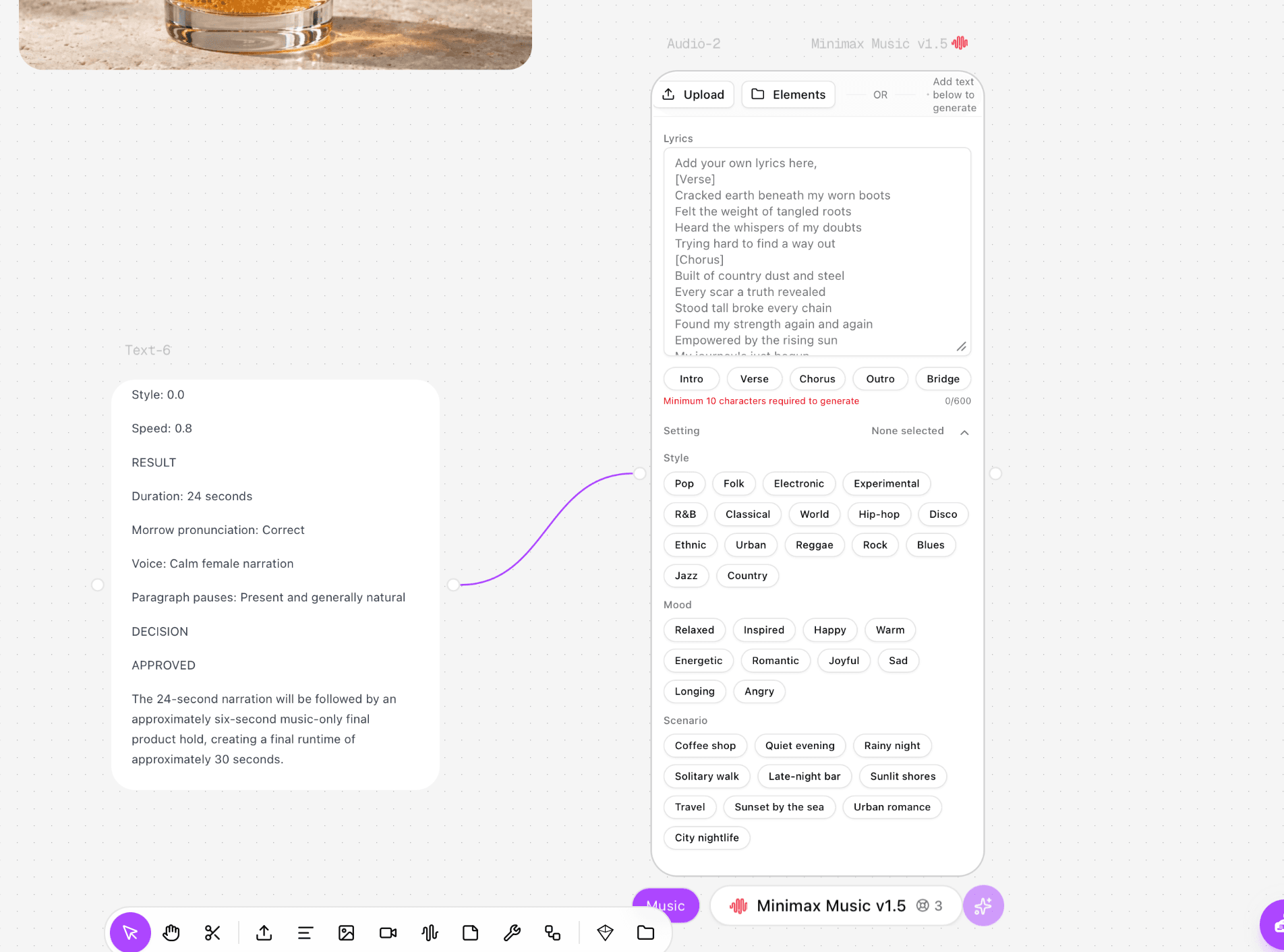
Figure 4.5. Music node before the instrumental prompt and style cleanup.
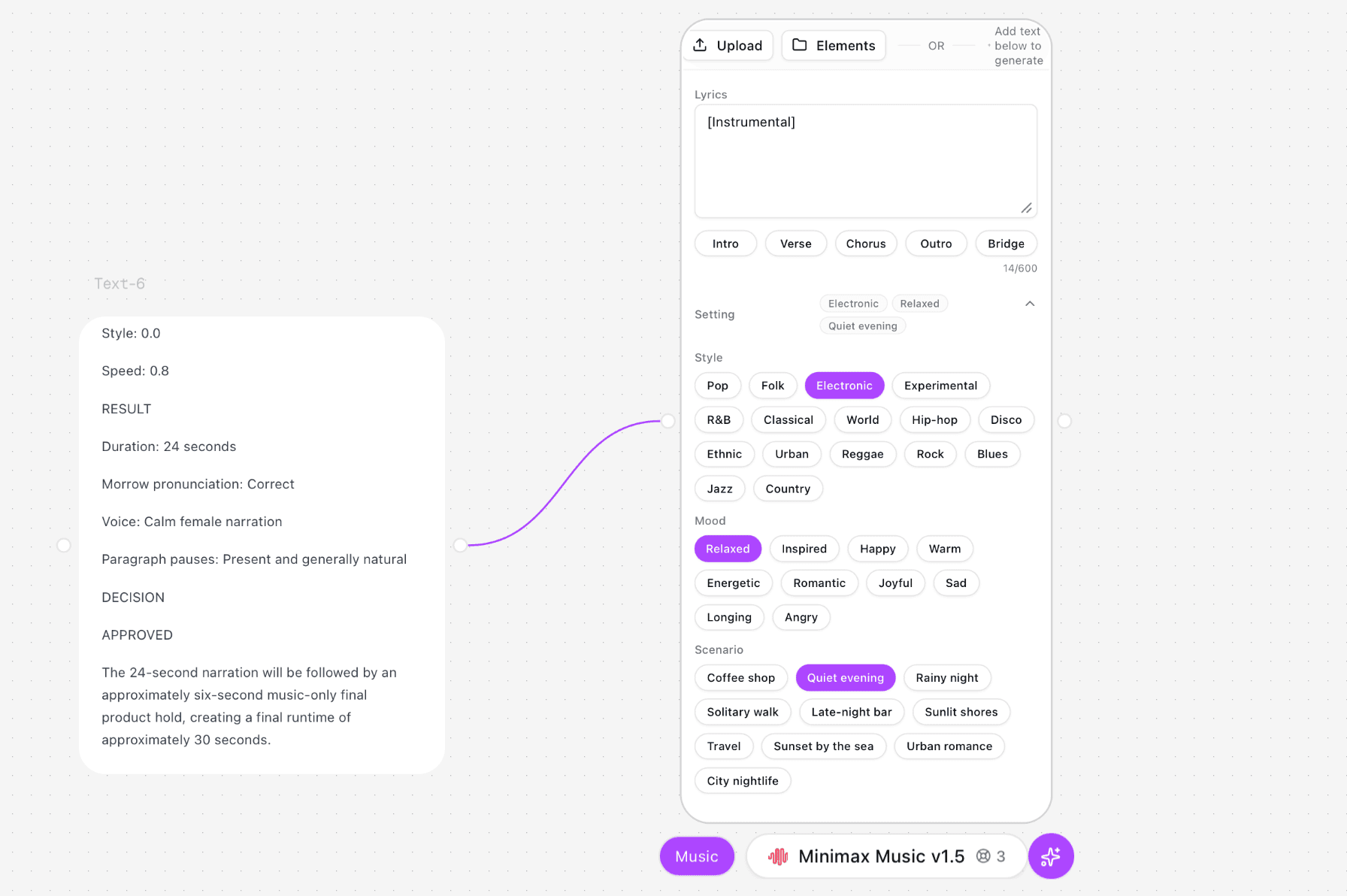
Figure 4.6. Rejected instrumental alternative: Electronic, Relaxed, Quiet evening.
The approved configuration used Folk, Warm, and Quiet evening with “[Instrumental]” as the only lyric instruction. It generated in roughly 90 seconds and produced a 27-second track with folk guitar, gentle warmth, some rhythm, no female vocal, and a more natural ending.
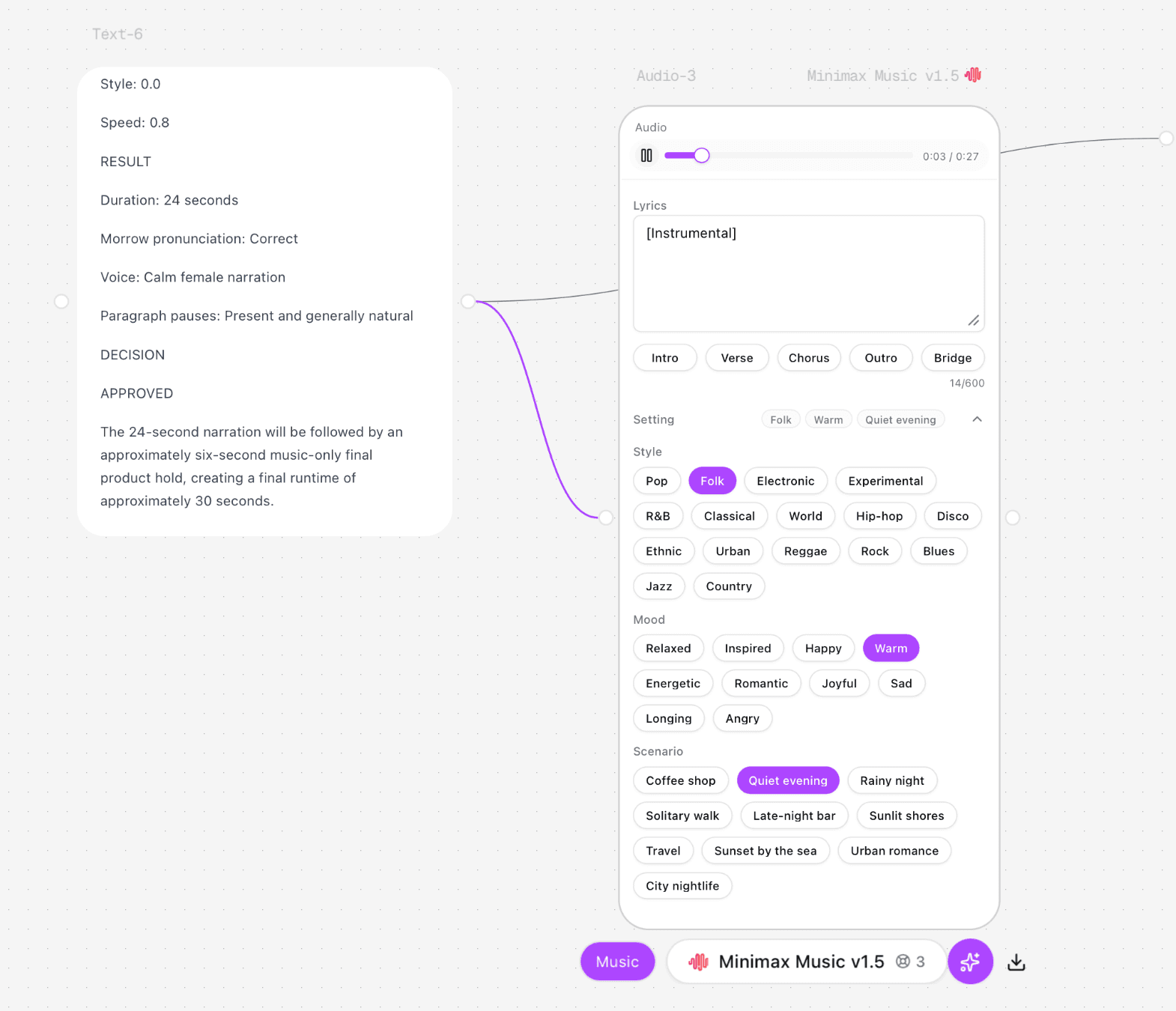
Figure 4.7. Approved instrumental result: Folk, Warm, Quiet evening, 27 seconds.
Cross-media stoplight decision
Asset | Continuity decision | Reason |
Five storyboard stills | Green | Approved bottle, label, palette, and shot function were retained closely enough for handoff |
Seedance product-camera clips | Red | Bottle geometry, label system, copper mark, or framing changed |
Seedance pouring clip | Amber for motion / Red for brand | Hand and liquid were credible, but package and set drifted |
Seedance bubble clip | Red | Bubbles were mechanically uniform; camera and ice changed |
ElevenLabs narration | Green | Correct MORROW pronunciation, calm delivery, usable 24-second timing |
Electronic music test | Amber | Technically usable but less aligned with the warm sound world |
Folk instrumental | Green | Warm guitar, restrained rhythm, no voice, natural ending |
The continuity contract worked because it produced explicit rejection decisions. It did not make every model preserve the brand automatically. Image, video, and audio remained separate production routes, but the same identity locks and stoplight gate determined which outputs were allowed into the handoff.
Frequently Asked Questions
Can a prompt alone keep a brand consistent?
No. A prompt can repeat style instructions, but reliable consistency also requires approved references, identity locks, controlled variables, review criteria, and archived lineage.
How many reference images should a brand use?
Use the smallest set that clearly covers the required roles. One identity reference, one style reference, and one composition reference can be more useful than a large mixed folder. Add a reference only when it controls a different visible decision.
Should every brand train a custom image model?
No. Custom training fits repeated, high-volume style or subject work when rights and governance are clear. A reference pack and editing workflow is usually easier to change. Train when manual routing and review have become the bottleneck, not simply because training is available.
How do I keep a character consistent across image and video?
Approve a canonical character sheet, lock facial structure, hair, wardrobe, proportions, and protected props, then use those references for the image master and video shots. Review the complete clip for drift, not only the opening frame.
Does native video audio replace a separate voice workflow?
Not automatically. Native audio can be useful for ambience, dialogue exploration, or synchronized effects, but branded speech still needs an approved voice, pronunciation, delivery, consent, and review process.
Where should Astorie sit in the workflow?
Use Astorie as the connected generation and branching workspace when image and video references, prompts, models, and outputs need to remain visible together. Keep final conform, detailed audio work, delivery masters, and formal asset governance in the specialist systems responsible for those stages.
Ready to try it on the canvas?
Open Astorie and fan your prompt across every frontier model in one workflow.