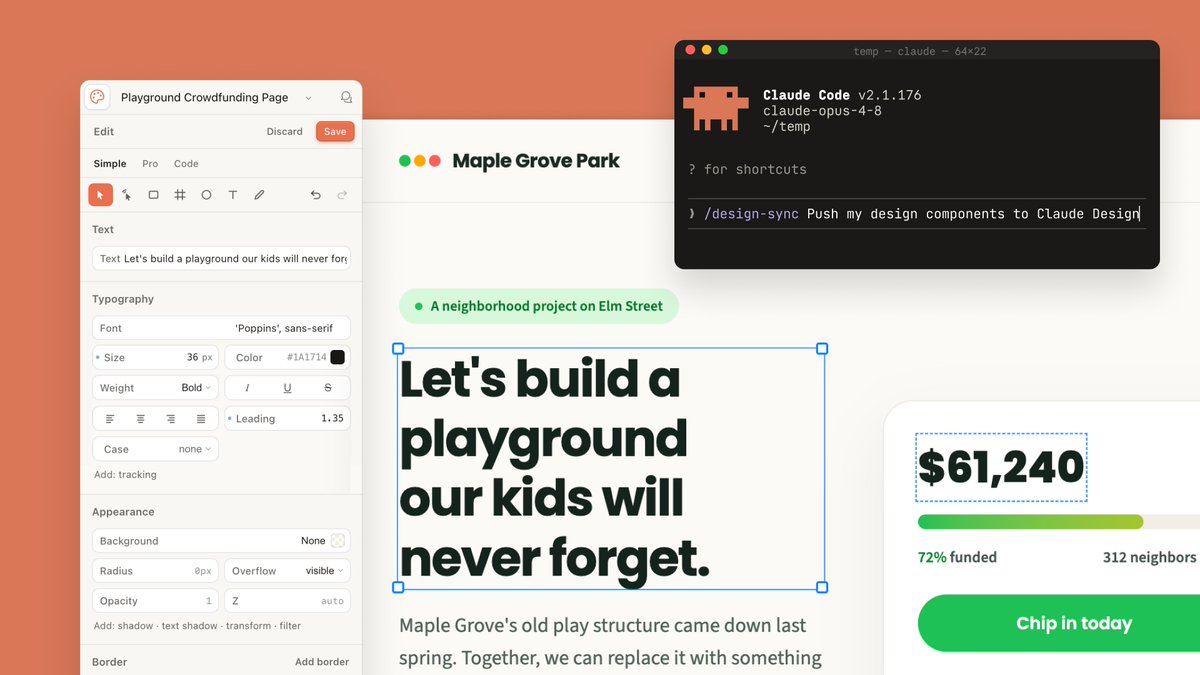
Product Marketing - Claude Design Sync UI Mockup

Generates a polished SaaS-style mockup of a design editor syncing a playground crowdfunding page with a Claude Code terminal.

Prompt

3,803 charactersOpen Astorie studio ↗
Goal: Create a polished wide 16:9 product-announcement mockup showing Claude Design and Claude Code working together on a fundraising webpage design.

Canvas: 1200×675 landscape composition with a warm coral-orange background filling the full frame. Center a large cream-white design canvas with subtle shadow, partially covered by a left editor sidebar, a right donation card, and a floating terminal window.

Layout: Use exactly 4 main interface elements: 1 left design editor panel, 1 central webpage artboard, 1 right donation progress card, and 1 floating dark terminal window in the upper-right. The artboard should sit behind the panels, with the terminal overlapping its top-right area.

Left editor panel: A rounded off-white sidebar titled “Playground Crowdfunding Page” with a small circular app icon at far left and a bell icon at far right. Below it show a top row with exactly 3 actions: “Edit”, “Discard”, and a coral “Save” button. Then show exactly 3 tabs: “Simple”, “Pro”, “Code”, with “Simple” active. Include a compact toolbar with exactly 9 visible icons: selected pointer, cursor, rectangle, grid/cross, circle, text T, pencil, undo, redo. Add labeled controls for Text, Typography, Appearance, and Border. Typography controls should include font “Poppins”, size “36 px”, color “#1A1714”, weight “Bold”, italic, underline, strikethrough, alignment icons, leading “1.35”, case “none”, and tracking. Appearance controls should include background “None”, radius “0px”, overflow “visible”, opacity “1”, and z “auto”.

Central webpage artboard: At the top of the webpage show a small logo made of exactly 3 colored dots: green, yellow, and red, followed by the site name {argument name="organization name" default="Maple Grove Park"}. Beneath it place a pale green pill tag with one green dot and the text {argument name="project label" default="A neighborhood project on Elm Street"}. The main headline must be large, bold, dark green-black, and actively selected with a thin blue bounding box and exactly 4 blue square corner handles. Headline text: {argument name="headline text" default="Let's build a playground our kids will never forget."} Break it into four lines like the image. Under the headline, show smaller gray body copy beginning “Maple Grove's old play structure came down last spring. Together, we can replace it with something”.

Right donation card: A white rounded card with a soft shadow, cropped slightly off the right edge. It contains exactly 4 visible content items: a selected amount text box reading {argument name="funding amount" default="$61,240"} with a blue dashed selection outline, a horizontal progress bar with green-to-lime fill and pale gray remainder, a status row reading “72% funded” on the left and “312 neighbors” on the right, and a large rounded green call-to-action button reading “Chip in today”.

Floating terminal window: In the upper-right, add a black macOS-style terminal with rounded corners and shadow. It has exactly 3 traffic-light dots: red, yellow, green. Window title line reads “temp — claude — 64x22”. Show a pixel-art orange Claude-like mascot icon on the left. Terminal text should include “Claude Code v2.1.176”, “claude-opus-4-8”, “~/temp”, “? for shortcuts”, and a command line reading “/design-sync Push my design components to Claude Design” with the caret at the end. Use monospaced terminal typography.

Visual style: Modern SaaS interface screenshot, clean Figma-like design controls, creamy whites, dark forest-green text, coral accent background, soft shadows, rounded corners, crisp readable UI text, high-end presentation slide aesthetic.

Constraints: Keep the composition wide and uncluttered, preserve the exact counts listed above, do not add people, do not add extra panels, and do not include watermarks.

From sourceView source ↗

More to explore

Social Media Post - Minimal Gallery Poster with Pop-Out Effect

Social Media Post - Minimal Gallery Poster with Pop-Out Effect

KGPT Image 2
Using the uploaded photo, create a 3:4 vertical poster split into top and bottom halves that touch seamlessly, with no white line, gap, or border between them.

Top: the original photo, full-bleed.

Bottom: a warm off-white textured paper background. The main subject is cut out, enlarged, and centered. Behind it, a thin horizontal rectangle shows a blurred crop of the original scene, and the subject breaks out of the frame (3D pop-out). The subject's base fades softly into the paper with natural particles, shadow, or reflection. Add small uppercase serif text in light grey with wide spacing: 3 short poetic lines at top-left and 2 lines with a "—" at bottom-right. Minimal gallery-poster style, photorealistic.
Social Media Post - Photography vs Impasto Oil Painting Poster

Social Media Post - Photography vs Impasto Oil Painting Poster

SairahGPT Image 2
Create a premium 3:4 vertical photography and impasto oil painting comparison poster using the uploaded photograph.

### LAYOUT
Divide the canvas into two perfectly equal horizontal sections (50/50):
- Top: Original photograph.
- Bottom: Artistic impasto oil painting interpretation.

Both sections must connect directly with a clean horizontal boundary, without gaps, gradients, or overlapping.

### TOP SECTION — PHOTOGRAPHY
Preserve the original subject's identity, quantity, pose, proportions, silhouette, details, composition, perspective, lighting, and natural colors. Apply only subtle premium color grading. Do not redraw, distort, duplicate, reposition, or alter the subject. No text or decorations.

### BOTTOM SECTION — ARTISTIC INTERPRETATION
Reimagine the same subject as a sculptural impasto oil painting micro-landscape. Use thick layered paint, palette-knife textures, handcrafted forms, raised edges, and expressive brushstrokes.

Keep the subject recognizable, centrally or slightly off-center, surrounded by generous warm-white negative space. Introduce a single color band inspired by the original photograph, transformed into a ground, water, pathway, or abstract landscape element.

### COLORS & TEXTURES
Extract a harmonious, limited color palette from the original photograph. Preserve the subject's natural color character while adding subtle brightness and luminosity. Use rich paint textures selectively, with refined subject details and delicate matte paper texture.

### TYPOGRAPHY
Add a short, elegant English title and one small supporting line within the lower section's negative space. Use thin, minimal typography. Generate text based on the actual subject or mood. Avoid invented dates, locations, logos, signatures, and unnecessary annotations.

### AESTHETIC
Quiet, minimal, sophisticated, and editorial. Create a collectible fine-art publication aesthetic through negative space, sculptural depth, material textures, and balanced composition.

### AVOID
Photo collages, altered subjects, unrelated scenes, illustrated photography, extra title bars, clutter, excessive decorations, incorrect text, watermarks, cartoon styles, neon colors, oversaturation, muddy tones, plastic-looking 3D, and cheap CGI.
Social Media Post - Vintage Photo of Woman in Field

Social Media Post - Vintage Photo of Woman in Field

いがぐりメタボGPT Image 2
A nostalgic, vintage-style photograph of a young woman sitting in a lush green field. She has short, dark bobbed hair with bangs and is looking down with a pensive, melancholic expression. She wears a black, long-sleeved top with a deep V-neckline featuring ruffled edges. The background shows a vast expanse of tall grass or crops stretching toward distant hills under a clear sky. The image has a distinct retro aesthetic, characterized by film grain, warm color tones, scratches, and dust spots typical of old analog photography from the Showa era.
Social Media Post - Retro Showa Cafe Portrait

Social Media Post - Retro Showa Cafe Portrait

いがぐりメタボGPT Image 2
A vintage-style photograph of a young woman sitting in a retro Showa-era cafe. She has dark hair tied back with loose strands framing her face, wearing round wire-rimmed glasses and a delicate floral sundress under an off-the-shoulder white cardigan. She is holding a small pastry up to her mouth, looking directly at the camera with a soft, candid expression. In front of her on the wooden table sits a cup of black coffee in a patterned ceramic cup and saucer, along with a sugar dispenser. The background features warm wood paneling, shelves with glassware, and another patron blurred out, creating a nostalgic atmosphere. The image has a grainy film texture, faded colors, and light leaks typical of 1970s Japanese photography.
Social Media Post - Mixed-Media Scrapbook Doodle Style

Social Media Post - Mixed-Media Scrapbook Doodle Style

TaarukGPT Image 2
Transform the uploaded reference image into a charming, whimsical 2D storybook illustration while preserving the original image’s exact composition, camera angle, perspective, framing, subject identity, facial features, hairstyle, pose, clothing, proportions, expressions, and all object placements. Do not redesign, remove, or rearrange any elements. Keep the main subject photorealistic or softly realistic, while transforming the surrounding background into a delicate hand-drawn illustration.

Create a beautiful mixed-media aesthetic combining realistic photography with minimal black-ink doodles on a warm cream-colored textured paper background. Add cute hand-drawn decorative elements inspired by the scene, such as tiny flowers, stars, snowflakes, butterflies, trees, hearts, grass, little characters, animals, and playful illustrations. Keep the doodles simple, delicate, and naturally arranged around the subject without covering important details.

Use a soft pastel and warm earthy color palette, subtle paper grain, pencil-like sketch marks, fine imperfect black outlines, and a cozy vintage journal aesthetic. Add elegant handwritten cursive text that complements the scene, with small arrows, decorative lines, hearts, and playful annotations.

The final result should look like a creative scrapbook page, a nostalgic illustrated diary, and a beautiful lifestyle editorial combined. Maintain the original subject as the main focus, with a clean cream background and balanced negative space.

Style: Mixed-media photography, hand-drawn doodle art, vintage scrapbook, cozy illustrated journal, minimalist ink sketches, textured cream paper, whimsical storybook aesthetic.

High-quality details, natural lighting, beautiful composition, vertical 9:16 format.
Social Media Post - Cinematic Fantasy Portrait with Miniature Self

Social Media Post - Cinematic Fantasy Portrait with Miniature Self

AizaGPT Image 2
STYLE AND COMPOSITION: Create an ultra-realistic, photorealistic, cinematic fantasy portrait in a vertical 9:16 composition. A beautiful young adult woman sits gracefully on a minimalist white cylindrical stool in a softly illuminated modern interior. She wears a light-blue button-up shirt with rolled-up sleeves, fitted blue denim jeans, and clean white sneakers. Her long, voluminous dark-brown wavy hair cascades naturally over her shoulders. Her makeup is soft and natural, with realistic skin texture, delicate facial features, and a gentle, dreamy expression.

MAIN SUBJECT — POSE AND EXPRESSION: The woman sits with her legs crossed elegantly, her torso slightly turned toward the right. She gazes upward with wonder and affection at a miniature version of herself floating above her hands. Both arms extend forward, with her palms open and gently cupped as if magically supporting the tiny figure. Her fingers are naturally positioned, anatomically correct, and delicately illuminated by the golden glow.

MINIATURE SELF — HIGHEST PRIORITY: A perfectly recognizable miniature duplicate of the same woman floats approximately 20–30 centimeters above her open palms. The tiny figure has the same facial features, hairstyle, skin tone, blue button-up shirt, fitted jeans, and white sneakers as the seated woman. Show the miniature woman in a full-body view, hovering weightlessly with her arms slightly extended outward, legs gently crossed at the ankles, and head tilted gracefully upward. Her expression is peaceful and joyful. The miniature must appear three-dimensional, realistically proportioned, and physically integrated into the scene, with no visible platform, strings, or support.

MAGICAL EFFECTS: Surround the floating miniature with delicate golden sparkles, glowing particles, tiny luminous stars, and elegant circular ribbons of warm golden light spiraling around her body. Add fine glitter trails and subtle lens flares, with the brightest golden glow concentrated around the miniature’s silhouette and feet. The light softly illuminates the woman’s hands, face, hair, and clothing. Keep the magical effects elegant, ethereal, and realistic rather than cartoonish.

BACKGROUND AND LIGHTING: A warm taupe-gray interior wall with strong natural sunlight entering from a large off-camera window on the left. Distinct geometric window-frame shadows stretch diagonally across the wall and pale floor, creating a sophisticated architectural pattern. Soft afternoon sunlight, warm rim lighting around the woman’s hair, gentle shadows, natural skin highlights, and a creamy neutral color palette. A subtle shallow depth of field adds cinematic depth without obscuring either subject.

CAMERA AND QUALITY: Full-body environmental portrait, vertical composition, slightly low camera angle, 50mm portrait lens, f/2.8, realistic perspective, balanced framing, professional fashion photography, high dynamic range, lifelike skin pores, individual hair strands.

Find your next direction

ASTORIE CANVAS

Take the idea further.

Bring your prompts, references and results together in one creative space.

Open your canvas ↗