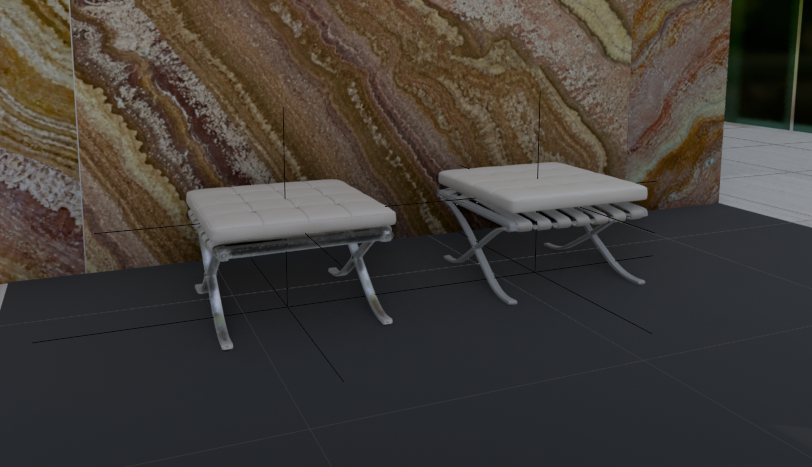
E-commerce Main Image - 3D Footstool Mesh Comparison

A realistic architectural render showing two white leather footstools side by side in a marble interior for comparing 3D generation quality and materials.

Prompt

1,683 charactersOpen Astorie studio ↗
Create a realistic architectural visualization comparing two 3D-generated ottoman stools in an interior showroom scene. Canvas: wide landscape 16:9 render, camera at low eye level looking slightly downward. Scene: two small Barcelona-style footstools placed side by side on a dark charcoal tiled floor, in front of a tall glossy stone wall with dramatic brown, cream, rust, and gold onyx/marble veining; a narrow strip of green-tinted glass or window appears at the far right edge, with pale exterior floor tiles visible beyond. Subjects: exactly 2 footstools: left stool is the HD version, slightly smaller and lower, with a white tufted square cushion divided into a 4-by-4 grid, rounded soft edges, light gray leather straps underneath, and reflective polished metal X-shaped legs; right stool is the Smart Mesh version, slightly larger and cleaner, with a thicker smooth white cushion, parallel white underside straps, and gray polished X-shaped metal legs. Add thin black 3D viewport guide lines or wireframe axis lines crossing through and around both stools, including vertical and horizontal alignment lines, as if shown in a 3D modeling comparison viewport. Materials: white leather cushions with subtle seams and soft highlights, chrome legs with reflections, dark matte floor tiles with faint grout lines, glossy veined stone wall. Lighting: soft indoor studio lighting, moderate shadows, realistic but slightly CGI-rendered look. Composition: left stool around one-third of the frame, right stool around two-thirds, both facing forward at a slight angle, enough floor visible in front, marble wall filling the background. No people, no labels, no UI panels, no watermark.
From sourceView source ↗

More to explore

Game Asset - Anime Adventurer Character Sheet
YouTube Thumbnail - Abandoned Road Under Bridge
Social Media Post - Suica Penguin in Akihabara
Profile / Avatar - Retro Portrait: Girl with Plush Dog
Profile / Avatar - Capybara Yuzu Hot Spring Sticker
Profile / Avatar - GPT Image 2 Miniature Forced Perspective Prompt

Profile / Avatar - GPT Image 2 Miniature Forced Perspective Prompt

SairahGPT Image 2
Create a 1:1 square, ultra-realistic overhead photograph based on the uploaded selfie. The selfie is the sole reference for the person's identity. Preserve the same recognizable adult face, natural facial proportions, skin tone, hairstyle, original expression, visible clothing (including existing prints), and accessories. Naturally complete any unseen trousers and shoes to match the original outfit.

CAMERA & ENVIRONMENT
Position the camera almost directly above the person, looking vertically downward. The setting is a clean, spacious, light-colored indoor stone floor or outdoor paved surface that matches the aesthetic of the original selfie. Use large paving slabs with only 2–3 thin, widely spaced seams across the entire frame. Each slab should be approximately twice the height of the miniature full-body figure. Keep the stone texture subtle and refined, with no props, plants, or clutter. A distant wall base may appear along the top edge.

COMPOSITION & PROPORTIONS
Only one person stands slightly below the center of the frame, fully visible from head to toe. The entire figure occupies just 40% of the image height, leaving extensive empty floor space above the head and on both sides.

Use extreme wide-angle forced perspective to create an enormous, realistic head and a miniature body. The head, from crown to chin, occupies 75% of the figure's total silhouette height. The shoulder width is only 50% of the head width. Below the head, create an extremely short, narrow torso, miniature arms, perspective-compressed short legs, and two tiny shoes placed close together.

The head and body must connect seamlessly. Both arms hang naturally close to the sides. The person tilts their head upward and looks directly toward the elevated camera. Preserve realistic facial anatomy, natural skin texture, and lifelike eyes. Absolutely no cartoon styling or collage effects.

LIGHTING & REALISM
Use natural lighting, realistic individual hair strands, authentic fabric textures, finely detailed stone surfaces, physically accurate contact shadows, and subtle film grain. The final image must look like a genuine photograph captured with a real camera.

Find your next direction

ASTORIE CANVAS

Take the idea further.

Bring your prompts, references and results together in one creative space.

Open your canvas ↗