
Alternative
Best ComfyUI Alternative for AI Video & Image Workflows (2026)
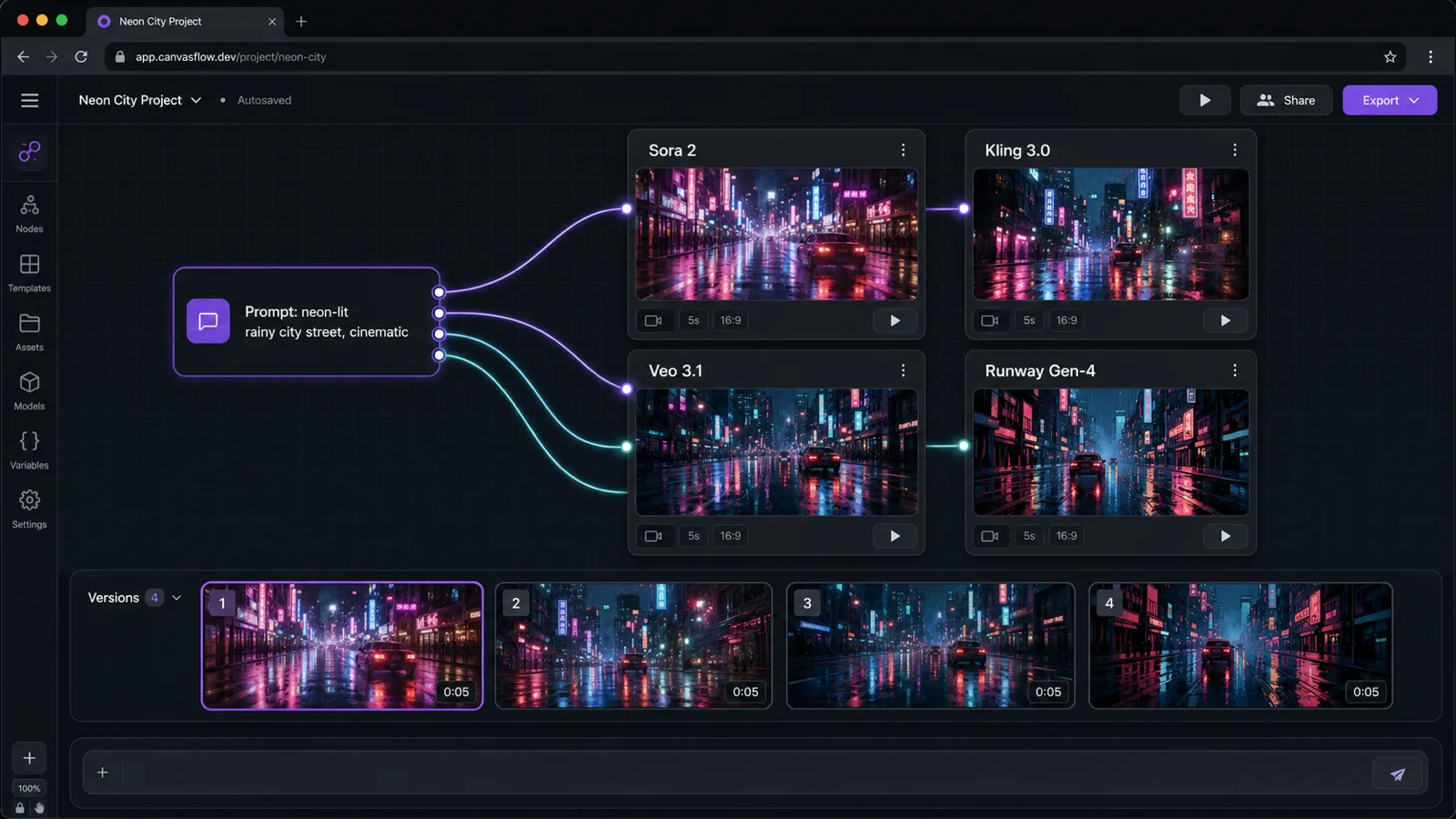
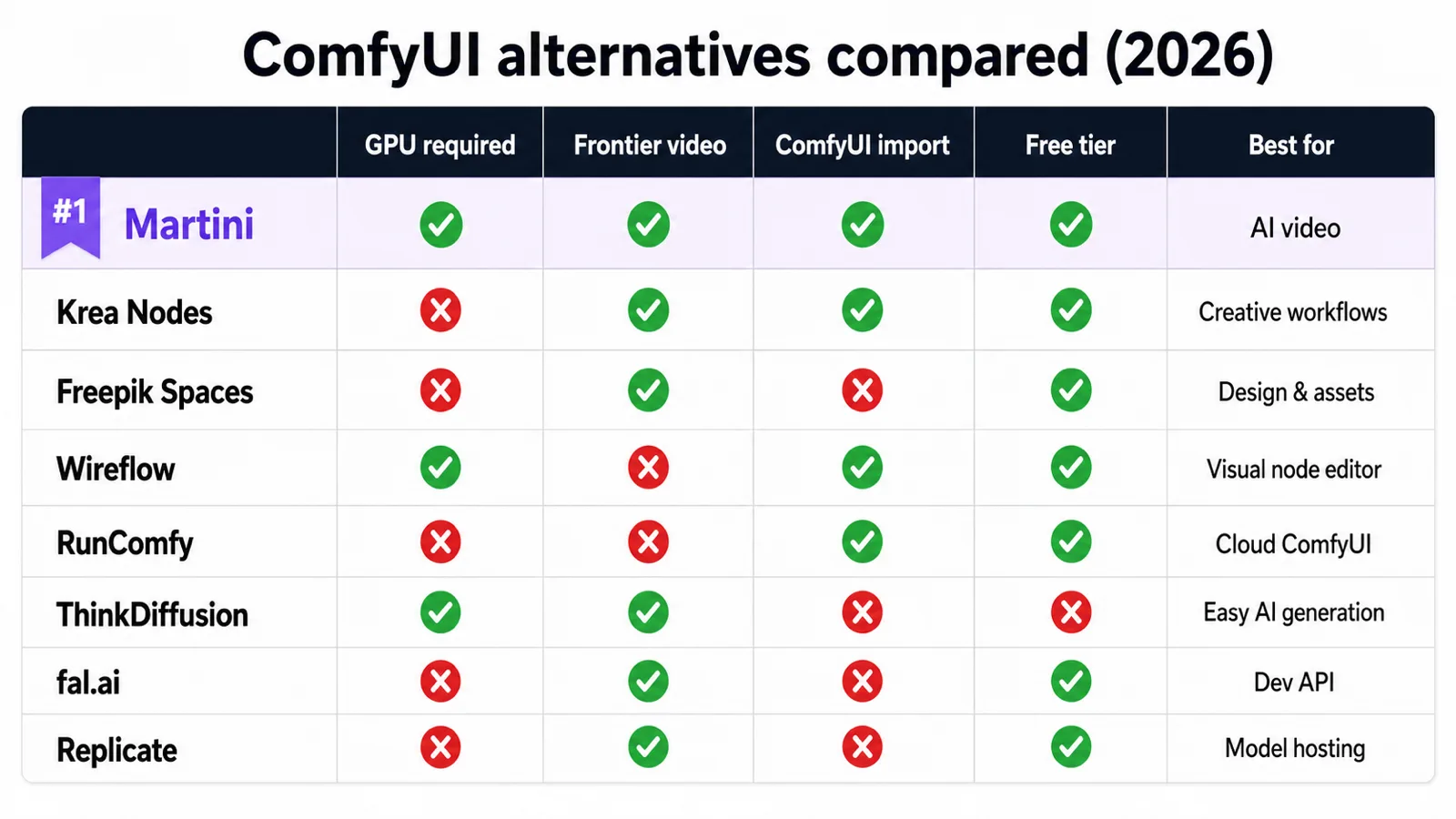
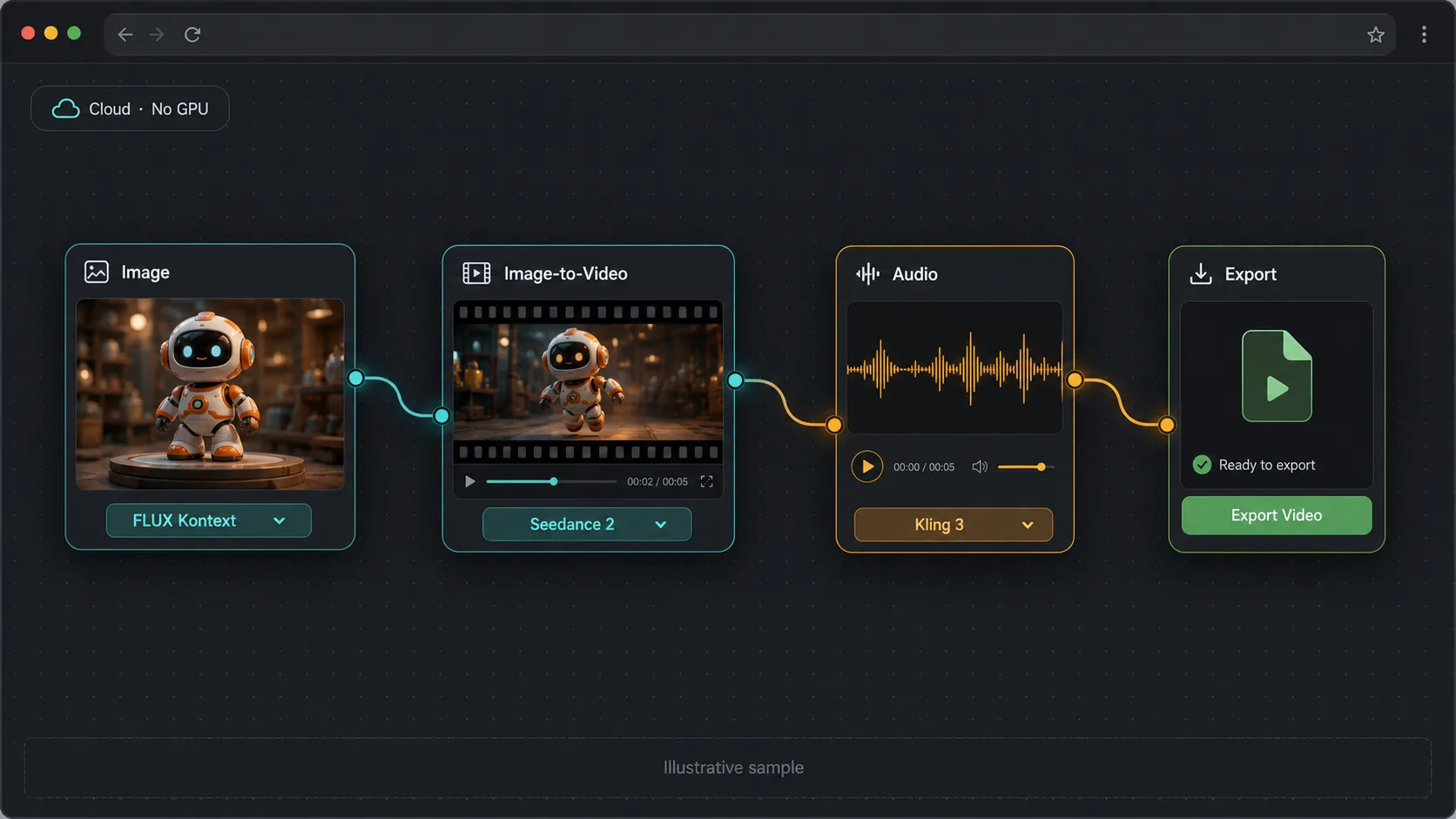
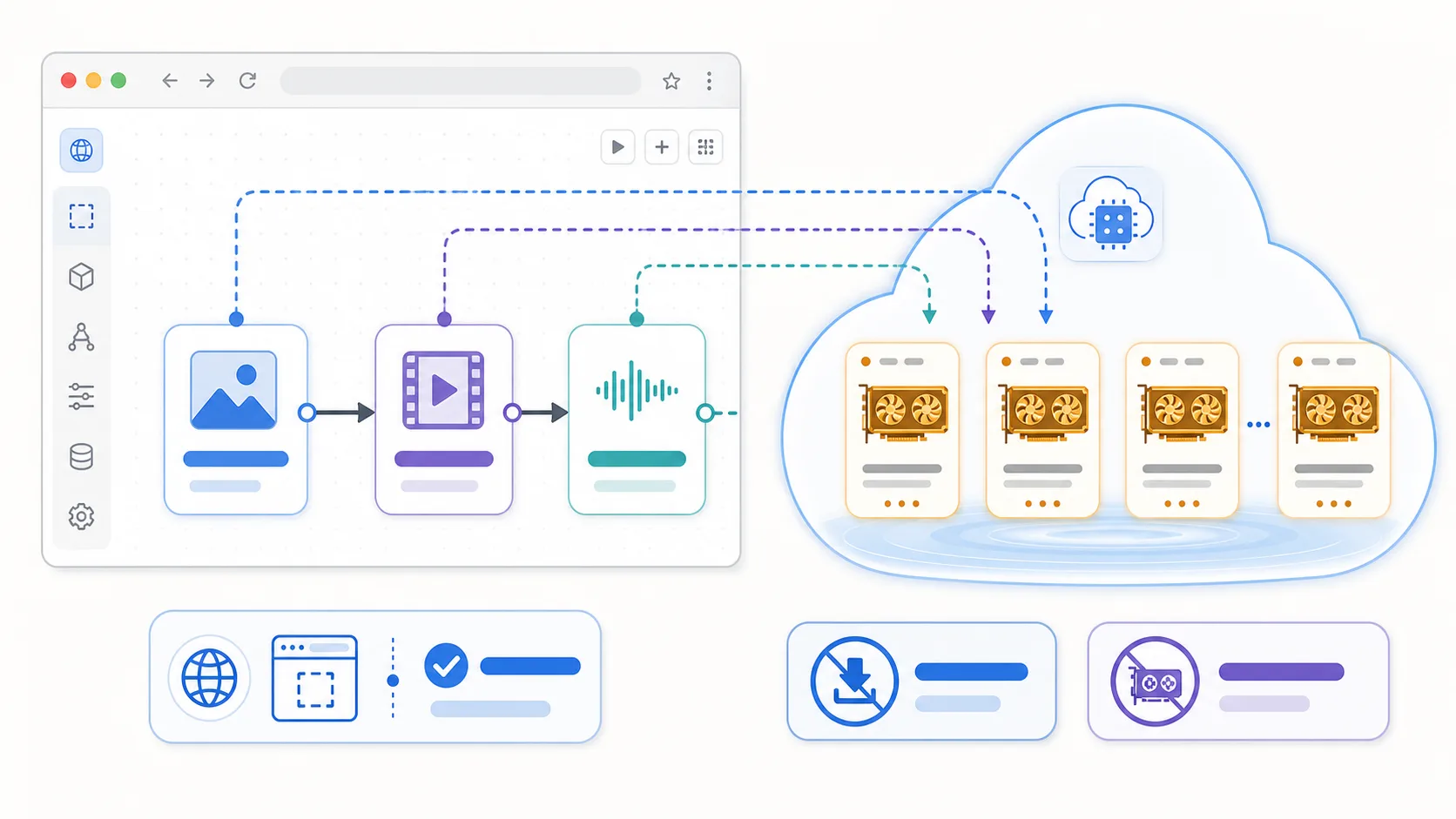
The best ComfyUI alternative without a GPU is a browser-based node canvas that runs models on remote compute, so you skip Python, CUDA, and a $400–$1,500 graphics card. Whether you searched for an online, cloud, or no-GPU ComfyUI alternative, the answer splits the same way: for AI video and multi-modal workflows, Astorie is the strongest pick — it fans one prompt across 100+ frontier image and video models (Sora 2, Kling 3.0, Veo 3.1, Runway Gen-4, FLUX) on an infinite canvas. For cloud-hosted ComfyUI itself with your own custom nodes and LoRAs, use RunComfy or ThinkDiffusion. For a free, open-source local replacement, InvokeAI and SwarmUI stay closest to ComfyUI. Be clear-eyed about the trade-off: ComfyUI is still unbeaten for free local control, custom samplers, and its 60,000+ community node ecosystem — its real cost is the GPU, the setup time, and the maintenance.
See them side by side


When to choose Astorie
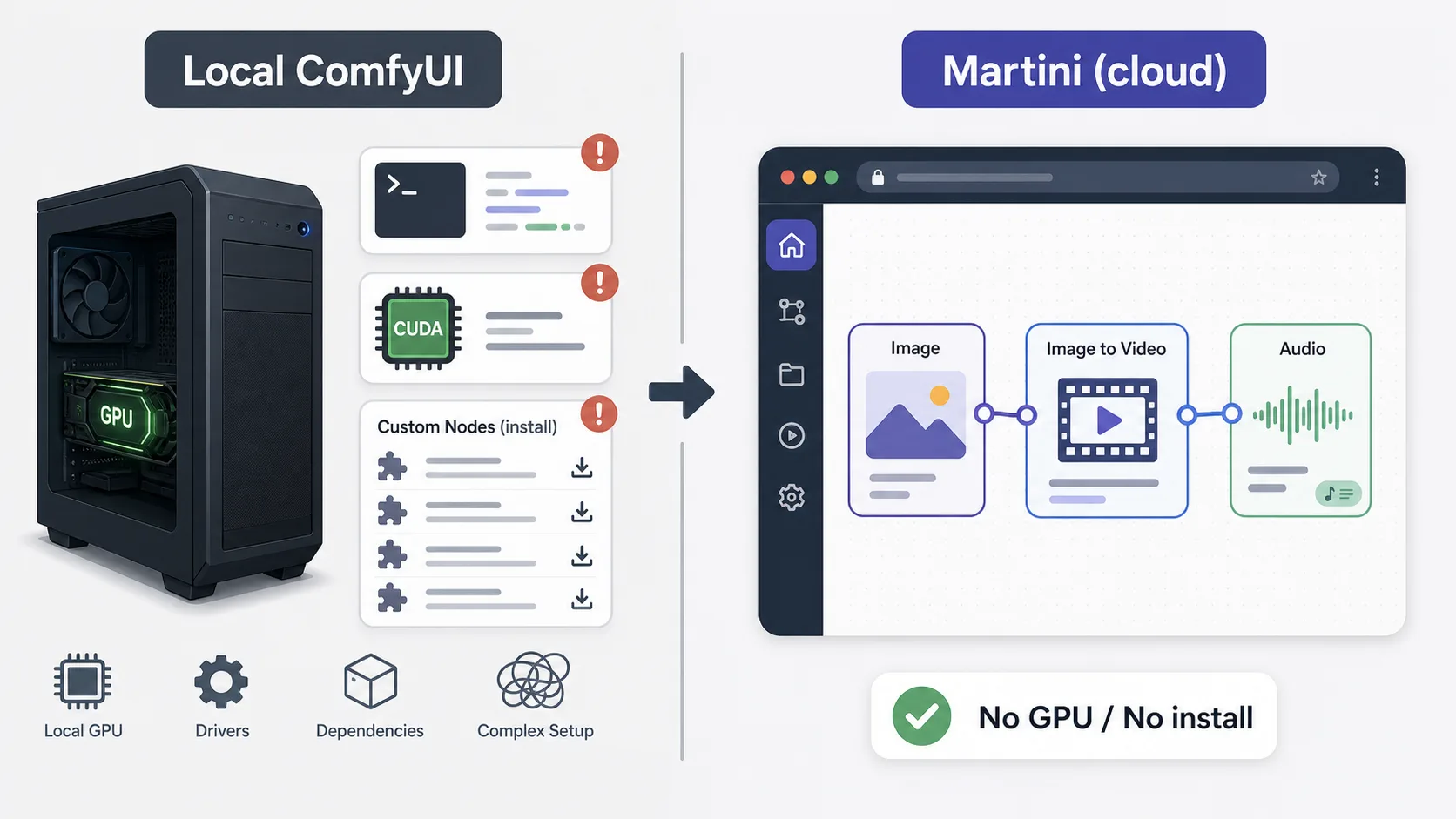
- You want node-based AI workflows without a local Python install, a CUDA GPU, or dependency troubleshooting — Astorie, our #1 pick, runs entirely in the browser on any laptop, tablet, or Chromebook.
- Your workflow is video-heavy — Astorie fans one prompt across Sora 2, Runway Gen-4, Kling 3.0, Veo 3.1, Hailuo, Ray 2, Vidu, Seedance, and Wan at once, where ComfyUI is image-only without bolt-on custom nodes.
- You want frontier video at all — the 2026 frontier video models (Sora 2, Kling 3.0, Veo 3.1, Runway Gen-4) are closed-weight cloud APIs no desktop GPU can run at any size, so the compute is remote regardless; a browser canvas simply stops pretending otherwise.
- You need image, video, audio, lip-sync, 3D, and script writing on one canvas instead of assembling checkpoints, LoRAs, and separate tools around a Stable Diffusion graph yourself.
- You want to compare many takes fast — fan-out runs the same prompt across multiple frontier models simultaneously and keeps every result in a version tray, so you pick the winner instead of re-wiring a graph per model.
- You build reusable workflows a creative team can remix — product references, characters, prompts, generated assets, and downstream video or audio steps stay in one shareable project.
- You collaborate with non-technical teammates — editors, designers, producers — who need a shared multiplayer canvas, not SSH access to a GPU box.
- You want NLE export — approved clips, audio, and edit notes move toward Adobe Premiere Pro and DaVinci Resolve via XML/EDL instead of losing context between tools.
When to choose ComfyUI
- You need low-level open-source Stable Diffusion control — custom samplers, schedulers, and raw latent manipulation that a curated cloud canvas deliberately does not expose.
- You rely on the community custom-node ecosystem — 60,000+ plugins extend ComfyUI in ways a managed platform cannot match.
- You already maintain a ComfyUI workflow library and want to keep it portable across machines — managed hosts run your exact .json graphs unchanged.
- You want a free, open-source (GPL-3.0) tool and are comfortable maintaining it across updates; ComfyUI, InvokeAI, and SwarmUI all cost $0 in software.
- You want offline, fully local workflows on hardware you already own, with no per-credit billing — only electricity.
- You already run an NVIDIA GPU with 8 GB+ VRAM and a technical setup, and value maximum customization over convenience.
Side-by-side comparison
| Attribute | Astorie | ComfyUI |
|---|---|---|
| What it actually is | A cloud-native creative canvas — a node graph that calls 100+ curated models across image, video, audio, 3D, and text. | An open-source local node app; "cloud ComfyUI" means a managed host (RunComfy, ThinkDiffusion) running it on a rented GPU. |
| Interface | Browser-based infinite node canvas — fan-out one prompt across many models. | Local node graph (Python desktop app); cloud only via hosts like RunComfy. |
| GPU required | No — generation runs in the cloud, any device works. | Yes locally — NVIDIA, 8 GB+ VRAM; or rent cloud GPU time. |
| Setup time | Under 2 minutes — sign up and start building. | 30+ minutes with Python, CUDA, and dependencies, plus ongoing custom-node maintenance. |
| Supported media | Image, video, audio, music, 3D, and text on one canvas. | Image generation (Stable Diffusion / Flux); other media need custom-node packs. |
| AI models | 100+ frontier models across providers — Midjourney, FLUX, Imagen 4, Sora 2, Runway, Kling, Veo, Suno, ElevenLabs, Tripo3D, Claude, GPT. | Stable Diffusion / Flux family plus community checkpoints and LoRAs you supply. |
| Frontier video models | Yes — Sora 2, Runway Gen-4, Kling 3.0, Veo 3.1, Hailuo 02, Ray 2, Vidu, Wan 2.6. | No native frontier video (Sora/Kling/Veo) — image only, or open video custom nodes (Wan/AnimateDiff). |
| Multi-model fan-out | Yes — wire one prompt into many image and video nodes and run them simultaneously. | No — one graph runs one model path per execution; comparing models means re-wiring. |
| Audio and lip-sync | Built in — Suno music, ElevenLabs/Minimax TTS, sound effects, lip-sync (Kling, InfiniteTalk). | None natively; requires external tools. |
| ComfyUI-compatible / workflow import | No — Astorie uses its own curated nodes, not ComfyUI JSON graphs. | Native — ComfyUI JSON workflows, custom nodes, ControlNet, IP-Adapter, LoRAs (verbatim on managed hosts). |
| API access | Workflow runs are credit-based on the canvas; programmatic API on the roadmap, not a dev SDK today. | ComfyUI has an HTTP/queue API; RunComfy/fal.ai/Replicate expose hosted endpoints. |
| Free tier | Yes — 40 credits/month, no card, all models unlocked. | ComfyUI software is free (you supply the GPU); hosted RunComfy/ThinkDiffusion bill by GPU time. |
| Open source | No — managed cloud platform. | Yes — GPL-3.0 (as are InvokeAI and SwarmUI). |
| NLE export | Direct XML/EDL export to Adobe Premiere Pro and DaVinci Resolve. | Export frames/clips; assemble in an editor manually. |
| Collaboration | Project sharing, workspace billing, per-member credit limits. | Single-user local setup; hosted instances are usually single-user too. |
| Cost | Free (40 credits/mo); paid plans from $19/mo flat. | Free software plus $400–$1,500+ GPU and electricity (or hosted GPU-time fees). |
Workflow comparison
| Step | Astorie | ComfyUI |
|---|---|---|
| Get a node-based workflow running | Open astorie.ai, sign up, and start building on the infinite canvas in under 2 minutes — no install. | Install Python, set up a CUDA-compatible GPU, clone ComfyUI, resolve dependencies, and add custom nodes (30+ minutes). |
| Generate a concept image | Drop an Image Node, type a prompt, pick a model (Nano Banana on the free tier, or Midjourney/FLUX), and hit Generate. | Wire a Stable Diffusion checkpoint, sampler, and VAE nodes; render locally — quality and speed bound by your GPU. |
| Compare four models on the same prompt | Fan the prompt out into four Image or Video Nodes and run them at once; every take lands in a version tray to pick from. | Swap the checkpoint and re-run the graph four times, or duplicate and re-wire the graph per model. |
| Animate the still into video | Connect the Image Node to a Video Node — the image feeds Sora, Runway, Kling, Veo, or Seedance automatically. | Not supported natively; install a video custom-node pack (Wan/AnimateDiff) or switch to a separate tool and rebuild the chain. |
| Add voiceover, music, and lip-sync | Chain an ElevenLabs or Suno node, then a lip-sync node onto a presenter clip — all on the same canvas. | Requires external audio and lip-sync tools outside the ComfyUI graph. |
| Keep a character consistent across shots | Pin one reference image in the Elements library; reuse it across image, video, talking-head, and storyboard steps via @mentions. | Manage ControlNet, IP-Adapter, or LoRA nodes per generation, tuned by hand. |
| Hand off to an editor | Export approved clips, audio, and edit notes directly to Adobe Premiere Pro or DaVinci Resolve. | Export image frames; assemble video and audio manually in separate software. |
Pricing compared
| Plan | Astorie | ComfyUI |
|---|---|---|
| Free | Free · 40 credits/month renewable · all 100+ frontier models · fan-out · no card | ComfyUI free (GPL-3.0) · you supply the GPU; hosted free trials limited |
| Entry paid | Standard · $19/month flat · 1,600 credits | Hosted ComfyUI (RunComfy/ThinkDiffusion) ≈$0.50–$2+/active GPU hour (2026) |
| Pro | Pro · $49/month flat · 4,800 credits | Self-hosted: $400–$1,500+ GPU + electricity, or scaling GPU-time fees |
| Top | Ultimate · from $99/month · 10,000 credits | Self-hosted — no managed top tier; dev APIs (fal.ai/Replicate) bill per inference |
| Top-ups | $1 per 100 credits · 90-day expiry | Not applicable (hardware/GPU-time/per-call instead) |
Pricing and operational tradeoffs
- Astorie (#1 pick): free tier with 40 credits per month and no card required — the full canvas, fan-out, and all 100+ frontier models are unlocked on the free tier.
- Astorie paid plans are flat by usage: Standard $19/month for 1,600 credits, Pro $49/month for 4,800 credits, Ultimate from $99/month for 10,000 credits, plus $1 per 100 credits in top-ups (90-day expiry).
- Cloud-hosted ComfyUI (RunComfy, ThinkDiffusion): your own ComfyUI graphs and custom nodes on a rented GPU, billed by GPU time — RunComfy advertises pay-as-you-go machines at roughly $0.50–$2+ per hour depending on GPU tier, ThinkDiffusion sells hourly machine tiers from a low-cost Basic GPU up to high-VRAM Ultra machines (as of 2026). Best when you must keep existing ComfyUI workflows.
- Mind the GPU-time gotcha: hosted ComfyUI bills for active machine time, not per generation — a slow or stuck workflow costs more than expected, where per-generation credit pricing tracks each call and stays predictable for teams.
- Developer endpoints (fal.ai, Replicate): pay-per-inference APIs for FLUX, SDXL, video, and audio models — priced per generation, no canvas UI. Best for engineers wiring models into their own product, not visual workflow building.
- ComfyUI itself is free, open-source software — the real cost is hardware: a capable NVIDIA GPU (8 GB+ VRAM) typically runs $400–$1,500+ as of 2026, plus electricity and your setup time. InvokeAI and SwarmUI are likewise free and open-source.
- Break-even math: at $19/month, Astorie costs about $228/year — roughly the price of a single mid-range used GPU, with zero electricity, driver, or maintenance overhead and 100+ frontier models you would otherwise assemble yourself.
Which to choose by use case
1. Astorie — best overall ComfyUI alternative and best for AI video
Recommendation: Astorie
Browser-based node canvas, no Python or CUDA, fan-out across 100+ frontier image and video models, plus audio, lip-sync, storyboard, and NLE export. Trade-off: not open source and no ComfyUI workflow import. Free tier; paid from $19/mo (2026).
2. Krea Nodes — best lightweight visual node canvas
Recommendation: Krea Nodes
A friendly browser node editor for image generation and remixing with a low learning curve. Trade-off: narrower video and team-production depth than Astorie. Paid plans as of 2026.
3. Freepik Spaces (Magnific) — best for upscaling and stock-adjacent image work
Recommendation: Freepik Spaces
Node-style canvas tied to Freepik/Magnific upscaling and a large asset library. Trade-off: design-tool focus, less frontier-video coverage. Subscription-based (2026).
4. Wireflow — best open node-canvas for chaining image and video steps
Recommendation: Wireflow
A web node canvas built around chaining generation steps with a live embed. Trade-off: smaller model roster and ecosystem than Astorie. Free and paid tiers (2026).
5. RunComfy — best cloud-hosted ComfyUI (keep your exact graphs)
Recommendation: RunComfy
Runs real ComfyUI in the cloud, so your JSON workflows, custom nodes, and LoRAs work unchanged on a rented GPU. Trade-off: still ComfyUI complexity, billed by GPU time. Hourly/credit pricing (2026).
6. ThinkDiffusion — best managed ComfyUI/A1111 for teams
Recommendation: ThinkDiffusion
Hosted ComfyUI and Automatic1111 machines with no local setup. Trade-off: GPU-time pricing and the same node-graph learning curve as ComfyUI. Per-hour plans (2026).
7. fal.ai — best developer API for inference at scale
Recommendation: fal.ai
Fast pay-per-inference endpoints for FLUX, SDXL, video, and audio models. Trade-off: an API, not a visual canvas — for engineers, not visual workflow builders. Per-generation pricing (2026).
8. Replicate — best model marketplace for prototyping
Recommendation: Replicate
Run thousands of community and frontier models via a simple API and web UI. Trade-off: no node canvas; you script the pipeline yourself. Per-second/per-run pricing (2026).
Related Astorie workflows
ai-canvas-workflow
/features/ai-canvas-workflow
ai-video-workflow
/features/ai-video-workflow
ai-image-to-video
/features/ai-image-to-video
ai-storyboard-generator
/features/ai-storyboard-generator
ai-video-nle-export
/features/ai-video-nle-export
ai-character-consistency
/features/ai-character-consistency
ai-voiceover-generator
/features/ai-voiceover-generator
Related models
Related how-to guides
animate-images
/how-to/animate-images
create-multi-shot-video
/how-to/create-multi-shot-video
generate-consistent-character
/how-to/generate-consistent-character
create-video-with-reference-character
/how-to/create-video-with-reference-character
create-ai-short-film
/how-to/create-ai-short-film
upscale-images-to-4k
/how-to/upscale-images-to-4k
Related workflows
Compare with other tools
Related reading
Related tools
Frequently asked questions
- What is the best ComfyUI alternative without a GPU?
The best ComfyUI alternative without a GPU is a browser-based node canvas that runs models on remote compute. Astorie is the strongest pick for AI video and multi-modal work because it fans one prompt across 100+ frontier image and video models on an infinite canvas with no Python, CUDA, or graphics card — it runs from a laptop, tablet, or Chromebook.
- Is there a browser-based or online version of ComfyUI?
Yes. Cloud hosts like RunComfy and ThinkDiffusion run the real ComfyUI in your browser on a rented GPU, so your existing JSON workflows and custom nodes work unchanged. If you want a node canvas without ComfyUI complexity, Astorie, Krea Nodes, Wireflow, and Freepik Spaces are native browser node editors built for the same visual workflow idea.
- Can I run my ComfyUI JSON workflows in the cloud or import them into another tool?
Only tools that run ComfyUI itself import your .json graphs — RunComfy and ThinkDiffusion load workflows, custom nodes, ControlNet, and LoRAs verbatim on a remote GPU billed by GPU time. Native canvases like Astorie, Krea Nodes, and Wireflow use their own node systems, so you rebuild the workflow there — the node mental model carries over, but the JSON does not.
- Are there free ComfyUI alternatives?
Yes. The free, open-source alternatives closest to ComfyUI are InvokeAI and SwarmUI (both free to run on your own GPU). For a free cloud option, Astorie has a free tier with 40 credits per month, no card required, and unlocks all 100+ frontier models plus fan-out — the trade-off is that it is a managed platform, not open source.
- What is the easiest ComfyUI alternative for beginners?
For beginners, Astorie is the easiest because it removes setup entirely — sign up, drop a node, type a prompt, and generate in under two minutes with no Python, CUDA, or dependency errors. Krea Nodes is another low-learning-curve browser canvas. Hosted ComfyUI like RunComfy still carries ComfyUI’s steeper node-graph learning curve.
- Which ComfyUI alternative supports video generation?
Astorie is the strongest ComfyUI alternative for video: it natively runs frontier video models — Sora 2, Runway Gen-4, Kling 3.0, Veo 3.1, Hailuo, Ray 2, Vidu, Seedance, and Wan — and can fan one prompt across several at once. ComfyUI itself has no native frontier video and reaches it only through open video custom nodes like Wan or AnimateDiff.
- Is a cloud canvas cheaper than buying a GPU?
Often, yes. A capable NVIDIA GPU for local ComfyUI runs $400–$1,500+ as of 2026 plus electricity and maintenance, while Astorie’s Standard plan is $19/month — about $228/year — for 1,600 credits and 100+ frontier models. If you already own a workstation GPU and technical staff, local ComfyUI can be cheaper long-term; if you do not, a cloud canvas usually wins on total cost.
- Should I run ComfyUI in the cloud, or switch to a cloud-native canvas?
Run ComfyUI in the cloud (RunComfy, ThinkDiffusion) when you need your exact graphs, custom nodes, custom checkpoints, and LoRA stacks untouched — that open-weights depth stays with real ComfyUI. Choose a cloud-native canvas like Astorie when the goal is the finished output — consistent characters, multi-model image and video fan-out, audio, lip-sync, and an NLE handoff — and you would rather skip GPU-time billing and custom-node maintenance entirely.
Try Astorie for your next project
Open Astorie and wire up your workflow on the canvas. Free to start — no card required.