

Video Review and Approval: Turn Client Notes into Checkable Shot Revisions

Video review and approval works when each client note becomes a timecoded change request with protected details, a pass condition, an owner and a named approver. Review the revised export against that request, then record an explicit decision for the exact version. A cleaner-looking frame is not enough if it changes the product the client approved.
You can run this process in a review tool, a shared document or a spreadsheet. The essential work is agreeing what the note means and what evidence will close it.
Video review and approval starts with a decision the reviewer can make
Before requesting feedback, identify the decision: approval of the concept, a particular shot revision, sound, or the delivery master. Send the reference and the candidate needed for that decision. A reviewer asked to approve “the video” may give aesthetic comments while the editor assumes the master has cleared technical review.
Keep this gate within the production pipeline. A shot-level change approval permits that change in that shot. It does not automatically approve every later export, caption or aspect-ratio version.
For a small team, one person may edit, manage feedback and perform QC. Still name the person who can accept the creative change. “Everyone liked it” is difficult to act on when two reviewers disagree about the product color.
Translate a vague note into a bounded request
Suppose the client note is “Make the shot feel cleaner.” That is an illustrative note, not feedback from a real client on this test. It could mean removing a prop, simplifying light, changing the background or shortening the shot. The editor should resolve that ambiguity before spending a generation or repair attempt.
Clara's source gives the request a concrete setting: an olive-green insulated bottle and a yellow mug on an oak tabletop. For this worked example, interpret “cleaner” as “remove the mug.” Preserve the bottle and the shot's established appearance.
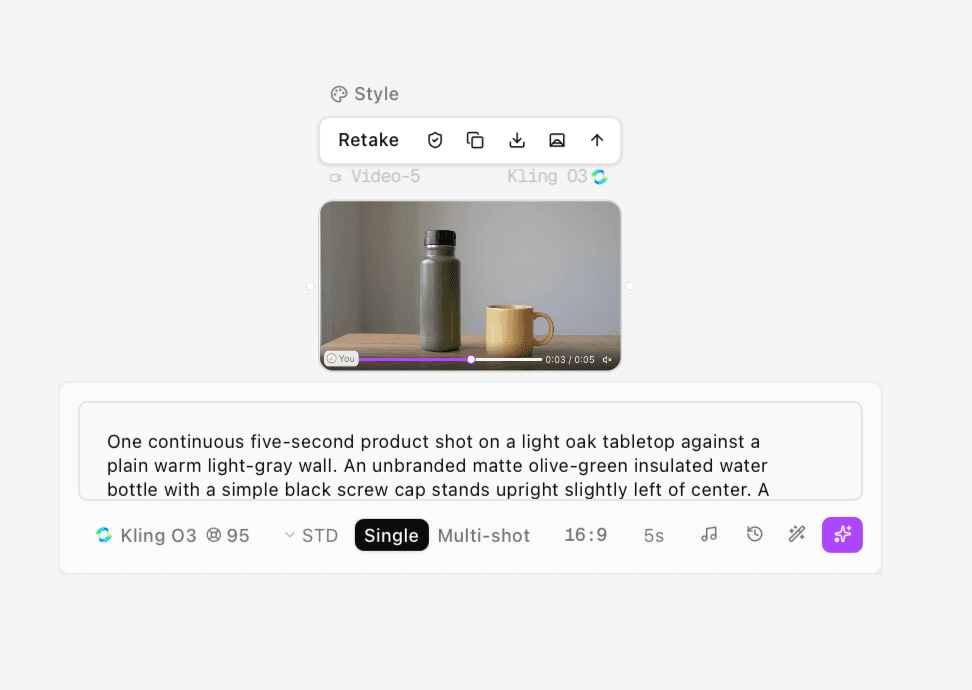
Figure 1. Clara’s source result shows the olive bottle and yellow mug, with Kling O3 STD, Single, 16:9, 5s visible. The 95-credit display is a quote.
Original product shot used as the protected reference for the illustrative mug-removal request.
The source includes a faint mark on the lower bottle despite the prompt asking for an unbranded product. Review against the supplied reference, including the mark if it is part of the approved appearance; do not describe the actual source as perfectly unbranded.
Field | Worked request R1-S01-N01 |
|---|---|
Source and range | R1 source export; 0.000s through the end of the approximately 5.042s video |
Original note | “Make the shot feel cleaner.” Illustrative client note |
Agreed change | Remove the yellow mug and handle throughout the range; reconstruct the oak tabletop and affected background |
Protected details | Bottle silhouette, olive color, opaque material, cap, mark, position, camera movement, light, timing and bottle shadow |
Acceptance test | Mug absent from the entire range; no residual mug reflection or contact shadow; protected details match the source |
Owner | Editor — example role |
Approver | Client lead — example role |
Decision | Changes requested — worked editorial assessment, not an actual client decision |
The protected list prevents the instruction “remove the mug” from becoming permission to create a different bottle. If the client wants stronger sunlight too, record that as another approved change with its own check.
Use a copyable review record
Copy one record per request. When multiple issues share a time range, give each its own ID so fixing one does not silently close the others. Use elapsed seconds or a stated frame-rate timecode convention consistently.
Field | Fill in for the project |
|---|---|
Request ID and shot | Unique request ID; shot name |
Source and candidate | Exact filenames or review links |
Time range and timebase | Start–end; seconds or HH:MM:SS:FF with fps |
Original note | Reviewer's wording |
Agreed change | One observable instruction |
Protected elements | What must remain unchanged; reference link |
Acceptance evidence | What to inspect, at which moments and scale |
Owner and due time | Named editor and agreed deadline |
Approver | Person authorized for this decision |
Result and decision | Pass, fail or needs review; decision date and approver |
A timestamp anchors the observation, while the range defines the obligation. “Mug visible at 0.0s” is a failure location; “remove throughout 0.0s–end” is the requirement. For review-tool users, Adobe's video-proof tutorial demonstrates time-stamped commenting. The table above is a suggested workflow, not an Astorie native approval feature.
Check the revision against each condition
Clara supplied a mug-removal candidate. She confirmed using the requested original-video editing setup; the screenshot's compact model label reads Kling O3, STD, Single, 5s. Preserve both records. A shortened UI label alone cannot establish that she chose the wrong backend route.
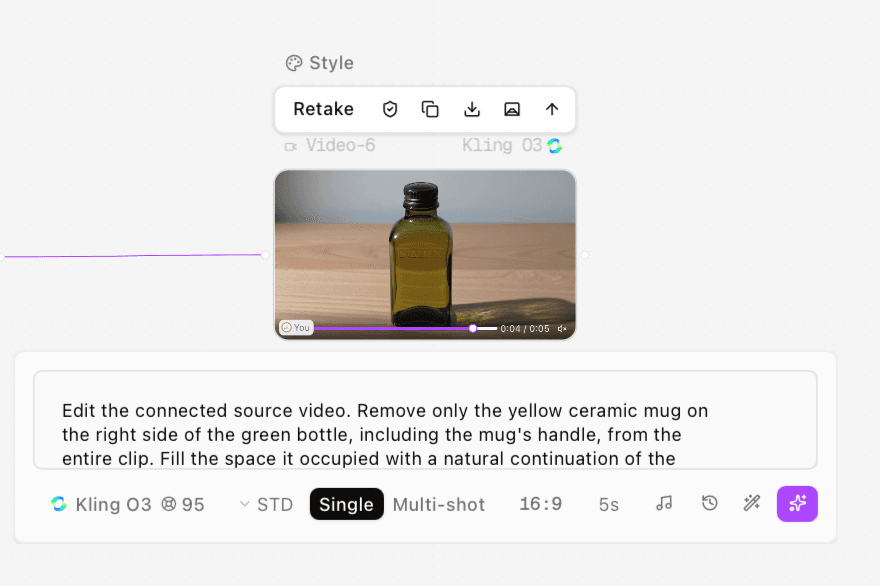
Figure 2. The supplied revision screenshot shows the removal prompt and shortened Kling O3 label. Clara confirmed the requested original-video editing setup; this screenshot does not independently establish a different route.
Supplied removal candidate: opening mug persistence and protected-product changes require rejection under the example brief.
The output does not satisfy the example request. At the beginning, the mug is still visible, then moves toward the right and out of the frame at roughly 1.1 seconds. Meanwhile, the tall opaque bottle has become a shorter transparent, rectangular green bottle, with a different cap and marking. Strong directional light creates a long shadow that was not part of the requested change.
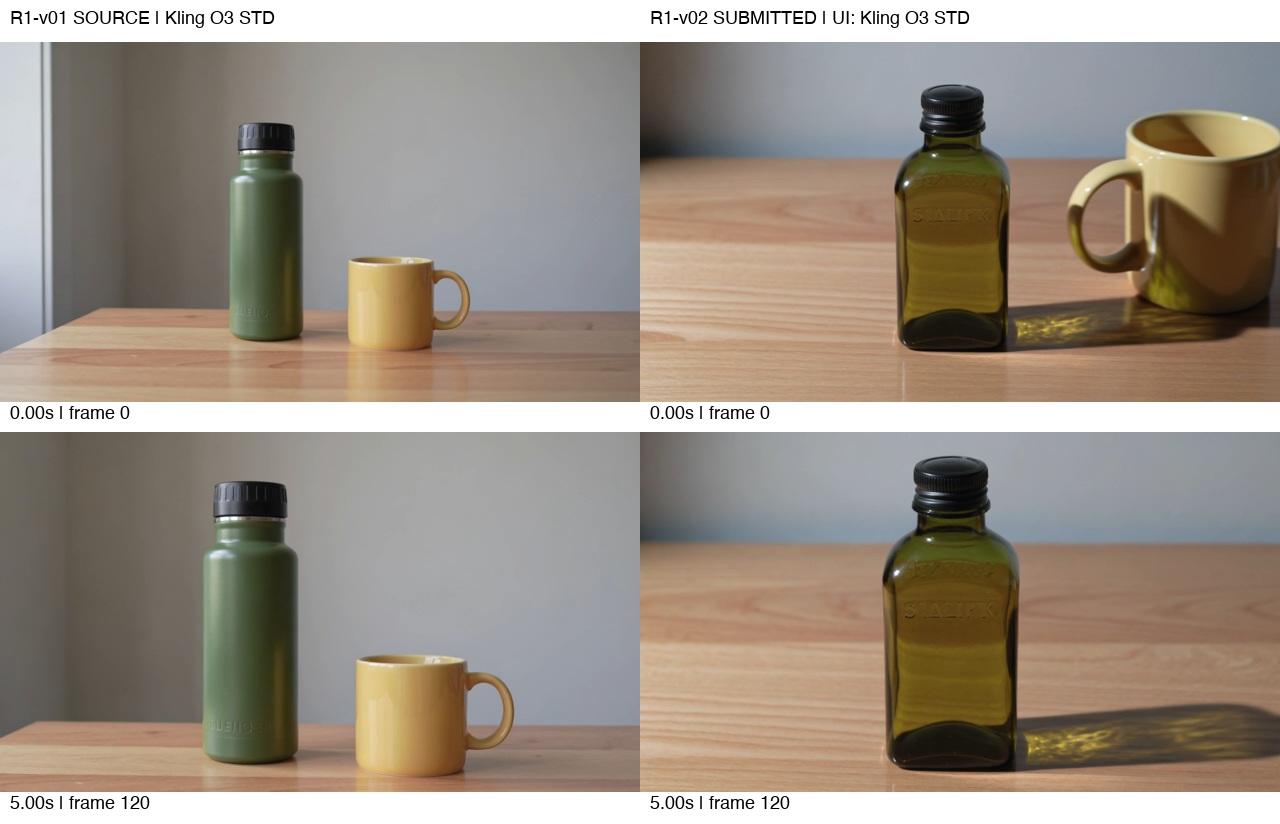
Figure 3. Matched source and revision frames show why the example request remains open: the mug persists at the start, and the bottle material, silhouette and lighting change.
Acceptance condition | Observation in this candidate | Result |
|---|---|---|
Mug and handle absent throughout | Mug remains in the opening and moves out later | Fail |
Protected bottle retained | Shape, material, cap and visible marking change | Fail |
Local tabletop repair | Global changes prevent this from demonstrating an isolated repair | Not demonstrated |
Original lighting and camera behavior retained | Lighting and shadow differ; matching duration does not establish a matching shot | Fail |
The decision for the worked example is Changes requested. A later clean-looking frame cannot override a failed opening or a changed product. This is an editorial assessment under the stated criteria, not a reported client rejection or a general model reliability score.
Send back a note that tells the editor what to do
A useful return note is: “R1-S01-N01 remains open. At 0.000s the mug is still visible; later it exits instead of being removed throughout. The bottle has changed from the opaque source to a transparent rectangular bottle. Restore the source bottle and lighting, remove only the mug over the full range, and resubmit source/candidate comparisons.”
This note names the failure and the protected reference without diagnosing an unverified model route. It also avoids “try harder” instructions. The editor can now choose a targeted repair, a mask-based composite, a different editing route or a new candidate.
Do not automatically regenerate the entire scene after a failed local revision. If the protected product is the main subject, a controlled local repair may be the appropriate next method. For another kind of bounded change, the character-replacement example illustrates why the changed element and the protected performance need separate checks.
Resolve conflicting feedback before the next round
If one reviewer wants the mug removed and another wants it retained, the editor needs a decision from the authorized approver. Do not merge incompatible comments into a prompt and hope the output will settle the brief.
Separate a new preference from a failed requirement. “Make the scene warmer” is a new creative request if neutral lighting was approved; “restore the approved bottle color” is a correction. Record any changed acceptance standard before reviewing the next version.
Agree a feedback cutoff and a realistic repair window. An example arrangement is one consolidated review from the client lead before the next revision round; this article does not prescribe an actual turnaround promise. Use a post-production schedule template to put those decisions beside editorial, sound and delivery work.
Close the request explicitly and approve the export
The owner marks a repair ready for review; the approver closes it after checking the candidate. Record the exact filename or review link and the range approved. If only part of the shot is accepted, state that range and keep the remaining request open.
An illustrative approval sentence is: “R1-S01-N01 approved for R1-S01-v03, 0.000s–end: mug removal and protected product appearance accepted by [named approver] on [date].” It is a copyable form, not an approval obtained in this test. Do not fill it with invented names or dates.
Finally, inspect the exported master rather than assuming the review preview is identical. Recheck repaired regions, adjacent frames, product detail, duration, frame rate and sound as required. The video quality control checklist covers that release check. Request closure and final-master approval are related decisions, but they should each identify the file actually reviewed.
Frequently asked questions
Who should approve a shot revision
Name a person authorized to accept the creative or brand change. The editor can verify a repair, but should not infer the client's acceptance from silence.
Is an approval comment enough
It can be, if it identifies the exact candidate, scope and approver. “Looks good” in a conversation containing several exports is ambiguous.
Does removing an object mean the revision passes
No. Check the entire requested range and the protected elements. A different product is not an acceptable side effect unless the approver explicitly accepts that change.
Test method and sources
Clara supplied the original and edited Astorie MP4s and screenshots, and confirmed using the provided prompts unchanged on November 13, 2026. The source UI shows Kling O3, STD, Single, 16:9, 5s; the edit route is recorded as tester-confirmed original-video editing with the shorter visible label noted above. Both files measure 1280 × 720, 24 fps and 121 frames, approximately 5.042 seconds, with no audio streams.
All frames were software-decoded and examined in chronological contact sheets, with larger matched samples. No real-time playback or actual client approval is claimed. One source and one revision export were supplied; total account attempts, generation dates, elapsed times and actual charges were not separately confirmed. Each screenshot displays 95 credits as a quote. The note, roles, acceptance conditions and decision are an explicitly illustrative worked review. Sources were checked November 13, 2026.
Ready to try it on the canvas?
Open Astorie and fan your prompt across every frontier model in one workflow.